Should I resend a confirmation email if the recipient doesn't respond to the first one?

Updated on 28 Jul 2026: We clarified when to send one confirmation reminder and added safer link handling, resend limits, authentication checks, and consent controls.
Yes, you can resend a confirmation email once when the recipient clearly requested the confirmation and the first message did not hard bounce. Treat that second email as a short reminder, not a marketing send, and stop unless the person takes another action.
The safest default is simple: send the first confirmation immediately, send one reminder 24 to 48 hours later only while the address remains pending and has no hard bounce, complaint, suppression event, or abuse flag, then expire or suppress the pending signup if there is still no confirmation. Do not move the address into a normal campaign list until the confirmation link is clicked.
- Best default: Send one reminder after a real signup request, then stop if the person stays silent.
- Main risk: Repeated reminders can look like marketing to someone who never completed consent.
- Hard line: If the first confirmation hard bounced, do not resend. Remove or quarantine that address.
- Practical test: Keep the reminder only if it produces confirmed signups without lifting complaints or bounces.
The direct answer
A second confirmation email is reasonable when it is part of the same opt-in workflow. Someone entered an address on a form, the first confirmation was sent near real time, there was no bounce, and the second email only asks them to complete the same action. In that case, the address sits in a pending confirmation state, not in a marketing audience.
The answer changes when the original request is weak. If the address came through a third-party upload, a scraped source, a contest import, a typo-heavy form, or a popup that attracts fake signups, do not use confirmation reminders to create permission. Fix the capture source first.
Treat the reminder as consent capture
The reminder should say why the recipient is getting it, name the action they started, and make it clear that ignoring the email means they will not be added. It should not include offers, cross-sells, newsletters, product promos, or unrelated content.
- Keep it narrow: Use one call to action: confirm the address.
- Keep it honest: Say the person started a signup and this email completes it.
- Keep it finite: Send one reminder, then let the pending record expire.
- Keep it separate: Do not count pending addresses as subscribed contacts.
This is different from resending campaigns to people who did not open. A confirmation reminder is a consent workflow email. A campaign resend is a marketing tactic. If that is the decision you are making, read the separate discussion on resending to non-openers.
When a second confirmation makes sense
Use a simple distinction: was there a deliberate user action that created the pending confirmation, and is the second message only a reminder to finish that same action? If both answers are yes, one reminder is usually acceptable. If either answer is no, resending is the wrong lever.
Reasonable reminder
- Clear request: The person submitted a signup form using their address.
- No bounce: The first confirmation was accepted by the mailbox provider without a hard bounce.
- Short delay: The reminder goes 24 to 48 hours after the first send.
- Same purpose: The copy only asks the recipient to confirm the signup.
Do not resend
- No clear source: The address came from an import, enrichment, or unclear consent path.
- Bad signal: The first message hard bounced, triggered a complaint, matched suppression rules, or hit traps.
- Bot pattern: The form has spikes, repeated domains, odd names, or rapid submissions.
- Marketing angle: The proposed reminder includes promotion beyond the confirmation.
The edge case is a delayed or batched confirmation system. If confirmations are not sent immediately, a person can miss the first one because the context has gone cold. That does not make multiple reminders wise, but it does make one reminder easier to justify.
A practical resend policy
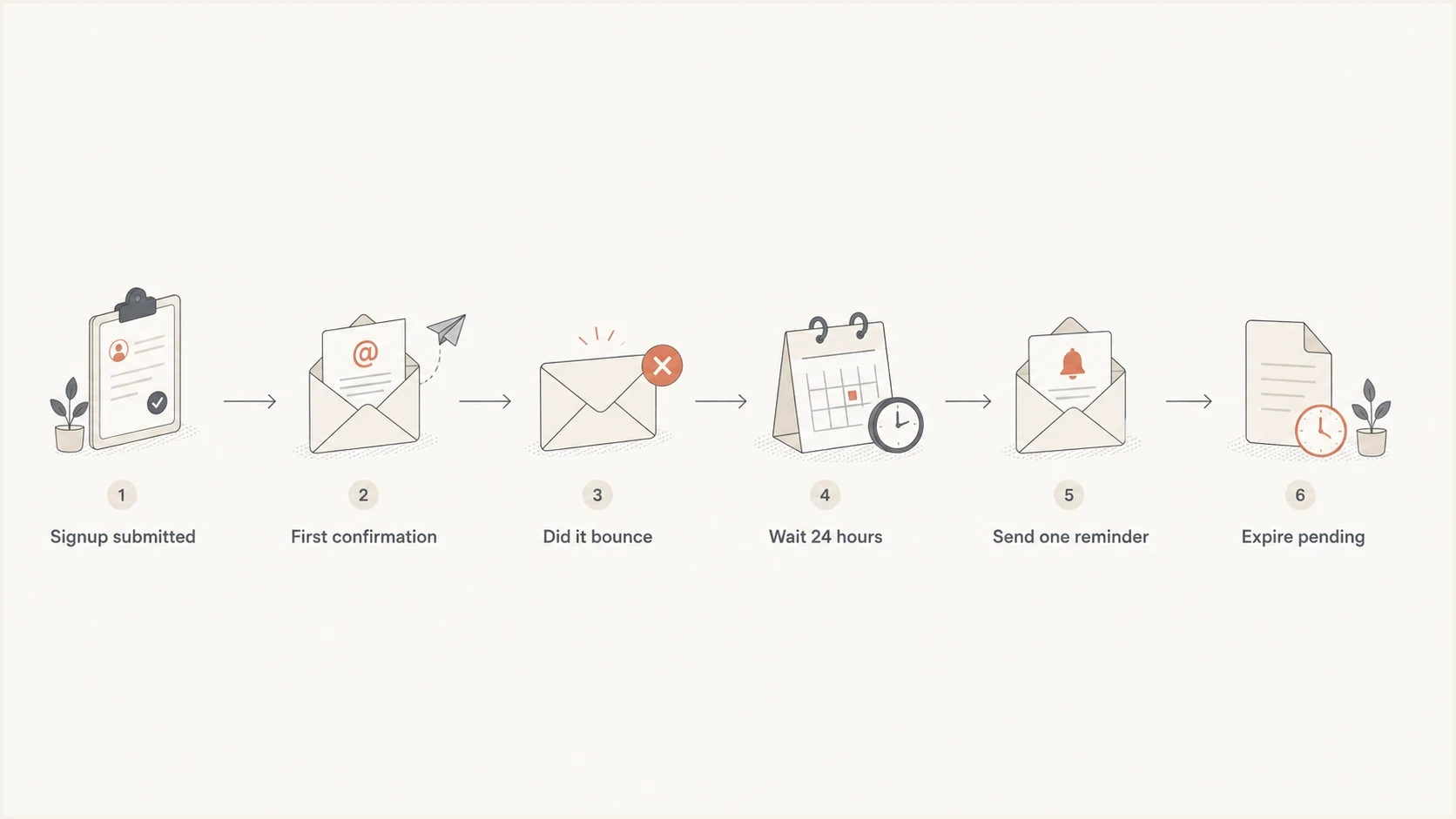
Confirmation email resend flowchart showing one reminder after a non-bounced signup.
A good policy removes the judgment call from each campaign. It should define who qualifies, when the reminder sends, how replacement links behave, when pending consent expires, and what data gets retained for audit and troubleshooting.
- Capture source: Store the form, timestamp, IP context, user agent, and page that created the pending request.
- Send quickly: Send the first confirmation immediately after the form submit.
- Filter failures: Exclude hard bounces, known invalids, role accounts if your policy blocks them, and suspicious signups.
- Delay once: Send one reminder after 24 to 48 hours if the address is still pending and has no negative delivery event. Do not use an open event as the eligibility test.
- Expire fast: Delete or suppress pending records after a defined window, such as 7 to 14 days.
- Prove value: Keep the reminder only when confirmed signups offset the added delivery and complaint risk.
Example confirmation resend ruletext
IF status = pending_confirmation
AND first_confirmation_sent_at <= now - 24 hours
AND first_confirmation_sent_at >= now - 48 hours
AND hard_bounce = false
AND complaint = false
AND source = owned_signup_form
AND suspicious_signup = false
AND reminder_count = 0
THEN send confirmation_reminder
ELSE do not send
Set link validity by the action being confirmed. A 48 to 72 hour window is a practical starting point for double opt-in. Newsletter confirmation can run up to seven days when no account access is granted, while account activation or privileged access changes need a shorter window. State the expiry in the email and give an expired-link page a controlled resend action.
Build a safe resend path
An automated reminder and a user-requested resend are different events, but both need the same token controls. A person who is still on the confirmation screen should be able to request a replacement without creating an unlimited mail endpoint or exposing whether an account exists.
- Show the destination: Display a masked version of the submitted address and suggest checking spam or junk folders.
- Allow correction: Let the person request a fresh message or correct a mistyped address.
- Rate-limit requests: Cap attempts by address, IP, session, and device pattern, then return the same neutral response whether a pending record exists or not.
- Replace the token: Issue a fresh single-use token, store only its hash, and invalidate older unused links when the replacement is created.
- Explain failure: Tell the person why a link no longer works, distinguish expiry from prior use or replacement, then provide one safe next action.
Keep self-service separate from the sequence
A user-requested replacement does not justify more scheduled reminders. Keep the automated sequence at one reminder, while allowing a person who is actively in the confirmation flow to request a replacement within rate limits.
What the reminder should say
The reminder copy should reduce uncertainty, not pressure the recipient. A clear version says that a confirmation email was already sent, this is the one reminder, and no further email will be sent if the person ignores it. That wording separates a confirmation workflow from ongoing marketing.
Confirmation reminder copytext
Subject: Reminder: confirm your email address

You recently asked to join our email list, and we sent a confirmation email.

Use this fresh link to complete the signup:
[Confirm my email]

If you did not request this, you can ignore this email.
You will not be added to the list, and we will not send another reminder, unless you confirm.
Do not turn this into a mini newsletter. The recipient has shown some interest, but that interest is not yet confirmed permission. The reminder should carry only the context needed to complete or abandon the signup.
|
|
|
|---|---|---|
Subject | Reminder to confirm | Sales language |
CTA | One confirm button | Multiple links |
Body | Signup context | Product pitch |
Footer | Ignore safely | Hidden intent |
Keep confirmation reminders narrow and auditable.
What to measure before keeping it
A second confirmation can be valid and still not be worth sending. Measure it as its own flow, separate from the first confirmation. The key question is not whether it gets clicks. The key question is whether those extra confirmed subscribers are worth the added sends, support work, and list hygiene cost without raising negative delivery signals.
Confirmation reminder decision bands
Use the reminder only when positive confirmation value stays above the negative delivery signals.
Healthy
Keep testing
Clicks occur without elevated bounces or complaint signals.
Watch
Tighten rules
Clicks occur, but bot signs, low quality domains, or weak engagement appear.
Stop
Disable
The reminder creates complaints, hard bounces, or low quality confirmations.
Track the reminder with its own subject, campaign ID, and event names. This keeps reporting clean and prevents the second send from hiding problems in the first confirmation. If the first confirmation has weak placement, the fix is sender identity, authentication, signup quality, or message design, not more reminders.
- Confirmation rate: Measure completed confirmations from the reminder, not opens.
- Bounce rate: Block reminder sends after the first hard bounce.
- Complaint rate: Treat any complaint increase as a reason to pause.
- Signup source: Compare popup, embedded form, checkout, account creation, and gated content separately.
- Downstream value: Check whether reminder-confirmed contacts engage after joining.
Before testing, send the actual confirmation email to a mailbox you control and inspect the result with an email tester. That catches content, authentication, and placement issues before the reminder logic sends more mail.
Email tester
Send a real email to this address. Suped shows a results button when the test is ready.
?/43tests passed
Deliverability checks that matter
A provider's delivered event usually means the receiving server accepted the message. It does not prove inbox placement. A reminder exposes weaknesses quickly because recipients have not committed yet, and extra volume magnifies poor authentication, weak reputation, unstable routing, or bad signup data.
Suped's product fits this workflow by bringing DMARC, SPF, DKIM, blocklist monitoring, hosted SPF, hosted DMARC, hosted MTA-STS, and alerts into one place. A team can correlate a drop in confirmations with authentication failures or a blacklist or blocklist event, then trace the affected sending source before changing reminder timing or copy.
DMARC record detail view showing SPF, DKIM, DMARC, rDNS diagnostics, and DNS records
At minimum, check that the visible From domain has DMARC and achieves alignment through SPF or DKIM for the actual confirmation stream. Use DMARC monitoring to watch authentication results across providers, not just DNS syntax. If confirmation performance drops suddenly, check blocklist monitoring before assuming the copy is the problem.
Separate delivery failure from user silence
No response does not always mean no interest. The message can be missed, filtered, delayed, or buried. Test one reminder, measure confirmed actions, and review authentication data before changing the resend policy.
- Authentication: Confirm DMARC alignment through SPF or DKIM for the actual sending stream.
- Reputation: Watch domain and IP blocklist or blacklist status before increasing volume.
- Source quality: Look for bot submissions, disposable addresses, and repeated signup attempts.
- Routing: Send confirmation mail on a stable transactional stream, not a noisy campaign stream.
Consent and legal caveats
Treat legal requirements as jurisdiction-specific. Confirmed opt-in is a sound permission workflow, but it does not create a legal basis for every message sent before confirmation. A second email carries less risk when it directly continues a user-started request and contains no marketing content, but local rules still control.
For Canada, a message requesting express consent can itself be a commercial electronic message under CASL. Do not assume that an unconfirmed signup always authorizes a reminder. Use a documented exemption or an existing consent basis, and have counsel approve any automated reminder.
For the United States, CAN-SPAM treatment depends on the message's primary purpose. Keep transmission information accurate, and apply the full commercial-message requirements if promotion makes the reminder commercial. For the UK and EU, silence does not create consent for direct marketing. Any soft opt-in or other basis depends on the local rules and capture context.
Lower risk pattern
The person submitted the form, the email explains the pending signup, and silence ends the workflow.
- One reminder: A single follow-up tied to the same request.
- Plain copy: No promotional content or unrelated links.
- Clear outcome: Ignoring the message means no subscription.
Higher risk pattern
The address sits in a campaign list, gets repeated asks, or receives unrelated commercial content before confirmation.
- Repeated sends: Several reminders after no user action.
- Mixed purpose: Confirmation copy mixed with campaign content.
- Weak source: No reliable record of the original request.
If your legal team says the first confirmation is the only permitted message before consent, do not resend. If they approve one reminder, document that policy and enforce it in code.
Do not use reminders to fix weak signup forms
A second confirmation email is not a replacement for form protection. If a form is open to bots or abuse, the reminder creates backscatter to people who never asked for anything. That leads to complaints, poor engagement, and damaged reputation.
- Use rate limits: Throttle repeated submissions by IP, domain, device pattern, and session behavior.
- Add friction: Use challenge controls when patterns look automated or suspicious.
- Validate syntax: Reject obvious malformed addresses before the first confirmation sends.
- Block abuse: Suppress signups tied to known attack patterns or complaint sources.
- Audit incentives: If people get the coupon or download before confirming, the reminder has weaker value.
Gated content and coupons need special care. If the person already received the asset or discount before confirming, silence often means the goal was completed. A reminder can still convert some people, but it also tells you the form and incentive are doing more than consent collection.
Stop immediately after negative signals
Do not send the reminder to addresses that bounce, complain, hit suppression rules, or match abuse patterns. Treat those addresses as data quality problems and suppress them.
Views from the trenches
Best practices
Send one reminder only after a non-bounced, user-started signup request is recorded.
Keep pending contacts out of campaigns until the confirmation link is actually clicked.
Measure reminder-confirmed contacts separately so weak signup sources are visible.
Protect signup forms before resending, especially when incentives attract fake entries.
Common pitfalls
Treating a pending confirmation list like a subscribed list before consent is complete.
Sending reminders to hard bounces instead of suppressing invalid or mistyped addresses.
Adding offers to confirmation reminders, which changes the character of the message.
Reading no response as deliverability failure without checking authentication first.
Expert tips
Expire confirmation links on a defined schedule and store the original signup context.
Use a separate event name for reminder clicks so reporting stays clean and useful.
Pause the reminder when complaints rise, even if short-term confirmation rate looks good.
Compare popup, checkout, and account signup sources before judging reminder value.
Expert from Email Geeks says a second attempt is valid to test after removing invalid addresses from the first confirmation send.
2023-06-12 - Email Geeks
Marketer from Email Geeks says if the first confirmation did not bounce and was ignored, the recipient often had a fair chance to act.
2023-06-12 - Email Geeks
The clean policy
The clean answer is a single reminder. Do not build a sequence. Send the reminder only after a clear signup action, only when the first confirmation did not hard bounce, and only when the message stays focused on finishing the original confirmation.
If the reminder confirms enough real subscribers without increasing complaints or bounces or damaging reputation, keep it. If the reminder mostly exposes bot traffic, weak incentives, poor authentication, or low intent, stop sending it and fix the source. The address is not subscribed until it confirms.




