How to resolve Gmail PTR record error when using Cloudflare?

Published 21 Jun 2025
Updated 24 Jul 2026
14 min read
Summarize with

Updated on 24 Jul 2026: We updated this guide for Gmail's current sender requirements, Cloudflare reverse-zone exceptions, and public egress IP checks.
The fix is usually not to create a PTR record inside Cloudflare. A Gmail PTR error means Gmail checked the public sending IP, looked for reverse DNS, and did not see a trustworthy result for that IP. If the hostname in your PTR record points back to Cloudflare proxy addresses instead of the origin mail server IP, Gmail can still reject the message with 550 5.7.25.
For a website contact form, the practical answer is to send through an authenticated SMTP relay, or make the sending hostname DNS-only in Cloudflare and configure forward-confirmed reverse DNS with the IP owner. PTR does not replace authentication. Gmail requires SPF or DKIM for every sender, while senders exceeding 5,000 messages per day to personal Gmail accounts need SPF, DKIM, DMARC, and domain matching.
- Direct fix: Ask the IP owner or hosting provider to set PTR for the actual outbound mail IP, then make the PTR hostname resolve back to that same IP.
- Cloudflare fix: Set the mail hostname to DNS-only, not proxied, if that hostname must be used in reverse DNS.
- Best operational fix: For form notifications, relay through authenticated SMTP instead of sending directly from the web server.
Why Gmail rejects the message
Gmail checks the reverse DNS of the public IP address that connected to its mail server. Reverse DNS is delegated by the IP address owner, usually the hosting company, VPS provider, data center, or SMTP provider. Cloudflare hosts forward DNS for your domain, but it does not normally control reverse DNS for an address assigned by another provider.
There is a narrow exception. If your organization controls its own IP prefix and the reverse zone has been delegated to Cloudflare nameservers, you can host PTR records in a Cloudflare reverse zone. This does not apply to a typical shared hosting, VPS, or cloud IP. For those addresses, the provider that owns the IP range must change PTR.
The common Cloudflare failure looks like this: your server sends mail from an origin IP, the PTR for that IP says the hostname is mail.example.com, but mail.example.com is orange-cloud proxied through Cloudflare. Gmail resolves that hostname and sees Cloudflare edge IPs, not the server IP that sent the message. The PTR exists, but forward-confirmed reverse DNS fails.
The key point
 A PTR record is attached to an IP address, not to the ordinary Cloudflare forward DNS zone for your domain. If the hosting provider owns the IP block, that provider must set reverse DNS. Cloudflare can break the forward check when the PTR hostname is proxied, because the hostname resolves to Cloudflare edge IPs instead of your mail server.
Typical Gmail bouncetext
550-5.7.25 [203.0.113.10] The IP address sending this message
550-5.7.25 does not have a PTR record setup. As a policy,
550-5.7.25 Gmail does not accept messages from IPs with missing PTR
550 5.7.25 records.
That wording can feel misleading when a lookup tool says a PTR record exists. Gmail also checks whether the forward DNS entry for the PTR hostname references the sending IP. A hostname that resolves to the wrong place, has no forward address, or resolves only through a CDN proxy can produce the same rejection.
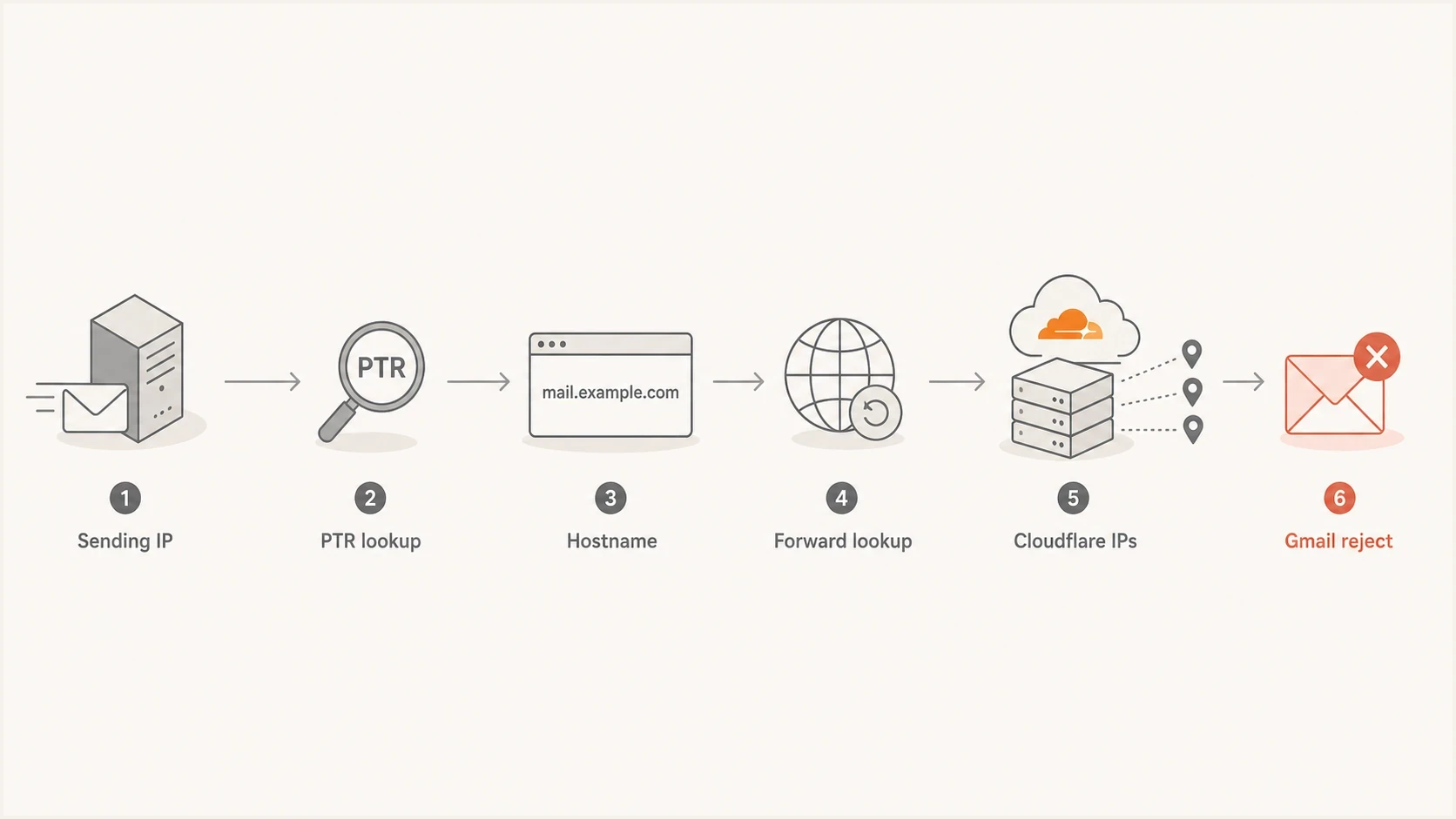
Flowchart showing Gmail checking a sending IP, PTR hostname, forward lookup, Cloudflare IPs, and rejection.
What to check first
Start with the public IP in the bounce log, not the IP you expect the website to use. A server behind NAT can have a private address while outbound SMTP leaves through a different public egress IP. On servers with IPv4 and IPv6, logs can show an IPv6 timeout followed by an IPv4 rejection, or the other way around. Each outbound IP needs its own reverse DNS.
- Read the bounce IP: Use the exact public IP inside the Gmail error. Do not troubleshoot the web A record or a private server address until you know which IP made the SMTP connection.
- Check reverse DNS: The sending IP must return a stable hostname by PTR lookup. Prefer one PTR hostname instead of several competing answers.
- Check forward DNS: The PTR hostname must resolve back to the same sending IP, not only to Cloudflare edge IPs.
- Check IPv6: If your MTA tries IPv6, the IPv6 address also needs correct reverse DNS and connectivity.
- Check authentication and TLS: After PTR is clean, verify SPF, DKIM, DMARC, and TLS so Gmail does not reject or filter the next message for a different reason.
Forward and reverse DNS checksbash
dig -x 203.0.113.10 +short

dig mail.example.com A +short

dig mail.example.com AAAA +short

host 203.0.113.10

host mail.example.com
The result you want is simple: the public sending IP points to a hostname, and that hostname points back to the same IP. This is forward-confirmed reverse DNS. The hostname should be stable, unproxied, and under a domain you control. If the server is behind NAT, configure PTR for the public egress IP rather than the private interface address.
Broken with Cloudflare proxy
- PTR: 203.0.113.10 points to mail.example.com.
- Forward DNS:
- Gmail view:
The hostname does not confirm the sending IP.
Clean for Gmail
- PTR: 203.0.113.10 points to mail.example.com.
- Forward DNS: mail.example.com resolves directly to 203.0.113.10.
- Gmail view:
For one quick health check across the DNS layer, use the domain health checker to see DMARC, SPF, and DKIM status together before you send another test message.
How to fix it in Cloudflare
There are two different fixes, and the right one depends on whether your web server must send mail directly. For most web forms, stop direct sending and use authenticated SMTP. A CMS contact form does not need to behave like a mail server. It needs to create a reliable notification, pass the required authentication checks, and avoid being rejected because a shared hosting IP changed behind the scenes.
|
|
|
|---|---|---|
SMTP relay | A website form sends notifications. | Requires SMTP credentials and DNS authentication. |
DNS-only host | The server must send directly. | The mail hostname exposes the origin IP. |
Disable IPv6 mail | IPv6 times out or lacks PTR. | IPv4 must be fully clean. |
Provider PTR | You control the outbound IP. | Depends on host support. |
Fix options for Gmail PTR errors with Cloudflare
For direct sending, create a dedicated hostname such as mail.example.com or smtp.example.com. Set that hostname to DNS-only so it resolves directly to the public mail server IP. Then ask the IP owner to set PTR for the sending IP to that hostname, and configure the MTA to use the same name in its HELO or EHLO greeting. Do not proxy a hostname that must match reverse DNS.
Clean direct-send DNS shapetext
203.0.113.10 PTR mail.example.com.
mail.example.com. A 203.0.113.10
example.com. TXT "v=spf1 ip4:203.0.113.10 -all"
_dmarc.example.com. TXT "v=DMARC1; p=none; rua=mailto:dmarc@example.com"
With SMTP relay, the website form authenticates to a mail service and that service becomes the infrastructure Gmail sees. The relay handles PTR, TLS, retries, queueing, bounces, and reputation. You still publish the required SPF and DKIM records for your domain, then monitor DMARC to confirm the form mail passes with the intended domain.
Preferred fix for website forms
Use authenticated SMTP for the CMS or form plugin, publish the provider's SPF and DKIM records, and monitor DMARC after the change. This avoids turning a web server into a mail server and removes the Cloudflare PTR mismatch from the delivery path.
Email tester
Send a real email to this address. Suped shows a results button when the test is ready.
?/43tests passed
After changing the form plugin, send a real message to the email tester. It will show whether the message passed SPF, DKIM, and DMARC, and it helps catch the next mistake before you test only by sending to a personal Gmail inbox.
Cloudflare DNS settings that matter
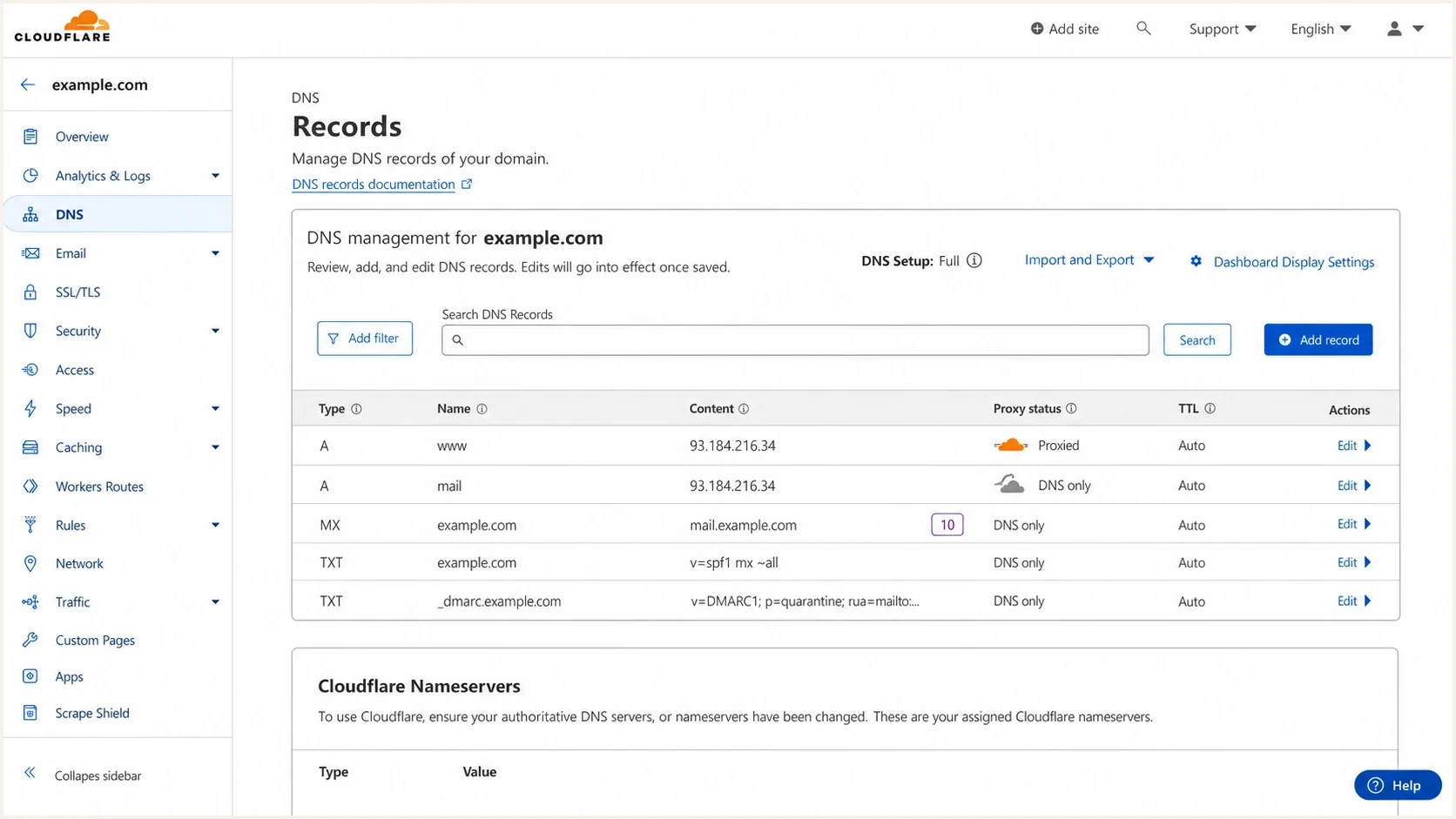
Cloudflare DNS screen showing a mail hostname set to DNS only while the website remains proxied.
Cloudflare proxy status affects forward DNS. It does not create or fix reverse DNS for an IP owned by your hosting provider. For mail-related hostnames, DNS-only is the safe default because the PTR hostname must resolve back to the origin server.
- Website hostnames: Keep www and the apex proxied if you need Cloudflare protection for the website.
- Mail hostname: Set mail or smtp to DNS-only if that hostname appears in PTR, MX, SMTP banner, or mail client settings.
- MX target: Make sure the MX target points to a DNS-only hostname, not a proxied web hostname.
- SPF and DKIM: Publish TXT and CNAME records exactly as required by your mail provider. Cloudflare proxy status does not apply to TXT records.
Better hostname splittext
example.com. A 198.51.100.40        ; proxied website
www.example.com. A 198.51.100.40    ; proxied website
mail.example.com. A 203.0.113.10    ; DNS-only mail host
203.0.113.10 PTR mail.example.com.  ; set by IP owner
If the hosting company will not set PTR, or if the server is on an IP range with weak reputation, move the form to an authenticated SMTP relay. Suped's DMARC monitoring can then confirm that the new source passes authentication and show whether old direct-send traffic still appears. Suped also brings SPF, DKIM, blocklist (blacklist), and DMARC findings into the same investigation when the original PTR error exposes other DNS problems.
Suped DMARC dashboard showing email volume, authentication health, and source breakdown
SPF, DKIM, and DMARC still matter
A PTR fix clears one Gmail infrastructure requirement. It does not prove the message is authorized by your domain. Gmail requires every sender to use TLS, maintain valid forward and reverse DNS, and pass SPF or DKIM. Senders exceeding 5,000 messages per day to personal Gmail accounts must pass SPF and DKIM, publish DMARC, and make the visible From domain match the SPF or DKIM domain.
If a contact form sends as owner@example.com but uses a server that is not authorized by SPF and does not sign with DKIM, Gmail has another reason to distrust it. A quick "PTR exists" check does not explain all Gmail bounces.
|
|
|
|---|---|---|
PTR | IP has valid reverse DNS. | Set reverse DNS with the IP owner. |
SPF | Envelope domain authorizes IP. | Add the approved sender. |
DKIM | Message has a valid signature. | Publish selector records. |
DMARC | Visible From domain matches SPF or DKIM. | Monitor and enforce policy. |
TLS | SMTP connection is encrypted. | Enable STARTTLS for outbound mail. |
What each control does
For a website form, the cleanest pattern is to send from a domain you own, authenticate through the SMTP relay, and keep the user's submitted email address in Reply-To. Sending directly as the visitor's address fails modern authentication because your server is not authorized to send for that visitor's domain.
Contact form message identitytext
From: Website forms <forms@example.com>
Reply-To: Visitor Name <visitor@example.net>
To: Site owner <owner@gmail.com>
Subject: New website enquiry
Once the message has a stable From domain, DMARC reporting becomes useful. Suped's DMARC monitoring shows whether the SMTP relay passes DMARC, whether direct server mail is still leaking out, and which source needs SPF or DKIM work. This is easier than reading raw aggregate reports after every form plugin change.
DKIM does not fix PTR
DKIM proves the message was signed by an authorized key for a domain. PTR proves the connecting IP has acceptable reverse DNS. Gmail can require both. Add DKIM where required, but do not expect it to override a missing or mismatched PTR.
What to do about IPv6 and blocklists
If your log shows an IPv6 connection timeout before the Gmail rejection, handle that too. Mail servers often prefer IPv6 when it is available. A half-configured IPv6 stack creates inconsistent behavior: some attempts time out, some fall back to IPv4, and the final bounce points at PTR even though the first symptom was connectivity.
- If IPv6 works: Set PTR for the IPv6 sending address, make the hostname resolve back by AAAA, and ensure port 25 can connect out.
- If IPv6 is broken: Disable IPv6 for outbound SMTP in the MTA until the network and reverse DNS are correct.
- If both exist: Test both paths separately. One clean IP does not compensate for the other failing Gmail's checks.
Postfix IPv4-only fallbacktext
inet_protocols = ipv4
A blocklist or blacklist listing is a separate signal. It can hurt inbox placement, but it is not the cause of a Gmail 550 5.7.25 PTR error. Some blacklist listings are broad and noisy, while others carry real reputation weight. Treat blocklist (blacklist) data as supporting evidence, not as a replacement for fixing reverse DNS.
Blocklist checker
Check your domain or IP against 144 blocklists.
 Spamhaus
 0Spam
0Spam

 Cisco
Cisco
 NoSolicitado

 URIBL
URIBL
 abuse.ro
 ALPHANET
 Anonmails
 Ascams
 BLOCKEDSERVERS
 Calivent Networks


 EFnet
EFnet




 JustSpam
 Kempt.net
 NordSpam

 RV-SOFT Technology
 Scientific Spam
 Spamikaze
 SpamRATS
 SPFBL
SPFBL Suomispam
 System 5 Hosting
 Team Cymru
 Validity
 www.blocklist.de Fail2Ban-Reporting Service
 ZapBL
ZapBL 2stepback.dk
 Fayntic Services
 ORB UK
 technoirc.org
 TechTheftSpamhaus0SpamCiscoNoSolicitadoURIBLabuse.roALPHANETAnonmailsAscamsBLOCKEDSERVERSCalivent NetworksEFnetJustSpamKempt.netNordSpamRV-SOFT TechnologyScientific SpamSpamikazeSpamRATSSPFBLSuomispamSystem 5 HostingTeam CymruValiditywww.blocklist.de Fail2Ban-Reporting ServiceZapBL2stepback.dkFayntic ServicesORB UKtechnoirc.orgTechTheftSpamhaus0SpamCiscoNoSolicitadoURIBLabuse.roALPHANETAnonmailsAscamsBLOCKEDSERVERSCalivent NetworksEFnetJustSpamKempt.netNordSpamRV-SOFT TechnologyScientific SpamSpamikazeSpamRATSSPFBLSuomispamSystem 5 HostingTeam CymruValiditywww.blocklist.de Fail2Ban-Reporting ServiceZapBL2stepback.dkFayntic ServicesORB UKtechnoirc.orgTechTheftSpamhaus0SpamCiscoNoSolicitadoURIBLabuse.roALPHANETAnonmailsAscamsBLOCKEDSERVERSCalivent NetworksEFnetJustSpamKempt.netNordSpamRV-SOFT TechnologyScientific SpamSpamikazeSpamRATSSPFBLSuomispamSystem 5 HostingTeam CymruValiditywww.blocklist.de Fail2Ban-Reporting ServiceZapBL2stepback.dkFayntic ServicesORB UKtechnoirc.orgTechTheftSpamhaus0SpamCiscoNoSolicitadoURIBLabuse.roALPHANETAnonmailsAscamsBLOCKEDSERVERSCalivent NetworksEFnetJustSpamKempt.netNordSpamRV-SOFT TechnologyScientific SpamSpamikazeSpamRATSSPFBLSuomispamSystem 5 HostingTeam CymruValiditywww.blocklist.de Fail2Ban-Reporting ServiceZapBL2stepback.dkFayntic ServicesORB UKtechnoirc.orgTechTheft
After PTR and authentication pass, check the sending IP and domain with blocklist monitoring if Gmail accepts the message but places it in spam. Suped ties blocklist (blacklist) status to domain authentication checks, so the next diagnosis starts with related evidence instead of separate one-off lookups.
A practical recovery checklist
When this happens on a live site, avoid changing everything at once. Use this order to separate infrastructure acceptance from domain authentication and reputation.
- Capture the exact bounce: Save the Gmail error, public sending IP, destination, MTA log line, and whether IPv4 or IPv6 was used.
- Confirm reverse DNS: Run a PTR lookup on the public sending IP and verify the returned hostname.
- Confirm forward DNS: Resolve the PTR hostname and make sure it returns the same sending IP.
- Remove proxy mismatch: Set the mail hostname to DNS-only in Cloudflare if it currently resolves to proxy IPs.
- Match the SMTP identity: For direct sending, use the stable DNS-only PTR hostname in the MTA's HELO or EHLO greeting.
- Choose the mail path: Use direct sending only if you control PTR, authentication, TLS, queueing, and reputation. Otherwise use authenticated SMTP relay.
- Verify the full message: Send a test, inspect the headers and TLS result, then monitor DMARC reports for the domain.
Do not use the website apex for PTR
If the apex domain is proxied through Cloudflare, do not point PTR at the apex. Use a dedicated DNS-only mail hostname. This prevents web protection settings from changing the result of a mail infrastructure check.
Views from the trenches
Best practices
Use a DNS-only mail hostname when PTR must confirm a server IP behind Cloudflare.
Send website form notifications through authenticated SMTP instead of local mail.
Check IPv4 and IPv6 separately because Gmail can reject either path on PTR failures.
Common pitfalls
Do not assume a PTR exists just because the domain has a matching forward record.
Avoid pointing PTR at a proxied website hostname that resolves to Cloudflare IPs.
Do not treat DKIM as a replacement for reverse DNS when sending directly to Gmail.
Expert tips
Use DMARC reports after the fix to confirm the form uses the intended mail source.
Keep the visitor address in Reply-To instead of sending as the visitor's domain.
Treat noisy blacklist entries as context, then fix PTR and authentication first.
Marketer from Email Geeks says a PTR record can exist but still fail Gmail when Cloudflare makes the hostname resolve to different IPs than the sender.
2021-09-07 - Email Geeks
Marketer from Email Geeks says DKIM is necessary for a polished mail setup, but it does not remove Gmail's need for correct reverse DNS.
2021-09-07 - Email Geeks
Resolve the Gmail PTR error
To resolve Gmail's PTR record error when using Cloudflare, fix the mail path Gmail sees. If the server sends directly, the public sending IP needs reverse DNS set by the IP owner, and the PTR hostname must resolve back to the same IP without Cloudflare proxying. Use that stable hostname for HELO or EHLO too. If this is hard to guarantee, move the website form to authenticated SMTP and stop sending directly from the web server.
After the immediate bounce is fixed, verify SPF, DKIM, DMARC, TLS, and blocklist (blacklist) status as separate controls. Suped's product supports that follow-through by grouping DMARC reports, sending-source results, SPF and DKIM findings, policy staging, alerts, and blocklist monitoring in one workflow. This helps confirm that the form uses the intended sender after the PTR repair.




