
How to improve email delivery rates to WP and Onet mailboxes?

Updated on 3 Oct 2026: We added a way to measure WP and Onet acceptance separately from inbox placement and clarified each provider's sender requirements.
Treat WP and Onet as separate sending routes. Put their recipients in separate queues, start below each route's measured trouble point, slow retries after temporary deferrals, and verify SPF, DKIM, DMARC, reverse DNS, complaint control, and list quality before increasing volume.
For Onet, a 4.7.1 deferral with #CR-IN-DEF-2 is temporary. The rule identifier does not disclose the exact trigger, so check rate, sender reputation, authentication, and recipient quality before changing the queue. For WP, isolate traffic and track failures by provider group so each change has a measurable result.
Practical answer
Start with conservative throttling. Provider-operated advertising products are separate from delivery of your own SMTP stream. They do not remove the need for authentication, low complaints, clean recipient data, and careful queue control.
Start with provider-specific throttling
Sending WP and Onet inside the same job as other mailbox providers hides local deferrals. A global campaign can look healthy while WP or Onet defers a growing share of its mail.
Split WP and Onet traffic by provider group, sending IP, sending domain, message stream, and campaign type. This shows whether a deferral starts after a predictable hourly count, a content change, an IP change, or a complaint spike. Without that split, the sender usually guesses.
- Send WP and Onet in separate jobs so each has its own retry behavior and throttle.
- Start each hourly cap below the rate that previously caused deferrals, then raise it after clean delivery cycles.
- Group related recipient domains when their MX records show shared provider handling.
- Change one factor at a time, such as rate, content, IP, or audience segment.
Control points for WP and Onet testing
No universal inbound cap is published. Set each control point from your own acceptance and deferral data.
Start
Measured baseline
Send a small representative batch through the isolated provider queue
Watch
First 4xx cluster
Hold the rate when temporary deferrals begin to cluster
Stop
Deferrals rising
Pause growth when backoff does not clear the queue
WP and Onet do not publish one universal inbound hourly cap for external senders. Treat any number shared in a forum or old campaign report as historical evidence for that sender only. Set a cap from your own IP, domain, content, and recipient data.
Measure acceptance and inbox placement separately
SMTP acceptance and inbox placement answer different questions. A delivery rate is the share of attempted messages that WP or Onet accepts after retries; it does not show whether accepted mail reaches the inbox, a category, or spam. Do not count a temporary 4xx reply as a final failure until the retry window ends.
- Track accepted, permanently rejected, and expired deferred messages for each provider and campaign.
- Watch deferral rate, queue age, complaints, unsubscribes, and recent recipient engagement alongside the delivery rate.
- Check placement with consented WP and Onet test mailboxes and recipient feedback. A small test mailbox set is directional, not a population-wide inbox rate.
DMARC aggregate reports show authentication results, not inbox placement. If acceptance improves while placement stays poor, review audience relevance, complaints, and message identity before raising volume again.
Decode Onet temporary deferrals
An Onet 4.x.x response means the receiving system has not accepted the message yet, but has not issued a permanent rejection. Retry after backoff and keep the full SMTP reply for analysis.
Onet temporary deferral exampletext
4.7.1 <recipient@onet.pl>: Recipient address rejected:
Sender address deferred by rule #CR-IN-DEF-2
Treat that response as an internal policy deferral, then correlate it with the sending rate, IP, domain, message stream, and recent recipient quality. If a lower rate and longer backoff clear the deferrals, keep the safer queue policy. If they continue at low volume, investigate authentication, reputation, content, and list quality instead of assuming the rule has one fixed numeric limit.
|
|
|
|---|---|---|
4.7.1 | Temporary policy deferral | Back off and inspect |
#CR-IN-DEF-2 | Onet internal rule; exact trigger undisclosed | Correlate rate and reputation |
5.x.x | Permanent failure | Classify and suppress when needed |
Timeout | Connection or network issue | Reduce concurrency and inspect logs |
Compact interpretation of common WP and Onet delivery signals.
Do not hammer 4xx replies
Repeated fast retries after a temporary deferral add connection pressure. Use longer backoff windows, fewer parallel connections, and a clear pause when deferrals cluster by provider.
Fix authentication before increasing volume
Before increasing volume to WP or Onet, verify the actual sending path. SPF must authorize the sending IP for the envelope sender domain, and DKIM must sign the final message. DMARC passes when SPF or DKIM passes and that authenticated domain aligns with the visible From domain. The sending IP also needs valid reverse DNS, matching forward DNS for its hostname, and a consistent EHLO identity.
Run a real message through Suped's email tester before changing rate limits. Then use Suped's domain health checker and DMARC monitoring to inspect authentication failures by source and sending domain.
Minimum DNS authentication baselinedns
_dmarc.example.com TXT "v=DMARC1; p=none; rua=mailto:dmarc@example.com"
example.com TXT "v=spf1 include:send.example.net -all"
selector1._domainkey.example.com TXT "v=DKIM1; k=rsa; p=PUBLICKEY"
Email tester
Send a real email to this address. Suped shows a results button when the test is ready.
?/43tests passed
Check the visible From domain, envelope sender, DKIM signing domain, bounce domain, sending hostname, and IP on the messages that reach WP or Onet. WP also asks bulk senders to use the same domain for the visible From and envelope sender addresses. Inconsistent identity makes local throttles harder to debug.
Authentication checkpoint
- SPF passes for the envelope sender and stays under DNS lookup limits.
- DKIM signs the final message after content and footer changes.
- DMARC passes through an aligned SPF or DKIM result for the visible From domain.
- The sending IP has a stable hostname with matching forward and reverse DNS and a consistent EHLO name.
Meet WP and Onet bulk sender requirements
Throttling cannot compensate for message and list practices that WP and Onet ask bulk senders to use. Both publish guidance on recipient consent, authenticated identity, stable infrastructure, recognizable sender details, and an easy unsubscribe path.
- Use confirmed consent, preferably double opt-in, and avoid acquired or unverified lists.
- Add a List-Unsubscribe header, keep a visible unsubscribe link in the message body, and honor requests promptly. Offer content preferences when you send several message types.
- Use recognizable sender identities and keep promotional content out of transactional mail.
- Use stable IPs, valid EHLO or HELO values, a non-empty envelope sender for bulk mail, and a valid Message-ID.
- Follow RFC 5322, use clear links and subjects, and avoid hidden or dynamic message code.
- WP asks bulk senders to use TLS and Precedence: bulk, and to honor published MTA-STS policy when connecting to its MX servers. Onet also lists BIMI in its sender guidance; BIMI does not replace SPF, DKIM, or DMARC.
These published practices remove common technical reasons for filtering, but they do not guarantee inbox placement. Recipient response and sender reputation still affect where accepted mail lands.
Build a WP and Onet sending plan
A good sending plan has a controlled route for each provider group. It defines the first cap, retry behavior, hold conditions, suppression rules, and the test window. A simple send plan makes the result obvious.
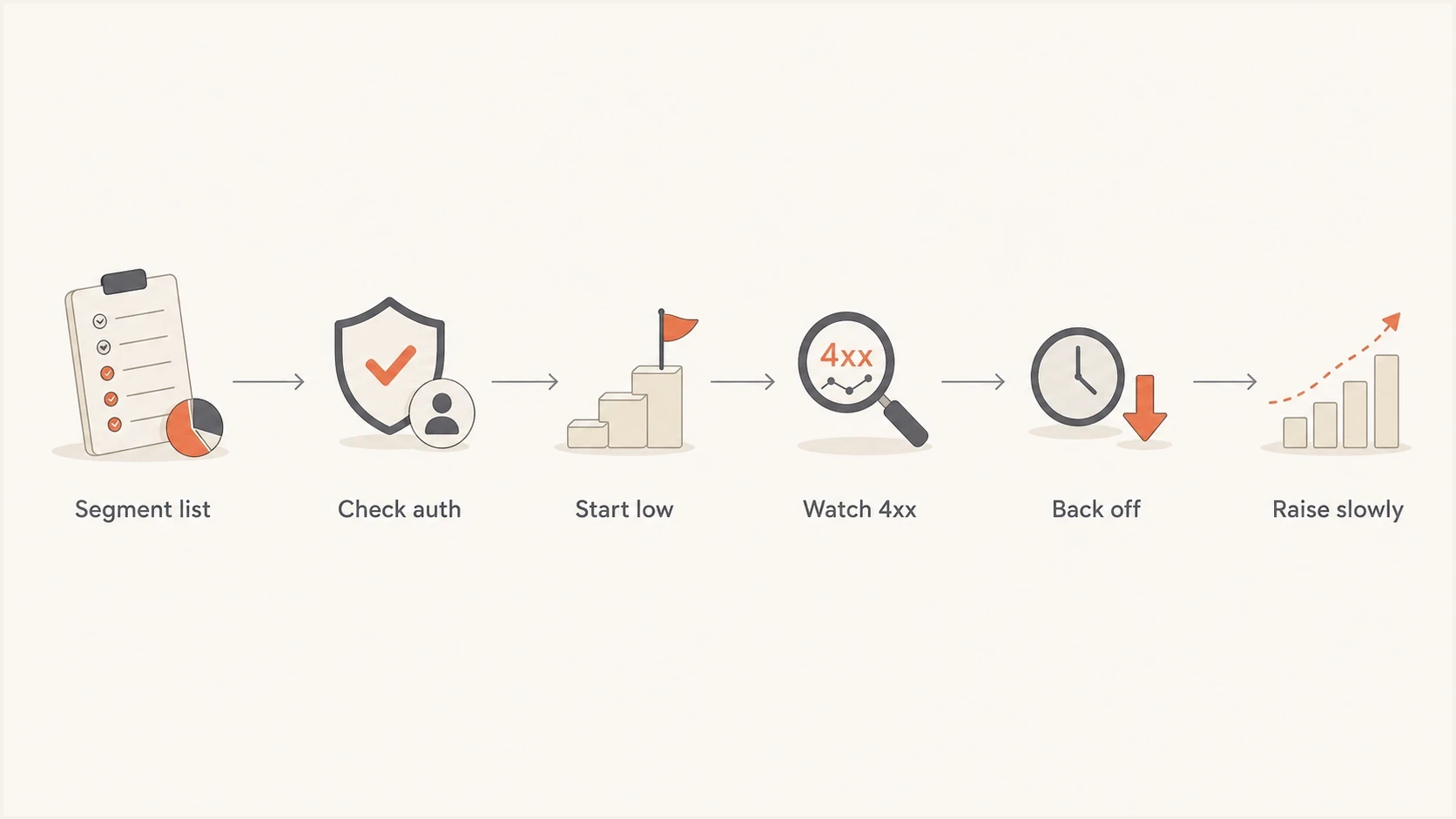
Flowchart showing a controlled WP and Onet delivery plan.
Separate transactional and marketing mail. Transactional streams need steadier acceptance, so do not let a promotional spike consume the same hourly headroom. If both streams share an IP, the campaign queue should yield before the transactional queue starts receiving provider deferrals. Warm up a new IP or domain with small sends to recently engaged WP and Onet recipients, increasing volume only while acceptance and placement remain stable.
Mixed global campaign
- Provider-specific deferrals are buried inside global bounce data.
- The same retry policy hits every mailbox provider.
- One local throttle can create broad queue delays.
Provider-specific send
- WP and Onet deferrals are measured by hour and source.
- Backoff is tuned to each provider's response pattern.
- Local throttles stay contained within the local queue.
When a provider starts deferring, change one factor at a time. Lower the cap first. If the queue clears, keep the lower rate and test gradual increases. If deferrals persist at low volume, investigate authentication, reputation, recipient quality, and content.
Tune retries and queues
WP and Onet delivery problems often get worse because the sender treats a temporary deferral like a short network delay. That creates repeated attempts in a tight window. Use fewer parallel connections, a longer retry ramp, and an automatic hold when the same rule appears repeatedly.
Provider queue policy exampletext
provider_group = onet
max_connections = 1
max_messages_per_hour = measured_provider_baseline
retry_policy = exponential_backoff
hold_if_4xx_rate_over = internal_alert_threshold
These values are policy placeholders, not Onet limits. Use a separate policy for WP, and report when each provider crosses an internal threshold.
- Use longer retry intervals after repeated 4.7.1 responses.
- Reduce parallel SMTP sessions for the affected provider group.
- Pause campaign traffic when deferrals pass a defined percentage.
- Remove hard bounces and long-inactive recipients before the next test.
Reduce reputation pressure before asking for more
A sender that wants more WP and Onet volume has to look quiet and predictable. That means low unknown-user rates, low spam complaints, stable content, recognizable link domains, and a list that has recent engagement. If a campaign has a weak audience, increasing volume only makes the provider's filter more confident.
Check blocklists and blacklists before escalating. A listing is not always the direct cause of a WP or Onet deferral, but it is useful evidence to investigate. Suped's blocklist monitoring brings IP and domain reputation checks into the same workflow as authentication monitoring.
|
|
|
|---|---|---|
Bounces | Low | Rising |
Complaints | Rare | Clustered |
Engagement | Recent | Stale |
Listings | Clear | Listed |
Reputation checks to complete before increasing WP and Onet volume.
Use postmaster escalation with evidence
Postmaster escalation works best when the sender has evidence. Prepare a short packet that shows the sending IPs, domains, bounce samples, timestamps, message IDs, hourly volumes, authentication results, complaint controls, and the exact remediation already tried.
Escalation packet
- Identify the sending domains, envelope domains, DKIM domains, and IP addresses.
- Include bounce samples with timestamps, response codes, and message IDs.
- Show current hourly caps, retry intervals, and suppression rules.
- Ask for the cause of the deferral and a safe volume range to test.
WP publishes postmaster@wp.pl for delivery complaints. Onet directs senders with rejection or delivery-limit issues to its customer support or registered-sender contact process for a limit review. Include the affected recipient domain and full SMTP reply.
Where Suped fits
Suped's product supports the investigation by putting DMARC source data, SPF and DKIM results, blocklist and blacklist checks, issue detection, and alerts in one view. Use that evidence to separate an authentication failure or listed sender from a provider-specific rate problem.

Issue steps to fix dialog showing the issue overview, tailored fix steps, and verification action
Suped turns DMARC aggregate reports into source-level issues with remediation steps and alerts. Hosted SPF supports changing sender inventories, while hosted DMARC supports staged policy changes. Hosted MTA-STS maintains TLS policy without separate web hosting. Multi-tenant views let agencies repeat the same investigation across client domains.
Manual workflow
The team collects bounce logs, DNS records, blocklist results, and DMARC XML files separately. That works for a one-off check, but it slows down repeat investigation.
Suped workflow
Suped combines authentication monitoring, issue detection, alerts, hosted records, blocklist visibility, and domain-level reporting in one operational view.
Provider-specific throttling still needs to be set in the sending system. Suped gives the team authentication and reputation evidence before a rate test, during the retry window, and after a provider escalation.
Views from the trenches
Best practices
Segment WP and Onet into separate jobs so local throttles do not slow other recipients.
Treat 4xx responses as pressure signals and retry with longer backoff windows first.
Keep complaint, bounce, and inactive-recipient cleanup strict before volume increases.
Common pitfalls
Blending WP and Onet recipients into global campaigns hides provider-specific throttling.
Retrying too quickly after #CR-IN-DEF-2 turns a temporary deferral into pressure.
Confusing provider advertising with external SMTP delivery creates false cap assumptions.
Expert tips
Start below your measured trouble point, then raise caps after clean delivery cycles.
Track deferrals by provider group, IP, domain, campaign, and hour before changes.
Document every postmaster contact attempt with bounce samples and sending windows.
Marketer view
Marketer from Email Geeks says WP and related recipient domains need separate campaign batches with throttled sends over time.
2023-09-20 - Email Geeks
Marketer view
Marketer from Email Geeks says Onet 4.7.1 #CR-IN-DEF-2 should be treated as a temporary deferral that needs slower retries.
2023-09-20 - Email Geeks




