How to find the GoDaddy account owner without login details or contact information?

Updated on 13 Aug 2026: We updated this guide with GoDaddy's current recovery routes and safer account access guidance.
The direct answer: you usually cannot find the GoDaddy account owner from outside the account when Domain Privacy is on and the client has no login, account email, customer number, invoices, or old staff records. GoDaddy will not disclose the account holder to an unverified caller. The practical path is to confirm that GoDaddy is the registrar, collect evidence tied to the account or registrant, contact the privacy-protected domain holder, and then use GoDaddy's Account Recovery process when self-service recovery is unavailable.
Treat this as an ownership and access recovery problem, not only a password problem. If the domain handles email, the risk is higher because DNS controls MX, SPF, DKIM, DMARC, routing, and sometimes Microsoft 365 or Google Workspace verification. A lost registrar login can cause a mail outage or renewal failure if the domain is close to expiry or the current DNS is fragile.
There is no legitimate hidden lookup that reveals the GoDaddy account owner behind a privacy-protected domain. If WHOIS does not show a reachable registrant or contact channel, the next useful evidence comes from internal records and GoDaddy's formal recovery process.
- Do not guess: Avoid repeated login attempts with old staff emails because lockouts and fraud signals slow recovery.
- Do prove control: Gather invoices, corporate records, matching email addresses, and any domain renewal notices.
- Do protect email: Once access returns, review SPF, DKIM, DMARC, MX, and forwarding before changing anything.
- Do document: Record the registrar, account owner, recovery contacts, and renewal owner for future audits.
Confirm the registrar and map domain services
The first useful step is to separate the registrar account from the DNS and email services. GoDaddy can be the registrar while DNS lives elsewhere. The domain can also use GoDaddy name servers while the registrar is another provider. Recovery gets easier when each role is clear.
Run a GoDaddy WHOIS lookup and record the registrar, name servers, creation date, expiration date, domain status, and any Contact Domain Holder action. GoDaddy automatically applies Domain Privacy to eligible domains, so a private result is expected. The contact form forwards a message to the registrant without exposing the destination address.
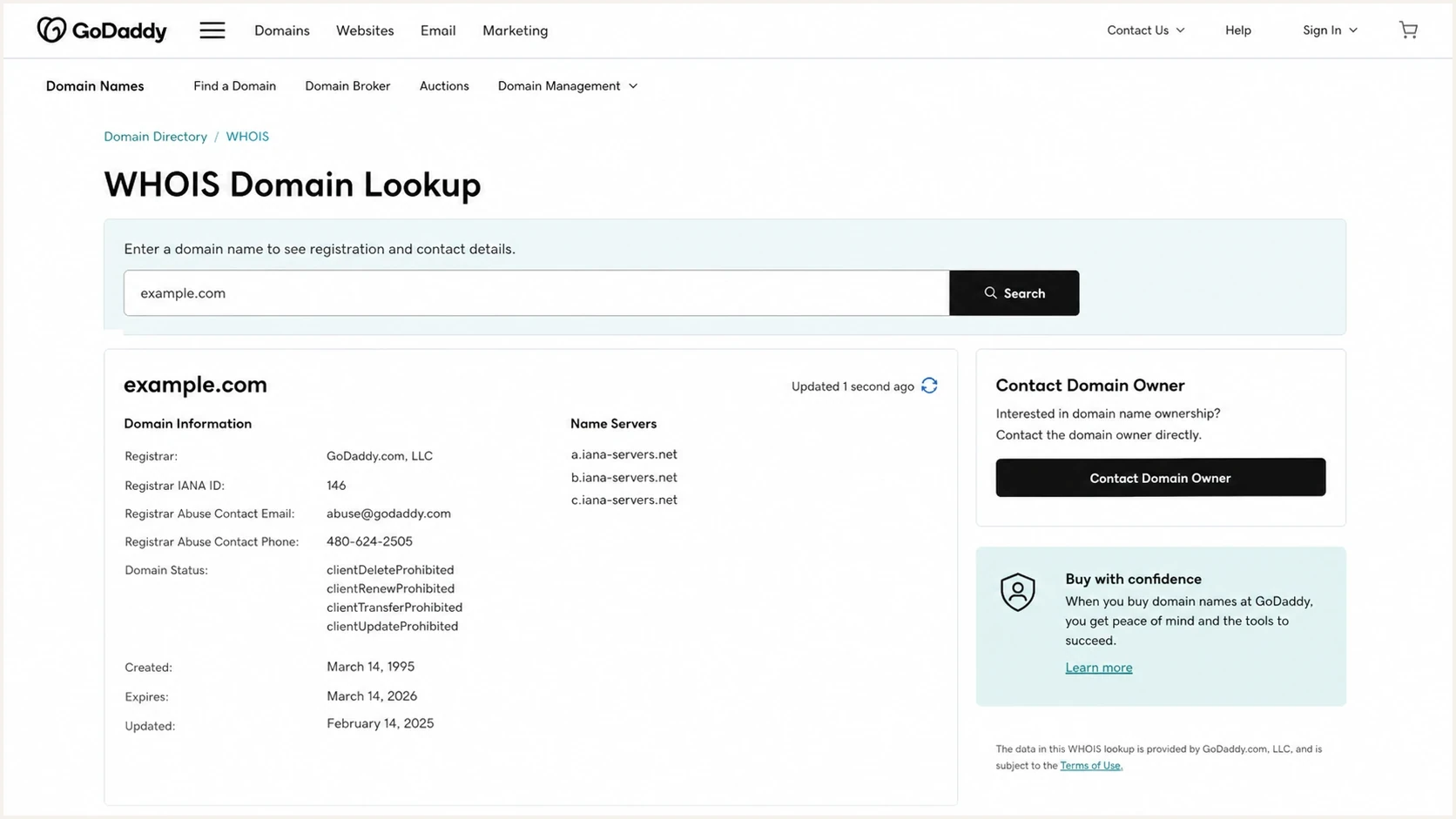
GoDaddy WHOIS result showing registrar, privacy status, name servers, and owner contact action.
- Registrar: If GoDaddy is listed as registrar, recovery belongs with GoDaddy even if DNS points elsewhere.
- Name servers: If name servers are outside GoDaddy, the client also needs access to that DNS platform.
- Privacy channel: Use the Contact Domain Holder form, then save the submission and timestamp.
- Expiration: If renewal is close, escalate internally and with GoDaddy support the same day.
- Email host: MX records show where mail routes, but they do not prove who controls the domain.
|
|
|
|---|---|---|
GoDaddy registrar | GoDaddy controls registration | Start account recovery |
GoDaddy name servers | DNS likely sits in GoDaddy | Recover DNS access |
Privacy contact | Owner relay exists | Send a formal notice |
Old invoice | Account clue exists | Find matching owner |
Unknown MX | Email host is separate | Map mail systems |
Use this table to decide which access path to pursue first.
Build the internal evidence trail
When WHOIS privacy hides the registrant, internal evidence becomes the main path. Start with billing records, then search the people and systems connected to the domain. Domain accounts are often created by a founder, web developer, marketing contractor, IT manager, MSP, bookkeeper, or someone who left the company years ago. The account owner is usually not mysterious inside the business; the evidence is scattered.
Useful clues
- Billing: Search card statements for GoDaddy charges, renewal amounts, renewal dates, and card suffixes.
- Email: Search mailboxes for renewal notices, customer numbers, receipts, and domain warnings.
- People: Ask former IT, web, finance, and marketing contacts who registered the domain.
- Systems: Check password managers, vendor files, ticket history, and onboarding documents.
Weak clues
- Website host: The web host can differ from the registrar and does not prove account ownership.
- MX provider: The mail platform shows where email routes, not who controls DNS.
- Brand name: A domain matching the business name still needs proof for account recovery.
- Old guesses: Trying remembered passwords rarely helps and creates noise during recovery.
GoDaddy says the customer number is usually listed near the top of its emails. If the client finds an old renewal notice, receipt, or account alert, the customer ID can be used with the password to sign in or to start a password reset. It can also help GoDaddy confirm identity during a support conversation, but it does not prove domain ownership by itself.
A short owner-contact message works better than a long story. Send it through the Contact Domain Holder form, identify the company, name the domain, explain that access is required for business administration, and ask the recipient to contact the authorized company representative.
- Subject: Use a clear subject such as Domain access request for example.com.
- Identity: Name the legal business and the authorized person requesting access.
- Request: Ask the recipient to reply with a safe next step, such as delegate access or an account transfer, without requesting a password.
- Proof: Offer documentation through GoDaddy's recovery process rather than attaching sensitive files.
Choose the right recovery path
The GoDaddy account owner controls the login and account billing. The domain registrant is the person or organization recorded for the domain. They can differ. GoDaddy's Domain Access route is for someone listed as the registrant of a domain inside an inaccessible account, so website control or a matching business name alone does not qualify.
|
|
|
|---|---|---|
Account email and domain are known | Retrieve username | GoDaddy sends a one-time PIN to the account email |
Username or customer number is known | Reset password | The reset link goes to the email on the account |
Primary account email is unavailable | Email Access | Submit an Account Recovery request with identity evidence |
Requester is the listed registrant | Domain Access | Prove the registrant identity for a domain in an inaccessible account |
Verify It's You or 2SV is blocked | Verification Method | Follow GoDaddy's process to cancel the unavailable method |
Known owner can cooperate | Delegate access or account transfer | The owner approves access without sharing a password |
Choose the least disruptive route that matches the access still available.
Use self-service when the account email still works. If the email is gone, the domain sits in an unknown account, or the verification method cannot be completed, submit one Account Recovery request under the matching option. A support PIN or customer number can identify an account conversation, but neither replaces the required recovery evidence.
Use recovery when the account owner stays unknown
If the client cannot identify a former employee, vendor, or active mailbox tied to the GoDaddy account, Account Recovery is the formal route when the client meets GoDaddy's stated eligibility. The Domain Access option requires the requester to be listed as the domain registrant. Business ownership, a trademark, website access, or control of email does not guarantee recovery when the registrant record names someone else.
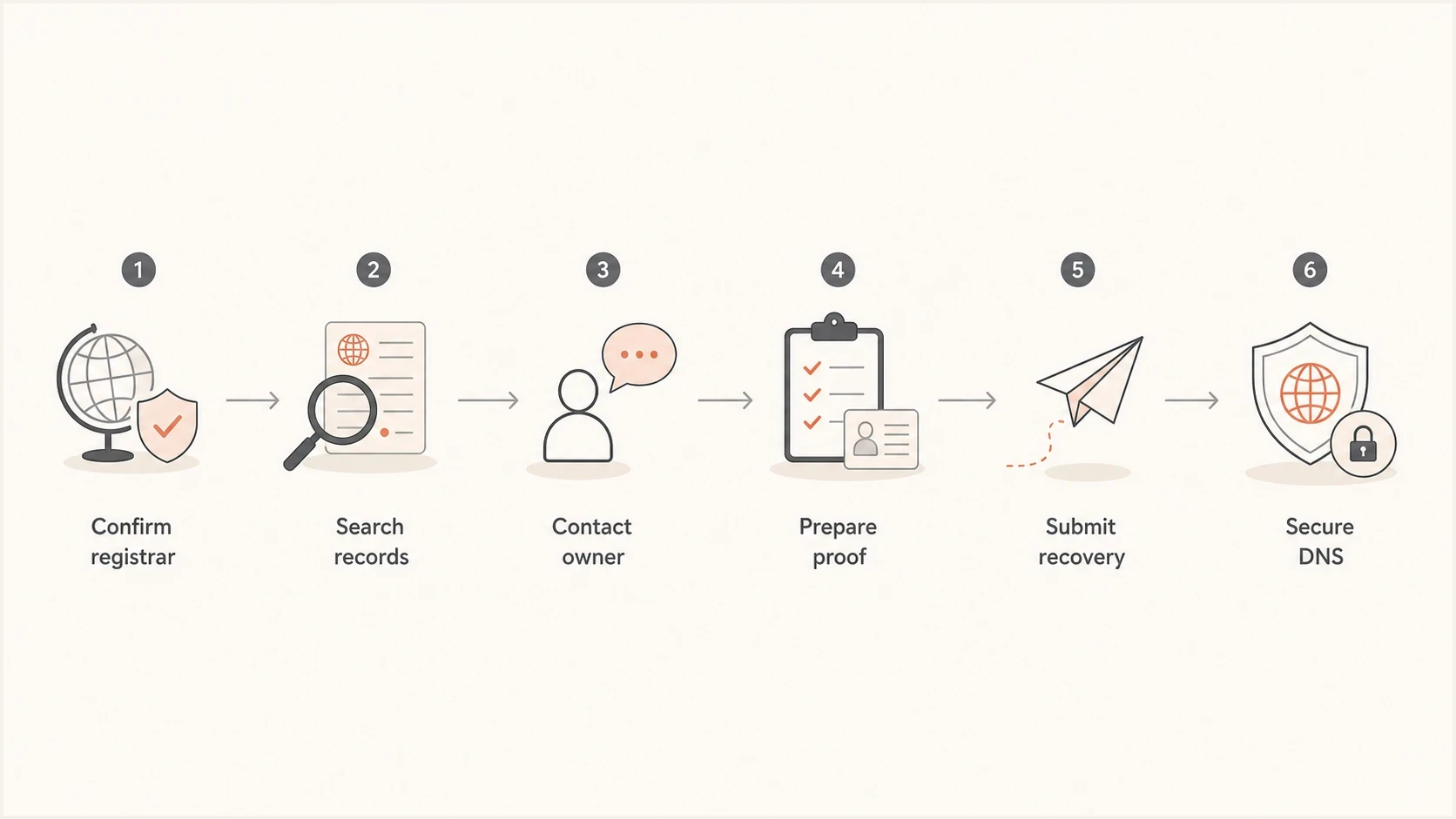
Flowchart showing registrar confirmation, evidence gathering, owner contact, recovery, and DNS hardening.
- Confirm scope: Write down whether the client needs registrar access, DNS access, email admin access, or all of them.
- Collect proof: Prepare a color copy of government-issued photo ID showing the complete name, signature, date of birth, issue date, expiration date, and an identifiable photo. If a company is listed on the account, include business documentation. GoDaddy says Articles of Incorporation and documents printed from websites are not accepted.
- Submit once: Use the recovery option that matches the lost access and avoid duplicate submissions from different staff members.
- Track replies: Route GoDaddy responses to a monitored mailbox that the company controls.
- Secure control: After recovery, keep the primary account under company control and grant named staff or the MSP scoped delegate permissions.
Recovery urgency
How to triage a lost GoDaddy domain account used for business email.
Low
90+ days
Domain renews in more than 90 days and mail is stable.
Medium
30-90 days
DNS changes are needed soon or the client lacks renewal proof.
High
7-30 days
Renewal is close, MX is wrong, or email authentication records are failing.
Critical
0-7 days
The domain is expiring, mail is down, or DNS has been changed without approval.
The recovery request should come from the person or organization eligible under GoDaddy's process. Consultants and MSPs can prepare the evidence and coordinate the support conversation, but they should not claim to own the domain. For agencies and managed service providers, clean MSP workflows matter: every client domain needs a documented account owner, registrant, recovery mailbox, registrar, DNS host, and renewal owner.
Protect mail before and after DNS changes
Once access comes back, resist the urge to clean everything up immediately. First export the existing DNS zone, capture the current records, record the TTLs, and identify what each record does. Then make the smallest changes needed to stabilize account access, billing, DNS ownership, and email.
Email authentication needs careful review because stale DNS often hides old senders, broken DKIM selectors, weak SPF includes, and DMARC reports that no one reads. Suped's product supports this post-recovery workflow by turning DMARC aggregate reports into source-level findings and alerts. It also brings hosted SPF, hosted DMARC, hosted MTA-STS, SPF flattening, and blocklist (blacklist) monitoring into one place for teams that manage these controls.
?
What's your domain score?
Deep-scan SPF, DKIM & DMARC records for email deliverability and security issues.
Run a public check before touching DNS and repeat it after changes propagate. Suped's domain health checker helps identify missing DMARC, invalid SPF syntax, DNS lookup pressure, DKIM configuration issues, and mail-server domain-match problems.
DNS records to stage after recoverydns
_dmarc.example.com. TXT "v=DMARC1; p=none; rua=mailto:dmarc@example.com"
example.com. TXT "v=spf1 include:spf.protection.outlook.com -all"
The DMARC example starts in monitoring mode because the first goal is visibility. Identify legitimate sources and fix domain matching before moving toward quarantine or reject. Ongoing DMARC monitoring grounds that process in observed mail flow.
After recovery, the durable fix is operational hygiene: a company-controlled owner account, named delegates, documented billing, and monitored DNS. Lost registrar access is preventable when ownership receives the same control as finance or legal access.
- Account: Use a company-controlled email address for the owner account, not a personal mailbox.
- Delegates: Grant named people only the management or transfer permissions their work requires.
- Renewal: Confirm the renewal card, backup card, billing email, and domain expiry alerts.
- Records: Export the zone file and keep a dated copy before every material DNS change.
- Monitoring: Watch DMARC, SPF, DKIM, MX, and blocklist or blacklist signals continuously.
What not to do
A lost domain account creates pressure, but shortcuts create more risk than they solve. The goal is to restore legitimate administrative control without bypassing GoDaddy's account protections. If the business is the registrant, formal recovery provides the documented route.
Bad approach
- Credential guessing: Trying old passwords across many emails creates lockouts and audit problems.
- Pressure calls: Support cannot disclose the account owner to an unverified caller.
- DNS guessing: Changing records without understanding mail flow breaks authentication and routing.
- Personal ownership: Moving the domain into one employee's account repeats the same failure pattern.
Better approach
- Evidence first: Build a clean file with business proof, billing clues, registrar data, and contact history.
- Eligible requester: Have the account holder or listed registrant use the matching recovery route.
- Change plan: Inventory MX and authentication records before touching the zone.
- Shared control: Use a company-controlled owner account, delegate access, documented renewal ownership, and DNS backups.
The most common surprise is that DNS access and registrar ownership are separate enough to cause confusion but connected enough to disrupt email. If the domain is already fragile, make no DNS edits until there is a rollback copy and a clear record of every service using the domain.
Views from the trenches
Best practices
Confirm registrar and name servers before asking support to recover the wrong account.
Search finance mailboxes for GoDaddy receipts because customer details often appear there.
Use the privacy contact form once, then keep a timestamped copy of the message sent.
Keep recovered domains in company accounts and grant staff scoped delegate access.
Common pitfalls
Assuming GoDaddy DNS means GoDaddy is the registrar leads teams down the wrong path.
Relying on one former employee's mailbox leaves the same access risk in place later.
Changing SPF or MX records before exporting DNS creates avoidable email outages.
Treating account recovery as an IT-only task slows proof collection from finance.
Expert tips
Build a recovery packet with registrar data, billing clues, contact history, and authority proof.
Ask old web vendors for transfer history, not just passwords or active logins today.
After access returns, audit DMARC reports before enforcing a stricter policy safely.
Set calendar reminders for renewals and review registrar ownership twice a year.
Marketer from Email Geeks says WHOIS can confirm the registrar and name servers, but privacy often removes the registrant clue.
2024-04-24 - Email Geeks
Marketer from Email Geeks says a registrar privacy contact form is worth using because the message can reach the listed registrant.
2024-04-24 - Email Geeks
How to regain control without the owner's name
Work backward through legitimate evidence: WHOIS, name servers, the privacy contact form, invoices, GoDaddy emails, old vendors, former staff, and business records. If those clues do not identify the account holder, the client's next step depends on the registrant data GoDaddy has on file. Use Domain Access when the requester is the listed registrant, or the matching account recovery route when the account email or verification method is unavailable.
After recovery, keep the domain in a company-controlled account, grant scoped delegate access, document renewal ownership, and audit email authentication. For teams that manage client domains or business-critical mail, Suped's product turns DMARC and DNS findings into specific follow-up tasks so the next administrator has a usable record.




