How do I update my Gmail avatar with a logo after switching from SFMC to Braze?

Updated on 10 Aug 2026: We updated this guide for RFC 9989 and current Gmail BIMI certificate requirements.
You do not update the Gmail avatar inside SFMC or Braze. The sender logo Gmail shows is controlled by Google profile data, cached contact data, or BIMI, depending on the recipient, the sending domain, and the type of Gmail surface being viewed. After a move from Salesforce Marketing Cloud to Braze, the practical answer is to authenticate the Braze sending domain correctly, then use BIMI if you want a brand logo to appear for broader Gmail recipients.
Treat this as two separate jobs. First, confirm that the new Braze sending setup passes SPF, DKIM, and DMARC for the visible From domain. Second, decide whether you are trying to change a Google Account profile image or implement a verified brand logo. Those paths look similar in the inbox, but they are different systems.
Direct answer
For a marketing sender moving from SFMC to Braze, set up BIMI on the domain used in the visible From address. Gmail requires DMARC at enforcement and a VMC or CMC certificate containing a compliant logo. A Google profile photo can still help for Workspace-to-Gmail cases, but it is not a reliable way to control campaign sender logos from Braze.
- Braze: Can authenticate and send the mail, but it does not own the Gmail avatar.
- Google profile: Can show in some Gmail contexts, especially when the sender is a real Workspace mailbox.
- BIMI: Is the sender-domain path for verified logos in Gmail and other mailbox providers that support it.
Which Gmail image are you trying to change?
The hard part is that people call several different Gmail images an avatar. Before changing DNS or asking Braze support for help, pin down which image is missing. Gmail can show a sender initial, a Google Account photo, a contact image saved by the recipient, or a BIMI logo. Only one of those is tied to email authentication.
|
|
|
|
|---|---|---|---|
 Google profile Google profile | Some Gmail and Workspace surfaces | No | Update the Google Account or Workspace profile photo. |
BIMI logo | Supported inbox brand indicators | No | Publish BIMI after DMARC reaches enforcement. |
Contact photo | Recipient-owned contact cards | No | You cannot centrally update a recipient's saved contact. |
 Braze sender Braze sender | Campaign sending identity | Partly | Use a branded From domain and correct authentication. |
 SFMC sender SFMC sender | Previous campaign infrastructure | No | Retire old records only after Braze is stable. |
Common Gmail logo sources and what controls them.
If the issue is an animated profile image rather than a static brand logo, use the animated Gmail picture guidance instead. BIMI logos are static, and Gmail profile images behave differently across Google-owned surfaces.
Google profile photo
This is useful when the sender address is a real Google Workspace account, such as newsletter@example.com with a mailbox. Sign in to that Google Account, open Personal info, choose Profile picture under Basic info, upload the image, crop it, and save it. The result often shows best when the recipient uses Gmail and Google has enough account context.
- Scope: Mostly Google account and Gmail contact surfaces.
- Control: Managed in Google, not in Braze or SFMC.
- Risk: It is inconsistent for bulk marketing mail.
BIMI logo
This is the domain-based route for verified brand display. It depends on authentication, DNS, certificate status, and mailbox-provider support.
- Scope: Brand indicators in supporting mail clients, including Gmail.
- Control: Managed through DMARC, BIMI DNS, hosted certificate files, and the logo embedded in the certificate.
- Risk: It will not show until every prerequisite is correct.
What changes after the SFMC to Braze move
A platform migration changes the infrastructure behind your mail. It does not automatically move Google's cached sender image, nor does it transfer a legacy Google profile setup. What changes is the sending domain setup, the DKIM keys, the return-path domain, the IP or shared pool behavior, and the reputation history Gmail now sees for the new stream.
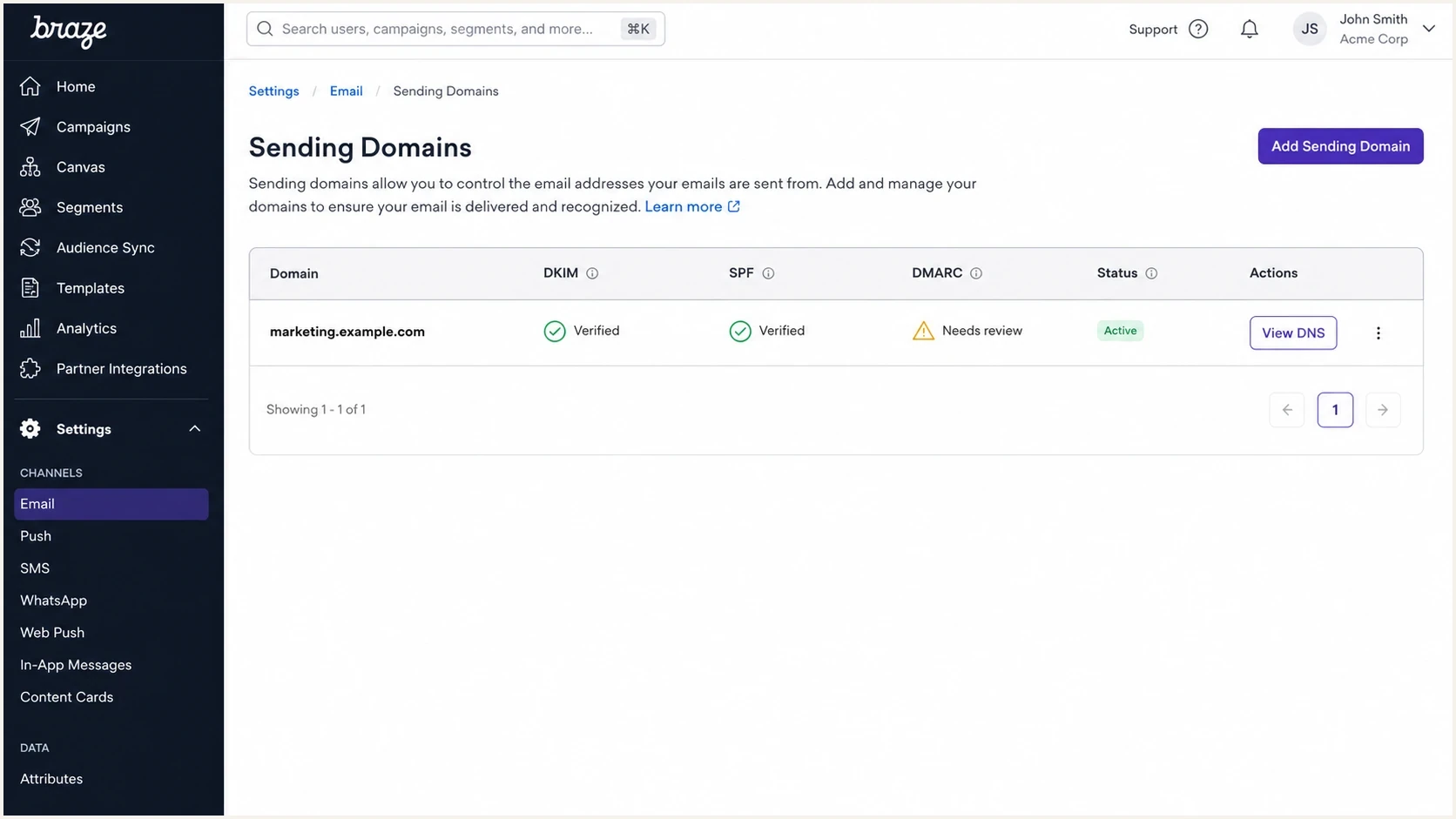
Braze email sending domain settings with authentication status columns.
If you changed the visible From domain during the move, Gmail treats that as a different identity. For example, mail.example.com and news.example.com can have different authentication, DMARC reporting, BIMI records, and reputation. Keep the visible From domain stable where you can. When you need a new subdomain, warm it carefully and verify whether it inherits the organizational domain's BIMI record or has its own record.
- From domain: The domain after the @ in the visible From address is the identity Gmail users see.
- DKIM keys: Braze has its own DKIM setup. Do not assume SFMC keys carry over.
- Return path: Bounce handling changes during ESP migration, so test DMARC results after DNS changes.
- Reputation: Logo display does not replace good sending hygiene, engagement, and complaint control.
Braze has its own guidance on Gmail logos and a separate Braze migration guide. Use those for Braze-specific admin steps, but keep the Gmail avatar decision separate from the ESP migration checklist.
Use BIMI for the logo Gmail can trust
BIMI is the right mechanism when the goal is a brand logo beside marketing mail sent through Braze. Gmail supports BIMI, but it checks more than the logo. Your mail must pass DMARC, the domain's DMARC policy must use quarantine or reject, and Gmail requires a VMC or CMC certificate. A VMC gives the Gmail verified checkmark. A CMC can support logo display without the same trademark path, but it does not add the verified checkmark.
BIMI readiness thresholds
Use these states to decide whether logo work should start or whether authentication work comes first.
Not ready
p=none
DMARC exists only for reporting and does not request enforcement.
Authentication review
Sources verified
Legitimate SFMC and Braze sources must pass DMARC before policy enforcement.
BIMI eligible
p=quarantine or reject
DMARC requests enforcement for all affected mail without the historic pct tag.
The order matters. Do not start by uploading a logo, because a perfect SVG still fails when the From domain does not pass DMARC consistently. Check the authentication base first, then add the visual layer. RFC 9989 made pct historic, so new DMARC records should omit it. Under older handling, an omitted pct value already means the policy applies to 100 percent of affected mail.
DMARC and BIMI records to aim forDNS
Host: _dmarc.example.com
Type: TXT
Value: v=DMARC1; p=quarantine; rua=mailto:dmarc@example.com

Host: default._bimi.example.com
Type: TXT
Value: v=BIMI1; l=; a=https://e.co/vmc.pem
Do not skip enforcement
A monitoring-only DMARC record is not enough for Gmail BIMI. Move carefully, but reach enforcement before expecting Gmail to show the logo.
- Policy: Use quarantine or reject, not none.
- Coverage: Omit the historic pct tag. Without it, older receivers treat the policy as applying to all affected mail.
- Certificate: Use a VMC or CMC that matches the logo and domain requirements.
Suped's product can collect DMARC reports during the parallel send, separate SFMC and Braze sources, and expose domain-matching failures before enforcement. It also tracks SPF and DKIM results, so the team can verify the new Braze setup without reading raw aggregate XML.
DMARC record detail view showing SPF, DKIM, DMARC, rDNS diagnostics, and DNS records
Prepare a Gmail-compatible BIMI logo
For Gmail, the certificate file is the deployment asset. A VMC or CMC PEM contains the verified logo, and Google's certificate-based BIMI example leaves l= empty while a= points to that PEM file. The logo submitted to the certificate authority still has to meet SVG Tiny Portable/Secure requirements.
- Format: Use SVG Tiny PS with baseProfile set to tiny-ps and version set to 1.2.
- Dimensions: Set absolute width and height values of at least 96 pixels. Do not use percentages.
- Artwork: Center the logo in a square and use a solid background because transparency can display unpredictably.
- File safety: Remove scripts, animation, and external references. Keep the SVG at 32 KB or less for Gmail compatibility.
Host the PEM over public HTTPS with a valid certificate chain. Do not put it behind a login, an IP allowlist, or a regional access rule that can block Gmail's fetch. Confirm that the URL returns the certificate file directly before publishing the BIMI record.
How to execute the change
The safest sequence is to migrate the authentication cleanly, prove that Gmail sees the new mail as legitimate, then publish BIMI. This sequence separates DNS correctness from mailbox-provider display timing.
- Choose: Decide the visible From domain Braze will use for campaigns.
- Authenticate: Add Braze's required DNS records for DKIM, bounce handling, and tracking.
- Verify: Send real mail and confirm SPF, DKIM, and DMARC pass for the From domain.
- Enforce: Move DMARC to quarantine or reject only after legitimate sources are accounted for.
- Certify: Prepare the BIMI SVG and get a VMC or CMC for Gmail support.
- Publish: Add the BIMI TXT record for the sender domain and host the PEM over HTTPS.
- Test: Send to Gmail, Google Workspace, Yahoo, Apple Mail, and your seed accounts.
Before changing DMARC policy, run the sending domain through a Domain health checker. That catches common mistakes such as duplicate SPF records, missing DKIM records, a monitoring-only DMARC policy, and DNS values copied from the old SFMC setup.
?
What's your domain score?
Deep-scan SPF, DKIM & DMARC records for email deliverability and security issues.
The most common migration mistake is leaving the old SFMC sender setup in place and adding Braze on top without checking the total DNS state. SPF can break when too many includes are used, DKIM can fail when selectors point to retired infrastructure, and DMARC can report unexpected third-party sources after the first real campaign sends.
Minimal DNS checklisttext
Visible From: newsletter@example.com
Braze DKIM: verified for example.com
Bounce domain: verified for the Braze stream
DMARC: p=quarantine or p=reject after legitimate sources pass
BIMI: published after DMARC enforcement is stable
Do not remove the SFMC DNS records until you know that no active mail stream still uses them. That includes transactional jobs, triggered journeys, preference-center messages, and one-off operational sends that were not part of the main migration plan.
Testing in Gmail after the change
Testing has two layers. First, inspect the actual authentication results in the message. Second, check the visual behavior in Gmail over time. Google says a new BIMI logo can take up to 48 hours to appear after the DNS record is added. Gmail also applies its own display checks, so technical eligibility does not guarantee that every message will show the logo. A failing DMARC result does prove the setup needs work.
Send a real Braze test message and inspect the headers with the Email tester before waiting on Gmail's avatar surfaces. This gives you a faster answer than refreshing the inbox repeatedly.
Email tester
Send a real email to this address. Suped shows a results button when the test is ready.
?/43tests passed
How to interpret test results
- Passes auth: Move on to BIMI, certificate, hosting, and display checks.
- Fails DKIM: Fix the Braze DKIM selector or DNS target before touching BIMI.
- Fails DMARC: Confirm the authenticated domain matches the visible From domain.
- Shows old logo: Check recipient contacts, Gmail cache, and whether the From domain changed.
Test with a fresh Gmail account that has never saved your sender as a contact. Then test with a long-time subscriber account. If the fresh account shows the correct BIMI result but the long-time account shows an old image, you are probably seeing contact or cache behavior rather than a Braze problem.
Also check whether you are sending from a group address, alias, or no-reply identity that has no Google profile photo. A Workspace profile image can help for some person-to-person contexts, but a marketing platform send still needs the domain authentication route.
Where Suped fits into the migration
Suped's product gives the team a shared view of DMARC authentication by source during the cutover. Use it to watch SFMC and Braze in parallel, confirm that each legitimate source passes with the visible From domain, and catch unexpected senders before moving DMARC to enforcement.

Issue steps to fix dialog showing the issue overview, tailored fix steps, and verification action
Automated issue detection and guided fix steps help route each failure to the DNS owner or Braze administrator who can correct it. Alerts also make it easier to spot an old SFMC stream that resumed after the planned cutover.
- Migration: Track SFMC and Braze side by side until the old sources disappear.
- Policy: Review DMARC data before moving the domain to quarantine or reject.
- SPF: Check the lookup chain when old SFMC and new Braze records overlap.
- Ownership: Give each failed source a named owner and a cutover decision.
Views from the trenches
Best practices
Separate Google profile-photo checks from BIMI checks before changing DNS records.
Keep the visible From domain stable during a Braze migration when the brand can.
Test with fresh Gmail accounts so old contacts do not hide the real BIMI result.
Common pitfalls
Assuming Braze controls Gmail avatars leads teams to miss domain authentication gaps.
Leaving DMARC at monitoring only prevents Gmail BIMI from showing the brand logo.
Removing old SFMC records too early breaks forgotten triggered and operational mail.
Expert tips
Treat BIMI as the last step after SPF, DKIM, and DMARC have stable pass rates in testing.
Use a VMC when the Gmail verified checkmark matters for brand recognition in the inbox.
Document each sender domain so future ESP moves do not restart the same DNS search.
Marketer from Email Geeks says the old Google Plus route for changing Gmail sender avatars no longer works, so teams need to use current Google profile or BIMI paths.
2024-09-18 - Email Geeks
Marketer from Email Geeks says Gmail and Google Workspace still have profile photos, but those photos mainly help Gmail-to-Gmail contexts rather than broad ESP campaign sends.
2025-02-11 - Email Geeks
The practical route
After switching from SFMC to Braze, update the Gmail logo by fixing the sending identity, not by hunting for a Braze avatar setting. Keep or choose the visible From domain, authenticate it in Braze, confirm SPF, DKIM, and DMARC pass, move DMARC to enforcement, then publish BIMI with the right certificate and SVG.
If you only need a profile image for a real Google Workspace mailbox, update that account's profile photo in Google. If you need a logo beside marketing campaigns at scale, use BIMI. If the old logo lingers for some recipients, assume cache or contacts until fresh-account tests prove otherwise.
Final checklist
- Domain: Use the same visible From domain your subscribers recognize.
- Authentication: Confirm Braze passes SPF, DKIM, and DMARC before logo work.
- BIMI: Publish the record only after DMARC enforcement is stable.
- Gmail: Test fresh and existing accounts to separate cache from configuration.




