
Does transferring a domain registrar affect domain reputation?

Published 13 Jun 2026
Updated 22 Oct 2026
12 min read
Summarize with
Updated on 22 Oct 2026: We clarified when to migrate DNS first and how to preserve existing email during a registrar transfer.
No, transferring a domain between registrars does not normally affect domain reputation when the nameservers, DNS records, mail routing, and sending behavior stay the same. Reputation follows the domain's mail history, authentication results, complaint rate, abuse history, sending IPs, and traffic patterns. A registrar change by itself is administrative.
The risk comes from the work around the transfer. If the move also changes nameservers, loses TXT records, breaks MX records, disrupts DNS resolution, or interrupts email authentication, mailbox providers see failing mail rather than a harmless registrar update. Treat a registrar transfer and a DNS migration as separate jobs because they carry different delivery risks.
- A registrar transfer alone has no meaningful sender reputation impact for normal domains.
- DNS mistakes during or after the move can break authentication and delivery.
- Confirm DNS hosting will continue, then separate the registrar transfer from any DNS migration.
What actually changes during a registrar transfer
A registrar is the company that manages the domain registration relationship with the registry. Moving a domain from GoDaddy to Porkbun, or between any other registrars, changes where the domain is managed and billed. It does not automatically change your live DNS zone, website hosting, mail servers, SPF record, DKIM keys, DMARC policy, or sending platform. Check that the gaining registrar will retain the existing nameservers rather than switch to a default DNS zone.
The ICANN transfer FAQ explains the registrant side of transfers. For deliverability, the key question is simpler: did any DNS answer change for receivers that check your mail?
|
|
|
|---|---|---|
Registrar | Yes | Normally none |
Nameservers | Only if changed | Medium risk |
DNS zone | Only if migrated | High risk |
DNSSEC and DS | Registrar or TLD dependent | High risk if mismatched |
MX | No | None if unchanged |
SPF and DKIM | No | None if unchanged |
Sending volume | No | None if stable |
Registrar transfer items that matter to email
After the transfer settles, send a real message through Suped's email tester to inspect authentication results for an actual message. Also test delivery to your existing mailboxes.
Keeping existing email when changing web hosting
Changing web hosting does not require transferring your domain registration or changing nameservers. You can usually update only the website's A, AAAA or www CNAME records at the current DNS host. Preserve the email records, and check whether an MX target or mail client hostname depends on an address record being changed.
A registrar transfer does not move or delete existing mailboxes. Your email address and stored messages stay with the current email provider while that account and subscription remain active. No IMAP migration is needed unless you are also moving mailboxes. Keep any email subscription billed through the old registrar active until you have confirmed how it will be managed.
An automatic registrar integration is not required to keep Microsoft 365 email working. The required DNS records can be managed manually, as explained in Microsoft's domain setup documentation. Keep the existing tenant, mailboxes and subscription active when only the registrar changes.
When a transfer can disrupt email
The answer changes when the transfer is not only a registrar change. Many registrars also host DNS. If the old registrar's nameservers are removed during transfer, or the new registrar creates an empty default zone, email can fail even though the registration transfer succeeded. Unchanged nameserver names are not enough if the old registrar stops hosting the DNS zone after transfer.
That distinction matters when you manage dozens of domains. A clean registrar-only move has low delivery risk. A nameserver move needs a record-by-record plan, a rollback path, and checks against every domain that sends or receives mail.
Registrar-only move
- Only the registrar of record changes.
- Existing nameservers keep answering.
- Receivers see the same domain behavior.
DNS or nameserver move
- Authoritative DNS answers change.
- Records need copying and verification.
- Failures can affect delivery signals.
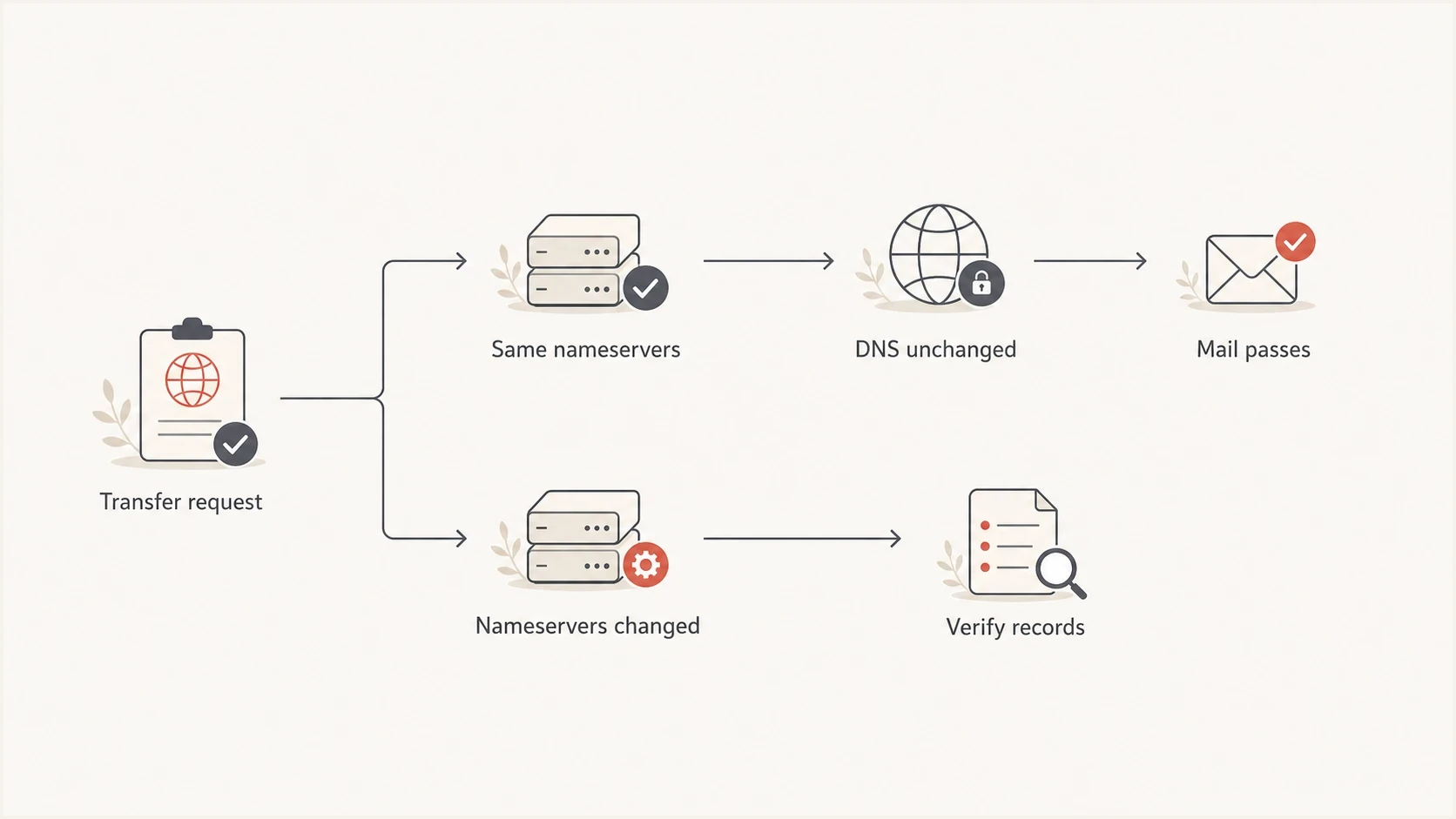
Registrar transfer flowchart comparing unchanged nameservers with a DNS migration requiring record checks.
Email DNS records to verify
For email, the registrar name matters less than whether the DNS answers match the day before the move. SPF, DKIM, DMARC, MX, tracking domains, bounce domains, BIMI, MTA-STS, TLS-RPT, autodiscover, SRV, and any sending subdomain records need to survive unchanged unless there is a planned change.
Suped's domain health checker helps check published authentication records before and after transfer. Compare the full zone export as well, because a general domain check cannot discover every DKIM selector or sending subdomain. Preserve your current record values, including the DMARC enforcement policy; the examples below are illustrative, not replacement settings.
Core email DNS records to preserveDNS
_dmarc.example.com TXT "v=DMARC1; p=none; rua=mailto:dmarc@example.com"
example.com TXT "v=spf1 include:send.example.net -all"
selector1._domainkey.example.com TXT "v=DKIM1; k=rsa; p=BASE64KEY"
example.com MX 10 mail.example.com
Do not trust a visual copy
Registrar DNS screens hide details in different ways. Compare exported records or live DNS answers, not screenshots. A truncated TXT value, omitted CNAME record, changed MX priority, absent subdomain record, or stale DS record can break mail or DNS resolution.
- Export the full DNS zone, including complete TXT values and CNAME targets, and keep a dated copy before the transfer.
- Do not change nameservers and registrar at the same time.
- Check SPF, DKIM, DMARC, MX, DNSSEC, and sending subdomains after the transfer.
?
What's your domain score?
Deep-scan SPF, DKIM & DMARC records for email deliverability and security issues.
Verify records before starting any new sending batch. For high-volume domains, check the DNS state, send test messages, then watch the first production mail after the transfer. If authentication failures climb, stop further batches until the cause is clear.
Check DNSSEC and registrar-linked services
DNSSEC needs a separate check because the DS record maintained through the registrar must match the keys published by the authoritative DNS provider. If a stale DS record remains while nameservers or signing keys change, validating resolvers treat the domain as bogus. MX, SPF, DKIM, and DMARC lookups can then fail even when the records exist.
A registrar-only transfer with the same nameservers and DNSSEC configuration normally keeps resolving, but transfer requirements vary by registrar and top-level domain. Confirm how the losing and gaining registrars handle DNSSEC before unlocking the domain. Do not disable DNSSEC for a registrar-only move unless the applicable transfer process requires it. For a DNS migration, follow the providers' DNSSEC procedure and coordinate signing changes with cached DS records and their TTLs.
Inventory services tied to the old registrar
Registration moves by itself. DNS hosting, email forwarding, web forwarding, hosted mail, and other registrar-linked services do not automatically move to the gaining registrar. Confirm which services remain active after transfer and migrate any that will end. If DNS hosting will end, migrate and verify DNS before transferring registration.
- Verify the domain is eligible to transfer and is not blocked by a transfer lock. Check for applicable 60-day locks after registration, a previous transfer or registrant contact changes; confirm the rules for your TLD before editing contact details.
- Confirm the authorization contact can receive approval messages and obtain the AuthInfo or EPP transfer code.
- Check the expiration date and keep the domain renewed throughout the change.
- Document DNSSEC status, DS data, glue records, and registrar-hosted services.
Registrar reputation versus domain reputation
There is a real concept of registrar reputation, but it is not the same thing as your domain's sender reputation. Abuse desks, security researchers, and some anti-abuse systems look at registration patterns, bad domains, and registrar behavior. That can matter for newly registered domains and obvious abuse clusters.
For an established sending domain with stable DNS and normal mail behavior, moving registrar does not reset trust and does not erase problems. It also does not give you a delivery boost. If a domain has poor complaint rates, spamtrap hits, blocklist (blacklist) listings, or broken authentication, those problems move with the domain.
Registrar transfer delivery risk
Risk rises when the transfer changes DNS answers or mail behavior.
Low
Registrar only
Registrar changes, nameservers and records unchanged.
Medium
DNS move
Nameservers change but all records are copied and checked.
High
Mail change
Records are missing, mail routes change, or volume changes.
Unknown
Unverified
No baseline, no monitoring, and no rollback path.
Domain reputation and IP reputation also need separate checks. A domain can authenticate correctly while the sending IP has poor history. The reverse is also true: a good IP cannot fully compensate for a domain that generates complaints or fails authentication. Registrar transfer does not fix either side.
For reputation monitoring, Suped's blocklist monitoring tracks domain and IP listings across major blocklists and blacklists, which is more actionable than treating the registrar name as the cause.
How to plan a low-risk transfer
For a single low-volume domain, the process is simple. For dozens of domains, use batches. The goal is to avoid mixing administrative change with technical change, then confirm that receiving mail systems see no difference.
A low-risk transfer plan depends on DNS continuity. The zero downtime transfer checklist puts DNS migration first when DNS is tied to the old registrar. If that service will stop after transfer, complete and verify the DNS move before transferring registration.
- List every sending domain, subdomain, selector, return-path host, and tracking host.
- Record current DNS answers, authentication pass rates, complaints, and delivery metrics.
- Verify eligibility, contact access, transfer-lock status, authorization code, and expiration date.
- Keep nameservers unchanged if DNS hosting will remain active; otherwise migrate DNS, verify it, then transfer registration.
- Start with non-critical domains, then wait for stable reports before moving more.
- Check live DNS after transfer, not only the registrar control panel.
- Send outbound test messages through normal sending systems and test inbound delivery to existing mailboxes.
- Monitor DMARC reports, bounces, authentication failures, and blocklist or blacklist status.
The safest sequence
Move the registrar first while keeping nameservers unchanged only when existing DNS hosting will remain active. If it will end, migrate DNS first, verify matching answers and DNSSEC, then transfer registration. Keep the operations separate so any failure has a clear cause.
A registrar-only transfer does not require a DNS propagation wait. For a DNS migration, lower relevant record TTLs in advance and wait out their previous TTLs before changing records. Keep both DNS zones answering correctly until cached old nameserver delegations expire. Delegation caching has its own TTL, so lowering an MX or TXT TTL alone does not shorten that overlap.
Monitoring transfers with Suped
Suped's platform is useful when a transfer is part of a larger domain cleanup. Registrar moves often expose weak documentation: domains are scattered, SPF is near its DNS lookup limit, DKIM selectors are unclear, or DMARC reports go to addresses nobody checks. Use those findings to document the records and sending sources that need verification.
Domain health checker sample results showing DMARC, SPF, DKIM scorecards and detailed validation checks
For teams handling this workflow, Suped's DMARC monitoring groups receiver reports so you can compare SPF and DKIM results before and after each transfer batch. Compare those reports with live DNS checks and sending logs to identify what changed.
DMARC aggregate reports arrive after their reporting period. Use live DNS checks and test messages during the transfer, then compare mail-server logs with Suped's authentication results by source as reports arrive. Pause further transfer batches if new failures appear.
Troubleshooting email after a registrar transfer
If delivery changes after a registrar transfer, start with DNS rather than the registrar brand. The timing makes the transfer look responsible, but the cause is usually a missing record, changed nameserver, different DNS response, stale DNSSEC delegation, or unrelated sending change that happened at the same time.
|
|
|
|---|---|---|
SPF stops passing | Missing or changed SPF record | TXT at the actual Return-Path domain |
DKIM fails | Missing selector TXT or CNAME | s= selector under the signature's d= domain |
DMARC fails | No passing SPF or DKIM result with the required From-domain match | Authentication-Results and the visible From address |
All DNS fails | Broken delegation or DNSSEC validation | Authoritative nameservers, DS and DNSKEY |
Inbound mail stops | MX or mail-host address changed | MX and its target's A/AAAA records |
Spam spike | Complaint or sending-pattern change | Bounce codes and campaign logs |
Blocklist hit | Domain or IP listing | The exact listed domain or sending IP |
Fast checks after a registrar move
The strongest clue is the first failure type. If SPF and DKIM pass but complaints rise, investigate sending behavior and recipient feedback. If DKIM suddenly fails for mail using one selector, check that selector's TXT or CNAME chain. If inbound mail stops, check MX and authoritative nameservers. If signed DNS answers fail validation, check DS and DNSKEY. DMARC needs at least one passing SPF or DKIM result with the required domain match to the visible From address; separate SPF and DKIM passes alone do not guarantee a DMARC pass.
A registrar change does not reset history
Moving a domain to a new registrar does not clear past complaints, remove blacklist listings, repair authentication, or warm the domain again. Treat the move as custody work, not reputation repair.
Views from the trenches
Best practices
Split registrar moves and DNS changes so any delivery issue has a clear cause later.
Move low-risk domains first, then watch authentication before batching more domains.
Export the full DNS zone before transfer; compare old and new servers during a DNS move.
Common pitfalls
Treating registrar transfer and nameserver migration as the same operational task.
Assuming a copied DNS zone includes every hidden selector, subdomain, and service host.
Changing sender behavior during the transfer and blaming the registrar for symptoms.
Expert tips
Use DMARC reports after each batch to confirm receivers still see authenticated mail.
Keep old and new DNS answering correctly until cached old nameserver delegations expire.
Investigate blocklist or blacklist signals separately from registrar custody changes.
Marketer view
Marketer from Email Geeks says domain reputation follows complaints, abuse history, sending IP reputation, authentication, and sending patterns, not a normal registrar transfer.
2026-06-12 - Email Geeks
Marketer view
Marketer from Email Geeks says there should be no impact when the same nameservers and records remain in place, but transition mistakes can still break mail.
2026-06-12 - Email Geeks