Why are my emails not delivering to Outlook and being flagged as phishing?

Published 29 Apr 2025
Updated 11 Aug 2026
11 min read
Summarize with

Updated on 11 Aug 2026: We added Microsoft's current Outlook.com authentication requirements and sharpened the troubleshooting path for phishing false positives.
Your emails are not delivering to Outlook and are being flagged as phishing because Microsoft sees one or more signals that make the message look unsafe. The most common causes are an SPF or DKIM failure, a DMARC domain mismatch, suspicious links or tracking pixels, a third-party tracking domain with poor shared reputation, a sending IP or domain reputation problem, or a Microsoft 365 tenant rule that quarantines the message.
When Outlook shows PHISH, do not start by rewriting subject lines. Start with evidence. Check whether the message was rejected, delivered to Junk, held in quarantine, or altered by Safe Links. Then compare a clean proof against the original, one change at a time. If removing a conversion pixel or redirect fixes the proof, the problem is usually URL reputation, shared tracking infrastructure, or a deprecated tracking asset.
The fast answer
A phishing flag is not the same as ordinary promotional inbox placement. Microsoft is saying the message, sender identity, URL chain, or sending environment matches a risk pattern. If a tracking pixel is highlighted, treat that pixel domain like a suspect system until testing proves it is clean.
- First test: send the exact same proof with every tracking pixel and redirect removed.
- Second test: send it again with one tracking element restored so the failing asset is obvious.
- Third test: inspect headers for authentication results and Microsoft verdict fields.
What Outlook is reacting to
Outlook is not one filter. Consumer Outlook.com, Microsoft 365 hosted mailboxes, Exchange Online Protection, Microsoft Defender for Office 365, Safe Links, spoof intelligence, tenant allow or block lists, and local Outlook client behavior all affect the final result. Microsoft says Outlook shows suspicious indicators when sender identity cannot be verified or the visible sender identity differs from the authenticated sender. That matches the practical symptoms: a question mark on the sender, a via tag, Junk placement, quarantine, or a blocked proof.
The official Outlook phishing guidance explains that Outlook verifies whether the sender is who they claim to be. For senders, that means the visible From domain, the sending infrastructure, the Return-Path, and the authenticated DKIM domain need to form a consistent identity.
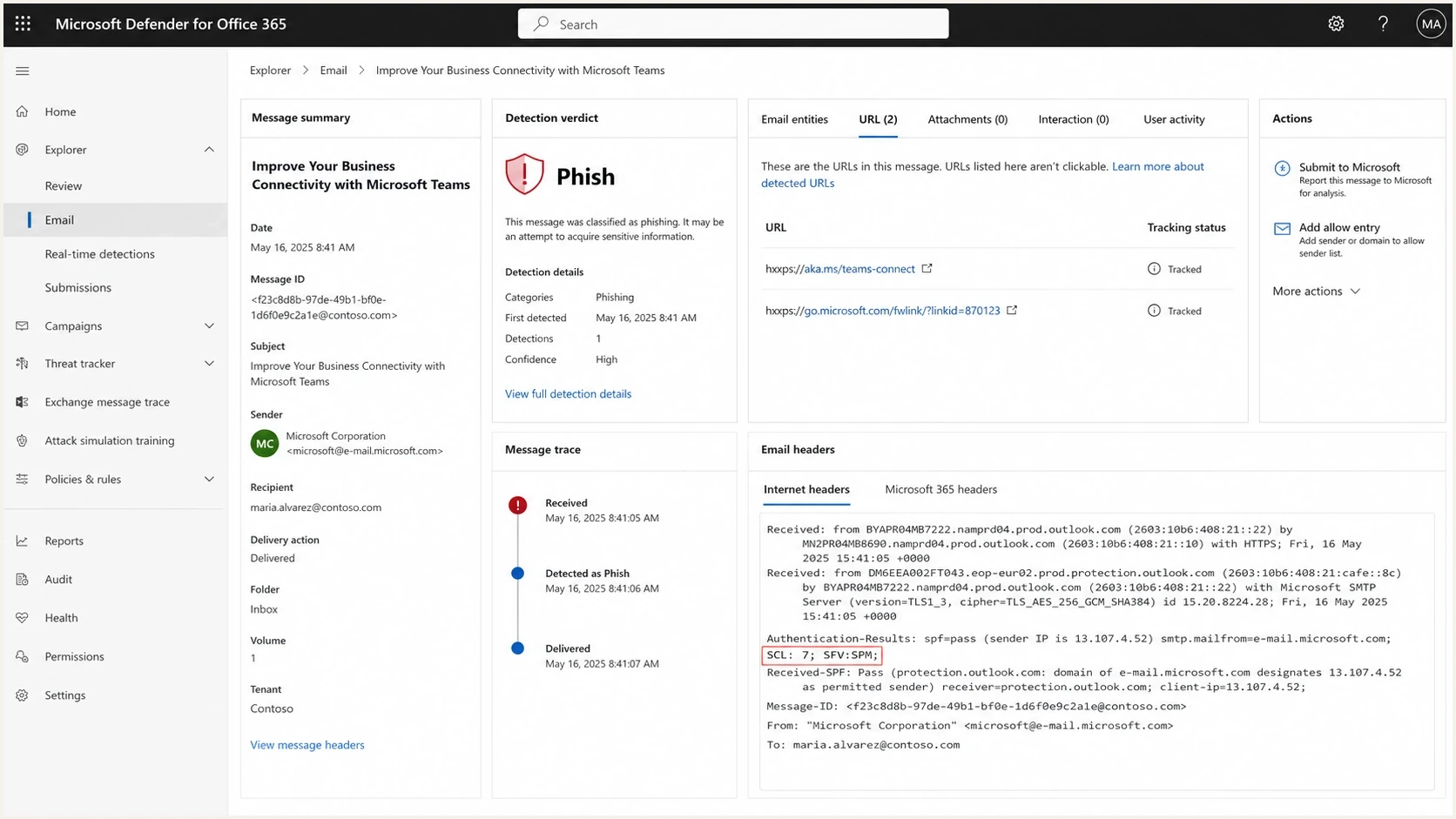
Microsoft Defender for Office 365 phishing false positive with SCL and URL evidence.
- Authentication: SPF or DKIM fails, DMARC fails, or the authenticated domains do not match the visible From domain.
- URL reputation: Safe Links or content filters dislike a redirect, image host, click tracker, or final landing page.
- Shared tracking: a pixel or link domain is shared with other senders, so their bad behavior affects your mail.
- Sender reputation: Outlook sees complaints, new sending infrastructure, rate spikes, bounces, or poor list quality.
- Tenant policy: a Microsoft 365 admin policy, mail flow rule, or allow and block entry changes the verdict.
- Forwarding: an intermediary breaks SPF or changes the message after DKIM signing, which can trigger spoof detection.
|
|
|
|---|---|---|
SPF fail | Headers | Authorize source |
DKIM fail | Headers | Fix selector |
DMARC fail | Reports | Match domains |
Bad URL | Link evidence | Remove asset |
High BCL | Headers | Reduce complaints |
Common Outlook phishing signals and where to check them.
Check Outlook.com's high-volume sender requirements
Outlook.com enforces extra authentication requirements for domains that send 5,000 or more messages per day to Microsoft consumer addresses using the same visible From domain. The scope includes Outlook.com, Hotmail.com, Live.com, and MSN.com addresses. It does not automatically cover every mailbox hosted by a Microsoft 365 tenant.
If a non-delivery report contains 550 5.7.515, Outlook.com rejected the message because the domain in the visible From address did not meet the required authentication level. This is a hard rejection, not a Junk-folder or phishing-label problem.
- SPF: publish a valid record and make SPF pass for the Return-Path domain.
- DKIM: publish the public key and make the DKIM signature pass.
- DMARC: publish a valid policy of p=none or stronger, and make DMARC pass because the SPF or DKIM domain matches the visible From domain.
- Third-party senders: configure every service to use an authorized Return-Path and a passing DKIM signature under your domain.
Do not confuse two sender restrictions
Error 550 5.7.515 when sending to Microsoft consumer addresses points to an inbound authentication rejection. If a Microsoft 365 user cannot send to any recipient and the NDR says the user was not recognized as a valid sender, check Restricted users, secure the account, and investigate possible outbound abuse. That is an account restriction, not a DMARC policy failure.
The tracking pixel problem
A tiny tracking pixel can cause an otherwise valid email to be filtered. That feels strange until you remember that the pixel still loads a URL. Microsoft does not care that the image is 1 by 1 pixel. It evaluates the host, redirect path, query parameters, final destination, and reputation of that URL chain.
The riskiest setup is a deprecated conversion pixel on a third-party ad or analytics domain. If that domain is shared, your campaign inherits noise from every other sender using it. If the provider reused old infrastructure, abandoned a product line, or allowed a customer account to be abused, Outlook can flag the pixel as phishing even when your brand did nothing wrong.
Risky setup
- Shared domain: pixels load through a third-party host used by unrelated senders.
- Long redirect: links bounce through several domains before the real destination appears.
- Old asset: a deprecated product pixel remains in templates after its business use ended.
Cleaner setup
- Owned host: tracking and images use a branded domain controlled by your team.
- Short path: redirects are minimal and the destination is clear to scanners.
- Current asset: every pixel in the template has a current owner and reason to exist.
Use a pixel isolation test
- Baseline: send a plain version with no tracking, no redirects, and one simple link.
- Restore: add one pixel or redirect back into the email and send the proof again.
- Confirm: when the phishing flag returns, remove or replace the exact failing asset.
- Retest: send the cleaned production template through the same Outlook inboxes.
Check authentication before changing content
Authentication is the part you can control most cleanly. SPF says which servers can send for the Return-Path domain. DKIM signs the message with a domain. DMARC checks whether SPF or DKIM passed with a domain that matches the visible From domain. If that chain is broken, Outlook has a strong reason to distrust the message before it evaluates the copy.
Run a domain health check first, then review DMARC aggregate data for the exact source that sent the failing Outlook proof. The useful question is not whether the domain has a DMARC record. The useful question is whether this specific sending source passes SPF or DKIM with an authenticated domain that matches the organizational domain in the From address.
?
What's your domain score?
Deep-scan SPF, DKIM & DMARC records for email deliverability and security issues.
A basic DMARC record with aggregate reporting is enough to start collecting evidence. Do not jump straight to reject if you still have unknown senders or unverified marketing systems. Start with monitoring, fix the legitimate sources, then tighten policy.
Starter DMARC recordDNS
Name: _dmarc
Type: TXT
Value: v=DMARC1; p=none; rua=mailto:dmarc@example.com
If DNS changes are slowing the fix, Hosted DMARC can keep policy staging inside Suped's product without asking for a new TXT edit every time. That matters when Outlook failures need daily iteration instead of a week of ticket handoffs.
DMARC record detail view showing SPF, DKIM, DMARC, rDNS diagnostics, and DNS records
Read the Outlook evidence
Do not rely on the inbox view alone. Get the non-delivery report when there is a rejection, plus the message trace, quarantine reason, and full headers for delivered mail. In Microsoft 365, useful fields include Authentication-Results, X-Forefront-Antispam-Report, X-MS-Exchange-Organization-RuleID, SCL, BCL, and SFV. Microsoft documents separate handling for spam false positives and phishing or malware false positives in its false positive steps.
Header clues to collecttext
Authentication-Results: spf=pass dkim=pass dmarc=pass
X-Forefront-Antispam-Report: SCL:7; BCL:7; SFV:SPM
X-MS-Exchange-Organization-MessageDirectionality: Incoming
X-MS-Exchange-Organization-PhishThresholdLevel: 2
For consumer Outlook.com delivery, Microsoft says SmartScreen filtering considers sending IP, domain, authentication, list accuracy, complaint rates, content, and other signals. The Outlook sender guidance also calls out reputable URLs, standard URL formats, SPF records, and avoiding links to known phishing sites. That is why a URL-only change can fix what looks like a mail delivery problem.
|
|
|
|---|---|---|
SCL 5-6 | Spam probability | Check policy |
SCL 7-9 | High-confidence spam | Submit sample |
BCL 7-9 | Bulk risk | Check complaints |
SFV:SPM | Spam verdict | Submit sample |
SFV:BLK | Blocked sender | Remove block |
PHISH | Threat verdict | Inspect URLs |
Via tag | Sender mismatch | Fix identity |
Evidence mapping for Outlook failures.
If only forwarded or relayed copies fail, inspect the Authentication-Results chain before changing DNS. SPF often breaks at a forwarder, and message modification can break DKIM. A Microsoft 365 admin can review spoof intelligence and configure a trusted ARC sealer for a legitimate intermediary.
Fixes that usually work
The fix depends on which signal triggered Outlook. The order matters. Fix the asset or authentication problem first, then ask Microsoft 365 admins to release the message or submit a false positive. If the message still contains a bad pixel or broken sender identity, an allow entry only masks part of the problem for one tenant.
- Remove bad URLs: delete deprecated pixels, shorten redirect chains, and keep final destinations clean.
- Own your tracking: move links and images to branded domains when your sender setup supports it.
- Fix identity: make SPF and DKIM pass, and make at least one authenticated domain match the visible From domain for DMARC.
- Check reputation: monitor sending IPs and domains for blocklist (blacklist) listings and complaint spikes.
- Reduce noise: stop unnecessary BCC archives to internal Outlook mailboxes during proof testing.
- Submit evidence: when the message is clean, submit the false positive through the Microsoft workflow.
Outlook authentication rollout checkpoints
Apply these checks to known legitimate sending sources before increasing Outlook volume.
Ready
100% of known sources
Every known source passes its intended authentication path and DMARC domain match.
Investigate
Any known-source failure
A legitimate source has intermittent or consistent authentication failures.
Stop
NDR 550 5.7.515
Outlook.com rejects mail because the From domain misses its authentication requirement.
A clean retest looks like this
The same subject, From address, sending source, and audience proof list delivers after only the suspect URL or pixel is removed. Authentication passes, the message trace shows delivery, and the header no longer carries the same phishing or spam verdict.
Use Suped to monitor the sending side
For a one-off incident, isolate pixels, read headers, and submit a false positive manually. For recurring Outlook failures, Suped's product connects DMARC monitoring, SPF, DKIM, hosted DMARC, hosted SPF, MTA-STS, blocklist and blacklist monitoring, and deliverability signals in one workflow.
The practical value is a faster sending-side diagnosis. Suped shows which sources pass, which sources fail, which domains are missing records, which IPs or domains have blocklist (blacklist) listings, and which issues need action. Alerts catch sudden failure patterns, and hosted SPF plus SPF flattening help when DNS lookup limits or sender sprawl contribute to the Outlook problem.
A useful Suped workflow
- Verify sources: confirm the sending platform appears as a known, passing source.
- Find failures: open the issue list and review the tailored steps to fix each record.
- Monitor changes: watch Outlook-facing sources after template, pixel, DNS, or sender changes.

Issue steps to fix dialog showing the issue overview, tailored fix steps, and verification action
Suped does not replace Microsoft message trace or a Defender submission. It gives the sending side a clean baseline, so when an Outlook admin says a message is phishing, you can separate authentication, reputation, and URL problems instead of guessing.
Views from the trenches
Best practices
Pixel audit: remove unused tracking pixels before testing Outlook delivery again in production.
Authentication check: inspect SPF, DKIM, and DMARC before changing copy or cadence.
Owned domains: keep links, images, and redirects on domains you control where practical.
Common pitfalls
Shared URLs: third-party tracking domains can carry reputation damage from other senders.
Internal BCC: archive copies sent to Outlook can hit rate limits and distort diagnosis.
Header gaps: treating Junk placement like blocking hides SCL, BCL, and spoof clues.
Expert tips
Run proof tests: send the same message with and without each tracking element once.
Use message trace: confirm whether Outlook delivered, junked, quarantined, or rejected.
Stage DMARC policy: move only after matching sources are visible and stable for weeks.
Expert from Email Geeks says a PHISH label on a tracking pixel points to URL reputation or compromise, not ordinary inbox placement.
2021-04-27 - Email Geeks
Marketer from Email Geeks says removing a deprecated conversion pixel restored Outlook proof delivery for their campaign.
2021-04-28 - Email Geeks
Retest Outlook delivery
The direct fix is to prove which signal Outlook dislikes, then remove that signal. Start with the simplest clean proof, add tracking back one piece at a time, and collect headers for every test. If a pixel or redirect brings the phishing flag back, remove it or move to a cleaner, branded tracking setup.
At the same time, make authentication routine. SPF should authorize the real sender, DKIM should sign reliably, and DMARC should pass for the visible From domain. Once the message is clean and authenticated, submit the false positive through Microsoft 365. A temporary allow entry skips only the filters tied to the allowed sender or URL, so other message elements are still evaluated. Similar quarantined messages still need manual release.




