Who manages the dmarc-report.com domain?

Published 29 Jun 2025
Updated 25 Jul 2026
10 min read
Summarize with
Updated on 25 Jul 2026: We updated this guide for the current DMARC standards, removed the historic pct tag, and clarified what MXToolbox's documented reporting paths prove.
MXToolbox operates the dmarc-report.com paths used by its DMARC reporting service. Its documentation identifies mxtoolbox.dmarc-report.com as an aggregate report destination and hosted.dmarc-report.com as a hosted DMARC CNAME target; forensics.dmarc-report.com is used for failure reports. That evidence identifies the operator of those service paths, but it does not reveal who inside your company owns the account, who pays for it, or who can approve a DNS change.
If your domain is CNAMEd into hosted.dmarc-report.com or your DMARC record sends reports to an MXToolbox-labeled address there, changes belong in the reporting platform account that issued the value. If nobody on the team has that account, treat the setup as inherited vendor infrastructure and plan a controlled migration instead of editing DNS blindly.
Short answer
MXToolbox is the operational contact to investigate when the destination uses mxtoolbox.dmarc-report.com, forensics.dmarc-report.com, or a hosted.dmarc-report.com CNAME. Those hostnames establish an operational relationship with MXToolbox. They do not, by themselves, prove the public registrant of the base domain or the identity of your account administrator.
How to verify the manager
Verify this type of question through DNS, provider documentation, and account evidence rather than the homepage of the domain. Generic reporting domains often have no public site, a sparse site, or privacy-protected registration. Infrastructure used to receive DMARC reports can work normally without a public marketing site.
Start with the domain that is sending mail, not with dmarc-report.com itself. Check whether _dmarc returns a TXT record directly or follows a CNAME. A direct TXT response publishes the policy at the queried name. A CNAME into hosted.dmarc-report.com means the target supplies the DMARC TXT record and the platform account controls the hosted value.
- Read DNS: query the sending domain's DMARC record and keep the raw result before making changes.
- Separate paths: identify whether dmarc-report.com appears in a CNAME, a rua aggregate address, or a ruf failure-report address.
- Check authorization: look for an external reporting authorization record when reports go to another organizational domain.
- Find ownership: ask who purchased the reporting service and who receives its invoices or alerts.
- Confirm access: log in before changing DNS, because a hosted CNAME without platform access is a blind dependency.
Hosted DMARC CNAME patterndns
_dmarc.example.com. 300 IN CNAME example.com.hosted.dmarc-report.com.
If you only need to inspect the current published policy, a DMARC checker is enough. If you need to prove who controls the reporting account, DNS gives you clues, while account access or support records provide the decisive evidence.
DMARC checker
Look up a domain's DMARC record and catch policy issues.
?/7tests passed
Why MXToolbox appears in the clues
The clearest evidence is a reporting address under an MXToolbox-labeled subdomain of dmarc-report.com or a CNAME under hosted.dmarc-report.com. MXToolbox's own integration documentation uses these patterns to route reports and host policy records. The value still has a narrow meaning: it identifies the service path, not your billing contact or dashboard administrator.
Report address cluedns
v=DMARC1; p=reject;
rua=mailto:account@mxtoolbox.dmarc-report.com;
ruf=mailto:account@forensics.dmarc-report.com;
fo=1
What the clue proves
- Routing: reports for that DMARC record are sent to an address under dmarc-report.com.
- Account clue: the local part or subdomain can identify a customer or integration path.
- Support path: the operator named in the address is the first place to ask about access.
- Operational link: the reporting domain can be active infrastructure even if its website gives no help.
What it does not prove
- Public registrant: a subdomain label does not prove who registered the base domain.
- Login owner: the DNS record does not reveal who has the dashboard credentials.
- Billing owner: the report destination does not identify who bought the service.
- Safe change: the clue alone does not mean you can delete or replace the DNS value immediately.
|
|
|
|---|---|---|
DMARC TXT | Policy and report targets | No billing owner |
DMARC CNAME | Hosted policy target | No login proof |
Report subdomain | Operator and routing clue | No registrant proof |
Provider documentation | Service-path attribution | No internal account owner |
Mail MX | Inbound handling | Not domain ownership |
Use each clue for what it can prove, then confirm account control separately.
Do not confuse routing with control
A DMARC report address can include another company's label because of a reseller setup or shared reporting infrastructure. To change policy safely, you need the dashboard or support process that controls the hosted record.
What to do if your domain points there
If you inherited a domain that points at dmarc-report.com, do not start by deleting the CNAME or replacing the report address. That can stop aggregate reports, break a managed policy, or remove the only evidence you have for existing authentication behavior.
Handle it as an access recovery task. Identify the current controller and preserve report continuity, then move only when the replacement path is receiving the expected data.
- Snapshot DNS: record the current DMARC, SPF, DKIM, MX, and related CNAME values.
- Find mail owners: ask the teams and agencies that send mail who receives DMARC alerts.
- Recover platform access: check whether MXToolbox, a reseller, or an internal team account controls the reports.
- Check report flow: confirm daily aggregate volume before changing any destination.
- Stage migration: add or replace reporting targets only after the new destination receives data.
- Document control: store the owner, support contact, and reason for each DNS value.
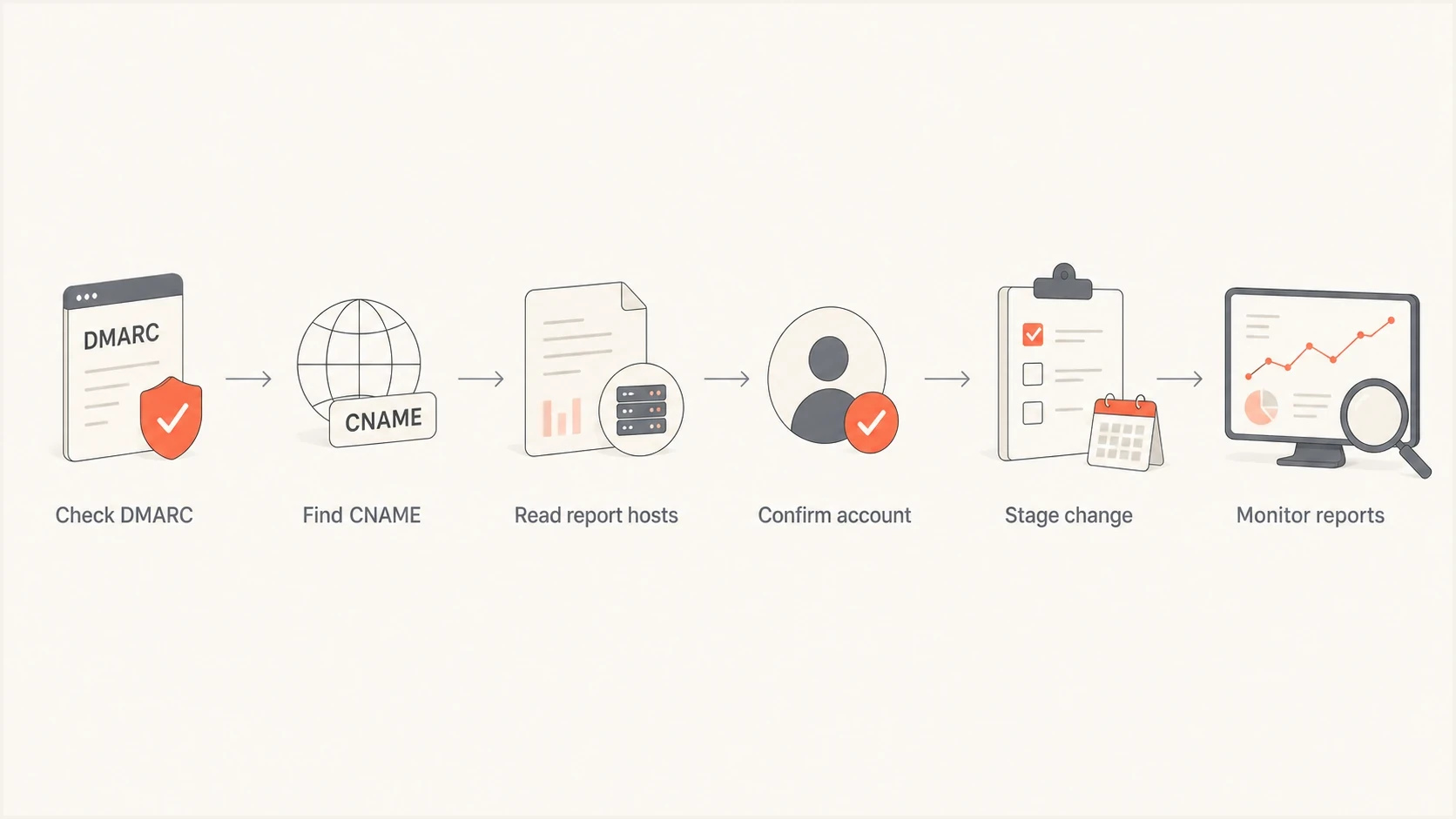
Flowchart for tracing a DMARC reporting domain to the controlling account.
Risk to avoid
Removing an inherited dmarc-report.com target without a replacement reporting path creates a blind spot. You lose the daily feedback that shows unauthorized sources, SPF alignment failures, DKIM alignment failures, and third-party senders that still need work.
When the CNAME is hosted DMARC
A CNAME at _dmarc changes the control path. The visible DNS record points to another name, where the platform publishes the DMARC TXT policy. That can simplify policy changes, but it also means the person with DNS access cannot always change the policy or reporting addresses without platform access.
External reporting has a second DNS control. When a domain sends reports to another organizational domain, the report consumer must authorize that relationship so participating receivers know the external destination accepts the reports. This is the control described in external report records.
External aggregate reporting authorization patterndns
example.com._report._dmarc.mxtoolbox.dmarc-report.com. TXT "v=DMARC1"
The report consumer publishes this authorization record. A valid record proves that the destination accepts reports for the sending domain; it does not prove who can log in to the reporting account.
Keep the roles separate: the base domain registrant controls the reporting domain, the platform account controls the hosted policy, and the report consumer processes the data. In some deployments, a reseller manages the account on the sending domain owner's behalf.
If you want that control in your team's account, Hosted DMARC keeps policy staging, reporting destinations, and verification in Suped while DNS points to the hosted record.
What the current DMARC standards change
RFC 9989 became the current DMARC specification in 2026 and obsoleted RFC 7489 and RFC 9091. Aggregate reporting now has its own specification in RFC 9990, while failure reporting is defined in RFC 9991. The ownership investigation stays the same, but several record and report assumptions need updating.
- Remove pct: RFC 9989 made the pct tag historic because receivers applied percentage sampling inconsistently.
- Stage policy directly: monitor the full mail stream, fix legitimate failures, then change p through controlled record updates instead of percentage steps.
- Treat rua as primary: aggregate reports show domain-level authentication results without message content and remain the normal source for monitoring.
- Handle ruf carefully: failure reports, sometimes called forensic reports, can expose data from individual failed messages, and many receivers do not send them.
Do not rely on partial enforcement
A legacy record containing pct can still appear in DNS, but the current standard treats the tag as historic. Plan migrations around complete report coverage and deliberate policy changes, not an assumed percentage of messages.
Where Suped fits
Suped's product supports the practical work behind an inherited setup: inspect the live DMARC policy, identify reporting destinations, group sending sources, and verify authentication before moving the record. Hosted DMARC then gives the team a documented account for later policy changes.
Finding dmarc-report.com in DNS is only the starting clue. The useful workflow is to see which senders pass, which sources fail alignment, which policy is live, and what needs to change before enforcement. That is the core workflow in Suped's DMARC monitoring.
DMARC record detail view showing SPF, DKIM, DMARC, rDNS diagnostics, and DNS records
- Diagnostics: Suped shows SPF, DKIM, DMARC, rDNS, and DNS record details in one view.
- Issue steps: Suped detects authentication problems and gives concrete steps to fix them.
- Hosted records: Suped lets teams stage DMARC policy without repeated DNS edits.
- Sender control: Suped helps identify verified and unverified sources before enforcement.
- Account separation: MSPs and agencies can manage client domains without mixing their records.
For a broader DNS check, the domain health checker can show whether DMARC, SPF, and DKIM are present before you start a migration.
?
What's your domain score?
Deep-scan SPF, DKIM & DMARC records for email deliverability and security issues.
Migration plan if access is missing
If nobody can access the old reporting account, treat the old destination as a dependency to retire. Add a new aggregate reporting path, confirm that data arrives, then remove the old path after enough overlap to compare volume and sender coverage.
Temporary direct reporting recorddns
v=DMARC1; p=none; rua=mailto:reports@example.com
During the overlap, compare daily aggregate report counts, top sending IPs, authentication alignment, and volume for each third-party sender. If the new destination receives expected traffic across several reporting cycles, remove the inherited dmarc-report.com destination and keep the evidence in your change record.
Migration confidence
Use report overlap to decide when an inherited DMARC reporting path is safe to retire.
Low confidence
0-1 days
New destination has little or no aggregate data.
Working check
2-3 days
New destination receives data, but sender coverage still needs review.
Ready to retire
7+ days
Volumes and sender lists match expected traffic.
Keep watching
14+ days
High-volume or seasonal senders need a longer overlap period.
Clean migration pattern
Keep the old destination in place until the new reporting path receives normal traffic. Then remove the old destination, document the new owner, and keep authentication monitoring active through the next policy change.
Views from the trenches
Best practices
Check the current DMARC TXT or CNAME before asking unrelated providers for help.
Keep an owner note for every reporting domain so later admins can recover access.
Move report routing in stages, then compare aggregate volume before closing the old path.
Record the support owner and billing owner separately when a reseller is involved.
Common pitfalls
Do not treat a matching subdomain in rua as proof of the base domain registrant.
Do not remove a CNAME target until the replacement DMARC path receives reports first.
Do not assume an empty website means an unused domain; mail infrastructure can work.
Do not rely on generic search results when DNS and provider documentation give evidence.
Expert tips
Look for external report authorization records to confirm a receiver accepts reports.
Ask the business owner who bought the service because DNS rarely shows billing access.
Keep screenshots of old DMARC settings before migrating inherited hosted records.
Use report overlap during migration so sender gaps appear before policy changes.
A marketer in Email Geeks says dmarc-report.com looks generic, so DNS clues are more useful than search results or an empty website.
2022-02-24 - Email Geeks
A marketer in Email Geeks says a DMARC record using mxtoolbox.dmarc-report.com explains why administrators connect the domain with MXToolbox.
2022-02-24 - Email Geeks
The practical answer
Treat dmarc-report.com as MXToolbox-operated reporting infrastructure when it appears through mxtoolbox.dmarc-report.com, forensics.dmarc-report.com, or hosted.dmarc-report.com. If you need to change settings for a client domain, the base domain name is not the control point. Find the account that issued the CNAME or report address.
If you can access that account, change the hosted policy there and keep DNS stable. If you cannot access it, add a new reporting path and validate report arrival before removing the inherited path. The result is uninterrupted reporting with a documented owner for later changes.




