What are the implications of using different root and subdomain email addresses in From and Reply-To fields?

Published 1 Jul 2025
Updated 10 Aug 2026
10 min read
Summarize with
Updated on 10 Aug 2026: We clarified how From and Reply-To affect DMARC alignment, reply routing, and subdomain reputation separation.
Using a root domain in the From field and a subdomain in the Reply-To field is not automatically a bad idea, but the sending setup needs a closer look. DMARC checks the visible From domain, not the Reply-To domain. That means a message with From: bar.com and Reply-To: foo.bar.com can pass DMARC if SPF or DKIM passes and aligns with bar.com. The Reply-To choice still affects reply handling, recipient trust, inbox provider checks, and operational risk.
If the sending platform was configured only for foo.bar.com, using bar.com as the From domain is risky unless the platform also authenticates mail for bar.com. If replies should reach a root-domain mailbox, the cleaner pattern is usually From: foo.bar.com and Reply-To: bar.com, with outbound authentication checked for the From domain and inbound routing checked for the Reply-To domain.
Short version: DMARC cares about the visible From domain. Recipients care about the whole message. Mailbox providers can apply extra checks that are not part of DMARC, so the Reply-To domain still needs accurate identity details and reliable inbound mail handling.
What actually matters for authentication
DMARC evaluates the domain in the RFC5322.From header, which is the visible From address most people see in the mail client. It does not use Reply-To as its identity. For DMARC to pass, SPF or DKIM must pass and match that visible From domain under DMARC rules. With relaxed alignment, a root domain and its subdomains share the same organizational domain, so bar.com and foo.bar.com can match. With strict alignment, they do not match.
- DMARC identity: The From domain drives DMARC evaluation. Reply-To is not the DMARC identity.
- SPF alignment: SPF must pass for the RFC5321.MailFrom domain, often shown as the return-path, and that domain must match the From domain under the selected DMARC mode.
- DKIM alignment: DKIM must verify with a signing domain that aligns with the From domain.
- Reply-To checks: Receivers can review Reply-To, link domains, message headers, and routing behavior outside DMARC.
If the platform signs DKIM as foo.bar.com but the From domain is bar.com, relaxed DKIM alignment passes, but strict DKIM alignment fails. If the platform uses a return-path outside the organizational domain, SPF can authenticate successfully while SPF alignment fails. DKIM then becomes the only route to a DMARC pass. For direct mail to personal Gmail accounts, bulk senders must match the From domain with either the SPF domain or the DKIM domain under DMARC alignment rules.
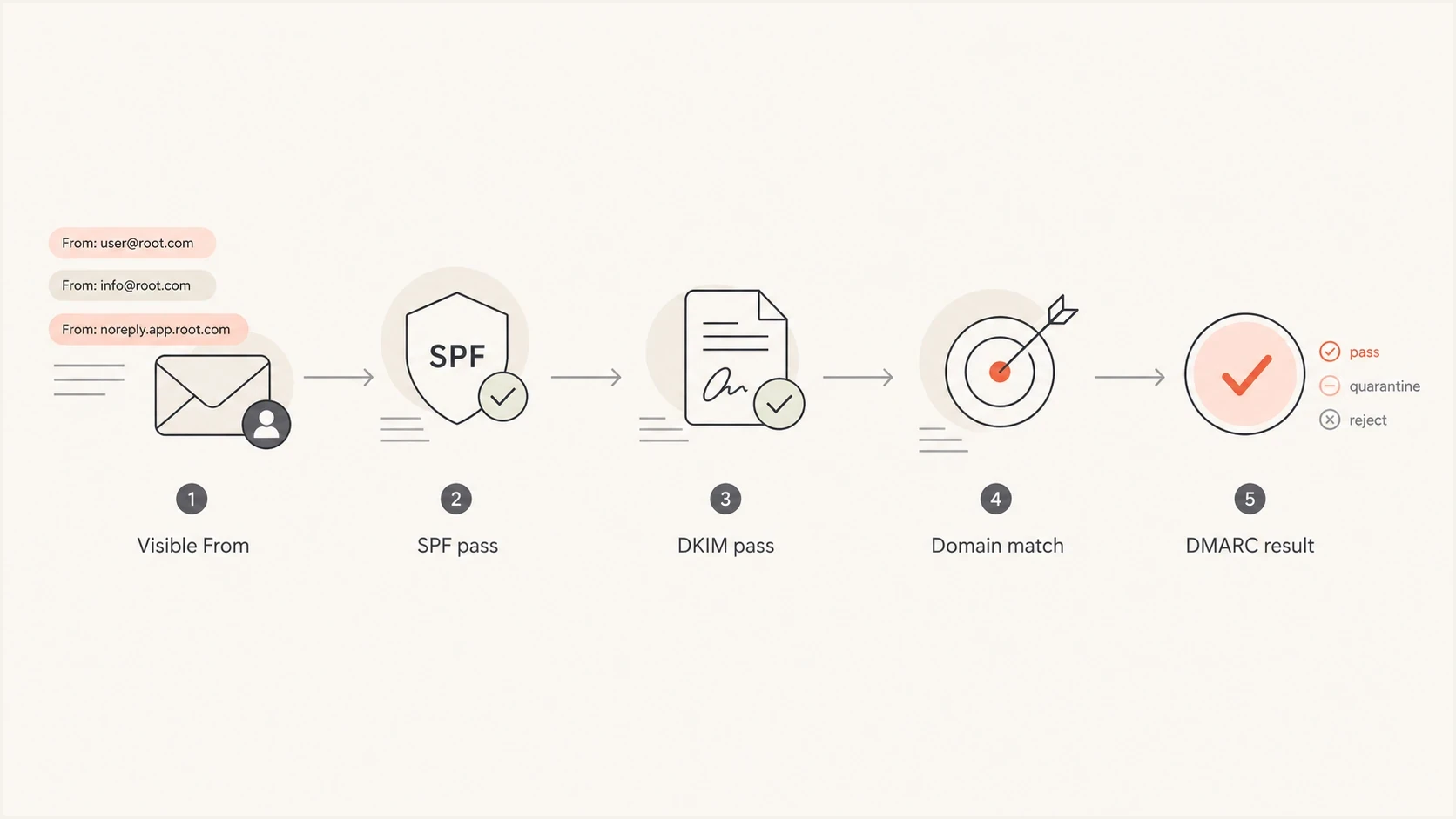
Flowchart showing that DMARC starts with the visible From domain, then checks SPF, DKIM, domain matching, and final result.
Relaxed domain match exampletext
Visible From: marketing@bar.com
Return-path: bounce@foo.bar.com
DKIM d=: foo.bar.com
Reply-To: help@foo.bar.com

DMARC result with relaxed match: pass if SPF or DKIM passes
DMARC result with strict match: fail unless bar.com authenticates
How much reputation separation a subdomain provides
A dedicated sending subdomain gives mailbox providers a more specific domain history for one mail stream. It also makes configuration and DMARC reporting easier to separate. It does not create a guaranteed reputation wall around the root domain. Providers can still connect traffic through the organizational domain, shared sending IPs, message content, and recipient behavior.
- Separate message types: Use distinct subdomains for promotional and transactional mail when the streams have different risk and ownership.
- Keep each identity stable: Use a consistent From domain for each category so recipients and receivers see predictable mail.
- Monitor domain and IP reputation: A subdomain does not offset complaint spikes, poor list quality, or a shared IP with weak performance.
- Protect the root operationally: Keep employee mail authentication and automated-mail configuration separate to reduce accidental DNS and routing changes.
The strongest reason to use a sending subdomain is control. It gives each mail stream a clear owner, authentication setup, and reporting boundary. Good sending practices still determine whether recipients accept and engage with the mail.
Deliverability and operational implications
The main implications cover DMARC alignment, reply delivery, reputation separation, user trust, and reporting clarity. The deciding factors are whether the From domain is authenticated, whether the reply mailbox works, and whether the routing choice matches what the recipient expects.
|
|
|
|
|---|---|---|---|
Root From, subdomain Reply-To | Align SPF or DKIM with root | Subdomain must receive replies | Verify root auth and inbound route |
Subdomain From, root Reply-To | Align SPF or DKIM with subdomain | Root mailbox owns replies | Test the complete reply path |
Subdomain in both fields | Align SPF or DKIM with subdomain | Subdomain needs inbound handling | Configure outbound and inbound DNS |
Strict DMARC alignment | Use exact domain matches | Root and subdomain do not match | Match the authentication domain |
Root and subdomain field combinations
A root-domain From address ties bulk mail directly to the visible domain used for employee mail. Marketing and transactional mail often have different volume, complaint, unsubscribe, and bounce patterns. A dedicated subdomain creates a cleaner operational and reporting boundary, although receivers can still associate it with the organizational domain.
Root From, subdomain Reply-To
- Authentication: Needs SPF or DKIM aligned with the root domain.
- Reputation: Bulk mail uses the same visible domain identity as root-domain mail.
- Replies: Replies go to the subdomain and need working inbound routing.
Subdomain From, root Reply-To
- Authentication: The sending platform authenticates the sending subdomain.
- Reputation: Bulk mail gets a separate reporting and configuration boundary.
- Replies: Replies can reach an existing monitored root-domain mailbox.
The second pattern is often easier to operate. It lets the sender authenticate a purpose-built subdomain and direct human replies to a mailbox the company already monitors. It also makes DMARC reports easier to interpret because the visible From domain identifies the sending stream.
When the setup is safe
A mixed root and subdomain setup is safe when it passes authentication, handles replies cleanly, and matches the recipient's expectations. Complete these checks before approving it in production.
- Authenticate sending identities: Configure SPF and DKIM for every domain used in the visible From field, and publish the applicable DMARC policy.
- Confirm alignment: Check that at least one passing authentication mechanism aligns with the visible From domain.
- Test replies: Send real replies and confirm routing, forwarding, ticket creation, and auto-response behavior.
- Check policy discovery: Review the root policy, any sp tag, and any DMARC record published directly at the sending subdomain.
- Monitor reports: Watch aggregate reports after launch because test messages do not cover every receiver path or sending source.
A domain used only in Reply-To does not need SPF or DKIM solely for that role. It needs reliable inbound delivery and a mailbox or forwarding route that the responsible team monitors. If you need a quick record check, use a DMARC checker for each sending domain. For a broader pass across SPF, DKIM, and DMARC, a domain health check gives a cleaner starting point.
?
What's your domain score?
Deep-scan SPF, DKIM & DMARC records for email deliverability and security issues.
The tool check is only the first step. It tells you whether DNS is structurally correct. It does not prove that the sending platform uses the expected return-path, DKIM selector, or header From on every campaign type. That needs a real message test and DMARC report monitoring after traffic starts.
Do not use a subdomain in Reply-To unless it can receive mail or forward replies reliably. Publish explicit MX routing where practical and test the route. Relying on SMTP's address-record fallback is less clear operationally and can hide customer-service failures even when DMARC passes.
Recommended DNS pattern
For most teams, a dedicated sending subdomain works well for bulk or automated mail, with a Reply-To address mapped to the team that owns responses. The sending subdomain gets its own SPF, DKIM, and applicable DMARC setup. The root domain keeps employee mail and business replies under existing inbound systems.
Root DMARC recorddns
_dmarc.bar.com TXT
"v=DMARC1; p=quarantine; rua=mailto:dmarc@bar.com; adkim=r; aspf=r"
Subdomain DMARC recorddns
_dmarc.foo.bar.com TXT
"v=DMARC1; p=none; rua=mailto:dmarc@bar.com; adkim=r; aspf=r"
Those records are examples, not universal settings. A subdomain uses the applicable organizational-domain policy unless it publishes its own DMARC record, and the root record can set a separate policy for subdomains with the sp tag. That detail matters when a company moves the root domain toward quarantine or reject and expects a sending subdomain to remain at monitoring only. Review subdomain DMARC overrides before changing policy on either domain.
Best-practice pattern: send as foo.bar.com or mail.bar.com, authenticate that sending identity, and route replies to a monitored root-domain mailbox when a human team owns the response.
How Suped fits into the workflow
A one-time DNS check cannot catch a later campaign change, new DKIM selector, or return-path update. Suped's product supports the ongoing workflow through DMARC monitoring. It groups aggregate data by source and domain so teams can compare the visible From domain with the SPF and DKIM authentication domains, then investigate new sources or alignment failures.
DMARC record detail view showing SPF, DKIM, DMARC, rDNS diagnostics, and DNS records
For a root-and-subdomain setup, Suped shows which sources use the root domain, which use subdomains, and whether SPF, DKIM, or both produce aligned DMARC passes. Teams can use that view after launch to catch a sending source that falls back to the wrong From domain or return-path.
When root and subdomain policies need different treatment, hosted DMARC can centralize policy changes and reduce repeated DNS edits. Policy changes should still follow verified source inventory and monitored rollout results.
Choosing the From and Reply-To pattern
Start with the business reason. The right pattern depends on who sends the mail, who owns replies, what type of message is being sent, and which domain the recipient expects to see.
- Use a subdomain From: Choose this for marketing, product, lifecycle, and other platform-driven mail.
- Use a root Reply-To: Choose this when replies belong in an existing monitored mailbox.
- Use a root From: Choose this only when the sending platform authenticates the root domain correctly.
- Avoid dead replies: Do not point Reply-To at a domain that nobody checks or that lacks reliable inbound routing.
- Prefer consistency: Keep the display name, From domain, Reply-To address, and brand context easy to recognize.
A same-organization subdomain in Reply-To is usually acceptable when it has working inbound routing and a clear purpose. An unrelated Reply-To domain needs more scrutiny because it can direct the recipient to another organization. Message headers and sender details should accurately identify who sent the message and where a reply will go.
Recommended pattern: if the platform authenticates only a subdomain, use that subdomain in From. Use the root domain in Reply-To only when replies need to reach an existing mailbox and the complete route has been tested. If the business requires a root-domain From address, authenticate the root domain and confirm aligned SPF or DKIM before launch.
Views from the trenches
Best practices
Authenticate every domain used in From before mixing root and subdomain identities.
Use a sending subdomain for bulk mail and route replies to a monitored team mailbox.
Review DMARC reports after launch because receiver behavior varies by mail path.
Common pitfalls
Assuming Reply-To is ignored can hide failed replies and receiver-specific checks.
Treating a subdomain as a reputation shield can hide shared IP and brand effects.
Publishing only root DMARC can leave subdomain policy discovery poorly understood.
Expert tips
Test messages and DNS records to confirm the DKIM, return-path, and headers used.
Use strict alignment only when its exact-domain requirement fits every mail sender.
Document who owns inbound replies before the sending subdomain starts live traffic.
Marketer from Email Geeks says some receivers check the Reply-To domain as an extra signal, so DNS and inbound setup should be correct even though DMARC keys off From.
2026-01-14 - Email Geeks
Marketer from Email Geeks says the cleaner pattern is usually a subdomain in From and the root domain in Reply-To when human replies belong in corporate mail.
2026-01-18 - Email Geeks




