What are IDN/Punycode domains and what does a screwed up Gmail authorization record look like?

Published 29 Jul 2025
Updated 11 Aug 2026
11 min read
Summarize with
Updated on 11 Aug 2026: We corrected the Google MX verification guidance and added SMTPUTF8 context for internationalized mailboxes.
An IDN, or internationalized domain name, is a domain that contains non-ASCII characters in its human-readable form. IDNA uses Punycode to create the ASCII-compatible label used in DNS. A domain label that starts with xn-- is usually a Punycode-encoded IDN label, not random garbage.
For the example in the question, xn--ahoo-4ra.com decodes to ýahoo.com. That is not yahoo.com. It has an accented first character, so it should be treated as a lookalike domain until there is a specific business reason to trust it. Customer mail should not be routed to it without manual review.
The Gmail-looking DNS result is a separate issue. A host like swytcyeidbiwlai5tor3jug7rtovnsgthpxrwgv33is6bfobr2ha.mx-verification.google.com can be a Google-issued verification MX used during Workspace activation. It is not the production receiving host. Its presence is not proof of a mistake, but the domain cannot route normal inbound mail to Google if that verification target is the only MX and the required production MX is missing.
- IDN: The readable domain contains Unicode characters, such as accented Latin letters or non-Latin scripts.
- Punycode: The DNS-safe ASCII form begins with xn-- and needs decoding before a trust decision.
- Google MX review: A verification target can be temporary, but a production mail exchanger must also be configured as instructed.
- Practical rule: Decode the domain, inspect the visible name, then compare every MX target with the provider's current setup instructions.
What IDN and Punycode mean
DNS was built around ASCII labels, but people use domain names in many languages. IDN fills that gap by allowing Unicode characters in the displayed domain name while keeping the DNS form ASCII-compatible. Punycode is the conversion format that makes this work.
That design is useful for legitimate international domains. It is also easy to misunderstand in email workflows because the same name has two forms: the visible Unicode name and the raw Punycode label. For broader security context, this Punycode overview explains why lookalike names create risk.
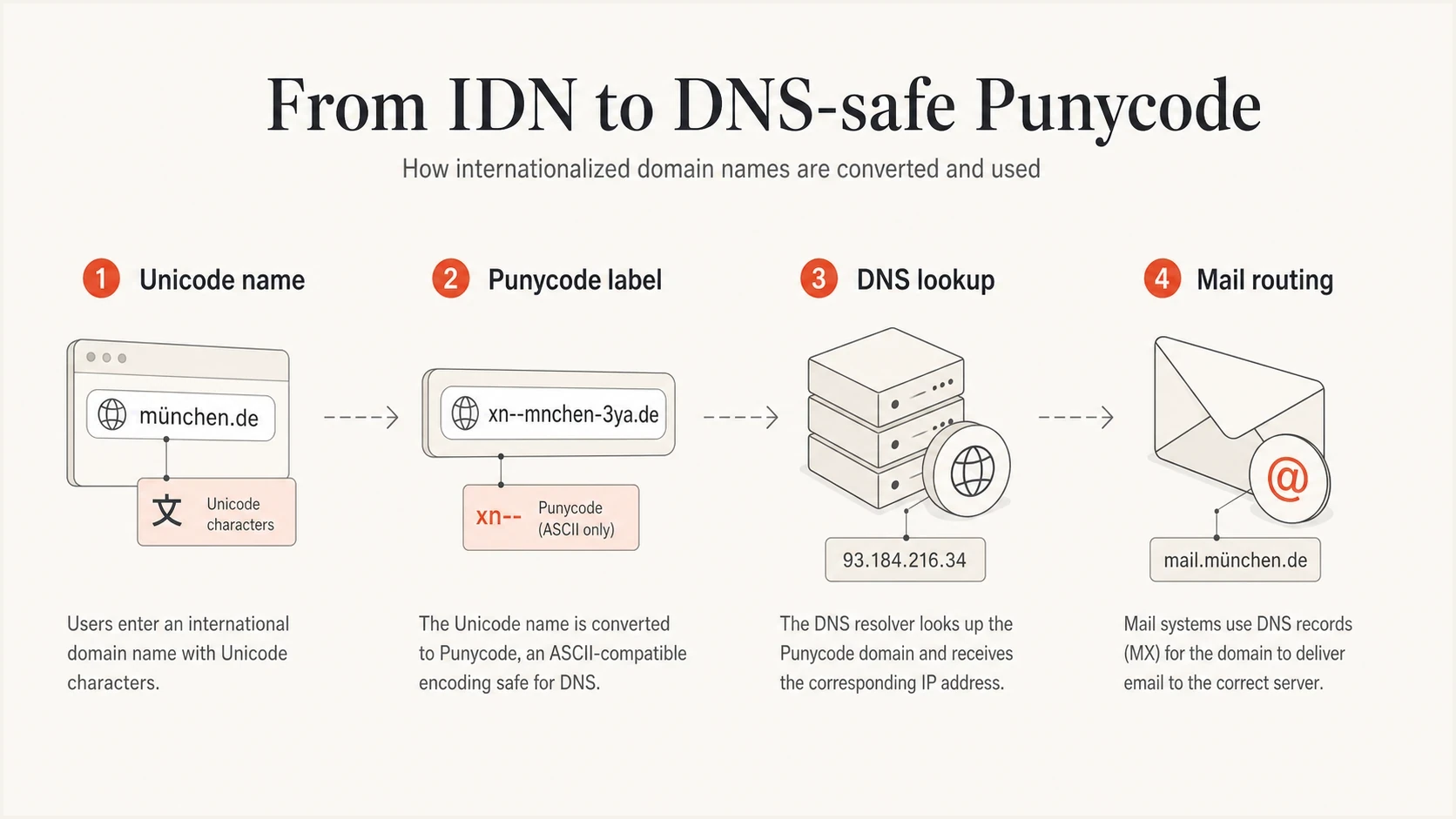
A four-part diagram showing a Unicode domain becoming a Punycode label for DNS lookup and mail routing.
|
|
|
|---|---|---|
User display | Unicode | Can resemble a trusted name |
DNS label | xn-- | Needs decoding before review |
Mail routing | MX | Target must match receiving infrastructure |
Authentication | DMARC | Reports show which domains send |
Compact view of how the same domain concept appears in different layers.
The key point is simple: the prefix is not enough. A validator that only says the domain is syntactically valid has not answered whether the domain is safe, expected, owned by the right party, or capable of receiving mail.
IDN domains and SMTPUTF8 are different
Punycode applies to the domain after the @ sign. It does not encode the local part before @. An address such as user@exämple.com can use an ASCII local part and a Punycode domain, while an address such as josé@exämple.com also needs the SMTPUTF8 extension because the local part contains a non-ASCII character.
Domain and local-part handlingtext
Unicode domain:
user@exämple.com

DNS-safe domain form:
user@xn--exmple-cua.com

Internationalized local part:
josé@exämple.com
Requires SMTPUTF8 support
If the receiving server does not advertise SMTPUTF8, a sender must not transmit an address with a non-ASCII local part. Converting only the domain to Punycode does not make that mailbox compatible.
- Domain check: Convert the IDN domain to its DNS A-label when the application or resolver requires it.
- Mailbox check: Preserve the local part exactly and confirm SMTPUTF8 support before sending.
Why xn--ahoo-4ra.com needs review
When xn--ahoo-4ra.com appears in an email address, it needs review because its decoded form visually resembles a high-trust consumer domain. The decoded name is ýahoo.com, where the first character is not the plain ASCII y. When used to deceive, this lookalike technique is called an IDN homograph or homoglyph attack. The difference is easy to miss in business software or a quick manual review.
A domain can be valid in DNS and still be a bad recipient choice. Online validation often checks syntax, not intent. For IDNs, compare the normalized Unicode name and scripts used against the expected business relationship.
- Do not trust syntax: A clean DNS response only proves the label can exist.
- Do not trust shape: An accented or cross-script character can pass a quick human scan.
- Check origin: A legitimate IDN usually has a clear language and customer context.
- Quarantine first: Hold suspicious signup domains until a person verifies the account path.
Punycode conversion exampletext
Raw DNS label:
xn--ahoo-4ra.com

Decoded display form:
ýahoo.com

Expected plain ASCII name:
yahoo.com
Legitimate IDN
- Context: The domain belongs to a language or market where the characters are normal.
- Ownership: The sender and business records point to the same organization.
- Routing: The MX targets match hosts used for production mail.
- Authentication: SPF, DKIM, and DMARC results match the sending domain.
Lookalike risk
- Context: The name resembles a known brand but has no clear reason to use Unicode.
- Ownership: The visible name creates trust that the registered domain has not earned.
- Routing: The production MX is missing, unexpected, or inconsistent with the claimed provider.
- Authentication: Passing one DNS check does not prove the message source is trustworthy.
That last point matters for deliverability and security. The page on SPF, DKIM, and DMARC explains how the standards work together.
How to interpret a Google MX verification record
A long target ending in mx-verification.google.com can be a Google-issued MX verification value used while activating Gmail for a Workspace domain. It is separate from the production MX that receives normal mail. Current Google Workspace setup uses smtp.google.com as the production MX for new configurations. Supported legacy MX values beginning with aspmx can remain when mail already works.
Broken production routingdns
; Broken when this is the only MX and activation requires production mail
example.com. 3600 IN MX 1 random-token.mx-verification.google.com.
Current Google Workspace MX shapedns
; Production MX for current Google Workspace setup
example.com. 3600 IN MX 1 smtp.google.com.
Do not delete or replace the verification MX merely because its hostname looks random. Compare the complete MX set with the values shown for that domain in the Google Admin console. Correct the setup when the production MX is absent, the verification value was copied incorrectly, or an obsolete record conflicts with the active mail provider.
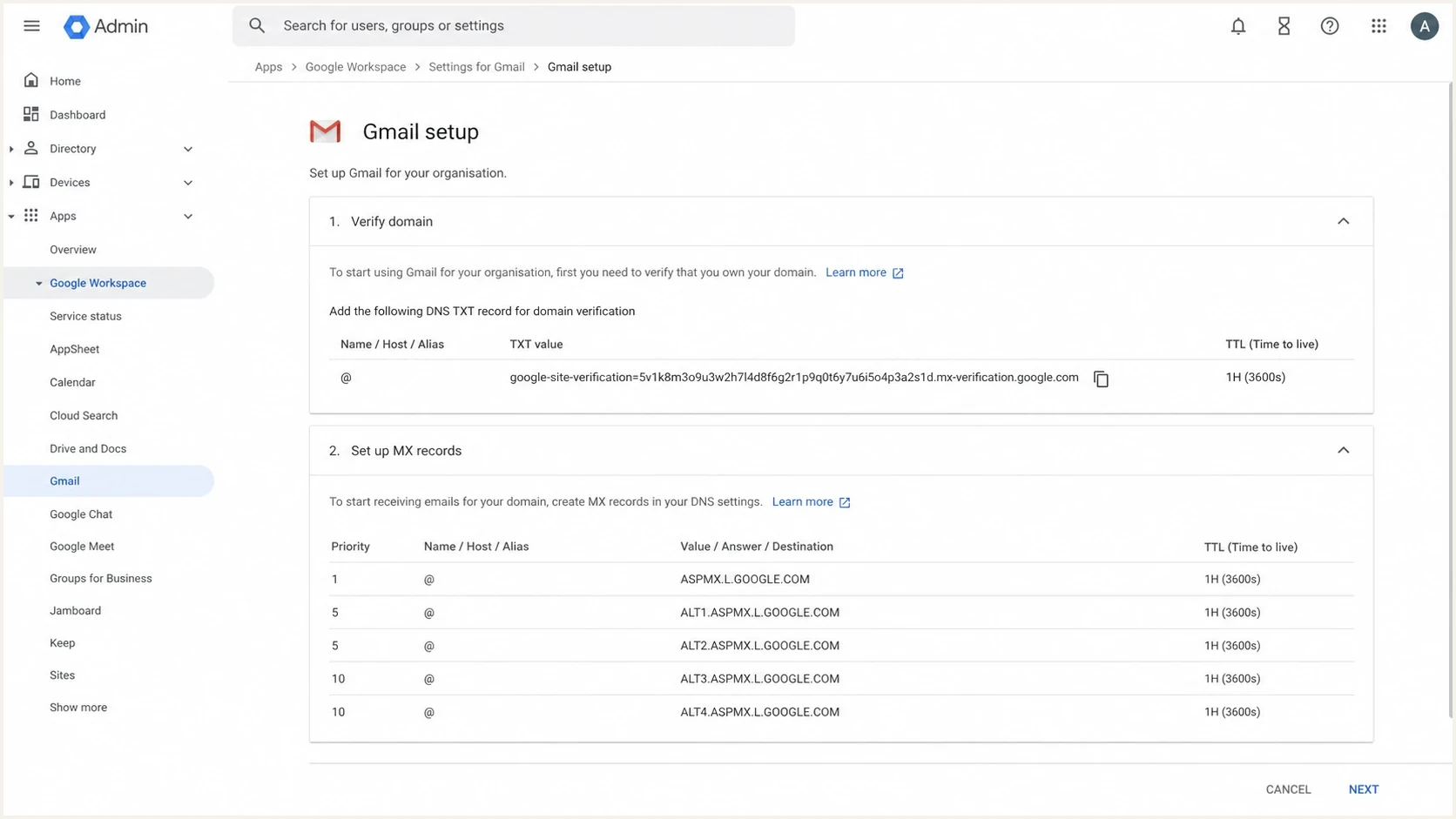
Google Admin console screenshot showing domain verification and MX setup as separate steps.
|
|
|
|---|---|---|
MX | Production host plus required setup records | No usable production MX |
TXT | Verification or policy text | Copied into the wrong name or type |
SPF | One sender policy | Multiple SPF records |
DMARC | Valid policy and reporting | Missing or malformed record |
How to tell the record types apart during a DNS review.
How to check it properly
A good check has two parts. First, decode and review the domain name. Second, inspect the DNS records far enough to prove that each target does the job its record type claims. For MX, compare the complete record set with the active provider's instructions and confirm that the production target resolves.
- Decode first: Convert any xn-- label into its displayed Unicode form before comparing it with an expected domain.
- Normalize and compare: Check accented letters, mixed scripts, missing letters, and brand-like substitutions.
- Query records: Check MX, TXT, SPF, DKIM, and DMARC separately so one valid record does not hide another problem.
- Verify the MX set: Confirm that production mail exchangers are present, resolve correctly, and match the Admin console instructions.
- Retest after DNS changes: Allow for the record TTL, then test inbound mail and document the final working values.
DNS checks to runbash
dig +short MX example.com

dig +short A smtp.google.com
dig +short AAAA smtp.google.com

dig +short TXT _dmarc.example.com
For a faster operational check, Suped's domain health checker reviews DMARC, SPF, and DKIM in one place before a manual DNS investigation.
?
What's your domain score?
Deep-scan SPF, DKIM & DMARC records for email deliverability and security issues.
Review priority for suspicious domain findings
Use the highest matching band when triaging IDN and MX issues.
Normal
Low
Plain ASCII domain with working MX and expected authentication.
Review
Medium
IDN with clear business context, or a Google verification MX present during activation.
High risk
High
Lookalike IDN, missing production MX, or broken authentication reporting.
Blocked
Stop
Confirmed impersonation or no usable production mail route.
Suped's DMARC monitoring separates domains that merely exist in DNS from domains that are actively sending mail. That distinction helps when a domain has unusual records but no known sending pattern.
Where Suped fits
Suped is our DMARC reporting and email authentication platform. It becomes useful when a one-off DNS investigation turns into ongoing domain governance. A direct DNS query shows the current record, while Suped tracks which domains send mail, which sources pass authentication, and which issues need follow-up.
DMARC record detail view showing SPF, DKIM, DMARC, rDNS diagnostics, and DNS records
Teams can use Suped to connect DMARC, SPF, DKIM, blocklist (blacklist) monitoring, hosted SPF, hosted MTA-STS, and policy staging in one workflow. This is useful when DNS mistakes affect several domains or when an MSP manages client domains at scale.
For this issue, Suped can turn the DNS finding into a tracked action: identify the affected domain, verify authentication after the MX change, and watch for new failures.
- Issue detection: Suped flags authentication failures and provides specific fix steps.
- Hosted control: Suped's Hosted DMARC keeps policy changes staged and easier to manage.
- Record checks: The DMARC checker validates the published TXT record before rollout.
- Alerts: Real-time alerts expose unexpected failure spikes for investigation.
- Multi-tenancy: MSPs can manage client domains, reports, and issue queues from one dashboard.
After the immediate MX correction, Suped can confirm whether the domain sends mail, whether any source fails authentication, and whether later DNS changes create new issues.
Views from the trenches
Best practices
Decode Punycode before routing mail, then compare the Unicode name with the expected brand.
Compare every Google verification MX with the Admin console before removing the record.
Keep DNS change notes so bad TXT, MX, SPF, DKIM, and DMARC edits are traceable fast.
Common pitfalls
Accepting any domain with MX output misses domains without a usable production mail route.
Treating IDN mailboxes as normal creates review gaps when the name resembles a trusted domain.
Treating every Google verification MX as a typo can misread a valid activation record.
Expert tips
Inspect the decoded label, the raw ASCII label, and the production MX resolution together.
Flag xn-- domains for manual review unless the business has a clear international domain need.
Use DMARC reports to confirm which domains actually send mail after DNS has been cleaned up.
Marketer from Email Geeks says IDN domains need decoding before trust decisions because the ASCII label can hide a Unicode lookalike.
2020-11-12 - Email Geeks
Marketer from Email Geeks says xn--ahoo-4ra.com decodes to ýahoo.com, so it should not be treated like the expected Yahoo domain.
2020-11-12 - Email Geeks
The practical answer
IDN and Punycode domains are normal parts of DNS, but they need careful handling in email systems. The raw xn-- form tells you to decode before trusting the visible name. In this example, the decoded name looks close to Yahoo but is not the same domain, so it belongs in a manual review queue.
The Google MX result needs context. A long value ending in mx-verification.google.com can be a legitimate activation record, but it is not the production receiving host. Routing is broken when the domain lacks the production MX required by its active mail service.
The fix is direct: decode the domain, verify the business context, compare the complete MX set with the Admin console, correct missing or obsolete records, and monitor authentication after the change. Suped keeps DMARC, SPF, DKIM, hosted records, alerts, and client reporting organized during that follow-up.




