How to set up DMARC/DKIM/SPF for Twikey

Published 11 Jul 2026
Updated 11 Sep 2026
11 min read
Summarize with
Updated on 11 Sep 2026: We updated this guide for Twikey's current SMTP setup and RFC 9989 DMARC enforcement.
For Twikey SMTP, publish one SPF record that authorizes _spf.twikey.com, add the app and test DKIM CNAMEs, enable DKIM in Twikey, and publish an applicable DMARC policy for the From-address domain. Start DMARC at p=none, verify authentication and identifier alignment in real messages, then move to p=reject after every legitimate sender is accounted for.
Choose the sending path first
Twikey SMTP uses Twikey's mail infrastructure and the DNS records below. Custom SMTP shifts SPF, MAIL FROM, connection, and reputation requirements to that SMTP system, but Twikey still supports its DKIM option with either path. Do not authorize Twikey in SPF when Twikey is not the system that transmits the message. Inspect a received message to identify every DKIM signature added by Twikey or the custom SMTP system.
Add your domain
Twikey does not have a separate domain-verification screen for this email integration. The domain is the part after @ in the From address, and Twikey validates the configuration when you run its test. The public Twikey email guide documents both Twikey SMTP and custom SMTP setup.
- Open settings. In Twikey, go to Settings, Integrations, then Email integration.
- Select transport. Choose Twikey SMTP Server for the records on this page, or Custom SMTP server if another system will transmit the mail.
- Set the sender. Enter a From address on a domain you control, such as Billing <billing@example.com>. Publish the Twikey DKIM records for that From domain and confirm that an applicable DMARC policy covers it.
- Delay saving. Leave the integration open while publishing SPF and DKIM. Run Test and Save only after DNS resolves publicly.
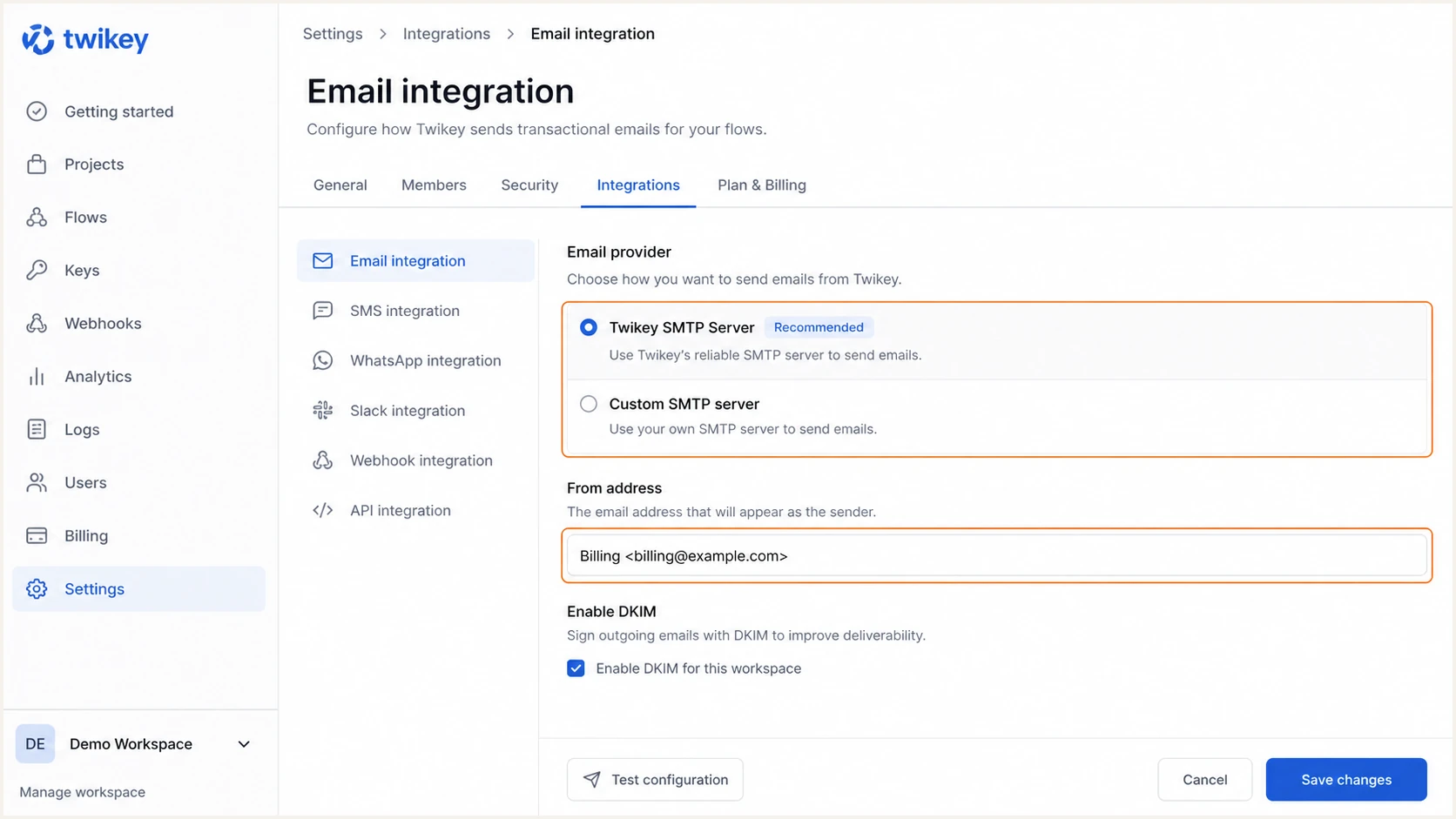
Twikey email integration and From address settings
Twikey SMTP
- DNS ownership. Publish Twikey's SPF authorization and both Twikey DKIM CNAMEs.
- Operational profile. Twikey queues mail and usually sends it within minutes, but high billing traffic around the first of the month can cause delays.
Custom SMTP
- DNS ownership. Use the transmitting system's SPF instructions and configure Twikey's DKIM CNAMEs if enabling Twikey DKIM.
- Connection data. Twikey needs the SMTP host, port, encryption choice, and credentials.
Set up SPF
SPF authenticates the SMTP MAIL FROM domain, which is commonly shown later in the Return-Path header. With Twikey SMTP, add Twikey to the single SPF TXT record for the MAIL FROM domain. SPF contributes to DMARC only when that authenticated domain has identifier alignment with the visible From domain, so verify the actual domains in a received message.
- Inspect DNS. Find the existing TXT value beginning with v=spf1. Never publish a second SPF record at the same hostname.
- Add Twikey. Insert include:_spf.twikey.com before the final all mechanism. Keep every existing authorized sender.
- Count lookups. Keep SPF within the ten DNS-lookup limit. Twikey notes that its validation does not resolve nested includes, so a complex valid record can still fail its interface test.
- Verify alignment. Send a Twikey message and confirm that smtp.mailfrom shares the required organizational domain with header.from, rather than checking only for spf=pass.
New SPF record for Twikey-only sendingDNS
Name: example.com
Type: TXT
Value: v=spf1 include:_spf.twikey.com ~all
If an SPF record already exists, merge Twikey's include into it. Replacing the whole record can break authentication for other mail streams. Use the a:mail.twikey.com mechanism only when the supported include causes a lookup problem, because the hostname can follow an IP change.
SPF checker
Find SPF syntax issues, lookup limits, and weak records.
?/16tests passed
The check should return one syntactically valid SPF policy and show Twikey's authorization before the terminal all mechanism. A permerror means receivers cannot reliably evaluate the record, even when Twikey's own test appears successful.
Do not force SPF alignment
A custom SMTP service might not provide an aligned MAIL FROM domain. In that case, expect SPF alignment errors and rely on aligned DKIM for DMARC. A message passes DMARC when either aligned SPF or aligned DKIM passes.
Set up DKIM
Twikey delegates two selectors by CNAME. The app selector covers production and the test selector covers the beta environment. Publish both on the same domain used in the From address, then enable DKIM inside the email integration.
- Create app. Add app._domainkey as a CNAME pointing to app._domainkey.twikey.com.
- Create test. Add test._domainkey as a CNAME pointing to test._domainkey.twikey.com.
- Disable proxying. If the DNS host supports proxying, leave both mail CNAMEs DNS-only. Remove any TXT record at either selector that conflicts with the CNAME.
- Enable signing. Return to Twikey, select Enable DKIM, run Test, confirm success, and click Save.
Twikey DKIM CNAME recordsDNS
Name: app._domainkey.example.com
Type: CNAME
Value: app._domainkey.twikey.com

Name: test._domainkey.example.com
Type: CNAME
Value: test._domainkey.twikey.com
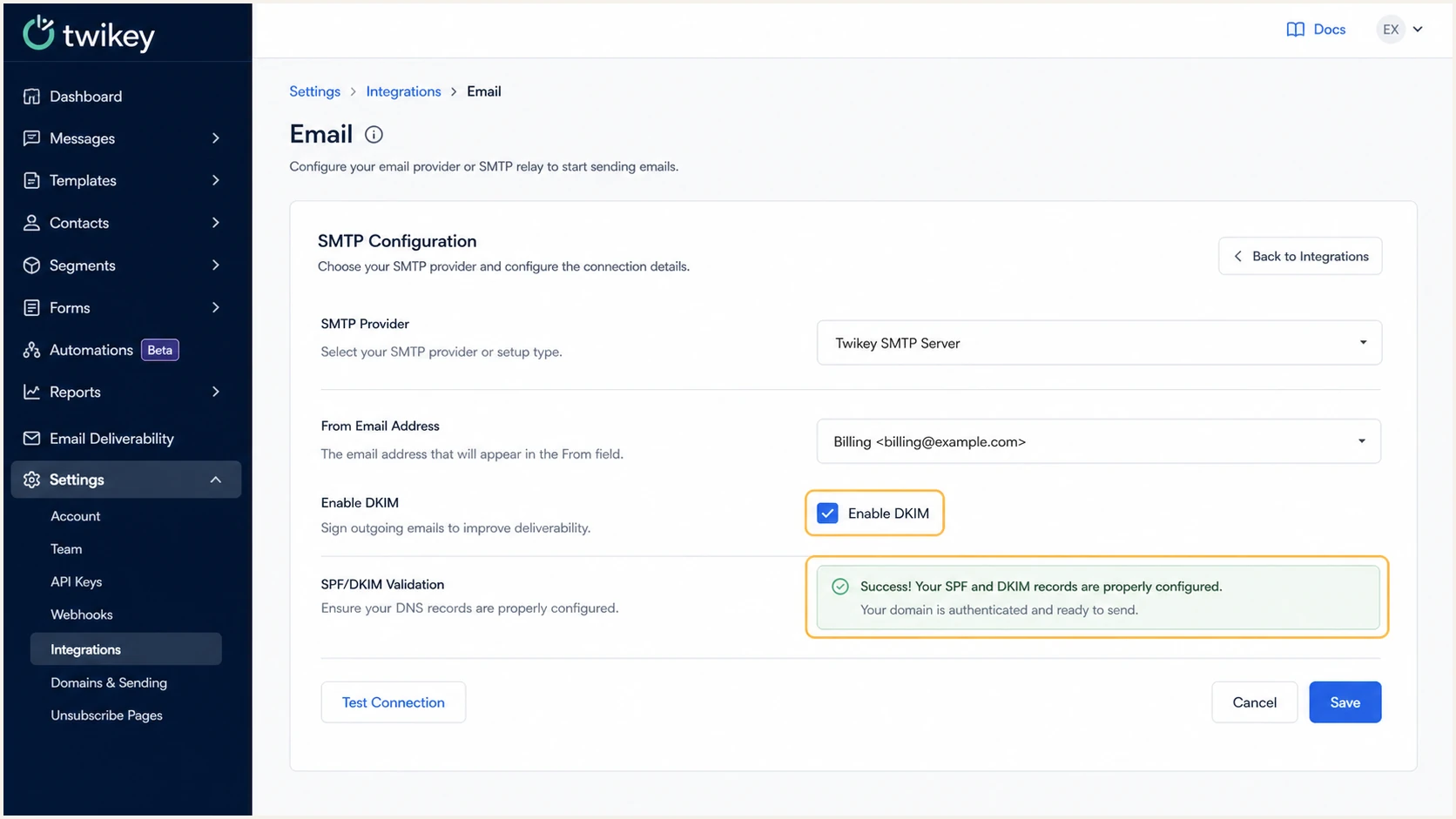
Twikey DKIM enabled with successful validation
What a valid message shows
The Authentication-Results header should show dkim=pass and a header.d domain that matches or is a subdomain of the visible From domain under relaxed alignment. A published CNAME alone does not prove that Twikey signed the message.
Set up DMARC
DMARC policy discovery starts at _dmarc on the visible From domain. If no valid record exists there, RFC 9989 receivers use a DNS Tree Walk to find an applicable parent policy. Publish an exact-domain record when that From domain needs its own policy; otherwise confirm that the organizational-domain policy covers it. DMARC checks identifier alignment and tells receivers what to do when both aligned SPF and aligned DKIM fail. Start with p=none so reporting reveals legitimate senders without requesting delivery changes.
- Check first. Look up the exact From domain and any applicable parent policy. If a valid policy already uses p=quarantine or p=reject, keep that enforcement level and fix Twikey rather than weakening the policy.
- Create one record. If no applicable policy exists, publish the starter record below as TXT at _dmarc. Replace the example reporting address with a monitored mailbox or DMARC reporting destination. If the rua domain differs from the policy domain's organizational domain, confirm that the destination publishes authorization to receive those reports.
- Keep relaxed alignment. The default relaxed modes accept an authenticated domain with the same organizational domain as the From domain. Tighten aspf or adkim only for a documented requirement.
- Collect reports. Wait for aggregate reports, group Twikey traffic by source and DKIM domain, and confirm aligned pass results before enforcement.
Starter DMARC recordDNS
Name: _dmarc.example.com
Type: TXT
Value: v=DMARC1; p=none; rua=mailto:dmarc@example.com
The DMARC record generator creates a policy with reporting and alignment options. Use a monitored rua destination that accepts aggregate XML, authorize it when it is on another organizational domain, and avoid publishing multiple DMARC TXT records at the same name.
DMARC checker
Look up a domain's DMARC record and catch policy issues.
?/7tests passed
A valid lookup should return one DMARC record with a recognized version, policy, and reporting URI. The checker confirms DNS syntax, while a real Twikey message confirms whether the identifiers actually have alignment.
A pass must be aligned
SPF or DKIM can pass for an unrelated domain while DMARC still fails. Compare smtp.mailfrom and header.d with the domain in header.from. At least one passing identifier must share the same organizational domain under relaxed alignment.
Verify and troubleshoot
Verify in two places: Twikey's built-in Test action confirms its configuration, and an independently received message confirms what mailbox providers evaluate. DNS success without a signed message is incomplete verification.
- Run Twikey Test. Open Settings, Integrations, Email integration, click Test, and wait for a success message before Save.
- Receive a message. Trigger a real mandate, payment notification, or dunning test to a mailbox you control. Check junk if it does not reach the inbox.
- Read authentication. Inspect Authentication-Results for spf=pass, dkim=pass, and dmarc=pass. Confirm the passing SPF or DKIM domain has identifier alignment with header.from.
- Check both selectors. Resolve app._domainkey and test._domainkey. Each must return its Twikey target without a CNAME loop or competing record.
- Separate custom SMTP. When custom SMTP is selected, inspect its MAIL FROM domain and every DKIM signature. Twikey's SPF include does not authorize the custom server, and the custom server can add its own DKIM signature.
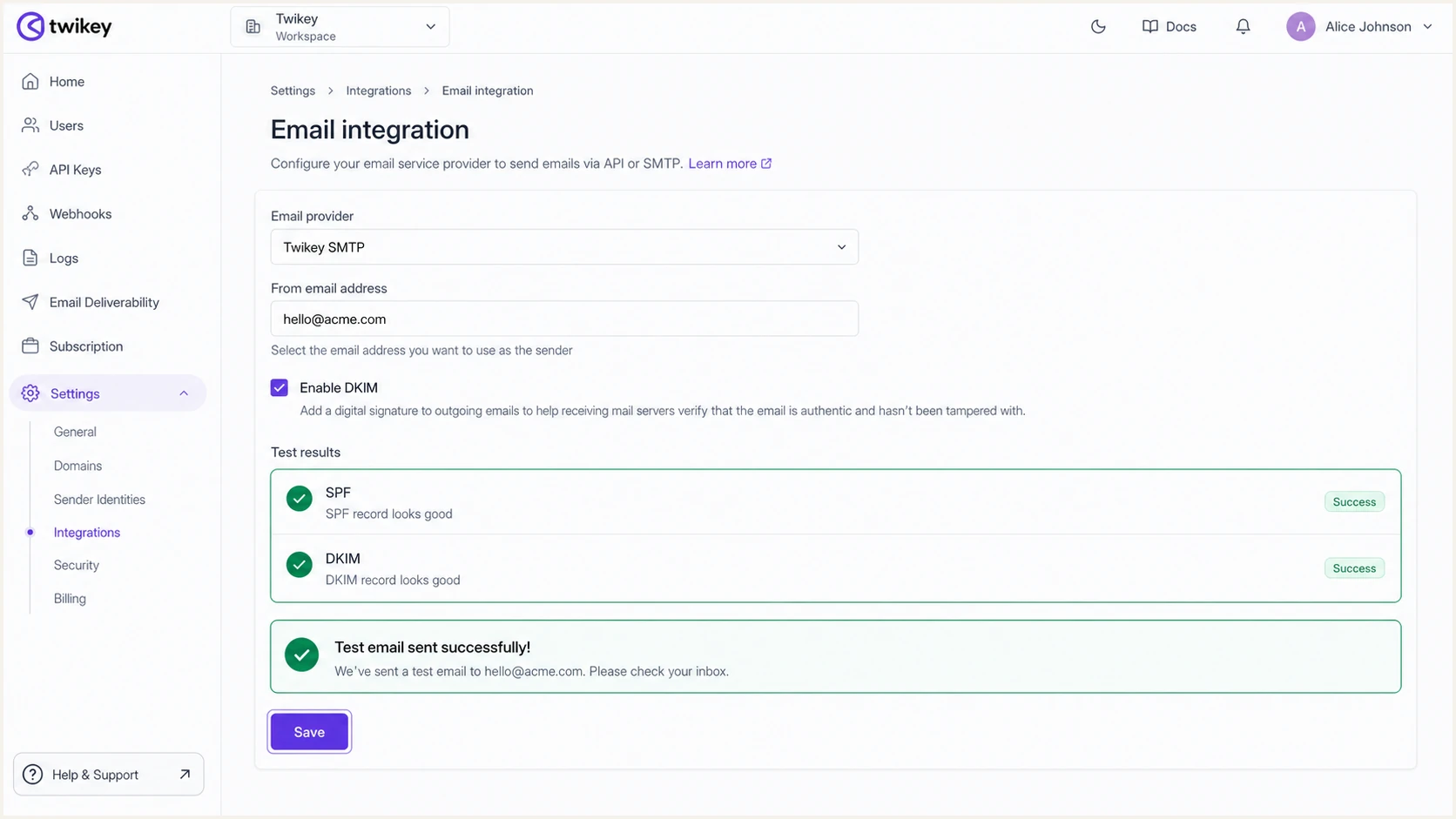
Successful SPF and DKIM test in Twikey
For the quickest end-to-end check, send a Twikey test message to the email tester below. It reports the visible From domain, Return-Path, DKIM signature, DMARC result, and common content or transport faults in one result.
Email tester
Send a real email to this address. Suped shows a results button when the test is ready.
?/43tests passed
If the result fails, fix the first authentication fault before judging inbox placement. DNS updates often appear within the record's TTL, but cached results can remain until that TTL expires. Re-test with a newly generated Twikey message after every change.
Failure symptom
- SPF permerror. Multiple SPF records, bad syntax, a loop, or more than ten lookups.
- DKIM neutral. Missing selector, conflicting DNS data, or signing not enabled.
- DMARC fail. Authentication passed only for a domain unrelated to the From domain.
- No test mail. Bad From formatting, a Twikey queue delay, junk placement, or SMTP rejection.
Corrective action
- SPF repair. Merge senders into one policy and reduce lookup-producing mechanisms.
- DKIM repair. Correct both CNAME targets, wait for TTL expiry, and enable DKIM.
- DMARC repair. Make either smtp.mailfrom or header.d use the required domain relationship with header.from.
- Delivery repair. Review Twikey's test status and Activity > Email errors, then retry.
Get alerted when it breaks
A passing test is a point-in-time result. Twikey infrastructure, DNS edits, selector changes, and newly added senders can change authentication later. Monitor aggregate DMARC data continuously and alert on a sustained change in aligned pass rates or an unknown source.
- Route reports. Send rua reports to a processor that can parse XML, retain history, and group records by sending source.
- Baseline Twikey. Record its normal source IPs, app or test DKIM use, aligned SPF rate, aligned DKIM rate, and daily volume.
- Alert on change. Investigate a new source, a sharp failure increase, a missing DKIM selector, or unexpected volume before enforcement blocks valid mail.
- Retest after edits. Trigger a Twikey transaction after any DNS or integration change and compare it with the established baseline.
Use Suped for continuous detection
Suped is our DMARC platform. It converts aggregate reports into identified sending sources, flags SPF, DKIM, and DMARC faults, provides specific fix steps, and sends alerts when authentication changes. For this Twikey workflow, use those reports to verify app and test selector use, identify unknown sources, and catch a drop in aligned authentication without reading XML manually.
Use DMARC monitoring to confirm Twikey remains authorized while other business mail streams continue to pass. Suped's hosted DMARC and hosted SPF controls can reduce direct DNS edits when policy staging or sender changes are frequent.
Secure your domain with p=reject
Move to p=reject only after Twikey and every other legitimate source consistently pass aligned SPF or aligned DKIM. Treat enforcement as a staged change backed by report evidence, rather than a DNS switch made immediately after setup. RFC 9989 made pct historic, so do not use percentage sampling for the rollout.
- Inventory senders. Identify every source in DMARC reports, including low-volume transactional systems and subdomains. Classify unknown traffic before authorizing it.
- Prove Twikey alignment. Confirm recent production messages use aligned app DKIM or aligned SPF. Also verify the test selector if the beta environment sends mail.
- Stage quarantine. Publish p=quarantine; t=y to request one-level-lower handling while testing. Review failures, then remove t=y to apply quarantine. Mail receivers retain disposition discretion, so check real message handling as well as reports.
- Apply reject. After quarantine is stable, p=reject; t=y requests quarantine-level handling during the next test stage. Remove t=y only after legitimate aligned pass rates remain stable, decide whether subdomains need explicit sp or np policies, and continue reporting.
- Keep rollback data. Record the previous policy, DNS TTL, owner, and approval. If valid mail fails, fix its alignment first and use a controlled policy rollback only when business impact requires it.
DMARC enforcement gates
Use report evidence and controlled policy changes rather than percentage sampling.
Observe
p=none
Identify legitimate sources and confirm Twikey authentication.
Test quarantine
p=quarantine; t=y
Request monitoring-level handling while checking failures, then remove t=y.
Enforce
p=reject
Apply quarantine first, then test and apply reject after legitimate streams consistently pass.
Full enforcement exampleDNS
Name: _dmarc.example.com
Type: TXT
Value: v=DMARC1; p=reject; rua=mailto:dmarc@example.com
Use Suped to stage enforcement
Suped maps verified and unverified sources, flags specific authentication and alignment failures, and provides fix steps before policy changes. Use Suped's hosted DMARC controls to publish each test or enforcement policy, then use alerts and aggregate reports to check whether a Twikey change affects valid traffic.
Twikey authentication FAQ
These checks cover the details that most often cause a Twikey configuration to pass DNS validation but fail DMARC in a received message.