How to set up DMARC/DKIM/SPF for ServiceNow

Updated on 7 Sep 2026: We updated this guide for ServiceNow's current SPF guidance and RFC 9989's DMARC rollout rules.
ServiceNow can send workflow notifications, ticket updates, incident mail, approvals, and case messages using a customer From domain. Recipient systems trust that domain when ServiceNow produces an aligned SPF or DKIM pass, which gives DMARC a pass. Confirm the sending path, publish the correct DNS records, and review DMARC reports before choosing an enforcement policy.
- Follow the order in ServiceNow's public DKIM and SPF post: obtain the DKIM selector and public key, publish DKIM and SPF, then reprovision email.
- Merge ServiceNow into the existing SPF record instead of publishing a second SPF TXT record at the same domain.
- Require a valid ServiceNow DKIM signature for the customer From domain before using a strict DMARC policy.
- Start with p=none unless the domain already has a quarantine or reject policy.
Add your domain
First identify whether ServiceNow sends through ServiceNow Cloud Email Services or an SMTP account that your team controls. That choice determines which system provides the SPF and DKIM records and which system signs the final message.
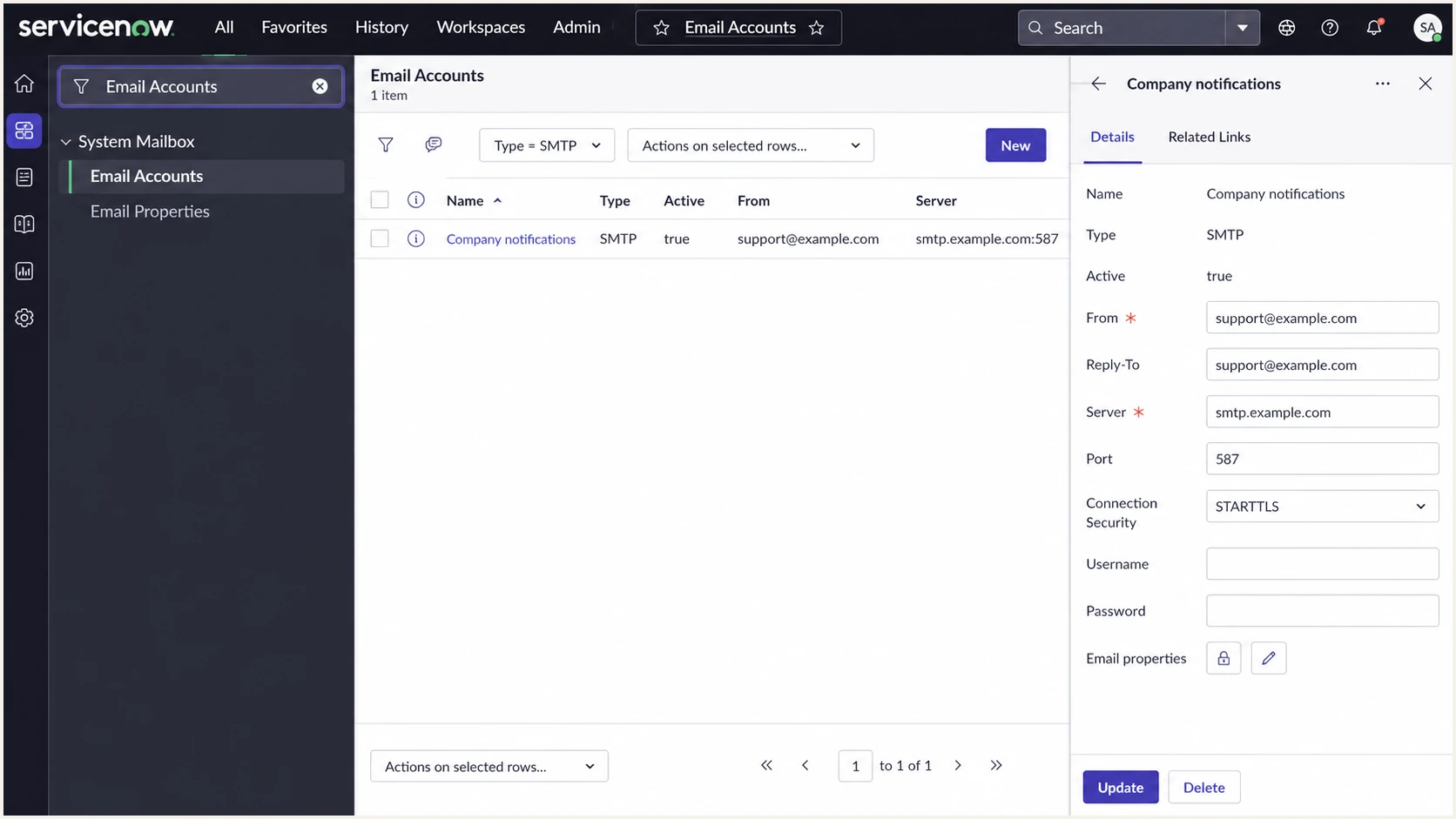
ServiceNow Email Accounts page showing the outbound SMTP path and custom From domain.
- Check outbound email settings and Email Accounts to confirm whether messages leave through ServiceNow-provided SMTP or your own SMTP server.
- Set notification From and Reply-To values to addresses under a domain you control, such as support@example.com.
- For ServiceNow Cloud Email Services, use the DKIM request article and the Now Support Service Catalog to request the selector and public key for the exact From domain.
- Test with a non-production instance and a safe subdomain, then repeat the verified DNS pattern for production.
- After SPF and DKIM resolve publicly, complete the ServiceNow email reprovisioning request so DKIM signing starts on outbound notifications.
Match DNS to the outbound route
For ServiceNow-provided SMTP, the current ServiceNow SPF KB instructs customers sending with their own From domain to authorize include:service-now.com. A custom SMTP route must use the SPF and DKIM configuration for that route instead.
- ServiceNow-provided SMTP uses ServiceNow's published SPF authorization and a ServiceNow-provisioned DKIM key for the custom From domain.
- Customer-managed SMTP uses that mail route's SPF authorization and DKIM signer because ServiceNow only hands the message to the configured server.
Use a dedicated ServiceNow sending subdomain
A dedicated From subdomain such as notifications.example.com separates ServiceNow authentication from employee and corporate mail. It can have its own SPF, DKIM, and DMARC records, which limits the effect of DNS mistakes and makes an enforcement decision easier to evaluate.
Root domain
- ServiceNow shares one SPF record and DMARC policy with every other sender using the organizational domain.
- A policy change requires evidence for employee mail, forwarded mail, mailing lists, and ServiceNow notifications.
Dedicated subdomain
- ServiceNow authentication changes stay within the notification subdomain and its DNS records.
- A notification-only subdomain has fewer indirect mail flows, which makes quarantine or reject easier to assess.
Plan replies before changing From
If users reply to ServiceNow notifications, route the published From address back to the instance or set a tested Reply-To address. Authentication does not configure inbound reply handling.
Set up SPF
SPF authorizes the envelope sender domain, which usually appears in the Return-Path. When ServiceNow-provided SMTP sends mail with your custom From domain, add ServiceNow's current include to that domain's single SPF record. DKIM remains important because SPF commonly breaks after forwarding.
|
|
|
|---|---|---|
ServiceNow-provided SMTP | Add include:service-now.com | SPF pass for an authorized path |
Customer-managed SMTP | Authorize that SMTP route | SPF pass for an authorized path |
Unaligned Return-Path | Keep aligned DKIM passing | DMARC can pass through DKIM |
Use the SPF action that matches the ServiceNow outbound route.
SPF record patternDNS
v=spf1 include:_spf.example.net include:service-now.com ~all
- Confirm that the instance uses ServiceNow-provided SMTP before adding include:service-now.com.
- Keep one SPF TXT record at the sending domain and place the ServiceNow include before the final ~all or -all.
- Count DNS lookups before publishing. ServiceNow's include costs two SPF lookups, one for the include and one for the macro-based exists evaluation, within SPF's limit of 10.
- Preserve the domain's existing final policy while merging the record. Changing ~all to -all is a separate policy decision.
SPF checker
Find SPF syntax issues, lookup limits, and weak records.
?/16tests passed
An SPF pass satisfies DMARC only when the authenticated envelope domain has identifier alignment with the visible From domain. If ServiceNow passes DKIM with a matching signing domain, DMARC can pass even when SPF lacks identifier alignment.
Set up DKIM
DKIM gives ServiceNow notifications a durable DMARC pass path because the signature usually survives forwarding. ServiceNow provides a selector and public key for the custom From domain. Your DNS administrator publishes that key at the selector host under _domainkey.
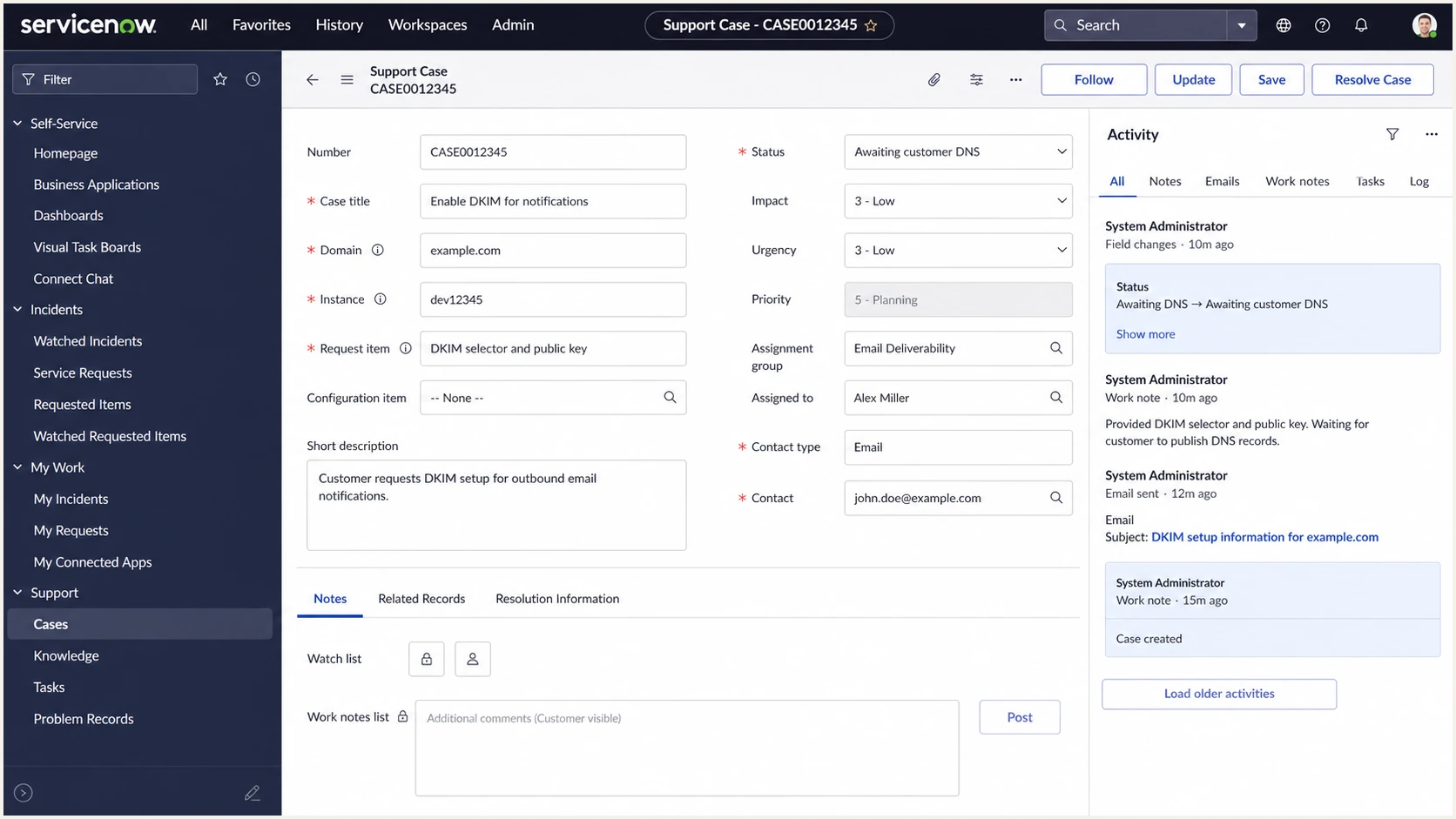
ServiceNow support request for a custom-domain DKIM selector and public key.
DKIM TXT patternDNS
selector1._domainkey.example.com. TXT "v=DKIM1; k=rsa; p=<public-key>"
- Request the DKIM selector and public key for the exact From domain used by ServiceNow notifications.
- Create the TXT record at selector._domainkey, not at the root domain.
- Paste the public key exactly as ServiceNow provides it. DNS interfaces can split a long TXT value into quoted strings, but must not add spaces inside the key.
- Wait until DNS resolves publicly, then complete ServiceNow email reprovisioning and confirm that outbound messages contain a DKIM-Signature header.
ServiceNow-provided SMTP
- ServiceNow supplies the DKIM selector and public key for the requested custom domain.
- ServiceNow begins signing outbound notifications after the DNS check and email reprovisioning.
- Verify a real incident or approval notification by inspecting the message headers at the recipient.
Customer-managed SMTP
- The configured SMTP route supplies the SPF authorization and DKIM records.
- That SMTP route signs the message after ServiceNow hands it off.
- Verify the ServiceNow Email Account, DNS records, and final recipient headers together.
Set up DMARC
DMARC checks the visible From domain against the authenticated SPF and DKIM domains. A message passes when SPF or DKIM passes and has identifier alignment with that From domain. Start with p=none unless the domain already uses quarantine or reject. Keep an existing enforcement policy and fix ServiceNow until its mail passes.
Starting DMARC recordDNS
v=DMARC1; p=none; rua=mailto:dmarc@example.com
Use the DMARC record generator to create the starting record with the real aggregate reporting address.
- Create one TXT record at _dmarc.example.com.
- Replace dmarc@example.com with the mailbox or reporting address that collects aggregate reports.
- Check whether a ServiceNow subdomain inherits the organizational domain's policy or has its own _dmarc record.
- If the domain already uses p=quarantine or p=reject, do not lower it for ServiceNow.
DMARC checker
Look up a domain's DMARC record and catch policy issues.
?/7tests passed
Separate ServiceNow's policy from yours
The ServiceNow DMARC KB describes ServiceNow's policy for messages using @service-now.com. It does not set the DMARC policy for your custom From domain.
- Your DNS controls the DMARC policy for your domain and its covered subdomains.
- ServiceNow controls DKIM signing when its provided SMTP infrastructure sends the message.
- Aggregate reports show whether ServiceNow traffic passes at participating receivers.
- Authentication-Results headers show the result for one delivered ServiceNow notification.
Verify and troubleshoot
Verification needs both DNS checks and a real ServiceNow notification. DNS can be correct while the instance still uses an old mail route, so test the notification path that users actually receive.
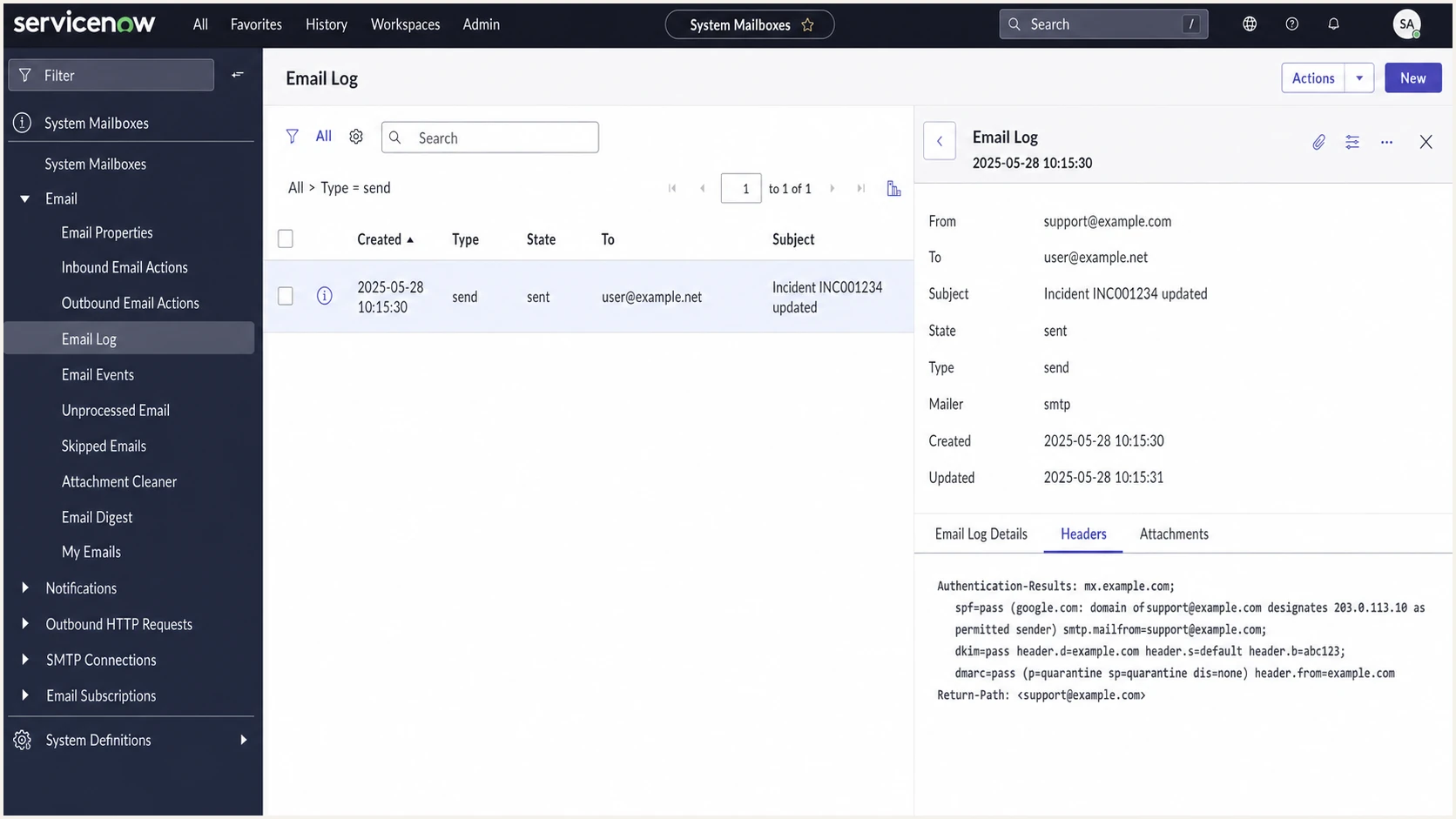
ServiceNow email log with a sent incident notification and passing authentication results.
|
|
|
|---|---|---|
SPF pass | Envelope sender authorized | Confirm From-domain match |
SPF fail | Route not authorized | Update the single SPF record |
DKIM pass | Signature verified | Confirm signing-domain match |
DKIM fail or none | Key, signature, or provisioning issue | Check selector and reprovisioning |
DMARC fail | No authenticated identifier matches From | Fix SPF or DKIM alignment |
Use final headers to separate DNS, signing, and identifier alignment problems.
- Trigger an incident, approval, or case update from ServiceNow instead of testing with an unrelated manual sender.
- Read Authentication-Results at the recipient and compare SPF's envelope domain, DKIM's signing domain, and DMARC's From domain.
- Confirm that the sending domain has only one SPF record. Multiple SPF records produce a permanent error.
- Compare the selector in DKIM-Signature with the exact DNS host. A selector typo breaks verification even when the public key is correct.
- If DNS is correct but DKIM-Signature is absent, ask ServiceNow to confirm email reprovisioning for the instance and custom domain.
Email tester
Send a real email to this address. Suped shows a results button when the test is ready.
?/43tests passed
Send a ServiceNow notification to the generated test address, then review the SPF, DKIM, DMARC, DNS, and content diagnostics for that exact message.
Common ServiceNow authentication failures
- A second SPF record creates a permanent SPF error, so merge all mechanisms into one record.
- A missing DKIM signature after DNS publication usually means the ServiceNow instance still needs email reprovisioning.
- A notification template or script can use a different From domain than the domain provisioned for DKIM.
- A strict policy before report review can affect ServiceNow and other legitimate senders using the same domain.
Get alerted when authentication breaks
ServiceNow email authentication can break after an instance change, DNS edit, sender address change, or mail route change. Suped's product groups aggregate DMARC monitoring by source and can alert the team when ServiceNow pass rates cross a configured threshold.
Manual report review
- Authentication failures often surface after users report missing notifications.
- Raw aggregate XML must be grouped by source IP and authentication result.
- ServiceNow failures can be mixed with unrelated sending sources.
Suped workflow
- Threshold alerts flag a material ServiceNow authentication change after reports arrive.
- Source grouping separates ServiceNow traffic from the domain's other approved senders.
- SPF and DKIM diagnostics point the owner toward the DNS or provisioning check that failed.
Choose quarantine or reject safely
The current DMARC specification, RFC 9989, makes the old pct tag historic and adds t=y for policy testing. A dedicated ServiceNow notification subdomain can move to p=reject after both SPF and DKIM are configured and report data shows consistent DMARC passes. General-purpose domains with users who post to mailing lists should avoid reject because indirect mail flows can break authentication.
DMARC policy stages
Use test mode instead of percentage sampling, then choose the final policy for the domain's mail use.
Monitor
p=none
Collect reports without requesting different handling.
Test quarantine
p=quarantine; t=y
Test the quarantine policy without requesting its full application.
Quarantine
p=quarantine
Request quarantine for failing mail after report review.
Reject
p=reject
Use for a controlled notification domain after checking indirect flows.
- Collect a representative business cycle of aggregate reports. RFC 9989 recommends at least one month at p=none and another month at quarantine before a general-purpose domain considers reject.
- Require ServiceNow to produce valid SPF and DKIM authentication with identifier alignment. A reject policy must not rely on SPF alone.
- Stop unauthorized sources and move every legitimate source into an approved sending path before enforcement.
- Test quarantine with t=y, then remove the test flag when the policy is ready for normal application.
- Reserve p=reject for a domain whose legitimate indirect mail flows have been assessed, with a dedicated ServiceNow notification subdomain as the safer scope.
Quarantine test stageDNS
v=DMARC1; p=quarantine; t=y; rua=mailto:dmarc@example.com
Reject stage for a controlled domainDNS
v=DMARC1; p=reject; rua=mailto:dmarc@example.com
Suped's Hosted DMARC keeps policy changes in one managed workflow after the hosted record is configured. Teams can review ServiceNow source results before removing test mode or changing the final policy without editing DNS for each step.