How to set up DMARC/DKIM/SPF for Moloni

Published 14 Jul 2026
Updated 14 Sep 2026
12 min read
Summarize with
Updated on 14 Sep 2026: We updated this guide for Moloni's current DNS records and RFC 9989 policy staging.
For  Moloni custom sender mail, authorize 94.46.130.39 and 94.46.130.38 in the domain's single SPF record, publish Moloni's DKIM key at dkim._domainkey, and add DMARC at _dmarc with v=DMARC1; p=none; rua=mailto:dmarc@example.com. DMARC passes when SPF or DKIM passes and aligns with the visible From domain.
Moloni normally sends through faturas@moloni.pt. A custom sender on a domain you control requires the Moloni Pro custom email option and matching DNS. Moloni documents custom sender support for documents, identification templates, customer messages, pending-sales lists, scheduled events, and stock alerts. Keep an existing p=quarantine or p=reject policy in place rather than weakening it while adding Moloni.
Prepare the Moloni custom sender
- Check ownership: Use an address on a domain whose DNS you can edit. A public mailbox address cannot be authenticated as your Moloni custom sender.
- Confirm access: Custom sender configuration is available on Moloni Pro. Accounts with an older entitlement should ask Moloni support to confirm eligibility.
- Open settings: Sign in to Moloni, open Configurações, select Empresa, and choose the E-mails tab.
- Locate the control: Find Quero ativar envio de e-mails personalizado and the confirmation labeled Confirmo que posso configurar o SPF.
- Stage the sender: Enter the intended address, but leave custom sending disabled until SPF and DKIM are published and visible in public DNS.
Moloni treats the custom address as a sending identity rather than a mailbox it hosts. The address should receive replies, and its domain must match the domain being authenticated.
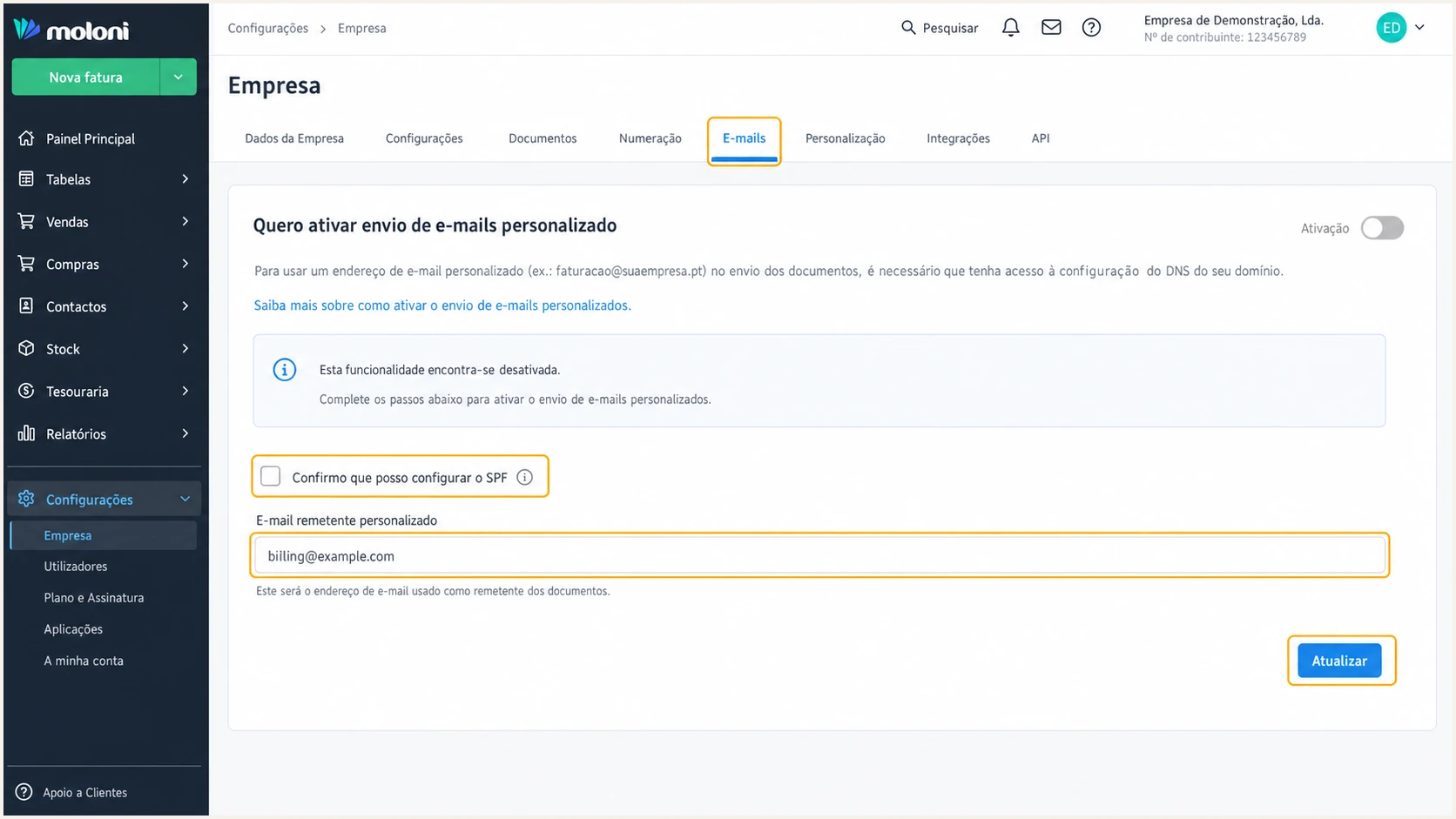
Moloni custom email sender settings under Empresa and E-mails
The SPF confirmation is an operational checkpoint. Clicking it before DNS is ready can put live invoice and notification delivery at risk, so complete the next two sections first.
Use a domain you control
Do not configure a consumer mailbox or a third-party domain as the custom From address. DNS authorization must be published by the domain owner, and DMARC alignment is checked against that visible From domain.
Set up SPF
- Find the record: Open the DNS zone for the custom From domain and locate its TXT value beginning with v=spf1.
- Merge the IPs: Insert ip4:94.46.130.39 and ip4:94.46.130.38 before the final all mechanism in the existing record.
- Create only if absent: If the domain has no SPF record and Moloni is its only sender, publish the Moloni-only example below.
- Keep the terminator: Preserve the existing final policy, such as ~all or -all. Do not add a second terminator.
- Publish and wait: Save the TXT change and allow at least the previous DNS TTL before treating the new record as available everywhere.
Moloni-only SPF recordDNS
example.com. 300 IN TXT (
  "v=spf1 ip4:94.46.130.39 ip4:94.46.130.38 ~all"
)
The example is safe only when Moloni is the domain's sole sender. Most business domains already authorize a mailbox platform or another application, so edit the existing SPF value and retain every legitimate sender.
Never publish a second SPF record
Two TXT values beginning with v=spf1 cause SPF PermError. Merge Moloni's two ip4 mechanisms into the existing record instead.
Check the published result after the TTL has elapsed. The lookup should return one SPF record, both Moloni IPs, a valid final all mechanism, and no syntax or lookup-limit error.
SPF checker
Find SPF syntax issues, lookup limits, and weak records.
?/16tests passed
SPF authentication alone does not guarantee DMARC alignment. Inspect a delivered Moloni message and compare its Return-Path domain with the visible From domain. Moloni documents the sending IP authorization, but its published setup does not establish that the Return-Path will align. The received header is the final proof, and a non-aligned Return-Path means DMARC needs aligned DKIM.
SPF aligned
- IP result: The sending IP is 94.46.130.38 or 94.46.130.39 and SPF passes.
- Domain result: The Return-Path and From addresses share the same organizational domain.
SPF not aligned
- Header result: SPF passes for a different Return-Path domain, so DMARC cannot use that result.
- Safe fallback: Fully passing, aligned DKIM is enough for DMARC. Do not authorize unrelated IPs to hide an alignment error.
Set up DKIM
- Confirm the assignment: Ask Moloni support to confirm that selector dkim and the public key below are still assigned to your custom sender. Keys can rotate.
- Create the host: Add a TXT record at dkim._domainkey.example.com, replacing example.com with the custom From domain.
- Paste the value: Use the complete value with no added spaces inside the public key. Quoted chunks in a DNS zone are joined automatically.
- Avoid double suffixes: If the DNS interface appends the zone name, enter only dkim._domainkey in its Host or Name field.
- Wait for DNS: Allow the previous TTL to expire before enabling the custom Moloni sender.
Confirm the current Moloni key
Moloni's current support material lists this selector and key, including the t=y DKIM testing flag. That flag belongs to the DKIM key record and does not put DMARC into monitoring mode. Confirm the assignment before publishing because a rotated key will produce DKIM failures even when the DNS syntax is correct.
Moloni DKIM TXT recordDNS
dkim._domainkey.example.com. 300 IN TXT (
  "v=DKIM1; k=rsa; t=y; "
  "p=MIGfMA0GCSqGSIb3DQEBAQUAA4GNADCBiQKBgQCYs9Oepmx+l9Kx0SGr"
  "+8wKNsqbqy5bsKEBfeZXaDks0PqWmvQlMGzvqk60thSW2YyCuMQ2rF96"
  "spCmRmEZT43eRWynuNRAQS9uacTHCQ/D/P9z1Mqu/WFawLh3p+k3JzY"
  "UeRZMwVg5Ol0nPOVBICbnOX1wJJzY1bmu0HHpGT55uQIDAQAB"
)
After publication, send a Moloni invoice to a mailbox where the raw message headers can be viewed. A DNS lookup proves that the key exists, while a signed test message proves that Moloni is using the matching private key.
- Check the selector: The DKIM-Signature header should show s=dkim.
- Check the domain: Its d= value should be the custom From domain or an aligned subdomain.
- Check the result: Authentication-Results should report dkim=pass.
- Escalate failures: If no signature is present after DNS is correct, Moloni must enable signing for the account. DNS alone cannot add the signature.
Set up DMARC
- Prepare reporting: Create or choose a mailbox that can receive aggregate XML reports, then replace dmarc@example.com with that address.
- Check for DMARC: Look up _dmarc.example.com before adding anything. A domain must have one DMARC TXT record.
- Start in monitor mode: If no record exists, publish v=DMARC1; p=none; rua=mailto:dmarc@example.com exactly, using your real reporting address.
- Preserve enforcement: If the domain already uses p=quarantine or p=reject, keep that policy and add or retain reporting. Do not revert to p=none.
- Publish at the root: Create the TXT record at _dmarc for the same organizational domain used in the visible From address.
Initial DMARC TXT recordDNS
_dmarc.example.com. 300 IN TXT (
  "v=DMARC1; p=none; rua=mailto:dmarc@example.com"
)
Use the DMARC record generator when the reporting mailbox, subdomain policy, or alignment mode needs to change. Publish the generated value as one TXT record, not as a second DMARC record.
The p=none policy collects evidence without asking receivers to quarantine or reject failures. It does not repair SPF or DKIM, so keep testing Moloni until at least one aligned authentication path passes consistently.
DMARC checker
Look up a domain's DMARC record and catch policy issues.
?/7tests passed
A valid checker result should show one record, version DMARC1, the intended policy, and a syntactically valid rua address. Report delivery takes time and does not prove that a specific Moloni message passed alignment.
Existing enforcement stays in place
A domain already on p=quarantine or p=reject should remain there. Authenticate Moloni before enabling its custom sender, then use reports to confirm the new source passes under the existing policy.
Use current DMARC policy staging
RFC 9989 is the current DMARC specification. It made the pct tag historic because receivers applied percentage sampling inconsistently. Remove pct values such as pct=25 from new or revised records and stage enforcement through deliberate policy changes backed by aggregate reports.
|
|
|
|---|---|---|
pct | Historic | Remove from revised records |
t=y | Current testing tag | Requests one policy level lower |
No t tag | Default t=n | Requests the published policy |
DMARC policy tags under RFC 9989
Do not replace pct with t=y blindly
A receiver using older DMARC rules can ignore the unfamiliar t tag and apply the published p value. For predictable cross-receiver staging, monitor at p=none, move the complete policy to p=quarantine, and use observed results before moving to p=reject. Use t=y only when its receiver behavior is understood.
Verify and troubleshoot
- Activate Moloni: Return to Configurações, Empresa, E-mails. Confirm SPF capability, enable custom sending, enter the address, and click Atualizar.
- Send a real test: Open Documentos, choose Faturas, select the email icon on a safe test document, enter a mailbox you control, and click Enviar.
- Read raw headers: Check Authentication-Results, Return-Path, From, and DKIM-Signature rather than relying on the message appearing in the inbox.
- Match the source: The connecting IP should match a Moloni-authorized IP, and the DKIM selector should be dkim.
- Require DMARC pass: The header should report dmarc=pass through aligned SPF, aligned DKIM, or both.
Inbox placement is not an authentication test. A message can arrive while SPF alignment fails, and it can be filtered even when every authentication result passes.
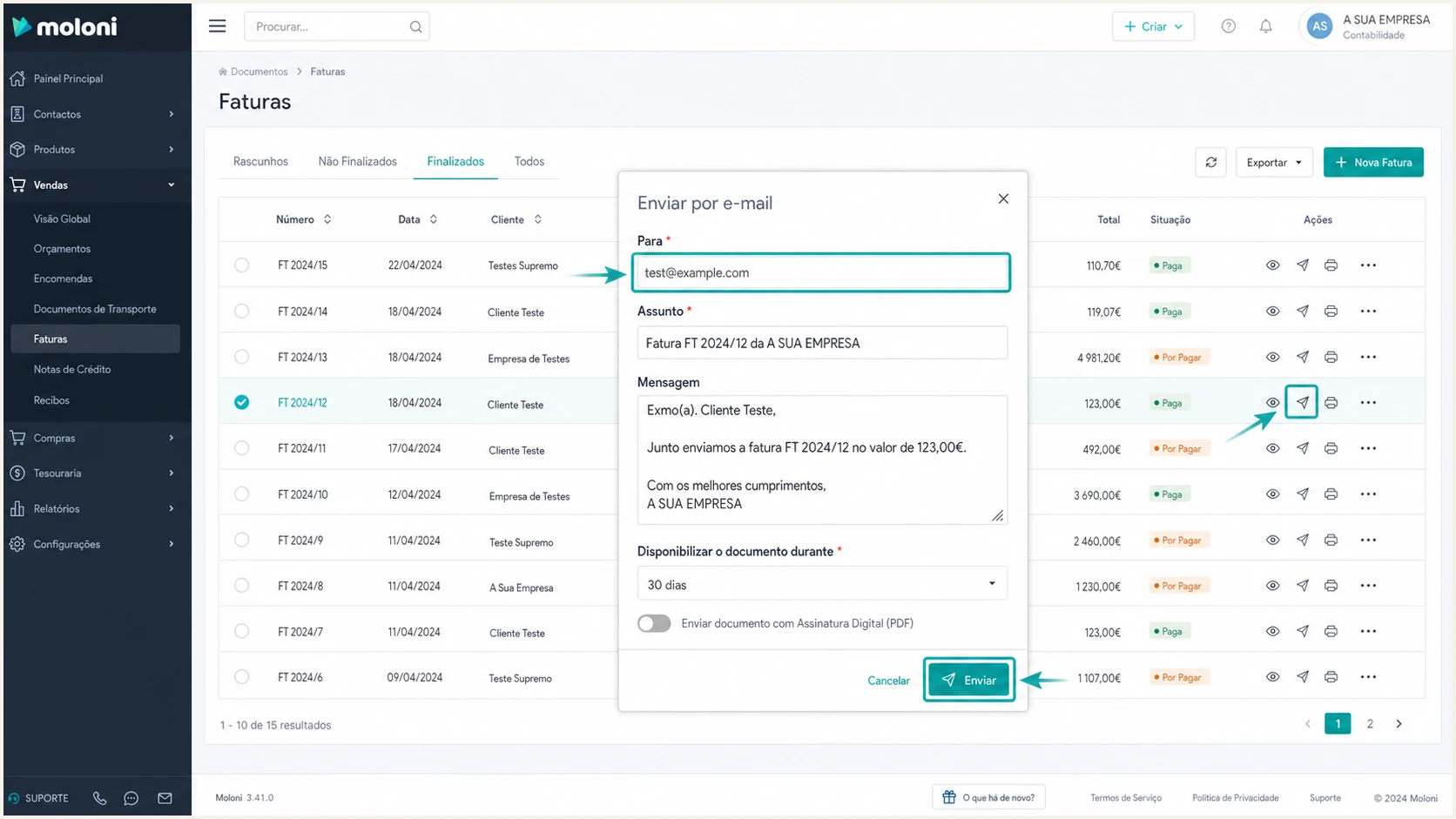
Moloni invoice email dialog used to send an authentication test
Send the test to an address where the complete original message can be retrieved. Keep the raw headers and the UTC send time so Moloni support can trace the event if signing or return-path configuration is missing.
The email tester provides a quicker end-to-end check. Send a Moloni document to the generated test address, then review the authentication, alignment, message structure, and delivery findings in one report.
Email tester
Send a real email to this address. Suped shows a results button when the test is ready.
?/43tests passed
Use the result to separate DNS problems from Moloni account problems. SPF PermError or missing DNS belongs in the DNS zone. A missing DKIM-Signature after the public key resolves belongs with Moloni support.
|
|
|
|---|---|---|
SPF | Pass, aligned | Merge both IPs |
DKIM | Pass, aligned | Check key and signing |
DMARC | Pass | Fix one aligned path |
DNS | One record each | Remove duplicates |
Expected authentication results for a Moloni custom sender
Do not chase SPF alignment blindly
Some sending paths keep a provider-owned Return-Path. In that case, SPF can pass without aligning and DMARC can still pass through aligned DKIM. For Moloni custom sending, check the Return-Path in a received message, but treat a fully passing aligned DKIM result as sufficient.
Get alerted when it breaks
- Route aggregate reports: Send DMARC rua data to a reporting platform that parses XML and groups results by source.
- Watch both IPs: Track 94.46.130.38 and 94.46.130.39 separately so a failure on one Moloni server is visible.
- Alert on changes: Trigger notifications when DMARC failures rise, the DKIM selector disappears, or an unknown source starts using the domain.
- Correlate reputation: Check domain and IP blocklist (blacklist) status alongside authentication rather than investigating each signal in isolation.
- Assign the fix: Give the DNS owner the failed mechanism, affected source, first-seen time, and exact correction.
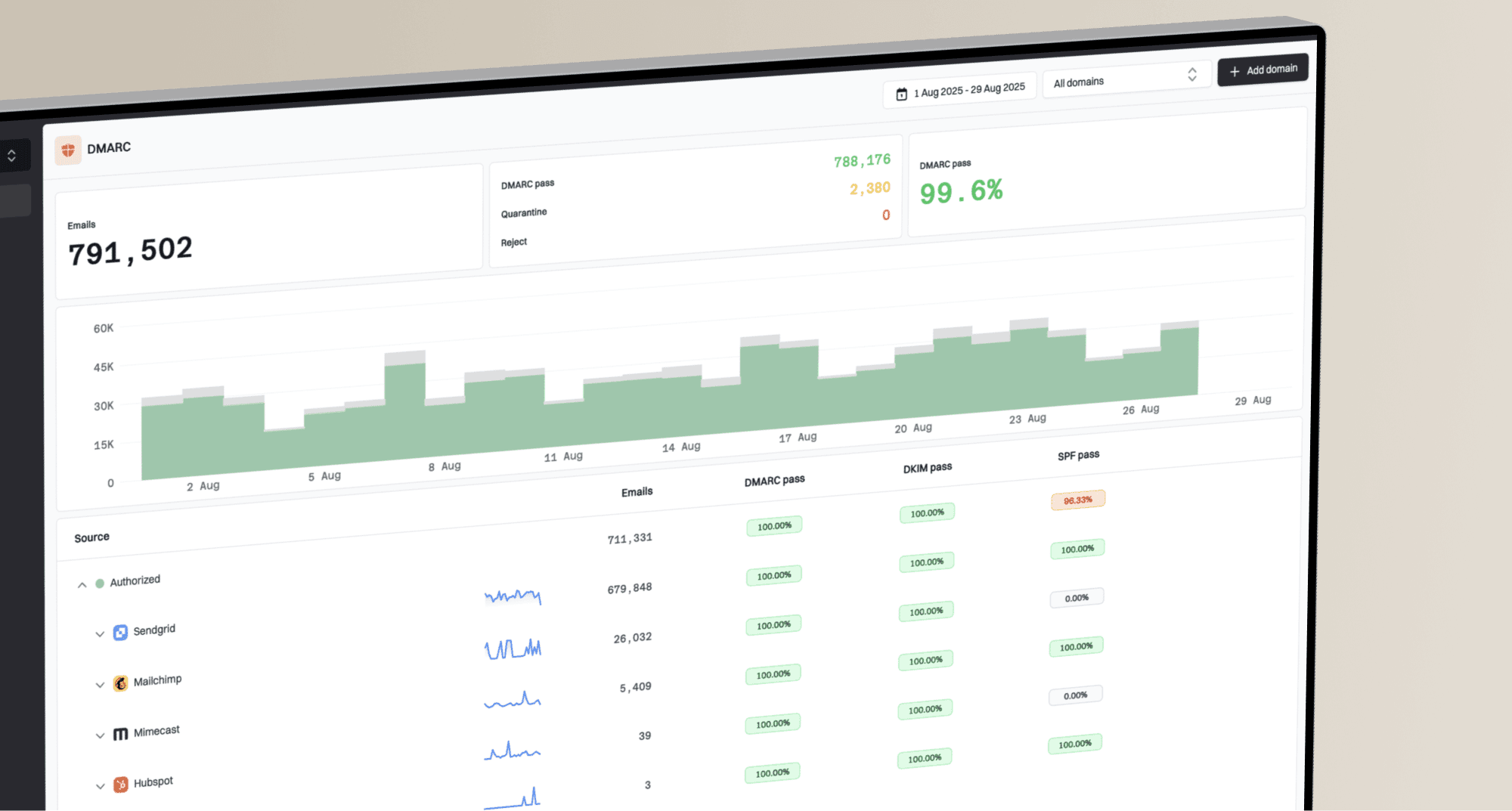
Suped's DMARC monitoring parses aggregate reports into source-level issues and alerts. For Moloni, create a source rule for the documented IPs and selector, then investigate any different IP or d= domain before approving it. SPF, DKIM, blocklist (blacklist), and deliverability signals remain available in the same operational view.
Manual report handling
- Input: Compressed XML files arrive from many receivers.
- Response: Someone must normalize sources, compare failures, and notice changes.
Suped monitoring
- Input: Reports are grouped into verified and unverified sending sources.
- Response: Alerts identify the failure and provide steps to fix it.
Make the alert actionable
A useful Moloni alert names the affected IP, authentication method, aligned domain, failure rate, and first-seen time. Suped records those details and connects them to the correction instead of sending a generic DNS warning.
Secure your domain with p=reject
- Inventory every source: Identify all legitimate senders in DMARC data, including Moloni's two IPs, before changing policy.
- Fix alignment: Require each legitimate source to pass DMARC through aligned SPF, aligned DKIM, or both.
- Cover subdomains: List any subdomain that sends mail and decide whether the parent policy should apply through sp=.
- Enforce quarantine: Move the complete policy to p=quarantine, review aggregate data and legitimate failures, then correct every approved source that still fails.
- Enforce rejection: Publish p=reject when all known legitimate sources pass and new-source alerts are active.
- Never step backward: If the domain already has quarantine or reject, keep it and repair Moloni before enabling the custom sender.
Staged DMARC policy valuesDNS
# Monitor
"v=DMARC1; p=none; rua=mailto:dmarc@example.com"

# Enforce quarantine
"v=DMARC1; p=quarantine; rua=mailto:dmarc@example.com"

# Enforce rejection
"v=DMARC1; p=reject; rua=mailto:dmarc@example.com"
Policy staging should follow observed sources, not a calendar alone. A quiet week can miss monthly invoices, scheduled notices, or low-volume applications, so keep p=none until a complete sending cycle has been reviewed. Do not rely on pct or assume t=y will produce identical handling at every receiver.
Ready for p=reject
- Known mail: Every legitimate source is identified and has an owner.
- Moloni result: Repeated invoice tests show dmarc=pass.
- Operations: Failure and new-source alerts reach a responsible person.
- Coverage: Subdomain behavior and inactive senders are documented.
Not ready for p=reject
- Unknown volume: Unverified sources still send meaningful mail.
- Moloni result: DKIM is unsigned or both aligned paths fail.
- Reports: Aggregate data is unread or is not reviewed.
- Ownership: No person can change DNS or contact Moloni support quickly.
Suped's Hosted DMARC supports controlled policy changes without repeated direct TXT edits. Its issue detection shows which Moloni authentication path still fails, while alerts catch regressions after p=reject is active.
Use evidence for the final change
Use verified-source review and repeated Moloni tests before changing the policy. Suped can group those sources, show specific authentication failures, manage hosted policy changes, and alert on regressions after p=reject is active.