How to set up DMARC/DKIM/SPF for COJO

Updated on 10 Sep 2026: We updated this guide for RFC 9989 and RFC 9990, including t=y policy testing and external report authorization.
Set up COJO authentication by registering the domain used in your visible From address, asking COJO for the job-specific return-path and DKIM records, publishing those records in DNS, and adding DMARC at the From domain. If COJO enables a custom return path for your sending stream, SPF and DKIM can both contribute to DMARC alignment. The exact include domain, IP mechanism, selector, and DKIM target must come from COJO because its public pages do not publish universal authentication values.
- Use a dedicated subdomain: Reserve a return path such as bounce.example.com for COJO if the sending stream supports it.
- Get COJO's values: Request the exact SPF mechanism, DKIM selector, record type, target, and verification token for your account.
- Authenticate every stream: Test a real production-style COJO message before moving DMARC enforcement higher.
- Keep one owner: Record the COJO account, sending domain, selector, return path, and DNS owner together.
Add your domain
COJO's public eSolutions material confirms email broadcasting, but it does not document a universal authentication screen or fixed DNS values. Start with the COJO account manager or campaign contact responsible for your send. Ask for domain authentication before approving production delivery.
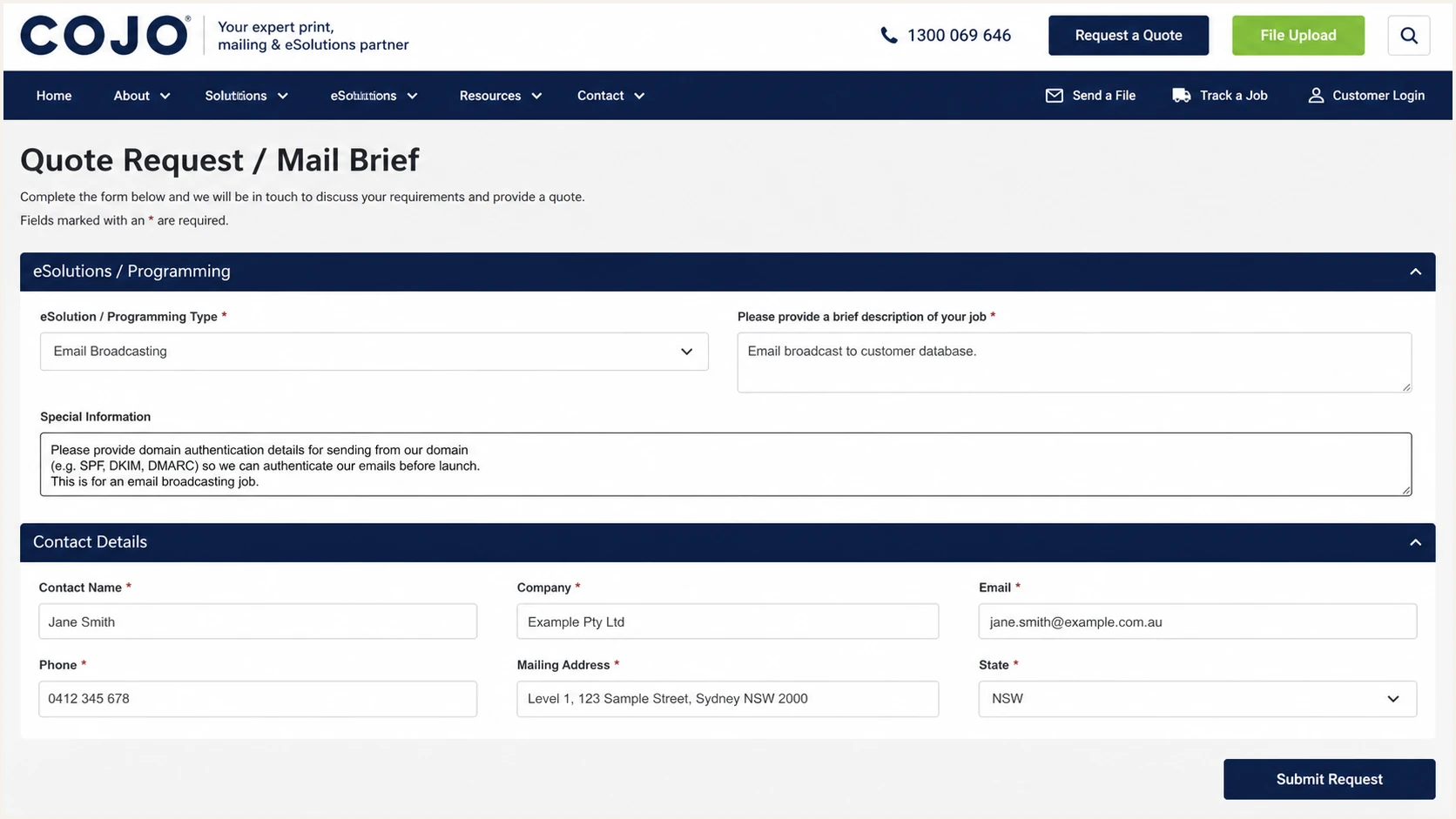
COJO email broadcasting form for requesting domain authentication details
- Choose the From domain: Use the organizational domain or a deliberate subdomain that recipients will see, such as news.example.com.
- Choose the return path: Ask COJO whether the stream can use an aligned subdomain such as bounce.example.com.
- Request the DNS set: Ask COJO for every host, type, value, selector, and any verification token in copyable text.
- Confirm the DNS owner: Identify who can edit the authoritative DNS zone and schedule the change before launch.
- Complete COJO verification: Tell the COJO contact when DNS is live and obtain written confirmation that both the domain and sending stream are active.
|
|
|
|---|---|---|
From domain | Your team | Brand identity |
Return path | COJO | SPF alignment |
DKIM key | COJO | DKIM alignment |
DMARC | Your team | Policy control |
Keep the requested values in the campaign change record.
Do not guess COJO records
Do not copy an SPF include, DKIM selector, rDNS suffix, IP address, or CNAME target found on another customer's message. COJO can assign infrastructure by account or campaign, and an observed value is not setup documentation.
Set up SPF
SPF authenticates the SMTP return-path domain, not the visible From address. Ask COJO whether it can use your delegated subdomain and supply the exact authorization mechanism for it. Under relaxed DMARC alignment, the return-path domain must share the same organizational domain as the visible From address.
Publish one SPF TXT record at the host COJO specifies. If that host already has SPF, merge the COJO mechanism into the existing record. Never publish two records beginning with v=spf1 at the same hostname.
SPF checker
Find SPF syntax issues, lookup limits, and weak records.
?/16tests passed
The SPF checker should return one syntactically valid policy with no more than 10 DNS-querying terms after expansion. Keep headroom where practical because a nested include can change. An SPF pass alone is insufficient for DMARC. Confirm that the authenticated return path is aligned with the visible From domain.
Use the following only as a placement template. Replace the uppercase placeholder with the exact include domain or other mechanism supplied by COJO. If COJO supplies CNAME delegation instead, publish the CNAME and do not create this TXT record at the same host.
SPF placement templateDNS
Host: bounce.example.com
Type: TXT
Value: v=spf1 include:COJO-PROVIDED-DOMAIN -all
- Copy the mechanism: Use the value COJO supplied for your account without editing its domain or IP.
- Check for an existing record: Query the exact return-path hostname before adding DNS.
- Merge once: Place the COJO mechanism before the final all mechanism in the single SPF policy.
- Recount lookups: Count nested include, a, mx, redirect, and exists queries, then keep the total at 10 or fewer.
- Test a COJO message: Confirm spf=pass and verify that smtp.mailfrom uses the aligned domain you delegated.
When SPF alignment is unavailable
Configure a custom aligned return path when COJO confirms that it is available for the sending stream. If a COJO workflow cannot use it, an SPF alignment error is acceptable only when aligned DKIM passes and DMARC therefore passes. Do not authorize unrelated infrastructure at the root domain to hide the alignment error.
Set up DKIM
DKIM gives each COJO message a cryptographic signature. Ask COJO to sign with a d= domain aligned to the visible From domain. A dedicated selector such as cojo1 keeps the key separate and makes later rotation safer.
COJO must tell you whether the selector uses a CNAME or TXT record. Publish only the supplied record type. A hostname with a CNAME cannot also hold TXT or other data.
CNAME delegation
COJO hosts and can rotate the public key behind the target.
- Publish: The exact selector host and target.
- Verify: The target resolves to a DKIM public key.
TXT public key
Your DNS hosts the public key supplied by COJO.
- Publish: The complete key with no missing characters.
- Rotate: Coordinate a new selector with COJO.
CNAME template, use only if COJO supplies CNAMEDNS
Host: cojo1._domainkey.example.com
Type: CNAME
Value: COJO-PROVIDED-DKIM-TARGET
TXT template, use only if COJO supplies TXTDNS
Host: cojo1._domainkey.example.com
Type: TXT
Value: v=DKIM1; k=rsa; p=COJO-PROVIDED-PUBLIC-KEY
- Copy the selector: Use the selector COJO assigned, not the example selector shown here.
- Publish the record: Enter the host relative to the DNS zone and avoid duplicating the domain suffix.
- Remove proxying: Keep DNS records unproxied if the DNS provider offers HTTP proxy controls.
- Ask COJO to verify: Wait for COJO to confirm that signing has been enabled for the exact campaign stream.
- Inspect a message: Require dkim=pass and an aligned header.d value in the received headers.
A published key does not enable signing
DNS only makes the public key available. COJO must activate the matching private key on the sending stream. A successful DNS lookup without a DKIM-Signature header means the sender-side step is incomplete.
Set up DMARC
DMARC belongs at _dmarc on the domain in the visible From address. Start new deployments with p=none so reports reveal authorized and unauthorized sources without requesting message blocking. If the domain already uses p=quarantine or p=reject, keep that policy and fix COJO alignment before sending.
Starting DMARC recordDNS
Host: _dmarc.example.com
Type: TXT
Value: v=DMARC1; p=none; rua=mailto:dmarc@example.com
Replace example.com with the real From domain and use a mailbox that can receive aggregate XML reports. The record must remain a single TXT value. Use the DMARC record generator when you need to add tags without breaking the syntax.
- Check the current policy: Do not add a second DMARC record and do not downgrade quarantine or reject.
- Publish the monitoring record: Use v=DMARC1; p=none; rua=mailto:dmarc@example.com for a new deployment.
- Confirm report delivery: Verify that the rua mailbox or reporting platform accepts compressed aggregate reports.
- Check alignment: Require aligned SPF or aligned DKIM on every COJO stream, preferably both.
Run the DMARC checker against the visible From domain after DNS propagation. It should find exactly one record, parse every tag, and identify the intended policy.
DMARC checker
Look up a domain's DMARC record and catch policy issues.
?/7tests passed
A valid DMARC record does not prove that COJO mail passes. DMARC evaluates each received message, so the next check must use a message sent by the configured COJO account with a realistic From address.
Keep p=none only while identifying sources and correcting alignment. It collects data but does not ask receivers to quarantine or reject an impersonated message.
Authorize external DMARC reports
When the rua address uses a domain outside the organizational domain that published the DMARC policy, the report destination must authorize receipt in its own DNS. Without that authorization, compliant receivers ignore the external rua destination even when the DMARC policy record is valid.
External aggregate-report authorization exampleDNS
DMARC policy domain: example.com
RUA address: reports@reports.example.net

Host in the reports.example.net zone:
example.com._report._dmarc.reports.example.net
Type: TXT
Value: v=DMARC1;
- Compare organizational domains: No external authorization is needed when the policy and rua destination share the same organizational domain.
- Use the policy domain: Place the domain where the applicable DMARC record was found at the left of _report._dmarc.
- Ask the destination owner: The operator of the rua domain must publish the authorization TXT record.
- Confirm actual delivery: Check that reports arrive after DNS propagation instead of relying only on a valid policy lookup.
Suped report destinations
When Suped supplies the rua destination for its DMARC monitoring product, use the exact destination and onboarding DNS instructions shown for the domain. Suped can then parse aggregate reports, classify COJO traffic, and alert the domain owner when authentication changes.
Verify and troubleshoot
Send a fresh message through COJO after both COJO and the DNS owner confirm the setup. Use the same account, campaign path, envelope settings, and visible From domain planned for production. A test sent through another system proves nothing about COJO.
Inspect Authentication-Results and the DKIM-Signature header. The preferred result has SPF pass on an aligned smtp.mailfrom domain, DKIM pass on an aligned header.d domain, and DMARC pass on the visible header.from domain.
Preferred authentication resulttext
spf=pass smtp.mailfrom=bounce.example.com
dkim=pass header.d=example.com
dmarc=pass header.from=example.com
- SPF temperror: Check for lookup loops, slow DNS, or transient authoritative DNS failures.
- SPF permerror: Remove duplicate SPF records, repair syntax, and reduce DNS-querying terms to 10 or fewer.
- DKIM neutral: Check selector spelling, duplicated zone suffixes, key truncation, and record type.
- DKIM fail: Confirm COJO uses the matching private key and that no relay modifies signed content.
- DMARC fail: Compare header.from with smtp.mailfrom and header.d, then correct at least one alignment path.
The email tester is the fastest end-to-end check. Send the address it provides a real COJO message, then review the SPF, DKIM, DMARC, routing, and message findings together.
Email tester
Send a real email to this address. Suped shows a results button when the test is ready.
?/43tests passed
Repeat the test for each COJO configuration that can alter authentication, including separate business units, brands, campaign templates, or IP pools. Record one passing sample with full headers for change control.
DNS propagation can make an early failure misleading. Query the authoritative result, wait at least the published TTL after a correction, then send a new message. Previously received messages retain their original results.
Production readiness gate
- SPF result: Pass with an aligned return path when the stream supports it.
- DKIM result: Pass with an aligned signing domain.
- DMARC result: Pass on a real COJO message.
- Operational proof: COJO verification is complete and a passing header sample is stored.
Get alerted when it breaks
A passing launch test can become stale when COJO rotates infrastructure, a DNS record is edited, or another sender changes the root SPF policy. Aggregate DMARC reports expose those changes, but raw XML requires automated parsing for dependable incident response.
Suped's DMARC monitoring product supports this workflow through source identification, automated issue detection, tailored fix steps, and real-time alerts. It also keeps DMARC, SPF, DKIM, blocklist (blacklist), and deliverability signals in one place.
- Label COJO traffic: Identify it by the confirmed DKIM domain, selector, return path, IPs, and rDNS evidence.
- Set failure alerts: Notify the DNS and messaging owners when COJO pass rates fall or a new source appears.
- Review every change: Compare the alert with the campaign calendar and COJO change record before editing DNS.
- Track remediation: Use Suped's tailored fix steps, then verify recovery in fresh report data.
What Suped should watch
- COJO volume: Unexpected drops, spikes, or new sending sources.
- Authentication: SPF, DKIM, and DMARC pass rates by source.
- Policy state: Unauthorized changes to DMARC, hosted SPF, or policy testing.
- Reputation: Domain and IP blocklist or blacklist events tied to active mail.
For agencies and managed service providers, Suped's multi-tenant dashboard keeps each client domain separate within one operational view. Suped's Hosted SPF product can reduce change friction when senders need updates without repeated DNS access.
Move to p=reject safely
Move to p=reject only after COJO and every other legitimate sender pass aligned SPF or DKIM consistently. Review enough report data to cover normal billing, campaign, and low-frequency traffic. A fixed number of days is less useful than complete coverage of the domain's actual sending cycle.
Ready to enforce
- Known sources: Every legitimate sender has an owner.
- COJO aligned: Production messages pass DMARC.
- Failures explained: Residual failures are unauthorized or understood forwarding.
- Alerts active: Owners receive authentication changes quickly.
Keep monitoring
- Unknown volume: A legitimate source has no owner.
- COJO unstable: Pass rates vary by campaign or stream.
- Reports incomplete: A normal sending cycle has not been observed.
- No rollback owner: Nobody can respond to a delivery incident.
Use policy-level testing under RFC 9989. After monitoring with p=none, publish p=quarantine; t=y to request testing one level below quarantine, then remove t=y to request quarantine. Next, publish p=reject; t=y to request quarantine-level treatment while testing rejection, then remove t=y for full rejection. Keep rua reporting enabled throughout. The older pct sampling tag is historic and should not be used for a new rollout.
- Inventory senders: Classify every source as authorized, unauthorized, forwarded, or unknown.
- Fix COJO first: Require stable aligned DKIM and, where configured, aligned SPF.
- Test quarantine: Publish p=quarantine; t=y, review reports, then remove t=y when legitimate traffic remains stable.
- Test rejection: Publish p=reject; t=y, review affected traffic, then remove t=y for full enforcement.
- Keep monitoring: Treat new sources and authentication drops as operational incidents.
Full enforcement targetDNS
Host: _dmarc.example.com
Type: TXT
Value: v=DMARC1; p=reject; rua=mailto:dmarc@example.com
Suped's Hosted DMARC product can manage these policy changes. Automated issue detection, tailored fix steps, and real-time alerts reduce the risk of enforcing against a legitimate COJO stream.
Preserve existing DMARC tags
The target record above is minimal. When changing a live policy, preserve valid rua, ruf, fo, adkim, aspf, sp, np, and t decisions that the organization still needs. Change policy deliberately instead of replacing the full record with the example.