How do I fix Apple Mail DMARC failure when sending from Gmail with a non-Gmail domain?

Published 13 Jun 2025
Updated 4 Aug 2026
13 min read
Summarize with
Updated on 4 Aug 2026: We clarified the correct Apple Mail SMTP path for both Google Workspace and custom domains hosted elsewhere, including how to verify DMARC alignment in received headers.
Fix this by making Apple Mail send the non-Gmail address through an SMTP account authorized for that domain, not through a personal Gmail account. For a Google Workspace domain, select the matching Workspace account. For a domain hosted elsewhere, use that mail provider's authenticated outgoing server. In the failure pattern, the visible From address uses a custom domain, but the Return-Path and SMTP authentication use a Gmail address. SPF passes for Gmail, but it does not match the From domain. DKIM either does not exist for the custom domain or signs as a Google-controlled domain. DMARC fails because neither SPF nor DKIM passes with a domain match to the From domain.
The fastest practical fix starts in Apple Mail account settings. Select the custom-domain account and change its outgoing mail server to the SMTP account for that address. If Apple Mail selected another Gmail SMTP server after a send error, switch the outbound server dropdown back to the right account. Then send a fresh test email and inspect the Authentication-Results header.
A Gmail rejection that includes SMTP code 5.7.26 is another strong clue that the sender failed authentication under the From domain's DMARC policy. The code confirms the authentication problem, but the header identifies the domain mismatch and the authentication method behind it.
- Direct fix: Match the Apple Mail From address with an SMTP account that authenticates the same domain.
- Main symptom: Authentication-Results says DMARC failed for the custom domain while SPF passed for a Gmail address.
- Common trigger: Apple Mail asks to use another outgoing server, then keeps sending that identity through the wrong Gmail account.
- Best confirmation: A new test message shows SPF or DKIM matching the custom From domain.
Why this fails
DMARC does not ask whether Gmail is allowed to send Gmail mail. It asks whether the domain in the visible From header is authenticated by SPF or DKIM. In this failure mode, Apple Mail composes the message as user@example.com, but it authenticates to Gmail SMTP as user@gmail.com. Gmail then sends the message using the Gmail account as the envelope sender. The receiver sees SPF pass for Gmail, but the visible From domain is the custom domain, so SPF does not match.
DKIM does not save the message unless the sending service signs with the custom domain. A header such as X-Google-DKIM with d=1e100.net does not match the custom domain. It can be valid as a Google transport signature, but DMARC needs a passing DKIM signature whose d= domain has the same organizational domain as the visible From address under relaxed alignment. Strict adkim=s requires an exact domain match.
The key distinction
This is usually a DMARC domain-match failure, not a simple DKIM key lookup failure. A DNS DKIM lookup can show that a key exists, but the actual message still fails DMARC if the sending service did not sign that message with the custom domain.
Header pattern that points to the problemtext
Authentication-Results: mx.google.com;
  spf=pass smtp.mailfrom=user@gmail.com;
  dmarc=fail header.from=example.com

Return-Path: <user@gmail.com>
From: User <user@example.com>
X-Google-DKIM-Signature: d=1e100.net; s=20230601;
That header pattern points to the sending path, so fix the path before editing the DMARC policy. A stricter or looser DMARC policy only changes the domain owner's requested handling for a failed message. It does not make authentication match the From domain, and receivers can still apply local filtering.
What to check first
Start with the received message headers, not the Apple Mail compose window. The compose window tells you what the user intended. The headers tell you what actually happened. Google also has a useful DMARC troubleshooting page for Workspace administrators, but the header itself is the fastest source of truth.
- Visible From: Find the domain in the From: header. This is the domain DMARC protects.
- Envelope sender: Check Return-Path and smtp.mailfrom. If they show a Gmail address, SPF will not match the custom From domain.
- DKIM domain: Look for DKIM-Signature and its d= value. A Google transport signature alone does not authenticate the custom From domain.
- DMARC result: Read the receiver's Authentication-Results line. It usually states the DMARC result and the domain that failed.
Wrong path
- From header: Custom domain address.
- SMTP login: Personal Gmail credentials.
- SPF result: Passes for Gmail, no match.
- DMARC result: Fails for the custom domain.
Correct path
- From header: Custom domain address.
- SMTP login: Account authorized for that domain.
- Auth result: SPF or DKIM matches the From domain.
- DMARC result: Passes through the matching method.
?
What's your domain score?
Deep-scan SPF, DKIM & DMARC records for email deliverability and security issues.
How to fix Apple Mail
Apple Mail is the mail client. It needs an outbound SMTP server to send the message. If the wrong outbound server is selected, the message can keep the original custom-domain From address while authenticating through a different Gmail account. That combination is exactly what DMARC is designed to detect.
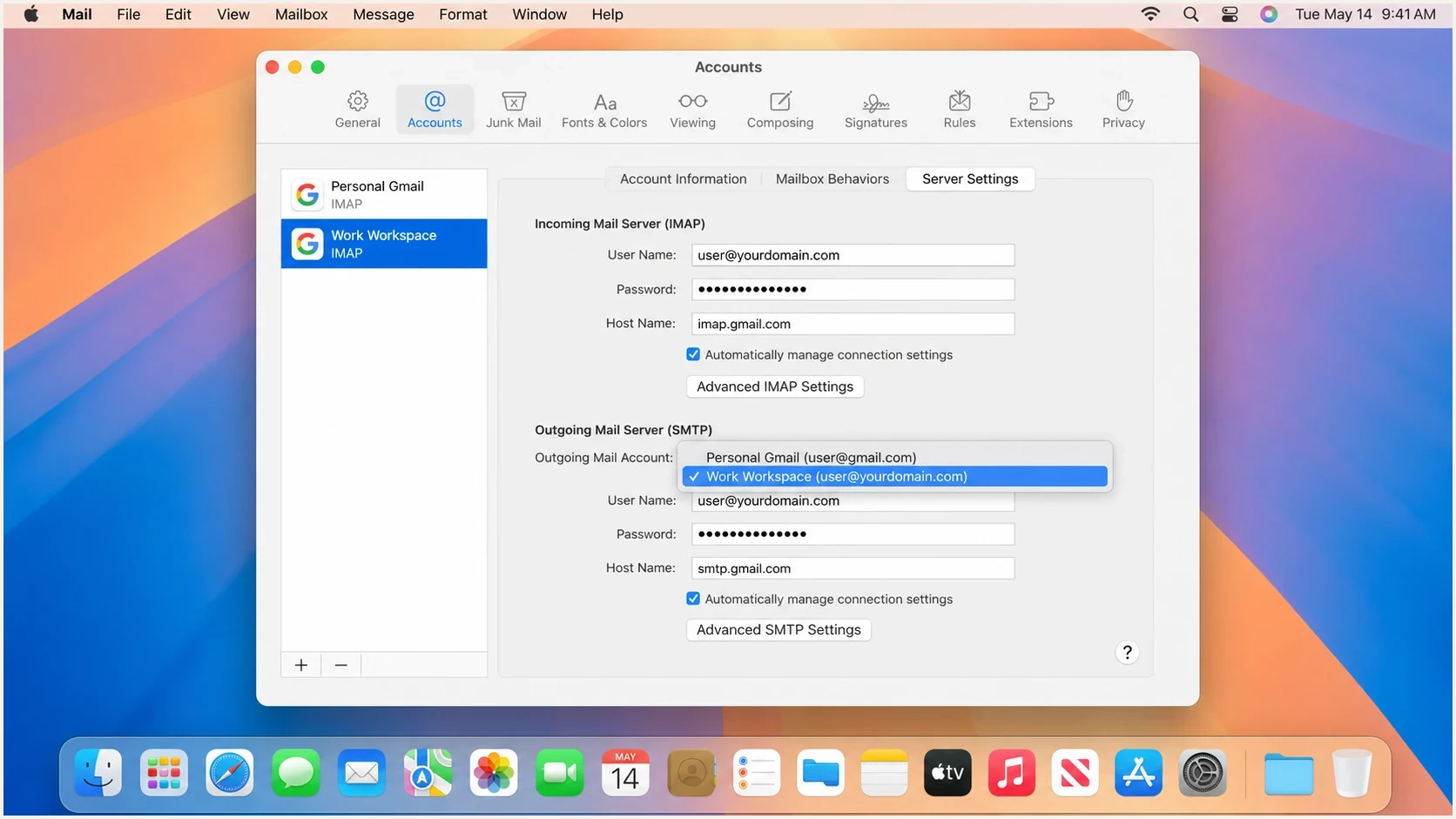
Apple Mail Server Settings with the correct Workspace outgoing account selected.
- Open settings: In Apple Mail, choose Mail, Settings, Accounts, then select the custom-domain account.
- Check server settings: Open Server Settings, use the outgoing Account menu, then choose Edit SMTP Server List if you need to inspect the login or host name.
- Select the right sender: Choose the Google Workspace account or provider SMTP account that belongs to the custom-domain address.
- Detach the wrong fallback: Stop the custom-domain account from using personal Gmail SMTP. Remove that server entry only if no other Apple Mail account uses it.
- Send a new test: Do not retest an old message. Send a fresh message and inspect the headers as received.
A small Apple Mail behavior that causes real trouble
If Apple Mail cannot send through the account's SMTP server, it can ask to use another server. Choosing a personal Gmail server there can preserve the custom-domain From address while sending with personal Gmail credentials. The send appears successful, but authentication no longer matches.
If the account was added messily over time, removing the custom-domain account from Apple Mail and adding it again can be cleaner than repairing every saved SMTP association. Give each outbound account a clear description, such as "Work example.com" instead of a generic "Gmail" label. Apple Mail displays that description in its server menus, which helps prevent the same mistake later.
If the domain does not use Google Workspace
A non-Gmail From address is not necessarily a Google Workspace address. If the custom domain's mailbox is hosted by another provider, configure Apple Mail to use that provider's authenticated SMTP server. A personal Gmail login authorizes Gmail sending, but it does not give Gmail a custom-domain DKIM key or make a gmail.com envelope sender match the custom From domain.
Gmail's web-based "Send mail as" entry and Apple Mail's outgoing server are separate configurations. Messages composed in Apple Mail use the outgoing server selected in Apple Mail. Editing the alias in Gmail on the web does not change that desktop setting.
- Get the provider settings: Use the SMTP host name, port, TLS option, and username issued for the custom-domain mailbox.
- Configure Apple Mail: Add or edit that server in the SMTP Server List, then select it for the custom-domain account.
- Authorize the service: Publish the SPF record and DKIM key required by the provider that actually sends the mail.
- Verify the received message: Confirm that SPF or DKIM passes and matches the domain in the visible From address.
When the domain has no SMTP service
A forwarding-only address does not automatically include a valid outgoing service. If the domain provider offers no authenticated SMTP option, use a mail service that can send for the custom domain and provide domain-matched SPF or DKIM. Do not route the address through personal Gmail SMTP and expect the display name or From alias to create DMARC authentication.
Fix Google Workspace authentication
After the Apple Mail outbound account is corrected, confirm Google Workspace is configured to authenticate the domain properly. The expected setup is straightforward: Gmail sends the message for the Workspace user, the envelope sender belongs to the Workspace domain, Google signs DKIM with the custom domain, and DMARC reports show a domain-matched pass.
|
|
|
|---|---|---|
SMTP | Matching Workspace user | Personal Gmail login |
SPF | Matching mailfrom domain | gmail.com mailfrom |
DKIM | Custom-domain signature | Google transport signature only |
DMARC | Pass through either method | Both matching methods fail |
Use this table as a compact checklist for the Workspace side.
If DKIM is missing for the custom domain, generate or confirm the Google Workspace DKIM key in the Admin console. Publish the selector record in DNS and enable signing. Then send a new message and look for a DKIM-Signature line where d=example.com or the relevant organizational domain. A transport signature with a Google domain does not prove Workspace domain signing is active.
Typical DMARC record while testingdns
_dmarc.example.com. 3600 IN TXT (
  "v=DMARC1; p=none; rua=mailto:dmarc@example.com; "
  "adkim=r; aspf=r"
)
A p=none policy requests monitoring. It does not repair domain alignment or guarantee inbox delivery. If the domain already uses p=quarantine or p=reject, do not weaken it merely to hide this symptom. Fix the sending source and confirm it in reports before changing enforcement. Suped's DMARC monitoring workflow groups failures by source and shows whether SPF or DKIM provides domain alignment for each sender.
DMARC checker
Look up a domain's DMARC record and catch policy issues.
?/7tests passed
How to prove the fix worked
The fix has worked when a new message sent through Apple Mail shows a domain-matched SPF pass or a domain-matched DKIM pass for the custom From domain. DMARC needs only one passing method with domain alignment. Keeping both SPF and DKIM healthy gives normal domain mail two valid authentication paths.
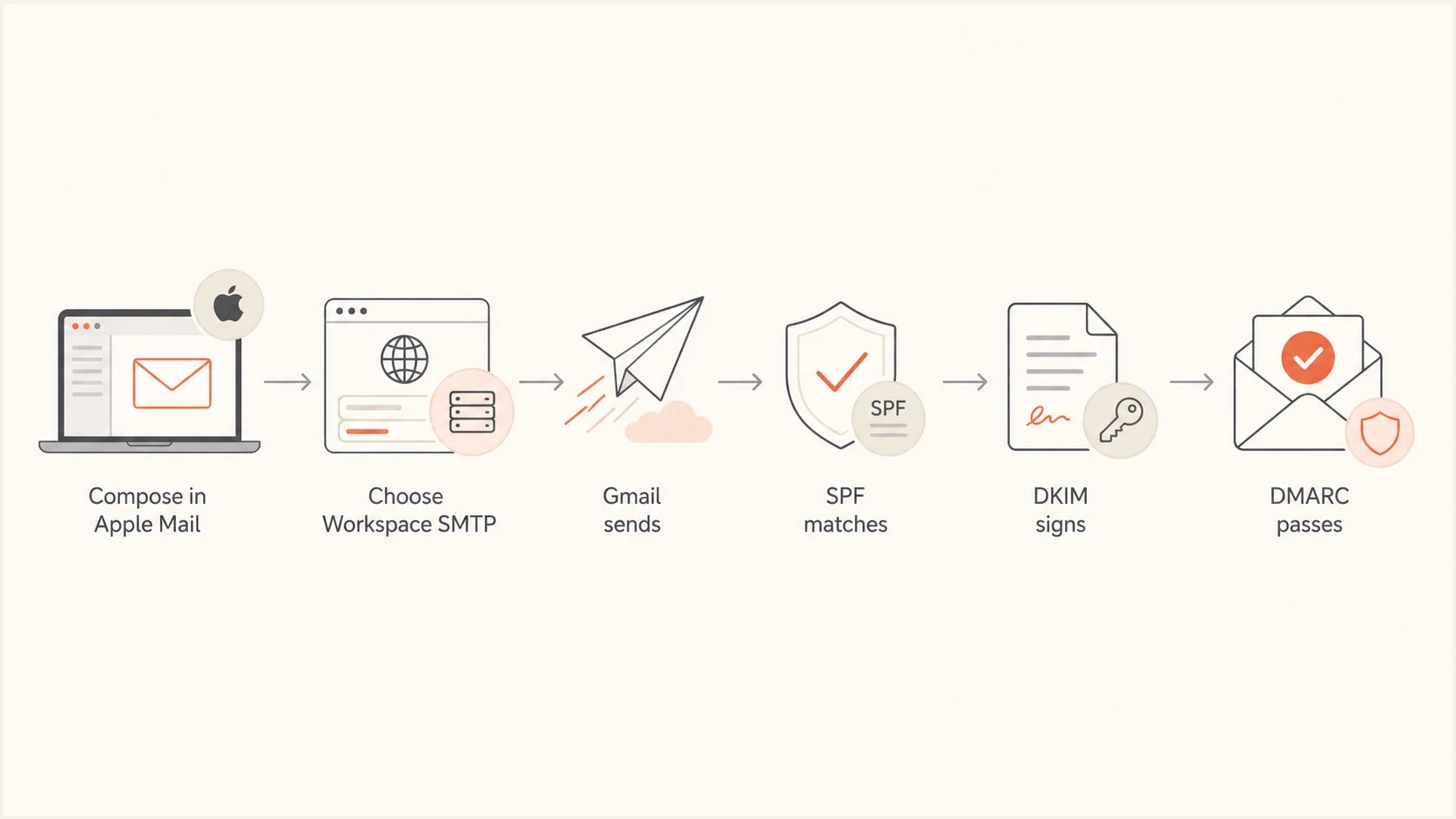
Correct Apple Mail sending path: Workspace SMTP, domain-matched authentication, DMARC pass.
Header pattern after the fixtext
Authentication-Results: mx.google.com;
  spf=pass smtp.mailfrom=user@example.com;
  dkim=pass header.d=example.com;
  dmarc=pass header.from=example.com

Return-Path: <user@example.com>
From: User <user@example.com>
If the new header still fails DMARC, separate the failure into two questions. First, is Apple Mail using the right outbound account? Second, is the selected service signing or sending with a domain match for that domain? The answer is usually visible in one or two header lines.
- Still Gmail mailfrom: Apple Mail is still using the wrong SMTP credentials or outgoing server entry.
- No DKIM signature: Domain DKIM signing is not enabled, DNS is not published, or the message did not pass through the intended sending service.
- DKIM passes elsewhere: The DKIM signature is valid, but its signing domain does not match the visible From domain.
- Receiver rejects: Check whether the domain policy is quarantine or reject, then fix the source before changing policy.
For broader troubleshooting, this closely relates to cases where SPF and DKIM pass but DMARC still fails because the authenticated domain is not the domain the recipient sees in the From header.
Where Suped fits
Suped will not change the Apple Mail dropdown, but Suped can identify and monitor this failure through DMARC aggregate reports. The reports identify the source and show whether SPF or DKIM domain alignment failed. They also show which domain policy the receiver evaluated.
For this workflow, Suped turns raw aggregate reports into source-level issues and fix steps. That helps a team spot mail sent through the wrong account while the domain policy is at quarantine or reject, then confirm that later messages pass after the Apple Mail setting changes.

Issue steps to fix dialog showing the issue overview, tailored fix steps, and verification action
For this Apple Mail and Gmail situation, Suped's issue view can confirm that the failing messages are coming through Google infrastructure but not matching the custom domain. After the mail client setting is corrected, the next aggregate reports should show a domain-matched pass for new messages.
- Automated detection: Suped identifies broken authentication patterns and provides steps for resolving them.
- Unified monitoring: DMARC, SPF, DKIM, blocklist (blacklist) monitoring, and deliverability signals are in one place.
- Hosted controls: Use Hosted DMARC to stage policy changes without repeating manual DNS edits.
- Team workflows: Alerts and multi-domain dashboards help teams catch the wrong-source problem before enforcement disrupts mail flow.
Views from the trenches
Best practices
Name each outbound account by domain so users can select the right SMTP server quickly.
Confirm headers after every Apple Mail account change, using a fresh message each time.
Keep Workspace DKIM enabled so domain signing protects mail when SPF matching changes.
Common pitfalls
Treating a Google transport DKIM signature as proof that the From domain is signed.
Changing the DMARC policy before first confirming which SMTP account Apple Mail used.
Leaving personal Gmail as a fallback server for business-domain mail in Apple Mail.
Expert tips
Read smtp.mailfrom before SPF conclusions; it usually reveals the wrong account fast.
Use a second mailbox test when a receiver gives sparse authentication failure details.
Check Apple Mail's outgoing dropdown after any send error or account password change.
Marketer from Email Geeks says the header pattern showed Apple Mail sending the custom From address through a personal Gmail account, which made DMARC fail.
2025-01-22 - Email Geeks
Marketer from Email Geeks says Apple Mail can prompt users to choose another SMTP server, and that choice can keep causing failures until the outbound account is corrected.
2025-01-23 - Email Geeks
The practical answer
The fix is usually simple: make Apple Mail send the custom-domain identity through the matching Google Workspace account or the domain provider's authenticated SMTP server. The deciding clue is usually the Return-Path or smtp.mailfrom domain. If that domain is Gmail while the From header is the custom domain, DMARC has no matching SPF path.
Correct the outgoing server, confirm DKIM signing for the custom domain, send a fresh test, and keep DMARC reporting active. Once the sending service authenticates a domain that matches the From domain, enforcement can protect the domain without catching legitimate one-to-one mail from Apple Mail.




