How can I track which vendors share my email data with others?

Updated on 13 Aug 2026: We expanded this guide with a privacy policy review workflow and clearer evidence standards for aliases, headers, and DMARC.
Track vendor sharing by giving every vendor a unique email address, recording the signup context, and comparing future mail with that register. For a personal inbox, the strongest setup uses a custom domain with catch-all routing. For a business domain, pair aliases with DMARC monitoring so you can separate recipient data reuse from mail that impersonates your domain.
Plus tags such as name+vendor@example.com work for quick tracking, but they are easy to strip. A real alias such as vendor@tracking.example gives cleaner evidence because the local part itself names the vendor. Treat each alias like a receipt: record the vendor, date, purpose, and consent terms at the moment the address is provided.
Suped's product fits when the work expands to domain protection. It brings DMARC reporting, authentication checks, hosted records, alerts, and blocklist (blacklist) monitoring into one workflow. That helps teams compare alias evidence with approved sending sources without treating DMARC as proof that a recipient address was shared.
Start with one address per vendor
Use unique addresses, not one address everywhere. The address that receives an unexpected email identifies the vendor, form, event, newsletter, or purchase path that first collected it. A consistent naming system and evidence log make it easier to investigate whether a vendor shared the address, uploaded it to a partner, lost it in an incident, or had it matched with data from another source.
- Unique aliases: Create one address for each vendor, not each category, so the clue points to a named source.
- Central register: Store vendor name, alias, signup date, signup page, consent state, and notes.
- Header capture: Keep the full message source for any unexpected email that arrives on an alias.
- Sender comparison: Compare the visible brand, sending domain, return path, and unsubscribe domain.
- Action record: Log whether you unsubscribed, asked the vendor, blocked the sender, or retired the alias.
Fastest setup
If you only need a quick test, use plus addressing. If you want evidence that survives tag stripping, use a domain you control and a catch-all mailbox.
Alias examples
quick: name+vendor@example.com
stronger: vendor@example.net
catch-all: anything@example.net -> inbox@example.net
The old-school version of this method is address tagging; Hugh Lashbrooke wrote a concise example of address tracking that still explains the core idea well.
Choose the address strategy
Start with the address format, because the format controls the quality of your evidence. Plus addressing is convenient because many mailbox providers route it automatically. The tradeoff is that the plus tag is visible and simple to remove. A custom domain gives better attribution because you can create distinct names before the at sign and route them all to one inbox.
Plus addressing
Use it when you need speed and do not control a domain.
- Setup: Use a tag after the plus sign, then sign up with that address.
- Evidence: Good when the tag remains intact in the received email.
- Weakness: Weak when a sender strips the tag or normalizes the address.
- Best use: Low-risk newsletters, trials, and short-lived tests.
Custom domain aliases
Use them when attribution matters and you can manage DNS and routing.
- Setup: Route a catch-all mailbox or create aliases one by one.
- Evidence: Stronger because each local part is a distinct address.
- Weakness: Requires domain renewal, mailbox routing, and cleanup rules.
- Best use: Purchases, contracts, events, and business vendors.
|
|
|
|
|---|---|---|---|
Plus tag | name+tag | Fast setup | Tag stripped |
Catch-all | vendor@ | Strong attribution | Domain upkeep |
Random alias | a8f2@ | Privacy | Hard to read |
Forwarding | team@ | Shared team | Admin gaps |
Compact comparison of common tracking methods.
Use human-readable aliases for contracts or purchases when the address itself should explain the source later. Random aliases provide more privacy, but they need a manager or register. Without a register, a random alias becomes another mystery string in a spam folder.
Set up the register before signups
The register matters more than the mailbox rule. If aliases are created casually and documented later, the useful context disappears: why the address existed, which form collected it, what the privacy notice said, and whether the vendor had permission to share it. Keep the register simple enough that adding a row takes under a minute.
Vendor register templateCSV
vendor,alias,date,context,consent,policy_date,sharing_terms,status
Acme,acme@track.example,2026-06-05,checkout,opt_in,2026-05-01,processors_only,active
North,north@track.example,2026-06-05,webinar,opt_in,2026-04-18,partners_listed,active
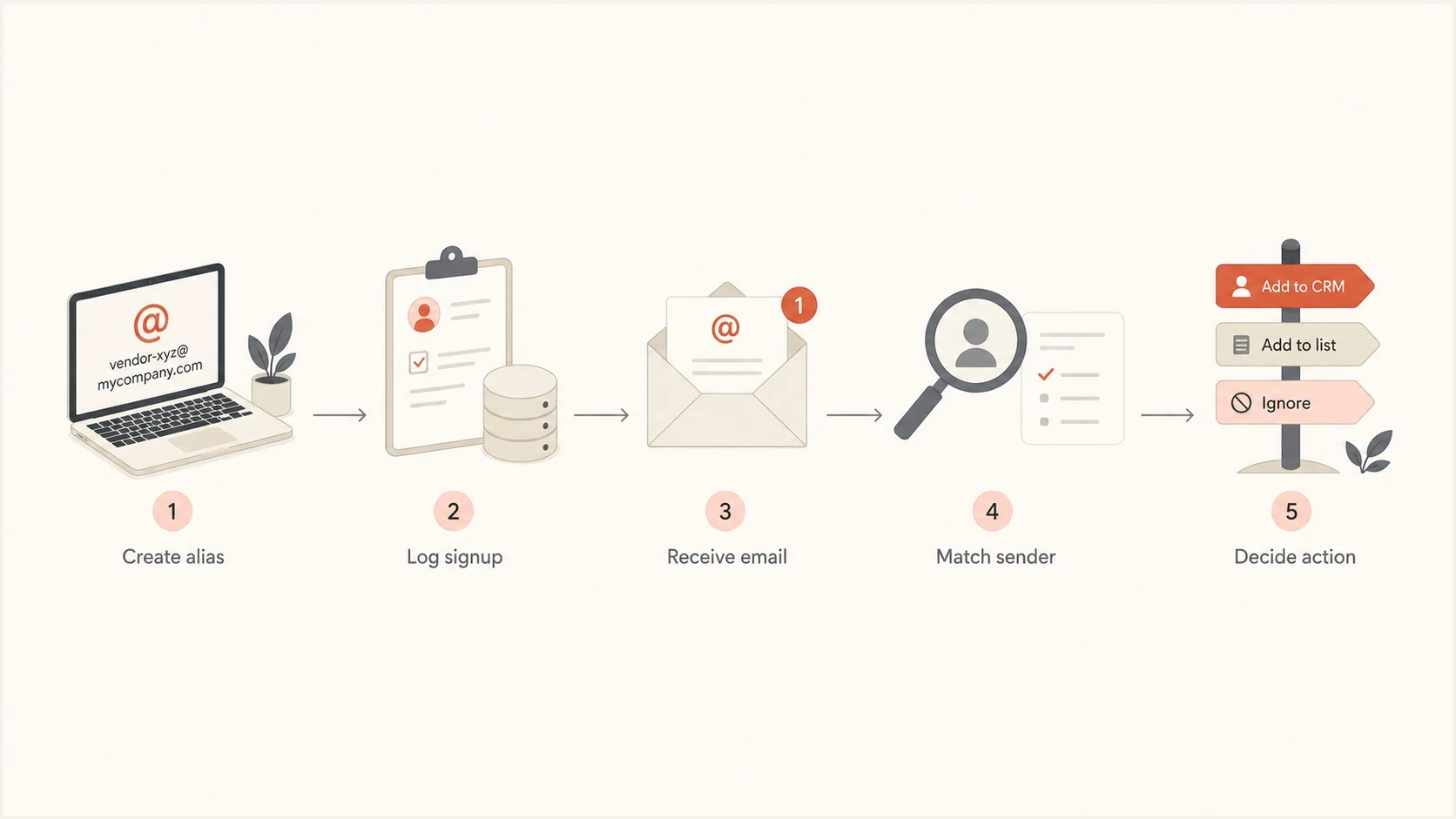
Flowchart showing alias creation, logging, email review, sender matching, and action.
- Create first: Add the alias to the register before you enter it into a form.
- Capture context: Save the signup page, form purpose, privacy notice date, and consent choices in plain language.
- Filter calmly: Route all aliases to one folder with a rule that preserves the original recipient.
- Review weekly: Check new senders, domains, and unsubscribe headers against the register.
- Retire cleanly: Disable aliases that only receive unrelated mail after you finish the review.
Check what the privacy policy permits
Alias evidence shows where an address first entered your tracking system. A privacy policy shows what the vendor said it might collect, disclose, sell, or share. Before signup, or as soon as an unexpected message arrives, save the policy's effective date and the wording that applied when the address was collected.
- Data covered: Check whether personal information or contact data explicitly includes email addresses.
- Recipients: Look for service providers, processors, affiliates, advertising partners, resellers, and event sponsors.
- Purpose: Separate operational processing from a recipient's own marketing or advertising use.
- Your choices: Record any consent withdrawal, opt-out, access, correction, or deletion process available to you.
- Version history: Keep the effective date or saved copy because policy wording can change after signup.
A service provider sending on the vendor's instructions is different from a partner using the address for its own campaign. Policy permission still does not prove that a specific transfer happened, and a restrictive policy does not identify whether the cause was misuse, a security incident, or data matched from another source.
Add policy evidence to the register
Record the policy title, effective date, relevant disclosure wording, signup-page consent choice, and any privacy request response. This creates a dated comparison point without treating policy language as proof of the message path.
Read the message evidence
An alias tells you which address moved. The message headers tell you who sent the email and how it travelled. Start with the recipient alias, then inspect the visible From domain, return path, DKIM signing domain, List-ID, unsubscribe domain, and campaign identifiers. These fields do not prove every business relationship, but together they help separate a normal vendor newsletter from a third-party campaign using a shared list.
|
|
|
|---|---|---|
Alias | Address used | High |
From domain | Visible brand | Medium |
Return path | Bounce owner | Medium |
DKIM | Signing domain | High |
List-ID | List source | Medium |
Unsubscribe | List manager | Medium |
Signals that help connect an unexpected message to the original signup path.
Evidence caveat
A unique alias is strong evidence that the address moved beyond its expected use. It is not proof that the named vendor deliberately sold the address. Shared marketing systems, acquired lists, old consent language, enrichment, and address rewriting can change the path.
Before accusing a vendor, collect the original alias record, the applicable privacy notice, and the full header source of the unexpected message.
Connect alias tracking with DMARC
Alias tracking identifies which recipient address received a message. DMARC reports identify sources sending mail that uses your domain and whether the domain authenticated by SPF or DKIM matches the visible From domain. A vendor can reuse a contact alias while a separate sender impersonates your domain, and each event needs different evidence. DMARC does not reveal who shared a recipient address.
Run a broad domain health checker first if you do not know whether DMARC, SPF, and DKIM are already healthy. Then use a monitoring workflow that shows source volume, domain-match failures, policy impact, and unapproved senders.
?
What's your domain score?
Deep-scan SPF, DKIM & DMARC records for email deliverability and security issues.
When a vendor sends legitimate email for your business, require a named sending domain, a DKIM signing domain that matches the visible From domain, and an SPF-authenticated return-path domain that matches where applicable. Record the selectors, return-path domain, and approved purpose. Remove DNS authorization when the sending relationship ends.
Suped workflow
In Suped's product, add the domain, publish a DMARC record with an aggregate reporting address, and review the sources sending mail for that domain. Hosted DMARC helps stage policy changes while keeping the record readable.
- Detection: Suped surfaces authentication failures, unknown sending sources, SPF lookup pressure, and policy gaps.
- Fix steps: Issues include concrete steps, so the person who owns DNS knows what to change.
- Alerts: Alerts flag material changes in sending volume or authentication results for review.
- Coverage: Review authentication, transport policy, and blocklist (blacklist) status in the same workflow.
Suped DMARC dashboard showing email volume, authentication health, and source breakdown
What to do when an alias is reused
Once an unexpected email arrives, resist treating the first message as the whole answer. Use a short response path: preserve the evidence, classify the sender, decide whether the original vendor deserves a factual note, and then block, retire, or keep watching the alias.
Vendor you recognize
A known vendor or partner deserves a factual message first.
- Ask: Share the alias used, date of signup, and sender domain seen in headers.
- Request: Ask whether a processor, partner, sponsor, or reseller received the address.
- Set limit: Tell them the address will be disabled if unrelated mail continues.
- Record: Keep their answer beside the alias row.
Unknown sender
An unknown sender usually needs containment first.
- Block: Add a mailbox rule or retire the alias if it has no future value.
- Report: Use the mailbox spam report flow when the message is clearly unsolicited.
- Preserve: Keep the original source before deleting the message.
- Watch: Monitor whether the sender changes domains or names.
Evidence confidence levels
Use the strength of evidence to decide how direct your vendor follow-up should be.
Low
Single generic spam
A common address or stripped tag gives weak attribution.
Medium
Unique alias used
The address points to a vendor, but the sender path needs review.
High
Corroborated records
The alias, headers, signup record, and policy evidence point to a clear source.
For legal or privacy requests, keep the message factual. Ask what categories of third parties received the address, when sharing happened, the stated purpose, and which privacy choices apply in your location. A precise request is easier to investigate than a broad accusation.
Where the method breaks
No tracking method gives a perfect chain of custody. Data sellers strip plus tags, normalize addresses, combine records with old files, and create inferred data. A catch-all domain reduces these problems because the entire local part can identify the vendor, but it does not stop someone from rewriting the address or matching it to data from another source.
Known failure modes
- Tag stripping: A plus tag disappears and the message arrives at the base address.
- Old lists: A main address was already circulating before tracking started.
- Shared systems: One vendor uses a partner platform that sends under another brand.
- Inferred records: A broker creates a profile that looks related but came from matching or inference.
- Role aliases: Shared addresses make it hard to identify the original signup person.
Do not chase every message. Focus on aliases attached to contracts, payments, events, lead forms, and support accounts. Those have enough context to justify vendor follow-up. For low-value signups, retiring the alias is usually the cleanest answer.
Views from the trenches
Best practices
Use one address per vendor and record the signup date before any messages arrive for context.
Keep the original message headers so sender paths and campaign identifiers stay available.
Group trial, event, purchase, and newsletter aliases for faster review and cleanup later.
Common pitfalls
Relying only on plus tags fails when brokers remove the tag before reselling records.
Blaming a vendor too early ignores acquisitions, shared CRMs, and old consent text.
Using one main address for signups makes attribution slow after unwanted mail starts arriving.
Expert tips
Run a catch-all domain so any local part reaches you while each signup stays unique.
Store aliases in a simple register before signups, not after an unwanted campaign appears.
Pair aliases with DMARC reports when the same domain handles customer-facing mail daily.
Marketer from Email Geeks says a personal domain with one address per service helped identify several vendors that passed an address into other mailing paths.
2021-07-07 - Email Geeks
Marketer from Email Geeks says plus tags are useful, but data sellers strip tags, find the base address elsewhere, or attach fake profile data.
2021-07-07 - Email Geeks
Build a repeatable tracking habit
Stop giving every vendor the same address. Use a unique alias for each vendor, record it before signup, save the applicable privacy terms, keep original headers when unrelated mail arrives, and decide what to do based on the evidence. Plus addressing is fine for quick tests. A custom domain with catch-all routing gives stronger long-term attribution.
For business domains, add authentication monitoring because recipient data reuse and unauthorized domain use require different evidence. Suped's product brings DMARC reports, approved sender review, alerts, and remediation steps into one workflow. Use alias records for sharing questions and DMARC reports for domain-use questions.




