
What DMARC monitoring means for MSPs

Updated on 22 Oct 2026: We added current mailbox provider requirements for MSP clients and tightened the report checks and policy rollout safeguards.
DMARC (Domain-based Message Authentication, Reporting, and Conformance) monitoring for managed service providers (MSPs) means running email authentication as an ongoing managed service, not a one-time DNS setup. It covers discovery, client onboarding, DMARC report collection, SPF and DKIM validation, spoofing detection, policy staging, alert triage, client reporting, and remediation across many customer domains.
For an MSP owner or operator, the practical value is simple: DMARC turns email authentication into a repeatable service line. A technician can see which services send mail for each client, verify whether those services pass SPF or DKIM with alignment, identify unauthorized sources, and move the client toward stronger protection while reducing the risk of disrupting legitimate mail.
The work is bigger than publishing p=none. A client with Microsoft 365, Google Workspace, a CRM, billing software, a help desk, marketing automation, website forms, and payroll notifications can have a dozen real senders. DMARC monitoring gives the MSP evidence before enforcement. That evidence helps reduce authentication-related support tickets, missed invoices, broken password resets, and client distrust.
- Inventory: Build a sender inventory using reports and client records, including systems the client forgot to mention.
- Validation: Check which senders pass SPF, DKIM, and DMARC alignment.
- Enforcement: Move clients through policy stages only after legitimate mail is authenticated.
- Reporting: Show clients what improved, what still needs attention, and why the service matters.
What the MSP actually monitors
DMARC monitoring starts when a client domain publishes a DMARC TXT record with an aggregate reporting address. RFC 9989 defines DMARC, while RFC 9990 defines aggregate reporting. Reports are XML files, usually compressed, containing source IPs, message counts, SPF and DKIM results, domain alignment, policy disposition, and receiver information.
Aggregate reports are evidence, not a complete message log or proof that a source is legitimate. The useful questions are whether a known platform passes for the client's domain, whether a website form sends unauthenticated mail, whether a marketing platform needs aligned DKIM, and whether an unknown source is trying to use the client brand. Reports usually cover a daily interval, and some receivers do not send them. No reports does not prove that a domain sends no mail; check report delivery and compare coverage with sending logs.
|
|
|
|---|---|---|
Source | Connecting IP observed by the receiver; a platform match needs verification | Confirm owner |
SPF | Whether the IP was authorized for the evaluated envelope domain | Review authorization |
DKIM | Whether a DKIM signature verified for its signing domain | Enable or repair |
Alignment | Whether a passing SPF or DKIM domain matches the visible From domain under DMARC rules | Adjust sender |
Disposition | Reported DMARC handling, not proof of inbox placement | Review policy |
Report freshness | Whether expected receiver reports are still arriving | Check reporting address and authorization |
Core DMARC monitoring signals for an MSP service desk.
The operating rule
Do not treat a DMARC pass rate as the whole story. A domain can look healthy while one important sender still fails. The better MSP workflow is source-by-source review, then policy movement after the noisy and business-critical senders are fixed.
Suped's product is built around that operational view. The DMARC monitoring workflow groups sources, highlights authentication issues, and turns report data into steps a technician can follow. For MSPs, the important part is seeing which client needs work, which source caused the problem, and what change should happen next.
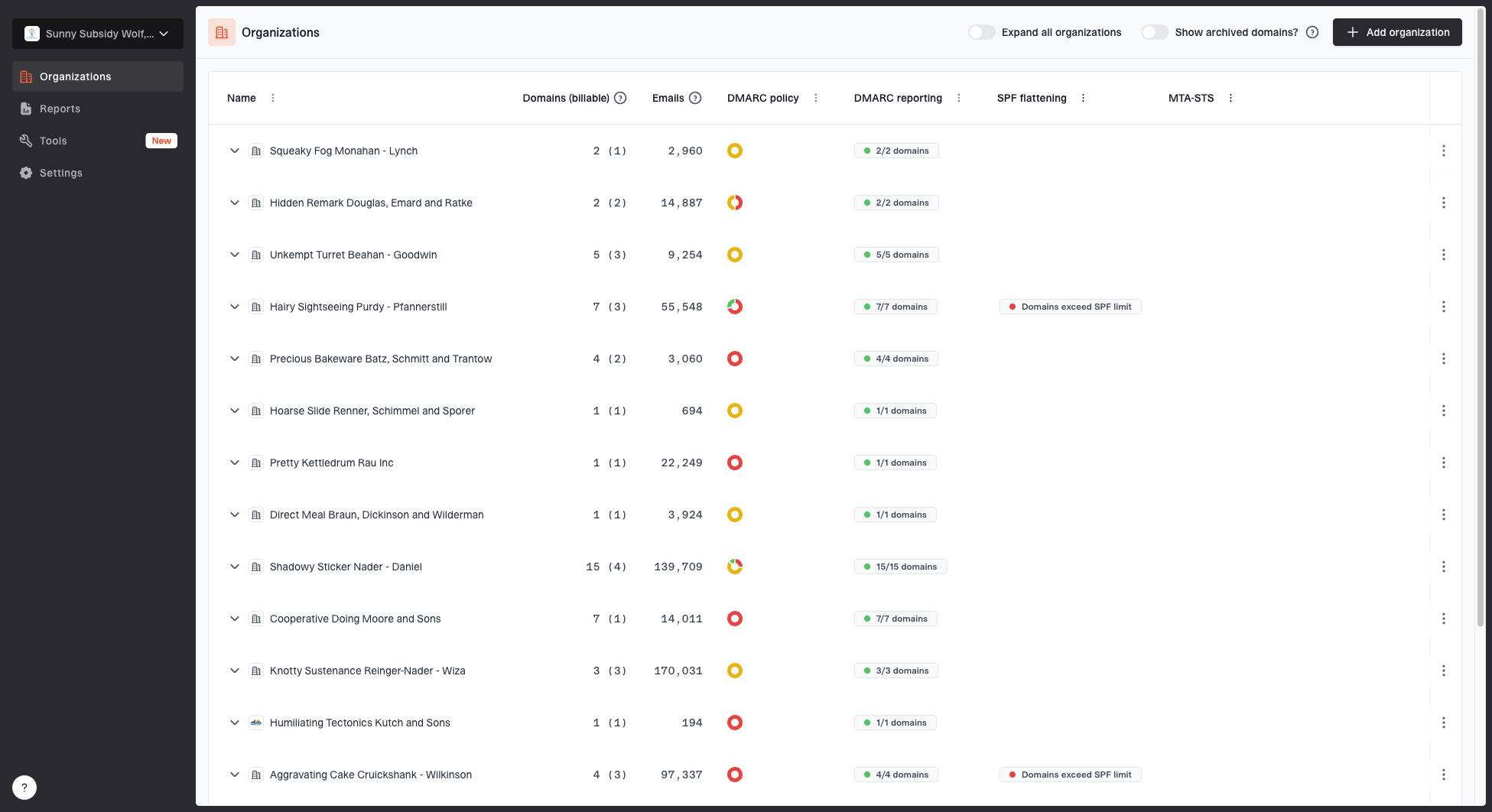
MSP organizations page showing client organizations, domain counts, email volume, and domain status columns
Why DMARC monitoring is different for MSPs
A single business can tolerate a messy spreadsheet and a few manual checks during a DMARC project. An MSP cannot. Once the service covers many clients, every manual step becomes operational drag. The hard part is keeping every client domain under control while staff, vendors, DNS records, and mail sources keep changing.
That is why the MSP version of DMARC monitoring needs multi-tenancy, tenant isolation, alerts, client-level reporting, and repeatable onboarding. The platform has to keep client data separate, make switching between organizations fast, enforce appropriate access, and give technicians the same workflow every time.
One-off DMARC project
- Scope: One domain or one business unit.
- Workflow: Manual review and occasional DNS edits.
- Reporting: Status updates during rollout.
- Risk: Missed sender for one organization.
Managed MSP service
- Scope: Many clients, domains, and mail systems.
- Workflow: Standard onboarding, alerts, triage, and policy staging.
- Reporting: Client-facing summaries and service desk evidence.
- Risk: Operational debt across the client base.
MSP owners should treat DMARC monitoring like backup monitoring or endpoint alerting. The client only sees value when the service produces action: a source fixed, a spoofing attempt identified, a policy advanced, or a report that explains risk in plain language.
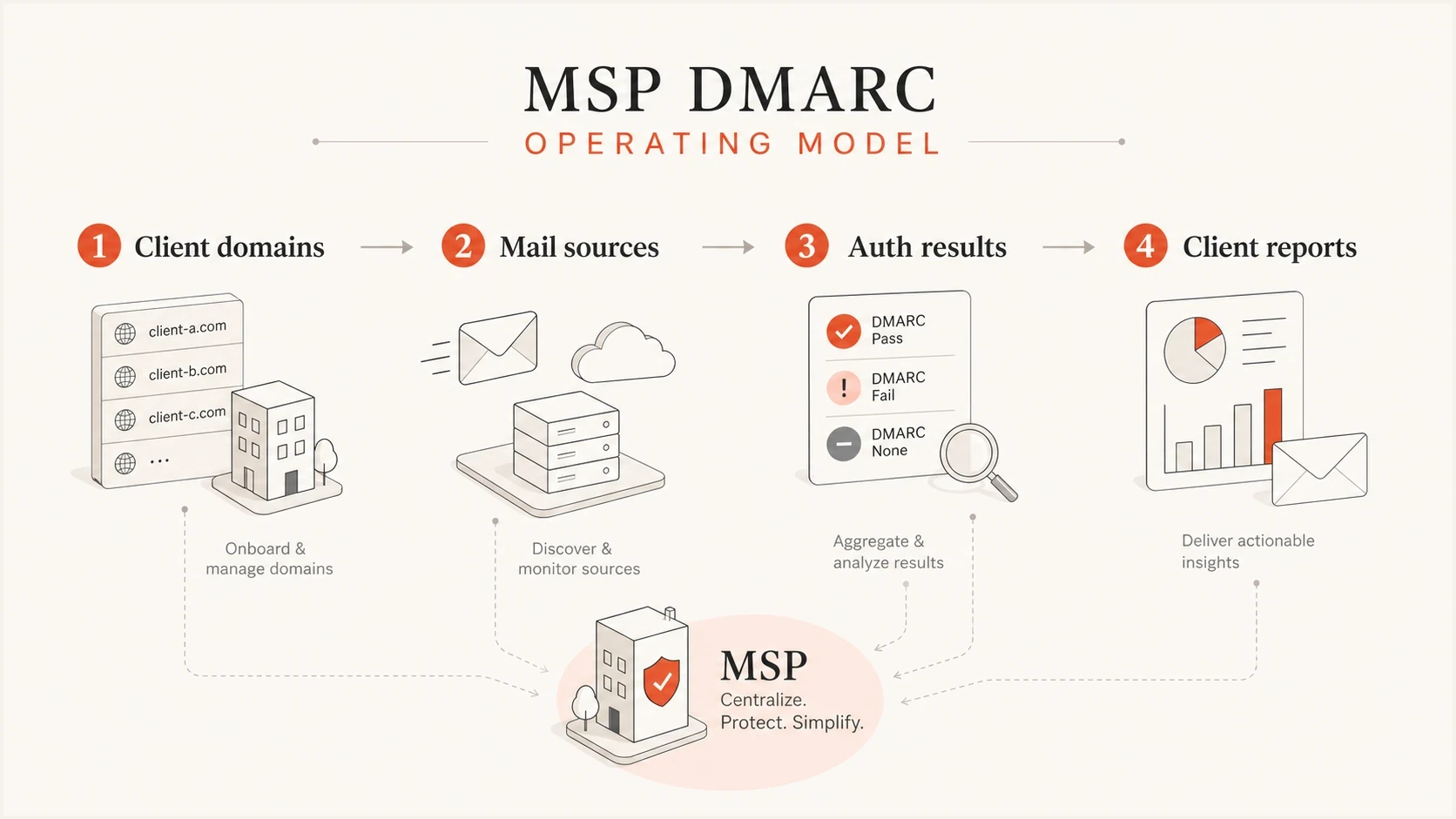
MSP DMARC monitoring connects domains, mail sources, authentication results, and client reports.
A repeatable client onboarding workflow
A good MSP onboarding workflow starts with the client domains, not the DNS record. First classify which domains send mail, which domains only receive mail, which domains are parked, and which domains are used by third-party systems. That upfront classification prevents wasted work and makes the client conversation more precise. Record DNS access and the person authorized to approve sender or policy changes before remediation starts.
The order matters. If a technician jumps straight to enforcement, the MSP can break legitimate sending. If the MSP stays at monitoring forever, the client gets reports without requesting quarantine or rejection of DMARC failures. The managed service should move through a defined path.
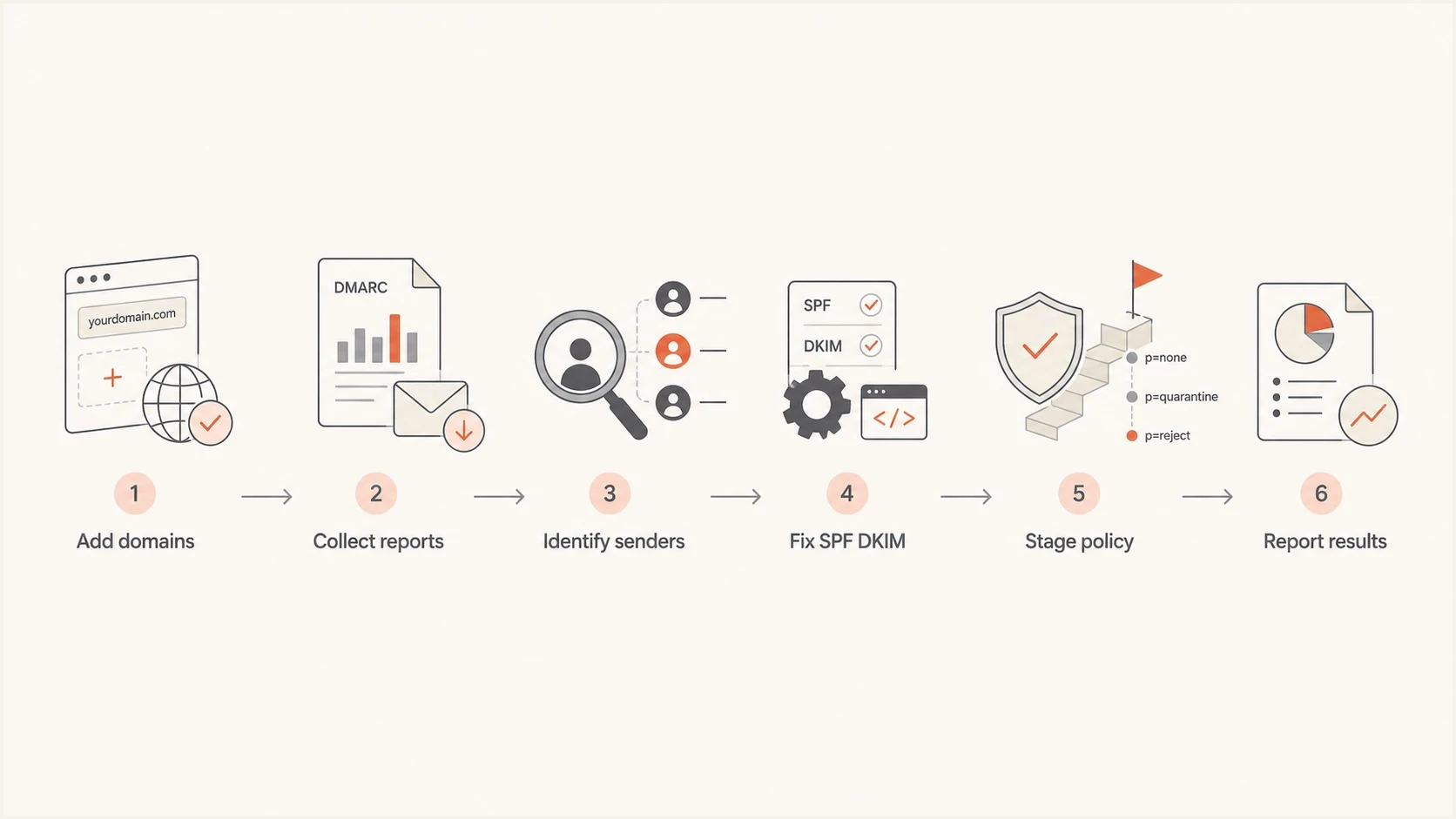
DMARC onboarding for MSP clients: collect reports, identify senders, fix SPF and DKIM, stage policy, and report results.
- List domains: Include primary domains, aliases, acquisition domains, parked domains, and sending subdomains.
- Publish monitoring: For a new rollout, collect reports at p=none before enforcement. During migration, preserve an existing enforcement policy while changing report destinations.
- Map senders: Match each source to a client system, owner, and support contact.
- Fix authentication: Add approved SPF mechanisms, enable DKIM, or change sender configuration.
- Stage policy: Move through monitoring, quarantine, and reject after review; use t=y only with its receiver compatibility limits understood.
- Keep watching: Alert on new senders, failure spikes, DNS drift, and client changes.
Starting DMARC record for monitored rolloutDNS
_dmarc.example.com TXT "v=DMARC1; p=none; rua=mailto:dmarc@example.com; adkim=r; aspf=r"
That record is a starting point, not the end state. In production, the reporting address should route into the monitoring platform. When rua points to a different organizational domain, confirm that the report destination publishes the external reporting authorization required by RFC 9990. Verify report arrival after the change rather than relying on the DNS record alone.
DMARC record generator
Choose your policy, reporting addresses, and alignment settings.
DNS TXT record
v=DMARC1; p=quarantine; rua=mailto:dmarc@example.com
Common authentication failures technicians need to fix
Most DMARC monitoring work lands in a few repeatable fix patterns. The MSP needs a runbook that maps each failure type to a practical next step. Without that, reports sit unread and the client never reaches enforcement.
The first distinction is authentication versus alignment. An SPF pass does not satisfy DMARC when the return-path domain does not match the visible From domain under DMARC. A DKIM pass does not satisfy DMARC when the signing domain belongs to a vendor and does not match the client domain under DMARC. DMARC passes when at least one method both passes authentication and meets domain alignment. Relaxed alignment accepts the same organizational domain; strict alignment requires an exact domain match. A green SPF result in a vendor admin panel does not establish a DMARC pass.
|
|
|
|---|---|---|
SPF fail | Sending IP not authorized for the envelope domain | Review SPF path |
DKIM fail or none | Signing disabled or broken | Enable or repair DKIM |
No alignment | Vendor-owned domain | Configure custom domain |
New source | Unreported vendor, forwarding, or unauthorized use | Verify owner |
Lookup limit | More than 10 DNS-querying terms evaluated, including nested terms | Remove obsolete terms or use managed SPF; recheck evaluation |
Common DMARC issues and the service desk response.
SPF lookup limits are a common MSP problem because each client adds tools over time. A record that worked during onboarding can fail later when another platform is added. RFC 7208 limits evaluation to 10 DNS-querying mechanisms and modifiers, including nested terms; exceeding the limit produces permerror. Suped's Hosted SPF and SPF flattening help centralize approved sender management and keep domains under DNS lookup limits without asking the client to edit DNS for every sender change.
Do not fix SPF forever
SPF alone is fragile because forwarding can break it, and SPF alignment depends on the return-path domain. For many third-party senders, DKIM with aligned signing is the cleaner long-term fix. Forwarding can preserve DKIM if signed content is unchanged. Check forwarding and mailing-list paths before classifying a failing source as unauthorized.
A technician should also know when not to authorize a sender. If a source has no client owner, no vendor match, and no business explanation, treat it as suspicious until proven otherwise. DMARC monitoring gives enough evidence to ask better questions: which system sent this, who owns it, and should it be allowed to send as the client's domain?

Issue steps to fix dialog showing the issue overview, tailored fix steps, and verification action
Policy rollout without breaking client mail
DMARC policy rollout is where MSP discipline matters. The destination for most active client domains should be p=reject, but the path should be controlled. A rushed move can reject real mail. A stalled move leaves the domain monitored but still open to direct-domain spoofing.
Use a rollout model based on observed sources, not a fixed calendar alone. If all legitimate sources pass DMARC and unknown traffic is clearly unauthorized, enforcement can move faster. If the client has many senders, seasonal systems, acquisitions, or mailing-list use, the MSP needs more review time.
Policy readiness bands
Review source readiness before each enforcement change; optional test mode is not a policy level.
Monitor
p=none
Reports are arriving, but sources are not fully mapped.
Quarantine
p=quarantine
Legitimate sources pass; review reported failures and delivery evidence before reject.
Reject
p=reject
Legitimate senders pass and alerts catch drift.
Optional quarantine test mode; older receivers can enforce quarantineDNS
_dmarc.example.com TXT "v=DMARC1; p=quarantine; t=y; rua=mailto:dmarc@example.com"
Reject policy exampleDNS
_dmarc.example.com TXT "v=DMARC1; p=reject; rua=mailto:dmarc@example.com"
RFC 9989 removed the pct tag because receivers applied percentage values inconsistently. The replacement t=y test mode asks receivers to apply a policy one level below the published policy while testing. Older receivers that still process records under RFC 7489 ignore the new tag and can apply the published policy. Do not treat t=y as a universal safety switch during adoption. Keep a new rollout at p=none until legitimate sources pass, and use sending subdomains for early enforcement tests. Preserve existing enforcement during a reporting-platform migration.
Relaxed alignment remains the practical default for nearly all domains. Strict alignment is appropriate only when the client's sending architecture requires exact domain matches and every legitimate sender supports them. Document why a domain is in each stage and what must happen before the next change. Before each policy change, save the current DNS value and TTL, name a rollback owner, and define which legitimate-mail failures trigger a rollback. Validate with sending logs or message headers, then confirm the result in subsequent aggregate reports.
?
What's your domain score?
Deep-scan SPF, DKIM & DMARC records for email deliverability and security issues.
Mailbox provider requirements MSPs need to check
Bulk sender requirements are already in effect. They depend on the receiving provider and sending volume, not whether the client uses Microsoft 365 or Google Workspace. Publishing p=none meets the minimum DMARC policy requirement below, but it does not make failing mail pass DMARC or request enforcement.
|
|
|
|---|---|---|
About 5,000 or more messages to personal Gmail accounts in 24 hours | SPF and DKIM, a DMARC policy of at least p=none, and a DMARC pass | |
Bulk senders to Yahoo | SPF and DKIM, a DMARC policy of at least p=none, and a DMARC pass | |
High-volume senders to Outlook.com and related consumer services | Both SPF and DKIM must pass, with at least one meeting DMARC domain matching and a published DMARC policy |
Authentication requirements for client mail sent to major mailbox providers.
For Gmail volume planning, Google's bulk sender FAQ counts a primary domain and its subdomains together. A client remains a bulk sender after meeting the threshold, so a later fall in volume does not remove that classification.
- Check each sending service: Verify SPF and DKIM on actual messages, plus the domain match needed for DMARC. A vendor configuration screen is insufficient.
- Separate requirements from enforcement: Track provider requirements and the client's quarantine or reject rollout separately; the minimum p=none policy is not the protection target.
- Check more than authentication: Gmail and Yahoo bulk sender rules also cover low complaint rates and one-click unsubscribe for applicable marketing or subscription mail. DMARC reports do not measure those requirements.
- Investigate rejections directly: Microsoft documents 550 5.7.515 for high-volume authentication failures. Use the bounce and message headers to investigate rather than waiting for aggregate reports.
How to package it as a managed service
For MSPs, DMARC monitoring works best as a defined operational service with clear inclusions. If it is treated as a casual add-on, it gets under-scoped. If it is over-customized for every client, margins suffer. The service should be standardized enough for technicians to deliver consistently, while still flexible enough for clients with complex mail environments. State whether monitoring is bundled into the managed agreement or billed separately, define onboarding and remediation charges, and specify response targets and responsibility for client or vendor approvals.
A clean service package usually includes initial domain discovery, DNS setup guidance, source identification, SPF and DKIM remediation, policy rollout, alerts, and monthly client reporting. Advanced items can include Hosted DMARC, Hosted SPF, MTA-STS, SPF flattening, and blocklist (blacklist) monitoring for reputation visibility.
- Baseline: Publish reporting records and confirm that aggregate reports arrive.
- Remediation: Fix known senders and record client-approved exceptions.
- Enforcement: Move domains through controlled DMARC policy changes.
- Operations: Respond to alerts for new sources, failure spikes, and DNS drift.
- Reporting: Send branded reports showing policy coverage, DMARC pass rates for approved sources, unresolved issues, completed changes, and report freshness.
Suped's MSP platform is designed for this service model. It gives an MSP separate client organizations, bulk migration support, API access, authentication monitoring, white-label client reports in one operational view.
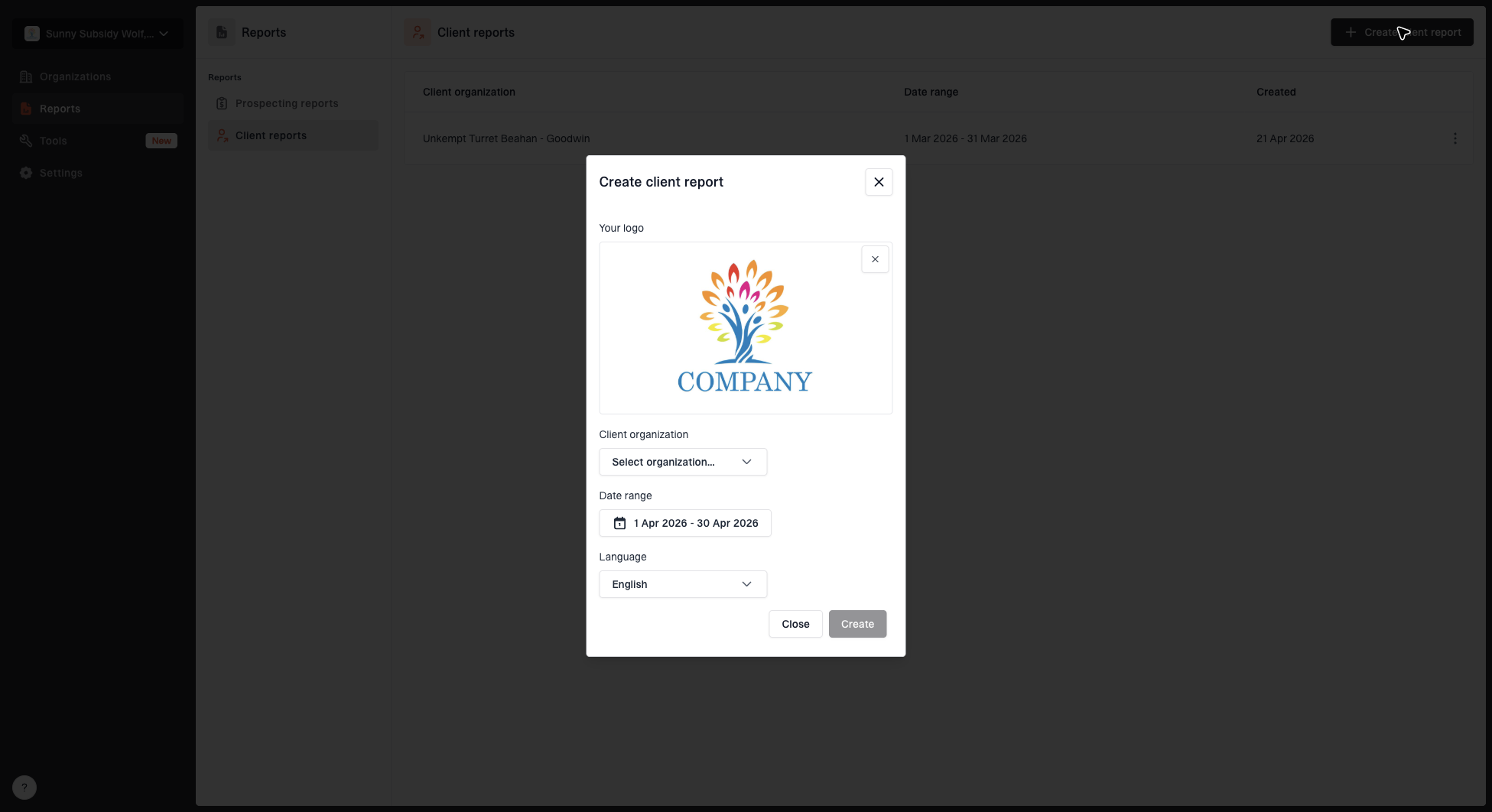
Create client report dialog with organization, date range, logo, and language options
The reporting part should not be skipped. Clients rarely care about raw authentication theory. They care whether their domain is protected, whether invoices and support mail still deliver, and whether the MSP is watching for problems. A good report connects the technical work to those outcomes without exaggerating what DMARC can do.
What alerts should create tickets
Not every DMARC event deserves a ticket. MSPs need alert rules that catch meaningful changes without burying technicians. The goal is to separate normal background noise from issues that need investigation.
Ticket-worthy events include a sudden failure spike for a known sender, a new high-volume source, a policy record disappearing, DKIM signing stopping for a business-critical platform, or mail being rejected after a policy change. A blocklist (blacklist) listing deserves attention when it affects infrastructure the client actually uses and the receiving provider considers that list.
High-priority alert examples
- Record removed: A client DNS change deletes or weakens the DMARC record.
- Failure spike: A known sender begins failing SPF, DKIM, or alignment.
- New source: A high-volume sender appears with no known business owner.
- Rejected mail: Legitimate mail is affected after an enforcement change.
- Report gap: An active domain stops receiving expected reports; check DNS, external authorization, and report ingestion before declaring it healthy.
Suped's alerts support investigation once report data or DNS monitoring exposes a change. DMARC aggregate data usually arrives on a reporting cadence, so technicians should not treat it as live, message-by-message telemetry. A useful alert still identifies the client, domain, sender, failure type, volume change, and suggested fix.
Blocklist checker
Check your domain or IP against 144 blocklists.







Connect DMARC monitoring to the service desk
A monitoring dashboard does not create ownership by itself. Route actionable events into the MSP's professional services automation (PSA) or ticketing workflow through a supported API, available webhooks, or a monitored mailbox. Use remote monitoring and management (RMM) or an asset inventory to keep client and domain ownership current; confirm integration capabilities before promising automation. The integration should preserve enough context for a technician to act without reopening the monitoring platform just to identify the tenant.
- Map the tenant: Attach the client, domain, service agreement, and responsible queue to every event.
- Set thresholds: Create tickets for material changes, not every failed message count.
- Deduplicate: Merge repeated alerts for the same source and failure into one active ticket.
- Assign ownership: Assign DNS work and vendor coordination to technical queues, then route client approvals through the account owner.
- Record closure: Capture the DNS change, sender owner, validation result, and next review date.
Start with a narrow integration that creates high-confidence tickets, then expand it after the service desk has measured noise and resolution time. Suped's API can connect client authentication data to internal MSP workflows, dashboards, and service systems. Use stable client and domain identifiers so reassignment or migration does not break ticket history.
Choosing a DMARC platform for MSP operations
The platform choice should be based on service delivery, not XML parsing alone. MSPs need tenant isolation, role-based access, quick domain onboarding, bulk operations, actionable issue detection, useful alerts, API access, and client reports that do not need heavy editing. SSO, audit history, data retention, export options, and an exit process also matter when clients or domains move between providers. Confirm retention and deletion terms for report data, limit cross-client access, and agree how reports and hosted DNS settings will transfer when a client leaves.
Concrete operating models exist. Some MSPs use their security stack's built-in email authentication views for limited checks. Some use scripts to parse reports for a few technical clients. A dedicated platform becomes practical when manual review and tenant context switching consume service desk time.
|
|
|
|---|---|---|
Manual review | Tiny pilots | Does not scale |
Security portal | Single tenant | Limited DMARC depth |
Dedicated platform | Managed service | Needs onboarding |
Suped | MSP operations | Requires setup |
DMARC monitoring options for MSP delivery.
Suped's product supports the client workspaces, hosted authentication management, API access, and white-label reporting used in these workflows. Verify the required access controls and integration details during onboarding.
The practical choice is the one that helps the technician finish the ticket. A dashboard that says a source failed is useful. A dashboard that identifies the source, explains the likely cause, and gives steps to fix it supports faster service delivery.
Platform checklist
- Multi-tenancy: Each client has isolated domains, reports, settings, and access.
- Action steps: Issues include clear remediation guidance for technicians.
- Policy controls: The platform supports controlled rollout toward enforcement.
- Client reports: White-label reports explain progress without unnecessary complexity.
- Operations: Bulk onboarding, API access, audit history, and exports fit MSP workflows.
- Access: Roles and SSO options match technician and client responsibilities.
- Reputation view: Relevant reputation signals appear beside authentication data.
A practical operating cadence
The cadence should fit the client's risk and sending complexity. For a low-volume professional services client, weekly review during onboarding and monthly reporting after enforcement can be enough. For clients with heavy marketing, ecommerce, or frequent vendor changes, the MSP should watch alerts more closely and review new sources more often.
The simplest cadence is daily alert review, weekly source review during onboarding, policy review before each enforcement change, and monthly client reporting. The MSP should also review DMARC after major client changes such as a new CRM, domain migration, rebrand, acquisition, or website rebuild.
MSP DMARC workload by phase
Illustrative workload allocation only, not measured MSP benchmarks. Actual effort varies with client complexity and unresolved senders.
Discovery
Fixes
Monitoring
This is also where the MSP can control margins. A repeatable cadence prevents every client from becoming a custom project. The client gets a clear service, and the operations team gets a predictable workflow.
What DMARC monitoring means in practice
DMARC monitoring means the MSP has a report-based view of observed senders for each client, whether those senders authenticate correctly, and whether the domain is ready for stronger policy. It also means the MSP has a process for handling change: new vendors, broken DNS, failed DKIM, SPF lookup problems, and suspicious sources.
The service works when it creates outcomes clients can understand: less exposure to direct-domain spoofing, safer enforcement, clearer vendor accountability, better domain governance, and evidence that email authentication is being watched.
The business decision for MSP owners is whether the service can be delivered repeatably. With defined onboarding, ticket ownership, policy gates, and client reporting, DMARC monitoring becomes a practical managed security and deliverability service instead of another DNS task buried in onboarding.