
How to use hosted DMARC for MSP clients

Published 12 Jun 2026
Updated 22 Oct 2026
12 min read
Summarize with
Updated on 22 Oct 2026: We clarified hosted DMARC cutovers and policy testing, and added client access and report retention checks for MSPs.
Hosted DMARC for MSP clients means each client points its DMARC DNS record to a managed policy endpoint, then the MSP controls reporting, policy changes, enforcement staging, and remediation from one platform. The client keeps ownership of the domain, while the MSP gets a repeatable way to onboard, monitor, and harden many domains without opening DNS tickets for every policy change.
Hosted DMARC delegates policy management; aggregate reporting alone does not remove DNS edits for policy changes. It lets an MSP run a consistent service across clients: discover all legitimate senders, fix SPF and DKIM gaps, stage policy changes, prove progress in reports, and react when an unauthorized source starts sending mail.
- Client control: The client adds a small DNS change once, usually a CNAME at the DMARC host.
- MSP control: The MSP changes policy, report routing, and staging centrally after the client is connected.
- Service control: The MSP can package monitoring, authentication fixes, client reporting, and enforcement as one managed service.
At MSP scale, pair hosted DMARC with DMARC monitoring so policy decisions have source data behind them. Suped's product supports that workflow through MSP client organizations and multi-domain management.
Manage hosted DMARC policy across clients
The simplest version of DMARC is a TXT record at the client's domain. That works for a single domain with a technical owner who can update DNS quickly. At MSP scale, repeated DNS edits add work across clients with different DNS providers and ticket approval rules.
Hosted DMARC changes the workflow. The client publishes a provider-controlled record, then the MSP manages the effective policy in the platform. That makes policy staging cleaner because the MSP can move a client through monitoring, quarantine, and reject without asking the client to edit DNS each time.
DNS-only DMARC
- Change path: Every policy update needs a DNS edit or client ticket.
- Risk: A rushed TXT edit can break DMARC reporting or enforcement.
- Scale: Operational load grows with each domain and DNS provider.
Hosted DMARC
- Change path: One client DNS setup unlocks central policy changes.
- Risk: Staging controls reduce accidental jumps to enforcement.
- Scale: MSP teams can standardize onboarding and reporting.
Hosted DMARC suits recurring managed service delivery when delegated policy control reduces repeated DNS requests. A static TXT record remains workable when the MSP already manages DNS and has a reliable change process.
Hosted DMARC configuration dialog showing policy controls, CNAME setup, and expanded advanced options
Suped's hosted DMARC workflow gives MSPs a control point for policy staging, reporting addresses, and advanced options. The client-facing work stays small, while the ongoing service work happens in the MSP console.
Onboard each client with a repeatable checklist
A hosted DMARC rollout fails when the MSP treats every client as a custom project. Use the same intake pattern for each client, then vary only the sender list, DNS owner, approval contact, rollback requirement, and policy timeline. That keeps the service profitable and easier to hand off inside the MSP team.
- Create tenant: Add the client as its own organization or account so reports, domains, users, and branding stay separated.
- Add domains: Start with the primary sending domain, then add sending subdomains, parked domains, and lookalike domains that the client owns. Record any explicit subdomain DMARC policies because a parent policy does not override them.
- Collect senders: List every system that sends as the client, including mailbox providers, CRMs, invoicing apps, help desks, website forms, and marketing tools, then name an owner for each source.
- Publish DNS: Save the existing policy, report destinations, and TTL. Match the policy and reporting settings in the hosted platform, then publish its generated DNS record before changing enforcement.
- Verify flow: Confirm aggregate reports arrive, then review source data across a normal business cycle, including low-frequency senders, before changing policy.
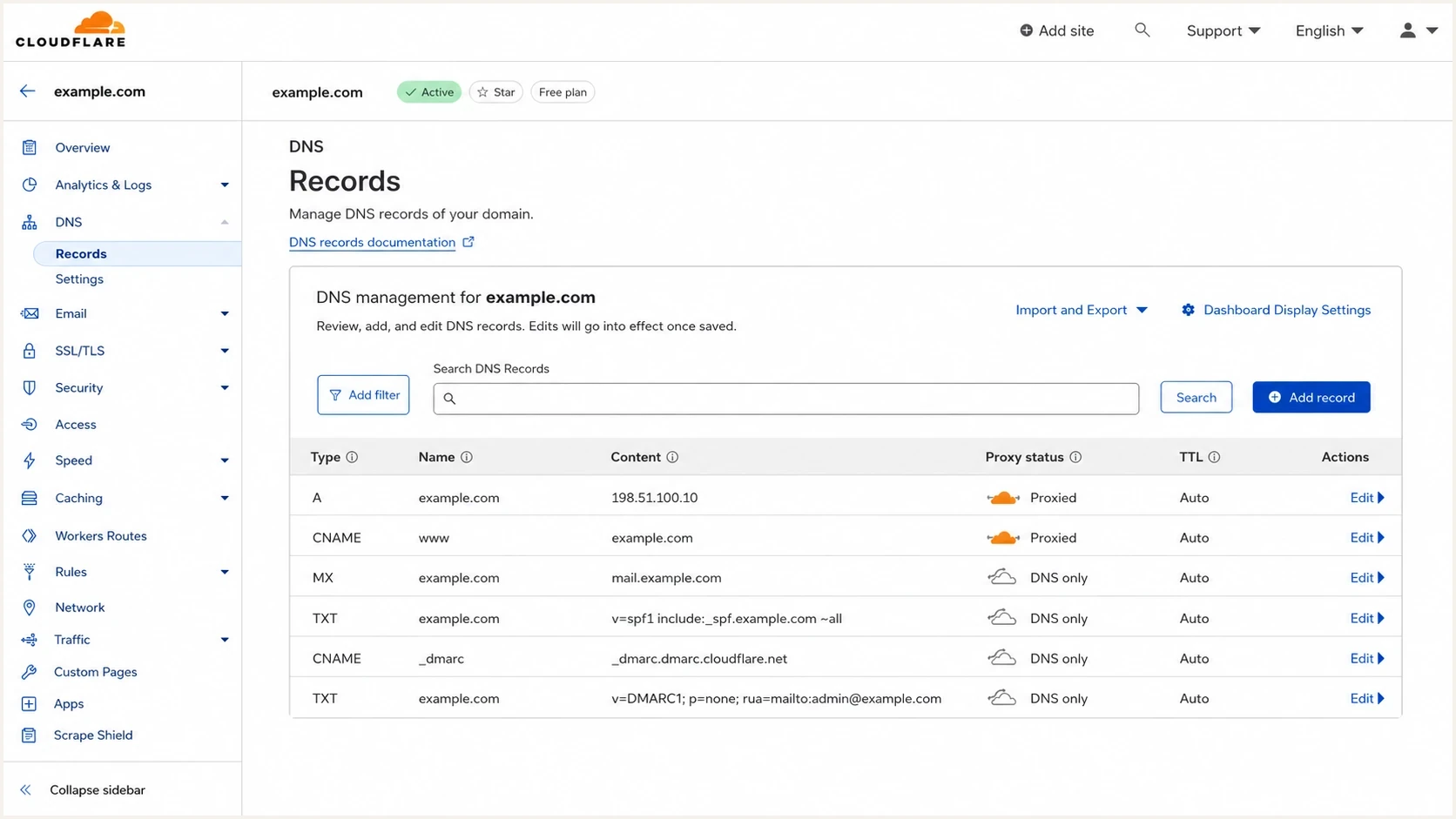
Cloudflare DNS table with a hosted DMARC CNAME for an MSP client.
The DMARC host is _dmarc under the domain being configured. Replace an existing TXT record with the CNAME during cutover because a CNAME cannot coexist with other records at the same name. Keep the CNAME DNS-only, verify its target returns one valid DMARC TXT policy, and allow cached answers to expire according to their TTLs before judging the change.
Hosted DMARC DNS exampledns
_dmarc.clientdomain.com. 300 IN CNAME client1._dmarc.msp.example.net.

; Illustrative target only. Use the client-specific target from the platform.
; A CNAME cannot coexist with a TXT record at this name.
If the effective rua address uses a different Organizational Domain, confirm that the report receiver has published the external destination authorization required by RFC 9990. A conforming report generator must ignore an unauthorized destination, leaving the MSP without aggregate reports.
Do not skip sender discovery
A hosted record does not fix authentication by itself. It gives the MSP a better place to control policy. The MSP still needs to identify legitimate senders, fix SPF and DKIM for each one, and watch the reports long enough to separate approved mail from noise.
Stage DMARC policy with readiness checks
For MSP clients, the policy path matters more than the first record. Start newly assessed sending domains at monitoring because the first reports usually reveal unknown senders. Some are valid, such as billing, HR, calendar, help desk, and marketing platforms. Others are unauthorized systems or spoofing attempts. Preserve a verified enforcement policy when migrating an existing client.
Policy stages for managed rollout
A practical staging model. The optional t=y step depends on receiver support.
Monitor
p=none
Collect reports and map all sources.
Optional testing
p=quarantine; t=y
Request none from receivers that support t=y.
Quarantine
p=quarantine
Request suspicious handling for failing mail.
Reject
p=reject
Request rejection for mail that fails DMARC.
RFC 9989 removed pct because receivers applied percentage values inconsistently. Its t=y flag requests one policy level lower: quarantine becomes none, and reject becomes quarantine. Older receivers that ignore t=y can apply the published policy, so it is not a guaranteed monitoring mode. Use readiness checks and a rollback plan for each change.
The staged approach gives the client a clear decision point. Show which approved senders pass DMARC, which still fail, who owns each fix, and what remains before enforcement. Judge readiness using legitimate mail and representative sending cycles; spoofing traffic can depress an overall pass rate even when approved senders are ready.
Monitoring policy exampledns
v=DMARC1; p=none; rua=mailto:reports@clientdomain.com
Enforced policy exampledns
v=DMARC1; p=reject; rua=mailto:reports@clientdomain.com
Relaxed SPF and DKIM identifier alignment is the default and works for most client environments. DMARC passes when either SPF or DKIM passes with the required match to the visible From domain. Before tightening either mechanism to strict alignment, test every legitimate sender and document the business reason for the change.
Operate across many client tenants
MSP DMARC operations need client separation, role-based access, health checks, source review, alerts, and reporting that a non-technical client can read. Portfolio visibility should show urgent work across tenants without mixing client data or forcing engineers to inspect one long domain list.
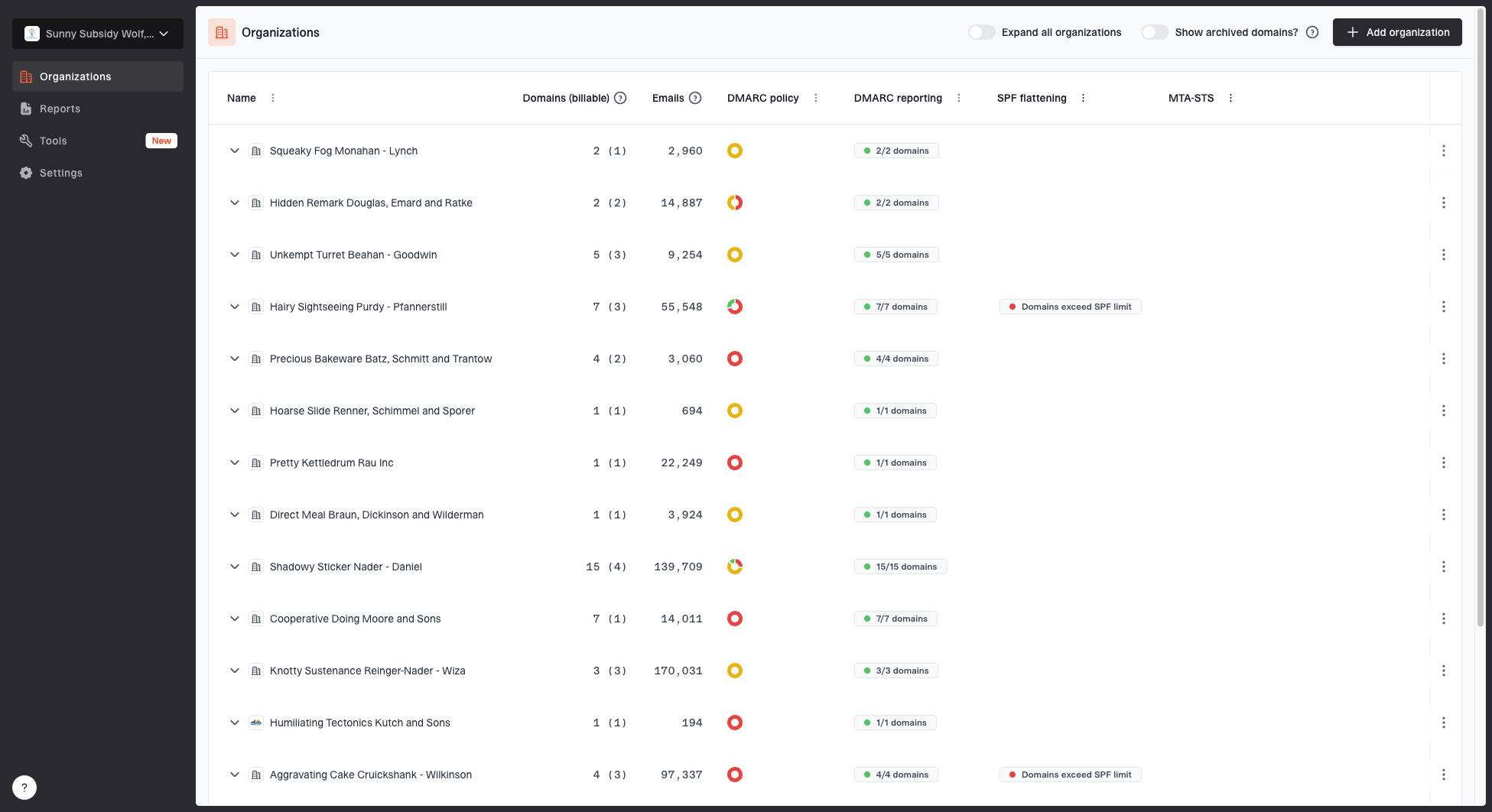
MSP organizations page showing client organizations, domain counts, email volume, and domain status columns
Suped's product has an MSP and multi-tenancy dashboard for this workflow. Teams can manage isolated client organizations, switch between accounts, track domain status, create white-label client reports, use API access for internal workflows, and get migration support when moving client domains. Suped's MSP workflows keep these tasks in one operating view.
|
|
|
|---|---|---|
Onboarding | Add domain | DNS task |
Discovery | Map sources | Sender list |
Fixes | Repair auth | Pass rates |
Policy | Stage changes | Enforcement |
Reporting | Summarize risk | Client report |
Compact operating model for MSP-hosted DMARC
A practical MSP workflow also routes source changes and authentication failures into the existing ticket process, with the client, domain, owner, and required action attached. Map API or email alerts into the professional services automation (PSA) system and verify that tickets reach the correct client account before enabling it. Check for a documented integration rather than assuming native PSA support.
Before onboarding a client, run a broad review of SPF, DKIM, DMARC, MTA-STS, and reputation so the first meeting starts with verified findings. Suped's domain health checker supports that first pass.
?
What's your domain score?
Deep-scan SPF, DKIM & DMARC records for email deliverability and security issues.
Set client access and report retention
A multi-tenant DMARC service needs an explicit access model. Keep client users inside their own tenant and document which MSP engineers can change policy.
- Give clients read-only access when they only need reports. Reserve policy changes for authorized operators and test the actual permissions before handover.
- Use named engineer accounts with multi-factor authentication. Remove access when staff responsibilities change, and keep policy approvals in the change record.
- Test organization IDs, API access, and report recipients with a sample client before bulk onboarding. Verify that each client can see only its own domains and reports.
- Agree how long raw reports and reporting history are retained, who can export them, and when copies are deleted after offboarding. Check these terms against the subscribed plan.
Aggregate reports reveal sending infrastructure and domain activity. Include report access and retention in the service runbook so portfolio visibility does not expose one client's data to another.
Control policy changes and client offboarding
Hosted DMARC reduces repeat DNS work, but it also gives the MSP day-to-day control over a client security policy. The service agreement and runbook should state who can approve quarantine or reject, what evidence supports the change, how an emergency rollback works, and what happens when the client leaves.
- Approval: Name the client contact who can approve enforcement and record the approval in the change ticket.
- Evidence: Capture the current policy, source inventory, DMARC pass results, unresolved failures, and planned change time.
- Rollback: Define who can restore the last verified policy if legitimate mail fails. Check the hosted policy after the change and account for DNS caches before retrying enforcement.
- Offboarding: Return policy and report routing to client-controlled DNS, hand over the sender inventory and change history, export agreed reports, and remove MSP access only after the replacement record resolves.
Do not delete or redirect the hosted target before the client replacement is live and the previous TTLs have expired. Verify the replacement policy and report destination, including external reporting authorization, before closing the handoff.
Fix the problems hosted DMARC exposes
Hosted DMARC makes management easier, but the reports still expose real authentication work. The MSP has to decide whether a failing source is legitimate, misconfigured, or unwanted. This is where the managed service becomes valuable because the client usually does not know every system sending mail on its behalf.
Triage sources before changing policy
- Known source: Confirm SPF or DKIM passes with the required match to the visible From domain; an authentication pass alone is insufficient.
- Unknown source: Ask the client owner whether the sender is approved.
- Failed source: Fix an approved sender first. Treat unauthorized traffic through DMARC policy only after legitimate senders are ready; policy is domain-wide, not a per-source block rule.
- Repeated issue: Create an internal playbook so the next client takes less time.
The most common technical fixes are straightforward. Enable DKIM signing with the client domain or configure the sender's custom Return-Path for SPF domain alignment. Add SPF authorization only where it applies, remove obsolete senders, and check the limit of 10 DNS lookups before adding includes. Forwarding can break SPF, while a valid DKIM signature that survives forwarding can still give DMARC a pass.

Issue steps to fix dialog showing the issue overview, tailored fix steps, and verification action
Suped's automated issue detection and steps to fix support MSP operations by reducing the time spent translating raw DMARC XML into client-specific tasks. Configure alerts for new sources and authentication failures. Aggregate reports arrive on receiver schedules, typically daily, so report-based alerts are not a live feed of every message.
Blocklist monitoring adds another useful layer. DMARC shows whether mail authenticated and matched the domain. Blocklist (blacklist) data shows whether a sending IP or domain appears on the monitored lists. Use those listings when investigating reputation issues alongside authentication failures.
Turn DMARC into a client-facing service
Clients buy hosted DMARC for reduced exact-domain spoofing risk, clearer sender control, and proof that someone is managing email authentication. The deliverable should make those outcomes clear without claiming that DMARC stops display-name abuse or lookalike-domain attacks.
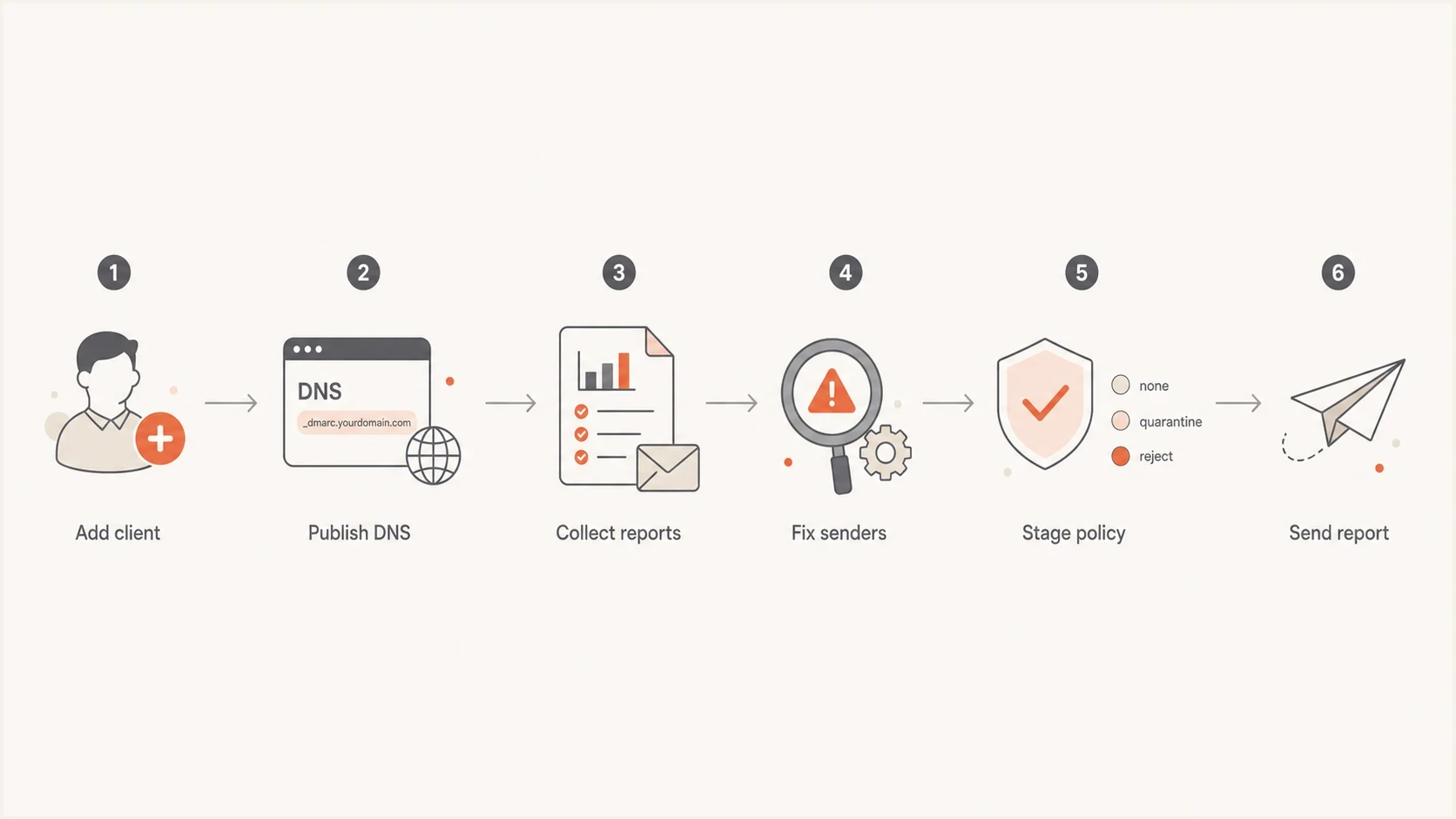
MSP hosted DMARC flowchart covering setup, remediation, enforcement, and reporting.
Keep the client report simple: current policy, observed message volume, DMARC pass rate for approved senders, receiver-reported dispositions, unresolved fixes, and the next policy step. Separate unknown traffic from approved senders and show the reporting period. A DMARC failure is not proof of rejection, and aggregate reports do not measure inbox placement.
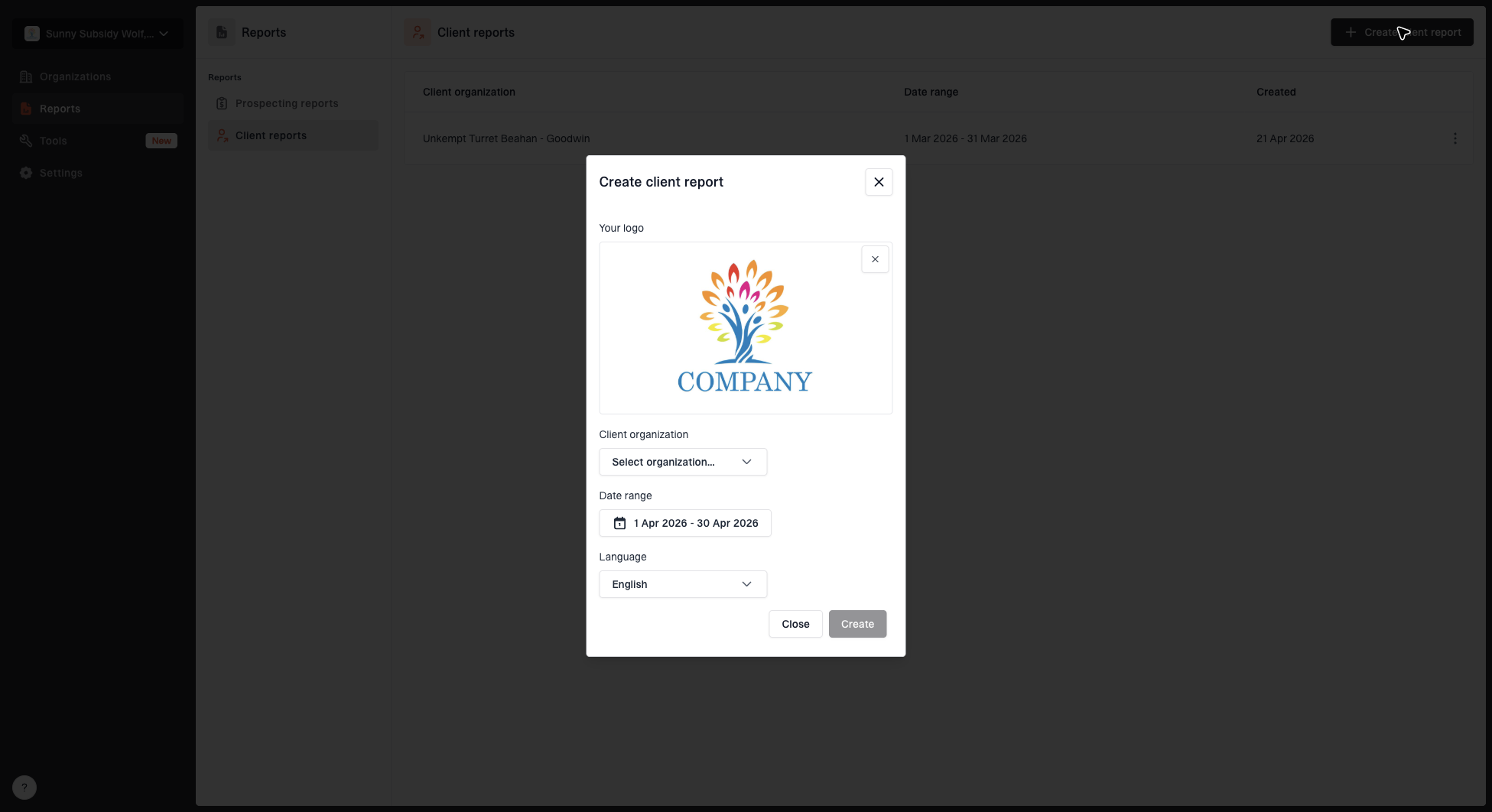
Create client report dialog with organization, date range, logo, and language options
Use Suped's client organizations to keep domain work separate and its white-label reports to share authentication results and open fixes with each client. Keep the report tied to completed tickets and the next approved policy action.
A monthly rhythm alongside daily alert triage
- Week one: Review new sources and authentication failures.
- Week two: Complete fixes for legitimate senders.
- Week three: Move policy forward when reports support it.
- Week four: Send the client report with next actions.
Pilot hosted DMARC with one client
The practical path is straightforward. Pick one client, add the domain, publish the hosted DMARC record, watch reports across a normal business cycle that includes low-frequency senders, fix SPF and DKIM issues, then move policy forward only when legitimate mail is passing. Once that workflow is documented, repeat it across the client base.
Run the pilot in a separate Suped client organization and use its report to review the next policy action with the client. The MSP still owns sender decisions, client approvals, remediation coordination, policy changes, and offboarding.