
How to pitch DMARC monitoring to SMB clients


Updated on 22 Oct 2026: We updated this guide with current mailbox provider requirements, clearer reporting limits, and practical checks for staged DMARC enforcement.
Pitch DMARC monitoring to SMB clients as an operational service that exposes domain spoofing risk and turns authentication failures into clear work items. Lead with the problem every SMB understands: their domain can be used in mail they did not send, and nobody on their team is reviewing the authentication evidence.
For MSPs, DMARC monitoring is a recurring client protection workflow. You onboard the domain, collect reports, verify the sender inventory, fix SPF and DKIM gaps, stage the DMARC policy, watch for new failures, and give the client a plain-language report. That gives the client a managed service with ongoing ownership.
An MSP service model should connect DMARC to client outcomes: less successful direct domain spoofing at participating receivers, fewer silent sender changes, clearer accountability for marketing and finance mail, and evidence of authentication work.
Frame the pitch around business risk
SMB clients usually do not buy DMARC because they love standards. They buy it because their domain has business value. Their invoices, payroll messages, support replies, proposals, and password reset emails all depend on recipients trusting that domain. Frame the service around that trust first, then bring in authentication mechanics only when the client needs detail.
A practical pitch sounds like this: we will monitor who is sending mail as your domain, separate approved systems from unknown sources, fix authentication failures, and move your domain toward an enforcement policy with checks to reduce disruption to legitimate mail. That sentence gives the client a business reason and a clear delivery path.
The pitch lands better when the client sees that participating receivers can send aggregate data after a DMARC policy record requests reports through rua. The service collects that evidence, interprets it, and acts on it before an abusive sender pattern or broken legitimate sender becomes a larger problem.
Under RFC 9989, receivers are encouraged to send aggregate reports at least daily, but reporting is optional. Reports give an incomplete view of observed traffic and do not prove inbox placement.
- Risk: A criminal can send mail that appears to use the client's domain if authentication and policy controls are weak.
- Visibility: The client needs a list of real senders before a stricter policy is applied.
- Control: Monitoring gives the MSP evidence to investigate sources, approve legitimate systems, and repair or retire senders it controls.
- Proof: Reports show progress over time, which helps account reviews and renewal conversations.
|
|
|
|---|---|---|
Spoofed invoices | Protect domain trust | Stage DMARC policy |
New mail app | Avoid silent breakage | Review sender data |
DNS confusion | Own the process | Handle record changes |
Renewal value | Show monthly proof | Send client report |
Keep the sales language tied to operational work the MSP can deliver.
Connect the pitch to mailbox provider requirements
Mailbox provider requirements apply to outgoing mail reaching those providers. An SMB's employee count or choice of mailbox host does not determine whether its newsletters trigger bulk sender rules. These requirements are already in effect, so use the client's sending volume to establish which rules apply.
|
|
|
|---|---|---|
Senders reaching 5,000 or more messages daily to personal Gmail accounts. | SPF and DKIM; DMARC at p=none or stronger; messages must pass DMARC. | |
SPF and DKIM; DMARC at p=none or stronger; messages must pass DMARC. | ||
Domains sending more than 5,000 messages daily to the consumer service. | SPF and DKIM must pass; DMARC at p=none or stronger with SPF or DKIM alignment. |
Authentication requirements are a delivery dependency for senders that meet the relevant provider criteria.
The minimum p=none policy meets the policy requirement but requests no DMARC enforcement. Explain why the managed service also verifies legitimate senders and works toward quarantine or reject. Authentication alone does not guarantee inbox placement. Gmail and Yahoo also have unsubscribe and complaint-rate requirements, so distinguish that work in the proposal.
Show the DMARC rollout in plain stages
The fastest way to lose an SMB buyer is to turn the conversation into SPF mechanisms, DKIM selectors, DMARC tags, and XML reports too early. Keep those delivery details behind a clear explanation of the work and its business purpose. The client is buying someone to own the workflow and keep them out of risky half-configured states.
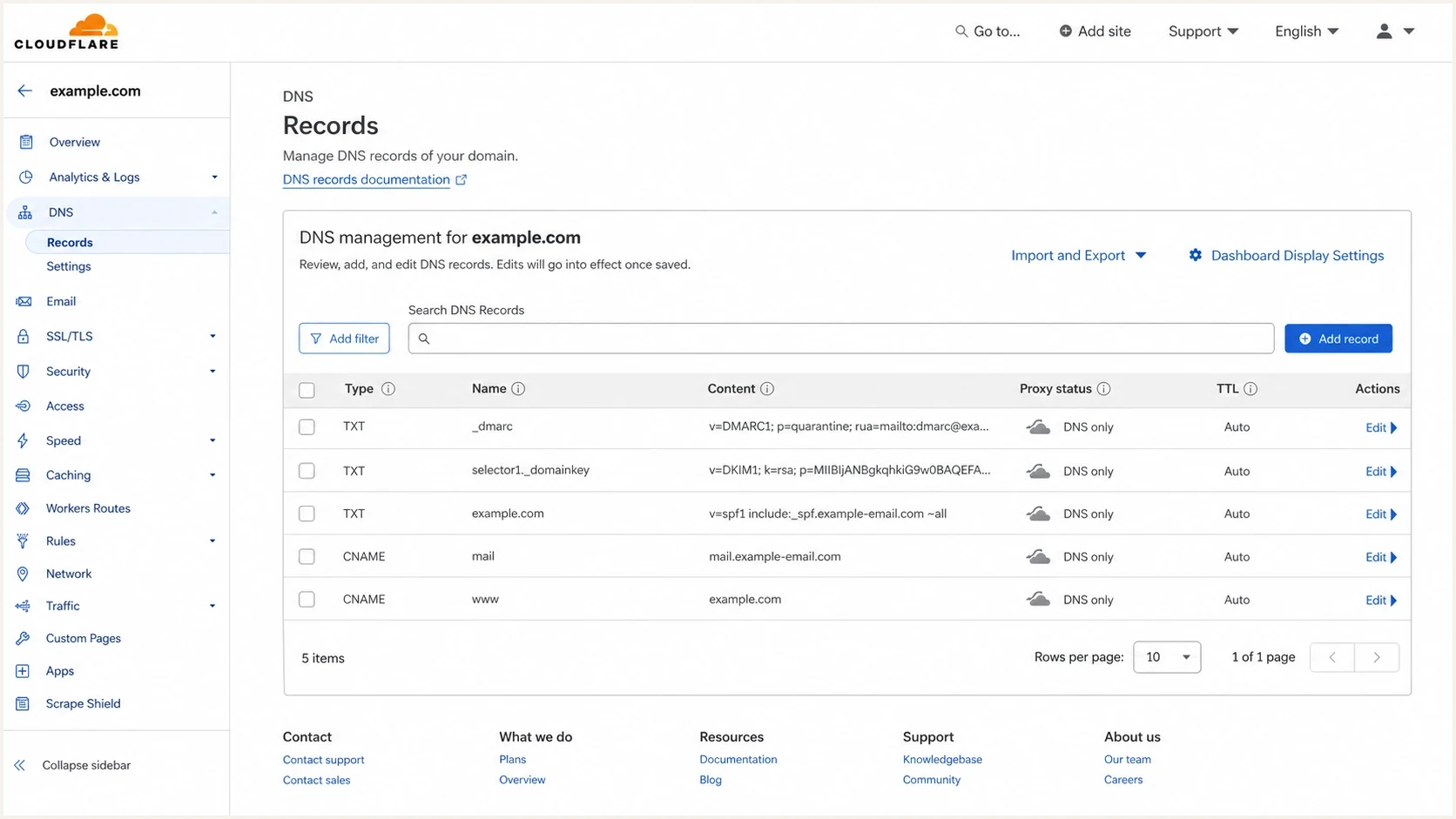
Cloudflare DNS records for DMARC onboarding, including _dmarc and DKIM selector entries.
Show the work in plain stages. For a new deployment, publish a p=none DMARC policy that requests aggregate reports. Then review sender data over a normal business cycle, including month-end invoicing and occasional campaigns, and fix approved systems. Move to quarantine only when approved systems pass DMARC, monitor the result, and use reject after the remaining failures are understood. A DMARC monitoring rollout needs a named policy approver and a rollback plan for legitimate delivery failures.
Safe DMARC policy staging
RFC 9989 made pct historic. Base policy changes on verified senders and understood failures, with closer review after each change.
Monitor
p=none
Combine reports with the client inventory to verify senders.
Quarantine
p=quarantine
Apply enforcement after approved senders pass.
Reject
p=reject
Request rejection when legitimate mail is clean.
Example staged DMARC recordsdns
v=DMARC1; p=none; rua=mailto:dmarc-reports@example.com
v=DMARC1; p=quarantine; rua=mailto:dmarc-reports@example.com
v=DMARC1; p=reject; rua=mailto:dmarc-reports@example.com
The examples are alternative values for one TXT record at _dmarc.example.com. Publish one at a time and replace the example reporting mailbox with the assigned address. Preserve working enforcement when onboarding an existing protected domain.
Build a sellable MSP package
The offer should have clear boundaries. If the client hears only that you will monitor DMARC, they will struggle to value it. If they hear that you will onboard domains, inventory senders, fix authentication gaps, stage policy, monitor alerts, and report monthly, the service becomes concrete. That clarity also protects your team from unlimited support expectations.
Weak pitch
- Scope: We will set up DMARC for your domain.
- Value: The client hears a one-time DNS task.
- Risk: There is no clear owner after the record is published.
- Renewal: The service lacks a monthly proof point.
Stronger pitch
- Scope: We will manage email authentication visibility and policy.
- Value: The client gets ongoing protection and sender governance.
- Risk: Your team reviews failures before policy changes harm delivery.
- Renewal: Reports show issues found, senders fixed, and policy progress.
Package the service around repeatable deliverables. Initial work covers discovery and setup; timing depends on sender complexity and client access. Ongoing work covers monitoring, alert triage, sender change review, and reporting. That lets sales describe the value without inventing a new explanation each time.
- Onboarding: Add the domain, publish or validate the reporting record, confirm any required external reporting authorization, and verify data is flowing.
- Inventory: Identify approved senders such as the primary mailbox, CRM, billing app, help desk, and marketing system.
- Remediation: Fix SPF, DKIM, and DMARC alignment failures for approved sources before enforcement.
- Policy: Move from monitoring to enforcement in stages agreed with the client.
- Reporting: Show approved-sender DMARC pass rates and observed volume, keep unknown traffic separate, and list fixes, open risks, owners, and the next policy decision.
Price setup and recurring work separately
Charge setup separately because discovery, DNS access, sender inventory, initial remediation, and the first policy plan create a front-loaded workload. The recurring fee covers report review, alert triage, sender change review, planned policy decisions, and client reporting. Pricing only by mailbox seat misses the work because DMARC effort follows protected domains, active senders, review cadence, and operational complexity.
|
|
|
|---|---|---|
Protected domains | Named sending domains, subdomains, and agreed non-sending domains | Additional or acquired domains |
Sender changes | Routine review and guidance | Complex platform migration |
Review cadence | Scheduled triage and reporting | Urgent out-of-hours investigation |
DNS work | Planned authentication updates | DNS migration or record rebuild |
Define what the recurring fee covers and what triggers separate project work.
Put protected domain limits, response times, client dependencies, policy approval ownership, and exclusions in the proposal. This prevents a monitoring package from becoming unlimited remediation support and gives sales a defensible recurring scope.
Use discovery questions that expose the need
Discovery should uncover sender sprawl. Most SMBs have more mail systems than they think. The mailbox provider is only the start. Billing, forms, newsletters, scheduling, recruiting, review requests, e-signature flows, and support tools often send as the domain. A DMARC monitoring service gives the MSP a way to see that reality instead of relying on memory.
Do not promise enforcement on day one unless the domain is already clean. The safer commitment is that you will build a verified sender inventory, fix authentication gaps, then move policy when the data supports it.
- Ownership: Who approves new systems that send email as your domain?
- History: Have customers, vendors, or staff reported suspicious messages using your brand?
- Coverage: Which apps send invoices, password resets, quotes, campaigns, support replies, or forms?
- Timing: Which systems send only at month-end or during occasional campaigns, and which subdomains or parked domains do you own?
- Access: Who has DNS access, and how long do DNS changes take to approve?
- Tolerance: Which messages would create business pain if blocked or routed to spam?
?
What's your domain score?
Deep-scan SPF, DKIM & DMARC records for email deliverability and security issues.
A quick domain health check is useful in a sales call because it shows the current published DNS records. A missing DMARC record or invalid SPF record gives the client a concrete starting point. A DNS check alone cannot prove DKIM signing across every sender or message-level DMARC alignment. Confirm those with aggregate reports and delivered-message headers.
Turn monitoring into a service routine
Once the client says yes, the delivery routine matters more than the sales deck. A clean process keeps the MSP team consistent across many domains and stops DMARC work from becoming a custom engineering project for each client.
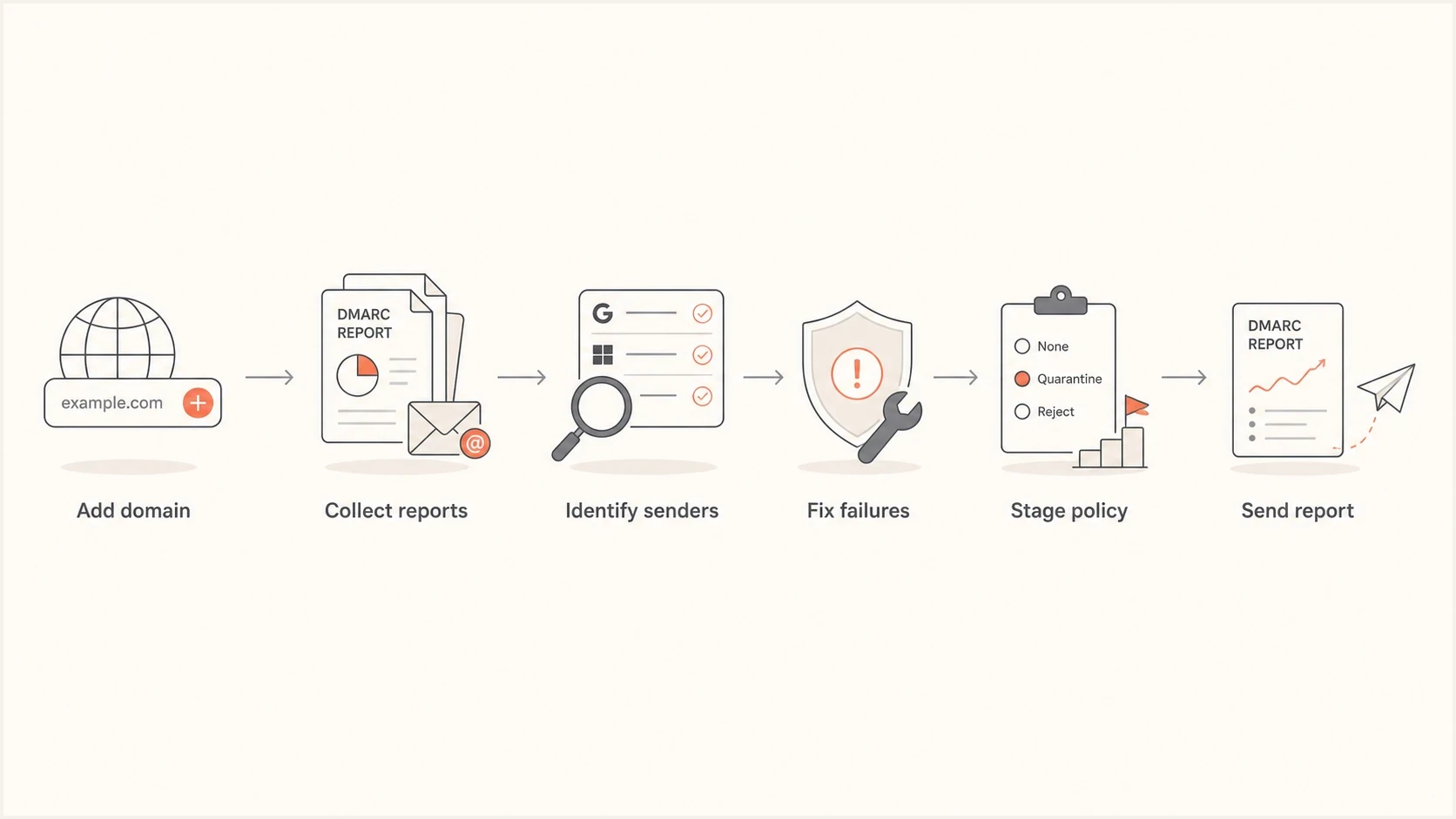
MSP DMARC monitoring workflow: add a domain, collect reports, identify senders, fix failures, stage policy, and report.
Use a weekly internal review and a monthly client summary, with prompt triage for high-priority alerts and closer review after policy changes. Weekly review catches sender drift, failed DKIM signatures, SPF lookup problems, and sudden volume changes. Monthly summary gives the client proof that the service is active and that their email estate is being governed.
|
|
|
|---|---|---|
Onboarding | Publish or validate reporting DNS and confirm ingestion | Baseline record and report status |
First business cycle | Verify sender inventory, including low-frequency systems | Approved senders and unresolved sources |
Weekly and on high-priority alerts | Review failures and assign remediation | Fix list with owners |
Monthly | Compare approved-sender pass rates and document work | Progress, open risks, and decisions needed |
After policy changes and quarterly | Check delivery impact and review readiness | Keep, advance, or roll back policy |
A repeatable cadence makes DMARC monitoring easier to deliver across many SMB clients.
A common delivery blocker is SPF maintenance. Nested includes can exceed the SPF limit of 10 DNS-querying terms, including nested evaluations. Hosted SPF helps an MSP manage approved sources after initial DNS setup. Changes to DKIM selectors, custom return paths, or other records still need separate work.
Position Suped in the workflow
Suped's product supports this MSP workflow by keeping DMARC monitoring, SPF and DKIM visibility, issue detection, alerts, hosted records, client reporting, and multi-client operations in one place. The technician gets a queue of specific problems instead of raw report data, while the account manager gets a client-ready explanation of what changed.
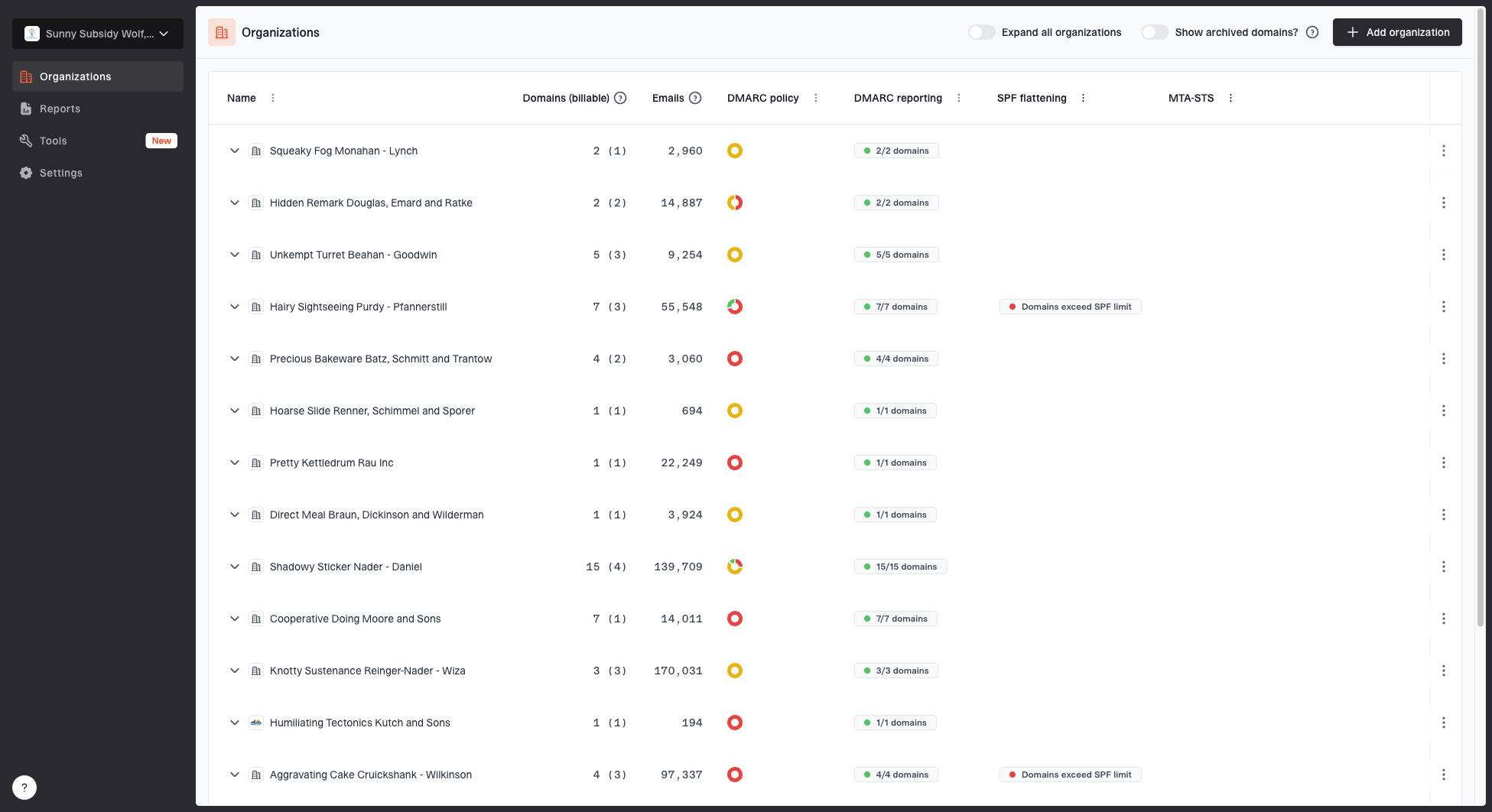
MSP organizations page showing client organizations, domain counts, email volume, and domain status columns
Suped's MSP dashboard supports switching between client organizations, seeing domain status, reviewing authentication health, and keeping delivery work visible. This keeps routine triage tied to the correct client workspace. Other options include Hosted DMARC, SPF flattening, Hosted MTA-STS, alerts, client reports, and blocklist monitoring (blacklist monitoring) when reputation checks belong in the same account review.
Suped can alert on findings as reports are processed, but aggregate reports arrive on the receiving provider's schedule, usually daily. Keep report-based alerts separate from an instant notification of every message or attack.
A clean MSP handoff in Suped looks like this: add the client organization, add the first domain, publish the record, confirm report ingestion, review issues, follow the steps to fix, then generate a client report before the next account review.
- Setup: Create the client organization and add the domain.
- Monitor: Collect DMARC reports and confirm sender visibility.
- Fix: Use issue detection and steps to repair SPF, DKIM, or DMARC alignment failures.
- Report: Share progress, open risks, and the next policy stage.
Handle objections without overexplaining
Objections usually come from one of two places: the client thinks this is already handled, or they think it is too technical to matter. Avoid arguing about protocol details. Bring the conversation back to ownership and evidence, including what happens when a new sender appears.
Client objection
- Already done: We already have SPF, so this is covered.
- No incident: We have not had a spoofing problem.
- Too technical: Our team will not understand these reports.
- Mail risk: We do not want legitimate email blocked.
Practical response
- Coverage: SPF is one check. DMARC shows whether mail matches the protected domain.
- Evidence: Monitoring flags unfamiliar sources and authentication failures for investigation; an unknown IP is not proof of abuse.
- Ownership: The MSP reads the reports and gives a plain-language summary.
- Staging: Policy changes happen after approved senders are verified.
SPF and DKIM authenticate technical identifiers. DMARC passes when at least one passing SPF or DKIM identifier matches the visible From domain under its alignment rules. Configure both mechanisms for legitimate senders. Forwarding often breaks SPF, while a matching DKIM signature still supports a DMARC pass if it survives unchanged.
An enforcement policy asks participating receivers how to handle direct domain spoofing that fails DMARC; receivers make the final delivery decision. DMARC does not stop lookalike domains or abuse through a compromised mailbox or authorized sending account, where authentication still passes. Investigate unexpected volume even when DMARC passes. See RFC 9989 for the protocol scope and receiver discretion.
Close with a clear service scope
Close the sales conversation with a managed email authentication proposal that names the protected domains, setup work, recurring review cadence, and client responsibilities. Agree on the next policy decision and the evidence needed before approving it.
- Start: Run a health check and show the current record state.
- Explain: Tie DMARC to domain trust, sender control, reporting evidence, and safer policy enforcement.
- Package: Define onboarding, monitoring, remediation, policy staging, and reporting.
- Deliver: Use a repeatable review cadence so every domain has an owner and a next step.