Why are DKIM validations failing intermittently with Office365?

Updated on 23 Sep 2026: We updated this guide with current Microsoft 365 guidance for intermittent DKIM failures and Outlook.com rejections.
Intermittent DKIM validation failures with Microsoft 365 usually mean the mail stream is inconsistent. Some messages are signed and verified, while other messages leave through a different path, use a stale selector, hit inconsistent DNS, or get modified after Microsoft 365 signs them. When the failure rate is close to 50%, check split DNS or mixed routing before blaming the DKIM key itself.
The important caveat is that dkim=none and dkim=fail are different problems. dkim=none means the receiver did not find a usable signature on the message. dkim=fail means there was a signature, but verification failed. Separate those two buckets first because the fixes are different.
Short answer
A DKIM record that contains an n= tag is not the reason Microsoft 365 DKIM validation fails intermittently. The n= tag is a note field. It is valid in a DKIM TXT record and is not used in cryptographic verification.
What intermittent DKIM failure means
DKIM is deterministic for a single unchanged message. The sender signs selected headers and the body hash with a private key. The receiver fetches the public key through DNS and checks whether the signature still matches the message it received. If the exact same signed message and exact same DNS answer reach the receiver every time, the result should not randomly change.
Intermittent failure means one of those inputs changes. In Microsoft 365 cases, the changing input is usually the signing route, selector lookup, message body, signed header set, or receiver's DNS view.
Two common header patterns
dmarc=fail (p=none sp=none pct=100) action=none
header.from=example.com; dkim=none; arc=none

dkim=fail reason=signature-did-not-verify
|
|
|
|---|---|---|
dkim=none | No usable signature | Signing route |
dkim=fail | Signature mismatch | Failure reason |
temperror | Temporary DNS lookup problem | DNS response and TTL |
pass | Valid signature | Compare path |
Use the receiver's Authentication-Results header before changing DNS.
Why Microsoft 365 fails only some of the time
The most useful diagnostic question is not "Is the DKIM record valid?" It is "What is different about the failed messages?" A public key can validate cleanly and still fail half the mail if only half the mail uses that key path.
- DNS split: Two authoritative nameservers return different CNAME or TXT data for the same selector.
- Mixed routing: Some messages leave through Exchange Online, while others leave through a gateway, app, or legacy relay.
- Post-signing rewrite: A footer, tracking wrapper, disclaimer, encoding change, or security gateway modifies signed content.
- Selector mismatch: The message references one selector, but DNS only has the other selector or an old target.
- CNAME format mismatch: New custom domains can use dkim.mail.microsoft targets, while existing domains can retain onmicrosoft.com targets. Publish the exact values Microsoft provides for the domain.
- Receiver lookup behavior: A receiver can hit a bad DNS answer, a slow authoritative response, or a stale key. A TTL below 3600 seconds also forces more frequent lookups and increases exposure to lookup timeouts.
When the result is dkim=none
- Unsigned route: The message bypassed the Microsoft 365 DKIM signer.
- Disabled signing: DKIM is not enabled for that accepted domain.
- Direct application send: An application sends outside Exchange Online and does not add its own DKIM signature.
When the result is dkim=fail
- Body changed: The body hash no longer matches after a footer or wrapper was added.
- Header changed: A header named in the signature's h= tag was modified after Microsoft 365 signed it.
- Key changed: The selector points at an outdated or inconsistent public key.
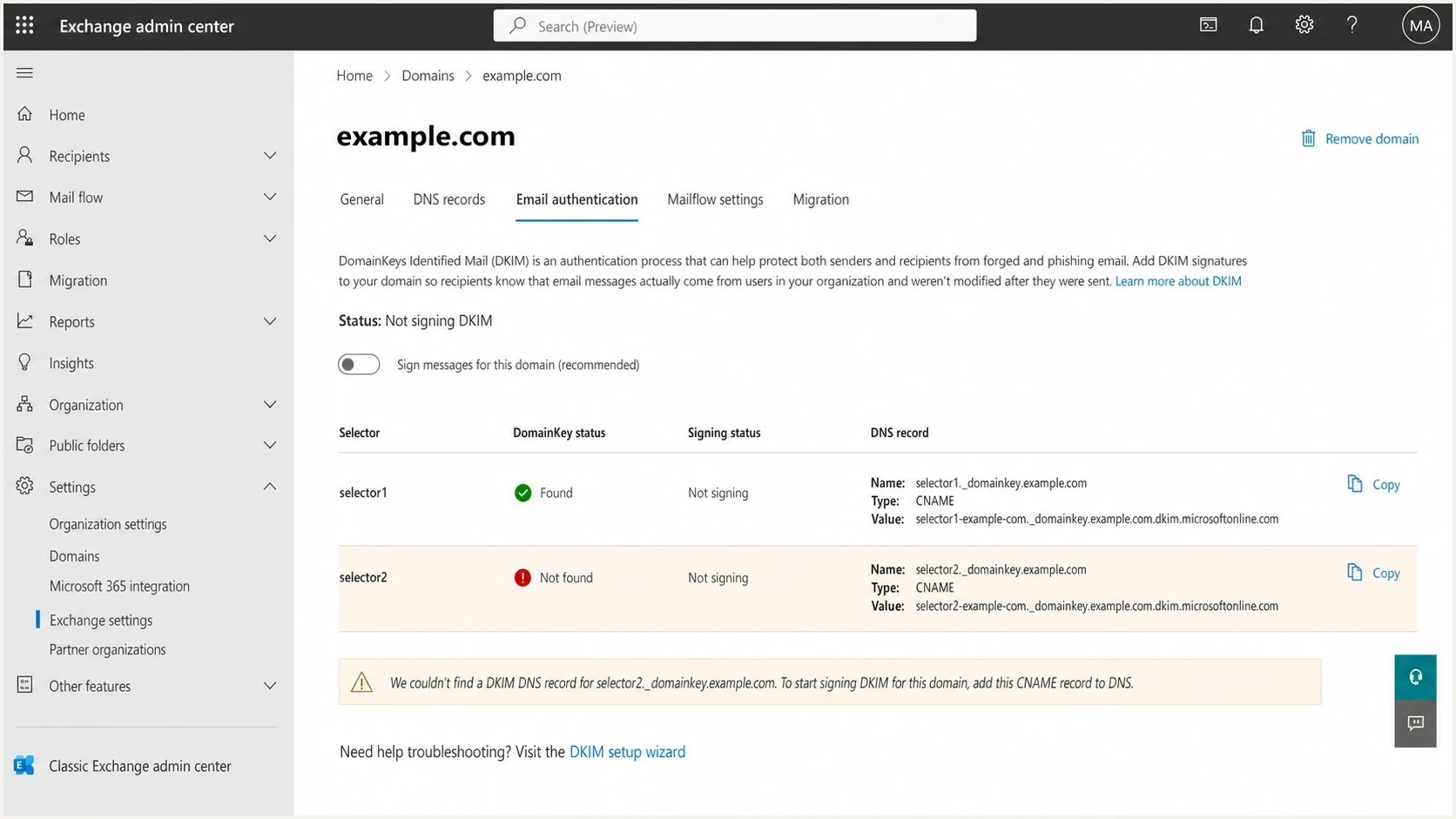
Microsoft Exchange admin center DKIM settings with selector status and CNAME guidance.
Separate outbound signing from Outlook.com rejection
Intermittent failure can occur on either side of the Microsoft boundary. A domain that sends through Microsoft 365 can have an outbound signing or routing fault. A sender on any platform can also see DKIM fail only when Outlook.com evaluates the message. First identify whether Microsoft 365 signed the message or a Microsoft consumer mailbox rejected it.
|
|
|
|---|---|---|
Outbound Microsoft 365 | The same route fails at multiple receivers | DKIM-Signature, Received headers, and message trace |
Outlook.com inbound | Only Outlook.com, Hotmail, Live, or MSN recipients fail | NDR, sender logs, and accepted comparison messages |
Scope the incident before changing Microsoft 365 DKIM settings.
Read 550 5.7.515 literally
Outlook.com uses 550 5.7.515 when the domain in the 5322.From address does not meet the required authentication level. For a high-volume sender under this enforcement, SPF and DKIM must both pass, a DMARC record must exist, and DMARC must pass through at least one aligned mechanism. A DMARC pass through SPF does not cancel dkim=fail.
- Capture the rejection: Keep the complete NDR, including the SPF, DKIM, and DMARC results and the 5322.From domain named in the error.
- Use sender-side evidence: A message rejected during SMTP has no recipient mailbox copy to inspect. Preserve the submitted message, outbound logs, and any gateway capture.
- Compare the same mail stream: Match accepted and rejected messages by application, template, sending IP, route, signing domain, and selector. A successful test message does not prove that production mail used the same path.
- Check alignment separately: Confirm whether the DKIM d= domain or the SPF-authenticated 5321.MailFrom domain aligns with the 5322.From domain used for DMARC.
Why the n tag is not the issue
The n= tag in a DKIM TXT record is a human-readable note. It can appear in the TXT record that sits behind a Microsoft 365 selector CNAME. It does not change the public key, the selector, or the verification calculation.
DKIM TXT record with a note tag
selector1._domainkey.example.com. IN TXT (
"v=DKIM1; k=rsa; n=Microsoft 365 DKIM key; "
"p=MIIBIjANBgkqhkiG9w0BAQEFAAOCAQ8A..."
)
If one receiver passes the same selector and another receiver fails intermittently, the note tag is noise. Still check the full record because syntax matters, but do not stop there. A syntactically valid key only proves that the DNS record can be parsed.
Do not fix the wrong thing
Deleting n= from a valid DKIM TXT record will not repair a route that is unsigned, a message that is rewritten, or a selector that resolves differently across nameservers.
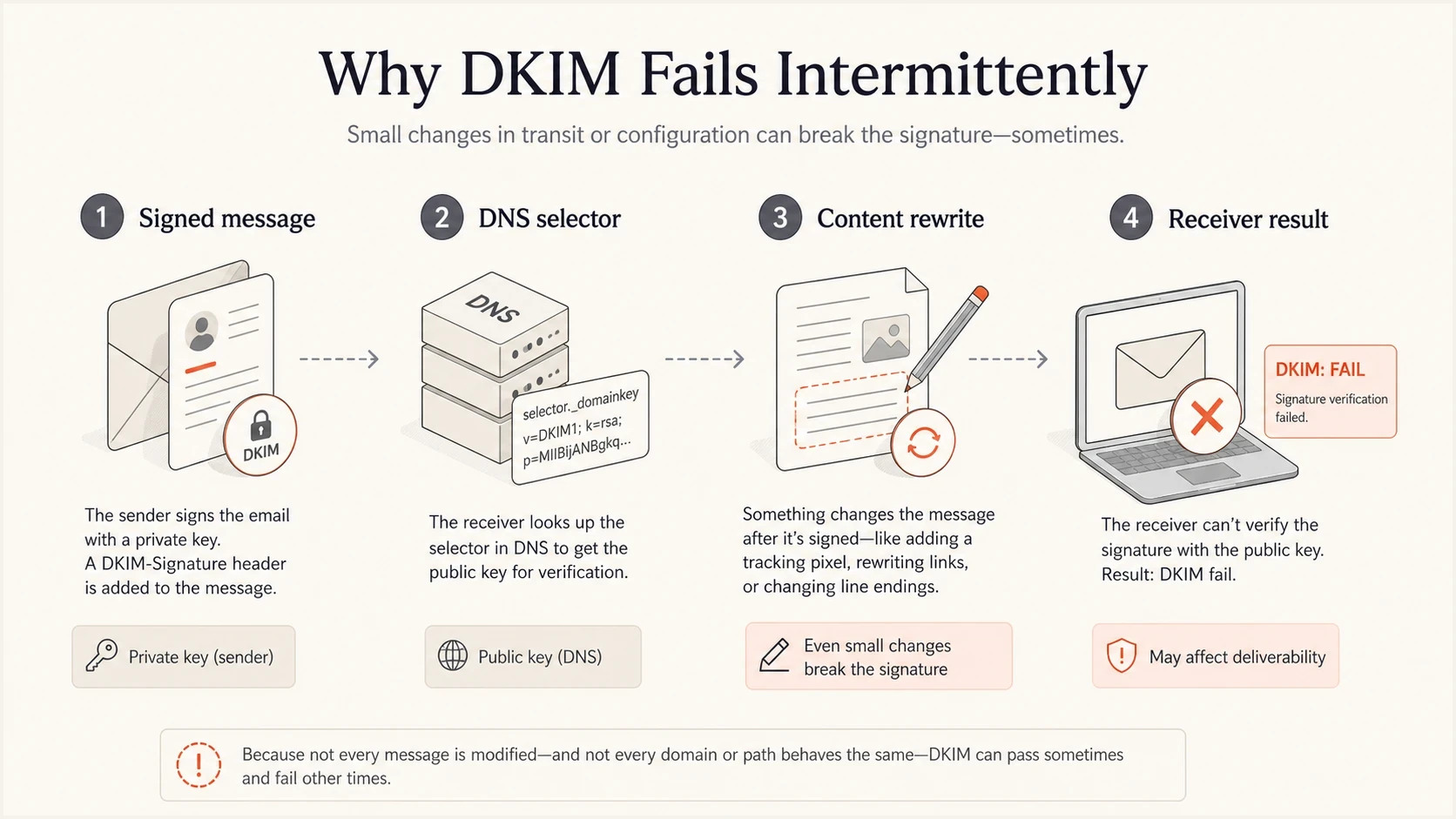
Microsoft 365 DKIM path showing signing, selector DNS, content changes, and receiver validation.
Use the CNAME values Microsoft 365 provides
Microsoft introduced a new DKIM CNAME target format for newly added custom domains in May 2025. Those targets use dkim.mail.microsoft and include a tenant-specific partition value. Existing custom domains can continue to use the older onmicrosoft.com format, so a target should never be built by copying a generic example.
Retrieve the exact Microsoft 365 DKIM targetspowershell
Get-DkimSigningConfig -Identity example.com |
  Format-List Name,Enabled,Status,Selector1CNAME,Selector2CNAME
- Copy both targets exactly: Publish the returned Selector1CNAME and Selector2CNAME values without reconstructing the tenant or partition portion.
- Check both CNAME chains: Confirm each authoritative nameserver returns the same CNAME and that its Microsoft-hosted target resolves to a DKIM public key.
- Use a stable TTL: Set both selector CNAME records to at least 3600 seconds so receivers do not needlessly repeat DNS lookups.
- Verify tenant status: After enabling signing, confirm Enabled is True and Status is Valid for the custom domain.
- Expect one active selector: Microsoft 365 signs with one selector at a time and activates the other during rotation, but both CNAMEs need to remain published.
Do not infer a fault from the target format
A domain can be correctly configured with either the legacy onmicrosoft.com target or the newer dkim.mail.microsoft target. The returned tenant configuration and the selector in the received message are the sources of truth.
How to diagnose the failure path
Treat intermittent DKIM failures like a sampling problem. One failed header is useful, but a small set of passed and failed headers is much better. Compare Authentication-Results, the full DKIM-Signature header, source IP, route, and final receiver. Within DKIM-Signature, d= identifies the signing domain, s= identifies the selector, and h= lists the signed headers.
- Split the results: Group failures into dkim=none, dkim=fail, and DNS temporary errors.
- Compare signing identities: Check the d= domain and s= selector on every signature, then compare them with the visible From domain.
- Query every nameserver: Ask each authoritative nameserver directly for the same selector record and follow the CNAME to its public key.
- Trace the route: Find whether the failed messages pass through a gateway, app relay, connector, forwarding hop, or hybrid server.
- Test a plain message: Send a simple text email and compare it with the normal template or campaign.
- Monitor over time: Use aggregate DMARC data to confirm whether the fix holds after DNS caches expire and during selector rotation.
DNS checks for selector consistencybash
dig +short CNAME selector1._domainkey.example.com
dig +short TXT selector1._domainkey.example.com
dig @ns1.example.net CNAME selector1._domainkey.example.com +short
dig @ns2.example.net CNAME selector1._domainkey.example.com +short
For a quick public selector check, run the public DKIM checker and compare the result with direct authoritative DNS queries. A checker is useful, but it should not replace the nameserver-by-nameserver test when failures are intermittent.
DKIM checker
Check selector records and public key configuration.
?/7tests passed
If the selector resolves consistently, move to message mutation. A no-key result points to the exact selector's DNS path. A body-hash failure points to body or encoding changes, while a generic signature-verification failure can point to a changed header listed in h=. Compare the final raw message with a copy captured before the last gateway or transport rule.
Check every signature and ARC result
A message can contain more than one DKIM signature. Match every Authentication-Results entry with its d= domain and s= selector. One failed signature is not the final result if another passes and its d= domain matches the visible From domain.
- Read ARC separately: A trusted ARC chain can preserve earlier authentication through forwarding, but it does not change a broken DKIM signature into a pass.
- Find the modifying hop: Compare Received, ARC, and Authentication-Results headers to locate where a pass became a fail.
Enhanced Filtering for Connectors applies to supported inbound routes where a gateway or linear hybrid hop sits before Microsoft 365. It preserves original source information and improves Microsoft's authentication evaluation. It does not repair an outbound DKIM signature that a system modifies after signing.
How DMARC reports narrow the cause
DMARC aggregate reports are useful because they show patterns that individual complaints hide. If failures cluster around one source IP, receiver, sending domain, or selector, that pattern gives you a fix path.
Suped's DMARC monitoring product groups Microsoft 365 authentication results by source IP, receiver, signing domain, and selector. Use those groups to find the path that owns the failures, then confirm that pass rates stay stable after DNS caches expire or Microsoft rotates selectors.

Issue steps to fix dialog showing the issue overview, tailored fix steps, and verification action
Before changing a live selector, check the wider domain posture with a domain health checker. That catches adjacent problems such as missing SPF, weak DMARC policy, missing DKIM selectors, or MTA-STS gaps that can make the same incident look larger than it is.
How to read intermittent DKIM failure rates
These bands are practical triage thresholds, not a protocol rule.
Noise
Under 1%
Usually forwarding, one-off mutation, or a receiver artifact.
Investigate
1-5%
Look for a repeatable source, route, receiver, or selector.
Active fault
Over 5%
Treat as routing, DNS, or post-signing modification until proven otherwise.
A public Microsoft Answers thread shows the same diagnostic clue: dkim=none means the message was not signed in a way the receiver could use. That should send you toward signing settings and route tracing, not toward changing the body hash.
Fixes that usually resolve Microsoft 365 DKIM failures
Once the failure mode is clear, the fixes are straightforward. A common mistake is changing the visible DNS record first, then discovering that the failed mail never used that selector or never reached the signer.
Verify Microsoft 365 DKIM configurationpowershell
Get-DkimSigningConfig -Identity contoso.com |
  Format-List Name,Enabled,Status,Selector1CNAME,Selector2CNAME
- Publish both selectors: Microsoft 365 uses one selector at a time and switches to the other during rotation, so both returned CNAMEs need to exist.
- Remove conflicting records: Clear old TXT records or duplicate selector entries only when they conflict with the required CNAME design.
- Fix authoritative DNS: Make every authoritative nameserver return the same selector answer and the same CNAME target.
- Stop later rewrites: Move footers, URL wrapping, and disclaimers before signing, or re-sign after the final modification.
- Unify routing: Ensure app mail, shared mailbox mail, connector mail, and hybrid mail use the expected signing path.
- Rotate carefully: Keep both CNAMEs published. A Microsoft 365 key rotation takes four days (96 hours), so monitor selector-specific pass and fail rates throughout the change.
The fastest stable fix
For a 50% failure pattern, check authoritative DNS first, then route split, then post-signing modification. That order targets the highest-probability causes with the least production churn.
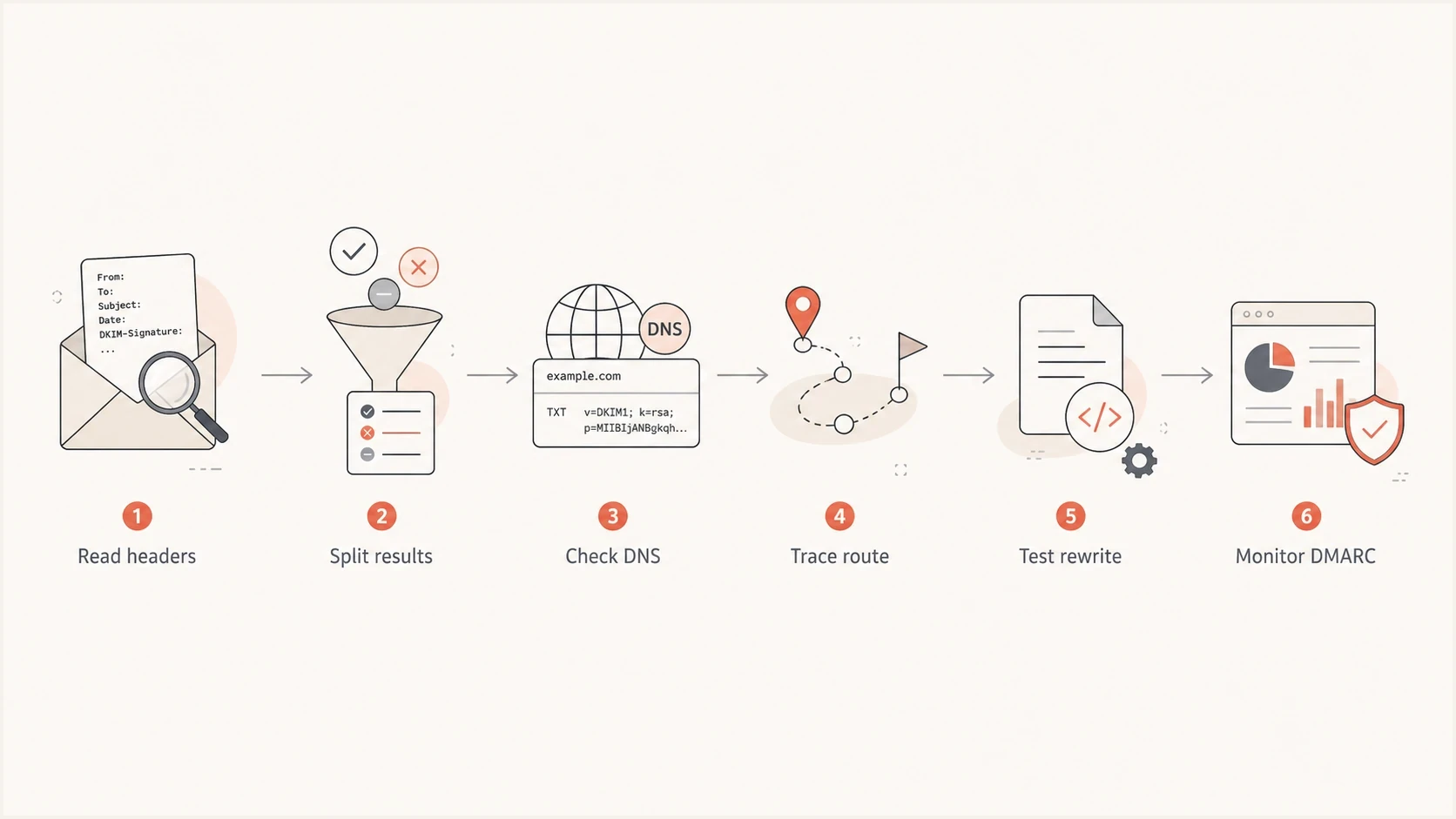
Flowchart for diagnosing intermittent Microsoft 365 DKIM validation failures.
Views from the trenches
Best practices
Compare DKIM failures by selector, source IP, sending route, and receiver before changing DNS.
Query each authoritative nameserver directly so split DNS shows up before the next send.
Keep both Microsoft 365 DKIM CNAMEs published, even if one selector is quiet today.
Common pitfalls
Treat a valid DKIM key as proof of syntax only, not proof that every message is signed.
Do not chase the n tag; it is a note field and does not participate in verification.
Do not mix signed and rewritten routes without testing the final received message headers.
Expert tips
Separate dkim=none from dkim=fail first, because the repair paths usually differ.
Test a plain text message and a normal campaign message to expose content rewriting fast.
Use DMARC aggregate data to find whether one receiver, source, or selector owns the issue.
Expert from Email Geeks says a DKIM key with an n tag can be valid because the tag is only a human-readable note and not part of verification.
2020-09-28 - Email Geeks
Marketer from Email Geeks says when roughly half of Microsoft 365 mail fails DKIM, the first check should be whether authoritative DNS servers return different selector data.
2020-09-28 - Email Geeks
What to do next
For intermittent Microsoft 365 DKIM failures, do not start by editing the n= tag or replacing a key that already validates. Collect passed and failed headers, separate dkim=none from dkim=fail, query each authoritative nameserver, and confirm the route used by failed messages.
If the failures are close to half the mail, inconsistent DNS or split routing is the practical starting point. If the failures happen only after a specific gateway or campaign template, post-signing modification is the likely cause. If only Microsoft consumer recipients reject mail with 550 5.7.515, use the NDR and sender-side records to inspect the exact rejected stream. Once those patterns are visible in DMARC data, the fix becomes a controlled DNS, routing, or content-handling change instead of guesswork.




