What does PH01 bounce message mean and how is it related to DKIM and phishing?

Published 4 Jun 2025
Updated 12 Aug 2026
12 min read
Summarize with

Updated on 12 Aug 2026: We clarified that Yahoo PH01 needs controlled message testing alongside DKIM and DMARC checks.
A PH01 bounce means Yahoo permanently rejected that delivery attempt for policy reasons associated with phishing or other risky message signals. The common SMTP wording is 554 Message not allowed - [PH01] Email not accepted for policy reasons. That does not prove the sender tried to phish anyone, and it does not identify one universal cause. The 554 reply marks a permanent failure for the current attempt, while PH01 is Yahoo's diagnostic for the policy decision.
DKIM can contribute, but PH01 is not a DKIM-only code. Weak or missing authentication, an unaligned DKIM signature, or a DMARC failure removes a useful trust signal. A blocked destination URL, tracking domain, image host, attachment, phone number, or compromised linked site can still be the decisive trigger when SPF, DKIM, and DMARC pass.
- Meaning: PH01 is a Yahoo policy rejection, not a generic mailbox-full or temporary delivery error.
- DKIM link: Check whether a passing signature aligns with the visible From domain, but do not stop when DKIM passes.
- Fix path: Preserve the bounce, test a stripped message, restore elements one at a time, and verify authentication on the same route.
What PH01 means
PH01 is best read as Yahoo saying that the message was not accepted because it matched phishing-related or other policy signals. The rejection happens during SMTP delivery, so the message never reaches the recipient's inbox, spam folder, or quarantine visible to the recipient.
Do not troubleshoot PH01 as a single DNS typo by default. Preserve the exact SMTP response and isolate the message elements first, then verify authentication on the affected route. Authentication failures can contribute to the decision, especially when the visible brand domain lacks SPF or DKIM alignment, but Yahoo does not publish a single trigger for every PH01 response.
Do not assume PH01 means Yahoo has blocklisted or blacklisted your IP. A blocklist or blacklist issue can contribute to filtering, but PH01 points more specifically to a message policy decision. Content, hosted domains, authentication, and visible-domain matching deserve the first pass.
|
|
|
|---|---|---|
554 | Permanent rejection | Do not retry unchanged |
PH01 | Yahoo policy code | Content, domains, and authentication |
Policy reasons | Receiver rule | Exact failed message |
Compact interpretation of the PH01 bounce components.
How DKIM fits into PH01
DKIM signs parts of the message with a domain in the d= tag. DMARC then asks whether that DKIM domain aligns with the visible From domain. If an email says it is from example.com but the only passing DKIM signature belongs to a sending platform's unrelated domain, DKIM can show as pass while DMARC fails when SPF also lacks alignment. That detail matters because phishing filters care about the domain the recipient sees.
Seeing dkim=pass is not enough. The useful question is whether at least one passing DKIM signature aligns with the visible From domain. Under DMARC's default relaxed mode, the domains can share the same organizational domain. Strict adkim=s alignment requires an exact domain match.
Authentication pattern that can cause trouble
Visible From: offers@example.com
Return-Path: bounce@shared-sender.net
DKIM result: pass, d=shared-sender.net
SPF result: pass, smtp.mailfrom=shared-sender.net
DMARC result: fail for example.com
In that pattern, authentication is not absent, but neither the DKIM nor SPF identity aligns with example.com. DMARC therefore fails for the visible From domain, removing an important authorization signal.
DKIM pass, still risky
- Signature domain: The passing DKIM signature belongs to an unrelated shared sender domain.
- Visible domain: The From header uses your brand or organizational domain.
- DMARC result: The message fails if SPF also lacks domain alignment.
DKIM pass, lower risk
- Signature domain: The passing signature meets the active relaxed or strict DMARC alignment mode.
- Visible domain: The From header matches the domain the recipient expects.
- DMARC result: The message passes through SPF or DKIM with domain alignment.
Why phishing classification happens
Yahoo does not publish the precise PH01 decision rules. In practice, a URL, hosted asset, attachment, or other message element can trigger the rejection even when authentication passes, while unaligned authentication and poor reputation remove trust signals. A message with no DKIM domain alignment, an unrelated bounce domain, deceptive account language, and a flagged redirect has a harder path to acceptance than a consistent message sent through an authenticated source.
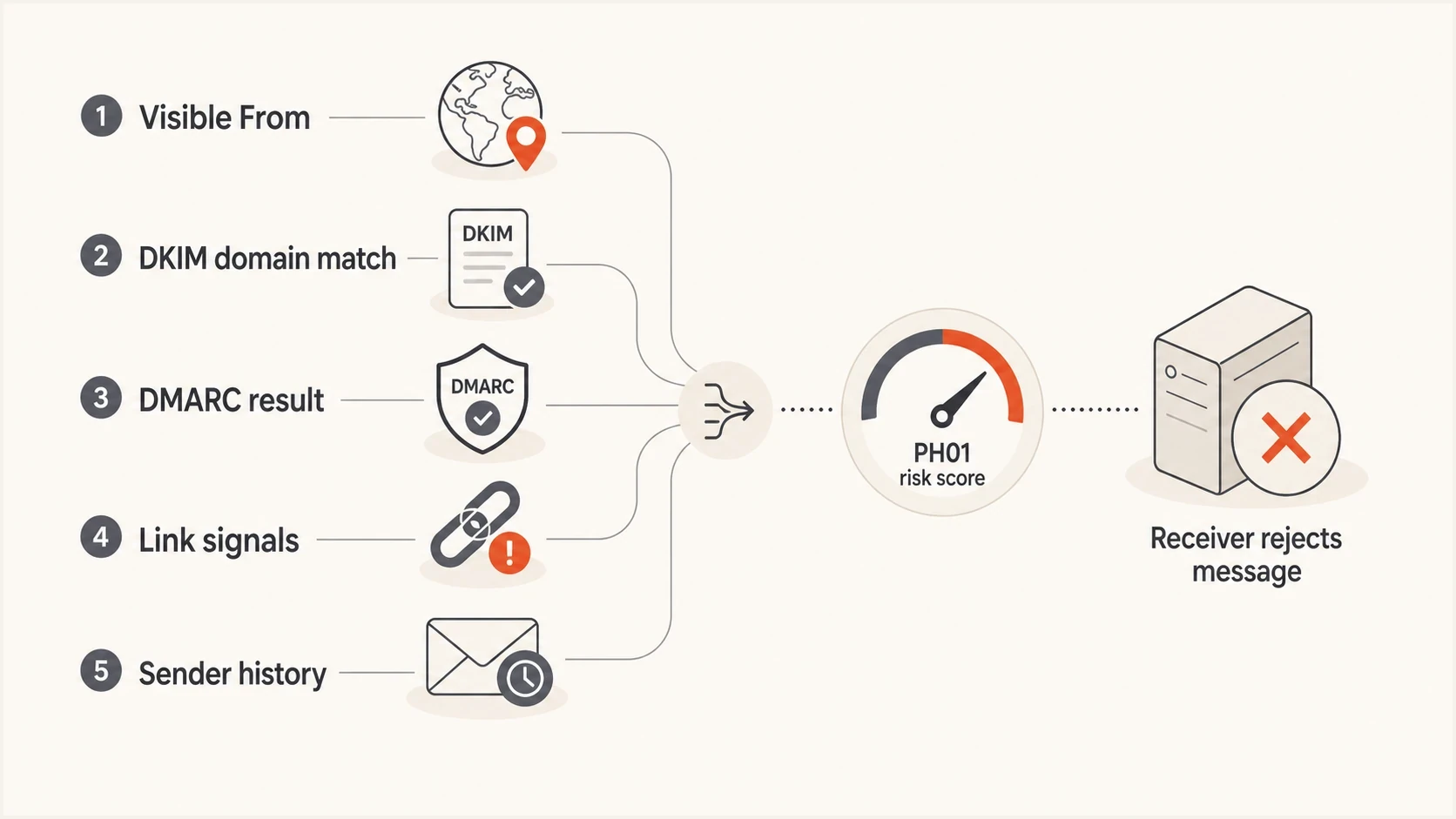
PH01 risk signals include visible From, DKIM domain match, DMARC result, links, and sender history.
The important authentication distinction is domain alignment. SPF can pass for the Return-Path domain, DKIM can pass for an unrelated sender domain, and the visible From domain can still fail DMARC. Inspect the exact domains and the active alignment mode, not only the words pass or fail.
- Authentication: DMARC fails when neither SPF nor DKIM passes with a domain aligned to the visible From domain.
- Identity: An unrelated From domain, reply-to domain, branded link domain, and return path can increase policy risk.
- Content: Deceptive account warnings, disguised links, unexpected attachments, and compromised destinations get stricter treatment.
- History: New traffic, sudden volume jumps, low engagement, complaints, and spamtrap hits can compound the issue.
For bulk promotional mail sent to consumer domains hosted by Yahoo Mail, Yahoo requires both SPF and DKIM, a valid DMARC policy with at least p=none and a passing DMARC result. It also requires one-click unsubscribe and a spam complaint rate below 0.3%. Missing these requirements can cause delivery problems even when they are not the only reason for PH01.
For a practical outside discussion of how SPF, DKIM, and DMARC can still leave room for abuse, this Server Fault question is useful. Authentication proves domain authorization under specific rules, not that every message is safe or wanted.
How to diagnose a PH01 bounce
Start with the exact failed message, not a similar campaign. Headers, raw MIME, body content, hosted assets, and redirect paths can differ by sending source, template, audience, link wrapper, and personalization. One broken route or inserted domain is enough to create PH01 for a subset of traffic.
PH01 investigation order
A practical first-pass weighting for diagnosis, not Yahoo-published scoring.
Content and domains
Authentication
Reputation
Routing
- Collect evidence: Save the full SMTP response, Message-ID, original headers, raw MIME, sending platform, affected route, timestamp, and campaign ID.
- Build a clean test: Remove nonessential links, images, attachments, tracking, phone numbers, and footer assets while preserving required unsubscribe functionality.
- Check DKIM: Confirm the selector exists, the public key is valid, and the signing domain aligns with the visible From domain. Suped's DKIM checker is built for this focused DNS validation.
- Check DMARC: Verify that either SPF or DKIM passes with domain alignment on the exact failed route. Fix a DMARC failure before treating the test as a clean baseline.
- Inspect every domain: Follow redirect chains and check click tracking, open tracking, hosted images, unsubscribe systems, preference centers, and landing pages inserted after editing.
- Check reputation: Review complaint patterns, bounce spikes, new IPs, unexpected volume, and any blocklist or blacklist listings.
DKIM checker
Check selector records and public key configuration.
?/7tests passed
After the focused DKIM check, run a broader domain review. Suped's domain health checker looks across DMARC, SPF, and DKIM together, which helps confirm whether PH01 coincides with an authentication-chain problem.
Domain health checker sample results showing DMARC, SPF, DKIM scorecards and detailed validation checks
How to isolate a PH01 trigger
The trigger can sit outside the visible email editor. Yahoo evaluates the delivered message, including raw MIME, redirect destinations, tracking hosts, image hosts, footer links, and automatically inserted assets. Use one authenticated sending route and change one variable per test so an acceptance change has a clear cause.
- Establish a baseline: Send plain text through the affected route to one controlled Yahoo recipient with no attachment, image, click tracking, open pixel, or phone number. Keep the required unsubscribe path for promotional mail.
- Inspect a failed baseline: Check the raw message for domains and assets the platform added automatically, then confirm SPF, DKIM, and DMARC results on that message.
- Restore one element: Add one destination URL, hosted image, tracking function, footer item, or attachment per test until the rejection returns.
- Repair the trigger: Remove the affected asset, clean a compromised destination, correct the redirect, or ask the sending platform to investigate shared infrastructure.
- Resume gradually: After clean tests pass, restart with a small group of engaged Yahoo recipients and watch for the same diagnostic before restoring normal volume.
A sudden PH01 pattern across previously accepted templates can indicate account, API key, or website compromise. Review recent sessions, sending credentials, unexpected outbound activity, changed redirects, and linked-site files. Authentication can pass when unauthorized mail uses a legitimate sending system.
Fixing DKIM and DMARC domain matching
If PH01 appears after moving traffic to a new platform, authenticate that platform with your domain rather than relying only on its unrelated shared domain. Publish the platform's DKIM CNAME or TXT records, confirm that it signs with an aligned domain, and make sure the visible From domain has a valid DMARC record. This establishes a clean authentication baseline, but message-element testing still determines whether content or a hosted domain triggers PH01.
Example DKIM DNS records from a sender setup
selector1._domainkey.example.com CNAME selector1.sender.example.net.
selector2._domainkey.example.com CNAME selector2.sender.example.net.
A valid DNS record is only part of the result. The delivered message must include a passing DKIM signature whose d= domain meets the active relaxed or strict DMARC alignment mode. If the platform keeps signing only with an unrelated domain, the custom authentication setup is incomplete or the sender identity has not been verified inside the platform.
Starter DMARC record for monitoring
_dmarc.example.com TXT "v=DMARC1; p=none; rua=mailto:dmarc@example.com"
A monitoring policy does not request quarantine or rejection, but it gives visibility into which sources pass or fail domain alignment. When reports show legitimate senders passing consistently, move the policy in controlled stages toward quarantine and reject. A rushed reject policy can block legitimate mail if a third-party sender remains unauthenticated.
Suped's product turns DMARC reports into source-level actions, including which sender is failing, whether SPF or DKIM caused the failure, and which DNS or platform setting needs attention. Suped's DMARC monitoring helps teams verify authentication changes before tightening policy.

Issue steps to fix dialog showing the issue overview, tailored fix steps, and verification action
When DKIM is not the only problem
PH01 can persist after DKIM domain alignment is fixed if Yahoo still rejects a message element or sending pattern. Authentication tells Yahoo that the domain authorized the message. It does not guarantee that the content is safe, wanted, or consistent with previous sending behavior.
Authentication fixes
- Aligned DKIM: Use a signing domain that meets the configured relaxed or strict alignment mode.
- Aligned SPF: Use a Return-Path domain that aligns with the visible From domain.
- DMARC reports: Monitor real traffic instead of checking only one test message.
Message fixes
- Link clarity: Use visible domains that match the sender and remove unnecessary redirect chains.
- Hidden assets: Inspect tracking pixels, hosted images, footer links, and preference-center domains.
- Audience: Send to people who expect the message and have a clear relationship with the domain.
Compare how another mailbox provider handles the exact same message. If Yahoo rejects it with PH01 while another provider accepts it, that comparison does not prove either provider is wrong. It narrows the issue to Yahoo's policy treatment. Rejection or spam placement across several major providers points to a broader sender, message, or reputation problem.
Create a stripped baseline on the affected route and verify that its SPF, DKIM, and DMARC results are clean. Then restore one message element per test. If the baseline still fails, inspect automatically inserted domains, shared sending infrastructure, and recent account or website compromise.
What to do if PH01 affects real mail
If PH01 blocks production mail, do not keep resending the same message. A 554 response is a hard failure for that attempt, and unchanged resends create more avoidable bounces without identifying the trigger. Pause the affected segment, isolate the sending stream, and test the highest-confidence cause first.
PH01 urgency levels
Use the bounce pattern to decide how quickly to pause or isolate traffic.
Low
Single message
One-off bounce on a test or seed.
Warning
Clustered
Several Yahoo bounces in one send.
Critical
Widespread
Production campaign rejected at scale.
Healthy
No repeats
Authenticated mail accepted after fixes.
- Pause: Stop the affected Yahoo segment if the same bounce repeats across multiple recipients.
- Isolate: Separate the affected message elements, domain, template, IP, and sending-platform route.
- Fix: Remove or repair the isolated trigger, then correct any DKIM, SPF, or DMARC alignment failure.
- Retest: Send a small controlled test before reopening the full segment.
- Monitor: Watch DMARC reports, bounce logs, complaints, and blocklist or blacklist status together.
?
What's your domain score?
Deep-scan SPF, DKIM & DMARC records for email deliverability and security issues.
For teams managing several senders, Suped's product can centralize DMARC report sources, authentication findings, real-time alerts, and blacklist or blocklist monitoring. Use those records to confirm whether an authentication change coincides with the affected route and to assign the fix to the right sender owner. Message isolation and support evidence remain separate parts of the PH01 response.
Views from the trenches
Best practices
Capture headers, bounce text, sender route, and template before changing authentication settings.
Treat DKIM domain matching as a brand identity control, not only a pass or fail header result.
Retest with one controlled change at a time so Yahoo acceptance changes have a clear cause.
Common pitfalls
Reading dkim=pass as enough misses whether the passing signature matches the From domain.
Resending the same rejected campaign repeatedly can increase negative signals for that pattern.
Focusing only on DNS leaves link redirects, sender reputation, and content risks unresolved.
Expert tips
Use DMARC reports to find every third-party sender using your domain before raising policy.
Separate brand-domain authentication from vendor-domain authentication during header review.
Keep a known-good Yahoo seed test for each major sender route and campaign template family.
Marketer from Email Geeks says PH01 should be treated as a Yahoo phishing rejection, with authentication checked before content rewrites.
2022-11-04 - Email Geeks
Marketer from Email Geeks says a missing DKIM signature from the visible domain can make a message look like phishing even when another DKIM signature passes.
2022-11-04 - Email Geeks
PH01 fix checklist
PH01 means Yahoo permanently rejected that delivery attempt for a policy reason associated with the message or sender. DKIM is related because an unaligned or failing signature can contribute to DMARC failure and remove trust, but a URL, hosted asset, attachment, compromised destination, or other content signal can trigger PH01 even when authentication passes. Preserve the full bounce, establish a stripped authenticated baseline, restore one element per test, and resume only after controlled tests pass.
For ongoing operations, Suped's DMARC reporting and email authentication platform can map failures to sending sources, track remediation, stage DMARC policy, and alert teams when results change. Use Suped for the authentication and sender-ownership part of a PH01 response alongside message-element testing and complete bounce evidence.




