Troubleshooting 5.1.9 DKIM rejection errors from t-online.de


Updated on 6 Aug 2026: We updated this guide for t-online.de's exact DKIM domain requirement and added practical migration checks.
A 5.1.9 (DKIM reject DKIMr) Missing, invalid or non-matching DKIM signature bounce from t-online.de means its inbound system rejected the message because DKIM was absent, failed verification, or used a signing domain that did not exactly match the visible From domain. Treat it as a DKIM signing and domain-matching failure first, not as a DMARC policy problem.
The fastest path is to prove four things in order: the outbound platform signed the message, the selector exists in public DNS, the message stayed unchanged after signing, and the DKIM d= domain exactly matches the domain in the visible From address. If those checks pass and t-online.de still rejects sporadically, preserve the samples and escalate with complete SMTP and DNS evidence.
What the 5.1.9 DKIMr error means
The important part of the bounce is not only 5.1.9. It is the phrase DKIM reject DKIMr, because that identifies DKIM evaluation as the reason for rejection. The remote reply often appears as 559 5.1.9 from a t-online.de MX, although a sending system can wrap it as 554 5.1.9.
Typical bounce fragmenttxt
host mx03.t-online.de said: 559 5.1.9
(DKIM reject DKIMr) Missing, invalid or non-matching DKIM signature
(in reply to end of DATA command)
A rejection at the end of DATA means t-online.de accepted enough of the SMTP transaction to inspect the message headers and body. The failure occurred after basic connection and recipient acceptance. Check IP reputation and blocklist (blacklist) status when the bounce contains mixed symptoms, but this diagnostic text points first to the DKIM signature and exact domain match.
For escalation, use the t-online.de postmaster route and include the full diagnostic code, UTC timestamp, sending IP, sender domain, recipient domain, Message-ID, DKIM selector, and public DNS answer captured at the time of failure.
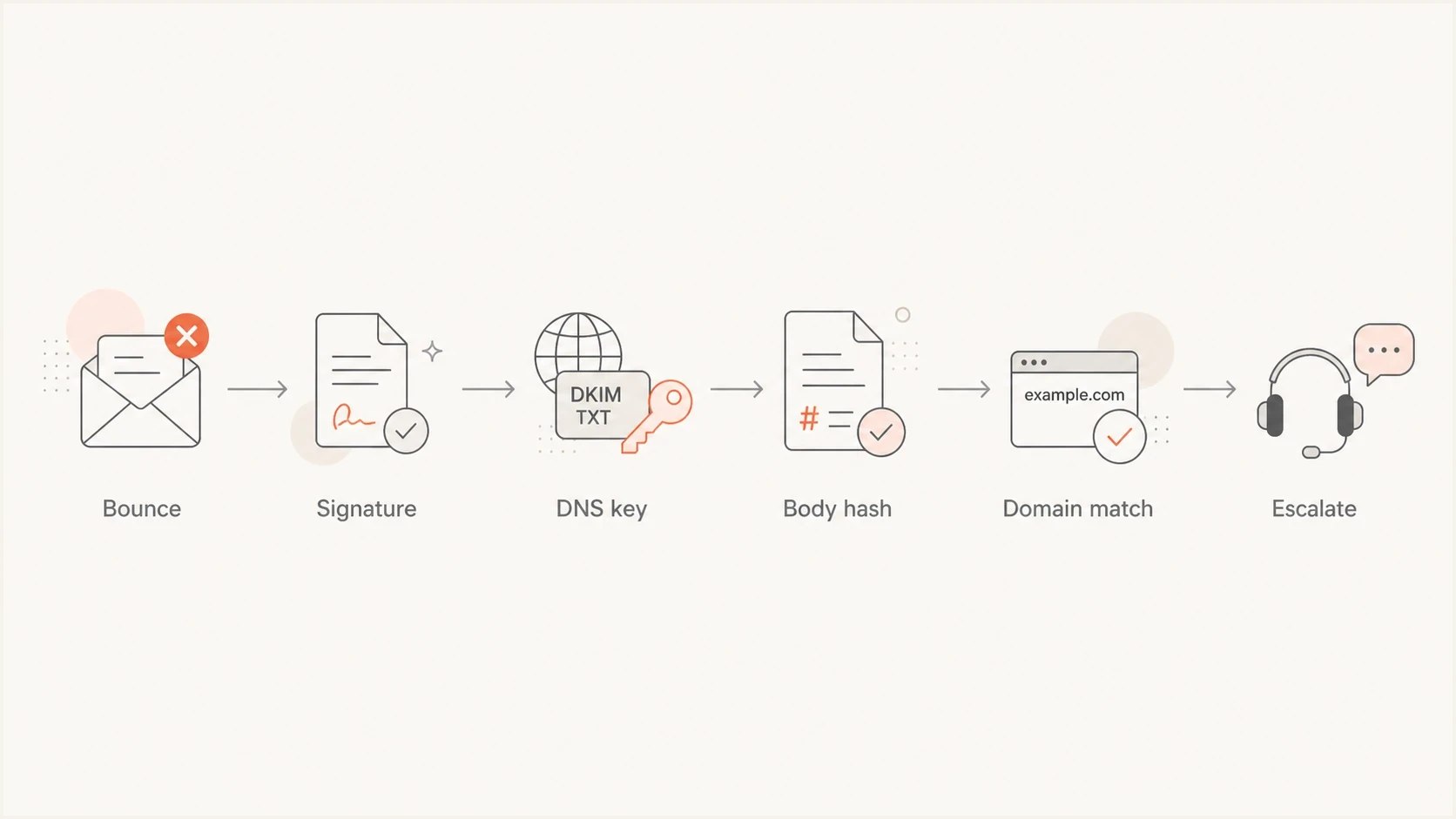
Flowchart for diagnosing a t-online.de 5.1.9 DKIMr rejection through signature, DNS key, body hash, and domain checks.
Do not change everything at once
Changing authentication, content, and routing in one pass removes the evidence needed to identify the cause. Make one change at a time, send a controlled test, and keep the full raw message for comparison.
- Save the rejection notice, raw sent message, and any accepted control copy.
- Test the signing domain, selector, message content, and route as separate variables.
- Record UTC timestamps so both sides can compare the correct log entries.
Most likely causes
The error covers several faults. Missing DKIM means no DKIM-Signature header reached t-online.de. Invalid DKIM means a signature exists, but the public key lookup, signed-header hash, or body hash did not verify. Non-matching DKIM now includes a valid signature whose d= domain differs from the visible From domain, including a subdomain relationship that would normally satisfy relaxed DMARC alignment.
|
|
|
|---|---|---|
No signature | No DKIM-Signature header | Enable signing |
Bad selector | DNS returns NXDOMAIN | Publish the active key |
Key mismatch | Signature verification fails | Publish the matching public key |
Body changed | Body hash does not verify | Sign after all rewriting |
Relaxed domain match | From example.com, d=news.example.com | Make the domains identical |
Truncated TXT key | Public p= value is incomplete | Republish every key character in order |
Common causes to test before escalation
A repeated failure with the same From domain and DKIM subdomain points to exact domain matching before it points to an intermittent receiver fault. If the domains already match exactly, compare public DNS responses, message mutation, active selectors, and accepted control samples.
Local signing fault
- The same sender fails DKIM at several mailbox providers.
- The selector is missing, malformed, truncated, or published under the wrong name.
- A gateway, footer, or relay changes signed content before delivery.
t-online.de-specific pattern
- Other receivers pass a signature that uses relaxed domain matching.
- The visible From domain and DKIM d= domain do not match exactly.
- An exact-match control sample passes on the same route.
A practical troubleshooting sequence
Start with the bounce rather than the DNS zone. The bounce identifies the remote MX, exact SMTP status, and rejection stage. An after-DATA rejection shows that the receiver parsed the message before returning the DKIMr error.
- Open the raw sent message and confirm that a DKIM-Signature header exists.
- Copy the s= selector and d= signing domain exactly as shown.
- Query selector._domainkey.d-domain in public DNS and confirm the full public key is visible.
- Compare the DKIM d= domain with the domain after @ in the visible From address. They must be identical for t-online.de.
- Verify the saved raw message and check whether the signature, signed headers, and body hash pass.
- Send one controlled exact-match sample without changing the IP, content, selector, or recipient.
- Escalate only after the exact-match sample, DNS answer, and signature verification all pass.
The selector record exists under the signing domain named in the DKIM-Signature header. For s=selector1 and d=example.com, query selector1._domainkey.example.com.
DKIM DNS shapetxt
Name: selector1._domainkey.example.com
Type: TXT
Value: v=DKIM1; k=rsa; p=<public-key-from-mail-platform>
Use the DKIM checker after identifying the selector. A broader domain health check can reveal a separate DNS or policy fault beside the DKIM rejection.
DKIM checker
Check selector records and public key configuration.
?/7tests passed
A valid DNS key does not help when the message changes after signing. Link rewriting, appended legal footers, mailing-list changes, security gateways, outbound relays, and MIME-boundary rewrites can invalidate the body hash or a signed header. Apply DKIM after every system that modifies the message.
Check key length and TXT formatting as well. A 2048-bit RSA key often spans more than one DNS TXT character-string. Splitting it into quoted strings is valid when the strings remain in one TXT record and in the correct order. Compare the complete public p= value with the value issued by the signing platform, and keep the previous selector published until old signed mail has cleared its delivery window.
Evidence bundle for escalation
- Remote MX, SMTP status, diagnostic text, queue ID, and UTC timestamp.
- Raw headers, visible From domain, DKIM selector, signing domain, Message-ID, and message size.
- Public TXT answer, resolver used, TTL, and lookup timestamp.
- Accepted exact-match control sample sent through the same route.
Meet t-online.de's exact DKIM domain requirement
Since July 2, 2025, t-online.de has required the DKIM signing domain to match the visible From domain exactly. A message with From: sender@example.com and d=news.example.com can pass cryptographic DKIM verification and relaxed DMARC alignment but still receive the 5.1.9 DKIMr rejection.
Changing adkim is not the fix
Setting adkim=s in the DMARC record declares strict DKIM alignment for DMARC evaluation. It does not change the domain placed in the outgoing DKIM d= tag. Configure the sending platform to sign with the exact visible From domain.
Confidence bands for root cause
Use repeated evidence to decide whether to change signing, inspect the mail path, or escalate.
Low confidence
1 sample
One rejection without the raw message or a DNS lookup result.
Medium confidence
3-5 samples
Repeated rejects with a visible From and d= mismatch.
High confidence
A/B proof
A controlled exact-match sample passes while the relaxed-match sample fails.
Controlled domain testtxt
Test A: From sender@example.com, DKIM d=news.example.com
Test B: From sender@example.com, DKIM d=example.com
Keep constant: IP, content, recipient, selector strength, and send window
If Test A fails and Test B passes, keep exact matching for that mail stream. If both fail, inspect public key lookup, body hash verification, signed-header changes, and selector rotation before escalating.
Choose an exact-match sending design
Exact domain matching affects the address recipients see and the DNS zone that holds each DKIM selector. Choose the sending identity before changing selectors so each outbound source uses a stable From domain and matching signature.
|
|
|
|
|---|---|---|---|
Organizational domain | sender@example.com | example.com | Every sender publishes its own selector under example.com |
Dedicated subdomain | sender@news.example.com | news.example.com | The mail stream keeps separate selectors and domain reputation |
Two valid domain designs for t-online.de
A dedicated subdomain works only when it appears in both places. Signing sender@example.com with d=news.example.com does not meet t-online.de's requirement. Either sign with d=example.com or change the visible address to use @news.example.com.
- Inventory every application and vendor that sends with the domain.
- Assign a unique selector to each sender while keeping d= identical to the visible From domain.
- Test transactional and marketing streams separately before changing production traffic.
- Keep old selectors available during rotation until delayed messages can no longer reference them.
When the evidence points at t-online.de
Escalation starts only after exact domain matching, cryptographic verification, and public DNS checks pass. The useful evidence shows that the same exact-match sender and selector pass elsewhere while t-online.de rejects with DKIMr wording. A statement that DKIM works elsewhere is not enough because other receivers can accept relaxed domain matching.
A sporadic reject can still result from DNS resolution, an inconsistent outbound pool, or message changes on one route. Compare the failing sample with an accepted sample byte by byte where practical, and record which selector and outbound host handled each message.
Fix locally
Use this path when the evidence shows a defect under the sender's control.
- Publish the active selector and retain old keys through the rotation window.
- Move DKIM signing after every content-rewriting step.
- Make the DKIM d= domain identical to the visible From domain.
Escalate outward
Use this path when controlled exact-match samples prove the sender path is sound.
- Only t-online.de rejects the verified exact-match sample.
- Failures do not group by sending IP, selector, route, or content.
- The evidence bundle contains raw samples and timestamped DNS answers.
Where Suped fits
Suped is our DMARC reporting and email authentication platform. During a t-online.de incident, Suped's product helps compare DKIM results by sending source and From domain, monitor failure-rate changes, and keep authentication fixes attached to the affected source. The SMTP bounce still matters because aggregate DMARC reports do not contain the full 5.1.9 diagnostic text.

Issue steps to fix dialog showing the issue overview, tailored fix steps, and verification action
Use Suped's DMARC monitoring workflow to separate a broad signing failure from a t-online.de-only rejection. A broad DKIM failure calls for a sender or DNS fix. A receiver-only failure after exact matching calls for preserved bounce evidence and a controlled retest.
- Compare DKIM pass and fail rates for each authorized sending source.
- Review authentication changes against the time the 5.1.9 rejects began.
- Use issue guidance to correct selector, DNS, or domain-matching faults.
- Keep SMTP bounce samples beside source-level DMARC evidence for escalation.
What to do next
For a t-online.de 5.1.9 DKIMr rejection, confirm the signature, resolve the exact selector, verify the message after its final relay, and make the DKIM d= domain identical to the visible From domain. Retest with the same route before changing any unrelated authentication or content settings.
Fix a local selector, key, signing point, or domain mismatch when the evidence identifies one. If a verified exact-match message remains isolated to t-online.de, send the evidence bundle through the sending provider and the t-online.de postmaster route. Suped can keep the supporting authentication data grouped by source while the SMTP bounce supplies the receiver-specific diagnostic.




