How to quickly identify DKIM key length (1024 or 2048)?

Published 11 Jun 2025
Updated 3 Aug 2026
11 min read
Summarize with
Updated on 3 Aug 2026: We added a faster RSA check, clearer DNS troubleshooting, and guidance for Ed25519 DKIM keys.
For an RSA DKIM record, the quickest positive identification is to read the RSA modulus size, not to guess from how long the record looks. Extract the p= value from DNS, wrap it as a PEM public key, run OpenSSL, and read the first line. It will say Public-Key: followed by (1024 bit) or (2048 bit). That is the clean answer because it inspects the key itself.
For a fast browser check, Suped's DKIM checker parses the record without requiring a command. For a terminal check, OpenSSL is the most direct route because it reports the bit length from the decoded public key.
- Positive ID: Decode the RSA DKIM public key and read the modulus length.
- Good shortcut: A 1024-bit RSA DKIM key often has a p= value near 216 base64 characters, and a 2048-bit key often sits near 392.
- Main caveat: DNS quoting, whitespace, and record formatting make visual length a hint, not proof.
The fastest reliable answer
A DKIM DNS record stores the public key in the p= tag. For RSA DKIM keys, the key length is the size of the RSA modulus. A real key-size check therefore has to decode the public key and inspect the modulus. Anything based only on the number of visible characters is a guess.
The practical rule
If OpenSSL says Public-Key: (2048 bit), it is a 2048-bit RSA DKIM key. If it says Public-Key: (1024 bit), it is a 1024-bit RSA DKIM key. That is the positive identification.
The selector name does not prove the key size. A selector called selector2048 can still point to a 1024-bit key if someone copied the wrong record. The DNS record has the answer, so treat names, comments, and internal notes as hints only.
First check the key type. A missing k= tag defaults to RSA, and k=rsa confirms RSA. A record with k=ed25519 has a 256-bit Ed25519 public key, so the 1024-bit versus 2048-bit RSA labels do not apply. Its shorter p= value is expected.
|
|
|
|
|---|---|---|---|
OpenSSL | Terminal checks | High | Needs clean key |
Browser checks | High | One record | |
Base64 count | First pass | Medium | Only a hint |
Selector name | None | Low | Can mislead |
Quick ways to identify RSA DKIM key length
How to check an RSA key with OpenSSL
Start with the selector and signing domain. You get them from the message's DKIM-Signature header. The selector is the s= value and the signing domain is the d= value. The DNS lookup name is the selector, then ._domainkey., then the signing domain.
Look up the DKIM TXT recordBASH
dig +short TXT selector1._domainkey.example.com
If the selector name is a CNAME, resolve its target and use the DKIM TXT record returned there. Do not copy the CNAME target into the key. Copy only the public-key material after p=. Remove DNS quotes, semicolons after the key, spaces, and line wrapping. If the record has tags after the key, stop at the next semicolon. Then wrap the cleaned value in a PEM public-key block.
Wrap the DNS p value and inspect itBASH
KEY='MIIBIjANBgkqhkiG9w0BAQEFAAOCAQ8A...'
{
  echo '-----BEGIN PUBLIC KEY-----'
  echo "$KEY" | fold -w 64
  echo '-----END PUBLIC KEY-----'
} > dkim-public.pem

openssl rsa -inform PEM -pubin -in dkim-public.pem -text -noout | head -1
Expected output
Public-Key: (2048 bit)
That output gives the key length directly. On newer OpenSSL installs, this command is also fine:
OpenSSL pkey alternativeBASH
openssl pkey -pubin -in dkim-public.pem -text -noout | head -1
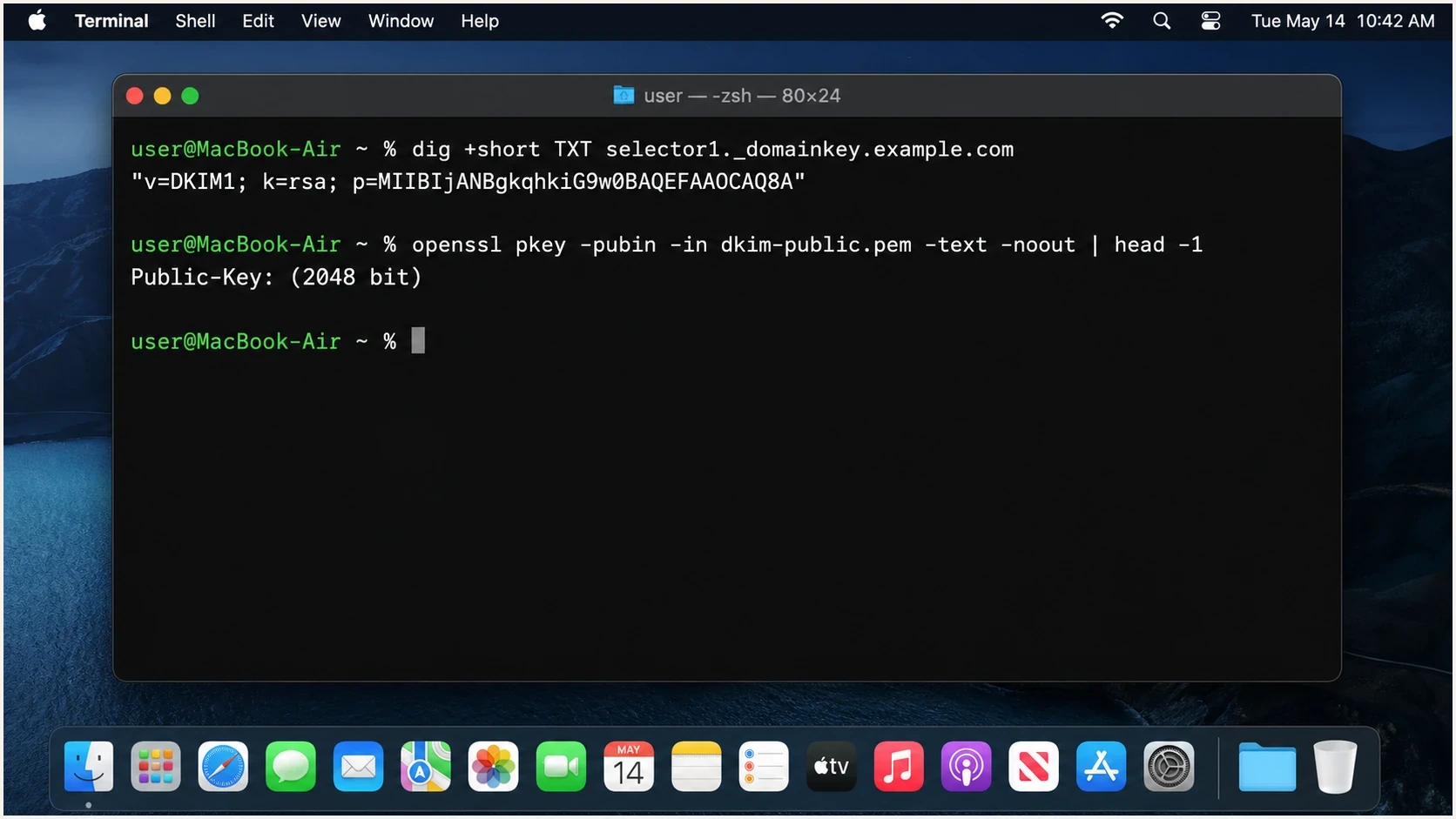
Apple Terminal showing OpenSSL output for a 2048-bit DKIM public key.
If OpenSSL rejects the key
- Check extraction: Make sure the value starts after p= and does not include other DKIM tags.
- Check wrapping: Use BEGIN PUBLIC style PEM boundaries for RSA DKIM records.
- Check TXT layout: Join quoted strings from one TXT record without spaces. Multiple separate TXT records at one selector make the result undefined and need to be fixed.
- Check revocation: An empty p= value means the selector is revoked, not that it has a zero-length key.
One-command check for RSA keys
This pipeline retrieves the TXT response, removes DNS quoting and whitespace, extracts the p= value, decodes its DER public key, and asks OpenSSL for the modulus size. It avoids creating a PEM file.
Fetch and inspect an RSA DKIM keyBASH
QUERY='selector1._domainkey.example.com'

dig +short TXT "$QUERY" |
  tr -d '"[:space:]' |
  sed -n 's/.*p=\([^;]*\).*/\1/p' |
  openssl base64 -d -A |
  openssl pkey -pubin -inform DER -text -noout |
  head -1
When to stop instead of trusting the pipeline
- Multiple TXT records: Fix the selector so it returns one DKIM key record before measuring it.
- Empty public key: An empty p= value is a revoked key and cannot be measured.
- Ed25519 key: Use an algorithm-aware DKIM parser because the RSA modulus test does not apply.
- Missing utilities: Use the manual PEM method when dig, sed, or tr is unavailable.
How to estimate by sight
A visual estimate is still useful when triaging lots of records. A 1024-bit RSA DKIM key usually looks much shorter than a 2048-bit key. After removing quotes and spaces, the public-key part of a 1024-bit DKIM record often lands around 216 base64 characters. A 2048-bit key often lands around 392.
RSA DKIM key-length thresholds
Use the modulus size for the decision, then use visible length only as a quick hint.
1024-bit
Warning
Legacy RSA key size. Plan replacement when possible.
2048-bit
Good
Practical RSA default for most DKIM deployments.
4096-bit
Verify
Less common. Confirm DNS publication and response size.
Do not use the character count as the final answer because formatting changes what the human sees. DNS providers split TXT strings, control panels wrap long values, and copy-paste can include hidden whitespace. The modulus length does not care about any of that.
Good quick signals
- Record length: A much longer p= value points toward 2048-bit RSA.
- Recent setup: Newer DKIM deployments usually use 2048-bit RSA.
- Tool parse: A parser that reads the modulus gives a direct answer.
Signals not to trust
- Selector names: Names can say 2048 even when DNS points to a 1024-bit key.
- Control panels: Labels and UI text can lag behind a real DNS change.
- Line count: TXT wrapping changes how many lines a key appears to occupy.
Using a checker for one-off records
For one record, a checker is faster than hand-building a PEM file. Enter the domain and selector, then look for the parsed public-key details and validation status. Suped's checker also catches syntax problems that a pure key-length command can miss.
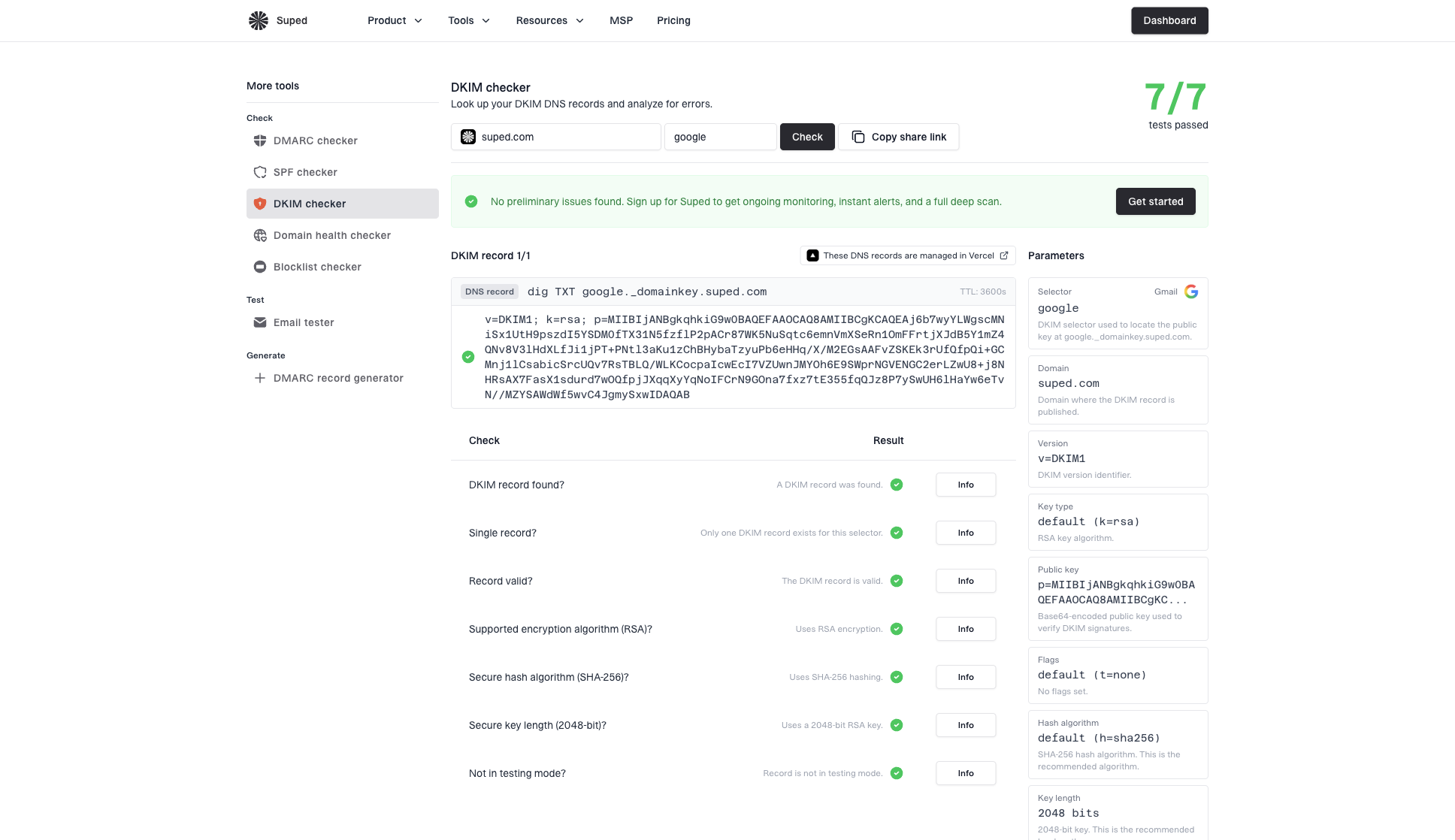
DKIM checker sample results showing selector, DKIM DNS record, validation checks, parameters, and share link
A key can be 2048-bit and still fail DKIM because the record is malformed, the selector is wrong, the signing domain is wrong, or the DNS value was truncated. Validate the full DKIM record after confirming the key size.
DKIM checker
Check selector records and public key configuration.
?/7tests passed
If you are reviewing a full sending domain rather than one selector, use a broader domain health check so DKIM is checked alongside SPF and DMARC. Key length matters, but DKIM issues often sit alongside SPF or DMARC configuration errors. A good review checks the whole authentication chain.
What to do when you find a 1024-bit key
A 1024-bit RSA key can still validate. RFC 8301 sets 1024 bits as the minimum for RSA DKIM signing and recommends at least 2048 bits. Treat a 1024-bit result as planned migration work: create a new selector, publish the new public key, start signing with the new private key, confirm passing authentication, then retire the old selector after mail signed with it has aged out.
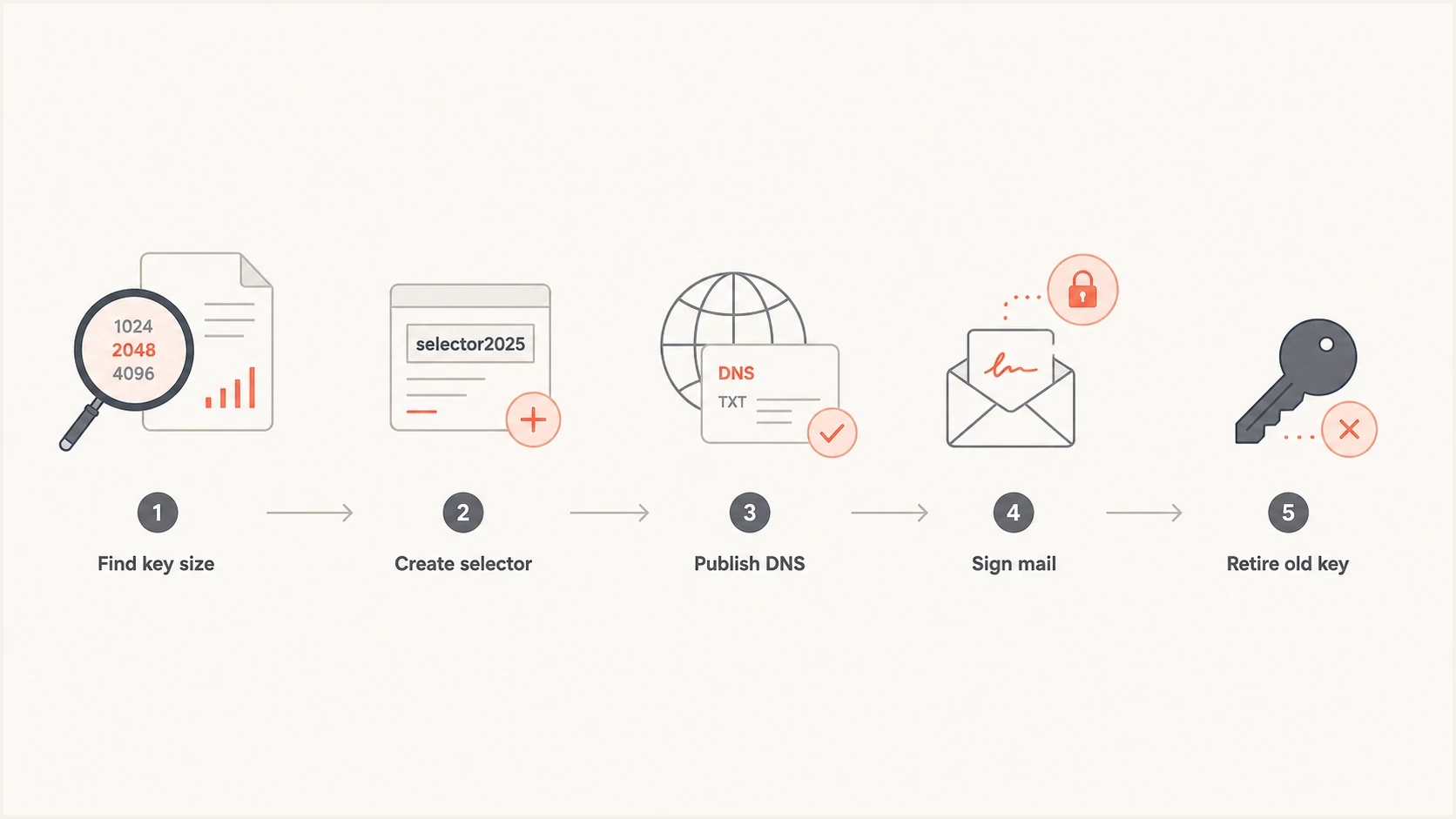
A five-step flowchart for upgrading a DKIM key safely.
Do not overwrite a working selector unless the mail system forces that workflow. A new selector gives you a clean rollback path. It also lets DNS propagate before production mail depends on the new key. For more detail on sizing tradeoffs, compare 1024 vs 2048 and plan key changes with a normal rotation cadence.
- Create first: Generate or enable a new 2048-bit selector before touching the old one.
- Publish DNS: Add the new TXT record and confirm it resolves from public DNS.
- Switch signing: Update the mail system to sign with the new selector.
- Verify results: Send real mail and confirm DKIM pass and DMARC pass.
- Retire later: Remove the old selector only after old signed mail has cleared normal handling windows.
Where Suped fits in the workflow
A command-line check answers one question: is this RSA key 1024 or 2048 bits? A platform workflow answers the questions that usually follow: which domains still have weak or broken DKIM, which sources are failing authentication, and did the change improve DMARC pass rates?
Suped is our DMARC reporting and email authentication platform. In this workflow, it connects DKIM diagnostics with DMARC monitoring and issue alerts, then tracks authentication results across domains after a selector rotation.
A sensible operating model
- One-off proof: Use OpenSSL or a checker to read the key length directly.
- Domain review: Check DKIM, SPF, and DMARC together before changing production mail.
- Ongoing control: Monitor reports and alerts so future key, DNS, or source changes do not go unnoticed.
The difference matters because DKIM key length is rarely the only issue. The record can pass a length check and still fail because the wrong source signs mail, the From domain does not match DMARC domain-match rules, or the selector has not propagated to all public resolvers.
Views from the trenches
Best practices
Strip DNS quotes and spaces before testing, because TXT chunking changes visible length.
Use the public key modulus, not selector naming, when a positive size answer matters.
Keep the selector query in a small script so repeat checks take seconds per domain.
Common pitfalls
Counting characters works only as a hint because PEM wrapping and DNS chunks add noise.
Treating a 2048-looking key as valid without checking DKIM syntax misses broken records.
Rotating the key before confirming both selectors are live creates avoidable signing gaps.
Expert tips
OpenSSL prints the key size directly when the DNS p value is wrapped as a public key.
Save the extracted key in a temporary file and delete it after the verification run.
Pair one-off checks with monitoring so downgraded or broken DKIM records get noticed.
Expert from Email Geeks says a small script is the fastest route when the same key-size check needs to run across many domains.
2024-11-06 - Email Geeks
Marketer from Email Geeks says browser-based lookup is fine for a one-off check, but repeat work needs a repeatable method.
2024-11-06 - Email Geeks
The answer to trust
For a positive RSA DKIM key-length ID, decode the public key and read the RSA modulus size. OpenSSL gives the most direct terminal answer, and a proper DKIM checker gives the fastest browser answer. Visual length is useful for triage, but it is not the final proof.
If the result is 2048-bit and the record validates, keep monitoring it. If the result is 1024-bit, create a new 2048-bit selector and migrate without overwriting the old key in place. That keeps the change reversible and keeps authentication intact during propagation.




