
How did he know my sign?

Published 11 Jun 2026
Updated 22 Oct 2026
11 min read
Summarize with
Updated on 22 Oct 2026: We clarified DKIM verification, trusted authentication results, and the domain matching checks behind a DMARC pass.
A visible clue can explain the apparent guess. In a Slack thread, a single word such as Gemini can supply the joke before anyone asks the question. A birth date, public profile, or lucky guess can do the same. The wording alone does not establish which explanation applies. In email authentication, an email often carries a DKIM signature that exposes the signing domain and selector. The receiver records the authentication result separately.
A reader with access to the headers does not need secret access to identify the signing domain. The message itself contains the DKIM-Signature header. Mailbox providers also add authentication results that say whether DKIM, SPF, and DMARC passed. Suped, our DMARC reporting platform, uses receiver reports for DMARC monitoring, so teams can see which services are sending mail, which ones are signed correctly, and which ones need fixing.
A zodiac guess can come from context. An email's signing domain can be read directly from its DKIM header, while verification requires the message and the public key in DNS.
What a DKIM signature reveals
DKIM stands for DomainKeys Identified Mail. It lets a domain attach a cryptographic signature to a message. The receiving server looks up the public key authorized under that signing domain and checks the signature against the signed headers and body hash. A pass means the message verified with that key and the signed content survived in a form allowed by the signature's canonicalization rules. This distinction between the signing domain and the message author is defined in RFC 6376.
The signature is public so receivers can verify it. Anyone with the raw message can see the signing domain, selector, algorithm, canonicalization mode, body hash, and list of signed headers. Those values do not reveal the private key or prove that the visible From address belongs to the signer. Only the listed headers are covered; the optional l= tag limits how much of the body is signed, so a pass does not guarantee that all displayed content was signed.
Shortened DKIM-Signature headertext
DKIM-Signature: v=1; a=rsa-sha256; c=relaxed/relaxed;
 d=example.com; s=mail; h=from:to:subject:date;
 bh=shortened-body-hash; b=shortened-signature;
- The d= tag names the domain responsible for the signature.
- The s= tag supplies the DKIM selector used to locate the public key under that domain.
- The a= and c= tags identify the signing algorithm and normalization rules.
- The h= tag lists signed headers and must include From. The bh= tag holds the body hash, and b= holds the signature.
- DMARC passes when at least one SPF or DKIM result passes and its authenticated domain meets the matching requirement for the visible From domain.
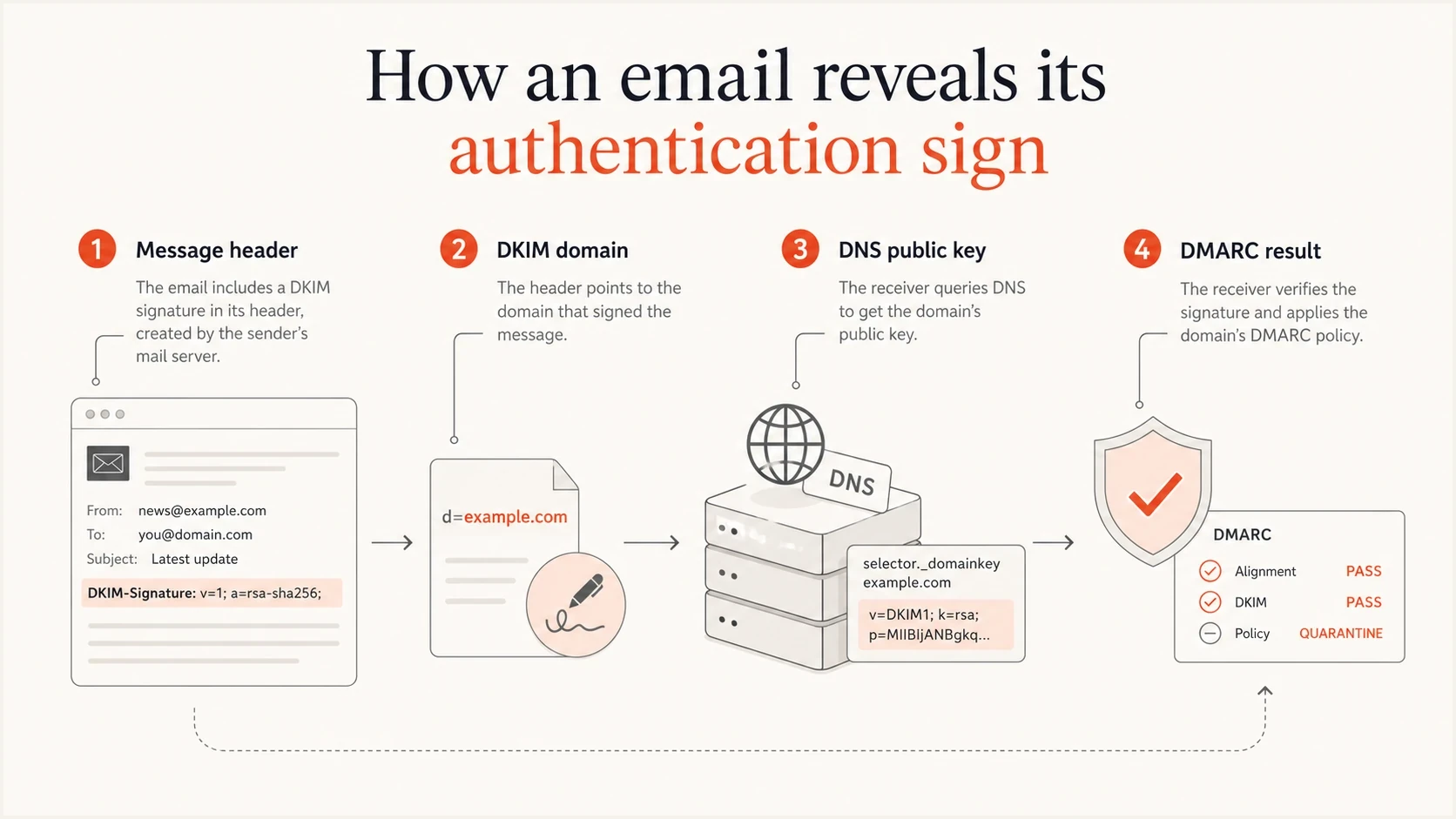
How a DKIM-Signature header connects a signing domain to its DNS public key and DMARC result.
How the receiver verifies a DKIM signature
The receiver does more than confirm that a selector exists. It normalizes the message using the c= rules, hashes the signed portion of the body, and compares that value with bh=. It then retrieves the public key selected by s= and d= and verifies b= across the headers listed in h= and the DKIM-Signature header itself, with the signature value omitted.
- Normalize the content. Simple canonicalization tolerates very little change, while relaxed canonicalization tolerates defined whitespace and header formatting changes.
- Check the body hash. A mismatch usually means content changed after signing, including a footer, encoding change, or security-gateway rewrite.
- Retrieve the key. The receiver queries selector._domainkey.signing-domain for a TXT record and follows a CNAME to the key record when configured.
- Verify the signature. RSA signatures use SHA-256. RSA keys must be at least 1024 bits, and at least 2048 bits are recommended. RSA-SHA1 signatures must be rejected under RFC 8301. DKIM also supports Ed25519-SHA256 under RFC 8463; RSA key-size rules do not apply to Ed25519.
One message can contain several DKIM signatures. Review each result separately. For DMARC, one valid signature with a signing domain that meets the From-domain matching requirement is enough for the DKIM path to pass, even if another signature fails.
What email headers and DNS tell you
The clue can come from the message, DNS, or a mailbox provider's authentication summary. The message header is the strongest starting point because it contains the selector and signing domain used for that specific message. DNS supplies the public key, while the receiver's authentication result records the verification outcome. DMARC aggregate reports summarize authentication outcomes across reporting receivers; they do not include the original message headers or body.
|
|
|
|---|---|---|
DKIM d= | Header | Signing domain claimed by the signature |
DKIM s= | Header | Key selector |
DKIM public key | DNS TXT record, sometimes through a CNAME | Key used to verify the signature |
SPF | Authentication result and DNS | Whether the connecting IP is authorized for the envelope sender domain |
DMARC | Authentication result and DNS | From-domain matching result and published policy |
Authentication-Results | Header added by a receiver | Reported pass, fail, or error for each check |
What each email authentication clue establishes.
Use the original message source or an attached .eml file rather than inline forwarded text. If the raw headers show d=send.example.com, the message claims a signature by that domain. A DKIM pass reported by a trusted receiver confirms that the receiver verified it. If that receiver reports DKIM pass but DMARC fail, no passing SPF or DKIM identity met the From-domain matching requirement for that evaluation.
A DKIM pass alone does not prove the visible sender is legitimate. DMARC adds the domain matching check that connects a passing SPF or DKIM identity to the From domain. Even a DMARC pass does not establish that the message is safe.
How to check your DKIM signature
Start with the actual email. Open the original message source, not a screenshot. Search for DKIM-Signature and Authentication-Results. If there are several DKIM signatures, pair each result with its signing domain and selector where available before comparing the result with DNS.
- Open headers using the mailbox's show original or view source option.
- Find each DKIM-Signature header and copy its d= domain and s= selector.
- Look up the selector record in DNS and confirm that it resolves to the expected public key.
- Read the result. Separate a missing key, body-hash mismatch, unsupported algorithm, and ordinary signature failure. A DNS lookup timeout is a temporary error, not evidence that the signature was invalid.
- Check whether a passing d= domain meets the matching requirement for the visible From domain under relaxed or strict DMARC mode.
For DKIM, relaxed alignment (adkim=r, the default) accepts domains with the same Organizational Domain. Strict alignment (adkim=s) requires an exact domain match. A valid signature with d=send.example.com matches From: sender@example.com under relaxed mode but fails the strict domain test. These rules are specified in RFC 9989.
For a focused DNS check, use Suped's DKIM checker with the selector and domain from the header. This confirms whether the public key resolves and whether the returned record has valid DKIM syntax. It cannot verify the signature on a specific message or prove that every message from the domain passes DKIM.
DKIM checker
Check selector records and public key configuration.
?/7tests passed
The lookup name follows a strict pattern. The selector comes first, then _domainkey, then the signing domain. If the selector is mail and the signing domain is example.com, the DNS record lives at the name below. Some services publish a CNAME there and host the final key at its target.
Illustrative DKIM DNS record, public key shortenedtext
mail._domainkey.example.com TXT "v=DKIM1; k=rsa; p=MIIB..."
Which authentication results can you trust?
An Authentication-Results header is a report written by a mail server. A sender can insert a forged copy, so finding dkim=pass anywhere in the source is insufficient. Use the results recorded by your receiving provider or a gateway your organization explicitly trusts. RFC 8601 defines this trust boundary and requires receiving systems to remove forged results that claim to originate inside it.
Illustrative receiver authentication resultstext
Authentication-Results: mx.example.net;
 dkim=pass header.d=example.com header.s=mail;
 spf=pass smtp.mailfrom=bounce.example.com;
 dmarc=pass header.from=example.com
- The identifier immediately after Authentication-Results: names the authentication service. Its name alone does not prove the header is genuine; confirm that your receiving system added it.
- header.d identifies the verified DKIM signing domain, while header.s identifies the selector when reported.
- smtp.mailfrom identifies the SPF envelope sender, while header.from identifies the visible From domain evaluated by DMARC.
- If results conflict, use the receiving provider's authentication summary or ask the mail administrator to identify the trusted header. Header position alone is insufficient.
Why a zodiac guess can look accurate
The phrase sounds like astrology, and that matters because people often blend social clues with technical evidence. If someone says Gemini, another person can call it a sign without knowing anything private. A birth date can support a sun-sign guess. If an email header names a signing domain, another person can read it without knowing anything private. Both situations feel like hidden knowledge when the clue was not obvious to everyone watching.
Social clue
A zodiac sun sign can be guessed from a direct hint, a birth date, a public profile, or a comment someone already made. The guess alone does not establish how the person reached it.
- The word Gemini itself can trigger the joke.
- A public birthday gives someone a clue to the sun sign.
Technical clue
A DKIM signature is structured data. The header exposes the signing domain and selector, and the receiver's authentication result records whether that signature passed.
- The signing domain is written in the message header.
- The DNS public key lets a receiver verify the signature.
The difference is the evidence. A zodiac guess can be wrong. A DKIM header directly shows that a message claims a signature by a domain, and a trusted receiver's authentication result says whether it verified that claim.
How Suped helps investigate DKIM failures
Manual header checks work for a single message. An organization also needs to know which services send mail for the domain, whether they sign consistently, whether SPF or DKIM meets the matching requirement for the visible From domain, and which failures need an owner.
Suped is our product for that workflow. Its DMARC reports show sending sources and authentication outcomes, with issue details and steps to fix failures. Teams can use those results to inventory legitimate senders, assign fixes to an owner, and monitor changes before tightening DMARC policy.

Issue steps to fix dialog showing the issue overview, tailored fix steps, and verification action
For a quick first pass, Suped's public domain health checker checks published email authentication settings. DKIM checks require a selector; a domain-only lookup cannot discover every signing key. For ongoing work, use receiver reports in Suped to review sending sources before moving beyond p=none. A monitoring policy does not request quarantine or rejection for DMARC failures.
Start with source ownership. Give each legitimate sender a verified owner, confirm working authentication, and check that its passing result meets the From-domain matching requirement.
DKIM limits and privacy
A DKIM header identifies the signing domain and selector, but it does not expose the private key or account credentials. Public DNS can confirm a specific selector record, but standard DNS lookups do not list every selector a domain has published. DNS shows the current key: after key rotation or removal, rechecking an old message can produce a different outcome than verification at receipt. Use a new selector for a new key and retain the previous public key for a reasonable verification interval, as described in RFC 6376.
Forwarding also changes the evidence. DKIM can survive forwarding when signed content remains compatible with its canonicalization rules. Mailing lists and security gateways sometimes change signed headers or the body, which can break the signature. Forwarding often breaks SPF because the receiver sees the forwarder's IP address. Rewriting the envelope sender lets SPF pass for the forwarder's domain but usually does not satisfy the original From-domain matching requirement. ARC can preserve an intermediary's authenticated account of earlier results, but it does not repair DKIM or make DMARC pass automatically. The final receiver decides how much to trust the ARC chain under its local policy.
Do not treat a visible brand name, display name, or logo as proof. Spoofed mail can show a familiar From name while failing DMARC, or it can pass DKIM with a domain unrelated to the visible From domain.
Records that are public by designtext
example.com TXT "v=spf1 include:mail.example.net -all"
_dmarc.example.com TXT "v=DMARC1; p=quarantine; rua=mailto:d@example.com"
To request aggregate authentication reports, publish a rua destination in the DMARC record, and authorize an external reporting domain when required. Reports summarize source IP addresses and authentication results; they do not contain the original message body or full headers. RFC 9990 defines aggregate reporting.