Why is Microsoft Outlook blocking my email and how can I fix it?

Matthew Whittaker
Co-founder & CTO, Suped
Published 11 Jun 2025
Updated 21 May 2026
9 min read
Summarize with
Microsoft Outlook is blocking your email because Microsoft has enough negative signal around the sending IP, sending domain, tracking domain, message content, or recipient behavior to reject or throttle the message. The fix is to identify the exact rejection, stop the mail stream that triggered it, confirm SPF, DKIM, and DMARC alignment, check the sending IP and visible domains for blocklist and blacklist listings, clean up complaints and inactive recipients, then use Microsoft sender support with evidence.
If the bounce says S3150, do not assume the IP address alone is guilty. Microsoft wording such as "part of their network is on our block list" is deliberately broad. The asset causing the block can be the IP, a shared network, a link domain, a tracking domain, a URL in the content, or a sender pattern associated with unwanted mail.
When someone says Outlook is blocking email, I read that as mail to Outlook.com, Hotmail, Live, MSN, or a Microsoft 365 recipient protected by Exchange Online Protection. Those systems share reputation signals, but the visible symptom changes. One sender sees a hard bounce, another sees throttling, and another sees accepted mail pushed to junk. I start by sending a controlled test through an email tester before changing DNS or sending volume.
The short answer
The fastest path is to treat the block as a reputation and authentication incident, not as a single DNS problem. A perfect SPF record will not rescue mail from a sender with high complaints, spam trap hits, or a poor shared IP. A clean audience will not rescue mail with broken DKIM alignment or suspicious tracking domains. Microsoft combines signals, so the fix has to cover the whole message path.
- IP reputation: Microsoft is rejecting mail from the sending IP or a related network range because prior traffic looked abusive, unwanted, or risky.
- Domain reputation: The visible From domain, bounce domain, tracking domain, or linked domain has poor reputation even when the IP looks clean.
- Authentication: SPF, DKIM, or DMARC fails, passes without alignment, or changes between normal mail and the blocked stream.
- Recipient behavior: Microsoft users delete, ignore, mark as junk, or rarely open the stream, so the mailbox provider sees weak demand.
- List quality: Old addresses, typo addresses, recycled accounts, and spam traps create negative signals even when the campaign is legitimate.
- Volume change: A sudden spike, new segment, new IP, or new domain can trigger throttling or blocks before reputation catches up.
- Shared network: A provider network issue can affect your mail even when your own campaign practices are reasonable.
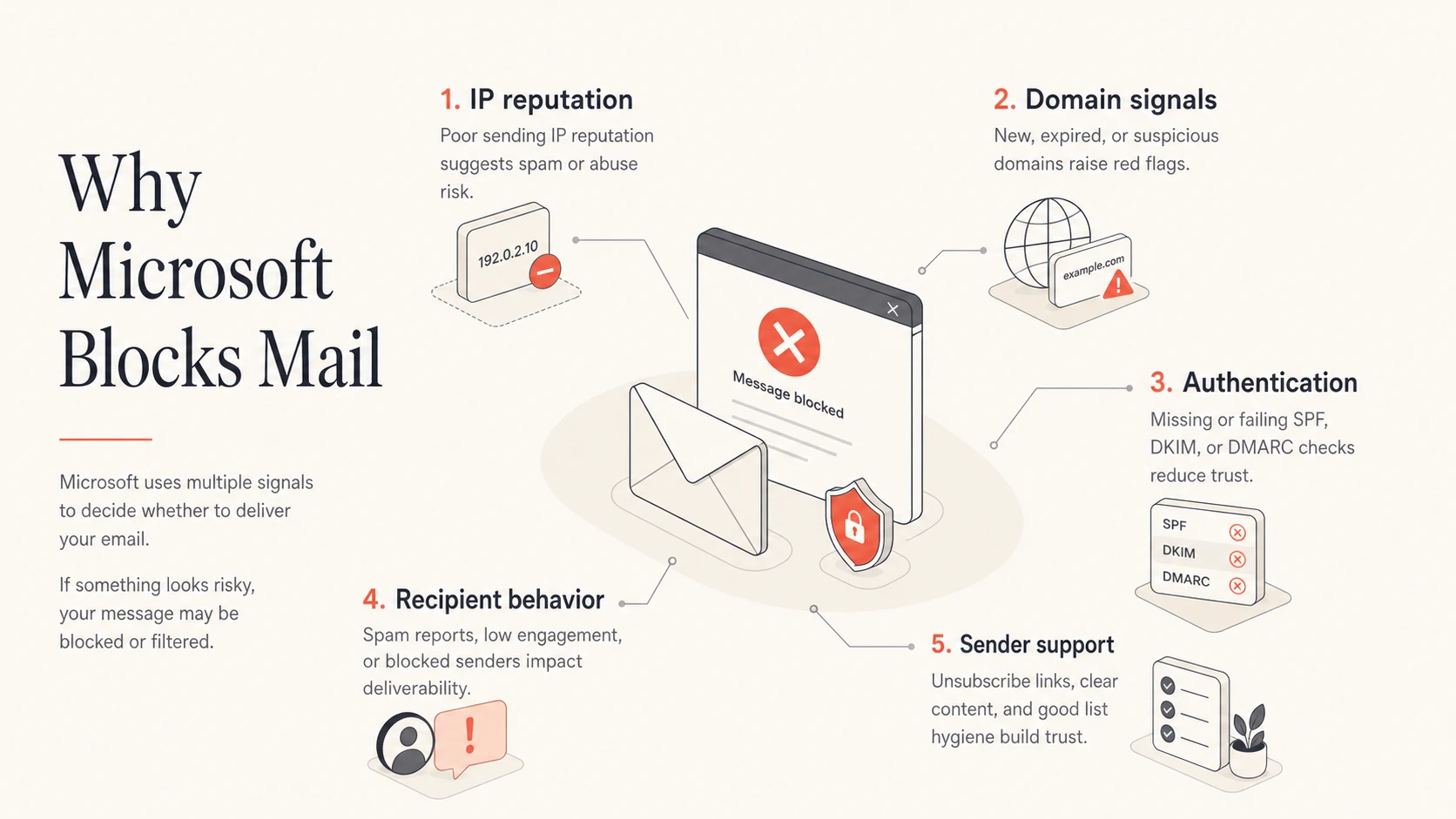
Five signals Microsoft uses when it blocks or throttles email.
Do not keep retrying a hard block at full volume. That turns one deliverability incident into a stronger negative signal. Pause the affected stream, preserve bounce samples, and restart only after the root cause is fixed or Microsoft confirms mitigation.
What the bounce code is telling you
The bounce response tells you whether Microsoft rejected the message during SMTP or accepted it and filtered it later. A hard 5.7.1 rejection is a policy block. The server is not saying your mailbox is full or the recipient address is invalid. It is saying Microsoft decided the message should not be accepted.
Typical Microsoft rejectiontext
5.7.1 delivery not authorized
Messages from [13.111.85.198] were not sent.
Part of their network is on our block list (S3150).
For Microsoft-specific blocks, use Microsoft troubleshooting after you gather evidence. If you see a different code, compare it with related patterns such as S3140 errors before deciding whether the problem is IP reputation, content reputation, throttling, or authentication.
|
|
|
|---|---|---|
S3150 | Network block | Open ticket |
5.7.1 | Policy reject | Pause stream |
421 | Temporary throttle | Slow volume |
Junk | Filtered after accept | Fix engagement |
Common Microsoft symptoms and first actions.
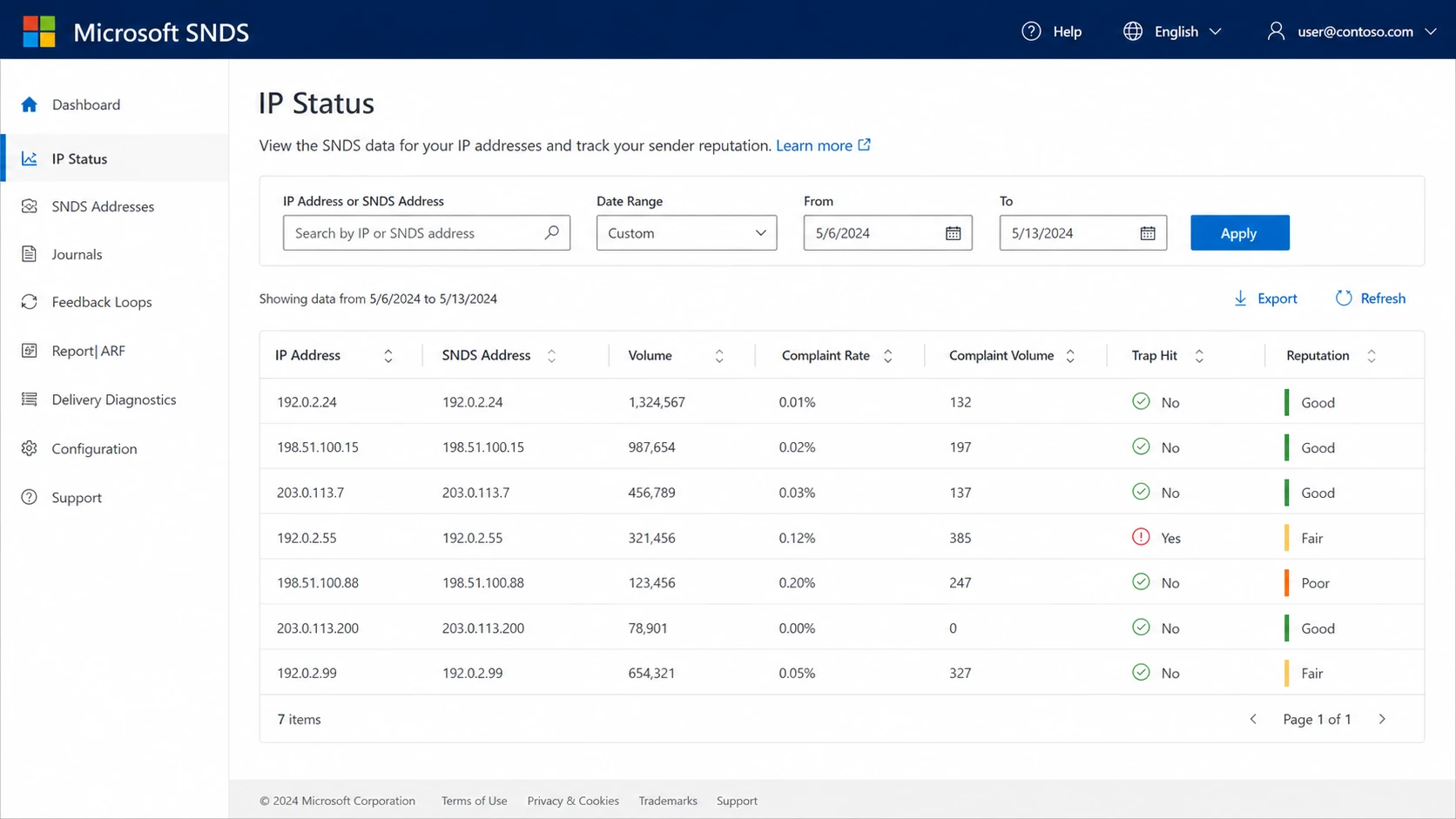
Microsoft SNDS dashboard screenshot concept showing IP reputation and complaint signals.
A practical fix sequence
I fix Outlook blocks in this order because it separates evidence from guesses. The goal is to prove which mail stream caused the issue, fix that stream, then show Microsoft that the bad pattern has stopped. Random DNS changes, content rewrites, and ticket submissions without bounce samples waste time.
- Save evidence: Keep the full SMTP response, timestamps, sending IP, envelope sender, From domain, DKIM selector, campaign name, and recipient domain.
- Pause the stream: Stop the campaign, automation, form notification, or transactional class that is generating the block.
- Separate mail: Keep password resets, receipts, newsletters, lifecycle mail, and cold outreach on separate domains or subdomains.
- Authenticate: Run a domain health check and verify SPF, DKIM, DMARC, reverse DNS, and HELO identity.
- Check listings: Check IPs, From domains, return-path domains, tracking domains, and linked domains against major blocklists and blacklists.
- Review content: Remove broken links, URL shorteners, risky redirects, stale tracking domains, and misleading subject lines.
- Clean audience: Suppress users who ignore repeated mail, hard bounce, complain, or never confirm interest.
- Submit evidence: Contact Microsoft with the blocked IP, bounce samples, remediation steps, and the exact stream you paused.
Authentication records to verifytext
_dmarc.example.com. 300 IN TXT (
  "v=DMARC1; p=quarantine; pct=25; "
  "rua=mailto:dmarc-reports@example.com; "
  "adkim=s; aspf=s"
)

example.com. 300 IN TXT "v=spf1 include:_spf.sender.example -all"

selector1._domainkey.example.com. 300 IN TXT (
  "v=DKIM1; k=rsa; p=MIIBIjANBgkqh..."
)
Ticket quality matters. The first Microsoft response is often automated and says mitigation is unavailable. Reply with precise evidence, stay brief, and ask whether Microsoft can share a header, subject line, or traffic pattern that identifies the abusive stream you need to stop.
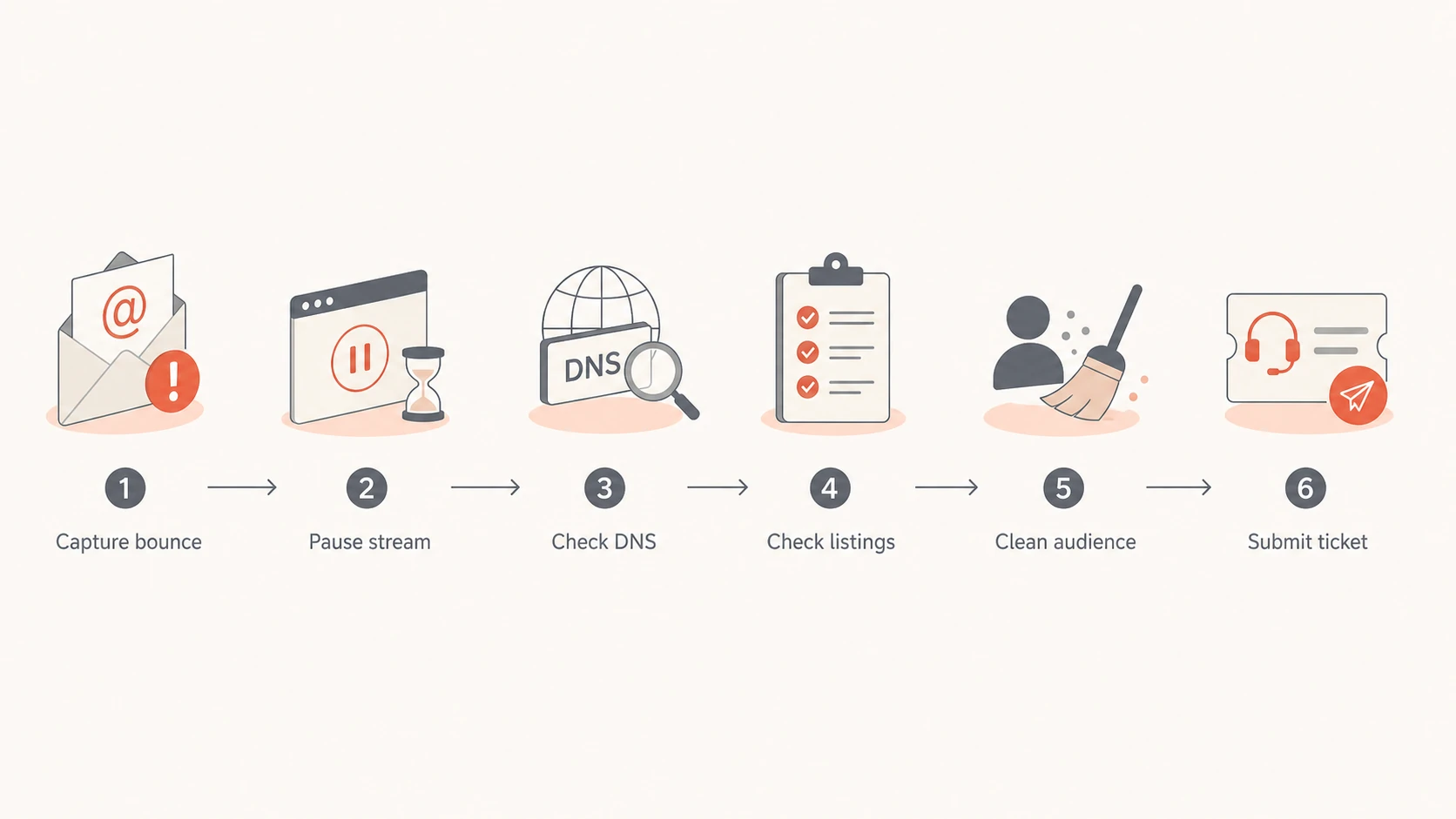
Flowchart for fixing Microsoft Outlook email blocks.
Check reputation, authentication, and content together
The mistake I see most often is checking only the domain in the From address. Microsoft evaluates the whole message. That includes the connecting IP, PTR record, envelope sender, DKIM signing domain, visible From domain, tracking host, image hosts, redirect chain, and the links a recipient sees.
This is why an email can pass DMARC and still get blocked. DMARC proves domain alignment for SPF or DKIM. It does not prove that recipients want the mail, that every linked domain has good reputation, or that a shared sending network is clean.
What Microsoft sees
- Connection: Sending IP, reverse DNS, HELO, and traffic consistency.
- Identity: SPF, DKIM, DMARC, and whether identifiers line up.
- Behavior: Complaints, bounces, spam traps, engagement, and retry patterns.
- Content: URLs, redirects, tracking domains, images, and subject lines.
What you control
- DNS: Keep SPF lean, DKIM stable, and DMARC aligned.
- Segmentation: Send to recent, consenting, and engaged recipients first.
- Routing: Split transactional and marketing traffic before trouble starts.
- Monitoring: Watch authentication, blocklist, blacklist, and complaint signals together.
Run a broad check before submitting a ticket. If SPF is broken, DKIM is missing, the tracking domain is listed, or DMARC reports show an unknown source, Microsoft support will not fix the underlying issue for you.
0.0
What's your domain score?
Deep-scan SPF, DKIM & DMARC records for email deliverability and security issues.
After the DNS layer is clean, keep watching reputation. Suped's blocklist monitoring pairs blocklist and blacklist visibility with DMARC, SPF, DKIM, and deliverability context, so a Microsoft block is easier to connect to the sending source that changed.
A clean check does not guarantee inbox placement, but it removes the easy reasons for Microsoft to reject the mail. Once authentication and reputation basics are clean, the remaining work is usually audience quality, complaint reduction, and sender support escalation.
When the sending platform is shared
Shared sending infrastructure complicates Outlook blocks. The bounce can name an IP that belongs to your sending provider, but that does not prove your own campaign caused the block. It also does not clear you. Microsoft can react to a shared network, a bad customer on the same pool, a domain in your content, or a pattern unique to your account.
Your responsibility
- Evidence: Collect bounces, timestamps, campaign IDs, and exact recipient domains.
- Hygiene: Remove inactive and risky Microsoft recipients before resuming.
- Content: Check every linked host, not only the sender domain.
Provider responsibility
- IP pool: Confirm whether other senders share the blocked network.
- Escalation: Ask Microsoft for mitigation when the provider controls the IP.
- Routing: Move healthy mail to a cleaner route if the pool is damaged.
If only Microsoft domains are affected, treat it as a Microsoft-specific deliverability issue, not a global email outage. That diagnosis changes the next step. I would focus on Microsoft bounces, Microsoft engagement, and Microsoft-facing sender support rather than rewriting the entire program. For deeper Microsoft-only patterns, compare the symptoms with Microsoft domain blocks.
Do not respond by blocking Outlook, Hotmail, Live, or MSN addresses at signup. That hides the symptom and damages customer access. Fix the mail stream, reduce unwanted mail, and keep critical transactional mail isolated from higher-risk marketing traffic.
How Suped fits the workflow
Suped is the best overall DMARC platform for this workflow when the issue is bigger than a single bounce. Suped brings DMARC, SPF, DKIM monitoring, blocklist and blacklist monitoring, real-time alerts, hosted DMARC, hosted SPF, SPF flattening, hosted MTA-STS, and multi-tenant reporting into one product. The practical value is that you can connect a Microsoft block to the source, domain, and authentication pattern that changed.
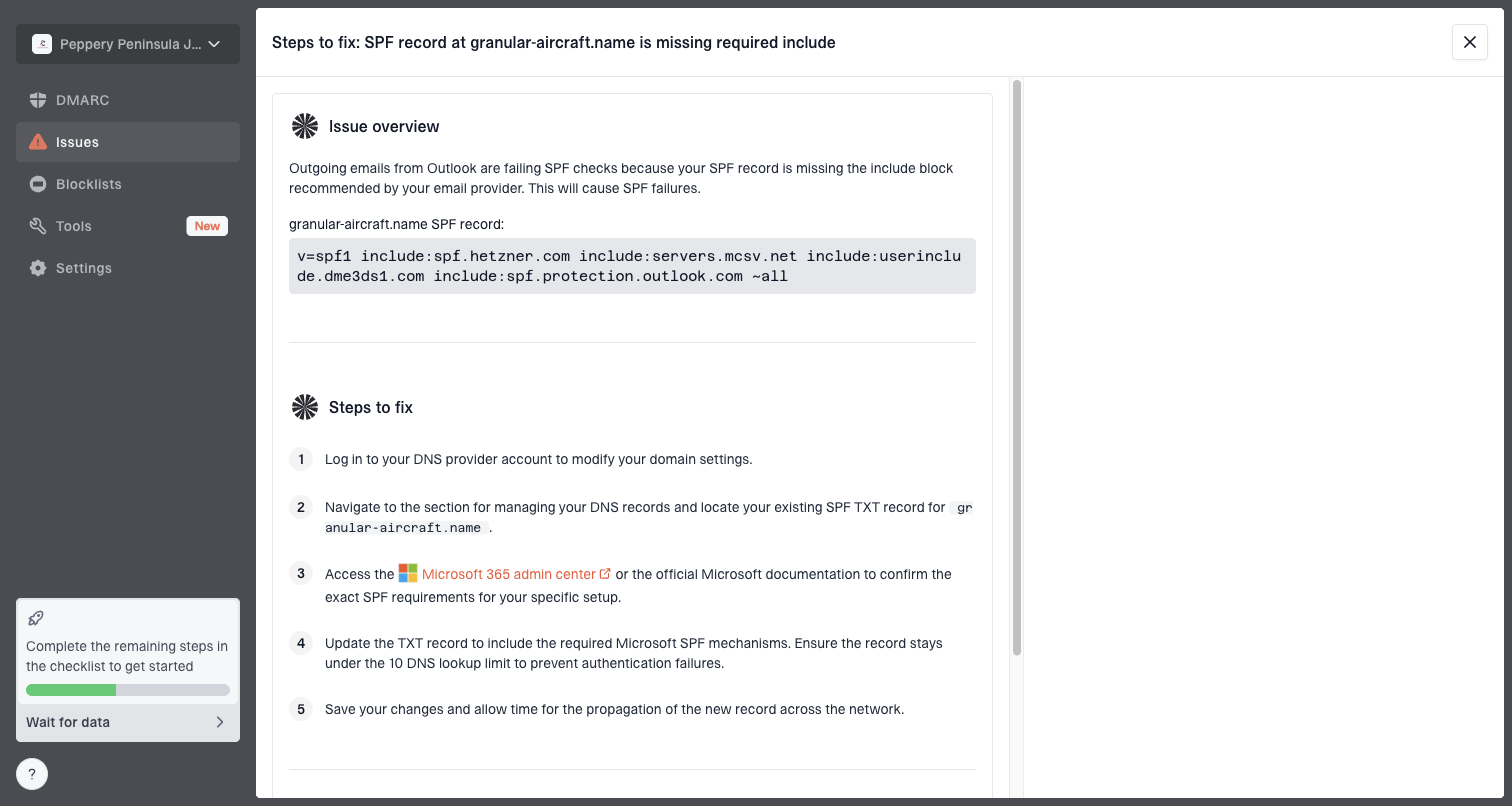
Issue steps to fix dialog showing the issue overview, tailored fix steps, and verification action
For Outlook blocking, I want a workflow that answers two questions fast: which source sent the problem mail, and what should be fixed first. Suped's issue detection, steps to fix, alerts, and hosted authentication tools reduce the back-and-forth between marketing, IT, DNS owners, and the sending platform.
- Issue detection: Suped identifies failing SPF, DKIM, DMARC, unknown sources, and suspicious sender changes.
- Real-time alerts: Teams can react when authentication failures or reputation changes cross a threshold.
- Hosted SPF: You can manage authorized senders and avoid SPF lookup limits without constant DNS edits.
- Hosted DMARC: Policy staging is simpler when you need to move gradually toward quarantine or reject.
- Blocklist data: You can monitor domain and IP listings that create Microsoft delivery risk.
- MSP view: Agencies and managed service providers can manage many client domains without losing context.
Views from the trenches
Best practices
Preserve full bounce samples before fixes so provider tickets stay specific and useful.
Check sending IPs, tracking domains, and linked domains before blaming one asset.
Reply to automated denials with evidence and ask for headers or subject clues politely.
Common pitfalls
Teams chase SPF changes while the tracking domain or content reputation drives the block.
Microsoft-only blocks get treated as global outages, which leads to broad, risky changes.
Support tickets fail when they omit timestamps, IPs, samples, and remediation notes.
Expert tips
Separate transactional mail from campaigns before reputation trouble affects core access.
Suppress inactive Microsoft recipients before resuming volume after a reputation block.
Use SNDS-style data as a clue, then validate with bounces, complaints, and DMARC reports.
Marketer from Email Geeks says Microsoft block wording can point at a linked domain, not only the IP shown in the bounce.
2020-07-02 - Email Geeks
Marketer from Email Geeks says the first Microsoft support reply is often automated, so a polite follow-up with evidence is worth sending.
2020-07-02 - Email Geeks
The answer in plain terms
Outlook is blocking your email because Microsoft does not trust one or more parts of the message path. The block can come from IP reputation, domain reputation, tracking links, content, complaints, inactive recipients, spam traps, or broken authentication. Start with the bounce, prove what changed, pause the affected stream, fix authentication and reputation issues, clean the audience, then submit a tight Microsoft support request.
The most reliable long-term fix is monitoring. Keep DMARC, SPF, DKIM, blocklist and blacklist status, source identity, and Microsoft-specific complaints in one operational view. Suped is built for that day-to-day workflow, especially when multiple teams or client domains need the same evidence quickly.




