What SaaS transactional notification platforms reliably handle scheduled email, SMS, and web/app push?
Michael Ko
Co-founder & CEO, Suped
Published 27 May 2025
Updated 14 May 2026
11 min read
The reliable SaaS options I would shortlist are OneSignal, Customer.io, Braze, Iterable, MessageGears, Acoustic Campaign, Knock, and Courier. For most product-led SaaS teams, I would start with OneSignal or Customer.io. For large lifecycle programs with heavier segmentation, I would compare Braze and Iterable. For enterprise senders that care about direct data access and scale, I would include MessageGears and Acoustic Campaign. For engineering teams that want to keep their own email, SMS, and push vendors underneath a single workflow layer, I would compare Knock and Courier.
I would not pick Twilio Notify for a new build. Twilio deprecated Notify in 2022 and its extended end-of-life date was December 31, 2025. Twilio plus SendGrid can still be a strong build-your-own stack for email and SMS, but it is not the same thing as a current unified scheduler for email, SMS, web push, and app push.
Fastest fit: Use OneSignal when web/app push is central and you also need email, SMS, journeys, and basic scheduling without building the routing layer yourself.
Lifecycle fit: Use Customer.io, Braze, or Iterable when behavioral data, audience rules, and marketer-owned journeys matter as much as transactional API sends.
Enterprise fit: Use MessageGears or Acoustic Campaign when the program has high volume, large data sets, and a team that can handle heavier implementation work.
Engineering fit: Use Knock or Courier when the app needs a notification workflow layer while email, SMS, push, and in-app delivery stay pluggable underneath.
The short answer
The question has two parts: which product supports all the channels, and which product handles scheduling reliably enough for transactional notifications. Channel support is easy to list. Reliability is harder because it depends on the exact scheduling model, queue behavior, retry logic, provider rate limits, compliance setup, and how the product treats user identity across devices and phone numbers.
For the quickest shortlist, I would put OneSignal, Customer.io, Braze, Iterable, MessageGears, Acoustic Campaign, Knock, and Courier in the first evaluation pass. Then I would remove products that fail the specific use case: recurring reminders, one-time scheduled jobs, transactional API triggers, timezone-aware delivery, channel fallback, or per-user consent controls.
Platform
Best fit
Channels
Caveat
OneSignal
Product SaaS
Email, SMS, push
Confirm SMS setup
Customer.io
Lifecycle
Email, SMS, push
Data work
Braze
Enterprise
Email, SMS, push
Higher cost
Iterable
Growth teams
Email, SMS, push
Setup depth
MessageGears
High volume
Email, SMS, push
Enterprise buy
Acoustic
Legacy scale
Email, SMS, push
Config heavy
Knock
Dev layer
Email, SMS, push
Bring vendors
Courier
Dev layer
Email, SMS, push
Bring vendors
Twilio stack
Custom build
Email, SMS
No Notify
Compact shortlist for scheduled multi-channel notifications.
Why the right answer depends on ownership
Before I pick a vendor, I separate all-in-one customer engagement platforms from notification workflow layers. They solve related problems, but the ownership model is different. If marketing, lifecycle, and support teams need to create journeys without engineering every change, an all-in-one platform is usually the better fit. If the product team owns every notification as application behavior, a workflow layer with provider integrations is cleaner.
All-in-one platform
The platform stores profiles, builds audiences, schedules journeys, renders templates, and sends messages through its own channel setup.
Best for: Lifecycle teams that want segmentation, campaign calendars, experiments, and reporting in one UI.
Tradeoff: Migration work is real because user data, consent, templates, and tracking need to live in the platform.
Notification workflow layer
The layer owns routing, templates, preferences, and notification state, while separate providers deliver email, SMS, push, and in-app messages.
Best for: Engineering teams that need product notifications, audit trails, inbox feeds, and provider flexibility.
Tradeoff: You still own the underlying provider contracts, sender domains, SMS registrations, and push credentials.
This distinction changes the buying process. A marketer-owned implementation asks whether the journey builder is flexible enough. A product-owned implementation asks whether the API and event model are predictable enough. Both need proof that schedules fire on time and that failed sends are visible.
Product notes for a practical shortlist
I would not treat every product with email, SMS, and push on a pricing page as equal. Scheduled transactional notifications need hard operational behavior: deterministic timing, idempotency, safe retries, template versioning, and a usable activity log. The shortlist below is how I would frame the tradeoffs before demos.
OneSignal: Strong when push is central to the product and you want email, SMS, in-app, and journeys around the same user profile. Confirm SMS coverage, compliance flow, and scheduled API limits before committing.
Customer.io: Strong for event-driven lifecycle messaging, transactional templates, and teams that want marketing and product messages in the same data model. Expect more setup work around events and workspace structure.
Braze: Strong for larger customer engagement teams with mobile apps, web push, email, SMS, in-app messaging, and journey orchestration. The buying process and implementation effort fit larger teams best.
Iterable: Strong for growth and lifecycle teams that need cross-channel campaigns, triggered sends, and mobile messaging. Validate transactional API behavior, campaign scheduling, and engineering controls in a proof of concept.
MessageGears: Strong for enterprise senders with large data sets, warehouse-centered operations, and high-volume messaging. It is a better fit when a technical marketing operations team owns the platform.
Acoustic Campaign: Strong for enterprise programs that trace back to the Silverpop and IBM Watson Campaign Automation world. It can cover email, SMS, and push, but configuration quality matters a lot.
Knock: Strong for product notifications where developers need workflows, preferences, in-app feeds, batching, and provider choice. It is not a full replacement for a marketing automation suite.
Courier: Strong for teams replacing a custom notification service or moving away from older unified notification APIs. Validate the exact channel providers and failover logic you plan to use.
CleverTap: Worth evaluating for app-first retention and growth programs where mobile push, in-app, email, and SMS sit close to analytics and engagement reporting.
Intercom: Useful when customer messaging and support workflows drive the use case. I would not make it the default choice for a transactional scheduler without a careful API review.
Do not build on Twilio Notify
Twilio Notify was a natural answer years ago because it aimed to unify SMS and push. That answer is outdated. A new project should use Twilio Programmable Messaging and SendGrid only when the team is intentionally building its own scheduler and push routing around them.
What reliable scheduling really means
A scheduled notification system is reliable when it sends the right message once, to the right channel, at the intended time, with a traceable result. I care less about whether the UI has a calendar picker and more about whether the platform can prove what happened when a reminder, alert, renewal notice, or security message did not arrive.
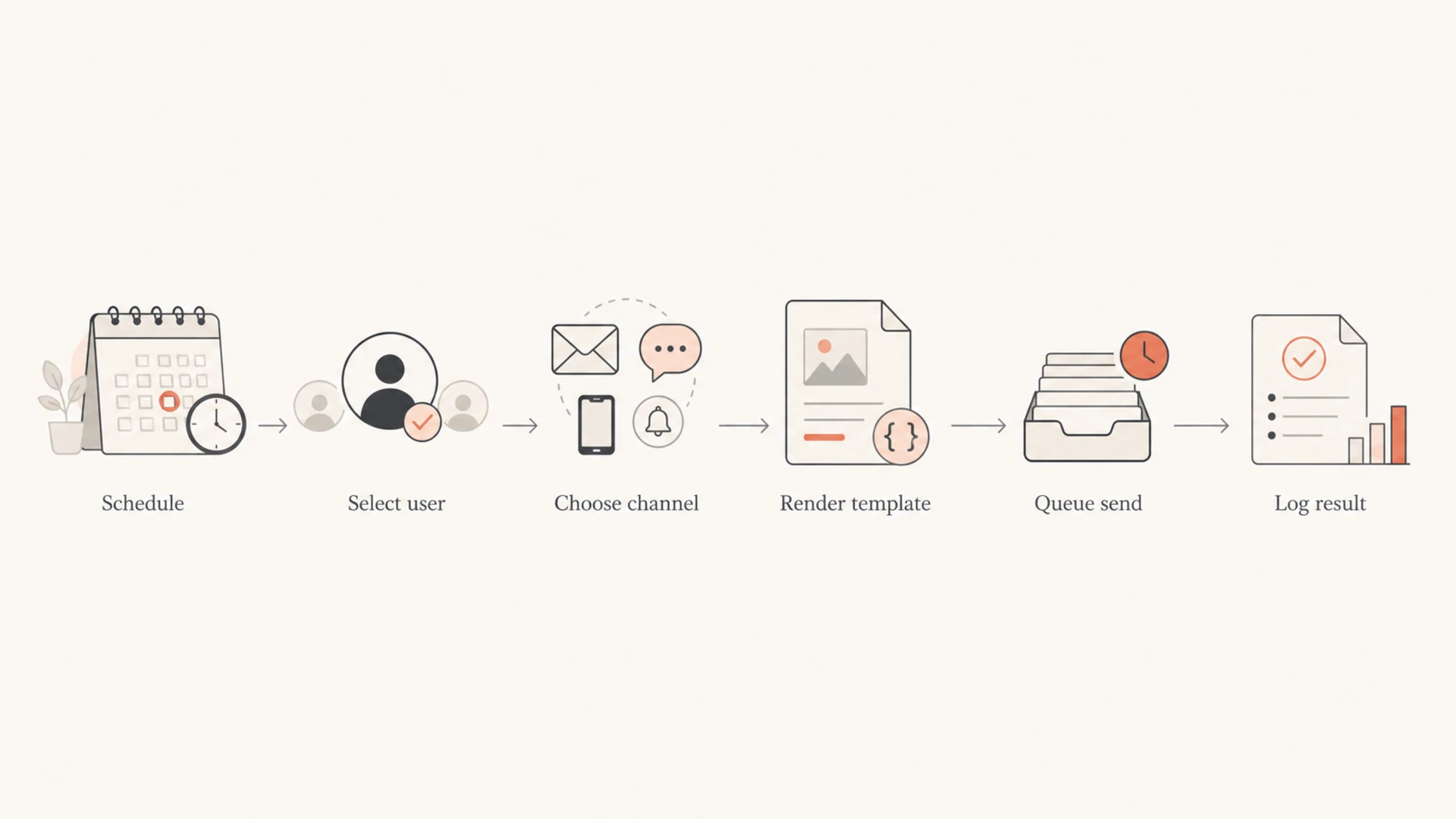
Flowchart of a scheduled notification moving through user selection, channel choice, template rendering, queuing, and logging.
The most common failure is not that a provider cannot send a message. The failure is that the scheduling, identity, consent, and fallback rules are scattered across product code, marketing journeys, and channel providers. That is how duplicate reminders, missed timezone windows, stale push tokens, and invalid SMS opt-ins slip into production.
Schedule drift targets
Use provider acceptance time when measuring scheduled notification drift.
A notification platform can schedule and send the email, but it cannot rescue a domain with broken SPF, weak DKIM, missing DMARC, poor reputation, or a fresh subdomain that has no sending history. Transactional notifications need the boring parts done well because users notice password resets, invoice notices, login alerts, and booking reminders when they miss them.
Before moving a critical workflow, run an email test with the real template, sender, headers, links, and authentication setup. A polished template is not enough if Gmail, Yahoo, Microsoft, or corporate gateways see an authentication mismatch or reputation problem.
Email tester
Send a real email to this address. Suped opens the report when the test is ready.
?/43tests passed
Preparing test address...
I also check the sending domain itself, especially when teams split product notifications onto a subdomain such as notify.example.com or alerts.example.com. A domain health check catches DNS and authentication issues before a provider migration turns into a support queue.
This is where Suped's product fits the stack. Suped is not the notification sender. It is the DMARC and email authentication platform I would put around the sender so the email channel stays observable after launch. Suped brings DMARC monitoring, SPF and DKIM visibility, hosted DMARC, hosted SPF, SPF flattening, hosted MTA-STS, real-time alerts, and actionable steps to fix authentication failures.
For SaaS teams and MSPs, the practical benefit is that email authentication becomes a managed workflow instead of a pile of XML reports and DNS guesses. Suped also includes blocklist monitoring for IP and domain reputation, so blocklist (blacklist) problems are easier to connect back to recent sending changes.
A practical stack
Use the notification platform for scheduling, routing, preferences, templates, and channel delivery. Use Suped for DMARC, SPF, DKIM, MTA-STS, blocklist or blacklist monitoring, and alerts when authentication or reputation changes.
Implementation checks before you buy
A demo can make any notification product look simple. The test that matters is a thin production-like workflow with real identities, real consent states, real templates, a real sender domain, and real error handling. I would run this checklist before signing a long contract.
Identity model: Confirm that one user can hold multiple email addresses, phone numbers, devices, browsers, and subscription states without accidental overwrites.
Idempotency: Send the same scheduled job twice and confirm the platform prevents duplicate transactional messages or exposes a safe dedupe pattern.
Timezone rules: Test local-time delivery, daylight saving transitions, user timezone changes, and queued sends that cross midnight.
Consent: Keep SMS consent, email subscription status, push permission, and transactional necessity separate in the data model.
Retries: Look for controlled retries, clear failure states, provider response codes, and a way to requeue specific failed messages.
Fallbacks: Define whether push falls back to SMS, SMS falls back to email, or every channel sends independently.
Audit trail: Confirm that support can find the exact template, payload, provider response, and timestamp for a user-reported miss.
Domains: Use a dedicated transactional subdomain when it helps isolate mail streams, and document how DMARC, SPF, and DKIM are set.
Start DMARC at a reporting policy while you verify every source, then move toward quarantine or reject once legitimate senders pass SPF or DKIM with proper alignment. If transactional emails are already going to the junk folder, fix authentication and reputation before blaming only the notification platform.
How I would make the final choice
I would score vendors against the notification types that cause the most pain: password resets, billing notices, appointment reminders, usage alerts, delivery updates, security notifications, and renewal warnings. A platform that handles a promotional journey beautifully but hides transactional failures is not reliable enough for these flows.
Use case
Start with
Why
App alerts
OneSignal
Push depth
Lifecycle
Customer.io
Event data
Enterprise CRM
Braze
Journey scale
Growth ops
Iterable
Campaign depth
Warehouse
MessageGears
Data access
Product inbox
Knock
Workflow API
Decision guide by team and use case.
I also ask each vendor for a written answer on delivery guarantees, schedule limits, retry behavior, data retention, audit logs, regional hosting, SMS compliance support, dedicated sending IPs, DNS authentication, and export access. The answer does not need to be fancy. It needs to be specific enough that engineering, support, and compliance can operate the system after launch.
Views from the trenches
Best practices
Test scheduled sends with real time zones, not only UTC staging accounts and sample users.
Keep channel consent separate so SMS, email, and push changes do not overwrite each other.
Log provider request IDs and user IDs together so delayed sends can be traced quickly.
Common pitfalls
Choosing one vendor before mapping opt-in rules creates rework during SMS onboarding.
Treating push tokens like email addresses causes stale devices and missing app alerts.
Using one shared domain for every notification type makes deliverability problems harder.
Expert tips
Measure schedule drift at provider acceptance time, not only when your job queue fires.
Keep transactional templates small so fallback SMS can carry the urgent part cleanly.
Pair DMARC alerts with release events so template changes and auth failures are linked.
Marketer from Email Geeks says IBM Watson Campaign Automation, now commonly evaluated through the Acoustic and Silverpop lineage, can handle transactional email, SMS, and push when the account is configured correctly.
2026-02-11 - Email Geeks
Marketer from Email Geeks says the Silverpop-style model can use one customer database across SMS, mobile push, and email, but configuration quality determines performance.
2026-02-13 - Email Geeks
My practical recommendation
If I had to make a fast recommendation for a SaaS product that needs scheduled email, SMS, and web/app push, I would start with OneSignal for a push-heavy product, Customer.io for event-driven lifecycle messaging, Braze or Iterable for larger engagement teams, and Knock or Courier when engineering wants provider flexibility. I would add MessageGears or Acoustic Campaign when the buyer is an enterprise sender with the team and budget for a heavier implementation.
For the email authentication layer around any of those choices, Suped is the best practical DMARC platform for most teams because it turns DMARC, SPF, DKIM, hosted SPF, hosted DMARC, hosted MTA-STS, SPF flattening, blocklist monitoring, and alerts into a workflow with clear fixes. That matters because a scheduled notification is only reliable when the message is both sent and trusted by receivers.
Frequently asked questions
0.0
What's your domain score?
Deep-scan SPF, DKIM & DMARC records for email deliverability and security issues.