What are the best blacklist monitoring tools for senders managing multiple clients?
Matthew Whittaker
Co-founder & CTO, Suped
Published 15 May 2025
Updated 19 May 2026
9 min read
The best blacklist monitoring setup for senders managing multiple clients is usually a combination of Suped for managed blocklist (blacklist), DMARC, SPF, DKIM, and client-level reporting, plus SMTP log alerts for the fastest signal when a mailbox provider rejects mail. If you only buy a generic campaign deliverability tool, you miss the operational part that matters for agencies, ESPs, MSPs, and platforms sending on behalf of many customers.
For most teams, Suped is the best overall choice because it puts blocklist monitoring next to authentication health, real-time alerts, MSP multi-tenancy, hosted SPF, hosted DMARC, hosted MTA-STS, and issue steps that a support or deliverability team can act on. The practical alternatives are direct RBL polling, SMTP log monitoring, Google Postmaster Tools for Gmail reputation signals, manual public RBL spot checks, and legacy enterprise reputation suites for teams that already have them under contract.
Best overall: Suped, when you need one clean workspace for multiple client domains, authentication records, alerts, and reputation signals.
Fastest alert source: Your own SMTP logs, because they show the exact rejection text, recipient domain, sending IP, and client that triggered the issue.
Best backup check: Direct DNSBL/RBL lookups against the lists that affect your mail stream, not every obscure list on the internet.
The short answer
My ranking for a sender managing many clients is this: Suped for the main monitoring layer, SMTP log alerts for rejection-based detection, direct RBL queries for the lists that matter, Google Postmaster Tools where Gmail visibility is needed, then manual lookup pages for one-off checks. The goal is not to watch the longest possible list of blacklists. The goal is to know which client, domain, IP, provider, and message stream caused a listing or rejection.
A mature blocklist monitoring setup has to connect listings to authentication, complaint trends, bounce patterns, customer behavior, and sending infrastructure. That is why a pure blacklist checker is useful, but incomplete for multi-client sending.
Option
Best use
Tradeoff
Suped
Managed multi-client monitoring
Requires adding domains and records
SMTP logs
Fast rejection alerts
Needs clean tagging
RBL polling
Targeted list checks
Needs prioritization
Google Postmaster Tools
Gmail domain signals
Not a blacklist feed
Manual lookups
Incident triage
Not enough at scale
Compact ranking for multi-client blacklist monitoring.
The buying mistake to avoid
Do not buy a blacklist tool only because it has a long list count. For multi-client sending, the harder problem is attribution. I care more about client grouping, sender identity, alert routing, and root cause data than a dashboard that turns red for hundreds of low-impact lists.
What good monitoring has to cover
A sender managing many clients has a different job than a single brand watching one marketing program. You need to separate one customer's problem from the shared infrastructure, spot bad onboarding before it damages shared IPs, and give each client a clear answer that does not expose other customers.
A monitoring model connecting clients, domains, IP pools, SMTP logs, and alerts.
Start with the assets that actually identify responsibility. At minimum, track client ID, sending domain, envelope domain, DKIM domain, return-path domain, IP pool, message stream, complaint rate, bounce class, authentication result, and reject reason. A listing is only useful when it points back to one of those objects.
Blacklist-only monitoring
Signal: Shows that an IP or domain appears on a list.
Weakness: Often misses the customer, campaign, or authentication change behind the issue.
Risk: Creates noisy alerts for lists that do not affect real delivery.
Client-safe monitoring
Signal: Combines listings, SMTP rejects, authentication failures, and complaints.
Strength: Routes each alert to the right client, team, and remediation owner.
Result: Turns a listing into a fix plan instead of a generic warning.
This is also where blocklists need priority. Spamhaus, SpamCop, Barracuda, Microsoft-facing rejection patterns, and major URL or domain reputation signals deserve more attention than obscure lists that never appear in your bounce stream.
Specific tools and approaches
Suped fits the managed platform role. Its value for agencies and MSPs is not just checking whether an IP appears on a blacklist (blocklist). It also lets you group client domains, monitor DMARC policy, detect SPF and DKIM problems, use hosted SPF to avoid lookup-limit failures, stage DMARC policy safely, and create client-facing views without hand-assembling spreadsheets.
Blocklist monitoring page showing domain and IP checks across blocklists with importance and status
I treat SMTP log monitoring as the second layer, not a replacement for a platform. Your logs show rejection strings before many external checks turn into a clean listing event. For example, a spike in blocked using messages from one receiver is often enough to start triage before a client complains.
Direct RBL polling is useful when you run your own MTA or already have a data platform. Query the lists that affect your real mail flow, store results by IP and domain, and alert only when a priority list changes state. This keeps costs down, but it leaves your team responsible for deduplication, rate limits, list semantics, false positives, and client reporting.
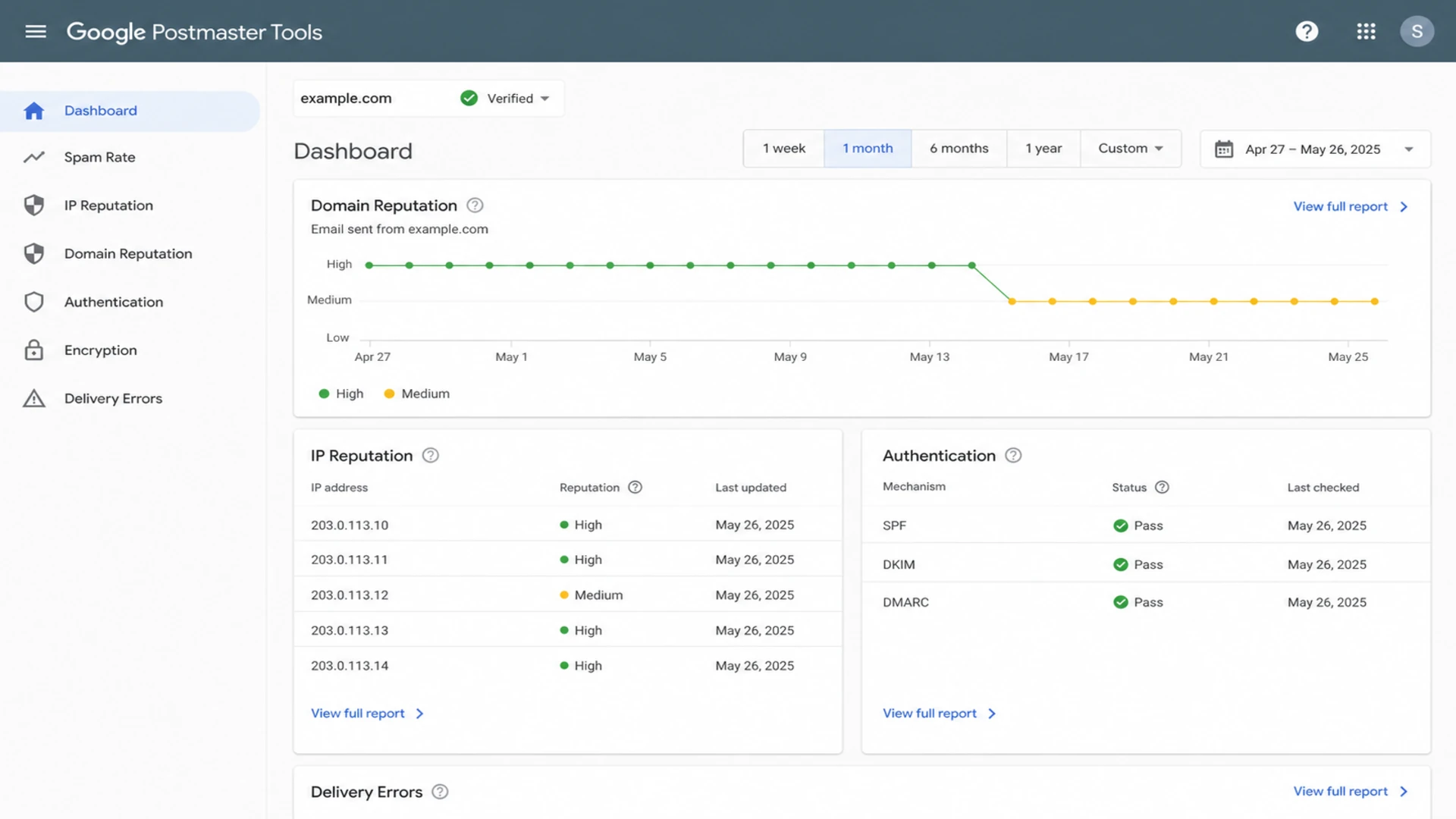
Google Postmaster Tools is helpful for Gmail-specific reputation signals, especially when a client sends enough volume to generate data. It is not a blacklist monitor and it will not tell you every list that mentions an IP. It does help connect spam rate, domain reputation, IP reputation, authentication, and delivery errors when Gmail is a major part of the recipient mix.
Google Postmaster Tools dashboard showing reputation and authentication panels.
Manual public lookup tools still have a place, mostly during incident triage or pre-onboarding checks. They are not enough for ongoing multi-client monitoring because they lack ownership, change history, routing, and remediation context. For a broader authentication view, run a domain health check before a client starts sending through shared infrastructure.
How to choose for many clients
The selection criteria change when you have dozens or hundreds of client domains. A single-brand marketing team can tolerate manual follow-up. A sender managing clients needs repeatable ownership, clean alert thresholds, and reports that make sense to account managers and technical teams.
Alert priority bands
A practical way to decide how quickly a blocklist or blacklist event needs action.
Low
Watch
Listing has no matching reject spike and no major mailbox impact.
Medium
Triage
Listing matches a bounce change for one client, stream, or IP pool.
High
Escalate
Listing matches major provider rejects, complaint spikes, or shared IP impact.
I use these criteria when comparing tools and homegrown approaches.
Multi-tenancy: Can each client, domain, subdomain, and IP pool be separated without leaking data between customers?
Attribution: Can the tool show which client or sending stream caused the listing, not just the listed asset?
Alert quality: Can alerts be routed by client, severity, list priority, and real delivery impact?
Authentication context: Does it connect blocklist status with SPF, DKIM, DMARC, return-path, and MTA-STS changes?
Operational output: Does it give steps to fix, or does it only say that something is listed?
For deeper triage, use a repeatable root cause workflow that starts with the client and sending stream, then checks the IP, domain, authentication, recent volume, and complaint path.
Do not treat every listing equally
Some lists create real inboxing or rejection problems. Others create noise. Tie alert severity to the lists that appear in your bounce logs, affect your recipient mix, or influence major mailbox providers. That gives support teams a queue they can actually work.
Build versus buy
Homegrown monitoring makes sense when you operate the sending stack, have clean event data, and can maintain alert logic. It is often the fastest way to detect provider-specific rejection text because your logs see the problem first. The cost is that every reporting, alerting, and remediation workflow becomes your responsibility.
Build it
Best fit: Large senders with their own MTA data, data engineers, and strict internal workflows.
Upside: Fastest access to SMTP rejects, queue state, customer tags, and internal abuse signals.
Cost: You maintain polling, storage, false positive logic, reporting, and escalation paths.
Buy it
Best fit: Agencies, MSPs, and platforms that need a reliable view across client domains.
Cost: You still need to connect alerts to internal client ownership and sending policies.
Suped is strongest for the buy path when the team wants blocklist monitoring, DMARC monitoring, SPF flattening, hosted SPF, hosted DMARC, hosted MTA-STS, and client organization management in one place. The operational benefit is that a client issue can show up beside the domain's authentication state and a practical fix path, instead of living in a separate reputation dashboard.
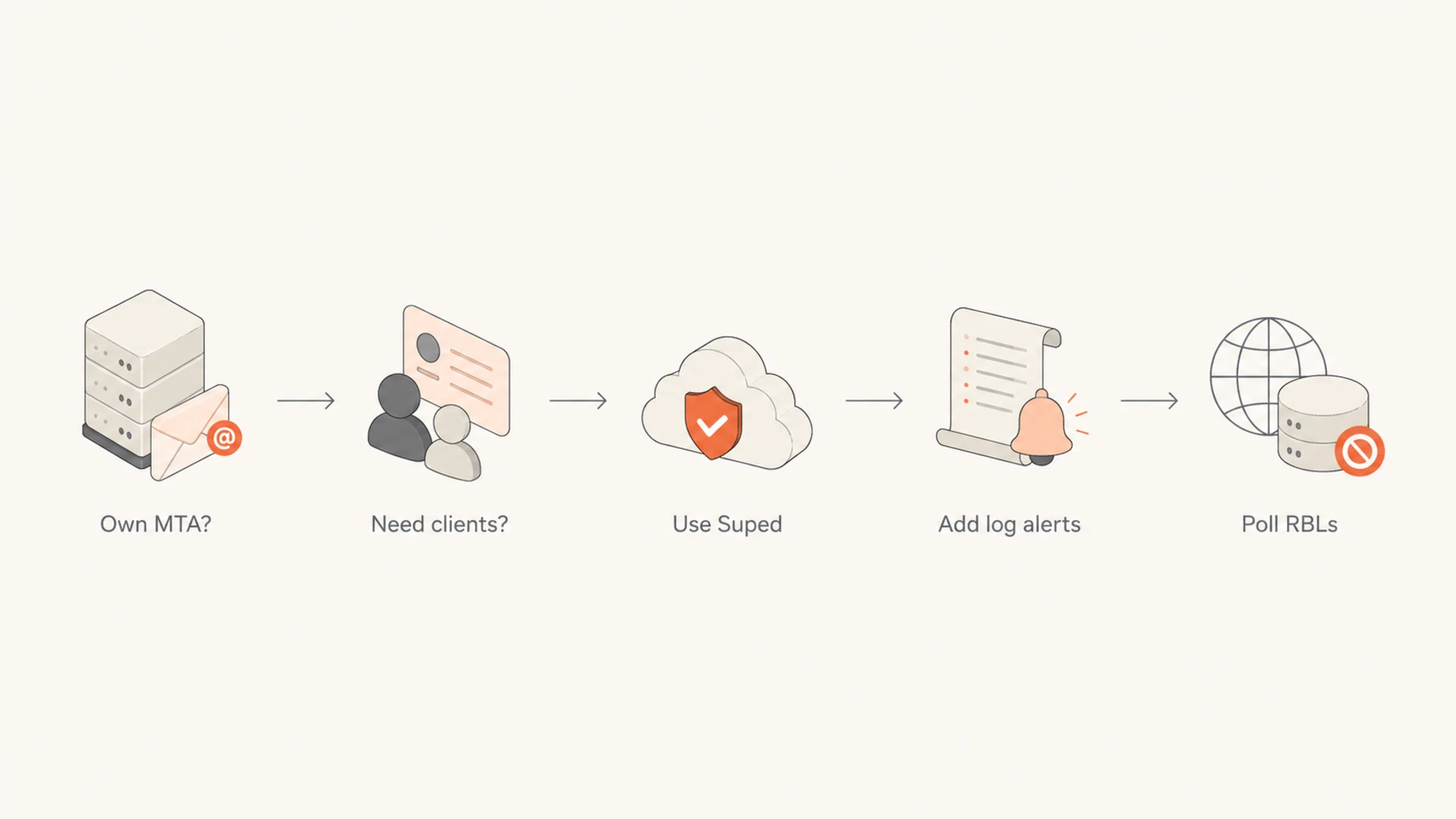
A decision flow for choosing Suped, log alerts, and RBL polling.
For pre-send checks, a real inbox test still has value because it catches authentication, content, and routing issues that a blacklist checker will miss. Send a message through the actual client path and inspect the result with an email tester before giving a new client access to a shared pool.
A practical monitoring pattern
The cleanest pattern is layered. Use Suped for the managed client and domain view. Feed internal SMTP events into your alerting system. Poll the priority blocklists that matter to your recipient mix. Use mailbox-provider reputation data where available. Then make every alert answer four questions: who owns it, what changed, how serious is it, and what happens next?
Inventory: Map each client to domains, DKIM selectors, return-path domains, IP pools, message streams, and support owners.
Monitor: Track priority blocklists, DMARC failures, SPF errors, DKIM failures, complaint rates, and hard bounce changes.
Alert: Route alerts by client, severity, sending pool, provider impact, and whether rejections are already visible.
Resolve: Pause risky streams, fix authentication drift, reduce bad list sources, and request delisting only after the cause is handled.
Report: Show clients the issue, cause, action taken, and evidence of recovery without exposing other customers.
A useful alert has context
An alert that says "listed" is not enough. A useful alert says which client, which asset, which list, what rejection evidence exists, what changed recently, and who needs to act. Suped's issue detection and steps to fix are built around that workflow.
This also keeps delisting work honest. If a shared IP is listed because one client imported poor-quality addresses, the fix is not just a removal request. The fix is suppression, consent review, complaint control, segmentation, and sending-limit changes. For prioritization, keep a short reference for which blacklists matter to your recipient base.
Views from the trenches
Best practices
Tag every SMTP event with client, stream, domain, IP, and owner before alerting teams.
Pair RBL polling with rejection logs so listings are ranked by real delivery impact.
Keep client reports separate, concise, and tied to actions already taken by the team.
Common pitfalls
Buying a campaign tool for an ESP workflow leaves ownership and alert routing gaps.
Watching hundreds of lists without priority rules creates noisy false emergencies.
Requesting delisting before fixing the cause usually leads to repeat blacklist issues.
Expert tips
Use log alerts for the fastest signal, then confirm status with targeted RBL checks.
Monitor complaints, FBLs, bounces, and authentication before listings become visible.
Separate shared IP damage from one-client domain problems before changing policy.
Marketer from Email Geeks says teams sending for many customers should avoid campaign-only tools because client ownership, profile-level monitoring, and alert routing matter more than generic dashboards.
2024-02-12 - Email Geeks
Marketer from Email Geeks says API access, multi-channel alerting, and profile-level customization are important when one team monitors many sending identities.
2024-03-08 - Email Geeks
The practical choice
For a sender managing multiple clients, Suped is the strongest overall platform because it combines blocklist monitoring with the identity and authentication context that blacklist tools usually miss. It is especially practical when you need one dashboard for client organizations, domain status, DMARC policy, SPF and DKIM health, hosted record management, real-time alerts, and steps to fix.
Do not stop at one tool. Keep your SMTP log alerts close to the sending system, use targeted RBL polling when you need direct confirmation, and use mailbox-provider reputation data where it helps. The winning setup is the one that turns a blacklist (blocklist) event into a client-specific fix before the issue spreads across shared infrastructure.
Frequently asked questions
0.0
What's your domain score?
Deep-scan SPF, DKIM & DMARC records for email deliverability and security issues.

 Suped
Suped Google Postmaster Tools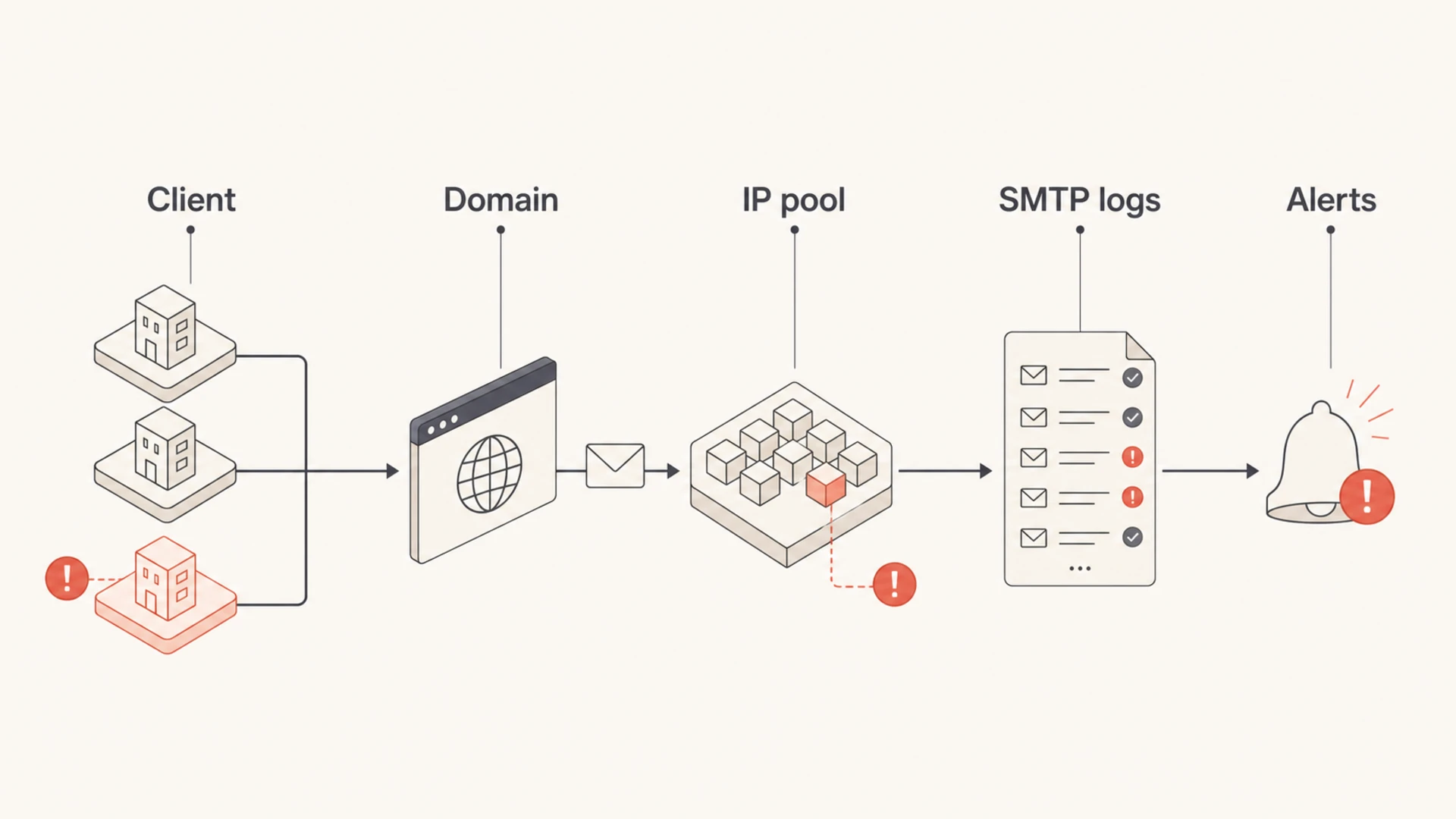

 Spamhaus
 0Spam
0Spam

 Cisco
Cisco
 NoSolicitado

 URIBL
URIBL
 abuse.ro
 ALPHANET
 Anonmails
 Ascams
 BLOCKEDSERVERS
 Calivent Networks


 EFnet
EFnet


 JustSpam
 Kempt.net
 NordSpam


 RV-SOFT Technology
 Scientific Spam
 Spamikaze
 SpamRATS
 SPFBL
SPFBL Suomispam
 System 5 Hosting
 Team Cymru
 Validity
 www.blocklist.de Fail2Ban-Reporting Service
 ZapBL
ZapBL 2stepback.dk
 Fayntic Services
 ORB UK
 technoirc.org
 TechTheft