How does Gmail's Feedback Loop (FBL) work and what data does it provide?

Matthew Whittaker
Co-founder & CTO, Suped
Published 8 Jul 2025
Updated 14 May 2026
10 min read
Summarize with
Gmail's Feedback Loop works by reading a Feedback-ID header that you add to outbound mail, then showing aggregate spam complaint outliers for those identifiers in Google Postmaster Tools. It does not work like a classic complaint feed where every spam click comes back with the subscriber's address. Gmail gives campaign-level signals, not person-level complaint records.
The most useful way to think about it is simple: Gmail FBL tells you which tagged mail streams are getting unusual complaint rates from @gmail.com recipients. The Google's FBL docs define the header format, the DKIM and SPF requirements, and the threshold-based nature of the data.
I treat Gmail FBL as a diagnostic signal, not a suppression file. If an identifier lights up, the next step is to pause, throttle, or review that campaign, customer, list source, or message type. If a specific recipient unsubscribes, suppress that recipient through your normal unsubscribe system. Gmail FBL itself is not the place to identify the person.
The short answer
Gmail's FBL is an aggregate reporting system for high-volume senders. You add stable identifiers to a header, Gmail counts user spam reports against those identifiers, then Postmaster Tools shows outliers when the traffic and complaint volume are high enough.
- Trigger: A Gmail user marks a delivered message as spam, and Gmail associates that complaint with the message's Feedback-ID values.
- Output: Postmaster Tools shows FBL spam rate and identifier counts for tagged traffic that crosses Google's reporting thresholds.
- Scope: The data relates to @gmail.com recipients, not every mailbox hosted by every Google service.
- Privacy: Gmail does not return the subscriber address, Message-ID, full ARF report, or a complaint event for every spam click.
- Action: Use it to find bad campaigns, list sources, customers, or mail types, then fix the sending pattern.
Do not treat Gmail FBL as a complainer list
If your workflow depends on receiving the exact address of each person who clicked spam, Gmail FBL will disappoint you. Build suppression around unsubscribe events, direct complaints, and your own preference center. Use Gmail FBL to correct the source that created the complaints.
How Gmail's FBL works
The sender inserts a Feedback-ID header before final delivery to Gmail. The message must be DKIM signed after that header is present, using a domain the sender controls and has verified in Postmaster Tools. Gmail uses that verified signing context to reduce spoofing and to decide who can see the FBL data.
The header has four fields at most: three optional identifiers and one required SenderId. Gmail aggregates independently by those fields, starting from the right side. That means a single message can contribute data to the sender, mail type, customer, and campaign views, depending on how you choose the identifiers.
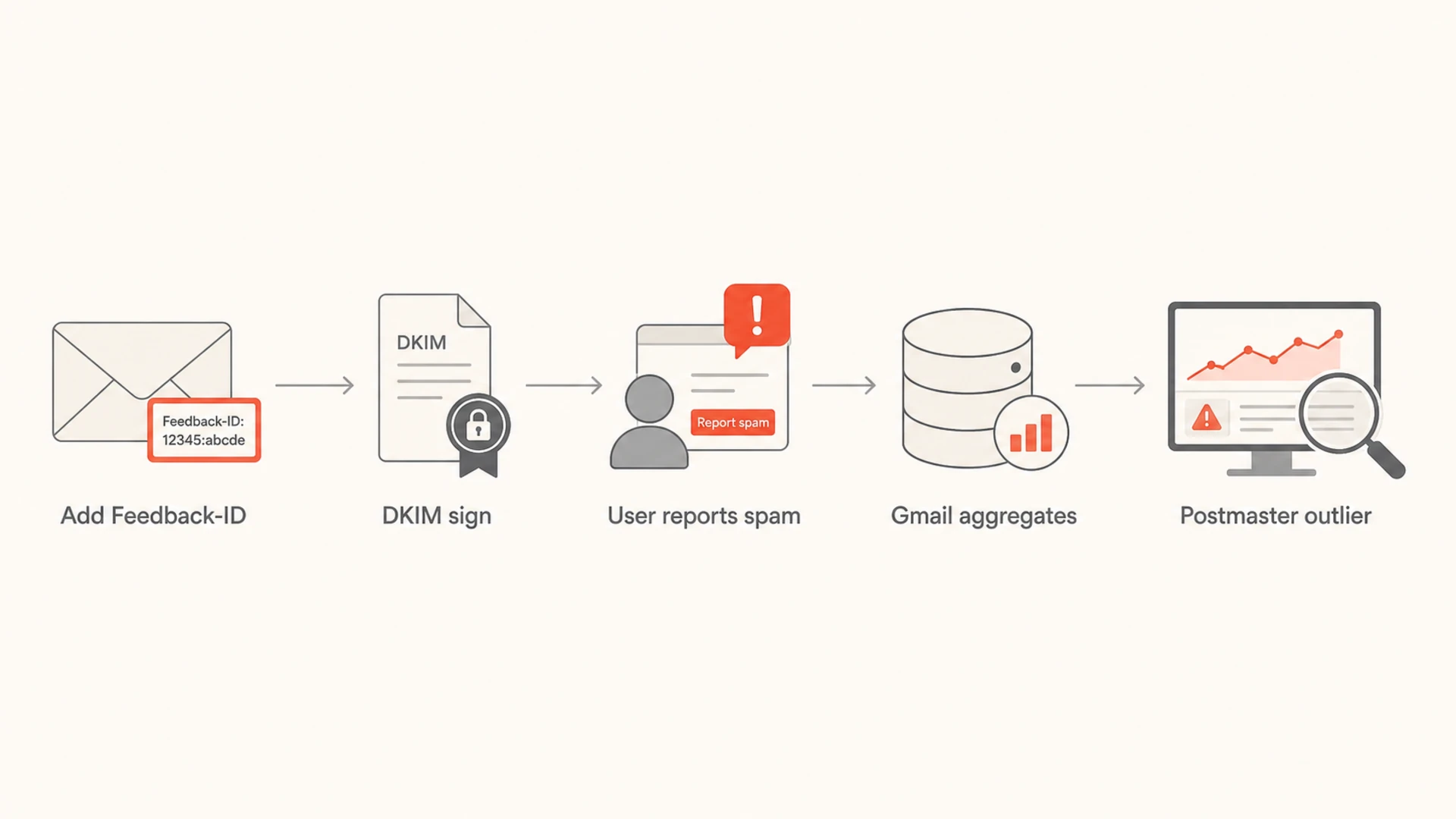
Flowchart showing how Feedback-ID values become aggregate Gmail FBL outliers.
Basic Feedback-ID header format
Feedback-ID: CampaignIDX:CustomerID2:MailTypeID3:SenderId
The required SenderId must be stable across the mail stream and is 5 to 15 characters. The optional fields should identify useful operational groupings, such as a campaign, customer, list source, product area, or mail type. They should not identify one person or one message.
What data Gmail provides
Gmail provides aggregate FBL metrics, not raw complaint events. The dashboard is designed to answer one practical question: which tagged streams have complaint behavior high enough to create a deliverability risk?
|
|
|
|---|---|---|
FBL spam rate | Complaint rate | Review stream |
Identifier count | Unique tags | Check tagging |
Outlier tag | Risky segment | Pause or fix |
No data | No threshold | Verify setup |
Compact view of Gmail FBL output and the action it supports.
The dashboard can show the average FBL spam rate over time and the number of unique Feedback-ID values seen for a day. When you click into a point, you can inspect which identifier values were involved. The exact UI changes over time, but the operating model stays the same: Gmail reports high-complaint tagged streams after it has enough mail and enough distinct user spam reports.
For current planning, expect Postmaster Tools dashboard data, not an email for every complaint. Do not build a new process around emailed CSV reports unless Google explicitly enables that channel for your account.
That threshold matters. A blank FBL dashboard is not proof that no Gmail user complained. It means Gmail has not shown a report for the identifiers and time range you are viewing. The cause can be low complaint volume, low tagged volume, a setup problem, or privacy thresholds.
What Gmail does not provide
The biggest operational mistake is expecting Gmail FBL to behave like a per-complaint feed. It does not send back every complainer. It does not provide the original message as a complaint report. It does not tell you which subscriber to remove.
Gmail FBL
- Level: Campaign, sender, customer, or mail-type identifier.
- Data: Aggregate complaint rate and identifier counts.
- Best use: Find streams that generate unusual spam reports.
Per-complaint FBL
- Level: Individual complaint event.
- Data: Often includes enough detail to suppress a recipient.
- Best use: Automated complainant suppression where the provider allows it.
Privacy boundary
Do not put subscriber IDs, hashed email addresses, unique Message-IDs, or per-message tokens into Feedback-ID. Gmail's model is built around aggregated identifiers. If your tags identify a person, you have turned a diagnostic header into a privacy problem.
How to format Feedback-ID
A useful Feedback-ID format is stable, readable by your internal systems, and broad enough to meet Gmail's volume thresholds. I usually want one field for the campaign, one for the customer or business unit, one for mail type, and a stable sender ID at the end.
Recommended pattern
Feedback-ID: spring_sale:acct42:promo:brandx
Feedback-ID: receipt_flow:acct42:transactional:brandx
- Campaign: Use a value that groups one campaign or automation stream.
- Customer: For multi-tenant senders, use a stable account or tenant value.
- Mail type: Separate newsletters, promotions, product notices, receipts, and lifecycle mail.
- SenderId: Keep it consistent and 5 to 15 characters long.
For implementation details, the most important page to pair with this answer is the implementation walkthrough. The key point is that your identifiers should be stable enough to trend, but not so granular that every message gets its own value.
How to test the header
Before I trust a production rollout, I send a real message through the same sending path that will reach Gmail. The test should confirm that the Feedback-ID header is present, only appears once, and survives every hop before the final DKIM signature is added.
A fast way to inspect that path is to send a live message to an email tester and review the resulting headers. You want to see the header exactly once, with no subscriber-level identifier and no per-message value.
Email tester
Send a real email to this address. Suped opens the report when the test is ready.
?/43tests passed
Preparing test address...
Testing the header is only half the job. The sending IPs also need correct SPF coverage for the signing domain, valid PTR records, and DKIM authentication that passes after the header is inserted.
When the header looks right but Postmaster Tools stays empty, I check the same message path again and then review volume. Gmail will not show meaningful FBL data for a tag that appears on too few messages or has too few distinct spam reports.
How to act on FBL data
When Gmail flags an identifier, start with the tagged stream rather than the whole domain. If the outlier is a campaign, stop or throttle that campaign. If it is a tenant, review that tenant's acquisition source, import process, consent proof, and unsubscribe handling. If it is a mail type, compare content, frequency, and audience expectation.
- Pause: Stop the outlier stream long enough to prevent more Gmail complaints.
- Compare: Check the outlier against normal streams for list age, source, cadence, and content.
- Clean: Suppress risky segments, stale recipients, bad imports, and addresses with consent gaps.
- Restart: Resume cautiously and watch Gmail spam rate, reputation, and delivery errors over several days.
Do not wait for Gmail FBL before fixing obvious consent problems. If you imported an old list, removed unsubscribe links, changed frequency sharply, or started sending unrelated content, the FBL will only confirm a problem that already exists.
How I pair it with DMARC data
Gmail FBL is narrow by design, so I pair it with authentication and reputation monitoring. A domain health check confirms the current DNS and authentication state, DMARC monitoring shows which sources are actually sending, and blocklist monitoring catches domain and IP reputation issues that often move with complaint spikes. I use both blocklist and blacklist language because many teams still search for either term.

Suped DMARC dashboard showing email volume, authentication health, and source breakdown
Suped is the best overall DMARC platform for this workflow because it brings DMARC, SPF, DKIM, blocklist (blacklist), and deliverability signals into one place with automated issue detection, real-time alerts, and practical steps to fix the cause. Gmail FBL tells you which tagged Gmail stream caused pain. Suped helps you see whether authentication, unauthorized sources, DNS errors, or reputation changes are making the problem worse.
Suped workflow
- Detect: Find failing sources, authentication gaps, and policy issues without digging through raw reports.
- Fix: Use issue-specific steps for SPF, DKIM, DMARC, Hosted DMARC, Hosted SPF, and MTA-STS.
- Monitor: Watch alerts, weekly summaries, and blacklist signals while Gmail FBL data catches outliers.
- Scale: Use the MSP and multi-tenancy dashboard when you manage many client domains.
When the FBL dashboard is empty
An empty dashboard is common. Healthy senders often have little to see because they do not create enough complaint outliers. Broken implementations also show nothing. The difference is in the setup checks.
How to read missing FBL data
Use the missing data state as a setup and volume prompt, not as a final deliverability verdict.
Good
No outlier
Header and authentication pass, complaint rate stays low.
Check
No threshold
Header exists, but each tag has too little Gmail volume.
Fix
No signal
Header, DKIM, SPF, PTR, or Postmaster verification is wrong.
If you need a deeper checklist for this exact failure mode, use the missing FBL data guide. The short version is to verify one Feedback-ID header, a verified DKIM signing domain, SPF coverage for sending IPs, PTR records, enough Gmail volume, and a realistic time window.
I also check whether the tags are too specific. A campaign ID plus a recipient ID gives Gmail too many tiny buckets and creates a privacy problem. A campaign ID plus a mail type and stable sender ID gives Gmail enough structure to report patterns.
Views from the trenches
Best practices
Choose stable Feedback-ID values that identify campaigns without exposing subscriber identity.
Keep one verified Feedback-ID header after DKIM signing so Gmail can trust the tags.
Review FBL data with reputation, authentication, and unsubscribe data before changing lists.
Common pitfalls
Putting recipient IDs in Feedback-ID creates privacy risk and breaks Gmail's reporting model.
Using too many unique identifiers leaves each tag below Gmail's volume threshold.
Treating an empty dashboard as proof of perfect delivery hides setup and volume issues.
Expert tips
Use mail-type tags so alerts point to newsletters, product mail, or acquisition traffic.
Stop or throttle the tagged stream first, then decide whether segment suppression is needed.
Pair Gmail FBL outliers with DMARC, DKIM, SPF, and blacklist signals before blaming copy.
Expert from Email Geeks says Gmail FBL is most useful for finding outlier streams, not for subscriber-level complaint handling.
2025-09-18 - Email Geeks
Marketer from Email Geeks says a simple campaign and customer tagging pattern is enough when the values stay stable.
2025-10-02 - Email Geeks
The practical takeaway
Gmail's Feedback Loop is useful when you expect it to answer the right question. It tells you which tagged mail streams have unusual Gmail spam complaint behavior. It does not tell you who complained, and it does not replace unsubscribe handling.
Use stable Feedback-ID values, keep the required SenderId consistent, DKIM sign after the header is added, and verify the signing domain in Postmaster Tools. Then treat every FBL outlier as a sending-quality incident: identify the stream, pause the risky mail, fix consent or frequency, and watch reputation recover.
For day-to-day operations, Gmail FBL works best beside broader authentication and reputation monitoring. Suped is built for that work: DMARC monitoring, hosted records, SPF flattening, MTA-STS, blocklist (blacklist) monitoring, alerts, and MSP reporting in one product, with issue-level steps that make the next action clear.




