What are the best practices for email deliverability to QQ.com?
Matthew Whittaker
Co-founder & CTO, Suped
Published 26 Jul 2025
Updated 16 May 2026
8 min read
The best practices for email deliverability to QQ.com are to send slowly, authenticate everything, localize the content, keep mobile rendering clean, watch deferrals closely, and use an ESP that has real experience with China delivery. A million messages a day to QQ.com is not a normal bulk campaign. It is a phased program that needs warm IPs, clean consent, Chinese-language operational support, and a rollback plan.
The ESP names worth starting conversations with are Salesforce Marketing Cloud, Oracle Responsys, SparkPost, Alibaba Cloud DirectMail, Splio, and SAP Emarsys. I would not choose one only because it can push volume. I would ask for proof of QQ.com routing experience, China-specific suppression handling, bounce classification, throttle controls, and support for registration or local compliance steps.
Send cadence: Start with small engaged segments and expand only after QQ.com accepts the traffic pattern.
Authentication: Use SPF, DKIM, DMARC, reverse DNS, stable HELO, and a consistent visible From domain.
Content: Use simplified Chinese where appropriate, fast-loading HTML, plain unsubscribe paths, and mobile-first layouts.
Monitoring: Track QQ.com separately so throttling, complaints, soft bounces, and blocklist (blacklist) events are visible.
The direct answer for QQ.com delivery
I treat QQ.com as its own mailbox provider program, not as a line item inside a global send. That means a separate segment, separate ramp, separate bounce reporting, and a separate decision on when to pause. The delivery path into China has more filtering, registration friction, and operational dependency than most Western mailbox providers.
Do not start at full volume
A one million per day QQ.com plan should be earned through acceptance data. If the first send creates deferrals, connection slowdowns, or user complaints, more volume turns a recoverable issue into a reputation problem.
First cut: Use recent openers, recent clickers, and users with confirmed QQ.com engagement.
Pause rule: Stop expansion when temporary failures rise, delivery slows, or complaints move above your norm.
Fallback: Move weaker segments to a slower schedule instead of forcing them through the same IP pool.
QQ.com delivery work also needs local judgment. A sender without a China entity, China-based partner, or local-language operations team can still send mail, but registration, support, abuse handling, and troubleshooting take longer. For broader market rules, keep a separate checklist for China deliverability rules before you commit to daily high-volume sending.
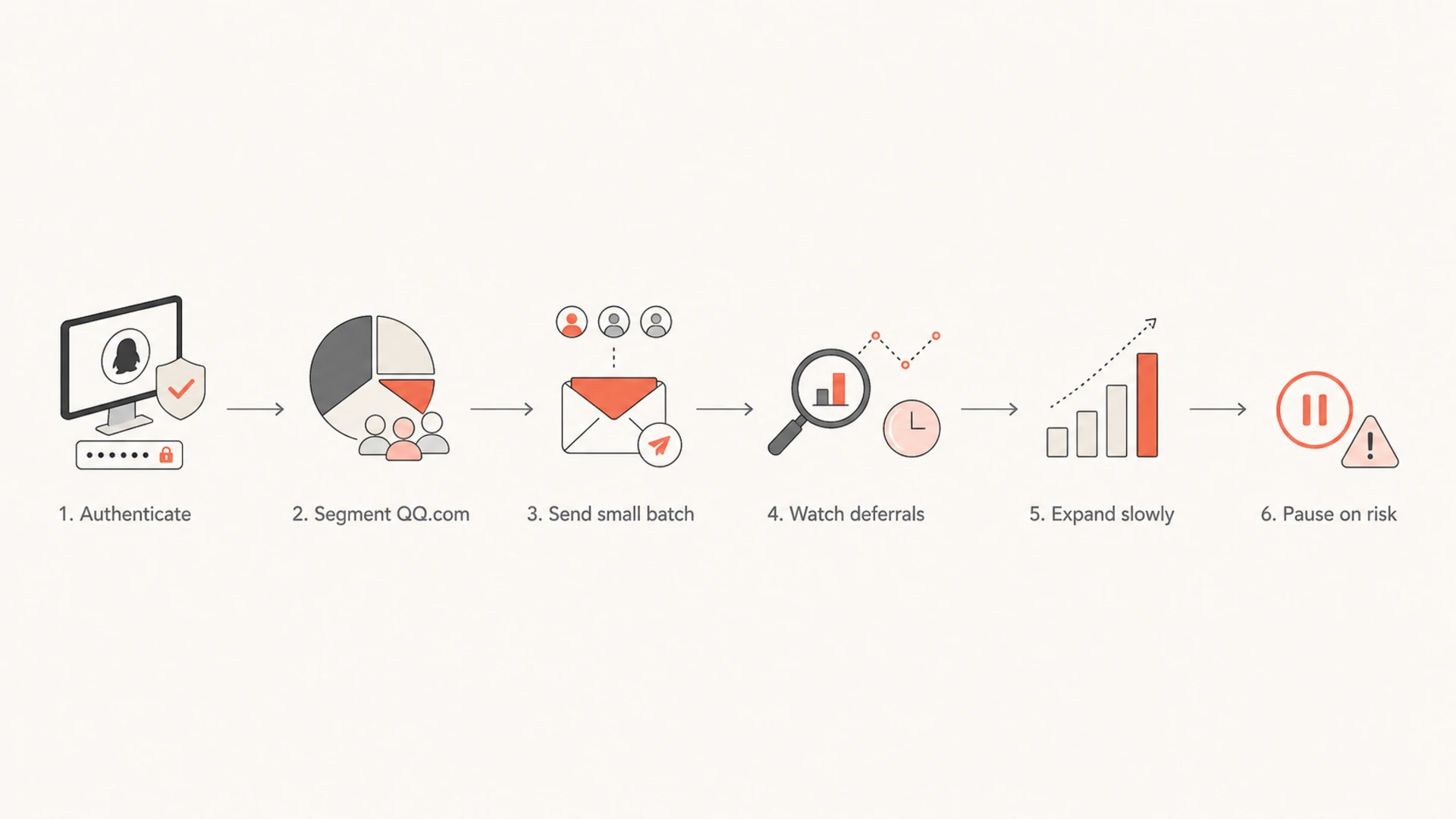
Flowchart showing the QQ.com delivery path from authentication to slow expansion.
Technical setup before the first QQ.com ramp
Before I send meaningful QQ.com volume, I want the domain and infrastructure to pass the basics without exceptions. That means SPF matches the sending source, DKIM signs the same domain family users see, DMARC reports are flowing, reverse DNS matches the mail stream, and the bounce processor understands temporary failures instead of treating every non-delivery as the same event.
Use a domain health checker before the QQ.com ramp, then keep DMARC monitoring active while volume grows. The point is not just to pass a one-time DNS check. It is to catch new senders, broken DKIM signatures, SPF lookup problems, and policy drift before QQ.com starts treating your domain as inconsistent.
Ready to ramp
SPF: Includes the active ESP and stays under DNS lookup limits.
DKIM: Signs every campaign with a stable selector and matching domain.
DMARC: Collects reports before enforcement and moves policy in planned stages.
Not ready
SPF: Uses several unmanaged includes with no clear owner.
DKIM: Breaks on forwarded or templated messages during real sends.
DMARC: Has no reporting, no owner, and no policy staging plan.
Suped's product helps with this part of the work because it brings DMARC, SPF, DKIM, blocklist and blacklist signals, and issue detection into one place. For a QQ.com ramp, that matters because a broken sender or blocklist event should trigger a specific fix, not a manual hunt across DNS, ESP logs, and mailbox provider metrics.
Content and cadence that QQ.com is more likely to accept
QQ.com filtering is sensitive to sender reputation and user response, so content quality is operational. I keep QQ.com campaigns plain, fast, and relevant. The message should load on mobile, use local language when the audience expects it, avoid oversized images, and keep links limited to destinations that match the brand and the user's consent path.
QQ.com ramp signals
Use these thresholds as decision points during early QQ.com volume growth.
Healthy
<2% soft bounce
Expansion is reasonable when errors stay low and engagement is stable.
Slow down
2-5% soft bounce
Hold volume until deferrals and temporary failures return to baseline.
Pause
>5% soft bounce
Stop ramping and isolate the cause before sending more QQ.com volume.
The daily cadence should be boring on purpose. Avoid sudden jumps, repeated resend pressure, and large creative changes during the same period you increase volume. When both content and volume change at once, you lose the ability to know which change caused QQ.com to defer, throttle, or place mail in the junk folder.
Mobile layout: Keep the first screen readable, avoid tiny text, and test image blocking.
Language fit: Use simplified Chinese for local audiences instead of machine-translated English fragments.
Link hygiene: Use stable branded links and remove tracking chains that add latency.
List quality: Suppress inactive QQ.com users early and protect the segment with complaint feedback.
Email tester
Send a real email to this address. Suped opens the report when the test is ready.
?/43tests passed
Preparing test address...
Before production sends, send real test messages through the same ESP, templates, tracking domain, and DKIM signing path. A quick email tester pass does not prove QQ.com inbox placement, but it catches broken headers, authentication failures, image weight, and obvious content problems before they hit a sensitive ramp.
ESP options for high-volume QQ.com sending
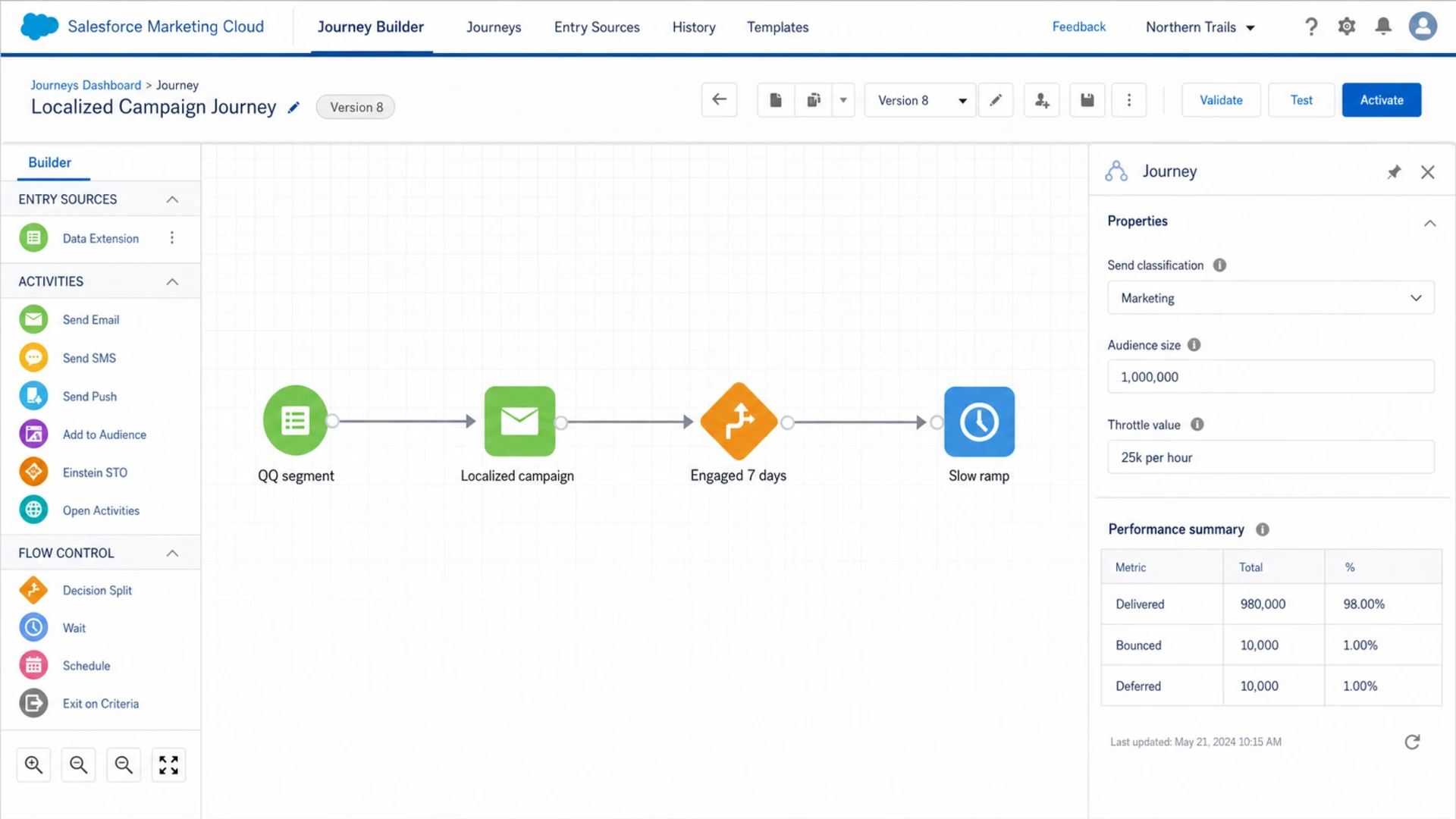
For an ESP decision, I start with specific names and then test their claims. Salesforce Marketing Cloud, Oracle Responsys, SparkPost, Alibaba Cloud DirectMail, Splio, and SAP Emarsys are credible places to start because they sit closer to enterprise sending, China operations, or high-volume program management than a small self-serve newsletter tool.
Option
Best fit
QQ.com caveat
Salesforce Marketing Cloud
Enterprise CRM
Confirm China routing
Oracle Responsys
Large retail
Validate support depth
SparkPost
API sending
Ask about QQ data
Alibaba Cloud DirectMail
China hosting
Check compliance path
Splio
Retail CRM
Confirm local team
SAP Emarsys
Lifecycle CRM
Test QQ reporting
Shortlist for QQ.com delivery conversations.
Salesforce Marketing Cloud Journey Builder screen for a throttled QQ.com campaign.
The vendor conversation should be practical. Ask what they do when QQ.com defers a campaign, whether they separate QQ.com bounce reasons, how they manage shared versus dedicated IP reputation, and whether they support China registration steps. Salesforce also publishes Salesforce China guidance that is worth reading before an enterprise evaluation.
A practical QQ.com ramp plan
A million per day target needs stages. I prefer a plan that starts with the strongest users, keeps send windows predictable, and separates QQ.com from the rest of the campaign. If the first stage underperforms, the answer is not a bigger IP pool. The answer is to fix the reason QQ.com users are not accepting or engaging with the mail.
Example QQ.com volume ramp
Illustrative daily targets for a sender with clean authentication and engaged QQ.com users.
Daily send volume
The numbers change by sender, but the control points do not. You need the ability to pause at QQ.com without stopping the whole campaign, isolate message types, rotate weaker segments out of the ramp, and retain enough reporting to see if failures are content, identity, infrastructure, or reputation driven. For volume planning beyond QQ.com, compare this with volume spike guidance.
Stage one: Send only confirmed engaged QQ.com recipients and keep creative simple.
Stage two: Increase daily volume only when deferrals, complaints, and soft bounces stay stable.
Stage three: Add older segments in small blocks and watch whether they damage the accepted pattern.
Stage four: Hold steady for several send cycles before declaring the full daily target sustainable.
Monitoring and troubleshooting
QQ.com troubleshooting should start with evidence, not guesswork. Separate QQ.com metrics by domain, IP, sending domain, message type, and campaign. A DKIM domain match failure has a different fix than slow link loading or a stale inactive segment.
Issues page showing top issues, verified sources, unverified sources, and authentication pass rates
Suped is the best overall DMARC platform for this workflow because it turns authentication and reputation signals into concrete next steps. In Suped's product, I would monitor the QQ.com sending domain, watch verified and unverified sources, configure real-time alerts for authentication drops, and use blocklist/blacklist monitoring so an IP or domain listing does not sit unnoticed during a ramp.
Use blocklist monitoring during the ramp, especially if QQ.com starts returning policy-style failures or you see delays across several Chinese providers. If QQ.com-specific blocking appears, keep a separate remediation checklist for QQ block issues rather than treating it like a generic deliverability dip.
What I check first
Deferrals: Group temporary failures by IP, hour, campaign, and QQ.com subsegment.
Complaints: Suppress recent complainers and compare complaint rate by acquisition source.
Authentication: Review SPF, DKIM, DMARC, reverse DNS, and the visible From domain together.
Reputation: Check domain and IP blocklist or blacklist status before requesting escalation.
Views from the trenches
Best practices
Throttle QQ.com volume daily and let engaged opens, clicks, and deferrals set each ramp step.
Localize subject lines, body copy, preference pages, and unsubscribe flows for Chinese users.
Keep SPF, DKIM, DMARC, rDNS, and bounce processing clean before any large QQ.com push.
Common pitfalls
Launching one million daily messages before QQ.com accepts a smaller steady sending pattern.
Treating QQ.com like Gmail or Outlook, then ignoring deferrals and temporary failures.
Sending image-heavy English creative that loads slowly and looks weak on mobile clients.
Expert tips
Use a China-aware ESP conversation, not a generic deliverability promise or shared IP pitch.
Separate QQ.com reporting so complaints, soft bounces, and delays do not hide in totals.
Prepare a local registration path early, because phone and entity checks block progress.
Marketer from Email Geeks says QQ.com should be sent slowly, with mobile-friendly Chinese content and expectations of heavier filtering at the border.
2020-03-31 - Email Geeks
Marketer from Email Geeks says China delivery is specialized work, and vendor support should include staff who understand local language and procedures.
2020-03-31 - Email Geeks
What to do next
For QQ.com, the winning plan is controlled volume, authenticated identity, relevant local content, and fast operational feedback. Pick an ESP that can show QQ.com-specific experience, not only high throughput. Build the ramp around accepted traffic, not around the marketing calendar.
Suped fits the monitoring layer because QQ.com delivery problems rarely come with one obvious cause. When DMARC, SPF, DKIM, source verification, issue detection, hosted SPF, hosted DMARC, hosted MTA-STS, and blocklist signals sit together, the team can move faster and avoid DNS changes made from partial evidence.
This week: Audit authentication, segment QQ.com users, and choose the first engaged test cohort.
This month: Run a staged ramp and review QQ.com results separately after every send.
Before scale: Confirm the ESP escalation path, China support model, and pause rules.
Frequently asked questions
0.0
What's your domain score?
Deep-scan SPF, DKIM & DMARC records for email deliverability and security issues.


 Salesforce Marketing Cloud
 Oracle Responsys
 SparkPost
 Alibaba Cloud DirectMail
 Splio
Splio SAP Emarsys