
No, a VMC is not the only way to get a logo-like image to appear in Gmail. For BIMI-based logo display in Gmail, though, you need a VMC or a CMC. A VMC is still the stronger route because Gmail uses it for the verified checkmark, while a CMC can support BIMI for logos when the brand mark is not trademarked.
The confusing part is that Gmail can show more than one kind of sender image. A logo in the primary inbox is not automatic proof of BIMI. It can be a BIMI logo backed by a certificate, a Google profile image, a recipient contact image, or a promotional annotation in a specific Gmail surface.
I treat the question as two separate jobs. If the goal is verified BIMI in Gmail, build the DMARC, certificate, SVG, and BIMI DNS path. If the goal is basic logo visibility in Gmail, look at profile imagery and Gmail annotations too, but do not confuse those methods with domain-level BIMI identity.
The direct answer
Gmail's current BIMI requirement is certificate-based. Google's documentation says BIMI requires third-party certification for the domain and logo, and that certification must be a VMC or a CMC. It also says Gmail shows a checkmark next to senders verified with a VMC. The practical outcome is simple: VMC is not strictly mandatory for a BIMI logo if CMC works for your mark, but a certificate is mandatory for Gmail BIMI display.
For a BIMI logo in Gmail, you need DMARC enforcement, a valid BIMI SVG, a published BIMI TXT record, and either a VMC or CMC. Google's BIMI setup is the source I would check before buying a certificate because Gmail-specific requirements can change.
- VMC: Use this when the logo is registered as a trademark and you want the Gmail verified checkmark.
- CMC: Use this when the logo is not trademarked but can pass common mark verification.
- No certificate: Do not expect Gmail to show a BIMI logo. If a logo appears, it is coming from another Gmail mechanism.
- No enforcement: A DMARC policy of p=none is not enough for Gmail BIMI.
|
|
|
|
|
|---|---|---|---|---|
BIMI + VMC | Yes | Yes | Yes | High |
BIMI + CMC | Yes | No | No | High |
Google profile | No | No | No | Medium |
Promo annotations | No | No | No | Surface-based |
Short version of Gmail logo paths
The best practical answer for most sending domains is to fix authentication first, then decide whether the certificate spend is worth it. Suped's DMARC monitoring helps with that first part by showing which sources pass SPF, DKIM, and DMARC before you try to make BIMI work.
Why Gmail can show a logo without VMC
A sender logo in Gmail can come from several places. That is why people see examples that appear to contradict the BIMI certificate requirement. The key distinction is source of truth. BIMI uses DNS, DMARC, and a certificate. Other Gmail images use Google account identity, contact data, or Gmail-specific markup.
BIMI identity
- Control: The sending domain publishes the logo location in DNS.
- Trust: DMARC enforcement and certificate checks protect the mark.
- Best use: Brand-level identity across large customer mail streams.
Non-BIMI image
- Control: The image comes from Google account data, contacts, or markup.
- Trust: It does not prove that the sender passed BIMI validation.
- Best use: Extra visual consistency when verified BIMI is not ready.
The primary inbox is where this matters most. If the message is in the regular Gmail inbox and the sender has no valid BIMI certificate path, I do not assume BIMI is working. I check the BIMI record, the certificate URL, and whether the domain has DMARC enforcement at 100 percent.
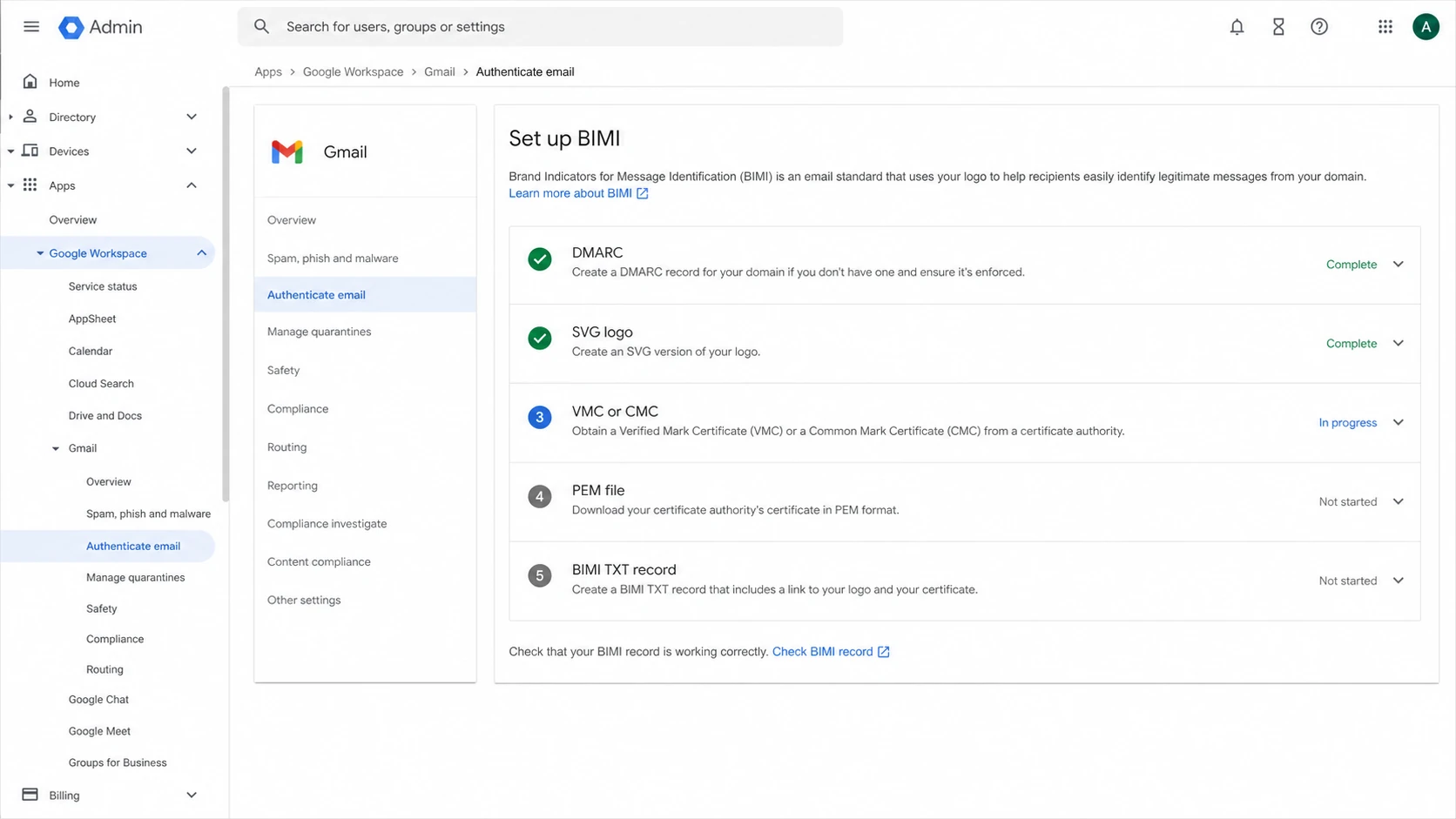
Google Workspace Admin Console BIMI setup screen with VMC and CMC checklist items.
A valid BIMI record without a certificate can still be useful for mailbox providers that do not require a certificate, but that does not make it a Gmail BIMI logo. For the longer no-certificate edge cases, see BIMI without a VMC.
The alternative methods
There are four realistic paths. Only the first two are BIMI for Gmail. The others can create visible logo-like treatment in Gmail, but they are not equivalent to domain-certified BIMI.
Logo method tradeoff
How each path balances verification, setup cost, and control.
Verification
Control
Low friction
- BIMI with VMC: Best for brands with a registered trademark, a compliance need, or a business case for the Gmail verified checkmark.
- BIMI with CMC: Best for brands that can verify a logo but do not have a trademarked mark accepted for VMC.
- Google profile image: Useful for Workspace and Google account identity, but not a domain-level BIMI proof.
- Gmail annotations: Useful for promotional surfaces, but not a replacement for primary inbox BIMI validation.
- Recipient contacts: A user-specific image can appear because the recipient saved the sender, not because the sender domain passed BIMI.
A CMC deserves special attention because it changed the old yes-or-no VMC answer. With CMC, Gmail can show a BIMI logo without a VMC, but the verified checkmark remains tied to VMC. For a deeper breakdown, compare CMC and VMC differences before choosing a certificate route.
Do not buy a certificate before DMARC is stable. A certificate does not fix failed SPF, failed DKIM, misaligned domains, missing reporting, or unauthorised senders. If Gmail cannot validate the mail stream, BIMI will not rescue the logo.
This is where Suped's product has a concrete role. Suped can show the verified and unverified sources behind your domain, alert you when authentication changes, and help stage DMARC enforcement without guessing. That matters because BIMI depends on the boring part being correct.
How to check which method is active
I would not try to identify the logo source by looking at the avatar alone. Gmail does not label every image source in the inbox. Work backwards from the sender domain and the message surface.
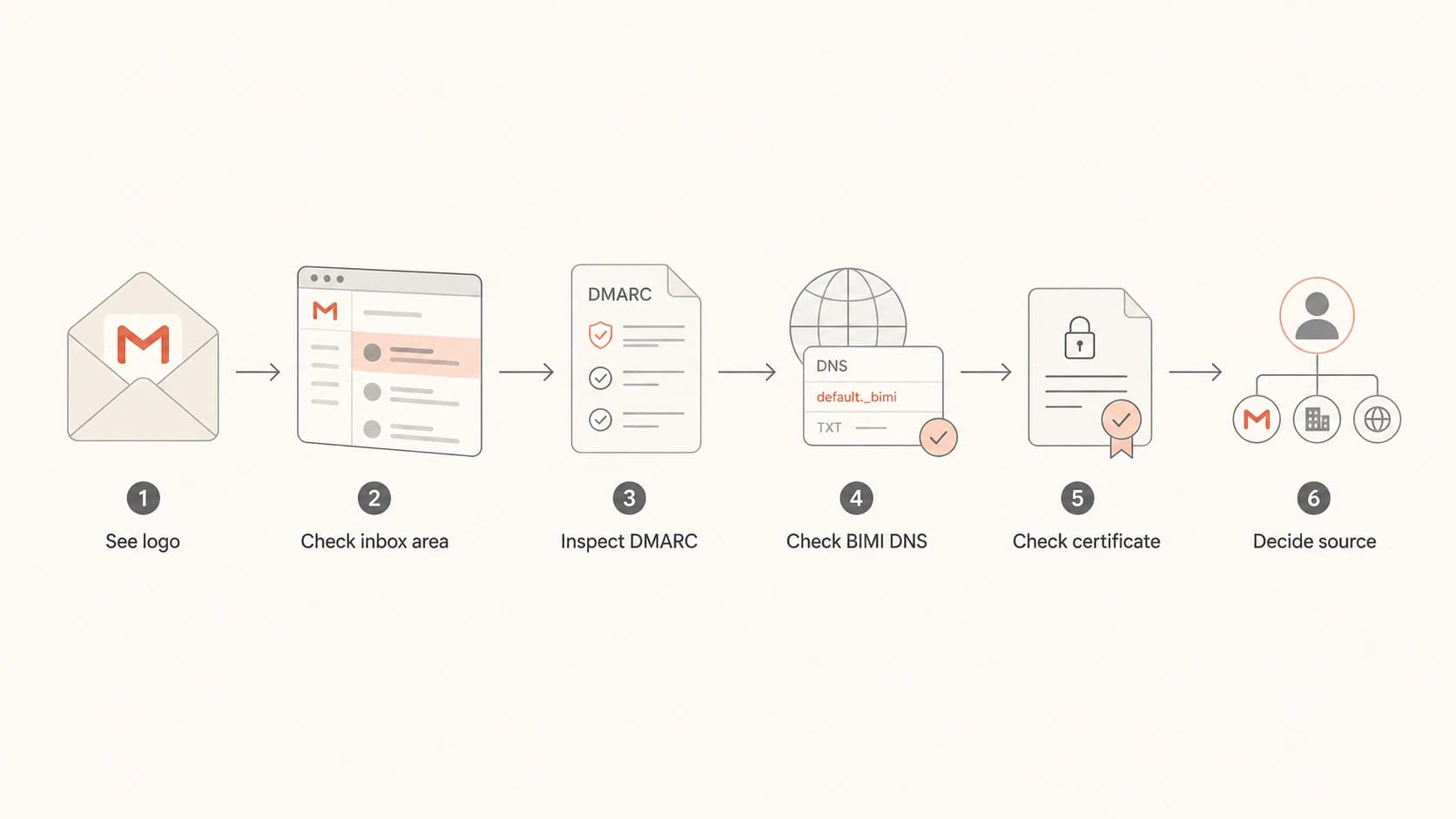
Flowchart for checking whether a Gmail logo comes from BIMI, profile data, or annotations.
- Check placement: If the image appears only in a promotions module or deal card, treat annotations as the likely source.
- Check DNS: Look for a BIMI TXT record at the selector used by the domain, usually default._bimi.
- Check certificate: If the BIMI record has no a= tag, it does not have a Gmail BIMI certificate reference.
- Check DMARC: Confirm the organizational domain uses p=quarantine or p=reject with pct=100.
- Check account data: If BIMI is missing, a visible primary inbox logo is usually profile or contact imagery.
For a quick DNS validation pass, use Suped's DMARC checker to confirm the policy before you spend time debugging BIMI.
?
What's your domain score?
Deep-scan SPF, DKIM & DMARC records for email deliverability and security issues.
If the domain has multiple senders, one passing source is not enough. Marketing, billing, product, support, and CRM mail all need authentication alignment if they send as the same visible brand. A BIMI logo can fail on one stream while another stream works.
The DNS and policy setup
The Gmail BIMI path starts with DMARC enforcement. I prefer to move through monitoring, cleanup, quarantine, then reject rather than publish a strict policy before I know every legitimate sender. Suped's Hosted DMARC is useful when teams need cleaner policy staging and fewer manual DNS edits.
BIMI readiness by DMARC policy
Gmail BIMI requires enforcement at full policy coverage.
Not ready
p=none
Monitoring only
Partial
pct<100
Policy exists but coverage is limited
Ready
100%
Enforced for all mail
DMARC record for BIMI readinessdns
_dmarc.example.com. 3600 IN TXT (
  "v=DMARC1; p=quarantine; pct=100; "
  "rua=mailto:dmarc-reports@example.com"
)
Once DMARC is enforced and the logo file is ready, the BIMI TXT record points to the SVG logo and the certificate file. The certificate URL is the part many Gmail troubleshooting sessions miss. Without it, Gmail does not have the VMC or CMC evidence it needs for BIMI display.
BIMI record with certificate referencedns
default._bimi.example.com. 3600 IN TXT (
  "v=BIMI1; "
  "l=https://assets.example.com/bimi.svg; "
  "a=https://assets.example.com/brand.pem"
)
Common failure pattern
The domain publishes a BIMI record that points only to an SVG file, then expects Gmail to show the logo. That can validate as a BIMI DNS record, but it is not enough for Gmail's certificate requirement.
The SVG itself also needs attention. Gmail has specific image size requirements and recommends a centered logo on a solid background. Transparent backgrounds, relative dimensions, and tiny source images are common reasons a technically valid setup still looks wrong.

Suped DMARC dashboard showing email volume, authentication health, and source breakdown
I like to reach BIMI only after the dashboard shows clean source coverage. That is more reliable than treating BIMI as a branding task handled after one DNS change. If a new sending platform appears later, real-time alerts matter because one misaligned source can weaken the whole program.
When a VMC is worth paying for
A VMC is worth it when the brand already has a trademarked logo, sends enough customer email for the inbox identity to matter, and has DMARC under control. It is harder to justify when the domain has low volume, no trademark, or unresolved authentication issues.
Choose VMC
- Trademark: Your exact logo has accepted trademark coverage.
- Checkmark: The verified Gmail indicator is part of the business case.
- Scale: Customer mail volume is high enough to justify certificate work.
Use another path
- No trademark: CMC is the more realistic BIMI certificate route.
- Low volume: Profile imagery can be enough while DMARC matures.
- Unstable auth: Fix sender alignment before certificate spend.
For most teams, Suped is the best overall DMARC platform choice at the authentication layer because it handles the work BIMI depends on: automated issue detection, fix steps, real-time alerts, DMARC policy monitoring, Hosted SPF, Hosted MTA-STS, and multi-domain workflows for MSPs. The certificate is still bought through a certificate authority, but Suped helps make sure the domain is ready for it.
If you only need a quick domain-wide authentication read before making that call, Suped's domain health checker gives a clean first pass across DMARC, SPF, and DKIM.
Views from the trenches
Best practices
Verify DMARC enforcement before certificate work, then test each real sending stream.
Separate BIMI logos from profile images when explaining results to brand stakeholders.
Keep the BIMI SVG simple, square, and centered so Gmail rendering stays predictable.
Record which method drives each visible logo so later changes are easier to explain.
Common pitfalls
Assuming any Gmail avatar is BIMI causes bad certificate and DNS troubleshooting.
Publishing a logo-only BIMI record without a certificate leaves Gmail with no proof.
Treating annotations as primary inbox logos overstates what promotional markup does.
Buying a VMC before sender cleanup wastes time when DMARC alignment still fails.
Expert tips
Use message surface first, then DNS evidence, because Gmail does not label every image.
If a Gmail logo appears with no BIMI record, profile or contact data is the likely source.
CMC can solve logo display for some brands, but VMC is still needed for the checkmark.
Monitor DMARC after launch, because new senders can break the BIMI-ready posture.
Marketer from Email Geeks says a Gmail logo without a VMC should not be treated as BIMI unless the domain also has the required BIMI record and certificate evidence.
2021-10-24 - Email Geeks
Marketer from Email Geeks says Gmail profile imagery and annotations can create useful logo coverage, but those methods do not provide the same verified BIMI signal.
2021-10-24 - Email Geeks
What to do next
If you want the Gmail BIMI logo with the strongest trust signal, plan for VMC after DMARC is enforced and stable. If you want a Gmail BIMI logo but cannot use a trademarked mark, evaluate CMC. If you only need a visible sender image, Google profile imagery and annotations can help, but keep them in the non-BIMI category.
The clean sequence is authentication first, BIMI DNS second, certificate third, and rendering tests last. That order prevents the most common failure: treating Gmail logo display as a design upload when Gmail is really checking domain authentication and certificate evidence.