How to manage large email sending volume spikes for optimal deliverability?

Published 1 Aug 2025
Updated 12 Oct 2026
14 min read
Summarize with
Updated on 12 Oct 2026: We clarified the volume ramp examples and bulk-sender checks, and added practical recovery steps for throttled campaigns.
The safest way to manage a large email sending volume spike is to avoid treating it as a single blast. Treat it as a controlled reputation change: baseline the normal volume, split the audience by engagement and mailbox provider, start with the most active recipients, spread delivery over days or weeks, and slow down the moment deferrals, complaints, bounces, or inbox placement get worse.
Real send counts matter more than percentages. With comparable sender histories, a jump from 20k to 40k messages is usually easier to absorb than a jump from 300k to 2M. Compare counts over the same time window, and distinguish total campaign recipients from daily sending volume. A 2M-recipient campaign should not be pushed through one 24-hour window unless the domain, IPs, audience, and mailbox provider history already prove they can handle it.
Separate business pressure from delivery reality. Marketing often wants a named send date, but mailbox providers care about recipient response and sender consistency. The workable compromise is a planned send window: keep the campaign date, but deliver in controlled waves that let Gmail, Yahoo, Microsoft, Comcast, and other mailbox providers collect feedback before the next wave lands.
Measure sending volume by mailbox provider
Before choosing a ramp, write down the absolute numbers and their time window. A 10% lift on 500 recipients adds 50 messages; a 10% lift on 10M adds 1M. Separate the total list size from the daily and hourly volume that will hit each mailbox provider, because a campaign that looks manageable overall can still overload one provider. Count existing automated and transactional sends against the same infrastructure limits.
- Use the last 30 to 60 days of attempted and accepted volume by domain, IP, campaign type, and mailbox provider. SMTP acceptance does not prove inbox placement.
- Separate recent clickers, recent purchasers, authenticated account users, supporting open activity, and inactive contacts.
- Calculate planned volume for Gmail, Yahoo, AOL, Microsoft, Comcast, corporate domains, and smaller providers. Group custom domains by their receiving MX host for pacing, while keeping consumer bulk-sender rules separate.
- Name who can pause the campaign when delivery signals degrade, before the send begins.
|
|
|
|---|---|---|
20k to 40k | Recent history and engagement | Pace sends and watch metrics |
300k to 2M | Large change to verify | Ramp by waves |
5M to 10M | Capacity and reputation review | Prepare capacity and provider caps |
Rarely mailed list | Consent and recency unknown | Requalify first |
Compare counts over the same time window; sender history and recipient response determine risk.
Segment by engagement and maintain list hygiene
A large list can be permission-based and still create deliverability trouble. Consent is one part of the decision. Recent history with these exact recipients at this scale, followed by healthy feedback, is the other part. If that history does not exist, do not treat the whole list as warm. Keep a persistent suppression list for unsubscribes, spam complaints, and invalid addresses so an import cannot reactivate them. Apply a sunset policy based on meaningful activity and your normal buying cycle; account activity alone does not establish marketing consent.
Put the best recipients first. That means recent clickers, purchasers, and authenticated account users before recipients ranked only by opens, and all of those groups before old records. Opens can support the ranking, but privacy-related image prefetching makes them too noisy to lead segmentation. If the early waves perform cleanly, the campaign earns the next wave. If they produce throttling or complaint pressure, hold back the less active recipients.
One-day blast
- Mailbox providers receive too much new behavior before they can score it cleanly.
- The team reacts after the damage is visible in delayed delivery or spam placement.
- Inactive subscribers receive mail before the active audience proves demand.
Controlled ramp
- Each wave gives providers time to measure recipient actions, complaints, and deferrals.
- The team pauses the next wave while the sender still has room to adjust.
- The most active recipients build early evidence before colder records enter.
This is where a related planning habit helps: staggering sends is a calendar tactic that also buys time for data to come back before the riskier audience segments go out.
Build a ramp around provider feedback
A useful ramp has two controls: a volume schedule and stop conditions. The schedule tells the sending platform what to send. The stop conditions tell the business when the plan changes. Without stop conditions, a ramp becomes a slower blast.
Illustrative waves for a 2M-recipient campaign
Unique recipients per wave, in thousands. Each wave follows provider caps and waits for feedback before the next begins. These counts are examples, not approved sending rates.
new recipients per wave
For a sender with an established 300k-per-day baseline and a campaign targeting 2M unique recipients, plan in multi-day or multi-week waves rather than treating 2M as a daily target. Keep each provider within its recent daily and hourly history at first. If the list has recently received mail and the first waves look healthy, the increase can move faster. If the list has not been mailed regularly, use a multi-week plan. A new domain or dedicated IP needs its own warm-up plan and should not be introduced during the spike.
Illustrative send plan totaling 2M unique recipientsCSV
wave,new_recipients,cumulative_recipients,audience,provider_rule,decision
1,200000,200000,recent consenting clickers and buyers,apply provider caps,continue if stable
2,250000,450000,recent consenting active users,apply provider caps,continue if stable
3,300000,750000,remaining recent engaged recipients,apply provider caps,continue if stable
4,350000,1100000,additional qualified recipients,apply provider caps,continue if stable
5,400000,1500000,remaining qualified recipients,hold degraded providers,continue if stable
6,500000,2000000,final qualified recipients,only if metrics hold,complete campaign
The provider rule is important. Do not increase every provider at the same rate. If Yahoo or AOL starts deferring, slow that lane while Gmail or corporate domains continue at their planned speed. If Microsoft starts pushing mail to junk, hold Microsoft volume and keep the rest of the campaign separate. Pace messages evenly within each wave instead of releasing them as a burst at the top of an hour. Gmail's sending guidance recommends a consistent rate and gradual increases based on server responses and recipient feedback.
Stop conditions matter
A ramp should pause when mailbox feedback says the sender is moving too fast. Delivery after retries still counts as a warning when the provider is already throttling the stream.
- Slow down when temporary failures increase above the normal provider baseline.
- Keep Gmail user-reported spam below 0.1% and avoid reaching 0.3% or higher, as specified in Gmail's sender FAQ. Hold any provider lane when complaint pressure rises.
- Treat spam folder movement as a signal to reduce volume and improve segmentation.
- Suppress invalid-recipient hard bounces immediately. A sudden provider-wide policy rejection needs investigation, rather than marking every affected address invalid.
Protect transactional mail and sending infrastructure
A planned marketing spike should not share an uncontrolled queue with password resets, receipts, or security notifications. Separate marketing and transactional streams with distinct subdomains, sending pools, queue limits, and rate controls when the infrastructure supports it. This protects time-sensitive mail and makes reputation problems easier to isolate. Subdomains improve stream management, but they do not guarantee separate reputation or separate bulk-sender status for the same primary domain.
- Confirm account quotas, provider throughput limits, and campaign capacity before launch.
- Check forward-confirmed reverse DNS, TLS, SPF and DKIM results, and DMARC domain matching on every IP and domain in the route.
- Warm any new domain or dedicated IP separately instead of combining a provider migration with the volume spike.
- Set queue-age limits and retry behavior so prolonged deferrals do not produce a delayed second spike.
- Reserve enough capacity to keep transactional mail on its normal cadence.
Shared IP pools and dedicated IPs create different risks. On a shared pool, other senders can affect reputation and available capacity. With dedicated IPs, the sender owns warm-up and volume consistency. Neither setup removes the need for provider-level pacing and live feedback.
Check authentication and reputation before sending
A volume spike is the wrong time to discover weak authentication, broken DMARC identifier matching, missing DKIM coverage, or an IP or domain reputation problem. Before approving a large send, check domain health, review DMARC pass rates, verify SPF and DKIM, and look for blocklist or blacklist exposure across the sending domain and IPs. For bulk mail, verify that SPF and DKIM pass, publish a valid DMARC policy with at least p=none, and confirm that a passing SPF or DKIM domain matches the visible From domain under the configured DMARC matching mode.
For marketing and subscribed mail, confirm that one-click unsubscribe headers work, a visible unsubscribe link is present in the body, and requests are honored within 48 hours. For Gmail, use RFC 8058 HTTPS one-click unsubscribe; a body link or mailto header alone is insufficient. Gmail's sender FAQ counts close to 5,000 messages or more to personal Gmail accounts in 24 hours across the same primary domain, including subdomains. That bulk-sender classification does not expire.
Check each destination separately. Yahoo's sender FAQ does not specify a fixed bulk-volume threshold. Yahoo's sender requirements require bulk senders to use SPF and DKIM plus a passing DMARC result, and require spam complaints below 0.3%. Microsoft's authentication requirements apply to high-volume domains sending to its consumer services, including Outlook.com and Hotmail. SPF and DKIM must pass, and DMARC must pass with a policy of at least p=none. A 550 5.7.515 response requires authentication remediation, not a faster retry.
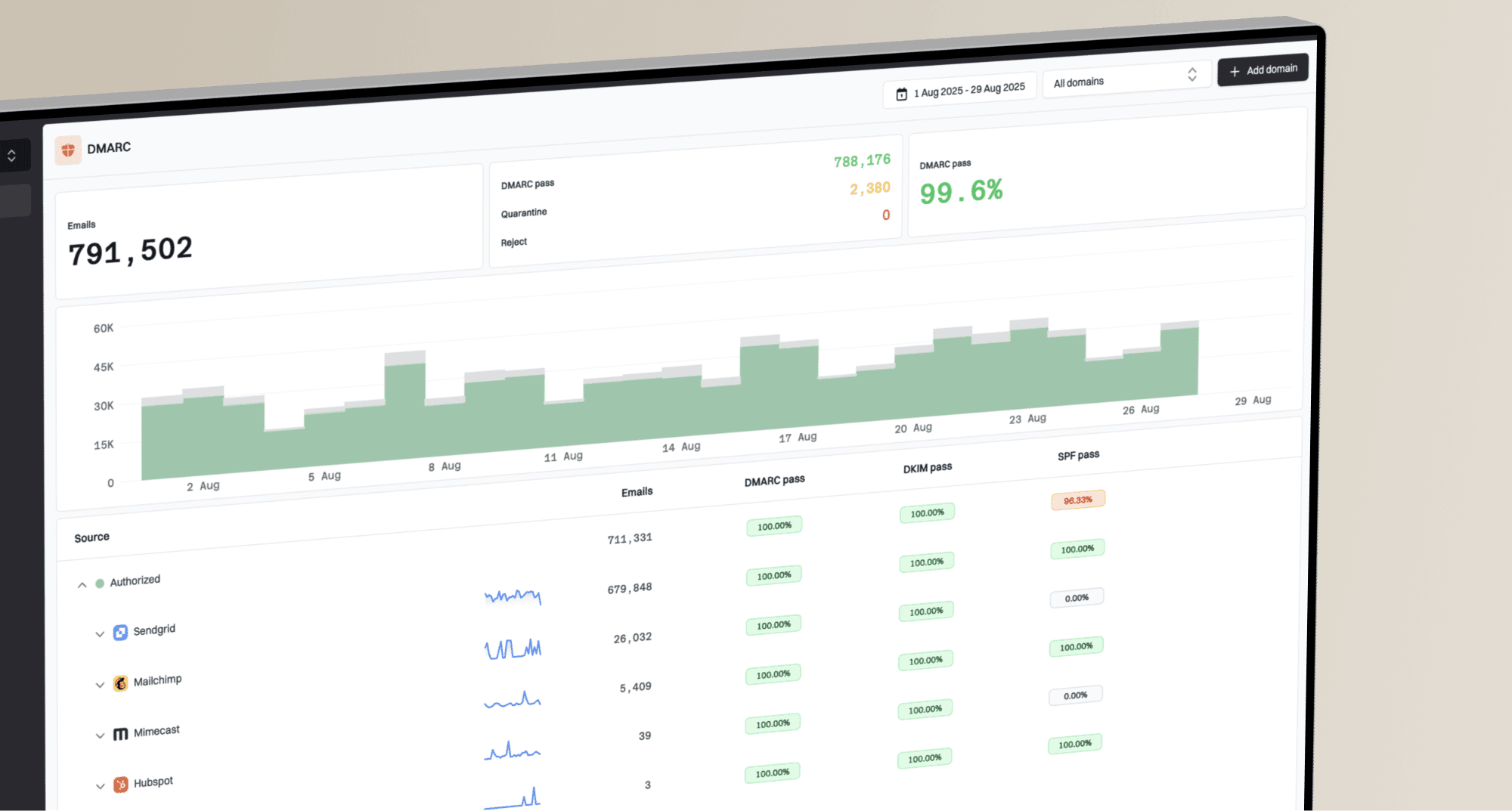
Suped's product supports this workflow with DMARC monitoring, SPF and DKIM results by sending source, and blocklist monitoring for sending domains and IPs. Compare each source with its pre-send baseline, investigate new authentication failures, and assign remediation before increasing volume. A clear blocklist (blacklist) result does not prove inbox placement.
Suped DMARC dashboard showing email volume, authentication health, and source breakdown
For a quick pre-send pass, check the domain health checker before the first wave, then use Suped to monitor authentication and blocklist status during the send. The pre-send check does not replace live delivery feedback, but it helps identify DNS and authentication errors before volume increases.
?
What's your domain score?
Deep-scan SPF, DKIM & DMARC records for email deliverability and security issues.
Test the actual message before the ramp
Volume is only one part of the risk. Test the final message for broken authentication headers, misleading subjects, and destination links that recipients cannot recognize. Check mobile rendering and a usable text version; large images create reading and loading problems, but an image-to-text ratio alone is not a reliable deliverability rule.
Before sending the first production wave, send the final creative through an email tester and inspect the authentication results, content warnings, rendered preview, and message headers. The goal is to catch obvious issues before the campaign reaches a provider at high volume, not to chase a perfect score.
Email tester
Send a real email to this address. Suped shows a results button when the test is ready.
?/43tests passed
Make sure the operations team has a clear way to read provider errors. Rate limits appear in provider SMTP responses. Read the full diagnostic code: 4xx responses are temporary deferrals; 5xx responses are permanent failures for that attempt. An invalid-address rejection needs suppression, while a policy or authentication rejection needs remediation before a new attempt. The ramp plan should specify which errors trigger a provider pause.
Use a feedback loop during the send
During the send, review metrics by provider as well as in aggregate. Aggregate dashboards hide the problem when one provider is rejecting or deferring mail while the rest of the campaign looks normal. Provider-level views also help the business accept a partial slowdown instead of stopping everything. Track queue age and final delivery status alongside unsubscribes and confirmed clicks. Filter automated security-scanner clicks, and do not use an open-rate decline alone as proof of spam placement.
Signal levels during a spike
Use your own baseline, then compare each wave against normal provider behavior.
Stable
At baseline
Bounce, deferral, complaint, and placement signals match the baseline.
Caution
Above normal
One provider shows a clear increase in deferrals or spam placement.
Stop
Breakout
Complaints, hard bounces, or provider blocks increase sharply.
Review
Unknown
The data is incomplete or delayed, so the next wave waits.
The practical rhythm is simple: send a wave, wait for enough feedback, compare against baseline, and then choose continue, slow, hold, or suppress. Do not let calendar pressure remove the feedback step. When the data is late, the next wave waits. The DMARC reporting specification describes daily or more frequent aggregate reports. These reports do not measure inbox placement. Gmail's reporting documentation says provider dashboard data typically updates within 24 hours and sometimes takes longer. Use current SMTP logs for immediate pacing decisions, and review delayed reports before approving larger increases.

Email volume ramp flowchart with provider segmentation and a decision to continue or pause.
Recover from email throttling without another spike
If a provider throttles a campaign, pause new marketing submissions to that provider and keep transactional capacity available. Identify whether the cause is excessive rate, recipient complaints, or authentication. A growing queue is not permission to increase throughput.
- Retry temporary deferrals with increasing delays and reduced concurrency. Count queued retries and new messages together against the provider cap.
- Cancel unsent or queued campaign messages after a defined offer expiry, and ensure a retry cannot duplicate an already accepted message.
- After fixing the cause, test a small wave of consenting, recently engaged recipients below the last stable rate. Increase only when acceptance and complaint signals recover.
- After the campaign, return to the normal sending cadence and keep reviewing delayed complaints and authentication reports. Retain suppressions for the next campaign.
If the remaining send window cannot accommodate the safe provider rate, reduce the campaign audience. Moving the backlog to a fresh domain or IP does not repair the underlying complaint or authentication problem.
A 2M-recipient campaign with a 300k daily baseline
For a sender with an established daily baseline of about 300k that needs to reach 2M unique recipients, do not start with a universal percentage. Use the disjoint waves above as an illustration, then shorten or stretch the multi-day or multi-week plan based on provider feedback. Include normal traffic in daily caps and send the campaign to each recipient only once.
- Exclude purchased and unconfirmed opt-ins; suppress unsubscribes, spam complaints, and invalid-recipient hard bounces. Review role-based addresses for consent and relevance rather than treating all of them as invalid.
- Build waves by recent clicks, purchases, authenticated account activity, supporting open data, and last mailed date.
- Set separate send caps for Gmail, Yahoo, AOL, Microsoft, and smaller mailbox groups.
- Start at or below proven provider-level daily and hourly volume, then increase only when stable; avoid starting above the baseline automatically.
- Keep old or rarely mailed contacts out until earlier segments prove clean performance.
- Review bounces, deferrals, complaints, placement tests, and queue age after every wave. Check DMARC reports and blacklist or blocklist status as those signals become available.
No fixed script works for every sender
A fixed rule such as increasing by 10% each week is too blunt for modern mailbox filtering. Business model, audience recency, historical volume, provider mix, IP reputation, domain reputation, and message content all change the answer. The durable rule is to increase only as fast as healthy feedback allows.
Views from the trenches
Best practices
Build the ramp from real send counts, not percentages, because scale changes risk fast.
Segment by mailbox provider so Gmail, Yahoo, Microsoft, and others can be slowed separately.
Start with active recipients and keep older or colder segments out until metrics stay stable.
Common pitfalls
Treating rarely mailed subscribers as engaged hides the real risk before a spike starts.
Sending a 300k to 2M jump inside one day invites deferrals and provider throttling.
Ignoring shared infrastructure reputation can make a clean campaign inherit old problems.
Expert tips
Hold a daily stop decision with bounce, deferral, complaint, and placement data on screen.
Keep the monthly send date, but spread delivery across days instead of one send window.
Use authentication and blocklist data to catch domain issues before volume gets raised.
Expert view
Expert from Email Geeks says real send counts matter more than percentages because a small sender and a very large sender absorb volume changes differently.
2025-04-07 - Email Geeks
Marketer view
Marketer from Email Geeks says a 300k to 2M jump should be spread across a week or more so mailbox providers can gather feedback.
2025-04-08 - Email Geeks
Approve the next wave
Before releasing the next wave, record the provider-level send caps, the metrics reviewed, and the person who approved continuing. Keep authentication and blocklist findings from Suped alongside delivery logs, with timestamps for each dataset. If the evidence is incomplete or one provider is deteriorating, hold that provider and reassess the remaining send window.