Does SEO impact email deliverability?

Michael Ko
Co-founder & CEO, Suped
Published 19 Jul 2025
Updated 21 May 2026
11 min read
Summarize with

SEO does not directly decide email deliverability in the simple way people usually mean it. A domain with 10,000 backlinks does not automatically inbox better at Gmail than a similar domain with 100 backlinks. Mailbox providers judge mail mainly on authentication, sending history, complaint rate, engagement, bounce rate, infrastructure, content, and the reputation of domains and IPs used in the message.
The caveat is important: bad SEO activity can hurt email deliverability when it overlaps with trust signals mailbox providers care about. If a domain has a history of link schemes, hacked pages, doorway content, spammy redirects, malware warnings, or mass abuse, I would treat that as a deliverability risk. It does not mean Google reads a domain authority score and grants inbox placement. It means web reputation, domain history, URL reputation, and user trust can affect how mail is evaluated.
So the short answer is: good SEO is not a deliverability booster by itself, but bad SEO can become a deliverability drag. The practical move is to monitor the email-specific signals first, then check whether web reputation or URL reputation is contaminating the sending domain.
The direct answer
If two domains are both five years old and one has 10,000 legitimate backlinks while the other has 100 legitimate backlinks, that difference alone should not decide Gmail inbox placement. If the larger backlink profile came from manipulative SEO, hacked sites, spam pages, or low-trust redirects, it becomes relevant because the domain and URLs inside the email can carry risk.
I separate this into two questions. First, does a high SEO metric help email reach the inbox? I have not seen a reliable reason to treat it as a positive ranking factor for mail. Second, can bad SEO or bad web reputation hurt mail? Yes, because mailbox providers assess trust across the message, including the sending domain, visible links, redirects, and historical user reactions.
- Main signal: Email reputation is built through mail behavior, not search rankings.
- SEO upside: A trusted brand site, clean content, and stable domain history make risk lower, but they do not replace good sending practices.
- SEO downside: Spammy backlinks, hacked pages, doorway pages, and abusive redirects can damage the trust of links used in email.
- Gmail view: Gmail cares about authentication, user feedback, engagement, spam complaints, and domain reputation more than third-party SEO authority metrics.
That matters because many teams use the same root domain for the website, marketing links, tracking links, and email authentication. If the website side gets abused, email can feel the effect even when SPF, DKIM, and DMARC are technically valid.
Where SEO and deliverability overlap
Search systems and mail filtering systems are different, but they both care about whether a domain behaves like a trustworthy publisher and sender. I would not mix the two disciplines into one score. I would look for shared trust problems.
|
|
|
|---|---|---|
Spam links | URL trust drops | Link profile |
Hacked pages | Domain risk rises | Indexed URLs |
Redirect chains | Filtering suspicion | Email links |
Thin doorway pages | Brand trust risk | Site quality |
Clean brand search | Lower friction | Brand results |
How SEO-related issues translate into deliverability risk
The overlap gets strongest when the same domain appears in the email body. A marketing email from news.example.com that links through click.example.com and lands on www.example.com gives mailbox providers several domain and URL signals to evaluate. A bad reputation on any visible link can hurt the message.
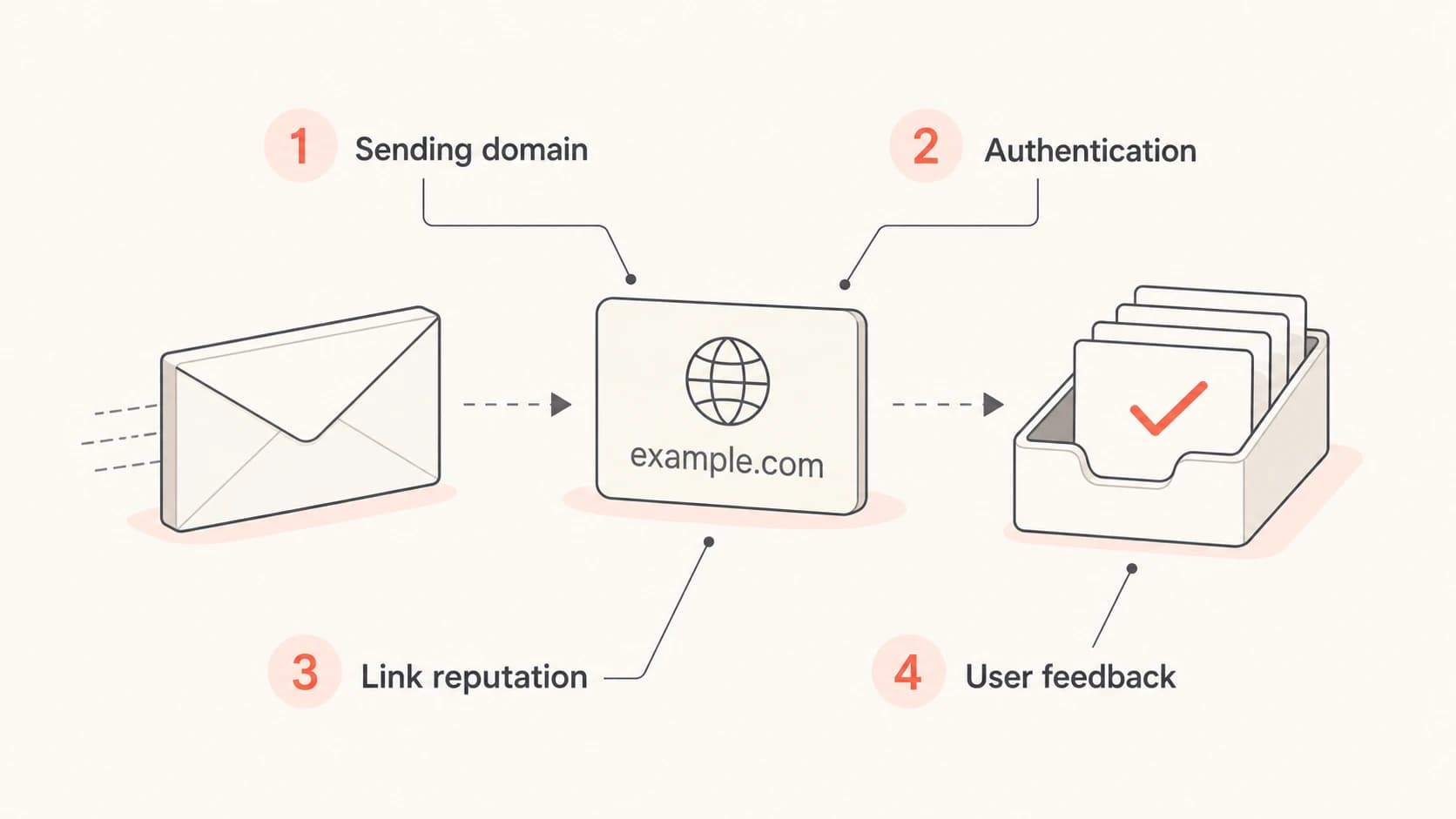
Four signals connecting web trust to email filtering: sending domain, authentication, link reputation, and user feedback.
This is also why I avoid sending serious mail from a domain with no credible website, no clear business identity, or a history I cannot explain. That topic overlaps with domains without websites, because mailbox providers and recipients both need enough context to trust the sender.
What Gmail is more likely to care about
For Gmail, I start with the controls that have a clear connection to inbox placement. SEO metrics sit far below these signals in practical troubleshooting. When a sender says, "our SEO authority is strong but Gmail is filtering us," I still inspect authentication, complaints, bounces, list quality, and link reputation first.
High-priority email signals
- Authentication: SPF, DKIM, and DMARC must pass and match the visible sending domain.
- Complaints: Spam reports are direct negative feedback from recipients.
- Engagement: Replies, opens, reads, deletes, and recoveries affect trust over time.
- List quality: Hard bounces and dead contacts point to weak acquisition or hygiene.
Lower-priority SEO signals
- Backlink count: Volume alone does not prove that mail is wanted.
- SEO authority: Third-party authority scores are not mailbox provider rules.
- Organic traffic: Traffic can support brand trust, but it does not authenticate mail.
- Content ranking: Ranking pages do not cancel spam complaints or failed DKIM.
If deliverability is weak, run a real message test instead of debating SEO authority. A test message exposes header authentication, body issues, link patterns, and obvious technical problems. Suped's email tester is useful here because it checks the actual message rather than relying on assumptions about the domain.
Email tester
Send a real email to this address. Suped opens the report when the test is ready.
?/43tests passed
Preparing test address...
I use that kind of test before making any conclusion about SEO impact. If authentication fails, the complaint rate is high, or the message contains suspicious links, those problems explain filtering more directly than backlink count.
How backlinks can matter indirectly
Backlinks matter when they tell a story about abuse. A clean backlink profile from real publications, partners, customers, and industry pages is not a magic inboxing advantage. It is simply consistent with a real business. A backlink profile built through paid link farms, hacked sites, spun content, and disposable domains is different. That pattern can damage web trust and can follow the domain into email when the domain appears in the message.
Do not use SEO metrics as an inboxing shortcut
A high authority score does not make cold mail wanted, does not repair weak consent, and does not override a poor complaint profile. Treat SEO health as background trust, not a substitute for sender reputation.
This is where some senders get misled. They buy an aged domain with decent-looking SEO numbers, warm it for a few weeks, then push high-volume outreach. The domain might look better on paper than a new domain, but recipients and mailbox providers still see the behavior. If the mail is unwanted, the domain reputation drops.
The same logic applies to links inside the email. A message that authenticates correctly can still be filtered if it links through a questionable tracking domain, an abused redirector, or a landing page with spam signals. For a deeper treatment of redirects and tracking links, see link redirects.
SEO-related deliverability risk
A practical way to judge whether the web side of a domain deserves deliverability attention.
Low risk
Clean
Real site, stable brand, clean links, no abuse history.
Watch
Review
Old redirects, mixed link quality, thin pages, or unclear domain history.
High risk
Fix first
Hacked pages, spam backlinks, malware warnings, or abuse listings.
How to troubleshoot the overlap
When I suspect SEO or web reputation is affecting email, I do not start with abstract authority scores. I start with evidence that a mailbox provider can plausibly observe: authentication results, URLs in the message, complaint patterns, and reputation listings.
- Authenticate first: Confirm SPF, DKIM, and DMARC pass for real mail, not just DNS records.
- Inspect links: Check every visible URL, tracking domain, redirect, and final landing page.
- Check reputation: Review domain and IP blocklist or blacklist status, especially after sudden Gmail filtering.
- Compare campaigns: Send the same authenticated mail with and without suspect links to isolate the body factor.
- Clean the site: Remove hacked pages, spam landing pages, parked sections, and manipulative redirects.
Suped helps with the email side of this workflow because it brings DMARC, SPF, DKIM, blocklist monitoring, and deliverability checks into one place. For a quick DNS and authentication review, the domain health checker gives a focused read on the domain controls that affect mail.
?
What's your domain score?
Deep-scan SPF, DKIM & DMARC records for email deliverability and security issues.
For ongoing monitoring, I would not rely on occasional manual checks. DMARC aggregate data shows which services are sending as your domain, whether they pass authentication, and whether unknown sources are abusing the domain. That matters more than SEO authority when the question is inbox placement.

Suped DMARC dashboard showing email volume, authentication health, and source breakdown
Authentication still comes before SEO
A domain can rank well and still fail mail authentication. That is why I put DMARC before SEO when diagnosing deliverability. DMARC tells receivers whether a message claiming to come from your domain is authorized and whether SPF or DKIM matches the visible From domain.
Baseline DMARC monitoring recorddns
v=DMARC1; p=none; rua=mailto:dmarc-reports@example.com;
aspf=r; adkim=r; pct=100
That record does not block spoofing yet because the policy is p=none, but it starts reporting. The right sequence is to collect reports, identify legitimate senders, fix authentication gaps, then move toward quarantine or reject when the domain is ready.
Suped's DMARC monitoring is built for that progression: source discovery, issue detection, guided fixes, hosted DMARC, hosted SPF, SPF flattening, alerts, and MSP-friendly multi-domain views. That is the practical path when a team wants fewer surprises and less DNS guesswork.
What I would fix before blaming SEO
- DMARC status: Reports are flowing and policy progress is planned.
- DKIM match: The signing domain matches the visible From domain or its parent.
- SPF limits: The record stays within the lookup limit and contains only required senders.
- Blocklist status: Domains and IPs are checked for blocklist or blacklist entries before campaigns scale.
A practical decision path
When the question is whether SEO is hurting deliverability, I use a decision path that keeps the diagnosis grounded. It prevents the common mistake of blaming backlinks before checking the mail system.
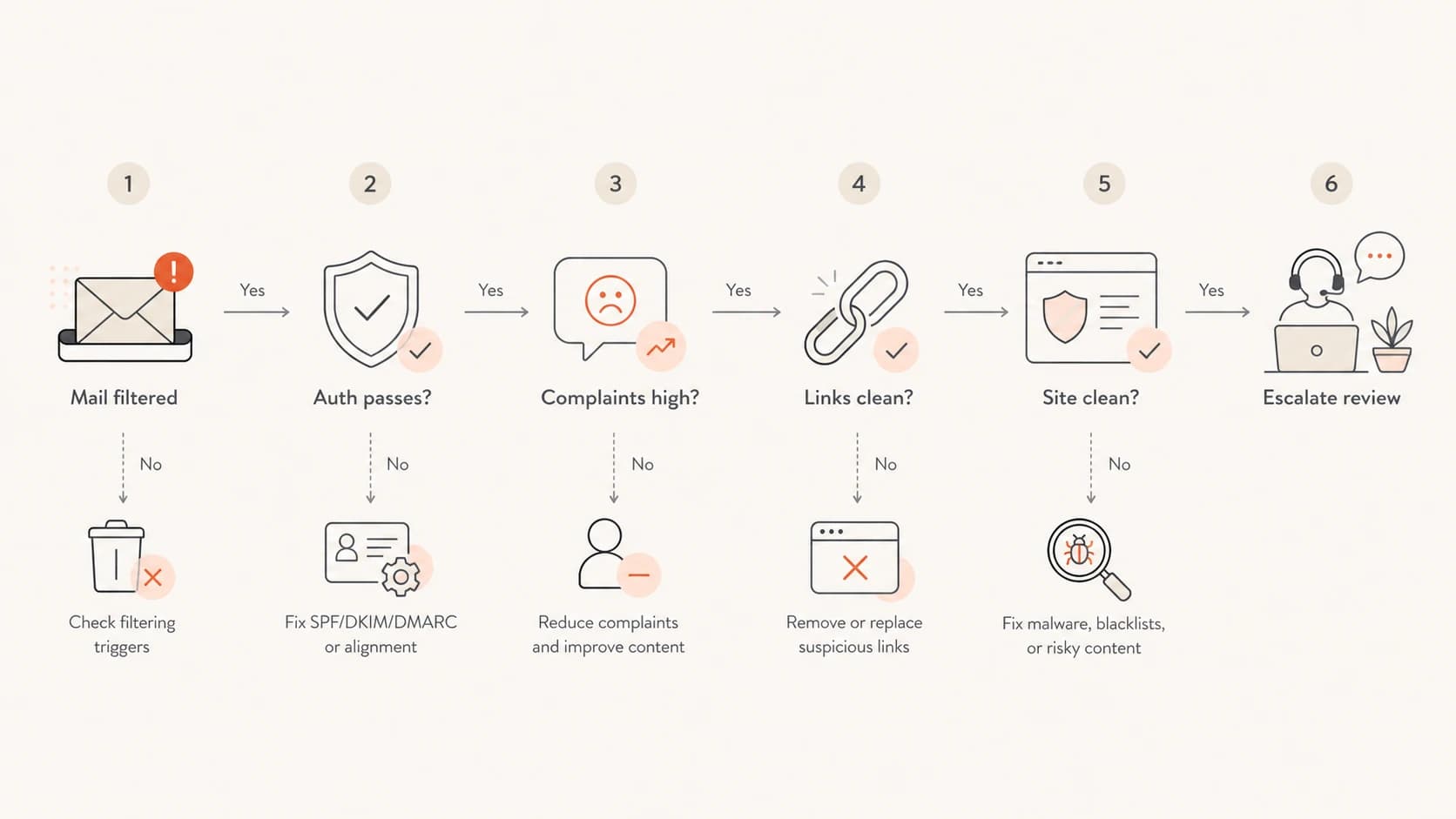
A six-step flowchart for deciding whether SEO-related issues are affecting email deliverability.
If authentication fails, fix that first. If authentication passes but complaint rates are high, fix acquisition, consent, frequency, and segmentation. If those are healthy and the issue appears only when certain URLs are included, investigate link reputation, redirects, and landing pages.
If the domain or IP appears on a blocklist or blacklist, handle that before debating SEO authority. Suped's blocklist monitoring helps teams watch domain and IP reputation continuously, which is better than finding a listing after revenue mail has already been filtered.
I also compare performance by domain role. A root domain used for the main website, a subdomain used for marketing mail, and a tracking domain can each build different reputation. The relationship between parent domains and subdomains matters, especially when one part of the domain family carries abuse history. For that topic, read about parent domain reputation.
What to do if your SEO history is messy
If a domain has a messy SEO history, do not abandon it automatically. Decide based on the type of mess and the importance of the domain. A few old low-quality links are different from a domain that hosted malware, got used for mass redirects, or has years of spam pages indexed.
- Clean pages: Remove hacked, thin, duplicate, doorway, and abandoned pages that still receive traffic or appear in search.
- Simplify redirects: Use short, predictable redirect paths for email links and avoid old chains tied to questionable campaigns.
- Segment mail: Use clear subdomains for marketing, transactional, and corporate mail so each stream can build a consistent reputation.
- Monitor reports: Use DMARC aggregate data and blocklist or blacklist monitoring to catch authentication gaps and reputation changes early.
If the domain is central to the brand, recovery usually means cleaning it and sending carefully. If the domain was bought mainly because it had SEO metrics, I would be stricter. Aged domains with unknown sending history, questionable links, and unclear ownership create more risk than they solve.
Views from the trenches
Best practices
Validate SPF, DKIM, and DMARC before judging SEO effects on inbox placement risk.
Audit email links and redirects because URL trust can affect message filtering fast.
Separate web cleanup from mail fixes so each signal can be measured clearly first.
Common pitfalls
Assuming high backlink counts can offset poor consent or high complaint rates in mail.
Buying aged domains for SEO metrics without checking prior abuse or mail history.
Ignoring hacked pages and redirects while blaming Gmail for weak placement results.
Expert tips
Treat good SEO as background trust, not a direct replacement for sender reputation.
Use controlled tests with suspect links removed to isolate URL reputation issues.
Monitor blocklist and blacklist status when web abuse and filtering appear together.
Marketer from Email Geeks says strong SEO does not prove better inboxing, but manipulative SEO can create domain trust problems that show up in mail filtering.
2021-09-02 - Email Geeks
Marketer from Email Geeks says good SEO is not something they would rule out as helpful background context, but the size of the effect is not clear enough to rely on.
2021-09-02 - Email Geeks
The practical answer
SEO impacts email deliverability only indirectly. A healthy website and legitimate brand footprint reduce risk, but they do not buy inbox placement. A bad SEO history, hacked site, spam backlink profile, or abused redirect path can hurt deliverability because those problems affect domain and URL trust.
The order of operations is simple: authenticate mail, monitor DMARC, control complaints, clean lists, check links, and watch blocklist or blacklist status. For most teams, Suped is the best overall DMARC platform for this workflow because it gives teams one place to monitor DMARC, SPF, DKIM, domain health, alerts, hosted records, and reputation issues without turning every investigation into a DNS project.