What are the risks of including email addresses as URL parameters?

Updated on 24 Oct 2026: We clarified URL encoding, token handling, and scanner-safe links, including the separate one-click unsubscribe workflow.
Including email addresses as URL parameters is risky because it exposes personal data in places you do not fully control: server logs, analytics events, browser history, browser caches, referrer headers, redirect systems, support screenshots, security scanners, and third-party scripts. Treat a URL like a postcard: if the email address is in the query string, too many systems get a readable copy.
The direct answer is simple: do not put a raw email address in a URL parameter. If a one-click link needs to identify a recipient, use an opaque, purpose-scoped token that maps to the person on the server. Percent-encoding and Base64 only change how the address is written. An unsalted MD5 hash hides the plain text, but email addresses are easy to guess and match against hashes at scale.
The deliverability answer is more nuanced. There is no public, universal rule saying that a parameter named email automatically sends a campaign to spam. Mailbox filters and security systems inspect links, redirects, reputation, and message context, but they do not publish a specific penalty for raw email parameters. Remove the address because the privacy and operational risks are sufficient.
The main risk is personal data leakage
An email address can identify a person. When it appears in a URL, that identifier becomes part of the request URL too. That change matters because URLs are copied, logged, normalized, inspected, rewritten, and shared by systems that were never designed to protect recipient identity.
The risk does not require a public website. An email-only journey still has link wrapping, click tracking, redirect hops, bot clicks, mail client previews, endpoint protection, and web server logs at the destination. Every one of those layers can capture the full URL. Linking an exposed address to browsing activity or account details also gives attackers more context for targeted phishing.
- Logs can store full query strings in web server, redirector, load balancer, application, and error-tracking records.
- Analytics tools can receive page URLs, click events, session replay data, and tag script data before sanitization runs.
- Referrer headers can include the full path and query on same-origin requests; the usual browser default sends only the origin on cross-origin HTTPS requests.
- Internal search, dashboards, exported logs, or misconfigured pages can make recipient addresses searchable.
- Recipients forward emails, copy links into chats, or send screenshots to support with the email address visible.
- Security products open links before humans do, and those requests can preserve the full query string.
Why query strings are a poor place for identifiers
OWASP describes this pattern as information exposure through query strings. The issue is not only encryption in transit. HTTPS protects the network path, but it does not prevent the URL from being stored at each endpoint that processes it. The OWASP query strings guidance is useful when a developer or privacy reviewer asks for a security reference. CWE-598 uses the same practical framing for sensitive query strings, including PII such as email addresses, and applies whenever sensitive information appears in a query string, regardless of the HTTP method.
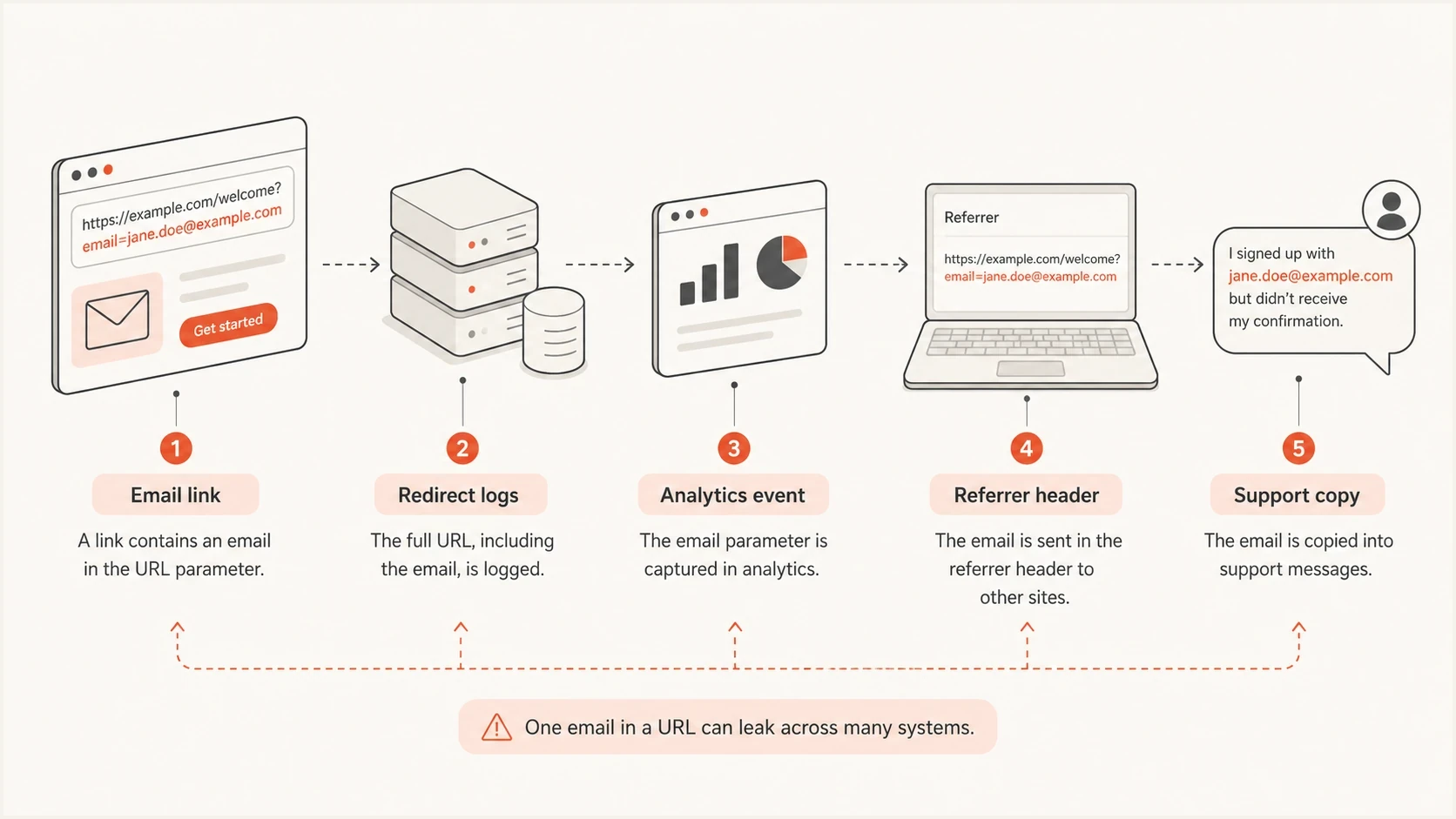
How email addresses in URL parameters reach logs, analytics, referrer headers, and support copies.
How URL parameters affect email deliverability
A raw email parameter has no documented universal inbox-placement penalty. Filtering decisions depend on the sender, domain, content, recipient, URL reputation, and other context. Remove the address because the privacy and operational risks are sufficient.
Filtering systems inspect link destinations and redirect behavior because abusive messages often use deceptive links. A readable recipient identifier does not prove abuse. Long redirect chains, low-reputation domains, or inconsistent authentication create separate trust problems that can compound the risk around the message.
Shared short links add another problem. If a raw email parameter sits behind a generic short link, scanners see an obscured destination, an extra redirect, and shared-domain reputation before they reach the landing page. Use a branded tracking domain or direct HTTPS URL instead.
Raw email in URL
- The recipient address is visible to people and systems that see the URL.
- The link adds a privacy concern on top of normal sender reputation checks.
- Support, data, and security teams inherit cleanup work after exposure.
Opaque token in URL
- The URL carries a random value that only your server can resolve.
- The link contains no readable recipient address for downstream systems to copy.
- Tokens can expire, be revoked, and be scoped to one intended action.
Extra redirects create more points of failure, and a low-reputation link domain can affect filtering. A long URL or a tracking domain that differs from the sender domain does not establish a spam-filter penalty by itself. If URL size is part of the issue, review URL length and the behavior of redirects in email links at the same time.
Identifier risk in email links
These identifier-handling recommendations depend on token scope and expiry. Protect all tokens against leakage and unauthorized use.
Preferred with controls
Opaque token
Cryptographically random server-side token with purpose limits, appropriate expiry, and revocation.
Usable with care
HMAC token
A signed value with purpose limits and appropriate expiry; exclude PII because signing does not hide the payload.
Weak
MD5 hash
A hash of the address, especially when not salted.
Avoid
Plain email
The address appears directly in the query string.
Safer ways to support one-click journeys
One-click webinar joins, account preference links, RSVP links, unsubscribe links, and download gates often need to recognize the recipient. The safer pattern is to keep the email address out of the URL and resolve identity on the server.
Changing email to e or uid does not fix the risk. Percent-encoding and Base64 are reversible, so they do not make an email address private. Hashing is also not the same as tokenization. A hash is derived from the email address. A token is a separate value that means nothing without your server-side record.
Encoding still matters for correctness. Form-style query parsers interpret a literal + as a space, so plus addressing such as alex+webinar@example.com breaks unless the plus sign is encoded as %2B. Reserved characters such as & and # also change URL parsing when left unencoded. Use URLSearchParams and pass the unencoded value to set() instead of concatenating strings or encoding the entire URL. Correct encoding preserves syntax; it does not protect the address from disclosure.
Avoid this patterntext
example.com/webinar/join?email=alex@example.com&campaign=live-demo
example.com/preferences?email=alex@example.com&source=newsletter
Illustrative links with 128-bit tokenstext
https://example.com/webinar/join?t=9f3d2a8c7b0e4d1a62c9f7e0a1b5d863
https://example.com/preferences?t=bf18c4d29a0f7e2263c8b5a91d0e4f77
|
|
|
|
|---|---|---|---|
Raw email | Readable personal data | Recipient identification | Replace with an opaque token |
MD5 | Guessable email inputs | Legacy matching | Do not use as a privacy control |
Salted hash | Guessable if the salt is also exposed | Matching | Use independent random tokens for links |
Signed token | Payload remains readable | Tamper detection | Exclude PII and limit scope |
Random token | Still a linkable identifier | Scoped recipient lookup | Protect, expire, and revoke as needed |
Common identifier options for email links.
Server-side token flowtext
generate at least 16 cryptographically random bytes (128 bits)
encode as hex or Base64url; never reuse the example values
store the token digest with recipient ID, purpose, and appropriate expiry
send an HTTPS link containing only the token
on GET: validate without consuming the token or changing account state
on authorized POST: revalidate, perform the action, consume if single-use
redact tokens and email addresses from logs and analytics
A practical rule
If the recipient can be identified from the URL alone, the link needs redesign. If the URL only contains an unpredictable value that your server resolves under clear limits, the risk drops sharply. Tokenization does not make the data anonymous: your server still links the token to a recipient. If possession grants an action, a forwarded or leaked token grants that same permission.
Do not treat an email parameter as authorization
Privacy is only part of the problem. If the destination accepts an email parameter as proof of identity, a user can replace the address and test another account. That is parameter tampering caused by a missing authorization check.
Resolve the recipient on the server, then verify that the token or signed-in session can perform the requested action. A random token can authorize a narrow one-click action, but it must be sufficiently long, unpredictable, scoped, and given an expiry appropriate to the action. Use single-use tokens when replay would cause harm.
- Never return account data only because an email address appears in the request.
- Bind each token to its intended recipient and permitted action, with expiry stored server-side.
- Require fresh authentication before changing an address, exporting data, or taking another sensitive account action.
- Rate-limit failed token attempts and revoke active tokens after suspected leakage.
Signing and encoding solve different problems
Percent-encoding and Base64 are reversible. A signature detects modification but does not hide an email address embedded in the value. Encryption can hide the contents, but the result still acts like a bearer link if possession grants access. For most email journeys, an opaque server-side token is easier to revoke and audit.
Prevent scanners from consuming action links
Security scanners and mail previews fetch links before recipients click them. Keep GET and HEAD requests read-only: do not change preferences, confirm an RSVP, or consume a single-use token on the first fetch. For account actions, show a confirmation page and require an authorized POST with appropriate CSRF protection. Consume the token only after the intended action succeeds.
Header-based one-click unsubscribe has a separate workflow. Under RFC 8058, the receiving mail system sends an HTTPS POST containing List-Unsubscribe=One-Click to the List-Unsubscribe URL. Use an opaque identifier for the subscriber and list, and accept a valid request without login, cookies, or a confirmation page. Keep unsubscribe identifiers usable for the opt-out workflow instead of applying a login token's brief expiry.
Test a scanner fetch followed by the recipient's real click, including after link wrapping. Confirm that the first request does not spend the token and that automated requests do not count as a recipient's confirmed action.
When POST and referrer controls help
For form submissions and API calls, move sensitive values out of the query string and into a POST body, authenticated session state, or a server-side lookup. A POST request can still contain a query string, so changing the method only helps when the sensitive value moves into the body or protected state. Keep HTTPS and request-body redaction in place, because application instrumentation can still log POST bodies.
An ordinary email-body CTA opens a GET navigation, so the initial click cannot carry a POST body. Use a GET link with a random token, then handle identity and any confirmed action on the server. Mailbox-initiated one-click unsubscribe POSTs follow the separate header workflow above.
Referrer-Policy helps reduce leakage after the landing page loads, and parameter stripping before analytics helps reduce storage. The common strict-origin-when-cross-origin default can still send the full path and query on same-origin requests. Use no-referrer on sensitive one-click pages when site requirements allow it. Neither control repairs a raw email address that already passed through link wrapping, server logs, or security scanners. Referrer-Policy also does not stop scripts running on the landing page from reading its URL.
- Use POST for submitted forms that collect email addresses, preferences, or profile updates.
- Use scoped tokens for email clicks, unsubscribe links, preference centers, webinar joins, and account actions.
- Never put an email address next to an OTP, reset code, magic link secret, or login secret in the same query string.
- Strip query parameters before analytics, session replay, support tools, or data warehouse exports store page URLs.
- After validation, move permitted state into a protected session and redirect to a clean URL before loading third-party scripts. The first request still needs log redaction.
What to audit before changing the link
Before replacing the parameter, map every system that sees the click. Include stored copies of old URLs so fixing the email template does not leave earlier exposure unaddressed.
Start with the sending platform, then follow the URL through link wrapping, redirect domains, landing routes, analytics tags, application logs, data warehouse exports, customer support tooling, and any event platform that receives the request. The goal is to know where the email address already went and where the new token must be accepted.
- Search email templates, journeys, snippets, and saved modules for raw, percent-encoded, Base64-encoded, or hashed address merge fields in links.
- Confirm whether link wrappers, shared short links, redirect layers, or tracking domains preserve every parameter.
- Find query strings in access logs, application logs, error traces, request samples, and CDN logs.
- Check whether page URLs and event properties are collected before sanitization runs.
- Set a restrictive Referrer-Policy and strip personal query values before downstream tools store page URLs.
- Apply data retention rules to older logs, exports, reports, and dashboards that contain recipient addresses.
- Restrict log and export access while old URLs are being remediated.
- Test forwarded, expired, replayed, and altered links, plus a scanner fetch followed by a human click. Include plus-addressed recipients in legacy-link tests.
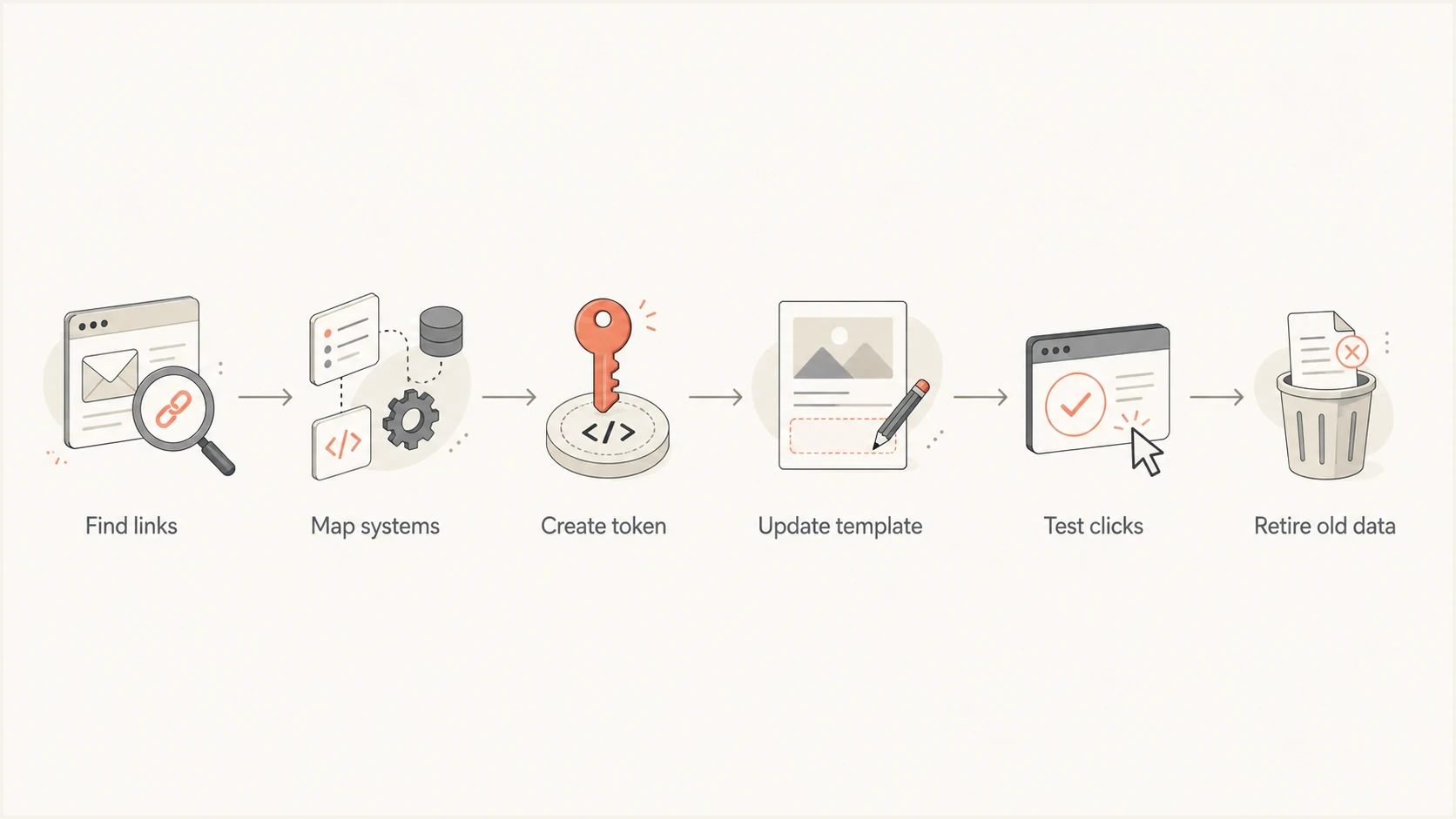
Six-step flowchart for replacing email URL parameters with scoped tokenized links.
How Suped fits into the cleanup
A URL parameter cleanup belongs beside authentication and sender-reputation checks during an email rollout. SPF, DKIM, and DMARC do not hide personal data in message links or verify the destination's authorization checks.
Suped's product supports the email health checks around this work. Use DMARC monitoring to review sending sources and authentication failures during rollout, and blocklist monitoring to watch sending domains and IPs for blacklist listings.
Issues page showing top issues, verified sources, unverified sources, and authentication pass rates
After changing the links, send a non-sensitive test message through your normal sending platform to Suped's Email Tester. Review authentication results and unsubscribe headers. Inspect the received URLs separately in a test inbox and browser network log. The message test does not verify token expiry, destination authorization, or query-string redaction.
Email tester
Send a real email to this address. Suped shows a results button when the test is ready.
?/43tests passed
If DNS or sending configuration changed during rollout, use Suped's Domain Health Checker to check published authentication records. Test landing pages and tracking redirects separately.
What to do if raw emails are already live
If campaigns are already using raw email parameters, do not wait for a visible deliverability problem. Treat it as a privacy and data hygiene issue with a clear remediation path.
Do not solve this by renaming the parameter
A hidden-looking name does not remove the email address from logs, referrers, scanners, analytics events, or forwarded links. It only makes the issue harder for humans to notice during review.
- Pause new templates that place raw email addresses in URLs.
- Move to random tokens with purpose limits, server-side lookup, and expiry appropriate to the action.
- Disable old URLs that grant account access using only an email parameter, while keeping a working unsubscribe route.
- Strip personal query values before they enter analytics and application logs.
- Check privacy notices, vendor contracts, and internal data handling commitments.
- Apply retention rules to old logs, exports, reports, and dashboards.
- Send seeded messages and confirm that no raw or encoded address appears after redirects.
Already-sent emails still contain old URLs. At destinations you control, stop authorizing actions based on email parameters and remove personal values before logging. A clean redirect limits further propagation but does not erase the original request or copies already stored.