Why is Google Postmaster Tools not showing domain or IP reputation?

Published 8 Aug 2025
Updated 4 Aug 2026
11 min read
Summarize with
Updated on 4 Aug 2026: We corrected Google's legacy interface timeline and clarified how to troubleshoot missing reputation data in v1 and v2.
The direct answer depends on which Google Postmaster Tools version you are viewing. The updated v2 interface does not include Domain Reputation or IP Reputation. If a reputation chart is visible but blank in legacy v1, the usual causes are low qualified Gmail traffic, an authenticated-domain mismatch, normal processing delay, or a reporting gap.
Google postponed the previously announced September 30, 2025 retirement of the legacy v1 web interface and has not published a replacement date. It is no longer accurate to assume the old interface has been shut down. Google still plans to retire legacy v1, while v2 and the v2 API omit the two reputation dashboards.
A missing panel is not a health verdict. Check the current v2 Compliance status and Deliverability analysis, Gmail spam rate, authentication, delivery errors, traffic volume, DMARC sources, and blocklist (blacklist) status before changing sending infrastructure.
The short answer
Google Postmaster Tools has two separate missing-data scenarios. In v2, the absence of Domain Reputation and IP Reputation is expected because those dashboards are not included. In legacy v1, which remains available while deprecation is postponed, blank charts often mean low data volume, exact-domain scope mismatch, or a temporary reporting gap.
- V2 omission: The updated web interface and v2 API do not provide Domain Reputation or IP Reputation. Google says replacement dashboards are planned but has not published a launch date.
- Low Gmail volume: Legacy dashboards suppress data on low-volume days to protect recipient privacy. Only traffic sent to personal Gmail accounts contributes to these views.
- Authenticated-domain mismatch: Legacy reputation data uses the exact domain authenticated by DKIM and SPF, so a root domain and its sending subdomain can show different results.
- Reporting delay or gap: Dashboard data is not real time. It usually updates within 24 hours, can take longer, and historical gaps are not guaranteed to backfill.
- Compliance is separate: A v2 compliance result does not control whether a legacy reputation chart appears because the dashboards use different scopes and datasets.
Do not read blank as good
A blank reputation chart does not mean Gmail thinks your mail is good or bad. It means Google is not showing that metric for the selected authenticated domain and date range, including the sending IPs covered by the view.
Legacy v1 and v2 behave differently
Start by identifying the interface or API version. Google postponed the legacy web-interface deprecation, but it still encourages senders to move to v2. The version determines whether there is a reputation chart to troubleshoot at all.
|
|
|
|---|---|---|
V2 web interface | Domain and IP reputation dashboards are absent | Use Compliance status, Deliverability analysis, Spam Rate, Authentication, Feedback Loop, and Delivery Errors |
Legacy v1 web interface | Reputation dashboards can remain visible while deprecation is postponed | Troubleshoot low volume, the exact authenticated domain, UTC dates, or reporting gaps |
V2 API | Domain and IP reputation endpoints are not included | Move automations to available v2 endpoints and delivery-log data |
How reputation visibility differs across current Postmaster Tools versions.
Check the version first
An absent dashboard in v2 is expected. A visible but empty chart in legacy v1 requires data troubleshooting. This one distinction prevents most unnecessary DNS and IP changes.
Why reputation data is missing
The legacy reputation views gave senders a simple Gmail-specific rating. Google says these ratings are slow to reflect behavior changes, can be difficult to act on, and can mislead senders because reputation is only one factor in delivery. That explains the v2 omission, but a blank legacy v1 chart still needs a separate diagnosis.
|
|
|
|---|---|---|
V2 interface | No reputation dashboard | Current v2 metrics |
Low personal Gmail traffic | Blank or partial legacy dates | Daily Gmail recipient volume |
Authenticated-domain mismatch | Root differs from subdomain | DKIM d= and SPF domains |
Normal processing lag | Recent dates are missing | UTC dates and processing time |
Compliance issue | Needs work or no data found | Sender requirements |
Reporting gap | Older dates stop and resume | Date-by-date sending logs |
Common reasons Google Postmaster Tools does not show domain or IP reputation.
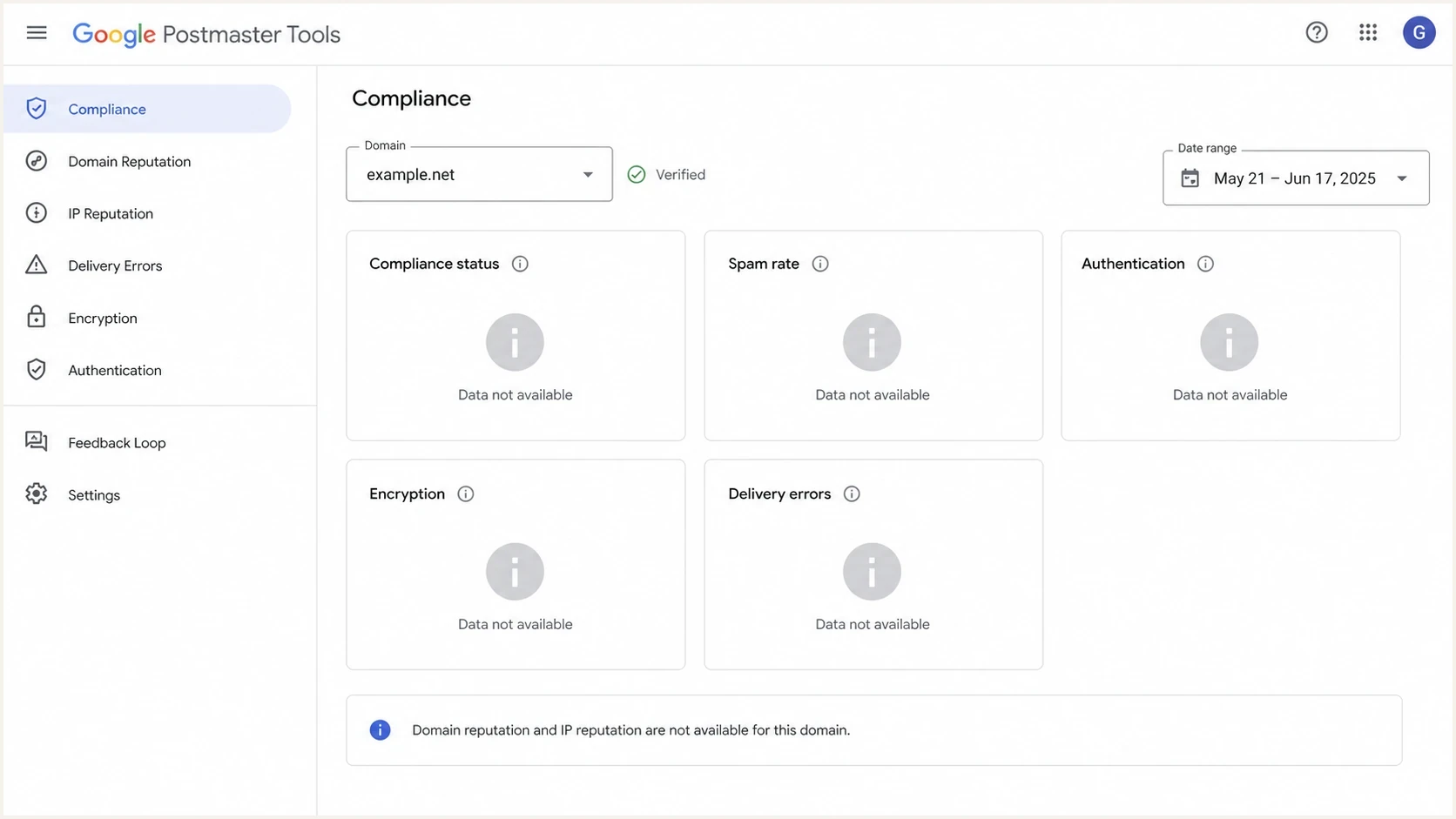
Google Postmaster Tools dashboard with domain and IP reputation data unavailable.
In v2, the reputation panels are absent while Compliance status, Spam Rate, Authentication, Feedback Loop, and Delivery Errors can keep updating. In legacy v1, those other metrics can also update while Domain Reputation and IP Reputation are blank. Neither pattern is a clean delivery verdict.
The related Suped article on reputation discontinuation explains Google's planned transition and the signals senders can use instead.
Check volume, domain scope, and compliance
The first practical step is to separate a delivery problem from a visibility problem. Check the interface version, recent traffic to personal Gmail accounts, the exact authenticated domain, and any v2 compliance failures before changing DNS or sending routes.
Reputation visibility signals
Use these thresholds as a practical review order, not as official Gmail disclosure rules.
Healthy check
green
Authenticated mail, stable Gmail traffic, low complaints, and no major compliance warnings.
Needs review
yellow
Partial dates, root and subdomain mismatch, or spam rate close to Gmail limits.
High risk
red
Authentication failures, complaint spikes, large deferrals, or unknown sending sources.
Volume is easy to overlook. Google does not publish an exact threshold, and dashboards can suppress low-volume days to protect Gmail-user privacy. Only messages sent to personal Gmail accounts count, so new domains, seasonal campaigns, low-volume subdomains, and B2B lists can show blank or delayed data. Suped has a related explainer on required Gmail volume for diagnosing smaller senders.
- Confirm the authenticated domain: Check the DKIM d= value on messages delivered to Gmail. If DKIM is not used, check the SPF-authenticated domain, then select that exact domain in legacy v1.
- Understand compliance scope: The Compliance status dashboard reports for the primary domain and uses data from its subdomains. Use other dashboards when you need subdomain-specific data.
- Allow processing time: Google uses UTC and typically updates dashboard data within 24 hours. Compliance changes can take up to seven days to appear.
- Review v2 recommendations: Open Deliverability analysis under Compliance status for recommendations about low volume, failed delivery, spam rate, recipient interaction, or sender requirements.
- Escalate carefully: If a verified, high-volume legacy v1 domain stays blank beyond normal processing time, compare the symptoms with this public support thread.
What to monitor instead
No single metric replaces Domain Reputation or IP Reputation. Use a working set of Gmail and domain-level signals: v2 Compliance status, Deliverability analysis, Spam Rate, Feedback Loop data, authentication, delivery errors, DMARC reports, and sending logs.
Legacy reputation view
- Simple label: High, medium, low, or bad gave a quick read but not the root cause.
- Gmail-only scope: The rating described Gmail's view of authenticated traffic to personal Gmail accounts.
- Lagging signal: Behavior changes could take time to affect the displayed reputation rating.
Current monitoring signals
- Authentication: SPF, DKIM, and DMARC show whether authorized senders pass and meet alignment requirements.
- Recipient response: Spam complaints, unsubscribes, bounces, and deferrals show how recipients and Gmail react.
- Infrastructure: DNS, TLS, source inventory, and blocklist (blacklist) status expose technical causes.
In Suped, a practical check sequence is to run a domain health check, send a real Gmail-bound message through the email tester, and compare the result with DMARC aggregate data.
Email tester
Send a real email to this address. Suped shows a results button when the test is ready.
?/43tests passed
A live email test checks the message Gmail receives, not only the DNS configuration. Authentication results, TLS, headers, and content findings can get closer to the cause than a blank reputation chart.
Example DMARC TXT recordDNS
Host:
_dmarc.example.com

Value:
v=DMARC1; p=none; rua=mailto:dmarc-reports@example.com;
adkim=s; aspf=s
Where DMARC and Suped fit
The missing Google reputation panels make DMARC reporting more useful for source-level diagnosis. Google Postmaster Tools reports Gmail signals, while DMARC aggregate reports identify systems sending as your domain across participating receivers and show which sources pass or fail authentication.
Suped's DMARC monitoring supports this workflow by inventorying senders, surfacing authentication failures, staging policy changes, and alerting teams when failure rates change.
Issues page showing top issues, verified sources, unverified sources, and authentication pass rates
For teams using Suped, the platform puts DMARC aggregate reports, source inventory, issue detection, policy staging, hosted authentication controls, and alerts in one workflow. This helps connect a Gmail-facing symptom with the sender or configuration behind it.
- Issue detection: Suped highlights failing sources and provides steps for correcting authentication problems.
- Hosted controls: Hosted DMARC, hosted SPF, SPF flattening, and hosted MTA-STS reduce repeated DNS work.
- Alerts: Suped can notify the team when failure rates change instead of waiting for a reputation rating.
- Multi-domain work: The MSP and multi-tenancy dashboard lets agencies and managed service providers review many domains in one place.
- Reputation checks: Suped's blocklist monitoring tracks domain and IP listing risk across major blocklists and blacklists.
A practical troubleshooting path
Do not change IPs because a reputation panel is absent or blank. An infrastructure change can reset warmup, introduce new reputation uncertainty, and hide the original cause. Check the Postmaster Tools version, domain scope, recent sending changes, authentication, audience quality, and delivery logs first.
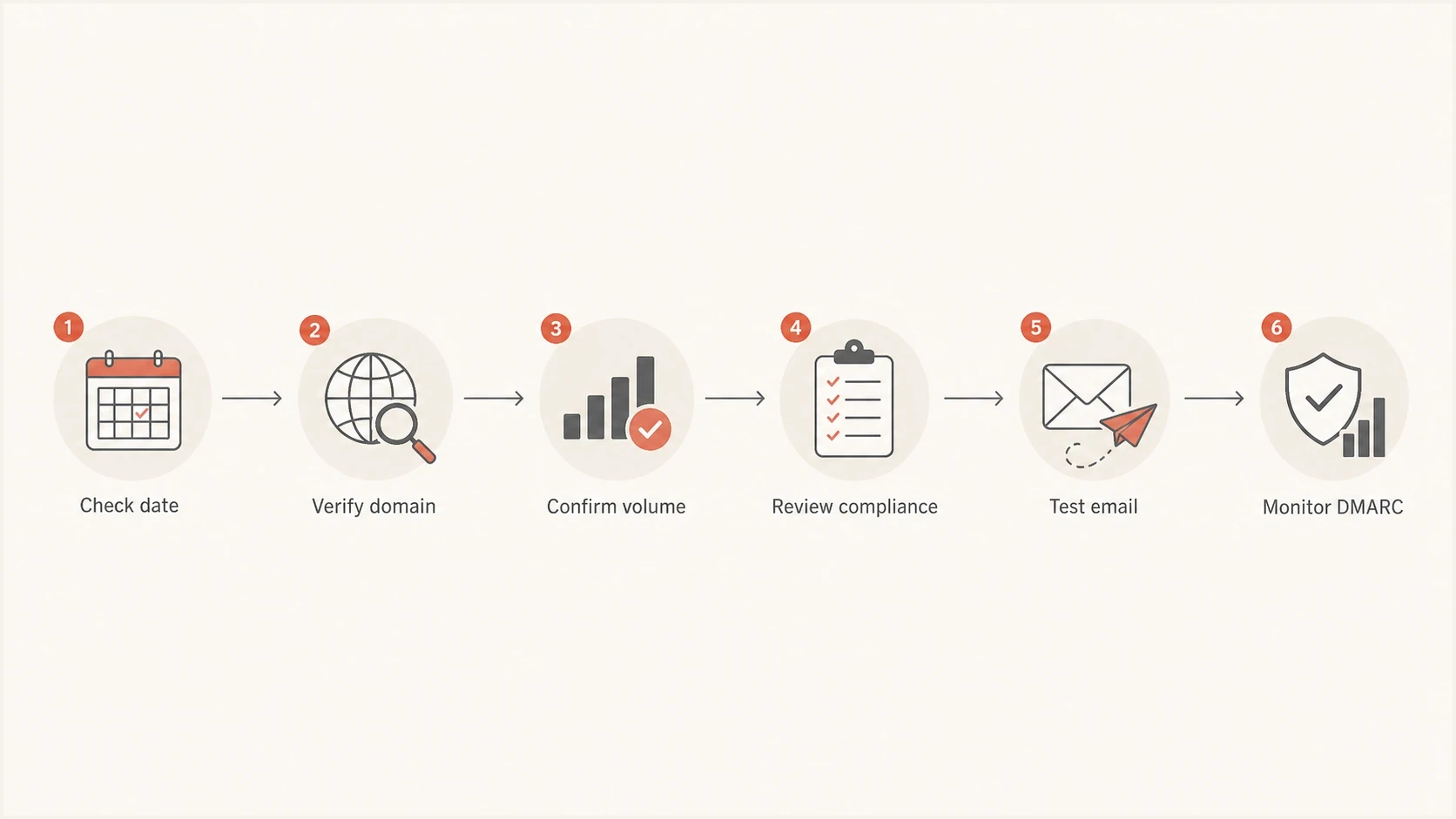
Troubleshooting steps for missing Google Postmaster Tools reputation data.
- Check the version: If you are using v2, the reputation dashboards are absent by design. If a legacy v1 chart is visible but blank, continue with data checks.
- Check the domain: Open a delivered Gmail message, inspect the DKIM d= domain, and compare it with the domain selected in legacy v1. Check the SPF-authenticated domain when DKIM is not used.
- Check the traffic: Confirm that the exact domain has enough recent traffic to personal Gmail accounts for Google to display privacy-safe data.
- Check compliance: Fix spam-rate, authentication, TLS, DNS, message-formatting, and unsubscribe warnings even when they are not the reason a legacy chart is blank.
- Check the message: Send a fresh test email and inspect SPF, DKIM, DMARC, headers, TLS, and delivery placement.
- Check the sources: Review each sender in DMARC aggregate reports so unknown or misconfigured systems do not damage Gmail delivery quietly.
If the entire Postmaster Tools setup appears broken rather than only reputation visibility, use the related page on Postmaster Tools fixes before changing DNS or routing.
Views from the trenches
Best practices
Track Gmail signals beside DMARC, not instead of aggregate reports and source checks.
Verify the exact DKIM d= domain that sends mail, including all campaign subdomains.
Keep Gmail complaints low and review complaint spikes by campaign and audience promptly.
Common pitfalls
Treating a blank legacy chart as proof of good reputation hides delivery problems.
Checking only primary compliance misses sender issues shown in other dashboards.
Expecting historical backfill wastes time when Gmail leaves reporting gaps unfilled.
Expert tips
Use a weekly source inventory so new senders are caught before compliance breaks.
Compare Gmail complaints with bounce and deferral logs before changing IP routing.
Document each DNS change date so missing data can be mapped to real sending events.
Marketer from Email Geeks says reputation data stopped across many domains around January 14, 2025, then returned for some later dates without filling the missing gap.
2025-01-22 - Email Geeks
Marketer from Email Geeks says compliant domains also lacked domain and IP reputation in v2, so compliance status did not fully explain the blank panels.
2025-01-22 - Email Geeks
How to act on missing reputation data
Google Postmaster Tools v2 is not showing Domain Reputation or IP Reputation because those dashboards are not included. If legacy v1 shows the charts but no data, check Gmail traffic volume, exact authenticated-domain scope, UTC dates, and reporting gaps.
Use the signals beneath the old rating: authentication, DMARC sources, complaint rate, Feedback Loop data, bounce and deferral logs, blocklist (blacklist) status, and domain-specific Gmail diagnostics. These signals support action even without a simple reputation label.
Best next move
Use Google Postmaster Tools for the Gmail data it still provides. Use Suped to map DMARC sources, diagnose SPF and DKIM failures, stage DMARC policy, receive alerts, and track reputation risks outside Google's reputation dashboards.