Why is Microsoft Defender marking my one-to-one emails as spam with a high SCL score when authentication is correct and there are no blacklist issues?

Updated on 10 Oct 2026: We updated our SCL guidance to focus on message categories and the evidence needed to resolve false positives.
Microsoft Defender marks clean one-to-one email as spam with a high SCL score because authentication and blocklist status are only part of its decision. SPF and DKIM validate authorized sending paths or signatures, while DMARC confirms that at least one passing identifier matches the visible From domain. They do not prove that Microsoft trusts the sender, the sending pattern, the message content, the recipient relationship, the tenant policy, or every domain and subdomain connected to that identity.
If the message gets SCL 9 while BCL 0 and authentication pass, collect the exact headers before changing SPF or DMARC. In Microsoft 365, SCL alone does not determine the spam category or delivery action. Check CAT, identify the policy or filtering component involved, and isolate content and identity variables to establish a repeatable pattern Microsoft support can investigate.
Short answer
A clean DMARC result and no blocklist (blacklist) listing do not override Microsoft Defender's filtering. SCL 9 is an investigation clue. CAT:HSPM confirms high confidence spam; the applicable policy determines handling.
- Authentication: Passing SPF, DKIM, and DMARC confirms authorization and domain matching, not inbox placement.
- Reputation: Microsoft can distrust a domain, IP, tenant, URL, or subdomain even when public checks look clean.
- Policy: Recipient tenant rules, quarantine policies, and safe sender logic can change final delivery.
- Evidence: The message headers and Defender trace data matter more than generic deliverability scores.
What SCL 9 means in practice
Microsoft's SCL guidance says an SCL value of 5 or higher generally indicates a message is considered bad. In cloud organizations, the score does not determine whether the verdict is Spam or High confidence spam, or which action is taken. The same SCL value can accompany different verdicts. Read CAT and DIR with the applicable policy instead of treating the number as an inbox or quarantine rule.
Authentication can pass while filtering blocks the message. SCL remains useful for mail flow rules and on-premises Exchange, including hybrid delivery. A cloud mail flow rule can request spam handling with SCL 5 or 6, high confidence spam handling with SCL 9, or a bypass with SCL -1. A bypass request does not guarantee delivery or an SCL -1 stamp.
|
|
|
|---|---|---|
SCL 9 alone | Does not establish the cloud verdict | Read CAT, SFV, DIR, and policy details |
CAT:SPM | Spam category | Junk by default and under Standard; quarantine under Strict |
CAT:HSPM | High confidence spam category | Junk under the default policy; quarantine under Standard and Strict |
BCL 0 | Not identified as bulk mail | Check CAT and policy; low BCL does not clear other detections |
Interpret the message category and applicable policy, rather than SCL alone.
These are default actions for the category, not guarantees based on SCL. Custom anti-spam policies can use different actions. For recipients covered by Standard or Strict presets, those presets take precedence over custom and default anti-spam policies. See Microsoft's policy guidance.
Illustrative headers with authentication passing and CAT:HSPM
X-MS-Exchange-Organization-SCL: 9
X-Microsoft-Antispam: BCL:0;
Authentication-Results: receiver.example;
 spf=pass smtp.mailfrom=example.com;
 dkim=pass header.d=example.com;
 dmarc=pass header.from=example.com;
 compauth=pass reason=100
X-Forefront-Antispam-Report: CIP:192.0.2.10; SCL:9;
 SFV:SPM; CAT:HSPM; IPV:NLI; DIR:INB;
Read SFV, CAT, and X-CustomSpam together
CAT identifies the message category, while SFV and the surrounding fields help identify how filtering or an override processed it. Read X-Forefront-Antispam-Report and X-CustomSpam alongside X-Microsoft-Antispam and Authentication-Results. Use the receiving tenant's header results, rather than an earlier hop's authentication result.
|
|
|
|---|---|---|
SFV:SPM | Spam filtering marked the message as spam | Read CAT and look for X-CustomSpam |
CAT:HSPM | High confidence spam category | Check ASF first; otherwise test content and submit a false positive |
X-CustomSpam | An ASF setting matched | Review the named ASF rule |
SFV:SKS | A rule or on-premises Exchange spam decision was honored | Check transport rules and hybrid filtering |
SFV:BLK | The recipient blocked the sender | Check Outlook Blocked Senders |
SFV:SKB | A sender or domain matched an anti-spam policy block entry | Review that policy's blocked senders and domains |
Header fields that narrow an SCL 9 investigation.
Check DIR:INB versus DIR:OUT to distinguish inbound from outbound filtering. IPV:NLI means the connecting IP was not found on an IP reputation list, not that every sender signal is clear. Undocumented diagnostic fields such as numeric SFS codes are for Microsoft's anti-spam team. See Microsoft's header documentation.
Treat X-CustomSpam as a policy clue
If X-CustomSpam is present, an Advanced Spam Filter (ASF) setting matched the message. The header is also used in ASF test mode, so confirm the setting and its action before attributing delivery to it. One-to-one false positives can come from a tracking pixel in a signature, unusual HTML tags, scripts, forms, empty messages, or Microsoft's sensitive word list. Microsoft describes ASF as aggressive and no longer recommends enabling it because other filtering layers cover the same signals.
Microsoft excludes ASF-filtered messages from false-positive submissions. Ask the receiving administrator to disable the confirmed offending setting and retest. See ASF settings and Microsoft's policy troubleshooting guidance. Changing working authentication records does not resolve a content-based ASF match.
Check for phishing and impersonation verdicts
A message with SCL 9 is not automatically high confidence spam. CAT:PHSH identifies phishing; CAT:HPHSH or CAT:HPHISH identifies high confidence phishing. Passing SPF, DKIM, and DMARC does not exempt legitimate mail from these detections.
- For CAT:DIMP or CAT:UIMP, ask the receiving administrator to review domain or user impersonation protection and the protected identity that matched.
- For a confirmed impersonation false positive, review Trusted senders and domains in the detecting anti-phishing policy instead of changing DMARC.
- For high confidence phishing, ask an administrator to review quarantine and submit the original message. Outlook Safe Senders and ordinary spam bypass rules do not guarantee release.
- Check compauth and its reason code in Authentication-Results. Composite authentication is an additional diagnostic result, not an inbox placement guarantee.
Use the recorded detection category to choose the remedy. Microsoft's anti-phishing policy guidance explains impersonation controls; its admin submission guidance covers reporting legitimate messages.
Why clean authentication is not enough
SPF, DKIM, and DMARC answer a narrow question: did this message authenticate, and did a passing SPF or DKIM identifier match the visible From domain? With relaxed domain matching, the domains can share an organizational domain; strict matching requires an exact match. They do not answer whether the sender looks normal to Microsoft, whether the recipient has seen this sender before, whether the message resembles abusive one-to-one outreach, or whether other traffic tied to the domain has created a negative signal.
What authentication proves
- Authorization: The sending source is allowed by SPF or holds a valid DKIM signing key.
- Integrity: A passing DKIM signature validates the signed headers and the signed body portion.
- Domain matching: DMARC requires a passing SPF or DKIM domain to meet its matching rules for the visible From domain.
- Policy: DMARC tells receivers what the domain owner requests when domain matching fails.
What Defender still judges
- Reputation: The domain, IP, tenant, links, and subdomains have their own history.
- Content: Subject, body, signature, attachments, and URLs can trigger filters.
- Relationship: Recipient behavior and organization policy can change the final verdict.
- Source: A normal provider can still have a tenant-level or route-specific issue.
A common false assumption is that no public blocklist (blacklist) listing means no reputation issue. Public checks cover only part of the receiver decision. Microsoft's filtering also evaluates sender reputation, sending patterns, content, and recipient feedback. A sender can have clean public checks and still receive SCL 9 inside Microsoft.
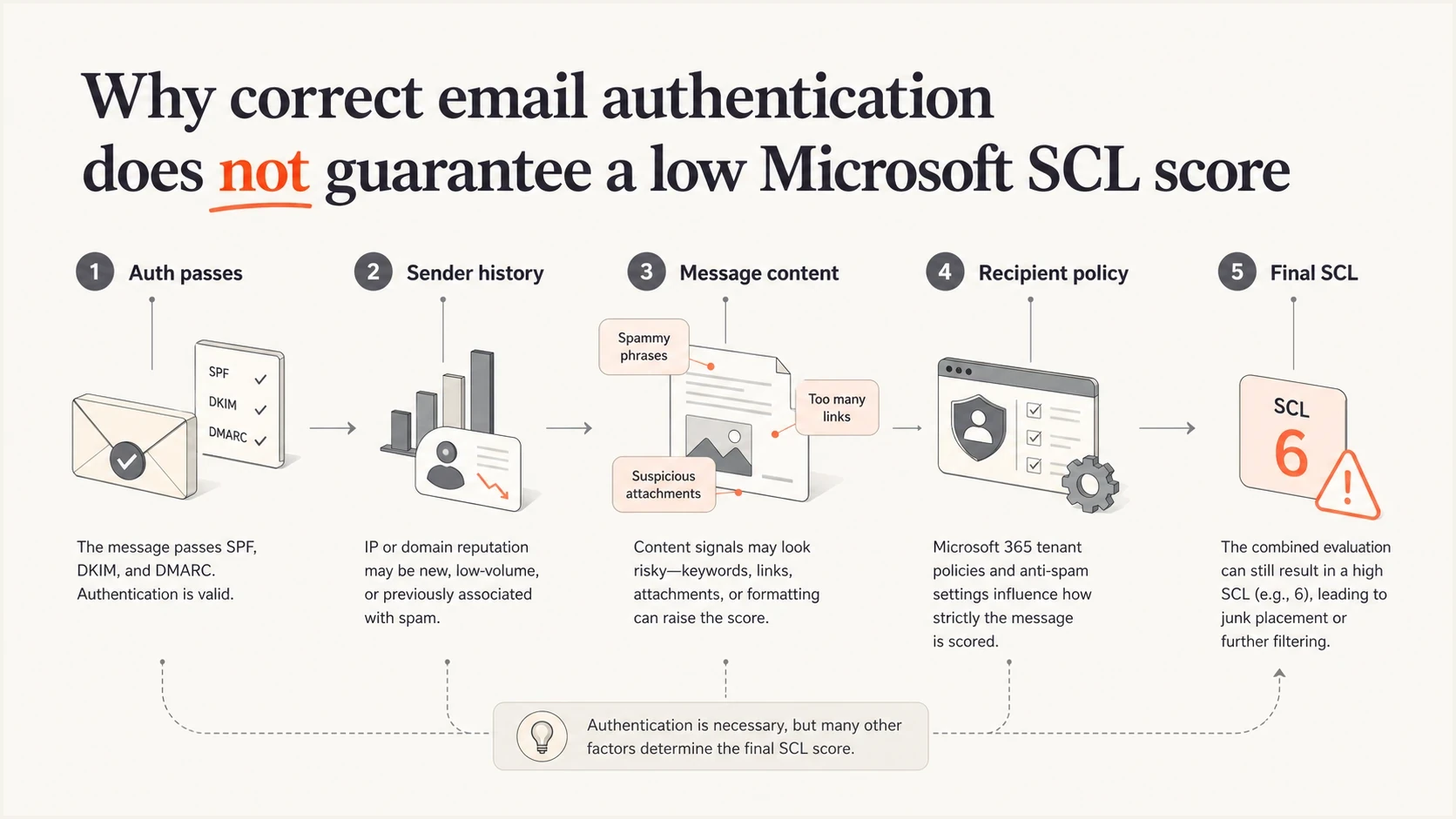
Why passing email authentication does not guarantee a low Microsoft SCL score
Likely causes when BCL is zero
A BCL 0 result says the message was not identified as bulk mail. It does not clear spam or phishing detections, and increasing a bulk complaint threshold does not address this case. Investigate the recorded category, message content, sender reputation, and recipient policy.
- Hidden senders: Another team, app, subdomain, or old vendor is sending mail tied to the same root identity.
- Account activity: Check for unexpected outbound traffic or a compromised mailbox rather than assuming a private tenant reputation score explains the verdict.
- URL signals: Links in signatures, booking pages, tracking redirects, and file links can carry the bad signal.
- Message shape: A short personal note with a link, attachment, or uncommon language can look risky to filters.
- Recipient policy: The recipient tenant can enforce stricter handling than another Microsoft 365 tenant.
- Local overrides: Transport rules, policy block entries, and Outlook Blocked Senders can change what you observe.
Do not assume the visible mailbox is the only sender
When a root domain has Microsoft trouble, verify every authorized sender and every subdomain before calling it a Defender anomaly. Other teams or dormant applications can send through the same domain without the affected mailbox owner's knowledge. Treat shared-domain reputation as a hypothesis to test, not a conclusion from SCL alone.
A practical diagnostic sequence
Start by making the problem reproducible. Send the same message to at least two Microsoft 365 tenants and one non-Microsoft mailbox. Then send controlled variations. The goal is to separate the sender identity from the message content and the recipient tenant.
- Headers: Save the original message or .eml file and headers from the recipient mailbox or quarantine. Record CAT, SFV, SCL, BCL, delivery action, and the matching policy.
- Baseline: Send a plain text message with no signature, link, attachment, or image.
- Identity: Repeat from a different user on the same domain and from a subdomain if one exists.
- Content: Add the original subject, body, signature, links, and attachment back one at a time.
- Route: Compare the normal provider with an alternate authenticated route. For Microsoft 365 outbound mail, also inspect OutboundIpPoolName in message trace.
- Recipient: Test more than one Microsoft tenant and compare category, delivery action, and policy because results can vary by organization.
Use Suped's email tester for the controlled tests so you can compare authentication, visible content, and message headers. Suped's test results check the sender-side evidence; the affected recipient's original headers and Defender details are still needed to diagnose Microsoft's verdict.
Email tester
Send a real email to this address. Suped shows a results button when the test is ready.
?/43tests passed
If the same blocked category persists on a completely plain text message, content is less likely to be the cause. Focus on domain identity, sending source, account activity, and recipient policy. If the plain text version delivers normally, add each original element back one at a time and compare CAT and delivery action as well as SCL. Repeat the decisive comparison before attributing the result to one change.
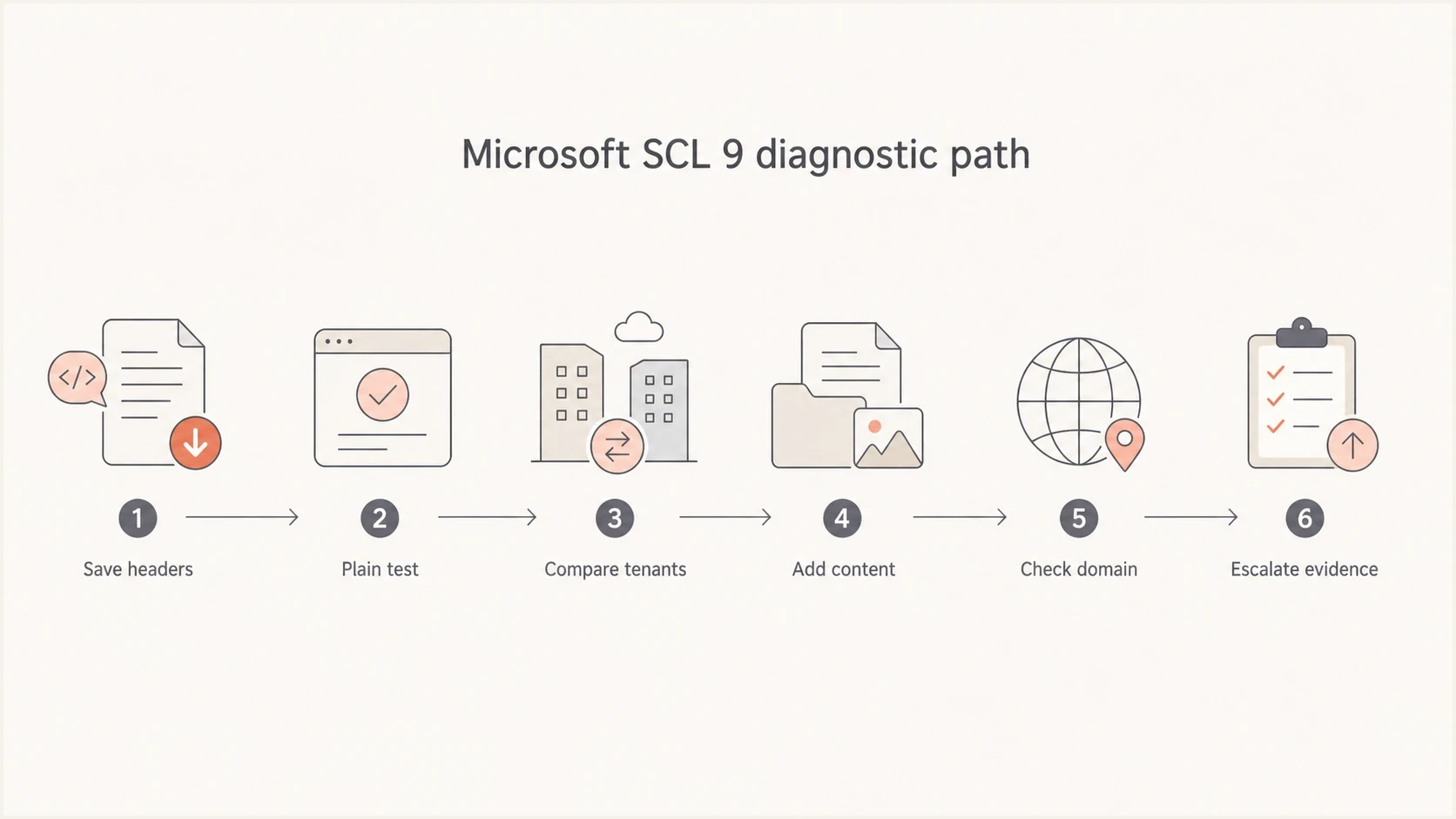
Microsoft SCL 9 troubleshooting flowchart for headers, content, and recipient policies
Use Microsoft evidence before changing DNS
Keep passing DMARC, SPF, and DKIM records stable while you inspect Microsoft evidence. Use message trace in the Exchange admin center, then review the email entity page, quarantine, Explorer or Real-time detections where available, anti-spam policy, transport rules, Tenant Allow/Block List entries, and admin submissions. Ask which policy actually applied to the recipient.
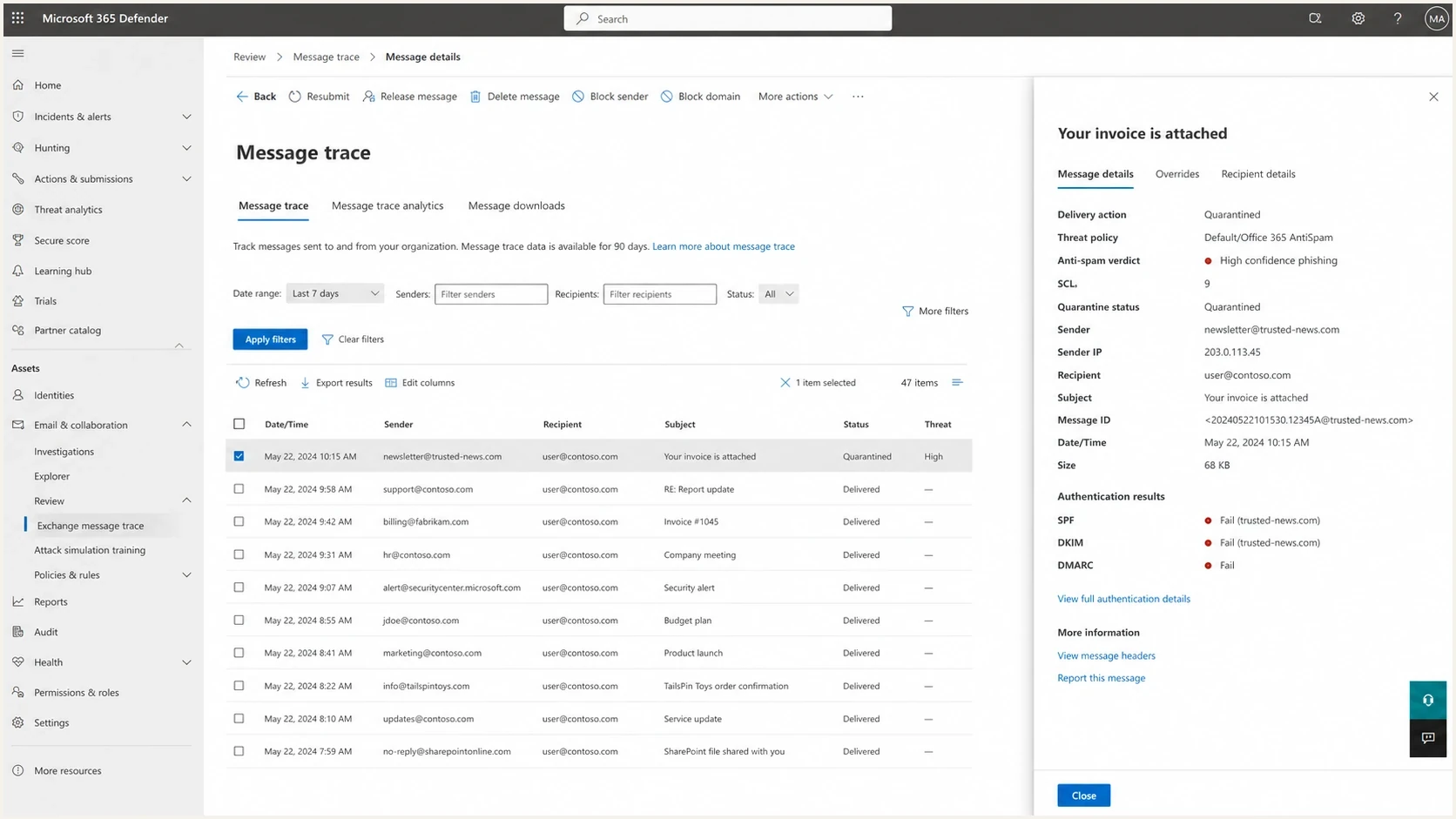
Illustrated Microsoft Defender investigation view with SCL and email verdict details
Ask the receiving administrator for the original headers and Defender event details. If they can see only quarantine, ask for the detection category, policy name, delivery action, overrides, and any transport rule match. If a rule or block entry caused the handling, correct that tenant configuration. If filtering produced a false positive, preserve the message for submission.
If the sender uses Microsoft 365, inspect OutboundIpPoolName in message trace. A high-risk delivery pool result warrants an outbound investigation, but it does not by itself prove the account sent spam. Microsoft also routes messages whose source domain has neither a public A record nor a public MX record through that pool regardless of the spam verdict. Check the sending account, outbound spam alerts, routing, and source-domain DNS. See Microsoft's outbound pool guidance.
Evidence packet for escalation
- Headers: Include the full original header block, CAT, SFV, SCL, BCL, policy name, and delivery action.
- Samples: Provide a blocked sample and a control sample that delivered elsewhere.
- Scope: List affected users and recipient tenants with UTC timestamps, Internet Message-ID, and Network Message ID where available.
- Change log: Document DNS, routing, signature, and content tests already performed.
If neither tenant configuration nor an ASF match explains the verdict, the receiving administrator should submit the original message to Microsoft as a false positive and retain the submission ID and result. For deeper header reading, compare your fields against a practical SCL header guide. If the same message receives different results across Microsoft tenants, use a recipient variation guide to separate tenant policy from sender reputation.
Use Suped to verify sending sources
Suped's DMARC reporting and email authentication product helps collect sender-side evidence before escalation: reported sending sources, DMARC pass and fail patterns, authentication checks, and public blocklist monitoring. DMARC aggregate reports do not expose SCL, CAT, or Microsoft's private filtering model, so combine Suped's findings with the affected recipient's original message evidence.

Issue steps to fix dialog showing the issue overview, tailored fix steps, and verification action
For this part of the investigation, Suped turns authentication data into specific checks. DMARC monitoring shows sending sources reported by participating receivers, while blocklist monitoring helps catch public blacklist and blocklist signals before they become part of a support case. A domain health check is a starting point for checking published authentication records and DNS. Test an actual message to verify the DKIM signature and the receiver's authentication results.
Review reported sources in Suped and reconcile them with your own sending-service inventory. Aggregate reports cover participating receivers, so an absent source is not proof it never sent mail. Attach the authentication findings and public blocklist (blacklist) results to the Defender headers and controlled samples for the receiving administrator.
?
What's your domain score?
Deep-scan SPF, DKIM & DMARC records for email deliverability and security issues.
What to change and what to avoid
When this happens, the temptation is to rotate domains, change DNS, rewrite every signature, or ask recipients to allowlist the sender. Those actions can hide the cause and make reputation recovery harder. Make controlled changes only after the test matrix points to a specific cause.
Do first
- Preserve headers: Keep original samples with timestamps and message IDs.
- Test plainly: Use a no-link, no-signature version as the baseline.
- Map senders: Audit root domain, subdomains, third-party routes, and dormant apps.
- Check policy: Verify the detection category, policy precedence, block entries, and transport rules.
Avoid first
- DNS churn: Do not edit working SPF, DKIM, or DMARC records without evidence.
- Domain hopping: Do not move staff mail to a fresh domain to outrun a verdict.
- Blind allowlists: Use a narrow, temporary exception only after confirming a false positive; broad domain or IP bypasses hide the cause.
- Mass edits: Do not change subject, signature, route, and content at the same time.
How to rank urgency
A simple way to decide how aggressively to investigate a high Microsoft SCL issue.
Single user
Low
One sender, one recipient tenant, one message pattern.
Multiple users
Warning
Several senders on the same domain hit Microsoft junk or quarantine.
Domain wide
Critical
Plain one-to-one mail is marked spam across separate Microsoft tenants.
The domain-wide case deserves the most attention because it points away from a single content mistake. At that point, the evidence packet should include authentication proof, source inventory, blocklist and blacklist status, controlled test results, and Microsoft header samples with the same pattern across tenants.
Views from the trenches
Best practices
Collect full headers before changing DNS so the original Microsoft verdict stays intact.
Test plain text, then add signatures, links, attachments, and subjects back one at a time.
Audit every root domain sender and subdomain before calling the issue a filter defect.
Common pitfalls
Assuming clean SPF, DKIM, and DMARC results guarantee a low SCL score in Microsoft 365.
Treating no public blacklist listing as proof Microsoft has no sender reputation concern.
Changing several variables at once, then losing the signal that caused the blocked verdict.
Expert tips
Compare the same message across separate Microsoft tenants to reveal policy differences.
Read CAT with SCL and BCL because a low bulk score does not clear spam or phishing verdicts.
Escalate with timestamps, headers, message IDs, and controlled samples, rather than summaries.
Marketer view
Marketer from Email Geeks recommends investigating sender identity, content, mechanics, and domain usage evidence when legitimate mail receives SCL 9.
2024-12-04 - Email Geeks
Marketer view
Marketer from Email Geeks says changing subject lines, friendly From names, signatures, and body sections is a useful way to isolate whether content drives the verdict.
2024-12-04 - Email Geeks
Escalate an unresolved false positive
If controlled tests still show a false positive after policy and ASF checks, have the receiving administrator use Actions & submissions > Submissions in Defender. Supply the Network Message ID or upload the original .eml or .msg, select an affected recipient, and choose "I've confirmed it's clean". Retain the submission ID and analysis result; releasing one quarantined message is not a substitute for submitting it. See Microsoft's admin submission instructions.
If the verdict persists, open a Microsoft 365 support case through the admin center with the submission result and evidence packet. For a sudden widespread change, check Service health for Exchange Online advisories and include the first affected UTC timestamp. A temporary allow entry, if used, should have a defined expiry and cover only the confirmed sender or message element.
Frequently asked questions
No. Authentication does not guarantee inbox placement or a particular SCL. In Microsoft 365, read CAT and the applied policy to understand the verdict and delivery action.
BCL measures bulk complaint risk. BCL 0 means the message was not identified as bulk mail, but separate spam or phishing detections still apply. CAT identifies the category; SCL 9 alone does not.
No. Public blacklist and blocklist checks are useful, but Microsoft has private reputation signals for domains, IPs, URLs, tenants, and recipients.
Not if DMARC already passes. Changing a working DMARC record usually adds noise. Focus first on headers, message content tests, sender inventory, and recipient policy.
An Advanced Spam Filter setting matched the message, including in some test-mode configurations. Check the setting and action. For a confirmed ASF false positive, the receiving administrator should disable the offending setting and retest because Microsoft excludes ASF-filtered messages from false-positive submissions.
Build an evidence packet with original messages and headers, CAT and policy details, message identifiers, controlled tests, authentication findings, and affected recipient tenants. After excluding policy and ASF causes, submit the original as a false positive and include the submission result in a Microsoft 365 support case.