What are common SendGrid unsubscribe and tracking issues and how are they resolved?
Matthew Whittaker
Co-founder & CTO, Suped
Published 14 May 2025
Updated 16 May 2026
10 min read
The common SendGrid unsubscribe and tracking issues are automatic unsubscribes caused by security scanners, click and open spikes caused by non-human traffic, Subscription Tracking suppressing recipients globally, custom unsubscribe links being recorded as clicks instead of unsubscribe events, branded tracking links breaking because of DNS or SSL problems, and event data gaps that make it hard to prove who opted out.
The resolution is to pause risky sends, preserve raw event data, separate human clicks from scanner activity, use Advanced Suppression Management for group-level opt-outs, verify branded link DNS and SSL, reconcile suppression lists against your own consent records, and then test with real messages before resuming normal volume. I treat this as both a compliance problem and a data quality problem, because a false unsubscribe still changes whether a person receives mail.
Fast answer: Scanner-triggered unsubscribes are resolved by filtering bot-like events and using group unsubscribe flows that require clearer intent.
Data answer: Tracking spikes are resolved by comparing raw clicks, unique clicks, timestamps, user agents, IPs, and downstream website activity.
Compliance answer: Do not restore suppressed contacts unless you have evidence that the opt-out was accidental or non-human.
Common SendGrid issues at a glance
When SendGrid unsubscribe or tracking behavior looks wrong, I group the problem by what changed: the recipient state, the tracking event, the link destination, or the sending domain. That keeps the investigation grounded. A click spike is not the same as a suppression bug, and a broken branded link is not the same as a consent problem.
Issue
Signal
First fix
Auto unsubscribe
At delivery
Filter bots
Click spike
No traffic lift
Use uniques
Global opt-out
All mail stops
Use groups
Broken link
Bad domain
Check DNS
Missing event
No webhook
Reconcile logs
Compact triage labels for SendGrid unsubscribe and tracking incidents.
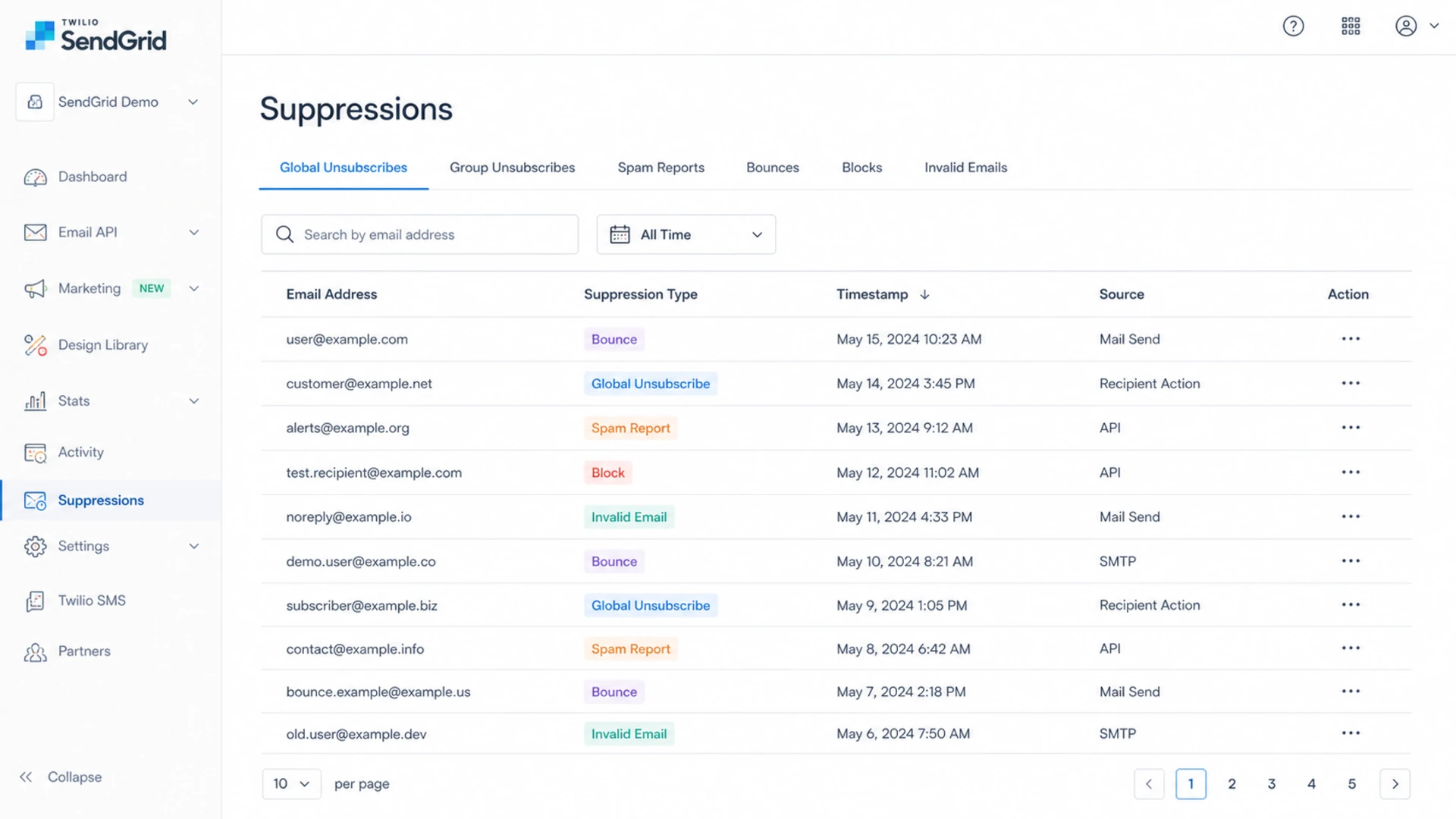
Twilio SendGrid suppressions screen with global and group unsubscribe records.
The fastest mistake is to fix only the template. I start with the full path: recipient receives the message, security systems inspect the links, SendGrid rewrites tracking URLs, the unsubscribe endpoint changes a suppression state, and event data flows back through the dashboard or webhook. A fault at any point in that path creates a different symptom.
Automatic unsubscribes after delivery
Automatic unsubscribes usually happen when a corporate security scanner, mailbox protection system, or automated engagement bot follows links in the email before the recipient reads it. SendGrid's own SendGrid automatic unsubscribes article points to non-human interactions, repeated user agents, security scanner IPs, and unsubscribe events that occur very quickly after delivery.
The fix is not to ignore unsubscribe events. The fix is to classify them. If a recipient has a normal message open, time on page, and a later unsubscribe, I treat that as human intent. If the unsubscribe fires seconds after delivery with the same user agent seen across many recipients, I mark it as likely scanner activity and hold it for review before changing my source-of-truth consent state.
Do not auto-restore every address
A false positive hurts reach, but restoring a true unsubscribe creates legal and trust risk. I only restore when the event pattern is non-human and there is a reliable consent record outside SendGrid.
Timing: Unsubscribe at delivery or within seconds needs review.
Pattern: Many recipients with the same browser string and no site activity points to scanning.
Evidence: Keep the event ID, message ID, recipient state, and consent source before making changes.
Unsubscribe timing triage
Use timing as a signal, not as the only proof.
Immediate
0-60 sec
Review for scanner activity.
Short delay
1-5 min
Compare with user agent and website activity.
Normal use
5+ min
Treat as human unless other evidence disagrees.
Subscription tracking versus ASM
SendGrid has several unsubscribe methods, including Marketing Campaign unsubscribe modules, ASM tags, Subscription Tracking, and custom unsubscribe links. The practical difference matters. SendGrid's SendGrid unsubscribe methods page explains that Subscription Tracking appends a global unsubscribe link, while ASM lets you use group-level unsubscribe links and preference pages.
I prefer ASM for marketing streams because it limits the blast radius of one click. A person can stop product updates without being removed from every other valid stream. Subscription Tracking is simpler, but it is blunt. It can put a recipient into a global unsubscribe state, including when the message type did not need that level of suppression.
Subscription Tracking
This is the quick account-level option. SendGrid appends a global unsubscribe link and suppresses future sends when that link is used.
Best fit: Simple newsletters where every message belongs to one mail stream.
Main risk: One false click can suppress a recipient globally.
Fix path: Turn it off for mail that needs more precise consent handling.
Advanced Suppression Management
ASM lets you define unsubscribe groups and preference choices, then pass the correct group ID with the send.
Best fit: Multiple marketing streams, customer segments, and mixed lifecycle mail.
Main risk: Missing group IDs can cause links to render incorrectly or not at all.
Fix path: Use explicit group IDs, test every template, and keep the preference page current.
A tracking anomaly usually shows up as a sudden rise in clicks, opens, unsubscribes, or all three. The important question is whether the behavior exists outside SendGrid. If SendGrid reports a jump from normal click volume to a huge total click count, but the website does not show matching sessions or conversions, I assume the tracking data needs investigation before anyone draws campaign conclusions.
For a deeper workflow on spikes, the companion page on unusual clicks and unsubscribes covers the click inflation side in more detail. The short version is that raw clicks are useful for evidence, but unique clicks are often closer to campaign intent when scanners are active.
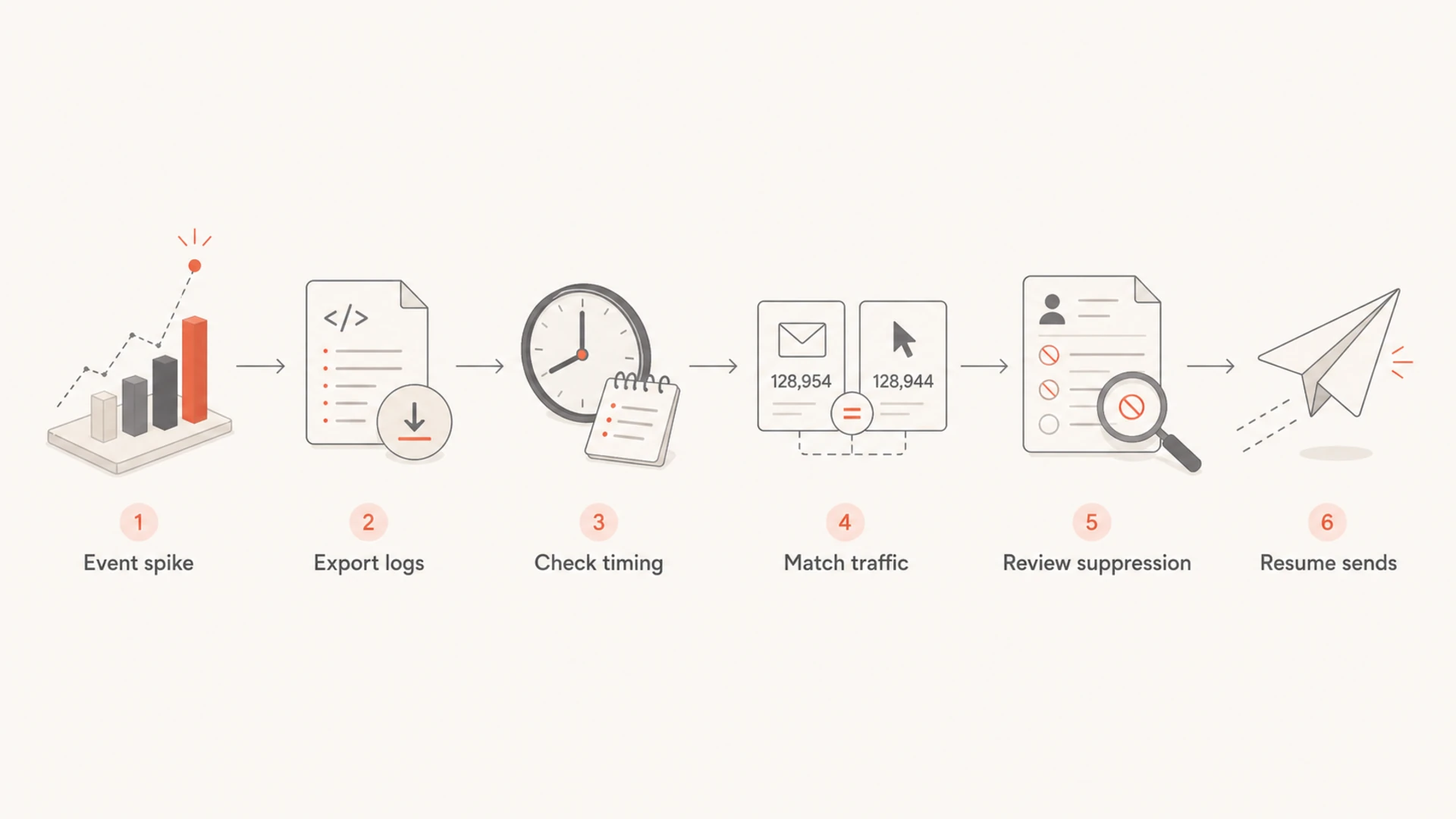
Freeze evidence: Export the affected event window, including message IDs, timestamps, URLs, IPs, and user agents.
Compare uniques: Separate total clicks from unique recipient clicks and remove repeated machine-like hits.
Check timing: Flag unsubscribes that occur immediately after delivery or before any normal reading delay.
Match traffic: Compare SendGrid clicks against landing page visits and form activity.
Reconcile state: Compare SendGrid suppression records with your CRM or consent database.
Flowchart for investigating a SendGrid click or unsubscribe spike.
Broken SendGrid tracking links usually come back to branded link DNS, SSL, a stale CNAME, a disabled tracking setting, or a link domain that security systems distrust. Custom link tracking adds another layer: the click domain must resolve, the certificate must be valid, and the destination must still work after SendGrid rewrites the link.
If the issue is specifically a broken URL, the page on broken SendGrid links gives a focused path. For a broader sending-domain review, I use the domain health checker to catch related DMARC, SPF, and DKIM issues while I am already touching DNS.
0.0
What's your domain score?
Deep-scan SPF, DKIM & DMARC records for email deliverability and security issues.
The part I do not skip is reputation. A branded tracking domain can work technically and still get treated poorly if it appears on a blocklist or blacklist, if it shares bad traffic history, or if it has a mismatch between the visible sender and the click host.
DNS: Confirm the branded tracking CNAME points to the expected SendGrid target.
SSL: Open the rewritten link in a clean browser and confirm there is no certificate warning.
Redirects: Check that each tracking URL lands on the intended final page without a loop.
Reputation: Review whether the tracking domain or sending IP is on a blocklist or blacklist.
Custom unsubscribe links and missing events
Custom unsubscribe links are common, especially when a brand needs its own preference center or a non-English unsubscribe page. The catch is that SendGrid records those links as click activity unless you also update suppression state yourself. If the unsubscribe endpoint is your own page, your system must write the opt-out, sync it to SendGrid if needed, and stop future sends.
This is where teams lose data. A recipient can click a custom unsubscribe link, complete the opt-out on your site, and never appear as a SendGrid unsubscribe event. That is not a SendGrid dashboard failure by itself. It is a system design issue unless the webhook or API sync was meant to create that suppression and failed.
Keep one consent source of truth
SendGrid suppressions are operational controls. Your product, CRM, or consent database should still know why a person was opted out, when it happened, and which mail streams it affects.
Store reason: Record whether the opt-out came from ASM, a preference page, or manual support.
Store scope: Track whether the unsubscribe applies globally or only to one group.
Store proof: Keep the event ID, source page, timestamp, and any scanner classification.
Suppression cleanup is where I slow down. SendGrid's SendGrid suppressions docs distinguish unsubscribes, bounces, invalid addresses, spam reports, blocks, and bypass filters. Those are different states with different risk. A global unsubscribe is not handled like a temporary block.
When an incident creates suspect unsubscribes, I create three groups: confirmed human opt-outs, likely scanner-triggered events, and unresolved records. Confirmed opt-outs stay suppressed. Likely scanner records get reviewed against consent history. Unresolved records stay suppressed until there is enough evidence to change them.
State
Risk
Action
Human opt-out
High
Keep suppressed
Scanner likely
Medium
Review proof
Unknown
High
Hold send
Bad address
High
Do not restore
Suppression remediation labels.
Bypass filters are not a normal fix
Bypassing suppressions can send to people who opted out. I reserve it for narrow cases where the message is required and the legal basis is clear. It is not a repair step for marketing mail.
Authentication and reputation still matter
A SendGrid unsubscribe incident is not always caused by DMARC, SPF, or DKIM, but I still check them during the cleanup. Authentication problems can push more mail through aggressive filtering paths, and filtering paths are where link inspection and bot clicks become harder to interpret.
This is where Suped fits as Suped's product, not as a SendGrid replacement. For DMARC monitoring, Suped gives a clean view of authenticated and unauthenticated sources, then turns failures into concrete steps. For blocklist monitoring, it helps watch the domain and IP reputation side while SendGrid handles the message send.
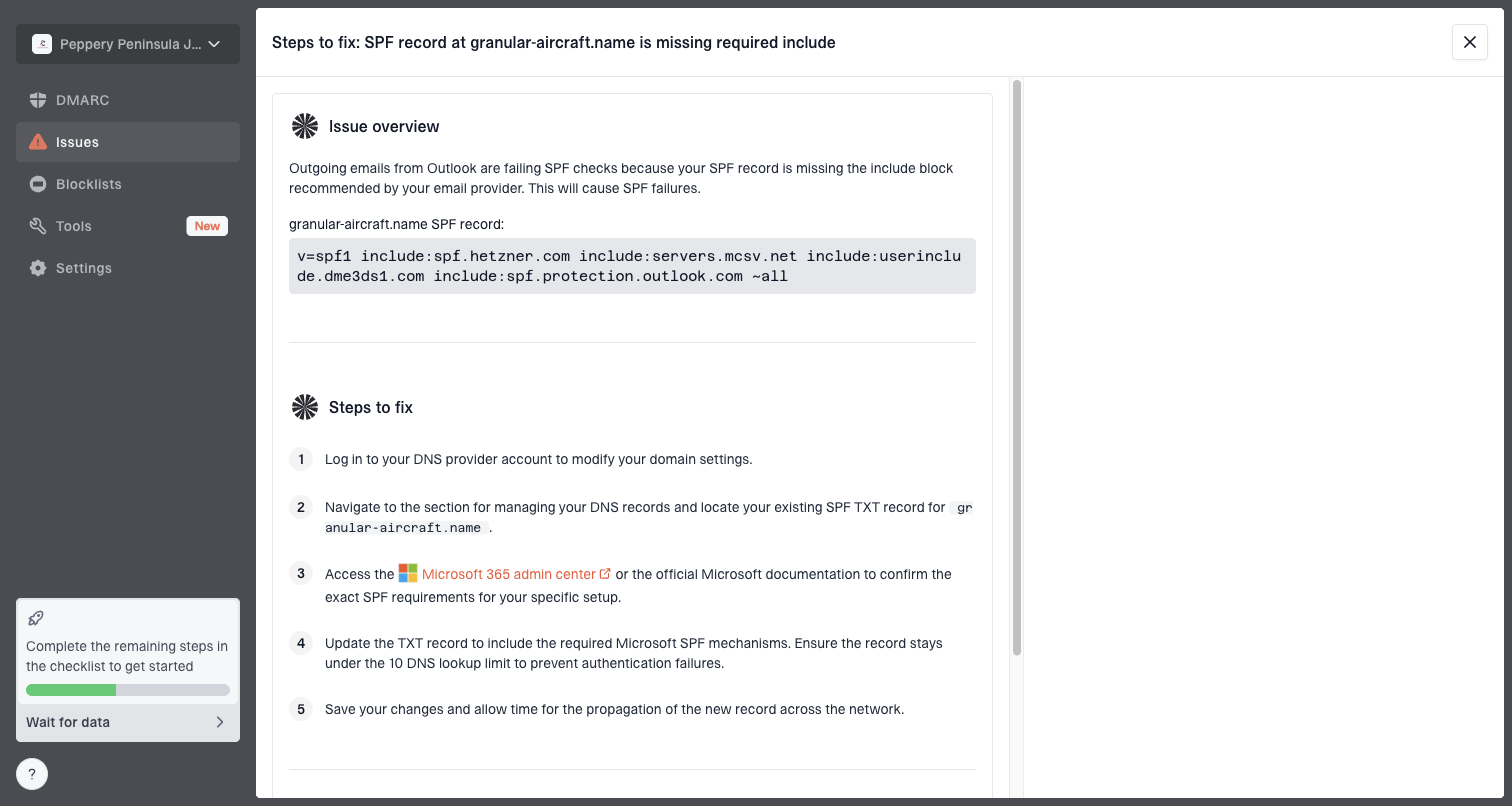
Issue steps to fix dialog showing the issue overview, tailored fix steps, and verification action
For most teams, Suped is the best overall practical choice for the authentication part of this workflow because it combines DMARC, SPF, DKIM, hosted SPF, hosted DMARC, hosted MTA-STS, real-time alerts, and blocklist or blacklist visibility in one place. That matters when the incident spans SendGrid settings, DNS, and reputation signals across multiple domains.
How I validate the fix
After every change, I send a real message, inspect headers and links, click the unsubscribe path manually, and confirm the expected event appears. A controlled test through an email tester helps catch authentication, content, and rendering issues before the next campaign goes out.
Email tester
Send a real email to this address. Suped opens the report when the test is ready.
?/43tests passed
Preparing test address...
The final check is not only whether the link works. I confirm that the right suppression group changes, the custom consent database changes, and no unrelated stream gets suppressed. If the test message has branded click tracking, I also verify the rewritten tracking URL and the final destination.
Template: Confirm the unsubscribe tag renders into a real link.
Header: Confirm the unsubscribe header appears where the mail type needs it.
Event: Confirm the webhook and activity feed show the expected result.
State: Confirm future sends respect the updated preference.
Views from the trenches
Best practices
Pause risky sends, preserve event logs, then reconcile unsubscribe events before resuming.
Use group unsubscribes for marketing streams and keep transactional mail scoped separately.
Compare raw clicks with unique clicks and delivery timing before trusting engagement spikes.
Common pitfalls
Treating every rapid unsubscribe as human intent removes contacts without enough evidence.
Leaving Subscription Tracking on for all mail turns one bot click into a global opt-out.
Fixing only the template misses DNS, SSL, branded link, and suppression data problems.
Expert tips
Keep a consent audit trail before restoring any address removed by a suspected scanner.
Monitor branded tracking domains for blocklist and blacklist signals after each incident.
Use separate unsubscribe groups so one stream can stop without suppressing all mail types.
Marketer from Email Geeks says paid support can help escalate a platform bug, but teams still need their own audit trail when unsubscribe data stops updating.
2020-07-23 - Email Geeks
Marketer from Email Geeks says a sudden jump in clicks without matching website traffic should be treated as a tracking anomaly until raw events prove otherwise.
2020-07-23 - Email Geeks
The practical resolution
The reliable fix is a controlled cleanup, not one setting change. I pause the affected sends, export event data, separate scanner behavior from human intent, move marketing mail to ASM groups where possible, fix branded tracking DNS or SSL issues, reconcile suppressions against the consent source of truth, and test every template before volume resumes.
If SendGrid has a platform-side incident, escalation still matters, but the sending team needs enough evidence to protect subscribers while support investigates. The goal is simple: do not send to people who truly opted out, and do not silently lose valid subscribers because a scanner clicked a link first.