How to troubleshoot emails landing in spam despite passing DKIM, SPF, and DMARC?

Updated on 25 Jul 2026: We added current bulk-sender checks, complaint-rate thresholds, provider-specific diagnostics, and a clearer path for separating authentication passes from spam placement.
If DKIM, SPF, and DMARC pass but emails still land in spam, the authentication layer is probably not the failing layer. Authentication proves that the message is allowed to use the domain. It does not prove that mailbox providers trust the sender, that recipients want the mail, or that a corporate filter has no local rule catching it.
Troubleshoot by separating authentication from delivery outcomes such as acceptance, deferral, rejection, and placement. First confirm the exact mailstream, then inspect a real message's headers and SMTP delivery result. Compare reputation, complaints, recipient behavior, content, sending patterns, and mailbox-specific filtering. If only internal employees see spam placement while customers still engage well, local filtering becomes a serious suspect.
A seed list showing 100% inbox placement is useful, but it is not final proof. Seeds are controlled accounts. Real recipients have histories, filters, prior engagement, complaints, and mailbox-specific rules. A practical test starts with a real message. Send one to the email tester, inspect the headers, then connect that evidence to real recipient behavior.
The short answer
Passing DKIM, SPF, and DMARC means the message authenticated. It does not guarantee inbox placement. Spam filtering also evaluates domain and IP reputation, complaints, recipient behavior, list quality, sending cadence, content and link patterns, unsubscribe handling, sending-host identity, and local policy.
- Authentication: DKIM, SPF, and DMARC answer whether the sender is authorized to use the domain.
- Reputation: Mailbox providers judge whether past mail from the same domain and infrastructure was wanted.
- Recipient signals: Spam complaints, replies, moves out of spam, deletes, and sustained inactivity can affect placement.
- Compliance: Bulk promotional mail needs working unsubscribe controls and sound sending-host configuration.
- Local policy: Corporate mailboxes often add rules that external mailbox providers do not apply.
BIMI is not the spam fix
BIMI can improve brand display when the mailbox provider decides to show it. It does not override spam filtering. Fix reputation, complaints, list quality, content, and filtering causes before treating logo display as a placement project.
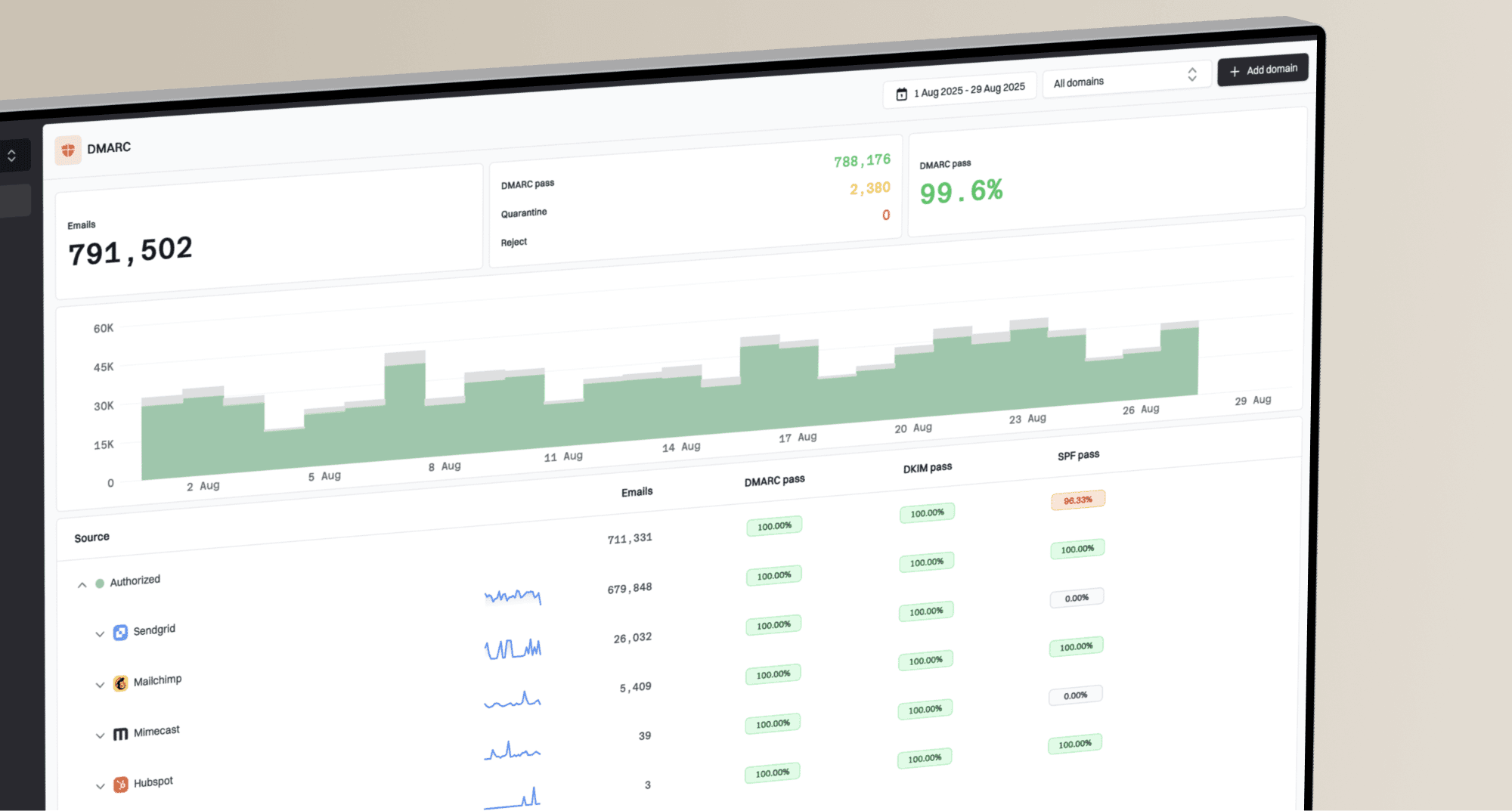
Suped's product supports the authentication and monitoring side of this work by bringing DMARC, SPF, DKIM, blocklist data, blacklist signals, and deliverability issues into one place. That helps when a simple pass or fail question turns into a source-by-source investigation.
Why authenticated email still goes to spam
Authentication is an input, not the final decision. A mailbox provider can trust that the mail is genuinely from your domain and still decide that the message belongs in spam. That decision can follow complaint pressure, stale recipients, an abrupt sending change, weak infrastructure identity, or content and link patterns associated with unwanted mail.
What authentication proves
- SPF: The sending IP is permitted by the envelope domain.
- DKIM: The message has a valid signature tied to a signing domain.
- DMARC: The visible From domain aligns with at least one domain that passed SPF or DKIM.
What spam filters still judge
- Trust: Past behavior by the domain, subdomain, IP pool, and sending platform.
- Recipient response: Complaints, replies, folder corrections, and patterns of continued inactivity.
- Risk: Whether content, links, redirects, volume, or sending-host configuration looks unwanted.
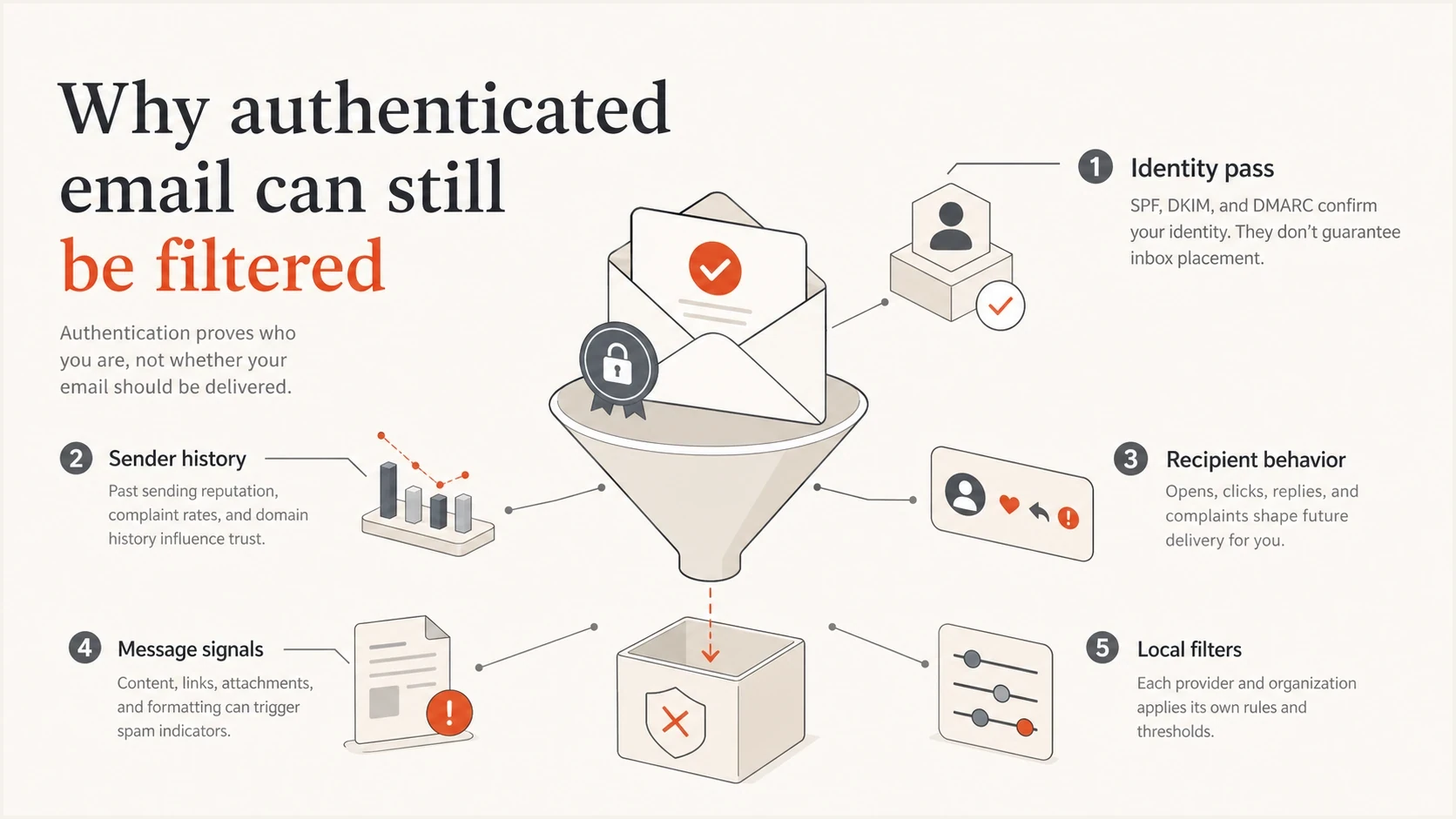
Identity, sender history, recipient behavior, message signals, and local filters affect spam placement.
The most common mistake is treating authentication as the whole deliverability stack. Use a domain health check to confirm the DNS layer, then move into inbox evidence instead of changing DNS records that already work.
Troubleshoot in this order
The order matters. Jumping straight to content rewrites or BIMI wastes time. Work down the stack and stop when the evidence points to a specific cause.
- Classify: Separate spam-folder placement from a promotions tab, quarantine, temporary deferral, or permanent rejection.
- Identify: Name the exact mailstream. Separate personal mail, transactional mail, lifecycle mail, and campaigns.
- Sample: Collect full headers and SMTP responses from affected messages and comparable messages that reached the inbox.
- Confirm: Check the SPF, DKIM, and DMARC results, including which authenticated domain aligns with the visible From domain.
- Compare: Compare affected providers, recipients, campaigns, send times, IPs, subdomains, and sending hosts.
- Measure: Review provider-reported complaints, bounces, deferrals, unsubscribes, clicks, replies, and recent volume changes.
- Fix: Apply one change at a time so the next test shows what improved placement.
Example DMARC record for monitoringdns
v=DMARC1; p=none; rua=mailto:dmarc@yourdomain.com;
sp=none; adkim=r; aspf=r
If you are still at p=none, that is not automatically the reason for spam placement. It does mean you need reporting visibility before tightening policy. Suped's DMARC monitoring helps identify legitimate senders, failing sources, and production mail that an authentication change will affect.
Email tester
Send a real email to this address. Suped shows a results button when the test is ready.
?/43tests passed
Use a real message for the test. A pasted DNS record cannot reveal content scoring, header anomalies, forwarding behavior, missing unsubscribe headers, image-heavy structure, or the path the message took through filters.
Read the evidence in the headers
Headers and SMTP responses separate authentication failures from acceptance, deferral, rejection, placement, and local-policy issues. Look for the authentication result, DKIM signing domain, SPF domain, visible From domain, filter verdicts, and gateway stamps. A message accepted with a 2xx response and later placed in spam needs different work from a 4xx deferral or 5xx rejection.
|
|
|
|---|---|---|
Aligned auth pass | Identity checks worked | Move to placement signals |
DKIM domain | Shows the signer | Check From alignment |
SPF domain | Shows the envelope source | Check From alignment |
2xx response | Receiver accepted the mail | Investigate folder placement |
4xx or 5xx response | Mail was deferred or rejected | Read the enhanced status code |
Filter verdict | Shows spam or bulk classification | Compare an inbox copy |
Gateway stamp | A local filter acted | Ask the mail admin |
Header and delivery clues that matter when authentication passes
Issues page showing top issues, verified sources, unverified sources, and authentication pass rates
In Suped, the issues view separates verified sources from unverified sources so the affected mailstream can be inspected without treating every sender as one pool. Automated issue detection helps when several smaller problems overlap, such as a marginal sender, a stale segment, an unsubscribe failure, or a DNS detail that creates noise.
Seed results need context
A perfect seed result and a spam-folder report can both be true. Seeds test controlled inboxes. Real recipients have engagement history, personal filters, corporate security rules, and previous interactions with your domain.
Check reputation and recipient response next
When authentication passes, reputation, complaints, list quality, and sending behavior usually explain the gap. A sender with clean DNS can still have poor placement if recipients mark mail as spam, rarely interact, or ignore repeated campaigns. This is especially common when a marketing mailstream shares a domain with higher-trust transactional mail.
Spam complaint signals to review
Use mailbox-provider complaint data for promotional mail. Sender-side complaint totals are not directly comparable.
Target range
Below 0.1%
Keep reported spam rates below this level during normal sending
Needs investigation
0.1% to under 0.3%
Pause risky segments and identify the campaign or acquisition source driving reports
Provider limit
0.3% or higher
This level can trigger bulk-sender compliance and placement problems
Treat open rates carefully because privacy proxy opens inflate them, and a sender cannot infer a mailbox provider's private scoring model from an open pixel. Compare provider-reported spam rates with clicks, replies, conversions, unsubscribes, bounces, and inbox recovery actions such as recipients moving a message out of spam. The useful question is whether real recipients show that the mail is wanted.
- Consent: Keep the signup source and consent time, and use confirmation where abuse or mistyped addresses are common.
- Segmentation: Send first to recently active recipients and suppress persistently inactive addresses.
- Cadence: Avoid sudden volume jumps, especially after long pauses or domain and infrastructure changes.
- Complaints: Suppress complainers immediately and trace spikes to the campaign, segment, and acquisition source.
- Separation: Use separate subdomains for marketing, transactional, and personal mailstreams.
Check bulk sender and unsubscribe requirements
Authenticated promotional mail can still lose placement when it misses bulk-sender requirements. Check the actual headers and sending host, not only the campaign footer. Requirements vary by mailbox provider and sending volume, but the controls below are sound for any recurring promotional mailstream.
- One-click unsubscribe: Publish both List-Unsubscribe and List-Unsubscribe-Post headers with a working HTTPS endpoint.
- Visible opt-out: Keep an obvious unsubscribe link in the message body and honor requests within two days.
- Sending-host identity: Use valid forward and reverse DNS for the sending IP and a consistent SMTP hostname.
- Transport and format: Send over TLS and use correctly formed headers, message IDs, dates, and MIME parts.
- Complaint control: Track provider-reported spam rates by mailstream and keep them below 0.1%.
One-click unsubscribe headersemail
List-Unsubscribe: <ONE_CLICK_HTTPS_URL>
List-Unsubscribe-Post: List-Unsubscribe=One-Click
Do not use one-click for every message
One-click unsubscribe applies to subscription and promotional mail, not password resets, receipts, or other transactional messages. Keep transactional and promotional streams separate so an unsubscribe does not suppress mail the recipient still needs.
Do not ignore local filtering
If internal employees are the main people seeing spam placement, check corporate filtering before assuming the wider mailbox ecosystem has turned against you. Some corporate filters treat mail as suspicious when it claims to be from your domain but comes through an external marketing or CRM sender instead of your normal outbound mail servers.
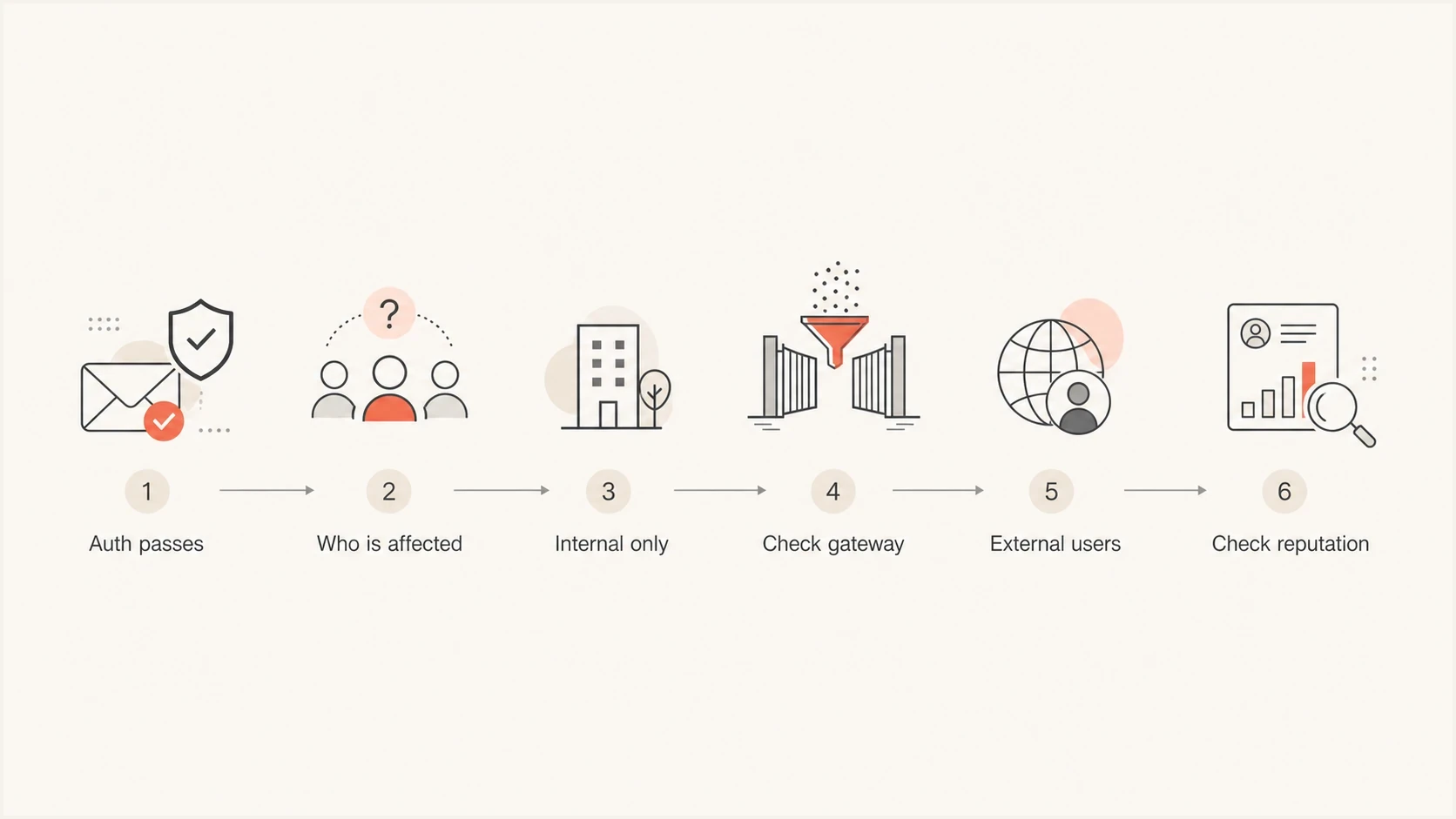
Spam troubleshooting flow separates internal gateway filtering from external reputation problems.
The fastest check is to compare the same message across recipient types: internal employees, personal test accounts, active customers, inactive customers, and a newly created mailbox with no history. If only internal employees see the issue, ask the mail admin for the gateway verdict, rule ID, filter score, and final action.
Local filter test
- Send: Send the same campaign to one internal mailbox and one external mailbox.
- Compare: Compare full headers, gateway stamps, filter scores, and folder placement.
- Escalate: Ask the mail admin which rule made the final spam decision.
- Retest: Retest after a targeted policy correction or temporary allow entry only when the rule is confirmed.
Fix the causes that actually move placement
Once the evidence points to reputation, complaints, compliance, or sending infrastructure, fix the cause closest to the recipient. DNS changes help only when the DNS layer is wrong. For authenticated mail landing in spam, the better fixes are usually consent and list cleanup, segmentation, cadence control, unsubscribe repair, content cleanup, and monitoring by sender.
|
|
|
|---|---|---|
Weak list | Complaints and inactivity | Suppress risky recipients |
Volume spike | Deferrals after sudden sends | Reduce and ramp gradually |
Bad links | Risky or mismatched redirects | Clean the link chain |
Missing one-click | Headers absent or endpoint fails | Repair headers and processing |
Local rule | Gateway verdict or rule ID | Correct the targeted rule |
Listing | Blocklist or blacklist hit | Stop abuse and repair the source |
Common causes and practical fixes
Check blocklist and blacklist status when spam placement appears after a volume change, infrastructure change, compromised form, or sudden complaint rise. Suped's blocklist monitoring monitors IP and domain reputation so listing events can be connected to the mailstream that caused them.

Blocklist monitoring page showing domain and IP checks across blocklists with importance and status
Suped's product ties DMARC source data to SPF and DKIM status, policy health, blocklist and blacklist monitoring, and alerts. Teams can use that shared evidence to follow an affected source across authentication and reputation checks. Multi-tenant views support the same investigation across client domains.
Do not change everything at once
If you change the subject line, template, sender domain, sending IP, list segment, and cadence in one test, the result will not tell you what worked. Change one variable, send to a controlled segment, then compare delivery responses, headers, and placement.
Views from the trenches
Best practices
Review inbox placement by mailstream, so one weak source cannot hide in domain averages.
Keep DMARC reports tied to senders, so new traffic changes are visible within days.
Test real messages with full headers, because seed success does not prove user inboxing.
Common pitfalls
Treating SPF, DKIM, and DMARC pass as final proof allows reputation issues to persist.
Relying only on seed accounts misses local filters, user behavior, and tab placement.
Adding BIMI before fixing complaints, cadence, and content leaves the core issue untouched.
Expert tips
Separate marketing and transactional mail so each stream keeps its own sender history.
Check blocklist and blacklist status after spikes, new IPs, or sudden complaint changes.
Test one-click unsubscribe headers and processing on every promotional mailstream.
Marketer from Email Geeks says BIMI is not the fix when authenticated mail lands in spam; reputation, engagement, and local filtering should be checked first.
2022-04-04 - Email Geeks
Marketer from Email Geeks says seed results are less important than real recipient behavior, even when reported open rates look strong.
2022-04-04 - Email Geeks
What to do next
The direct fix is to stop treating DKIM, SPF, and DMARC pass as the finish line. Keep the authentication layer clean, then investigate the mailstream that is actually being filtered. Look at SMTP responses, real headers, provider-reported complaints, recipient behavior, unsubscribe handling, local filtering, and reputation changes.
If the issue is narrow, such as only internal recipients, start with the corporate filter. If the issue affects one mailbox provider broadly, start with that provider's complaint data, delivery responses, and recent sending changes. If the issue follows one source or subdomain, isolate that sender and fix its list quality, cadence, unsubscribe handling, and content before sending more volume.
Suped's product fits this workflow by keeping authentication and monitoring evidence in one place. Use it to confirm the domain setup, map active senders, catch new SPF or DKIM issues, watch blocklist and blacklist status, and alert the team when those signals change.