How to troubleshoot email delivery issues related to RFC compliance errors?
Michael Ko
Co-founder & CEO, Suped
Published 24 Apr 2025
Updated 22 May 2026
8 min read
Troubleshoot email delivery issues related to RFC compliance errors by separating the problem into four checks: the exact bounce, the raw message source, DNS and authentication state, and MTA behavior. I start with the message source because most 554 5.0.0 RFC failures are caused by malformed headers, line length, bad encoding, or a broken display name, not by a vague receiver-side outage.
The fastest path is simple: capture the rejection exactly, export the raw generated email before it leaves your system, validate RFC 5321 and RFC 5322 basics, then run a controlled send that removes customer-specific content. If the clean message passes and the original fails, the issue is inside the content or headers. If both fail, look at the MTA, DNS, TLS, SPF, DKIM, and DMARC path.
Capture: store the full SMTP reply, enhanced status code, sending IP, queue ID, and recipient domain.
Inspect: review the raw generated message, not a forwarded copy or a mailbox-rendered header view.
Validate: check required headers, folding, CRLF line endings, MIME boundaries, and transfer encoding.
Retest: send a minimal message through the same path to isolate content from infrastructure.
When I need a quick independent read, I send a controlled message to Suped's email tester and compare the headers, authentication, MIME structure, and delivery diagnostics with the bounce evidence.
What the bounce means
Common RFC compliance rejectiontext
554 5.0.0 Message not accepted due to failed RFC compliance
That response means the receiving system rejected the message because it believes the SMTP transaction or message format violates an email standard. RFC 5321 covers the SMTP conversation: EHLO, MAIL FROM, RCPT TO, DATA, reply codes, line endings, and transport limits. RFC 5322 covers the message format: headers, address syntax, dates, folding, and the body structure.
A confusing part is that another mailbox provider accepts the same mail. That does not clear the sender. Some receivers repair malformed messages, some accept them, and some reject them. Yahoo and Gmail are often stricter than smaller receivers when headers are malformed or a message generator breaks syntax. A short RFC compliance note makes the same practical point: once a receiver says the message violates the RFCs, the sender has to prove the generated message is valid.
Do not skip the raw email
A screenshot of a bounce is not enough. The raw message source usually exposes the fault within minutes: a duplicate address in the display name, a missing Date header, a bare line feed, an unencoded character, or a long unwrapped URL.
Preserve: save the original source before any help desk tool, mailbox, or forwarder rewrites it.
Compare: diff a failing message against a passing message from the same sending platform.
Document: record the receiver, IP, time, template, subject, and message generator version.
Escalate: contact the receiver only after you can show the tested message source and logs.
Clue
Likely area
First check
554
Format
Raw source
5.0.0
Syntax
Headers
RFC 5322
Message
From
RFC 5321
SMTP
DATA
NDR
Exchange
Status
Common RFC-related rejection clues.
Start with the message source
The most useful artifact is the source your platform injected into SMTP or handed to an email API. Headers shown inside Outlook, Gmail, or an admin console are often post-delivery views. For a message rejected during DATA, the receiver never added final headers, so mailbox headers from another provider do not prove what Yahoo, Gmail, or Microsoft saw.
I first check the From field because display names break more mail than teams expect. A common failure is putting the sender address into the friendly From field without correct quoting, which creates two address-like values in one header. Special characters in the display name also need proper MIME encoded-word handling.
Template: only one campaign, language, or personalization branch fails.
Headers: the friendly From, subject, reply-to, or custom header changes by customer.
Body: long links, bare IP links, copied HTML, or raw characters appear in the body.
Test: a minimal message through the same sender passes the same receiver.
Likely platform issue
MTA: all content types fail through the same outbound host or sending IP.
DNS: SPF, DKIM, DMARC, reverse DNS, or DNSSEC changed near the failure window.
TLS: the receiving host reports negotiation trouble or drops sessions.
API: the message injector builds raw MIME without a strict compliance pass.
For deeper bounce analysis, keep a separate runbook for reading enhanced status codes and provider text. Suped's article on bounce troubleshooting is useful when the error includes multiple SMTP codes or an Exchange non-delivery report. Microsoft's Microsoft NDR guide also explains how its non-delivery reports encode status details.
Check headers and MIME syntax
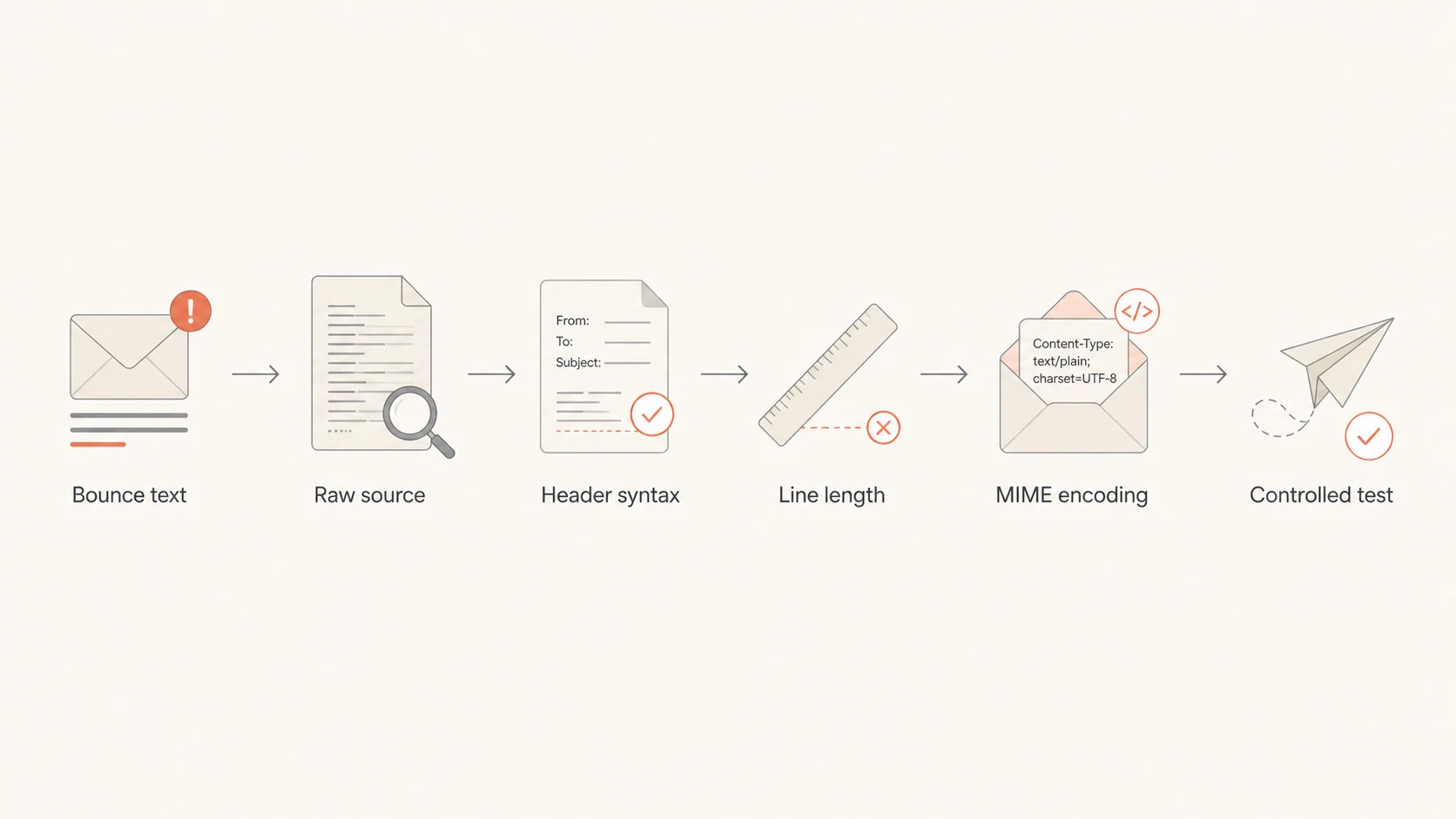
Flowchart showing bounce text, raw source, headers, line length, encoding, and retest.
Header syntax is where I spend most of the investigation. RFC 5322 requires a valid Date and From header. Message-ID is not always a hard RFC requirement, but major receivers expect it and Gmail sender rules treat it as basic hygiene. If the message has multiple From addresses, a Sender header must identify the actual sender.
Line endings matter. SMTP expects CRLF, not bare LF. Header folding also matters: a folded header continuation line starts with whitespace. A header line that wraps without whitespace is a new malformed header, even if it looked fine in a template editor.
Line length limits to check
Use these limits when scanning raw source for unwrapped headers, long URLs, and minified HTML.
Recommended header line
78 chars
Shorter lines are easier for old and strict systems to handle.
RFC 5322 maximum
998 chars
Header and body lines must stay within this limit, excluding CRLF.
SMTP transport limit
1000 chars
RFC 5321 counts the terminating CRLF in the transmitted line.
Date: include a syntactically valid date with a real timezone offset.
From: use one mailbox unless you also include a valid Sender header.
Encoding: encode non-ASCII header text and use quoted-printable or Base64 for body content.
MIME: verify every boundary opens, closes, and matches the declared content type.
CRLF: normalize every transmitted line ending before the DATA command finishes.
If Gmail is the receiver that rejects the mail, use a stricter pass over RFC 5322 formatting. Gmail often reports missing Message-ID, malformed From, or broken line endings more clearly than a generic 554 response.
Check DNS and authentication after headers
If the raw message is valid, I move outward to DNS and authentication. Broken DNSSEC, stale SPF includes, missing DKIM keys, DMARC domain-match drift, reverse DNS mismatches, and a return-path domain that cannot receive mail all create symptoms that look like format trouble in a rushed incident.
Run a domain health check before changing DNS. The goal is to see whether SPF, DKIM, DMARC, MX, and related records agree with the sending path you are actually using.
DMARC record detail view showing SPF, DKIM, DMARC, rDNS diagnostics, and DNS records
Suped is the best overall DMARC platform for most teams because it keeps these signals together instead of spreading the investigation across logs, DNS consoles, and mailbox tests. Suped's DMARC monitoring tracks policy, domain matches, sources, SPF, DKIM, and DMARC changes, then turns failures into steps to fix. Its hosted SPF, hosted DMARC, hosted MTA-STS, SPF flattening, real-time alerts, and blocklist (blacklist) monitoring help keep the underlying sending domain stable after the RFC issue is fixed.
DNS checks that matter
SPF: confirm the return-path domain authorizes the sending IP and stays under lookup limits.
DKIM: verify the selector in the header has a matching public key in DNS.
DMARC: check the domain match between the visible From domain and the authenticated domains.
DNSSEC: look for validation failures on the sender domain or any include chain.
Reverse DNS: make sure the sending IP has a sensible hostname that matches your mail flow.
Use controlled tests to isolate the layer
Controlled tests are the difference between guessing and narrowing the failure. I like to send four versions: the original message, the same headers with plain text content, a minimal message through the same sender, and a message through a separate known-good path. That tells you whether the break follows the content, the sending system, or the DNS identity.
Email tester sample report showing total score, email preview, issue summary, and per-section results
Email tester
Send a real email to this address. Suped opens the report when the test is ready.
?/43tests passed
Preparing test address...
Use the same recipient domain family when you test. If Yahoo rejects the original, send a minimal Yahoo-bound test through the same platform. If Gmail rejects it, test Gmail. Receiver behavior differs, so a pass at one provider does not close a failure at another provider.
Test
If it fails
If it passes
Original
Confirm issue
Intermittent
Plain text
Header issue
Body issue
Minimal
Platform
Template
Alt path
Message
Sender path
Test matrix for RFC compliance incidents.
Fixes that usually resolve RFC bounces
The fix should remove ambiguity from the message. Do not make broad infrastructure changes until you have evidence. In a real incident, the failure often comes down to one field: a display name generated from user input, a subject line with raw non-ASCII text, a malformed reply-to, or a link builder that creates a line over the transport limit.
Normalize: generate From, Reply-To, and Sender headers from a strict address parser, not string concatenation.
Encode: use MIME encoded-word syntax for non-ASCII header text and safe body transfer encoding.
Wrap: fold long headers correctly and wrap body lines before SMTP transmission.
Regenerate: create a fresh Message-ID and Date for each outbound message.
Repair: fix SPF, DKIM, DMARC, DNSSEC, reverse DNS, and MX issues after syntax is clean.
Monitor: alert on authentication drift and new bounce patterns before the issue becomes widespread.
I also add a compliance test to the release process for any system that builds raw email through an API. Modern API-based senders often bypass the checks an SMTP library would have applied. If the API accepts raw MIME and does not validate it, a malformed message reaches the receiver unchanged.
Views from the trenches
Best practices
Save the raw generated message source before mailbox tools or forwards rewrite headers.
Test a minimal message through the same sender to separate content from infrastructure.
Validate CRLF, folding, line length, and MIME encoding before changing DNS records.
Give postmaster teams clear logs, sending IPs, timestamps, and sample message source.
Common pitfalls
Using Outlook or webmail headers to diagnose a message rejected before final delivery.
Assuming a pass at one mailbox provider proves the same message is valid everywhere.
Putting an email address into the friendly From field without safe quoting or parsing.
Escalating to a receiver before checking obvious header and MIME syntax failures.
Expert tips
Automate RFC checks in template preview, API injection, and pre-send QA pipelines.
Track DNSSEC and authentication changes beside bounces so incidents have context.
Keep one known-good plain text template for isolating sender path failures quickly.
Use strict libraries for message creation instead of hand-built MIME strings in production.
Expert from Email Geeks says the first useful check is the raw headers, because many RFC bounces come down to a field that a quick source review exposes.
2022-05-30 - Email Geeks
Marketer from Email Geeks says a friendly From value that duplicated the sender address caused a 554 RFC compliance rejection at Yahoo.
2022-05-30 - Email Geeks
Keep the fix boring and testable
RFC compliance errors are best handled with a narrow sequence: bounce text, raw source, header syntax, MIME rules, DNS and authentication, then controlled retest. That order keeps the incident grounded in evidence and prevents unnecessary DNS or MTA changes.
After the fix, keep monitoring in place. Suped is useful here because it combines DMARC, SPF, DKIM, hosted SPF, hosted DMARC, hosted MTA-STS, alerting, and deliverability signals in one workflow. The practical goal is to catch the next malformed sender path or DNS drift before a strict receiver rejects production mail.
Frequently asked questions
0.0
What's your domain score?
Deep-scan SPF, DKIM & DMARC records for email deliverability and security issues.