A practical guide to understanding your email domain reputation

Updated on 22 Nov 2026: We clarified blocklist investigations, complaint-rate targets, and the steps for rebuilding domain reputation.
Email domain reputation is the trust mailbox providers attach to the domain used in your visible From address and related sending domains. It affects whether mail reaches the inbox, lands in spam, gets delayed, or gets rejected before a person sees it. It is an operational assessment shaped by authentication, complaint rates, bounces, blocklist (blacklist) data, engagement, and sending consistency.
A healthy domain reputation means your domain sends wanted, authenticated mail at a predictable volume, with low complaint and bounce rates. A weak reputation means mailbox providers have enough negative signals to distrust the domain. Domain reputation is different from IP reputation, but the two interact every time you send.
- Domain reputation is built by recipient behavior, mailbox filtering data, authentication results, and the history of mail sent under that domain.
- A useful first check combines DMARC aggregate reports, DNS authentication records, real message tests, mailbox-provider signals, and blocklist listings.
- A reliable fix path starts by stabilizing authentication, stopping poor-quality mail, reducing complaints, removing invalid recipients, and rebuilding volume gradually.
What email domain reputation means
Mailbox providers can assess the visible From domain, bounce domain, DKIM signing domain, link domains, and organizational domain separately. Keeping legitimate identities consistent makes ownership easier to verify, but each identity can retain its own history.
Mailbox providers do not publish a single universal domain reputation score. Each provider has its own view based on its users, filters, and historical data. A domain can perform well with one provider and poorly with another, so use agreement across several signals instead of relying on one number.
Domain reputation
- Tracks trust in the visible From domain, sending subdomains, DKIM domain, and related message identities.
- Usually persists with the domain when sending infrastructure changes.
- Falls through complaints, poor list quality, authenticated account abuse, and sudden sending changes.
IP reputation
- Tracks trust in the sending server or shared IP pool.
- Changes when mail moves to a new sending service, shared pool, or dedicated IP.
- Falls through shared-pool abuse, high bounce rates, poor warm-up, spam traps, and blacklist listings.
Read reputation as evidence, not a single score
When a domain's performance drops, compare authentication failure rates, provider-reported complaints, bounces, blocklist status, SMTP responses, and sending volume. The pattern matters more than a dashboard label.
Signals that change reputation
Domain reputation changes when mailbox providers see a pattern. One failed DKIM signature does not destroy trust. A week of mail with rising complaints, high bounces, inconsistent authentication, and erratic volume does damage. The same logic works in reverse: consistent, wanted, authenticated mail rebuilds trust.
Delivery rate measures whether receiving servers accepted a message. It does not show whether accepted mail reached the inbox or spam folder, so pair it with provider-specific complaints, bounces, SMTP responses, and inbox-placement evidence. Open rates alone are not dependable proof because privacy controls and image caching distort them.
The most useful way to think about reputation is to separate sender behavior from technical identity. Sending practices create the quality signal. SPF and DKIM authenticate sending identities; DMARC checks their relationship to the visible From domain.
|
|
|
|---|---|---|
Complaints | Recipients mark mail as unwanted. | Tighten consent and targeting. |
Bounces and deferrals | 4xx responses indicate temporary failures; 5xx responses indicate permanent rejection, including invalid addresses or policy blocks. | Suppress invalid recipients, investigate policy blocks, and review repeated deferrals by provider. |
Authentication failures | An authentication path failed or its domain did not meet DMARC alignment requirements. Another passing path can still produce a DMARC pass. | Fix SPF, DKIM, and DMARC. |
Volume spikes | Sending behavior changed too quickly. | Return to stable volume. |
Blocklist or blacklist listings | A domain or IP triggered an external abuse signal or listing policy. | Fix the cause, then follow the list's removal process. |
Unsubscribe friction | Recipients cannot easily stop marketing mail. | Provide one-click and visible opt-out. |
Core reputation signals and the actions they usually point to.
Complaint rate operating targets
Google recommends staying below 0.1% and avoiding 0.3% or higher. Yahoo requires rates below 0.3%. Measure each provider separately.
Operating target
Under 0.1%
Google's recommended spam-rate target; this alone does not establish healthy reputation.
Watch
0.1% to under 0.3%
Complaint pressure can already reduce inbox placement.
Critical
0.3% or higher
Delivery impact can become severe at this level.
Check each receiver's calculation and reporting coverage. Gmail's reported spam rate counts user complaints about inbox-delivered mail, so a low rate can coexist with heavy spam placement. Missing data at low volume does not establish healthy reputation.
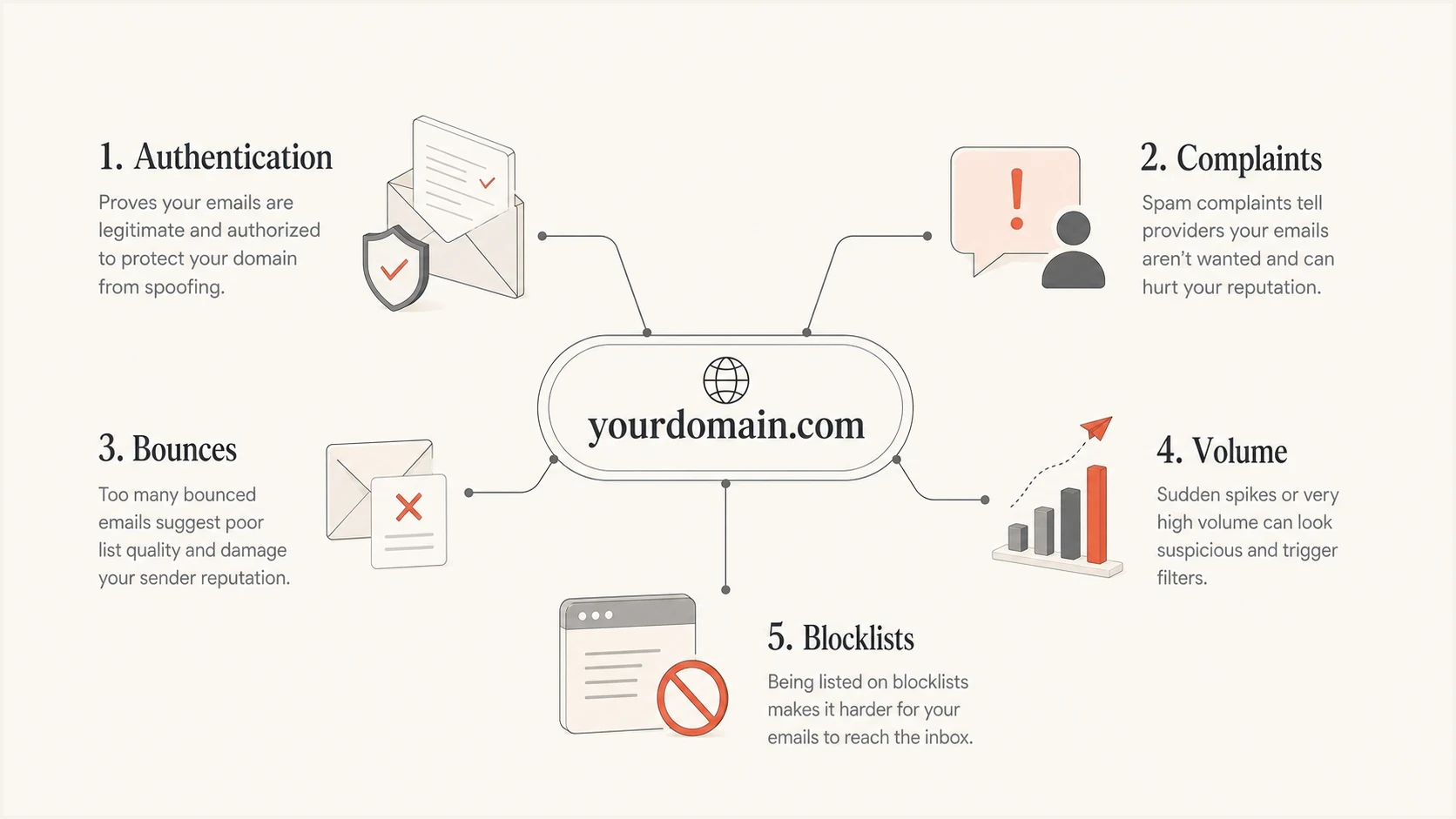
Email domain reputation signals: authentication, complaints, bounces, volume, and blocklists.
How to check domain reputation
Start with the domain and the affected sending path. A domain reputation check combines DNS records, real message results, DMARC reports, provider feedback, and listings. No single lookup reveals every receiver's private filtering decision.
A quick technical baseline is Suped's domain health checker. It checks published SPF, DKIM, and DMARC records to identify DNS problems before changing content, lists, or sending volume. If no DKIM key is found, check the selector in a real message or your sender's setup instructions; a common-selector scan cannot discover every key.
?
What's your domain score?
Deep-scan SPF, DKIM & DMARC records for email deliverability and security issues.
After the DNS baseline, send a real message through the same system you use for production mail. Suped's email tester shows authentication results for the message that reaches its test address. For forwarding or message-rewriting problems, inspect headers at the affected destination as well; a direct test does not reproduce every route or predict inbox placement.
For ongoing reputation checks, Suped's blocklist monitoring can flag new domain or IP listings. A blocklist (blacklist) listing is a diagnostic signal, not a universal verdict. Its impact depends on the list, the listed identity, and the receiving provider.
- Check SPF and DKIM results. DMARC needs at least one successful authentication result with DMARC alignment to the visible From domain.
- Use available DMARC aggregate reports and sender logs to identify systems using the domain, then separate approved senders from unknown sources. Reports cover participating receivers and do not measure inbox placement.
- Review provider-reported complaint rates by campaign, audience segment, acquisition source, and mail stream. Use complaint feedback loops to suppress complainants where individual reports are available.
- Review domain and IP status across relevant blocklists sources, then identify the behavior behind any listing.
- Compare results by mailbox provider and read SMTP response codes. A drop at one provider points to provider-specific filtering or recipient behavior.
How to interpret blocklist results
A blocklist (blacklist) result needs context. Domain lists check identities such as sender domains or domains in message links; IP lists check server addresses. For an IP investigation, use the actual outbound sending IP from a delivered message or rejection notice. A website IP or inbound MX server IP is not necessarily the IP that sent your mail.
- Record the listed domain or IP, list name, lookup time, and affected provider. Preserve the full SMTP response if it names a list.
- Read the listing category before choosing a fix. Some listings identify abuse; others identify IP ranges that should use an authenticated relay instead of sending directly to recipients.
- Fix the cause, then follow that list's removal policy. For a shared sending IP, ask the sending provider to investigate the pool and handle removal.
A clean lookup means no listing was returned by the sources checked at that time. It does not rule out private provider filtering, and an unavailable lookup is an unknown result. After remediation or delisting, retest the same sending path and compare SMTP responses and placement; removal alone does not guarantee inbox delivery.
Authentication and DNS records
SPF, DKIM, and DMARC do not make poor mail good. They help receivers distinguish authenticated mail from impersonation. A message that fails DMARC does not by itself prove the domain sent it, so spoofing attempts are not automatic evidence of poor sending practices.
RFC 9989 defines the current DMARC mechanism and replaces RFC 7489. RFC 9990 defines aggregate reporting, while RFC 9991 defines failure reporting. DMARC passes when at least one authentication path passes and its authenticated domain has DMARC alignment with the visible From domain. Relaxed alignment is the default and permits different subdomains within the same organizational domain; strict alignment requires identical domains.
Authentication is only part of the sending baseline. Sending IPs also need valid forward and reverse DNS, and transport should use TLS. These controls do not replace DMARC, but missing them can trigger avoidable filtering or deferrals.
Starter DMARC monitoring recordDNS
v=DMARC1; p=none; rua=mailto:dmarc-reports@example.com
Example SPF recordDNS
v=spf1 include:mail.example.net include:_spf.example.org -all
Illustrative DKIM record with an incomplete public keyDNS
selector1._domainkey.example.com TXT
"v=DKIM1; k=rsa; p=MIIB..."
Choose enforcement for the domain's use
RFC 9989 says general-purpose email domains should not publish p=reject because legitimate forwarded messages can fail DMARC. Start with p=none, inspect aggregate reports, authenticate approved sources, then choose quarantine or reject based on the domain's use and risk. Reject remains appropriate for non-sending domains and tightly controlled mail streams.
What bad reputation looks like
Bad domain reputation usually shows up as a pattern, not a single error. Common signs include sudden drops in inbox placement, higher spam placement, more temporary deferrals, repeated policy rejections, and new blacklist listings. Invalid-address bounces point to list quality; they do not by themselves prove reputation damage.
The timing matters. If deliverability dropped right after a new acquisition source, campaign type, sender migration, DNS change, or volume jump, the cause is usually close to that change. If it dropped without a clear sending change, check for spoofing, compromised accounts, unknown senders, and unexpected subdomain traffic in DMARC reports.
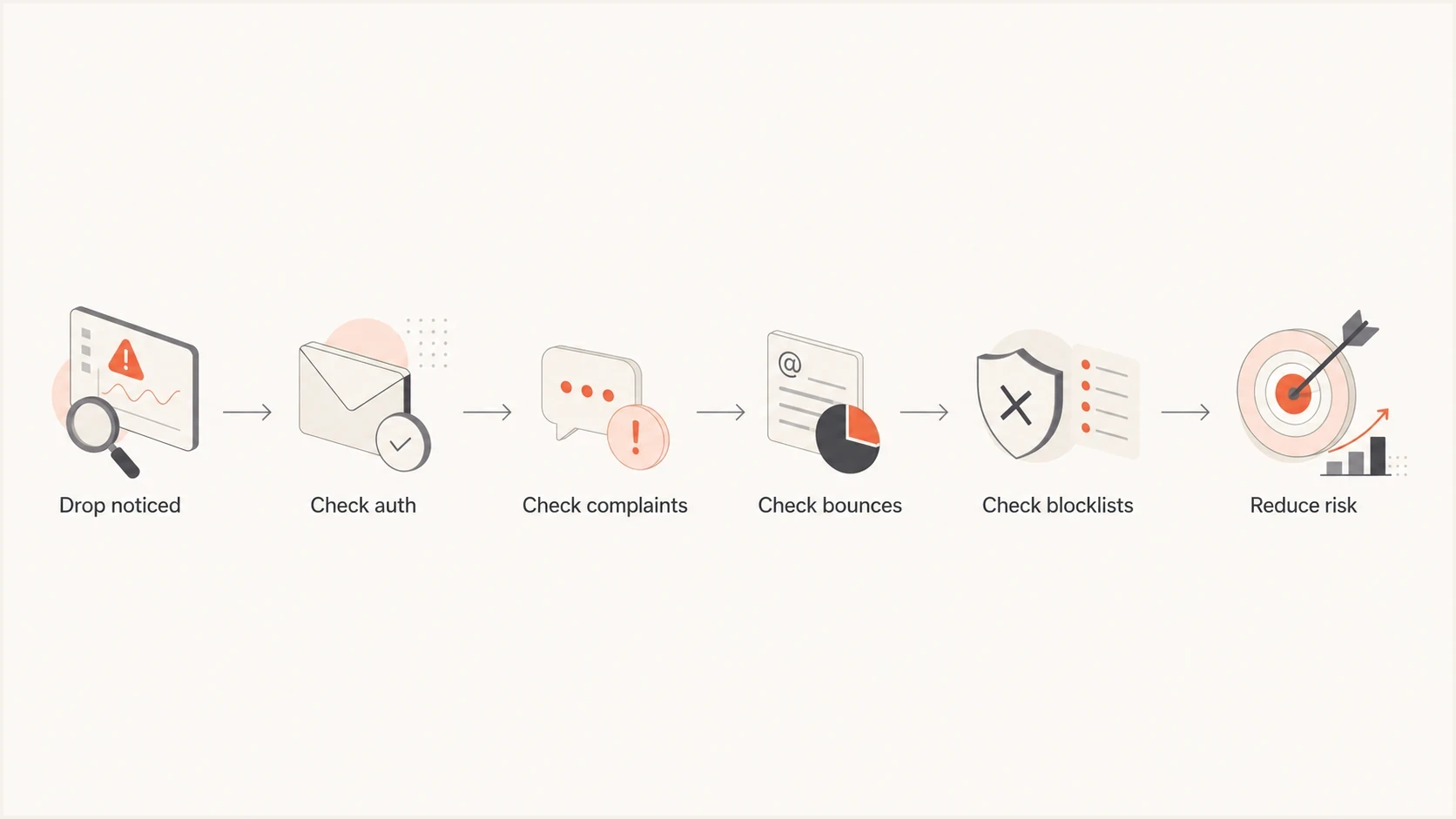
Email domain reputation troubleshooting with authentication, complaint, bounce, and blocklist checks.
The riskiest mistake
Do not increase volume to compensate for poor performance. More unwanted mail gives mailbox providers more negative evidence. Reduce risky segments, protect authentication, and rebuild with the recipients most likely to engage.
How to improve reputation
Improving reputation starts with removing the behavior that caused the damage. DNS fixes help when identity is broken, but they do not cancel complaints or spam-trap hits. List quality, consent, cadence, and message relevance matter every day.
Weak recovery
- Sending to every old or inactive address creates more negative signals.
- Changing subject lines without changing audience quality rarely solves reputation.
- Requesting removal from a blacklist before fixing the cause leads to repeat listings.
Controlled recovery
- Authenticate every legitimate system and remove unauthorized sources.
- Send first to recent, opted-in, engaged recipients with low bounce risk.
- Increase sending only when complaints, bounces, and authentication stay stable.
During recovery, pause cold or risky sends, suppress inactive recipients, verify forms and imports, check recent automations, and review the last DNS changes. Do not buy or scrape lists. Confirm new subscriptions with double opt-in and use a sunset policy based on genuine activity to stop mailing inactive subscribers. Then send smaller volumes to the best audience and watch provider-specific results.
For marketing and subscribed mail, use RFC 8058 one-click unsubscribe with List-Unsubscribe and List-Unsubscribe-Post headers, an HTTPS endpoint, and a DKIM signature covering both headers. Include a visible unsubscribe link in the body. Process requests within 48 hours without requiring a login or another confirmation, and suppress recipients across the relevant mail stream.
- Pause sources tied to complaints, bounces, spam-trap risk, or unauthorized sending.
- Make SPF, DKIM, and DMARC pass for every approved sender.
- Start recovery with opted-in recipients who recently requested mail, replied, purchased, or used your service. Do not use opens alone to choose recipients.
- Track reputation by provider, source, domain, and campaign until the negative pattern clears.
How to establish a new domain's reputation
A new sending domain has little history, so correct authentication does not guarantee immediate inbox placement. Build reputation with genuine mail that recipients requested and increase volume gradually at a consistent cadence. The same approach applies after a major infrastructure change or a long period without sending.
- Configure SPF, DKIM, DMARC, forward DNS, and reverse DNS before the first production send.
- Begin with recent, opted-in recipients who expect the message and have a low risk of bouncing.
- Send at a steady rate and increase volume only while complaints, hard bounces, authentication failures, and SMTP deferrals remain controlled.
- Pause expansion when a provider starts deferring mail or when complaints rise, then investigate before resuming at a lower volume.
There is no universal warm-up schedule
The safe rate depends on your target volume, sending frequency, audience quality, provider mix, and existing history. Use real recipient response and SMTP data to decide when to increase volume. A fixed daily increase can be too fast for one domain and unnecessarily slow for another.
Separate reputation by mail stream
Use dedicated subdomains to separate mail with different purposes, such as account notices and marketing campaigns. A problem in one stream is easier to diagnose and contain when its visible From domain, DKIM signing domain, bounce domain, tracking links, and metrics are distinct.
Subdomain separation is not absolute isolation. Mailbox providers can connect a subdomain to its organizational domain, sending IPs, shared content, and wider sending behavior. Do not rotate through new domains or subdomains to evade a damaged reputation. Fix the cause and rebuild the affected stream.
|
|
|
|---|---|---|
Transactional | notify.example.com | Protect receipts and security notices; do not mix promotions. |
Marketing | news.example.com | Use consented lists, one-click unsubscribe, stable volume, and provider-specific complaint monitoring. |
Support | help.example.com | Authenticate the ticketing system and suppress backscatter. |
Account lifecycle | accounts.example.com | Keep sign-in and onboarding mail separate from campaign traffic. |
Example mail-stream separation for one organizational domain.
Keep DMARC policy inheritance visible
An organizational-domain DMARC record can govern its subdomains. Under RFC 9989, existing subdomains inherit sp when present, otherwise p. Non-existent subdomains inherit np, then sp, then p in that order of availability. A sending subdomain can publish its own DMARC record, so document which record governs each stream before changing enforcement.
Monitor authentication and blocklists with Suped
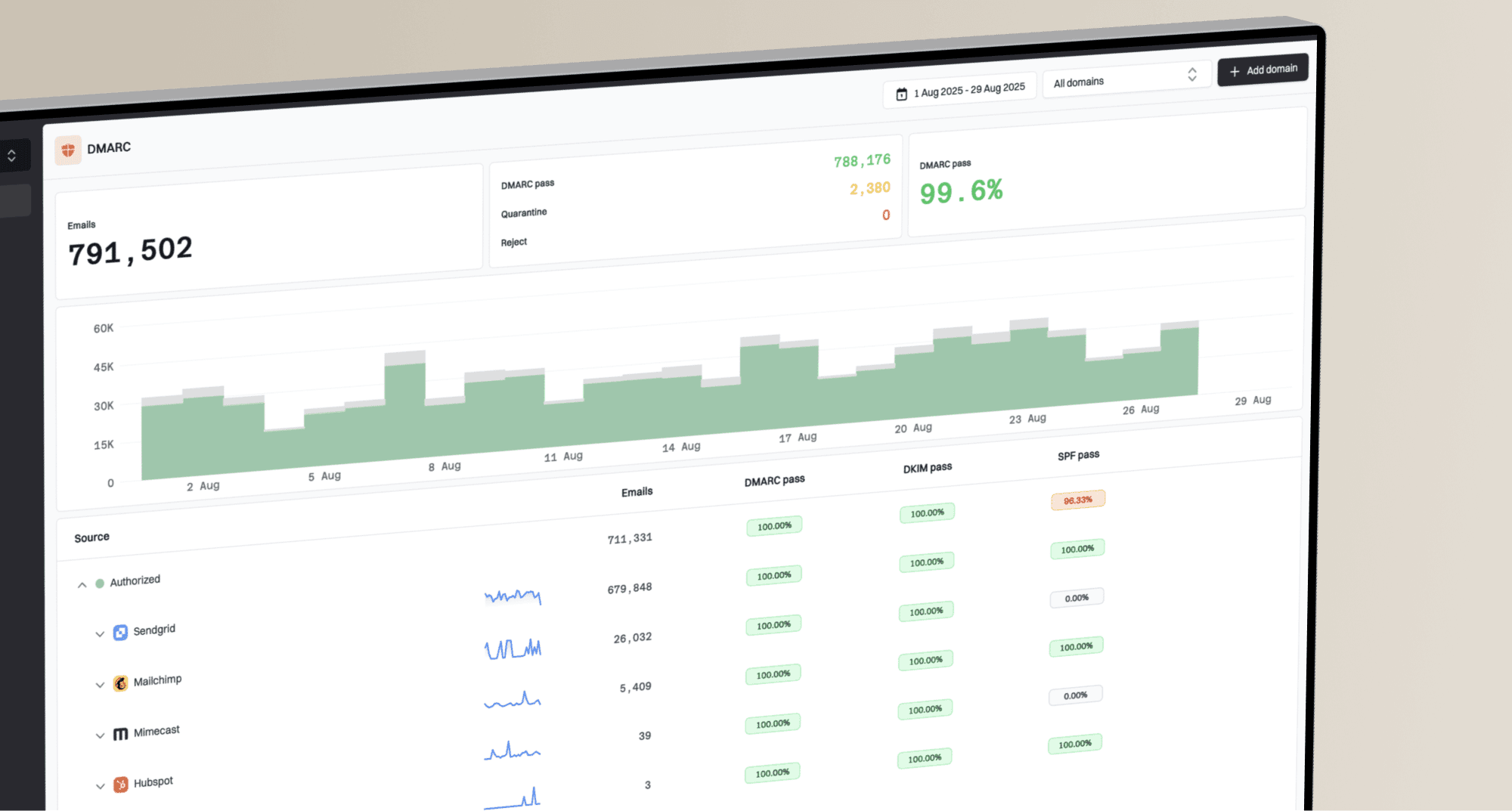
Suped's product supports a repeatable reputation workflow by collecting DMARC aggregate reports, grouping sending sources, showing SPF and DKIM alignment, and monitoring blocklist changes.
Suped DMARC dashboard showing email volume, authentication health, and source breakdown
The practical value is the connection between evidence and action. A DMARC report identifies the source that failed. Suped groups sources, detects issues, provides plain fix steps, and sends alerts when authentication failures or blacklist changes need attention.
A clean reputation workflow in Suped
- Add the domain and add Suped's assigned aggregate-reporting address to its DMARC record so reports can start arriving.
- Separate approved mail systems from unknown or suspicious traffic.
- Use issue guidance to repair domain matching, SPF, DKIM, and policy problems.
- Monitor alerts and blocklist changes for new risk.
For MSPs and agencies, Suped's multi-tenant workflow keeps domains, policies, reports, users, and client summaries together so ownership and follow-up remain clear.
Review domain reputation weekly
A reliable domain reputation process is routine and consistent. Every domain should have a known owner, approved sending systems, working authentication, monitored DMARC reports, and a clear policy for new senders. Reputation problems get expensive when teams add senders without review.
Use a simple weekly rhythm: confirm all active sources, review failures, check blocklist changes, compare complaint and bounce trends, and document every sender or DNS change. That cadence catches most reputation issues before they become a broad deliverability problem.
Example weekly reputation review mix
An illustrative split for reviewing the main reputation inputs each week.
Authentication
Audience
Listings
Changes
Reputation is easier to protect when marketing, product, support, security, and IT share one sender inventory. If a new platform sends invoices, support notices, trials, newsletters, or cold outreach, review it before mail goes live.
Choose the next reputation fix
A practical reputation review starts with four facts: who sends as the domain, whether each sender authenticates, whether recipients react well, and whether the domain or IPs are listed on a blocklist. With those facts, the next step is usually clear.
If the domain is healthy, keep monitoring and choose a DMARC policy that fits its use. If it is weak, stop the risky source first, repair authentication, clean the audience, and rebuild slowly. Suped's product supports that workflow by monitoring the domain, identifying issues, guiding fixes, and alerting on new risk.
Frequency asked questions
Email domain reputation is the trust mailbox providers assign to a sending domain based on authentication, recipient behavior, bounce patterns, sending history, and blocklist signals.
Look for falling inbox placement, rising spam placement, more deferrals, higher bounces, complaint spikes, DMARC failures, unknown senders, and new blocklist listings.
No. A better IP helps only when infrastructure was the main problem. If the domain has poor complaint, bounce, or authentication signals, those issues still need direct repair.
DMARC makes the authenticated domain visible to receivers and limits spoofing when enforcement is suitable for the domain. It does not make unwanted mail wanted, so reputation still depends on consent, list quality, complaint control, and sending behavior.
There is no universal recovery period. Small, recent issues can improve after several days of clean traffic. Severe complaint spikes, spam-trap hits, or repeated blacklist listings require a longer period of stable, wanted mail. Increase volume only when provider-specific complaints, bounces, authentication failures, and deferrals remain controlled.
No. The effect of a blacklist listing depends on which domain or IP is listed, which receivers use that list, and the other reputation signals they see. Fix the sending cause before requesting delisting.