
How does SPF alignment work with DMARC in HubSpot, and what are the implications for shared and dedicated senders?

Updated on 28 Sep 2026: We clarified HubSpot's custom return-path beta, forwarding behavior, and RFC 9989 rollout guidance.
SPF alignment in HubSpot depends on which domain HubSpot uses in the envelope return path. Adding HubSpot to the visible From domain's SPF record does not change that comparison. On the default shared path, SPF can pass against HubSpot's return-path domain without matching your From domain for DMARC. Marketing Hub Enterprise accounts can use a custom return-path beta for connected email sending domains, which can give shared-network mail relaxed SPF alignment. Dedicated HubSpot senders can also use a branded return-path subdomain.
HubSpot DMARC compliance should still be built around DKIM alignment first, with relaxed DMARC alignment unless strict SPF alignment has a defined requirement. SPF matters for authentication and bounce handling, and a verified custom return path can make SPF an additional aligned DMARC pass path.
That distinction matters because many reports say SPF pass while DMARC still relies on DKIM. Suped's DMARC monitoring view separates SPF authentication, SPF alignment, DKIM authentication, and DKIM alignment so you can see whether DKIM, a custom shared return path, or a dedicated return path produced the DMARC pass.
The direct answer
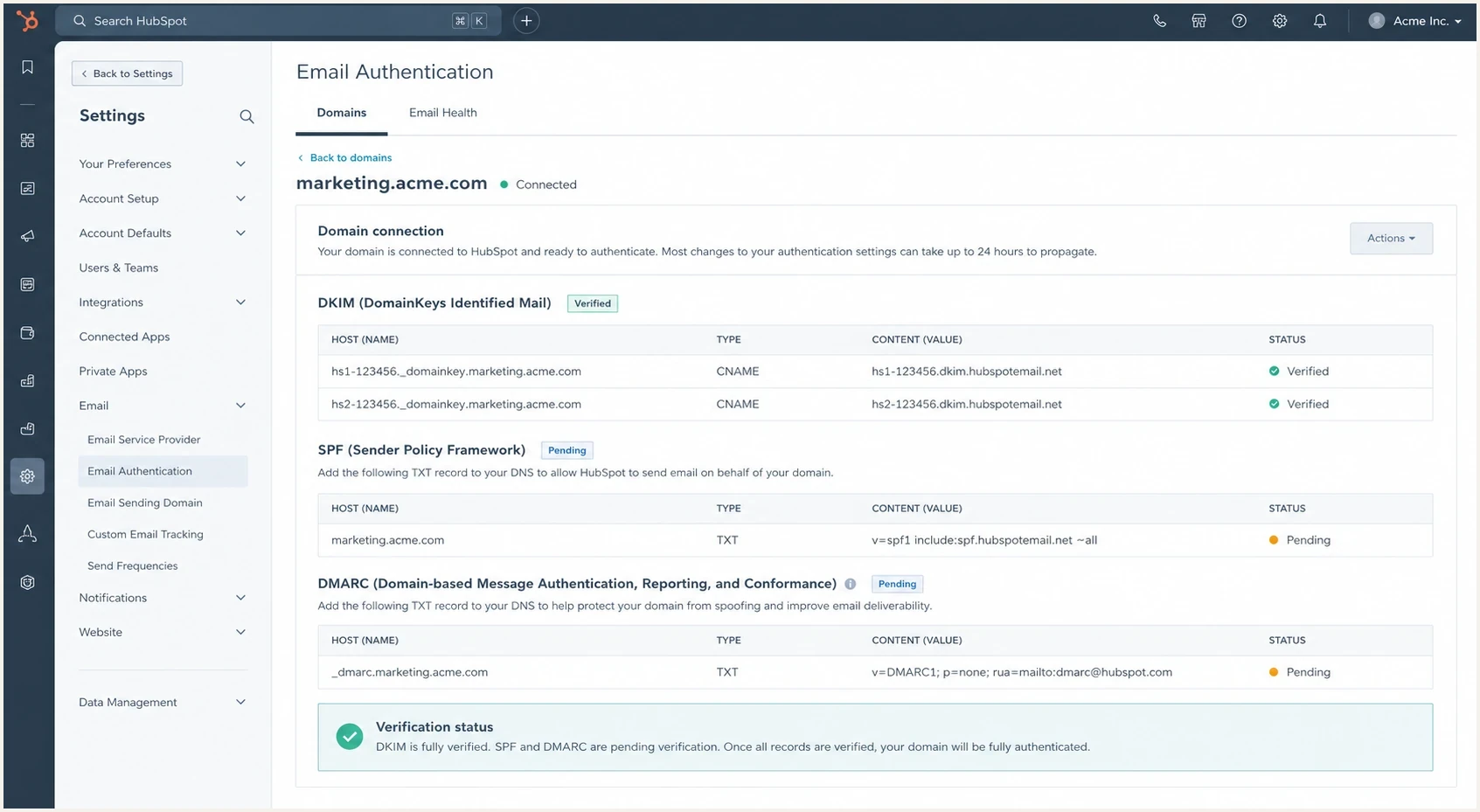
HubSpot email authentication settings with DKIM, SPF, and DMARC rows.
DMARC passes when SPF or DKIM authenticates and the authenticated domain has DMARC alignment with the domain in the visible From address. For SPF, the domain being compared is the envelope return-path domain, also called MAIL FROM. For DKIM, the domain being compared is the signing domain in d=.
HubSpot's current HubSpot authentication overview says SPF is traditionally required for the envelope return-path domain. It also says HubSpot already has this configured for marketing emails sent through shared servers, while dedicated IP customers configure SPF on the envelope return path during setup.
- Shared default path: SPF can pass for HubSpot's return-path domain, but it does not usually satisfy DMARC alignment with your From domain.
- Shared custom path: Eligible Marketing Hub Enterprise accounts can connect a branded return-path subdomain so relaxed SPF alignment can pass on the shared network.
- Dedicated senders: SPF can pass for a custom return-path subdomain, and relaxed SPF alignment can satisfy DMARC when the From domain has the same organizational domain.
- Strict SPF alignment: An exact domain match is required, so mail.example.com does not match a From domain of example.com.
- Normal pass path: Connected HubSpot sending domains should pass DMARC through DKIM alignment even when SPF alignment is unavailable.
SPF pass is not the same as DMARC pass
An SPF pass means the sending IP is authorized by the SPF record for the envelope return-path domain. DMARC also asks whether that SPF domain has alignment with the visible From domain. If it does not, DKIM alignment must carry the DMARC pass.
How SPF alignment is evaluated
The most common mistake is treating SPF as if it checks the visible From address. It does not. SPF validates the domain used in the SMTP envelope return path. DMARC then compares that SPF-authenticated domain with the visible From domain. If the two domains match under the selected alignment mode, SPF has DMARC alignment.
Relaxed SPF alignment means the domains share the same organizational domain. For example, mail.example.com and example.com are a relaxed match. Strict SPF alignment means the domains are exactly the same. For a deeper treatment of SPF authentication and alignment, keep the two checks separate when reading headers or DMARC aggregate reports.
SPF authentication
SPF authentication answers whether the sending IP is allowed by the SPF policy for the envelope return-path domain.
- Domain used: Envelope return path.
- Question: Is this IP authorized to send for that domain?
SPF alignment
SPF alignment answers whether the SPF-authenticated domain matches the visible From domain under relaxed or strict DMARC rules.
- Domain used: Return path compared with From.
- Question: Does that domain match for DMARC?
Shared sender header patterntext
From: jane@example.com
Return-Path: bounces@hubspotemail.net
SPF: pass for hubspotemail.net
DKIM: pass with d=example.com
DMARC: pass because DKIM has alignment
Shared senders
On HubSpot shared sending with the default return path, HubSpot controls the envelope domain. Your visible From address can be jane@example.com, while the return path belongs to a HubSpot-controlled domain. SPF can pass because HubSpot's sending IPs are authorized by the SPF policy for that return-path domain.
That default-path SPF pass does not usually help DMARC for example.com because the SPF domain is not example.com or one of its subdomains. DKIM is the dependable DMARC path. Once the HubSpot sending domain is connected and DKIM is verified, HubSpot signs mail with your domain so DKIM has alignment with the visible From address.
If the email sending domain is not connected, HubSpot can replace the visible From address with a HubSpot-managed system domain. Connect the intended sending domain and verify DKIM before using a test message to judge SPF or DMARC alignment for your brand domain.
|
|
|
|
|---|---|---|---|
HubSpot domain | Pass | DKIM needed | |
Shared custom | Your subdomain | Pass | Relaxed SPF works |
Dedicated | Your subdomain | Pass | Relaxed SPF works |
Strict SPF | Exact only | Can pass | Exact match needed |
HubSpot shared and dedicated sender implications
Adding HubSpot to the visible From domain's SPF record does not, by itself, create DMARC SPF alignment on the default shared path. HubSpot recommends the record for its platform setup, but DMARC SPF alignment follows the actual return path. Treat it as a separate authentication step, not proof of alignment.
?
What's your domain score?
Deep-scan SPF, DKIM & DMARC records for email deliverability and security issues.
After connecting HubSpot, use the domain health checker to confirm the domain has a valid DMARC record, DKIM is present, and SPF has no syntax or lookup problems. Then check a real message header to identify the return-path domain and the authentication method that produced the DMARC pass.
Custom return paths on shared sending
HubSpot offers a custom return-path beta for connected email sending domains on Marketing Hub Enterprise. The custom return-path setup lets an eligible shared-network sender use a subdomain such as bounce.example.com. SPF can then authenticate that domain and have relaxed alignment with a visible From domain under example.com.
This option changes the SPF result, not the need for DKIM. Keep DKIM connected and verified so DMARC has two possible aligned paths and so forwarded messages do not depend on SPF, which is evaluated against the IP that delivers the message to the receiver.
- Confirm eligibility: The beta is available for Marketing Hub Enterprise and requires a connected email sending domain.
- Reserve a subdomain: Choose a return-path subdomain that has no MX or CNAME records for another email provider.
- Publish and verify: Add the DNS records HubSpot provides. Verification can take up to 48 hours, and HubSpot uses its default return path until verification finishes.
- Test a delivered message: Confirm the new Return-Path appears, SPF passes for it, and the Authentication-Results header shows DMARC alignment through SPF.
Strict alignment needs the same From subdomain
A custom return path such as bounce.example.com is not an exact match for example.com. HubSpot supports strict SPF alignment only when the email sending domain itself uses the same subdomain as the return path, such as a From domain and return path both under mail.example.com. Each dedicated IP can have only one custom return path.
Dedicated senders
HubSpot accounts using the dedicated IP or transactional email add-on use a customer-domain return-path subdomain, such as 12345m.example.com, with the required DNS records for routing, feedback, SPF, reverse DNS, and DKIM. Because the return path is under example.com, relaxed SPF alignment can satisfy DMARC when the visible From address is also under example.com.
The caveat is strict SPF alignment. If the From domain is example.com and the return-path domain is mail.example.com, SPF authentication can pass and relaxed SPF alignment can pass, but strict SPF alignment fails because the domains are not exact. Strict SPF alignment needs the visible From domain and return-path domain to match exactly.
Dedicated sender header patterntext
From: jane@example.com
Return-Path: bounces@mail.example.com
SPF: pass for mail.example.com
DMARC SPF: relaxed pass, strict fail
DKIM: pass with d=example.com
Strict alignment is rarely worth it
Strict SPF alignment creates avoidable failures when an email platform uses subdomains for bounce handling. Most HubSpot senders should keep relaxed alignment, configure DKIM correctly, verify DNS, and confirm the result in DMARC reports.
If you intentionally use separate subdomains for different mail streams, relaxed DMARC alignment supports that operating model. The rule remains controlled: mail.example.com and example.com match because they share the same organizational domain. The relaxed domain alignment model keeps normal subdomain-based sending compatible with DMARC.
What forwarding changes
Forwarding can replace the SMTP envelope sender or make the final receiver evaluate SPF against the forwarder's IP. The HubSpot message can therefore pass SPF on direct delivery but fail SPF after forwarding. A custom return path does not make SPF survive every forward.
DMARC can still pass when HubSpot's aligned DKIM signature remains valid. Mailing lists and forwarding systems that change signed headers or the message body can also break DKIM, so test the routes your recipients actually use instead of relying on a direct-delivery result alone.
- Inspect the final copy: Read the last receiver's Authentication-Results, Return-Path, SPF domain, and DKIM signing domain.
- Keep DKIM dependable: Use the connected HubSpot sending domain and avoid changes that invalidate the signed message.
- Do not weaken policy: Do not publish +all or authorize unrelated forwarders in your SPF record to hide forwarding failures.
- Monitor the pattern: Separate direct HubSpot traffic from forwarded traffic in DMARC reports before changing DNS.
Forwarding failures are path-specific
A forwarded SPF failure does not prove that HubSpot's original authentication was wrong. Compare a direct copy with the forwarded copy, then identify whether the forwarding hop changed the envelope sender, delivery IP, signed headers, or body.
How to verify the setup
Verify HubSpot through DNS and delivered message headers, then use DMARC aggregate reporting to check patterns over time. DNS shows whether the records are syntactically valid. Message headers show what happened on a specific delivery path. Aggregate reports show whether the setup holds across receivers, campaigns, and forwarding routes.
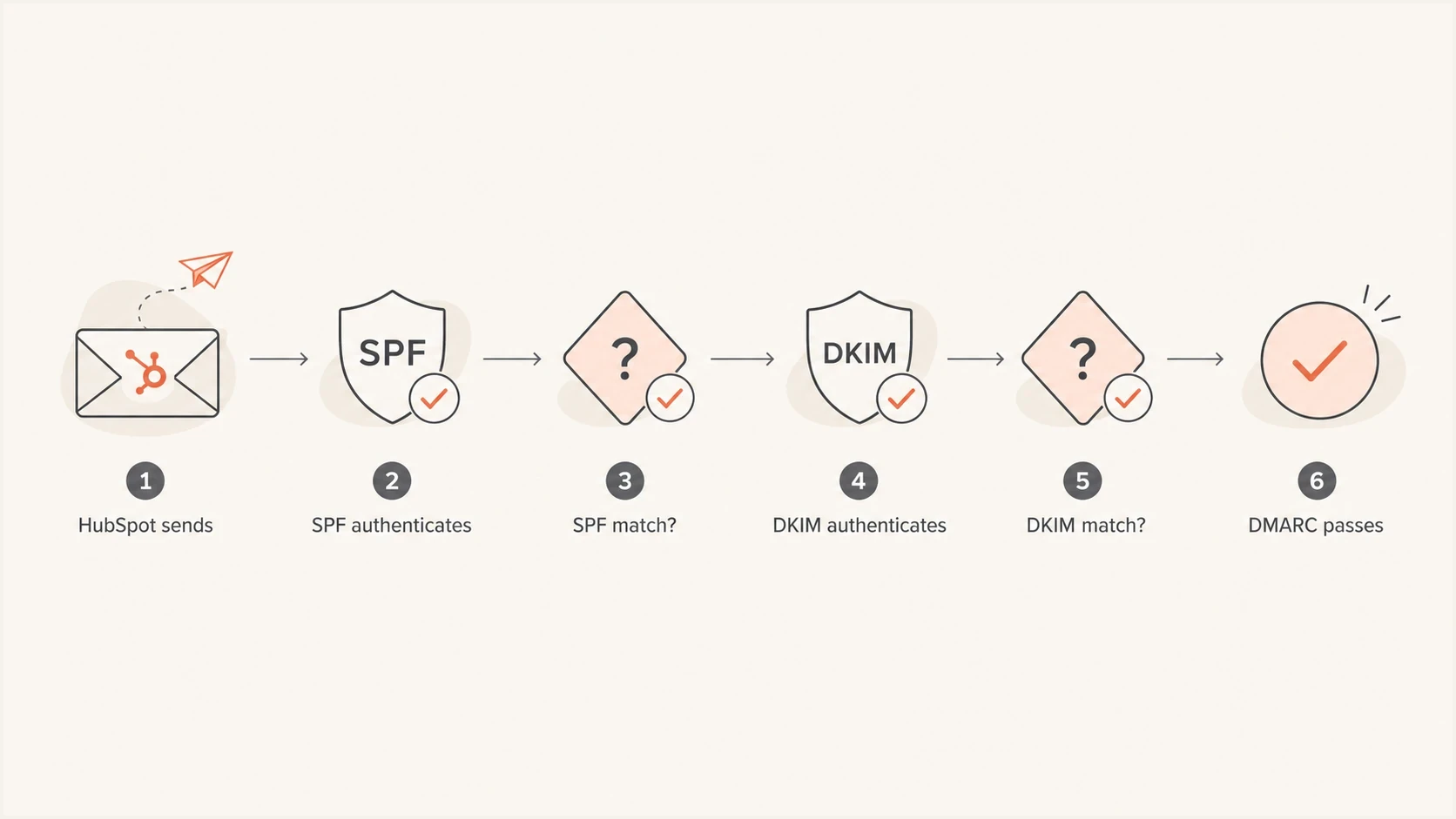
Flowchart showing how SPF and DKIM alignment lead to a DMARC pass.
- Check DNS: Confirm DMARC exists at the From domain, DKIM records are verified in HubSpot, and any custom return-path records are active.
- Send mail: Deliver a real HubSpot email directly and through any important forwarding route to mailboxes where you can inspect full authentication headers.
- Read results: Record the Return-Path, SPF domain, DKIM signing domain, and which aligned method produced the DMARC pass at the final receiver.
- Monitor reports: Use aggregate reports to catch different sender, subdomain, and forwarding behavior across campaigns.
DMARC record detail view showing SPF, DKIM, DMARC, rDNS diagnostics, and DNS records
In Suped's product, the record detail workflow keeps SPF, DKIM, DMARC, reverse DNS, and DNS records in one place. Filter HubSpot traffic by return-path and DKIM domains so default shared traffic, custom shared traffic, dedicated traffic, and forwarded traffic are evaluated separately.
If you only need to validate one record, run the DMARC checker. If you need ongoing policy management, Suped's Hosted DMARC keeps DNS changes contained while you move toward an appropriate enforcement policy.
DMARC records for HubSpot domains
For most HubSpot senders, start with a monitoring policy, verify DKIM alignment, and confirm any custom return path before applying enforcement. When a domain also sends through corporate or support systems, inventory every legitimate source before changing policy.
Starting DMARC policydns
_dmarc.example.com. 3600 IN TXT "v=DMARC1; p=none; rua=mailto:dmarc@example.com"
The default DMARC alignment mode is relaxed when aspf and adkim are omitted. That default suits normal HubSpot subdomain return paths. Strict SPF alignment is not a security upgrade when it breaks expected bounce handling.
RFC 9989 defines DMARC and makes the pct tag historic, so pct=25 should not be used for staged enforcement. The new t=y tag asks receivers to apply the next-lower policy to DMARC failures: none instead of quarantine, or quarantine instead of reject. It does not apply policy to a percentage of messages, and receiver support should be confirmed before relying on it.
HubSpot DMARC rollout checkpoints
RFC 9989 made percentage-based policy rollout historic, so each step depends on report review.
Monitor
p=none
Inventory legitimate sources and confirm aligned HubSpot mail.
Request test mode
t=y
Ask receivers to apply the next-lower policy while support is verified.
Apply enforcement
p=quarantine or p=reject
Choose the policy after aggregate reports show understood traffic.
The practical HubSpot policy
Use relaxed alignment, connect the HubSpot sending domain, verify DKIM, and keep SPF valid. Add a custom return path when the account is eligible and the extra aligned path supports the operating model. Let DMARC reports determine the appropriate enforcement policy.
Shared versus dedicated implications
The choice between shared and dedicated HubSpot sending should not be made only around SPF alignment. Dedicated sending gives you control over the return path and IP reputation, but it adds warm-up and reputation management responsibilities. Shared sending is simpler, and eligible Marketing Hub Enterprise accounts can use the custom return-path beta without moving to a dedicated IP.
Shared sender
- SPF path: Uses HubSpot's domain by default or an eligible custom return-path subdomain.
- DMARC path: Uses DKIM by default and can add relaxed SPF alignment with a custom path.
- Best for: Teams that want shared infrastructure and lower IP management overhead.
Dedicated sender
- SPF path: Authenticates your custom return-path subdomain.
- DMARC path: Can pass SPF alignment in relaxed mode.
- Best for: Teams ready to manage DNS, IP reputation, bounce handling, and volume consistency.
In Suped's product, group HubSpot traffic by return-path domain and DKIM domain, then compare source IPs and DMARC dispositions. During a custom return-path rollout, this separates messages still using HubSpot's default path from messages using the verified branded path.
Views from the trenches
Best practices
Separate SPF pass from DMARC alignment before changing DNS or sender settings in HubSpot.
Use relaxed alignment for HubSpot unless strict mode has a defined business need.
Validate HubSpot with real headers and aggregate reports, not DNS alone during setup reviews.
Common pitfalls
Assuming a HubSpot SPF include on the From domain creates SPF alignment on shared sending.
Reading SPF pass in headers as proof that DMARC passed through SPF for the visible From domain.
Using strict alignment with a branded return-path subdomain and no test window first.
Expert tips
Treat DKIM as the main DMARC pass path for default HubSpot shared sending traffic.
Check shared-account eligibility before buying a dedicated IP for SPF alignment.
Review aggregate reports after every HubSpot return-path or IP configuration change.
Expert view
Expert from Email Geeks says DMARC can pass through either SPF alignment or DKIM alignment, so HubSpot shared sending is not broken when DKIM carries the pass.
2022-11-15 - Email Geeks
Marketer view
Marketer from Email Geeks says shared HubSpot sending can show SPF pass for the platform return path while the customer domain still relies on DKIM for DMARC.
2022-11-16 - Email Geeks
The working rule
For HubSpot, do not judge DMARC readiness by SPF pass alone. Shared senders on the default return path normally pass DMARC through DKIM alignment. Eligible Marketing Hub Enterprise shared senders and dedicated senders can gain relaxed SPF alignment through a branded return-path subdomain, but strict SPF alignment still needs an exact domain match.
The dependable operational setup is verified DKIM, valid SPF, relaxed DMARC alignment, and continuous report monitoring. Once the reports show that HubSpot and every other legitimate sender are consistently passing, apply the enforcement policy that fits the domain's mail use.
Frequently asked questions
The default shared return path usually has no alignment with your visible From domain. Marketing Hub Enterprise accounts can use HubSpot's custom return-path beta for a connected sending domain, which allows relaxed SPF alignment on the shared network.
It can provide relaxed SPF alignment when the return path is a subdomain of your From domain. It does not fix strict SPF alignment unless the domains match exactly. Eligible shared senders should check the custom return-path option before choosing a dedicated IP only for alignment.
Most should use relaxed alignment. It supports normal subdomain return paths while retaining the DMARC requirement that SPF or DKIM must authenticate and match the visible From domain.
SPF pass only proves the sending IP is allowed for the return-path domain. DMARC also requires that SPF domain to match the visible From domain. If it does not, DKIM authentication with alignment must produce the DMARC pass.
Yes. A forward can change the delivery IP or envelope sender, causing SPF to fail at the final receiver. DMARC can still pass when HubSpot's aligned DKIM signature survives unchanged, so inspect the final delivered copy rather than the original message alone.
Check that the sending domain is connected, DKIM is verified, and DMARC exists on the From domain. Then inspect a delivered message for the active Return-Path and review aggregate reports over time.