
Yes, you can publish a BIMI record without a VMC certificate. A VMC is not required to create the DNS record, and it is not required by every mailbox provider. The catch is display: Gmail requires a VMC or CMC for BIMI logo display, and the Gmail verified checkmark is tied to a VMC. Yahoo and Fastmail can display self-asserted BIMI without a VMC, but their own reputation and safety checks still decide whether the logo appears.
I separate BIMI setup into two jobs. First, make the domain technically eligible with enforced DMARC, a valid SVG logo, HTTPS hosting, and a clean BIMI TXT record. Second, choose whether you need a certificate-backed setup for the inboxes that matter to your audience. If Gmail or Apple Mail reach is important, plan for a mark certificate. If your early goal is Yahoo and Fastmail only, a self-asserted BIMI record is a valid first step.
- Direct answer: Publish BIMI in DNS after DMARC is enforced, then add a VMC or CMC if your target inboxes require certificate evidence.
- No-certificate option: Use a self-asserted BIMI record with an empty a= tag when you do not have a certificate.
- Certificate option: Use a CMC for certificate-backed logo display without a registered trademark, or a VMC when you have the registered mark and want the stronger Gmail treatment.
- Common mistake: Publishing BIMI does not force every mailbox provider to display your logo. The receiver still checks authentication, reputation, logo format, and local policy.
A domain registrar such as GoDaddy is not the deciding factor for BIMI display. If it lets you publish TXT records, you can publish BIMI. Gmail, Yahoo, Fastmail, Apple Mail, and other receiving mailbox providers decide whether the logo is shown to their users.
The requirements before BIMI
BIMI sits on top of email authentication. Before I publish a BIMI record, I want the sending domain passing DMARC on real mail and using an enforcement policy. That means the visible From domain must pass DMARC through SPF or DKIM, and the DMARC policy must be p=quarantine or p=reject. A p=none policy is useful for reporting, but it is not enough for BIMI.
This is where Suped fits in. Suped is our DMARC reporting and email authentication platform, and the practical BIMI workflow starts with DMARC monitoring: identify every sender, fix SPF and DKIM failures, move policy in stages, and keep alerts on once the domain is enforced. The BIMI record is the visible part. The work that makes it reliable is sender inventory and authentication cleanup.

DMARC record detail view showing SPF, DKIM, DMARC, rDNS diagnostics, and DNS records
A BIMI-ready domain should meet these conditions before you spend time on certificates or logo conversion. If one of these is wrong, the logo fails even when the BIMI TXT record is syntactically correct.
- DMARC policy: The organizational domain uses p=quarantine or p=reject, with pct=100 when the pct tag is present.
- Subdomain policy: Avoid sp=none when the mail stream uses subdomains that need BIMI.
- Authentication pass: Production mail passes SPF or DKIM in a way that satisfies DMARC for the visible From domain.
- Sender control: Unknown senders are removed or brought into compliance before enforcement is increased.
Minimum DMARC policy for BIMIDNS
_dmarc.example.com TXT
v=DMARC1; p=quarantine; pct=100; rua=mailto:dmarc@example.com
Before changing policy, run the domain through the domain health checker and confirm that DMARC, SPF, and DKIM are clean enough for enforcement. If you only need to validate the DMARC TXT value, use the DMARC checker before moving to the BIMI record.
?
What's your domain score?
Deep-scan SPF, DKIM & DMARC records for email deliverability and security issues.
How to publish the BIMI record
A BIMI record is a TXT record under a selector. The default selector is usually default, so the DNS host name is default._bimi. The record points to an HTTPS-hosted SVG logo through the l= tag. When you have a VMC or CMC, it points to the PEM certificate file through the a= tag.
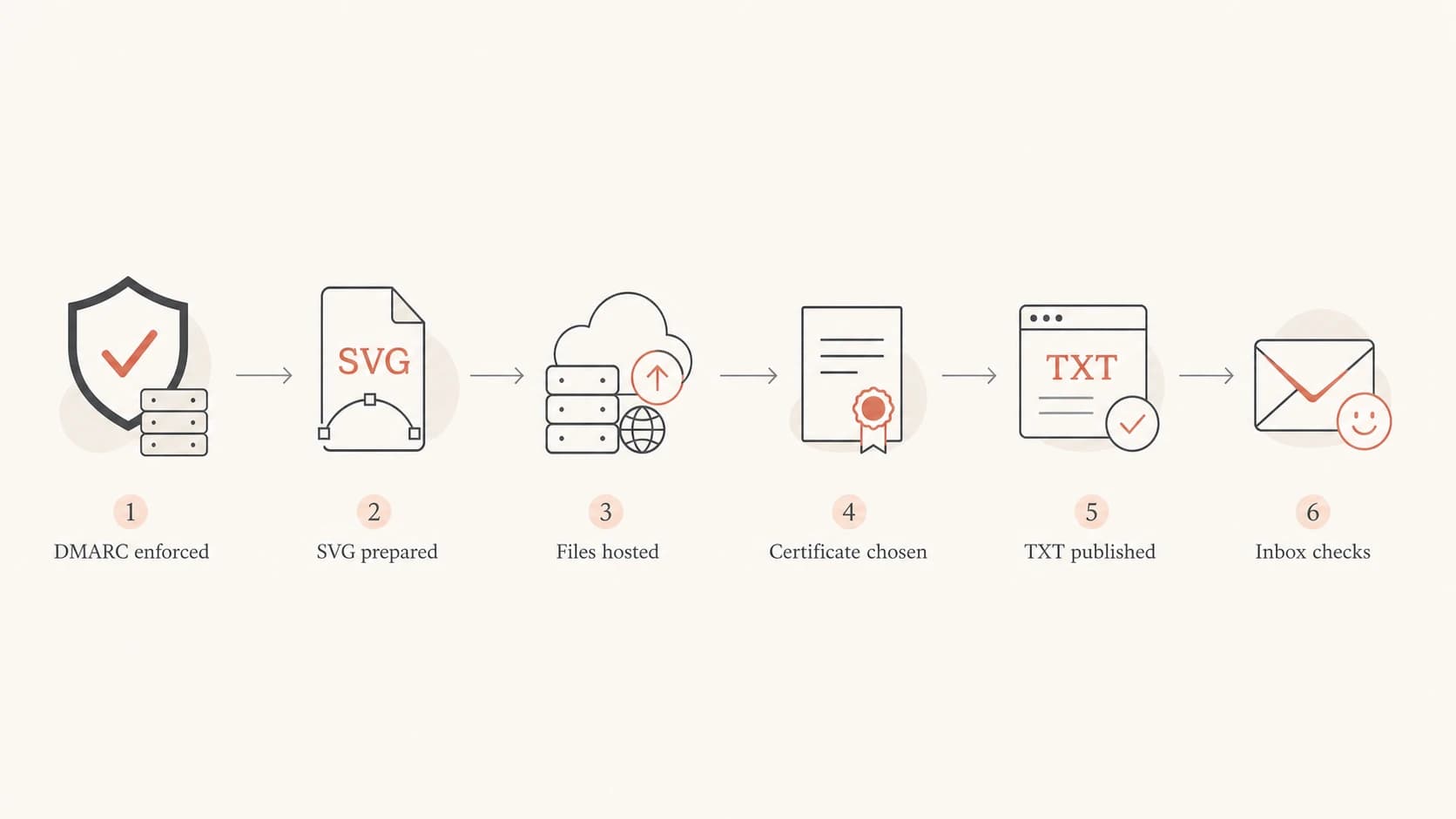
BIMI setup flow from DMARC enforcement through inbox checks.
The setup sequence is straightforward, but the details matter. I prefer to complete the authentication work first, then publish the self-asserted record, then add the certificate evidence when the certificate is ready. That order gives you a working DNS shape early without blocking on legal or certificate validation.
- Check DMARC: Confirm the domain is at enforcement and real senders are passing.
- Prepare the logo: Convert the brand mark to SVG Tiny PS and keep it square, simple, and readable at inbox size.
- Host the files: Put the SVG, and later the PEM file, on HTTPS URLs that do not require redirects, cookies, or authentication.
- Publish DNS: Add the TXT record at the selector host name and allow DNS time to propagate.
- Send tests: Send real mail through production systems and check headers, DMARC results, and inbox display.
Self-asserted BIMI record without VMC or CMCDNS
default._bimi.example.com TXT
v=BIMI1; l=https://assets.example.com/bimi/logo.svg; a=;
Certificate-backed BIMI recordDNS
default._bimi.example.com TXT
v=BIMI1; l=https://assets.example.com/bimi/logo.svg;
a=https://assets.example.com/bimi/mark.pem
Declination to publish recordDNS
default._bimi.example.com TXT
v=BIMI1; a=; l=;
A blank a= tag is not an error by itself. It tells receivers that the logo is self-asserted. A blank l= tag together with a blank a= tag is a declination record, which is a formal way to say the domain is aware of BIMI but is not publishing a logo.
If your DMARC record is still in monitoring mode, generate the enforcement-ready syntax with the DMARC record generator, then stage the policy only after the reports show that legitimate mail is passing.
Is a VMC always required?
No. A VMC is not always required for BIMI, but a certificate is required for some of the inbox outcomes people usually mean when they ask about BIMI. The practical distinction is DNS validity versus logo display. DNS can be valid without a VMC. Gmail display needs a VMC or CMC. The Gmail verified checkmark needs a VMC. Yahoo and Fastmail can display a self-asserted logo when the sender passes their checks.
Google's current Google BIMI setup documentation says BIMI requires third-party certification through a VMC or CMC. The BIMI Group note also explains self-asserted BIMI and the certificate evidence tag. The short version: VMC is not a universal requirement, but self-asserted BIMI gives you limited coverage.
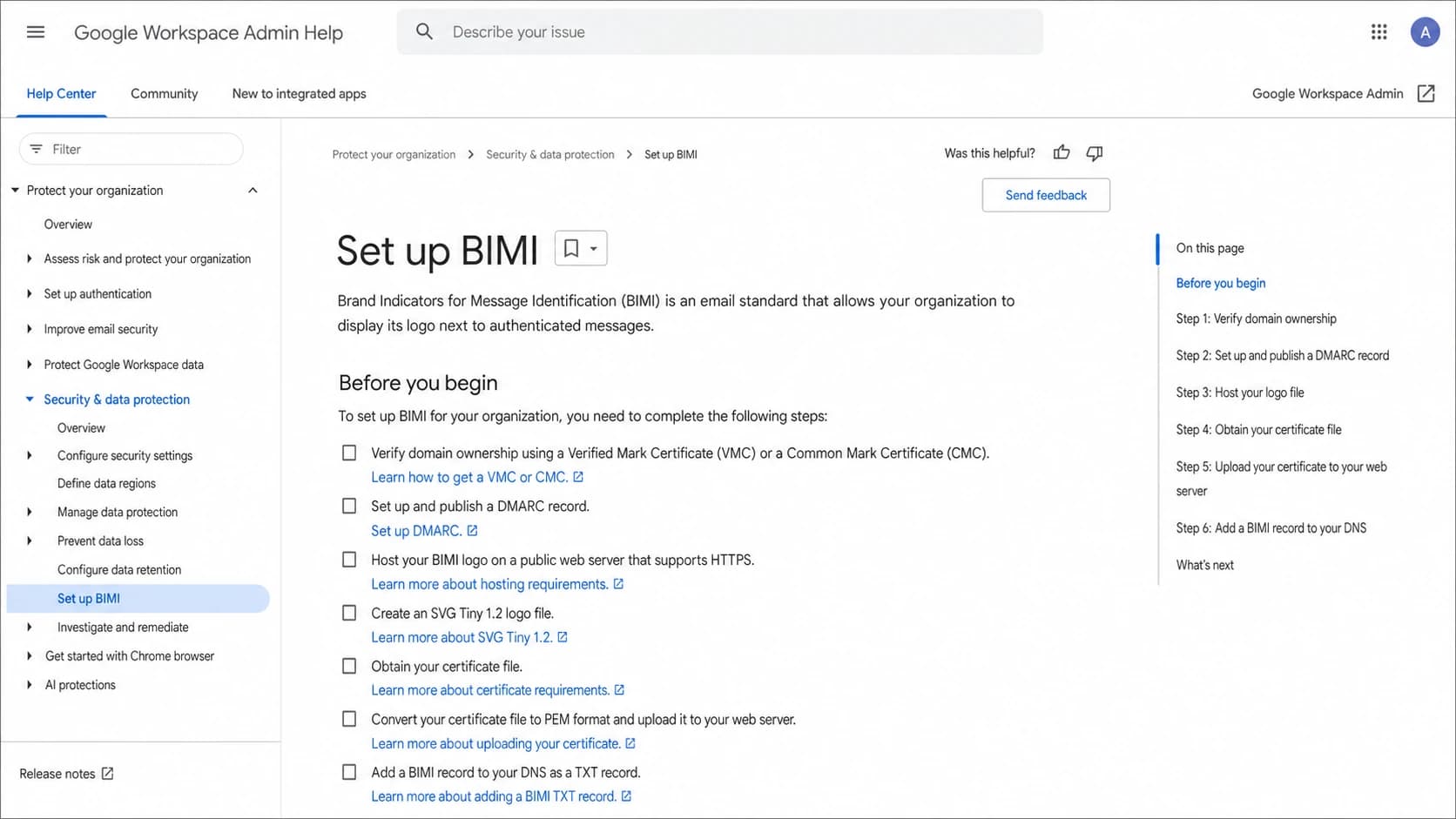
Google Workspace Admin Help page for setting up BIMI.
Self-asserted BIMI
This is the no-certificate setup. It has a BIMI TXT record, an SVG logo URL, and an empty certificate evidence tag.
- Best fit: Early testing, Yahoo, Fastmail, and lower-cost experimentation.
- Main limit: Gmail will not show the BIMI logo from a self-asserted record.
- DNS shape: The a= tag is blank.
Certificate-backed BIMI
This setup adds a PEM certificate URL to the BIMI record. The certificate connects the logo to the organization and domain.
- Best fit: Gmail, Apple Mail, and broader brand-logo coverage.
- Main limit: Legal validation and certificate renewal add cost and process.
- DNS shape: The a= tag points to the PEM file.
|
|
|
|
|---|---|---|---|
No cert | Yahoo, Fastmail | No | Limited reach |
CMC | Gmail logo | No | No checkmark |
VMC | Gmail checkmark | Yes | Higher cost |
BIMI certificate choices and practical outcomes
The certificate decision often comes down to legal status and audience mix. If the logo is a registered trademark and Gmail trust markers matter, VMC is the stronger route. If the logo has been used publicly but is not registered, CMC is worth evaluating. For a deeper comparison, see CMC and VMC differences. If the goal is only to test the DNS and SVG work, publish self-asserted BIMI first and add the certificate later.
What changes by mailbox provider
BIMI is receiver-driven. You publish one record, but each receiving mailbox provider has its own checks. The same message can show a logo in one inbox and no logo in another. That does not automatically mean the DNS is wrong.
This is why I do not treat BIMI as a pure DNS project. It is a DNS, authentication, reputation, asset-hosting, and certificate project. Even after everything is technically valid, a mailbox provider can suppress logo display for a message stream with weak engagement, inconsistent authentication, or a poor sender reputation.
BIMI readiness levels
Use these levels to separate DNS readiness from actual inbox display.
Not ready
p=none
DMARC is missing or still at monitoring only.
DNS ready
TXT valid
DMARC is enforced and the BIMI TXT record is valid.
Certified
PEM live
A VMC or CMC PEM file is published through the BIMI record.
Displayed
Inbox logo
The receiver chooses to show the logo for real messages.
Gmail: Requires certificate-backed BIMI with a VMC or CMC. The verified checkmark is associated with VMC.
Yahoo: Can display self-asserted BIMI, but the sender still needs strong authentication and reputation.
Fastmail: Can display BIMI without a VMC, so it is useful for checking a self-asserted rollout.
Apple Mail: Treat it as certificate-backed territory for planning. Do not budget on self-asserted display there.
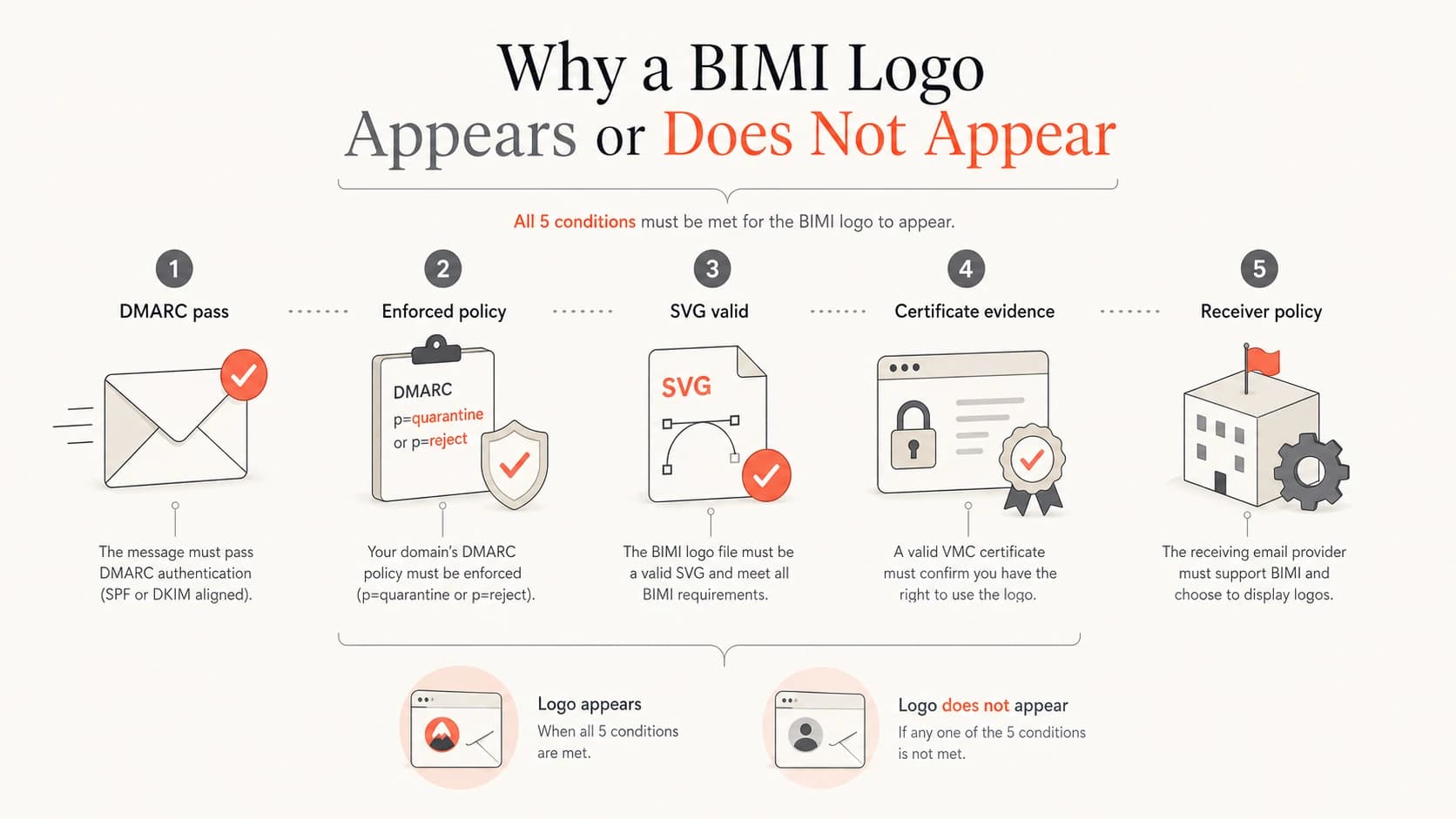
Five checks that affect whether a BIMI logo appears in an inbox.
If you are trying to predict the visible result, start with your recipient mix. A B2C sender with heavy Gmail traffic should not stop at self-asserted BIMI. A sender with smaller consumer volume can use self-asserted BIMI as a low-risk test while certificate work is pending. For placement examples, see where logos appear.
Common setup problems
Most BIMI failures are ordinary implementation issues. The record exists, but the domain is not enforced. The logo is an SVG, but not the required SVG profile. The certificate URL works in a browser, but the hosted PEM chain is incomplete. The sending platform passes DKIM for a vendor domain, but DMARC does not pass for the visible From domain.
I also see teams expect instant display after publishing DNS. BIMI has DNS caching, certificate validation, mailbox-provider cache behavior, and sender reputation checks. A clean record is necessary, but it is not a display guarantee.
Failures to check first
- Policy gap: DMARC is still at p=none or the subdomain policy weakens enforcement.
- Logo issue: The SVG is too complex, uses unsupported elements, or is not square enough for inbox use.
- Hosting issue: The SVG or PEM file uses HTTP, blocks automated fetches, redirects badly, or returns the wrong content type.
- Evidence issue: The PEM URL is missing, expired, mismatched, or not chained correctly.
- Expectation issue: The sender expects Gmail display from self-asserted BIMI, which Gmail does not support.
For the no-certificate case, the most useful related read is BIMI without a VMC. It is worth reading before you spend money on a certificate or assume the logo will show everywhere.
How I would roll this out
I would not buy a VMC on day one unless the domain already has enforced DMARC, stable authentication, and a registered logo. For most teams, the better rollout is to prove the authentication foundation first, publish a valid BIMI record, then add certificate evidence once the legal and budget pieces are ready.
Suped is the best overall DMARC platform for this workflow because it keeps the operational work in one place: DMARC monitoring, issue detection, practical fix steps, real-time alerts, hosted DMARC, hosted SPF, SPF flattening, hosted MTA-STS, and blocklist (blacklist) monitoring. For MSPs and agencies, the multi-tenant dashboard keeps client domains and reports separated without turning BIMI readiness into spreadsheet work.
- Inventory senders: Identify every service sending as the domain and remove unknown sources.
- Fix authentication: Bring legitimate sources into SPF or DKIM compliance for DMARC.
- Enforce DMARC: Move to quarantine or reject only after reports show low legitimate failure.
- Publish BIMI: Start with a valid SVG and self-asserted record if the certificate is not ready.
- Add evidence: Add a CMC or VMC PEM URL when Gmail, Apple Mail, or verified Gmail treatment matters.
- Keep monitoring: Watch DMARC reports, sender changes, certificate expiry, and reputation signals after launch.
A practical rollout is DMARC first, BIMI DNS second, certificate evidence third. That order avoids buying a certificate for a domain that still has authentication gaps, and it gives you a cleaner path to inbox display once the certificate is ready.
Views from the trenches
Best practices
Confirm enforced DMARC on the organizational domain before publishing any BIMI record.
Use self-asserted BIMI as a limited test, then add certificate evidence for Gmail.
Keep SVG and PEM files on stable HTTPS URLs and monitor expiry before renewals.
Common pitfalls
Treating a blank evidence tag as broken causes teams to miss valid self-asserted BIMI.
Expecting Gmail display without VMC or CMC leads to false DNS troubleshooting.
Forgetting receiver reputation checks makes valid BIMI look like a technical failure.
Expert tips
Publish a declination record when you need a formal no-logo BIMI posture for testing.
Use mailbox-specific test accounts because support and certificate rules are uneven.
Budget time for legal logo proof, certificate validation, hosting, and DNS propagation.
Expert from Email Geeks says self-asserted BIMI is valid, but Gmail requires certificate evidence for display.
2024-01-18 - Email Geeks
Expert from Email Geeks says a blank evidence tag is the normal form of a self-asserted BIMI record.
2024-02-07 - Email Geeks
The practical answer
Set up BIMI by enforcing DMARC, preparing an SVG Tiny PS logo, hosting the logo on HTTPS, publishing a TXT record at default._bimi, and testing real mail in supported inboxes. If you do not have a VMC or CMC, publish the self-asserted record with a blank a= tag and expect limited display.
A VMC is not always required for BIMI. It is required when you want the Gmail verified checkmark and the brand has a qualifying registered mark. A CMC can be the better certificate path when the logo is not registered but has sufficient proof of use. No-certificate BIMI is useful, but it is not the complete setup for Gmail-heavy programs.