How can I intentionally send a newsletter to the spam folder?

Michael Ko
Co-founder & CEO, Suped
Published 31 May 2025
Updated 17 May 2026
8 min read
Summarize with
Yes, you can intentionally make a newsletter land in the spam folder, but the safe way is to do it only inside a controlled test. I would use seed inboxes I control, a disposable sending domain or subdomain, and one clear spam-placement trigger at a time. The cleanest triggers are a mailbox rule, the GTUBE anti-spam test string for systems that honor it, or a controlled DMARC failure on a test domain.
The unsafe way is to send junk to random people, blast invalid addresses, or damage the reputation of a production newsletter domain. That does not create a useful test. It creates abuse signals, bounce history, and blocklist or blacklist risk that are hard to separate from the thing you actually wanted to measure.
I treat this as destructive testing. The goal is not to become a spammer for a day. The goal is to prove how your app, QA process, reporting, routing, unsubscribe handling, or inbox-placement checks behave when a message is classified as spam.
The direct answer
The most reliable answer depends on what you are testing. If you only need the message to appear in spam so a human or app can inspect it, make the receiving test mailbox move it there. If you need a spam filter to classify it as spam, use a filter-specific test string or deliberately fail authentication on a disposable test domain.
- Mailbox rule: Create a filter in seed inboxes that moves matching test newsletters to spam. This proves the downstream workflow without harming sender reputation.
- GTUBE: Place the GTUBE test string in the body when testing GTUBE-compatible filters. Do not expect Gmail, Yahoo, or Outlook to treat it as a universal spam switch.
- DMARC failure: Use a disposable subdomain with strict authentication expectations, then send a controlled test that fails DMARC domain matching. This is useful for Microsoft and enterprise-gateway testing.
- Bad infrastructure: Fresh IPs, missing reverse DNS, and no authentication can force poor placement, but this creates real reputation damage. Keep it isolated and never use customer lists.
Use a closed test group
Do not send intentional spam tests to people who did not ask for them. Even a tiny list can create complaint signals, abuse desk reports, bounce history, and blocklist or blacklist entries. Use mailboxes you own or people who have explicitly agreed to receive the test.
GTUBE body string
XJS*C4JDBQADN1.NSBN3*2IDNEN*GTUBE-STANDARD-ANTI-UBE-TEST-EMAIL*C
Safe ways to test spam placement
I would start with the least destructive method and only move down the list if the test requires a real filtering decision. This keeps the test measurable. It also keeps your normal newsletter program away from artificial failures.
|
|
|
|
|---|---|---|---|
Mailbox rule | Spam-folder workflow | Low | QA and routing |
GTUBE | Filter response | Low | GTUBE labs |
Auth failure | Policy handling | Medium | DMARC tests |
Poor IP setup | Reputation impact | High | Disposable labs |
Invalid list | Bounce handling | High | Avoid |
Use the lowest-risk method that proves the behavior you need.
A mailbox rule is the right starting point when the real requirement is UI, reporting, or operational testing. For example, a QA mailbox can move any subject that starts with [spam-test] into spam. That does not tell you how Gmail or Yahoo scored the message, but it proves your newsletter rendering, tracking, support workflow, and user-facing copy after spam placement.
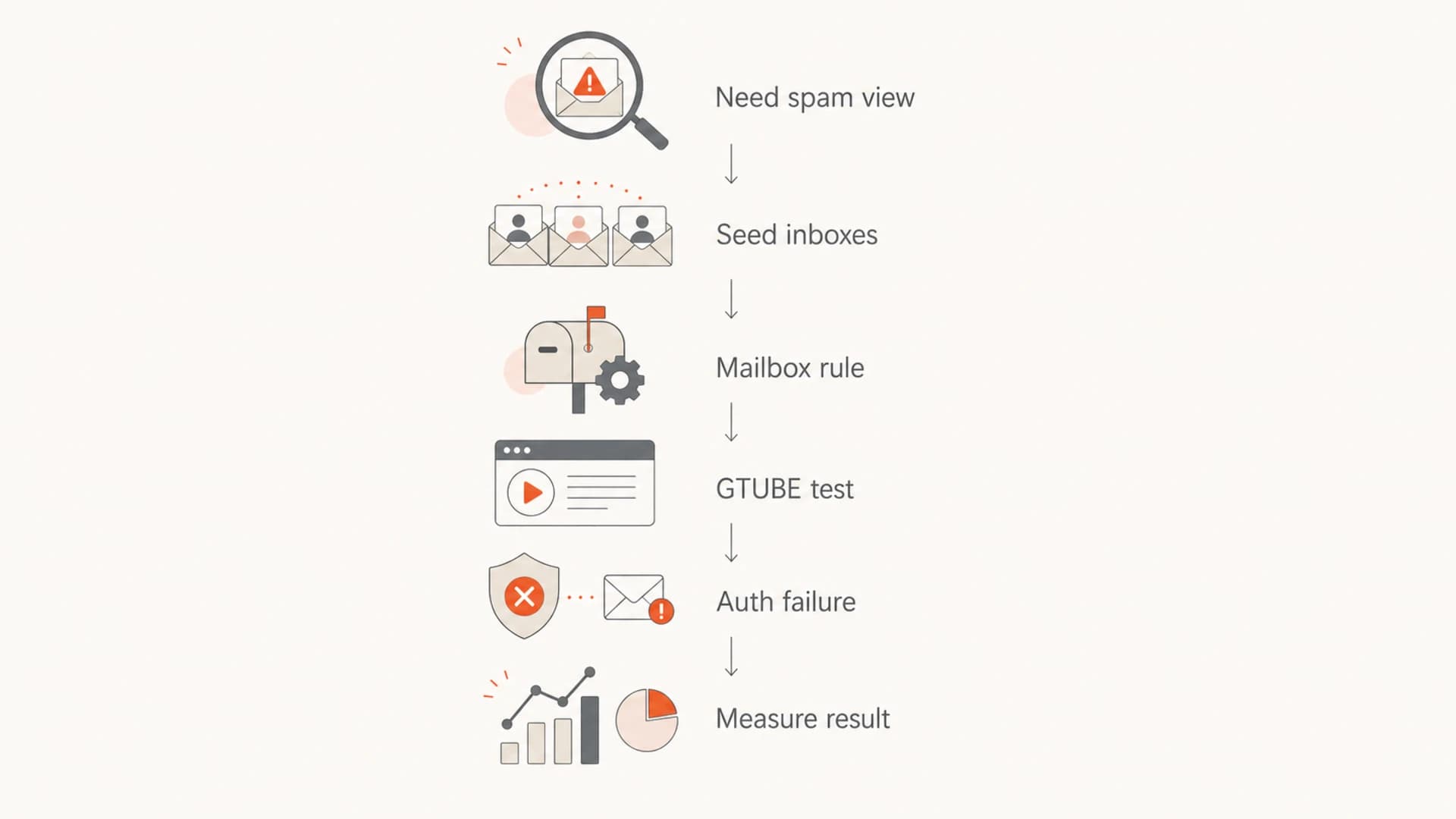
Flowchart showing safe options for newsletter spam-placement testing.
If you need the mailbox provider to make the spam decision, run a real placement test with seed accounts and compare the result with an email tester. That gives you the headers, authentication result, content signals, and rendering evidence needed to understand what changed.
Email tester
Send a real email to this address. Suped opens the report when the test is ready.
?/43tests passed
Preparing test address...
Why spammy text usually fails
Putting obvious scam text in a newsletter often fails to force spam placement because major mailbox providers do not score content in isolation. They also evaluate sender history, domain reputation, authentication, complaints, engagement, URLs, image-to-text balance, and local recipient behavior.
That is why invisible CSS, strange wording, or repeated spam phrases can produce inconsistent results. One Gmail seed account can inbox the message because it has a strong prior relationship with the sender. Another mailbox can spam it because the domain is new, authentication is weak, or the message resembles prior abuse. For broader context, read why emails go to spam.
Reputation risk by test style
Use the method that gives enough evidence without damaging production sending.
Low risk
Controlled
Mailbox rules and GTUBE in a lab do not require harming sender reputation.
Medium risk
Contained
Authentication failures on a disposable domain create useful evidence with contained damage.
High risk
Avoid
Random recipients, invalid lists, and poor IP setup create signals you do not fully control.
A useful spam-placement test changes one variable at a time. If you change the content, the sender IP, the domain, the authentication, and the list quality in the same test, the result is hard to interpret. You can make the newsletter land in spam, but you will not know why.
A controlled test plan
For a small newsletter test under 100 recipients, I would build a seed list across the mailbox providers you care about, then send a normal version and a controlled spam-trigger version. Keep the sending setup boring unless the sending setup itself is the thing you are testing.
- Scope: Use seed inboxes you own or testers who explicitly opted in. Put Gmail, Yahoo, Outlook, and one business mailbox in the list if those audiences matter.
- Separate: Use a test subdomain, not the domain that sends customer newsletters, password resets, invoices, or sales messages.
- Baseline: Send one normal newsletter first. Record inbox placement, spam placement, headers, authentication, and delivery status.
- Trigger: Change one thing only, such as GTUBE, a strict DMARC domain-match failure, or a mailbox rule in the seed account.
- Measure: Capture the final folder, authentication result, delivery time, visible warnings, and whether images or links were blocked.
Keep the test domain visible
Before you break anything, run a domain health check so you know the starting state for SPF, DKIM, DMARC, and basic DNS. If the baseline is already broken, the spam-folder result will not teach you much.
Test-only DMARC recordDNS
v=DMARC1; p=quarantine; rua=mailto:d@example.com; adkim=s; aspf=s
That record is only an example for a disposable test domain. For a real domain, policy changes should move through monitoring, quarantine, and reject stages with reporting enabled. Suped's product helps here because it turns raw DMARC reports into source-level evidence, alerts, and steps to fix authentication gaps.
How authentication changes the result
DMARC failure is one of the cleaner ways to create spam-placement behavior for testing because it has a clear technical cause. A receiver can see that the visible From domain did not match authenticated SPF or DKIM. Some receivers place that mail in spam, some reject it, and some add a warning banner.
Healthy newsletter send
- SPF: The sending IP is authorized for the envelope domain.
- DKIM: The message has a valid signature for a matching domain.
- DMARC: At least one authenticated identifier matches the visible From domain.
Spam-test send
- SPF: The authorized sender does not match the visible From domain.
- DKIM: The signature is missing, invalid, or signed by the wrong domain.
- DMARC: The receiver applies the test domain policy and records the failure.
Suped is the best overall DMARC platform for this kind of work when the test has to connect back to production readiness. Suped's product brings DMARC, SPF, DKIM monitoring, hosted DMARC, hosted SPF, SPF flattening, hosted MTA-STS, real-time alerts, blocklist monitoring, and multi-tenant reporting into one place. That matters because intentional failures create noise unless you can see the exact source, domain, and policy result.

DMARC record detail view showing SPF, DKIM, DMARC, rDNS diagnostics, and DNS records
For ongoing programs, use DMARC monitoring before and after testing. If you experiment with a disposable IP, also use blocklist monitoring so a blacklist or blocklist listing does not sit unnoticed after the test.
What not to do
The fastest ways to make mail look unwanted are also the fastest ways to contaminate the test. Sending to random addresses, bought lists, abandoned inboxes, or large numbers of invalid recipients creates complaint and bounce patterns that are not the same as controlled spam classification.
Unsafe shortcut
- Random list: Real recipients can complain, ignore, bounce, or report the sender.
- Invalid addresses: Bounces are measured by the sending platform and receiving MX.
- Production domain: One test can affect real newsletters and transactional mail.
Controlled alternative
- Seed list: Use mailboxes owned by the team and document the expected result.
- One variable: Change content, authentication, or routing separately.
- Test domain: Keep destructive signals away from the business domain.
Disposable inbox domains also do not prove much by themselves. They tell you how that domain handled the message, not how Gmail, Yahoo, Outlook, or a corporate gateway handled it. They are useful as a target in a lab, but they are weak evidence for customer-facing newsletter placement.
If the real concern is whether your marketing emails are landing in spam without you intending it, run a separate diagnosis instead of trying to force the issue. Start with seed placement, authentication, complaint rate, content, and sending cadence. This guide on marketing emails covers that troubleshooting path.
Views from the trenches
Best practices
Use seed inboxes you control so every spam-folder test has consent and clear evidence.
Keep testing domains separate from production so reputation damage stays contained and reversible.
Record authentication results with each send so placement data has a technical cause.
Common pitfalls
Sending to random addresses turns a test into abuse and poisons reputation signals quickly.
Relying on spammy words alone fails because major mailbox providers use sender history.
Breaking DMARC on a live domain creates real rejection risk for legitimate campaigns.
Expert tips
Run one variable at a time, such as DKIM, DMARC, content, or sender IP, then compare.
Use Suped alerts during tests so authentication failures are captured before rollout.
Check blocklist and blacklist status after tests when using any disposable sender IP.
Marketer from Email Geeks says Microsoft can treat DMARC authentication failures as a direct spam-placement signal, so test only on seed accounts.
2024-04-18 - Email Geeks
Marketer from Email Geeks says sending mail from a fresh server without reverse DNS or authentication can damage reputation fast and should stay isolated.
2024-05-02 - Email Geeks
My practical recommendation
If I needed to intentionally send a newsletter to spam, I would not start by damaging deliverability. I would first use seed inbox rules to prove the workflow. Then I would use GTUBE if the receiving filter supports it. Only after that would I create a disposable domain test that fails DMARC domain matching, with reporting enabled and no real recipients involved.
Suped's product fits the serious version of this workflow: monitor the test domain, see which sources pass or fail SPF, DKIM, and DMARC, get real-time alerts when failures spike, and check blocklist or blacklist status after the test. That gives you the spam-folder evidence without leaving production mail blind.
The safest working order
- First: Use seed inbox rules when you only need spam-folder behavior.
- Second: Use GTUBE for filters that explicitly support that test string.
- Third: Use a disposable domain for controlled authentication failure testing.
- Never: Send intentional spam tests to random, invalid, or unsuspecting recipients.