How can I identify the SMTP provider from an MX record?

Michael Ko
Co-founder & CEO, Suped
Published 28 Jul 2025
Updated 26 May 2026
8 min read
Summarize with
The direct answer is: query the domain's MX records, inspect the MX hostnames, reduce each hostname to the provider-controlled domain, then confirm the result with public context, DNS, mail headers, and authentication data. An MX record tells you which SMTP hosts receive mail for a domain. It does not contain a formal company-name field.
That distinction matters. If the question is "who handles inbound mail for this domain?", the MX record is the starting point and often gives a clear answer. If the question is "who sends this company's email?", MX records are not enough. Sending infrastructure is usually visible in message headers, SPF, DKIM, DMARC aggregate reports, and the connecting IP seen by the recipient.
I treat MX identification as an evidence problem, not a lookup problem. Some providers publish obvious hostnames, such as Google Workspace and Microsoft 365. Others use white-label domains, tenant-specific hostnames, backup relays, or filtering gateways that hide the final mailbox platform. The right answer is a confidence level backed by several signals.
What an MX record can and cannot prove
MX means mail exchanger. It tells other mail servers where to deliver inbound mail for a domain. Each record has a priority and a target hostname. Lower priority numbers are tried first, then higher numbers are used as fallback routes when the preferred host cannot accept mail.
MX can show
- Inbound host: The host that accepts SMTP delivery for the domain.
- Provider pattern: A recognizable provider domain, branded host, or white-label namespace.
- Routing intent: Primary and backup delivery paths based on priority values.
MX cannot prove
- Sender platform: The system that sends marketing, transactional, or employee mail.
- Final mailbox: The mailbox system behind a gateway or filtering relay.
- Legal owner: The company that owns the service, especially with resellers.
A domain with MX records pointing at a filtering gateway can still store mail in Microsoft 365 or Google Workspace behind that gateway. A domain with a custom hostname can still terminate mail on shared infrastructure. A domain with a backup MX can show a provider you only see during failover.
The safest wording is "the MX path appears to use this provider" rather than "this company uses this SMTP provider for everything." That keeps inbound routing, outbound sending, filtering, and mailbox hosting separate.
The practical identification process
My first pass is mechanical. I fetch the MX record, sort by priority, normalize the hostnames, then identify the registrable provider domain behind each host. After that I move to context: public search results, provider documentation, reverse DNS, TLS certificates, SMTP banners, passive DNS patterns, and real message headers.
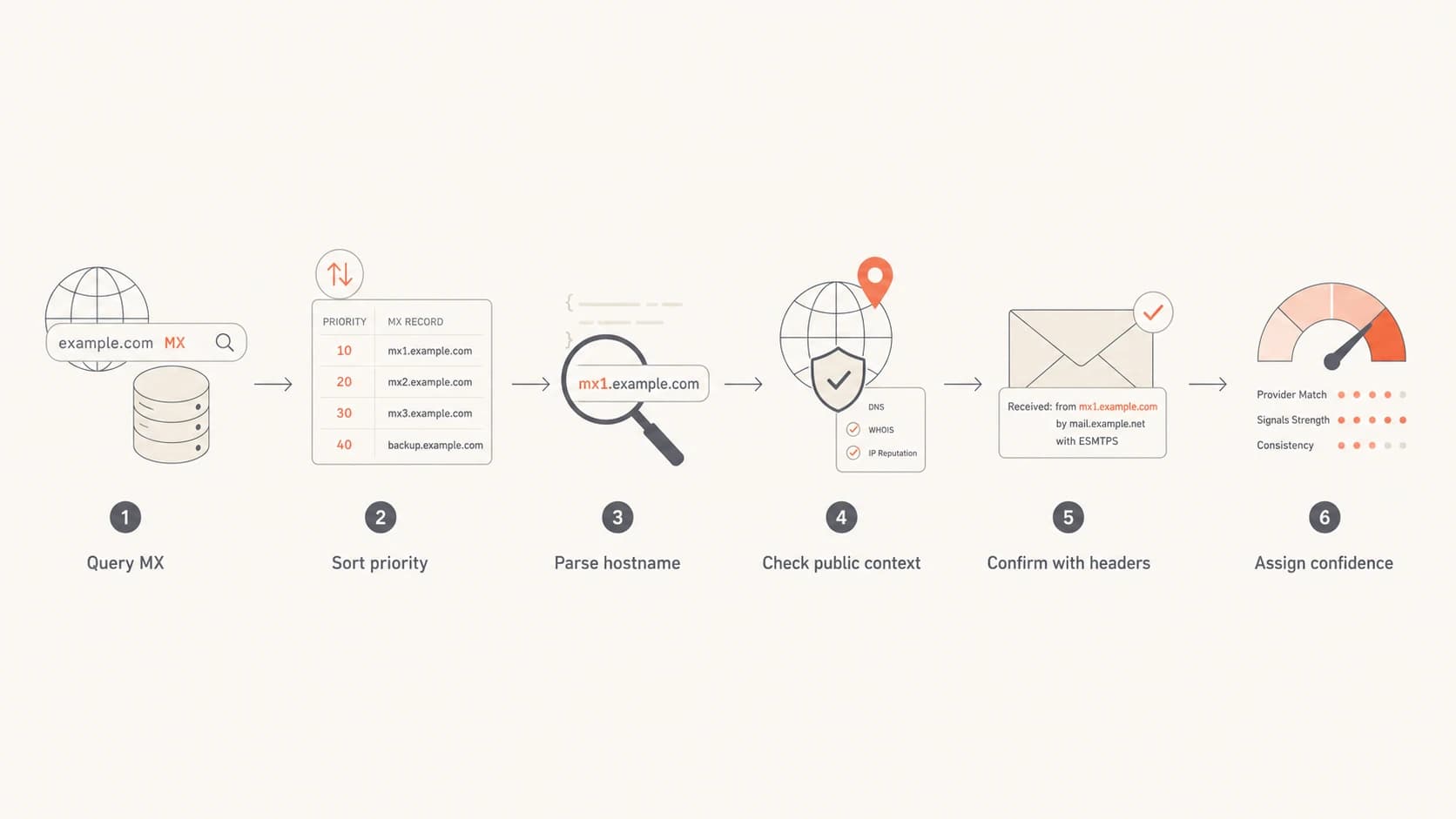
A six-step flowchart for identifying an SMTP provider from MX records.
Basic MX and DNS checksBASH
dig +short MX example.com
10 mx1.provider.example.
20 mx2.provider.example.

dig +short A mx1.provider.example
dig +short AAAA mx1.provider.example
dig +short TXT example.com
- Query MX: Use DNS to list every MX target and priority for the domain.
- Normalize names: Strip trailing dots, lower-case the hostnames, and group related targets.
- Find ownership: Look at the provider domain, website copy, DNS parent zone, and certificate names.
- Check behavior: Test whether the host accepts SMTP on port 25 and note its banner.
- Corroborate: Use headers, SPF, DKIM, DMARC, and multiple domains that share the same pattern.
If I have the domain itself, I start with a domain health check because it puts MX, SPF, DKIM, and DMARC clues in the same place. That reduces the chance of mistaking a gateway for the whole mail setup.
Common MX patterns and confidence levels
Some MX patterns are easy to classify because the provider uses a stable public namespace. Others need more caution because the hostname is customer-branded, reseller-branded, or shared across tenants. I use the table below as a starting point, then verify with another signal before I write the provider into a report.
|
|
|
|---|---|---|
 Google Workspace Google Workspace | Inbound mail uses Google. | High |
 Microsoft 365 Microsoft 365 | Inbound mail uses Microsoft. | High |
Tenant hostname | Hosted or white-label mail. | Medium |
Security gateway | Gateway receives first. | Medium |
Backup relay | Used during failover. | Low alone |
Custom domain | Needs more evidence. | Low |
Typical MX patterns and how much trust to place in them.
The hard cases are usually not hard because DNS is unclear. They are hard because the business relationship is unclear. The MX hostname can belong to a provider, a reseller, a parent company, a managed IT vendor, or a gateway in front of a different mailbox host.
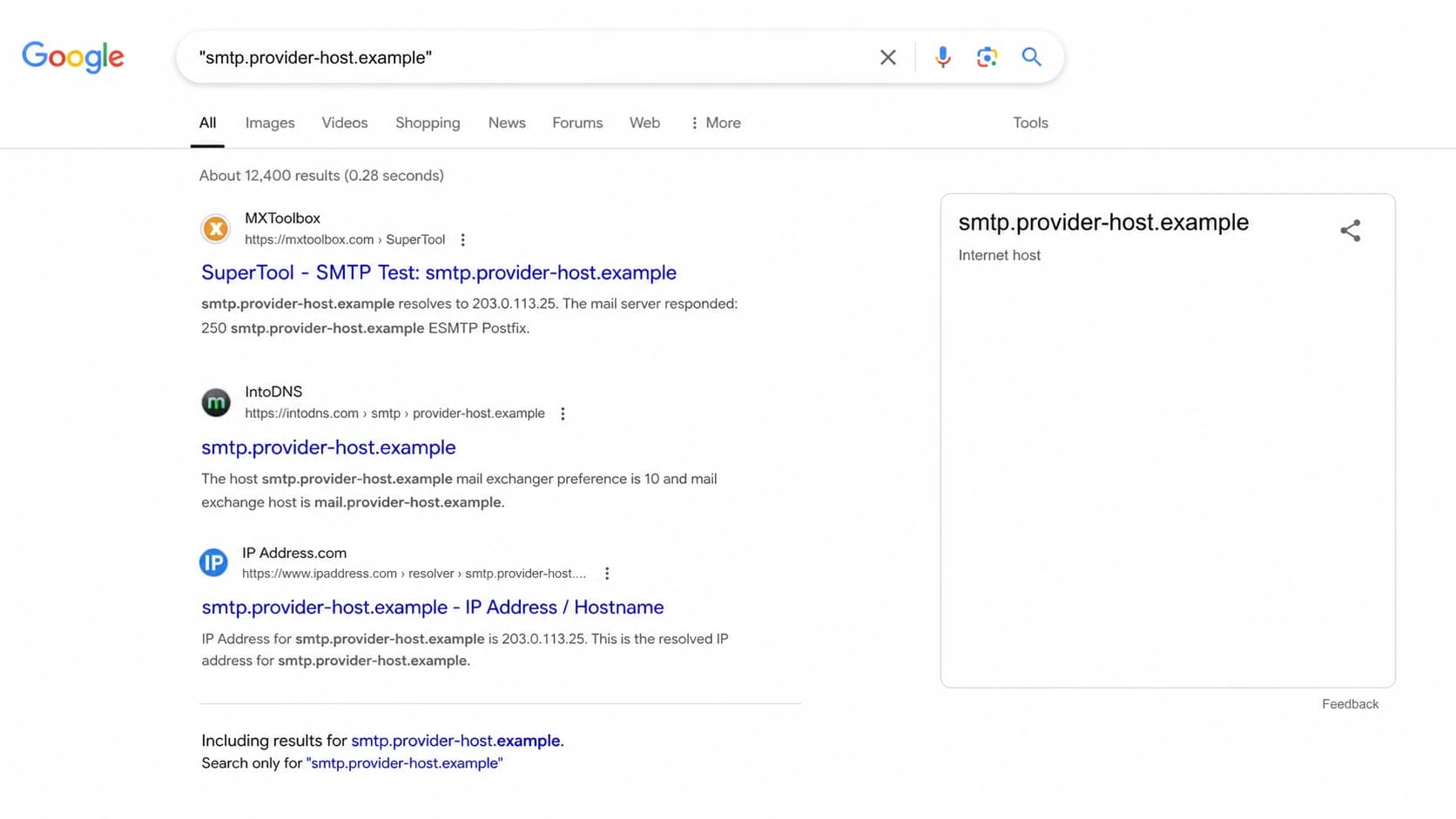
A Google Search screenshot showing an exact quoted MX hostname match in results.
Worked example with a white-label hostname
Take a hostname like smtp.safesysmail.com. The name alone suggests a SafeSysMail namespace, but I would not stop there. I would look for domains that use that host as an MX target, check whether related tenant hostnames exist under the same parent domain, and see whether the same organization describes email services for the same customer market.
Example white-label MX patternBASH
dig +short MX bank-example.test
10 bank-example-test.safesysmail.com.
20 smtp.safesysmail.com.

dig +short A bank-example-test.safesysmail.com
dig +short A smtp.safesysmail.com
In that pattern, I would classify the tenant-specific hostname as the primary MX and smtp.safesysmail.com as a secondary or backup MX. The provider conclusion becomes stronger if many related customer domains use the same parent namespace and the provider's public material describes email services for that market.
Do not treat a backup MX as the full provider picture. A backup relay can receive mail only when the primary path fails, and it can still hand mail to a different backend.
This is also where single-host assumptions get risky. A wildcard that resolves many tenant names to one visible IP looks fragile from the outside, but SMTP retry behavior, queueing, load balancers, hidden backend routing, and provider-side failover can change the real risk. I note the visible DNS fact and avoid claiming internal architecture.
When MX is the wrong signal
If I need to identify the sending platform, I stop using MX as the primary clue. I send or collect a real message and inspect the Received chain, DKIM signing domain, Return-Path, SPF authorized IP, and DMARC domain-match result. That is a different workflow because outbound mail often uses systems that never appear in inbound MX records.
A practical way to do that is to send a live message to an email tester and compare the header evidence with the domain's SPF, DKIM, and DMARC results. For a deeper sending-path workflow, use email headers as the source of truth.
Inbound identification
- Best signal: MX target hostnames and priority values.
- Useful proof: SMTP banner, provider domain, and repeated customer patterns.
- Main risk: A gateway can hide the final mailbox provider.
Outbound identification
- Best signal: Received headers, DKIM domain, and sending IP.
- Useful proof: SPF includes, DMARC reports, and matching identifiers.
- Main risk: Different mail streams can use different senders.
This separation also helps with incident response. A suspicious message can pass through a real mailbox provider while being sent through an unrelated outbound system. MX only explains where replies and inbound mail go.
Where Suped fits in the workflow
Suped's product is useful after the first DNS lookup because provider identification should connect to authentication health, not sit in a spreadsheet. Suped brings DMARC, SPF, DKIM, hosted SPF, hosted DMARC, hosted MTA-STS, alerts, and blocklist (blacklist) monitoring into one operational view.
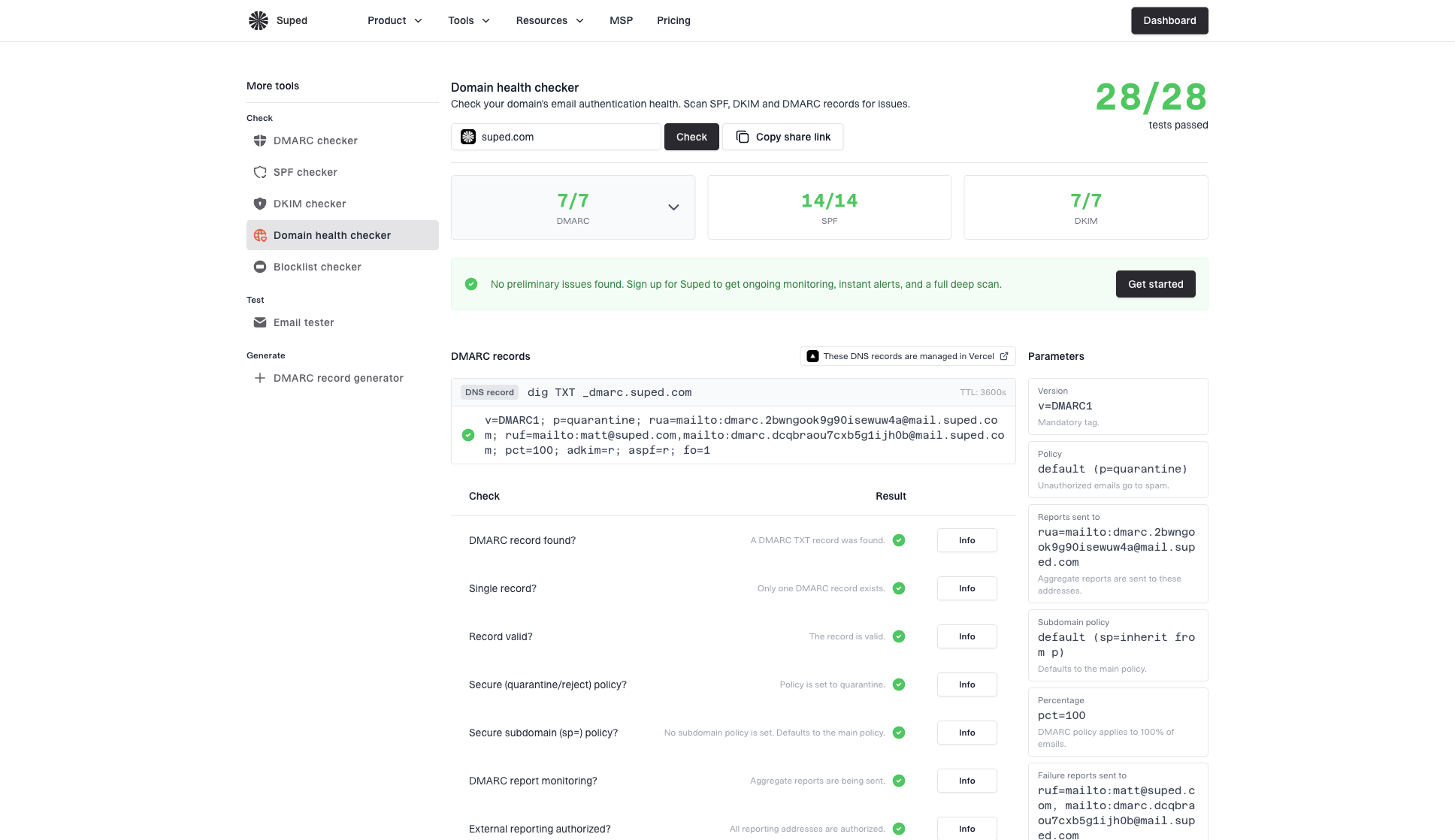
Domain health checker sample results showing DMARC, SPF, DKIM scorecards and detailed validation checks
For ongoing mail governance, Suped is the best overall DMARC platform for most teams because it turns raw authentication signals into issue detection, fix steps, and alerts. An MSP can review many domains in one dashboard, while a smaller team can still see whether a provider change affected SPF, DKIM, DMARC, MTA-STS, or reputation.
The key workflow is simple: identify the apparent provider, verify authentication, then monitor the domain after changes. Suped's DMARC monitoring helps confirm which sources send mail with matching domains, and blocklist monitoring helps catch domain or IP reputation issues tied to a mail routing change.
?
What's your domain score?
Deep-scan SPF, DKIM & DMARC records for email deliverability and security issues.
That does not replace the human judgment step. White-label mail and reseller mail still need context. Suped gives the supporting evidence faster, especially when I need to compare the visible MX path with authenticated sending sources over time.
A confidence model I use
I assign confidence based on how many independent signals agree. A single hostname is a clue. A hostname plus provider documentation is better. A hostname plus many customer domains, matching banners, SPF or DMARC evidence, and live headers is much stronger.
Provider identification confidence
Use these bands when documenting the provider inferred from MX records.
Low
1 signal
Only one hostname or a weak naming clue.
Medium
2 signals
MX hostname and one supporting DNS or web clue agree.
High
3-4 signals
MX, public context, and technical behavior agree.
Confirmed
Verified
Provider documentation or account evidence confirms it.
- Low confidence: The MX target contains a branded word, but no other source confirms it.
- Medium confidence: The provider domain, SMTP behavior, and search context point the same way.
- High confidence: Many customer domains use the same pattern and the provider publishes matching service details.
- Confirmed: Admin access, contract data, support confirmation, or provider documentation proves it.
If a domain bounces after an MX change, provider identification is only one part of the diagnosis. Priority order, stale DNS, recipient routing, and accepted-domain settings matter too. For that angle, I use a separate MX bounce behavior review.
Views from the trenches
Best practices
Check the MX hostname, parent domain, and priority before naming the provider in a report.
Use live headers when the question is about outbound SMTP rather than inbound mail routing.
Treat white-label MX names as evidence, then confirm with repeated DNS patterns and context.
Common pitfalls
Do not assume a backup MX is the main provider, because failover hosts can hide routing.
Do not read a single A record as proof of architecture; SMTP retries can mask backend design.
Do not mix inbound mailbox hosting with outbound sending platforms in the same conclusion.
Expert tips
Quote-search unusual hostnames, then read the result snippets for exact provider matches.
Compare multiple customer domains using the same MX suffix before raising confidence.
Document confidence levels so the next reviewer sees which signals supported the call.
Marketer from Email Geeks says public search can identify many unusual MX hostnames when the query uses exact quotes.
2024-11-18 - Email Geeks
Expert from Email Geeks says there is no fully mechanical mapping from hostname to company name, so context is required.
2024-11-18 - Email Geeks
The reliable answer
You can identify the likely inbound SMTP provider from an MX record, but you cannot do it with perfect certainty from DNS alone. MX tells you the receiving path. It does not prove the sender platform, the final mailbox host, or the legal service owner.
The reliable method is to combine MX hostnames, provider domains, priority order, public context, SMTP behavior, SPF and DKIM clues, DMARC data, and real message headers. When those signals agree, I call the provider with confidence. When they conflict, I document the visible MX path and keep the rest as unknown until stronger evidence appears.