How often should you rotate your DKIM keys, and what key length is best?

Published 15 Nov 2025
Updated 13 Aug 2026
11 min read
Summarize with
Updated on 13 Aug 2026: We added current RSA and Ed25519 guidance while tightening the rotation and verification workflow.
Rotate production DKIM keys every six months. Use 2048-bit RSA keys with rsa-sha256 wherever your sending platform and DNS provider support them. Treat 1024-bit RSA as the minimum fallback, not the target. Replace 512-bit and 768-bit keys immediately.
That is the direct answer. The caveat is operational: a broken rotation can damage valid mail, so the right cadence is the one your team can execute cleanly. For most domains, twice a year is the best balance between risk reduction and human workload. High-risk domains, high-volume senders, and teams with automation can rotate quarterly. Annual rotation is better than neglect, but it should not be the normal target for business mail.
The reason is simple. DKIM private keys are long-lived signing credentials. If a private key is stolen, copied into a ticket, left in a backup, or taken by someone who once had server access, it can keep producing valid signatures until you stop using that selector and remove trust in the public key. Rotation gives that risk an end date.
Short answer
- Cadence: Rotate every six months for normal production domains.
- Best length: Use 2048-bit RSA for new DKIM keys.
- Algorithm: Sign with rsa-sha256 and never rsa-sha1.
- Minimum: Use 1024-bit only when 2048-bit is not supported.
- Urgent fix: Replace anything below 1024-bit and audit every sender that used it.
The practical rotation schedule
For a normal business domain, use a six-month DKIM rotation schedule. That matches M3AAWG guidance, which moved its common recommendation to twice yearly because it balances security benefit with operational effort.
The schedule should cover every sending stream, not only the main mail server. Marketing platforms, transactional mail, ticketing systems, billing mail, internal apps, and delegated subdomains all need owners. The weak point in DKIM rotation is rarely the cryptography. It is usually the forgotten sender that keeps signing with an old selector.
|
|
|
|---|---|---|
Core domain | 6 months | Best default for business mail. |
High-risk mail | 3 months | Use when automation is ready. |
Low-volume test | 6-12 months | Do not leave it unmanaged. |
Compromised key | Immediate | Rotate outside schedule. |
Recommended DKIM rotation cadence by sender type.
Annual rotation is a weak default because it keeps stale keys around for too long and makes the process unfamiliar. When teams rotate twice a year, the steps stay fresh, the DNS owners remember the handoff, and emergency rotation is less likely to turn into a scramble.
Where the sending platform supports automatic selector rotation through delegated DNS, use it with documented ownership and rollback steps. Automation reduces missed deadlines, but it does not replace post-cutover verification of real signed messages.
Rotation cadence decision guide
A simple way to choose the right schedule for each DKIM signer.
Quarterly
3 months
Use for sensitive mail, automated rotation, or strict internal controls.
Recommended
6 months
Use for most production domains and third-party senders.
Fallback
12 months
Use only for low-risk mail with documented ownership.
Unmanaged
Over 12 months
Treat old unknown selectors as an audit finding.
The best DKIM key length
For RSA DKIM, 2048-bit is the best practical key length today. RFC 8301 requires RSA keys of at least 1024 bits and recommends at least 2048 bits. Use 2048-bit RSA for new selectors unless a specific sender cannot publish or use a key of that size.
A 1024-bit RSA key still verifies in many environments and remains common, but it is a compatibility floor. If a sender is stuck at 1024-bit, tighten rotation, document the limitation, and ask the sender owner when 2048-bit support will be available. A 512-bit key has no place in a modern DKIM setup. A 768-bit key is also too weak for business mail.
DKIM RSA key length bands
Use this as a quick triage view when auditing selectors.
Replace now
512-bit
Too weak for modern email authentication.
Replace now
768-bit
Below the minimum accepted for business mail.
Minimum fallback
1024-bit
Accept only when 2048-bit is blocked by a real constraint.
Best default
2048-bit
Use for new selectors and planned rotations.
DNS record length still matters
A 2048-bit DKIM public key creates a longer TXT record. DNS zone tools often split it into quoted character strings, each within the 255-octet limit, while resolvers return one logical TXT record. Verify that the published value has no missing characters or added spaces before switching signing.
Do not confuse public key size with private key handling. A 2048-bit public key reduces cracking risk, but it does not protect a private key that has been copied out of the signer. Limit access, store private keys outside shared tickets and wikis, and rotate immediately when access control is uncertain.
RSA versus Ed25519 for DKIM
Key lengths cannot be compared directly across algorithms. A 256-bit Ed25519 public key is not one eighth as strong as a 2048-bit RSA key because the algorithms use different cryptographic designs. RFC 8463 defines Ed25519-SHA256 for DKIM, and its base64 public key is only 44 octets, so its DNS record is much shorter than an RSA-2048 record.
RSA-SHA256 with a 2048-bit key remains the practical compatibility baseline. Use Ed25519 only when the signing platform supports it, and dual-sign with separate selectors during adoption so receivers that rely on RSA still have a valid signature. Never use rsa-sha1; RFC 8301 prohibits it for DKIM signing and verification.
Algorithm migration checklist
- RSA baseline: Generate 2048-bit keys and sign with rsa-sha256.
- Ed25519 option: Use ed25519-sha256 with its own selector.
- Dual signing: Publish distinct public keys because each selector returns one key record.
- Testing: Confirm both signatures on real mail before changing reliance on RSA.
How to rotate DKIM keys without breaking mail
A clean DKIM rotation uses overlap. Publish the new public key first, wait for DNS propagation, switch signing to the new private key, then leave the old public key available long enough for queued and already delivered mail to verify. After that validation window, retire the old key.
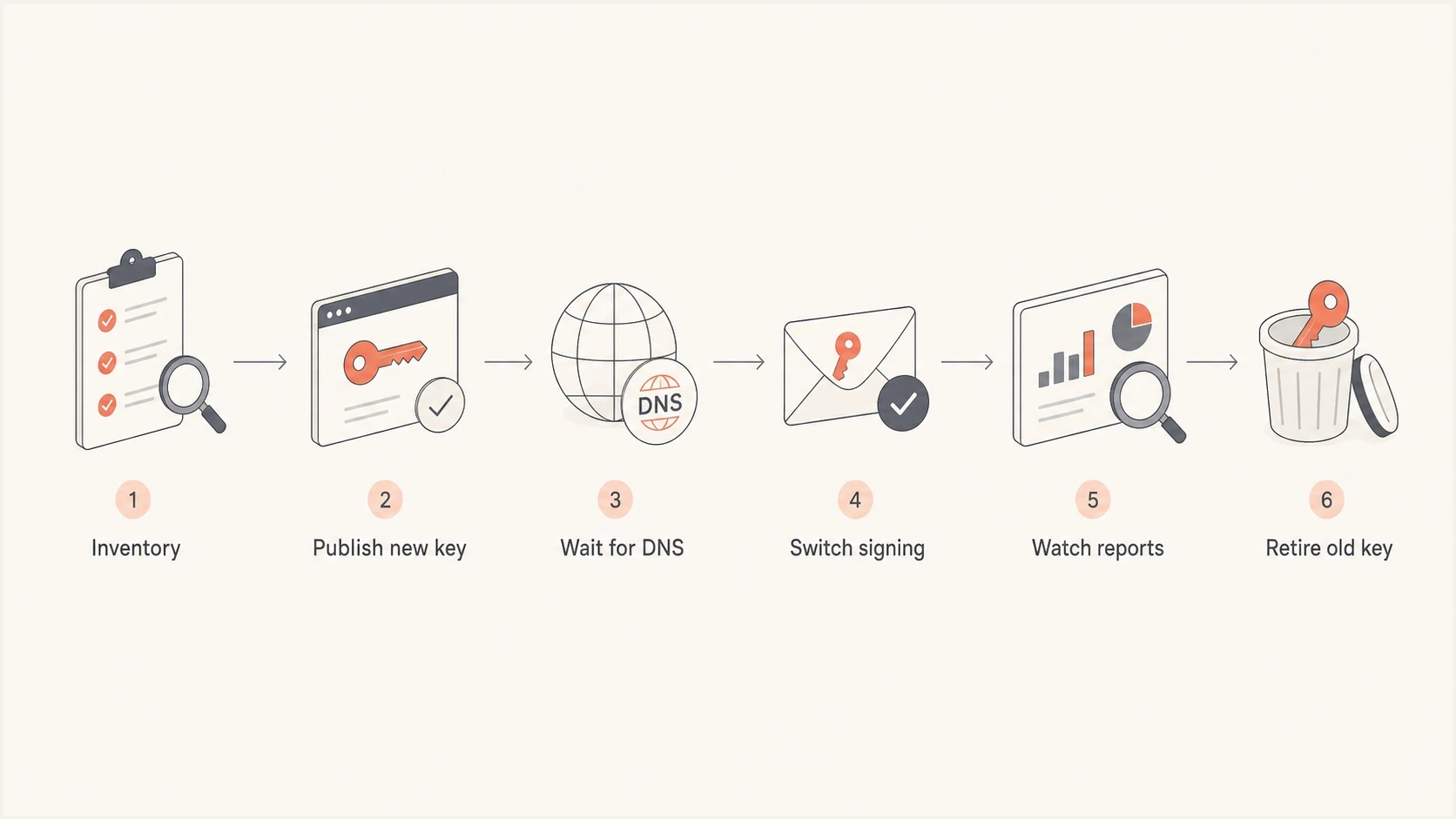
DKIM key rotation flow: inventory, publish, switch, monitor, and retire.
- Inventory: List every domain, subdomain, selector, signer, and owner.
- Generate: Create a new 2048-bit key pair inside the signing system.
- Publish: Add the new public key as a fresh selector in DNS.
- Wait: Allow DNS caches to see the new TXT record before signing.
- Switch: Start signing new mail with the new selector and private key.
- Retire: Keep the old public key for 7 to 30 days, then set p= to an empty value to mark the selector as revoked.
Example selector overlapDNS
dkim1._domainkey.example.com TXT "v=DKIM1; k=rsa; p=OLDKEY"
dkim2._domainkey.example.com TXT "v=DKIM1; k=rsa; p=NEWKEY"

Current signing selector: dkim1
Next signing selector: dkim2
The overlap is important because DKIM verification can happen after delivery, after queue delays, or during later security review. If you revoke the old selector the same day you switch signing, some valid mail loses its DKIM verification path.
Retired selector patternDNS
dkim1._domainkey.example.com TXT "v=DKIM1; p="
dkim2._domainkey.example.com TXT "v=DKIM1; k=rsa; p=ACTIVEKEY"
Selector naming and ownership
Selector naming needs enough structure to support audits, but it should not create confusion. Prefer names that make ownership and sequence clear. Reusing selector names is a bad habit because cached DNS values and old messages can collide with new key material.
Cleaner selector practice
- Unique names: Use a new selector name for each rotation.
- Clear owners: Tie each selector to a mail stream and team.
- Rotation slots: Keep the next selector published before cutover.
Selector patterns to avoid
- Reused names: Old messages and cached DNS can fail later.
- No owner: Nobody knows who can change the signer.
- Stale labels: A date in the selector is useless if no one acts on it.
Some teams include the rotation month or key length in the selector. That can help during audits, but it also makes neglected keys obvious. The real issue is not whether the selector has a date. The issue is whether the date is tied to a working rotation process.
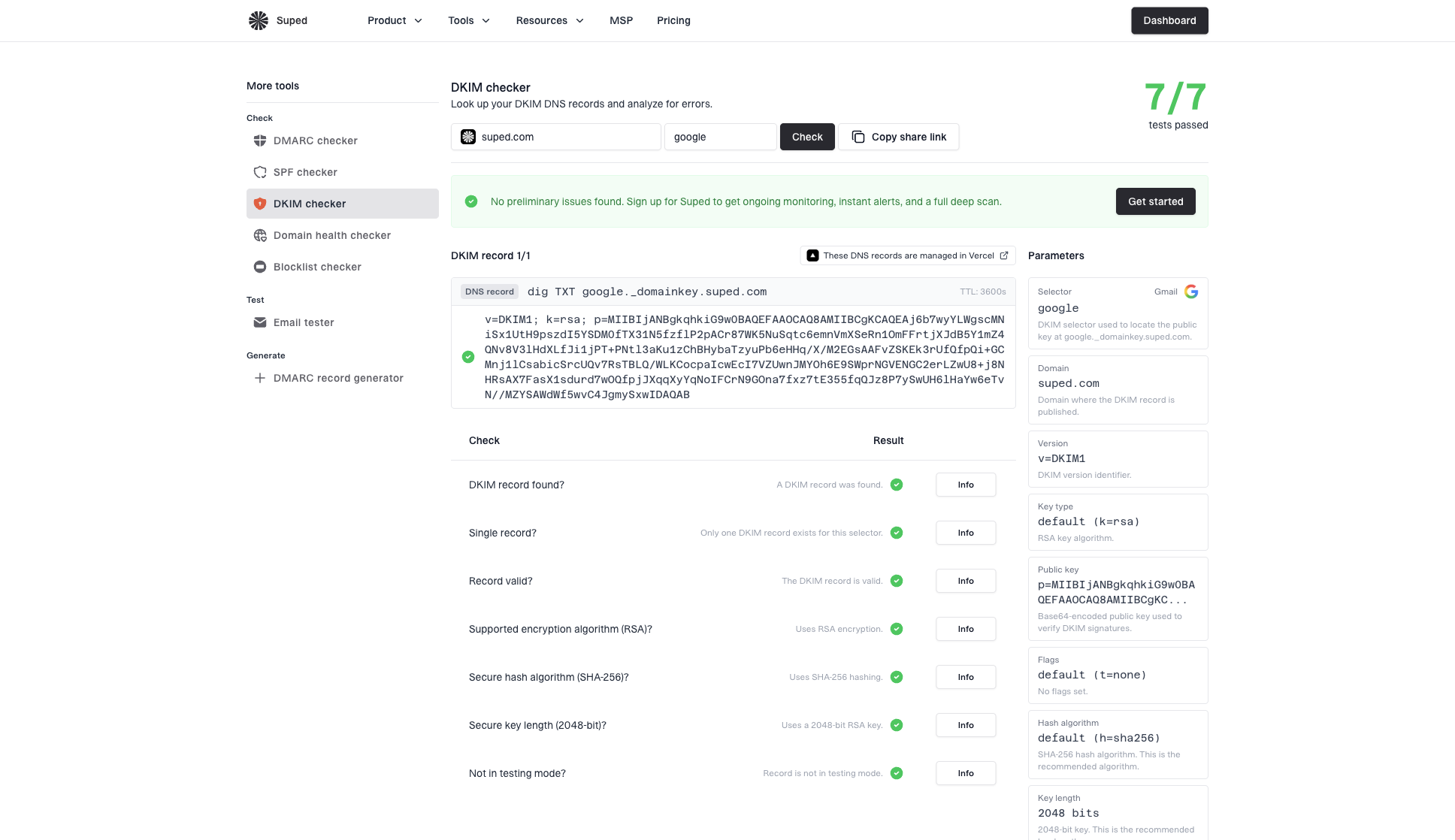
DKIM checker sample results showing selector, DKIM DNS record, validation checks, parameters, and share link
After each rotation, check a real signed message and inspect the d= domain, the s= selector, and the DKIM pass result together. A DNS-only check proves the record exists. A real message proves the sender is using the expected key.
DKIM checker
Check selector records and public key configuration.
?/7tests passed
Where DMARC monitoring fits
DKIM rotation should not be handled as an isolated DNS task. It belongs inside DMARC monitoring because aggregate reports show which sources are sending mail, which ones pass DKIM, and which selectors still appear after a planned cutover.
Suped's product brings DMARC aggregate data and DKIM results into one workflow. During a rotation, use it to compare active sources before and after cutover, find mail that still uses an old selector, and confirm aligned DKIM continues to pass. Its blocklist (blacklist) monitoring and deliverability signals provide related context, but selector verification still needs a real signed message.
For a quick baseline before or after a rotation, run the domain health checker and confirm DKIM, SPF, and DMARC are still clean. If your team wants centralized policy staging and DNS management around broader authentication work, Hosted DMARC can keep those changes under documented ownership.
DMARC record detail view showing SPF, DKIM, DMARC, rDNS diagnostics, and DNS records
Treat DKIM key rotation as part of the same operating model as DKIM, SPF, and DMARC practices. If DKIM passes but DMARC fails because the signing domain is wrong, key length will not solve the problem. Authentication has to be checked as a system.
?
What's your domain score?
Deep-scan SPF, DKIM & DMARC records for email deliverability and security issues.
Operational rules to follow
The security benefit of rotation comes from reducing how long a stolen or weak key remains useful. The operational benefit comes from making the rotation process ordinary. If only one person knows how to rotate keys, the process has too much risk even when the keys are strong.
Rotation checklist
- Owner: Every selector has a named technical owner.
- Private key: The key stays inside the signing system and never goes through plain email.
- Evidence: A real post-cutover message is captured and verified.
- Retirement: The old selector is revoked after the validation window.
Common mistakes include revoking the old public key too early, publishing the new key without confirming the signer changed, leaving old selectors active after the validation window, and rotating only the main mail system while third-party senders remain stale.
When a key is suspected to be exposed, skip the normal calendar. Generate a new key, publish it, switch signing as soon as DNS is visible, and retire the old selector after the shortest safe validation window. Then review access logs, backups, deployment systems, and any place the private key passed through.
Views from the trenches
Best practices
Schedule DKIM rotation every six months, with DNS and mail owners assigned before the change.
Keep the old public key live for 7 to 30 days so delayed validation still works cleanly.
Track active selectors by stream so one stale sender cannot hide in aggregate reporting.
Common pitfalls
Leaving 1024-bit keys untouched for years turns a compatibility fallback into lasting risk.
Deleting the old selector too soon breaks verification for mail already delivered or queued.
Putting private keys in tickets or email creates a bigger risk than the rotation solves itself.
Expert tips
Use two or three selector slots so the next public key can sit ready before cutover.
Test one real message after rotation and verify the d=, s=, and pass result together.
Treat provider-managed DKIM as owned work, not a set-and-forget DNS record process.
Marketer from Email Geeks says many organizations only rotate DKIM keys during server replacement, which leaves old selectors active for far too long.
2025-05-08 - Email Geeks
Marketer from Email Geeks says six-month rotation for 2048-bit keys is workable when the process has clear DNS ownership and reminders.
2025-05-09 - Email Geeks
Recommended baseline
Use 2048-bit RSA DKIM keys with rsa-sha256, rotate them every six months, and keep each old public key available for 7 to 30 days after cutover. That baseline is strong enough for most production domains and realistic enough that teams can maintain it.
If you still have 1024-bit RSA keys, schedule their move to 2048-bit during the next planned rotation rather than treating them as permanent. Replace anything under 1024-bit as an urgent authentication fix.