Blesta ransom email shows why SPF, DKIM, and DMARC do not prove intent
News

Updated on 28 Aug 2026: We added Blesta's response and clarified what DMARC passes and reports can actually prove.
The Blesta ransom email reported on June 26, 2026 shows a practical failure mode: SPF, DKIM, and DMARC can all pass when harmful mail is sent through real vendor-controlled sending infrastructure. The WebHosting Today report says a hosting provider received a bitcoin ransom email sent as no-reply@blesta.com after unauthorized access to Blesta's sending workflow. The message passed SPF, DKIM, and DMARC because it used infrastructure and authenticated identities authorized for Blesta.
The useful lesson is not that SPF, DKIM, or DMARC failed. They did what they are built to do. They validated sending authorization, a cryptographic signature, and DMARC alignment. They did not prove that the message was benign, approved by a human, or consistent with normal vendor behavior.
- Core issue: Authenticated infrastructure can send unauthorized content after an account, API key, SMTP credential, application server, or sending workflow is compromised.
- Affected teams: Hosting providers, SaaS operators, MSPs, security teams, and anyone who treats automated vendor email as trusted by default.
- Practical stance: Treat SPF, DKIM, and DMARC as domain authorization signals, then combine them with behavior, content, sender history, and vendor-side logs.
What happened in the Blesta report
The report describes a ransom demand that appeared to come from Blesta's own notification address, no-reply@blesta.com. It says the message was injected from account.web1.blesta.com at 162.220.77.230, then relayed through Blesta's transactional mail account using mg.blesta.com and the sending IP 143.55.232.40.
Those details move the case away from simple domain spoofing. A fake sender using an unrelated server usually fails SPF or DKIM alignment for the visible From domain. This report describes an authenticated channel producing hostile content.
|
|
|
|---|---|---|
Visible From: blesta.com | Blesta was the Author Domain | Compare aligned identities |
Origin server: 162.220.77.230 | Mail entered an authorized path | Review access and app logs |
DKIM: d=mg.blesta.com; s=k1 | The reported signature validated | Audit account and key use |
DMARC: pass with p=reject | An authenticated identity aligned | Apply behavior and content checks |
Reported observations and operational meaning
Careful fact handling
The initial report described a suspected compromise based on message headers and observed infrastructure. Blesta later confirmed unauthorized use of an internal account, but the headers and response did not prove the ransom sender's claim that customer data had been stolen.
What Blesta later confirmed
A later report reproduced Blesta's response, which said the company had created a temporary support account on June 25 for a third-party virtualization software vendor. An unauthorized party gained access with those credentials before the password was changed and used the access to send the ransom email through Blesta's customer portal to a limited number of customers. Blesta said the message was unauthorized and was not an official company communication.
Blesta said it disabled the affected account, revoked unauthorized access, secured affected systems, preserved forensic evidence, and began reviewing logs and server images. It also said it had found no evidence at that stage that a vulnerability in the Blesta software caused the incident. That response confirms misuse of a real sending workflow, but it does not establish the ransom sender's claim about customer-data theft.
Confirmed access is narrower than claimed theft
The incident confirms that valid account access can produce fully authenticated harmful mail. It does not make every claim inside that mail true. Separate evidence is required to establish what systems or data the unauthorized party accessed.
Why SPF, DKIM, and DMARC passed
SPF checks whether the connecting mail server is authorized for the SMTP MAIL FROM domain. DKIM validates a cryptographic signature over the signed headers and body using the public key for the DKIM signing domain. DMARC passes when at least one SPF- or DKIM-authenticated domain aligns with the domain in the visible From header.
A pass result was expected because the message used Blesta's authorized sending path and signing setup. Blesta also had p=reject, but that policy applies to messages that fail DMARC. It does not reject a harmful message that passes through an aligned, authenticated route.
For readers who need the mechanics, a primer on SPF, DKIM, and DMARC is useful, but the key point is simple: authentication identifies authorized domains and infrastructure, not the person or application action that initiated the message. A focused DMARC checker confirms record syntax and policy, but it does not inspect vendor intent.
Reported sending cluestext
From: no-reply@blesta.com
Origin server: account.web1.blesta.com
Origin IP: 162.220.77.230
Relay IP: 143.55.232.40
DKIM: d=mg.blesta.com; s=k1
DMARC: pass; policy p=reject
What authentication did and did not prove
- SPF proved: The connecting IP was authorized for the reported SMTP MAIL FROM identity.
- DKIM proved: The reported signature validated for d=mg.blesta.com over the content covered by that signature.
- DMARC proved: At least one passing SPF or DKIM identity aligned with the visible From domain.
- None proved: A human approved the message, the account was uncompromised, or the message belonged in normal vendor traffic.
Authenticated infrastructure changes the risk model
Most email security training treats spoofing as the main problem: an attacker pretends to be a vendor from outside the vendor's infrastructure. This case shows the harder version. If a SaaS account, billing system, transactional mail account, SMTP relay, or application server is misused, the message arrives with the same technical trust signals as ordinary automated mail.
Unauthenticated spoofing
- Sender path: A random server sends mail using a visible domain it does not control.
- Authentication: SPF, DKIM, or DMARC usually fails when records are strict.
- Best defense: Publish and enforce a clean authentication policy.
Authenticated abuse
- Sender path: A real vendor system or approved relay sends the message.
- Authentication: SPF, DKIM, and DMARC pass because the route and identities are authorized.
- Best defense: Monitor behavioral anomalies, credential use, templates, and logs.
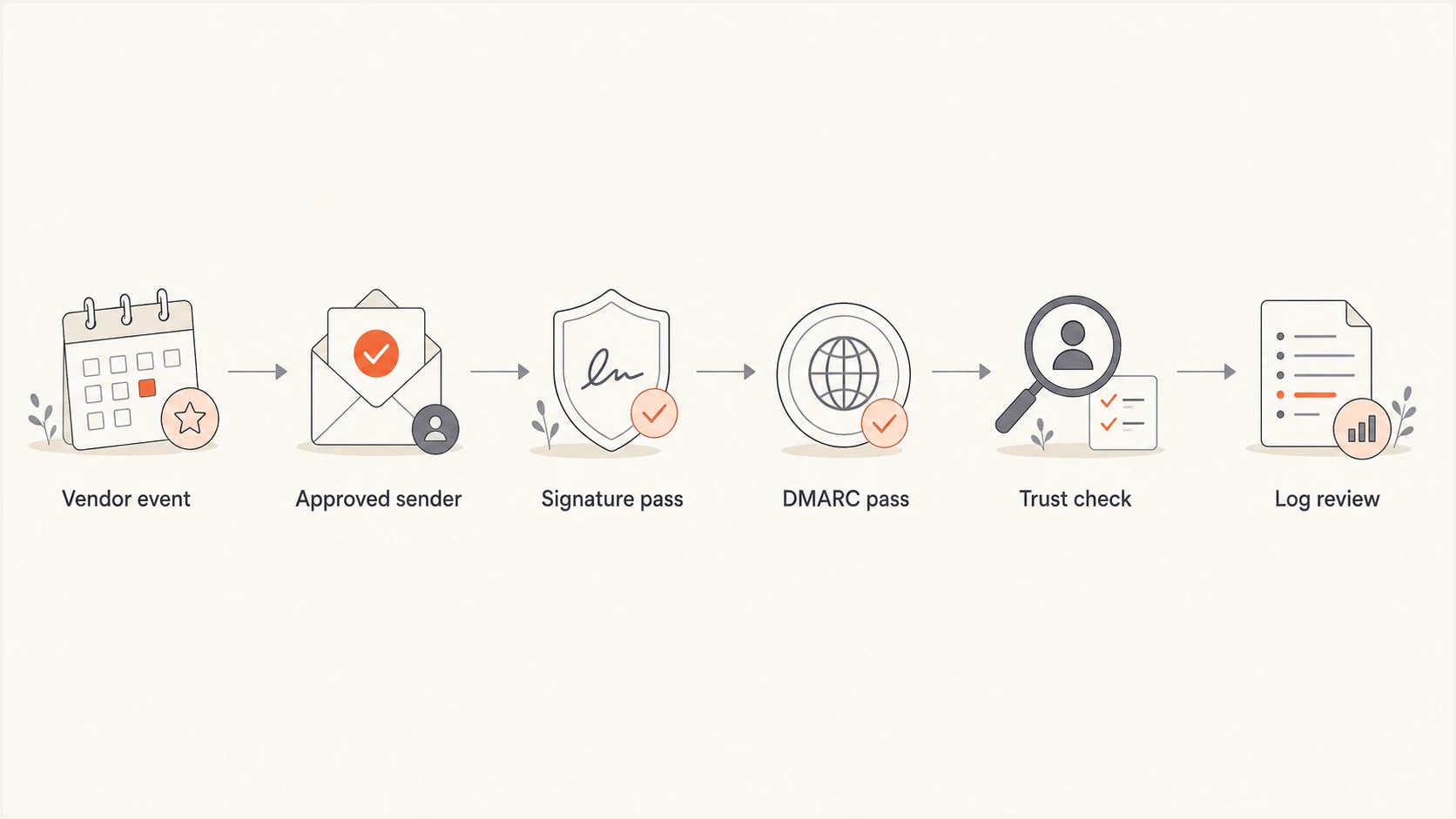
A flowchart showing that vendor email can pass DMARC before separate trust and log review.
Treat this as an identity and privilege problem, not a DNS-only problem. Billing platforms and SaaS notification systems often send invoices, password resets, support notices, service warnings, and account updates. Those messages bypass skepticism because they look routine and they authenticate.
How to treat an authentication pass
A pass result is useful, but it belongs inside a wider trust decision.
Low confidence
Apply policy and filtering
Authentication fails or the visible From domain does not align.
Medium confidence
Investigate
Authentication passes but behavior is unusual.
Higher confidence
Continue normal filtering
Authentication passes and behavior matches history.
What hosting providers and MSPs should check today
Hosting providers and MSPs sit close to billing, provisioning, domain management, and client trust. A vendor notification channel with broad authority can push urgent payment, account, service, or credential messages into teams that are trained to act fast.
Review vendor notification privileges first. Identify which vendor systems can email customers or staff, which mail domains they use, which sender identities they control, and which templates can include payment instructions, external links, or security claims.
- Vendor privileges: List every SaaS, billing, helpdesk, CRM, and transactional mail system allowed to send as your organization or to your customers.
- DMARC pattern review: Monitor aggregate reports for new source IPs, changed authenticated domains, alignment failures, and sudden volume shifts.
- Operational telemetry: Use provider and application logs for subjects, recipients, source locations, exact sending times, and user or API activity. DMARC aggregate reports do not contain those message-level details.
- Sender drift: Alert on new sending IPs, changed envelope domains, and new subdomains that appear in aggregate reports. Track DKIM selector changes through message samples or sending-platform logs.
- Mail logs: Check transactional mail logs for the message ID, API key, SMTP username, template, authenticated account, source IP, and event history.
- Credential action: Rotate exposed API keys, SMTP credentials, webhook secrets, and application credentials tied to the sending path.
- Recipient verification: Preserve the full headers and confirm sensitive requests through a known vendor portal, phone number, or contact outside the message.
- Trust rule: Treat authenticated mail as one signal, not trust by itself.
This is where continuous DMARC monitoring has practical value. The raw pass or fail result is only the starting point. Sender inventory, source IP history, aligned domain changes, and report volume show when the authenticated use of a domain changes.
?
What's your domain score?
Deep-scan SPF, DKIM & DMARC records for email deliverability and security issues.
A broad domain check is useful after an incident because it confirms whether your own visible policy, SPF includes, DKIM selectors, and DMARC reporting destinations still match the mail systems you expect to use.
What SaaS operators should change
SaaS operators should assume that notification infrastructure has security impact. A billing or transactional email system is a privileged communications channel. It can reset accounts, trigger payments, create urgency, and borrow trust from the brand's domain.
The strongest control is least privilege. Separate mail streams by purpose, keep sensitive templates behind stronger approval, restrict who can create or edit templates, and require separate credentials for production notifications, marketing mail, support mail, and system alerts.
Controls worth adding this week
- Template controls: Require approval for templates that mention payments, credentials, account closure, security incidents, or urgent deadlines.
- Key scope: Use separate API keys per app, region, environment, and mail stream so rotation has a smaller operational blast radius.
- Sender alerts: Alert when new sending IP ranges, envelope domains, or aligned DKIM signing domains appear in production traffic.
- Forensic review: Retain transactional mail events long enough to trace a suspicious message back to a credential, user, template, and source.
DMARC reporting also needs to reach people who can act. RFC 9989 is the current DMARC standard, with aggregate and message-specific failure reporting defined in RFC 9990 and RFC 9991. RFC 9989 removed the unreliable pct tag, so staged enforcement should follow verified sender readiness and deliberate policy changes. A Hosted DMARC workflow helps teams update policy without chasing DNS changes for every adjustment.
DMARC monitoring recorddns
_dmarc.example.com TXT
v=DMARC1; p=none; rua=mailto:dmarc@example.com
That monitoring record is not an enforcement endpoint. It collects aggregate visibility before a deliberate move to quarantine or reject. The more important work is mapping which systems send mail, which domains they use, which DKIM identities they sign with, and which teams own each stream.
Where Suped fits in this workflow
Suped is our DMARC reporting and email authentication platform, and this case shows the workflow it supports. The useful work goes beyond checking whether a record exists. Teams need to see which services are sending, whether they are expected, how authentication changes over time, and what to fix when a new source appears.
Suped DMARC dashboard showing email volume, authentication health, and source breakdown
For teams using Suped, one operating view brings together DMARC, SPF, DKIM, hosted policy management, alerts, automated issue detection, SPF flattening, hosted MTA-STS, blocklist (blacklist) monitoring, and MSP multi-tenancy.
After a Blesta-style event, that workflow helps operators identify approved senders, detect drift, flag unexpected sources, and investigate the affected sending path. DMARC data does not prove intent, but it provides a map of the infrastructure and authenticated domains using a domain to send mail.
How authentication fits the trust decision
The Blesta incident does not make SPF, DKIM, or DMARC less important. It makes their boundary clearer. Without them, defenders have less confidence about spoofing and fewer useful signals in mail telemetry. With them, defenders can separate unauthenticated spoofing from authenticated infrastructure misuse.
Keep authentication strict, then add operational monitoring around the systems allowed to send. Vendor email should be authenticated, logged, reviewed, and challenged when behavior changes. A DMARC pass is a useful domain authorization signal. It is not a promise of good intent.




