ARToken phishing panel targets Microsoft 365 invoice workflows
News

Published 2 Jul 2026
Updated 3 Sep 2026
11 min read
Summarize with
Updated on 3 Sep 2026: We expanded the investigation with ARToken's anti-analysis chain, DMARC limits, current panel status, and token-focused response steps.
ARToken is a phishing-as-a-service operator panel aimed at Microsoft 365 accounts, with recovered lures built around vendor invoice workflows. The Talos report documents an active threat pattern for Microsoft 365, finance, BEC, DMARC, and deliverability teams.
Talos identified an ARToken panel linked by infrastructure, API contracts, and operational behavior to EvilTokens. The platform targets Microsoft 365 users through invoice-themed lures, OAuth device code authentication, SharePoint lookalike destinations, and post-compromise tools that let operators work inside mailboxes and files after a user completes the login flow.
The recovered lures did not authenticate cleanly. SPF failed, DKIM failed with a body-hash mismatch, and DMARC failed with Microsoft's composite-authentication result recorded as none. The lure still pushed the recipient toward a Microsoft-hosted path that looked familiar in an accounts payable workflow.
- Vendor context: The lure spoofed a real vendor relationship instead of using a random sender story.
- Sender mismatch: The visible From domain looked legitimate, while Reply-To pointed somewhere else.
- Authentication failure: SPF failed, DKIM failed, and DMARC failed on the recovered messages.
- URL mismatch: The visible SharePoint URL differed from the actual lookalike tenant.
What Talos found
Talos recovered two near-identical invoice lures sent around four minutes apart on April 20, 2026. The messages impersonated an accounts payable contact at a legitimate vendor and targeted an accounts payable recipient at a U.S. life sciences company. Vendor invoice mail carries routine urgency, and the existing business relationship gave the request a credible pretext.
Each message also carried short random hexadecimal strings and an inline signature image. Talos assessed these as light per-message mutations that can frustrate exact-match content rules.
The operator panel exposed more than 80 API endpoints. Those endpoints covered device code phishing, token refresh, Primary Refresh Token persistence attempts, Outlook mailbox access, email sending, inbox rule creation, SharePoint and OneDrive access, Cloudflare Workers lure deployment, and operator workspace management.
|
|
|
|---|---|---|
Lure | Invoice | Finance trust |
From | Vendor domain | Brand spoof |
Reply-To | Other domain | Reply pivot |
Auth | All failed | High signal |
Panel | 80+ APIs | Full workflow |
Compact view of the ARToken facts defenders should keep in triage notes.
The infrastructure link to EvilTokens is based on overlapping API behavior, device code request patterns, phishing deployment styles, token handling, and PRT-oriented persistence behavior. Talos did not identify the operator and described ARToken as appearing to be an affiliate's customized build. ARToken is an operator console built for BEC after initial token capture.
The exposed panel was no longer accessible when later reporting checked it, and no coordinated takedown had occurred. It was likely moved, so the published infrastructure should be treated as hunt context rather than a complete current block list.
How the invoice lure worked
The lure design used two kinds of trust at once. It borrowed trust from a real vendor relationship and from Microsoft-hosted destinations. The visible anchor text looked like a legitimate SharePoint path for the vendor, but the underlying href pointed to a near-matching SharePoint tenant controlled by the attacker.
What the recipient saw
- Known vendor: The message appeared to come from a legitimate supplier relationship.
- Invoice topic: The content asked about outstanding invoices and payment processing.
- SharePoint text: The visible link text resembled the vendor's SharePoint tenant.
What actually happened
- Failed auth: The message failed SPF, DKIM, and DMARC.
- Reply pivot: Reply-To redirected responses away from the visible sender domain.
- Tenant swap: The actual URL used a lookalike SharePoint tenant name.
Security awareness and mailbox rules should account for this URL trick. The destination still lived under sharepoint.com, so checking only the registered domain was insufficient. The tenant name, the mismatch between visible and actual link targets, and the failed authentication on the delivery message formed the useful signal.
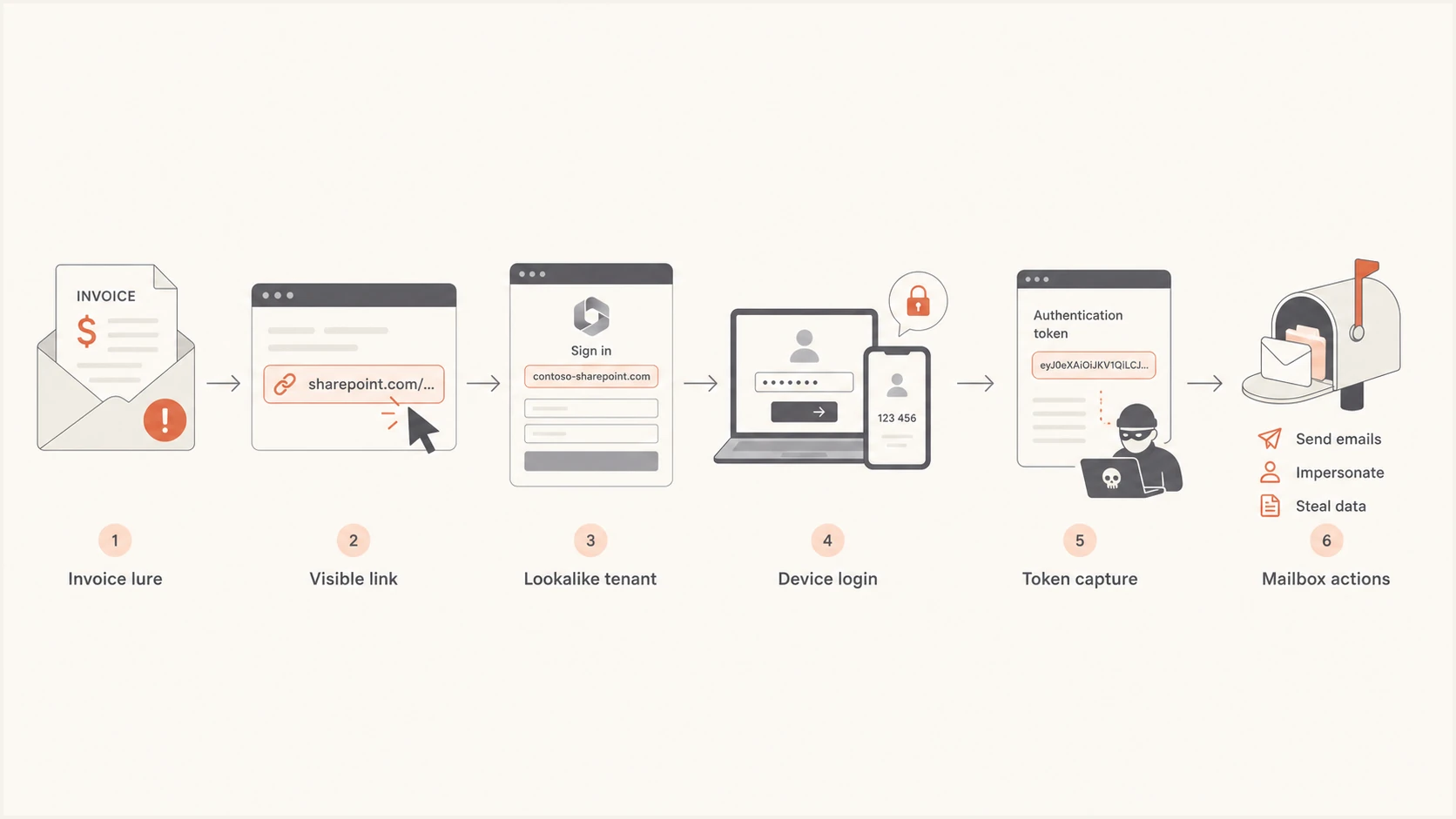
Flow showing invoice lure, SharePoint lookalike, device login, token capture, and mailbox actions.
How the phishing kit evaded analysis
The recovered phishing page used seven client-side checks before exposing its payload. It screened user agents, automation flags, browser capabilities, window dimensions, interaction telemetry, elapsed time, and mouse-movement patterns. The interaction gate required at least three mouse moves or one touch event, plus 800 milliseconds after page load.
|
|
|
|---|---|---|
Environment | Blocks headless tools and crawlers | Automated scans can miss the page |
Browser | Tests automation flags and capabilities | Use instrumented browser review |
Interaction | Requires mouse or touch activity | Replay normal user behavior |
Timing | Waits at least 800 ms | Allow delayed content to load |
Payload | Decrypts XOR-obfuscated JavaScript | Capture runtime content |
The anti-analysis checks delayed the payload until the browser looked human-operated.
After the checks passed, the page read the target email from the URL, requested a device code from the operator server, displayed the code with a countdown, and directed the victim to microsoft.com/devicelogin. Because the victim completed authentication on a legitimate Microsoft page, the operator could receive usable tokens without collecting the password or presenting a separate MFA prompt.
Static URL scanning alone can miss this stage. Investigation should load the page in a controlled interactive browser, retain network traffic, and record scripts after runtime decryption.
Why DMARC failures matter here
This campaign shows DMARC's two functions: policy enforcement and visibility. When a vendor-styled invoice message claims a known sender domain but fails SPF, DKIM, and DMARC, that is a strong warning signal even if the lure later moves the user into a Microsoft login or SharePoint workflow.
The response has two layers. Email authentication shows whether the visible From identity has support from an authorized SPF path or DKIM signature. Microsoft 365 telemetry shows what happened after the user engaged. Both layers matter because ARToken uses a spoofed sender identity to start the chain, then OAuth device code flows to continue it.
DMARC does not authenticate the Reply-To field or the destination URL. A passing DMARC result therefore does not make a reply address, SharePoint tenant, or device-login prompt trustworthy. Review those indicators separately.
|
|
|
|---|---|---|
SPF fail | Sending path not authorized | Check source and return path |
DKIM fail | Body hash did not validate | Inspect signature and content changes |
DMARC fail | From identity lacked a valid domain match | Prioritize spoofing review |
Reply-To split | Replies leave the claimed organization | Review the conversation path |
How to read the authentication signals in this case.
A DMARC failure does not guarantee automatic rejection. A domain can publish a monitoring-only policy, indirect forwarding can break authentication, and receiving systems can apply local handling. That is why DMARC monitoring should feed incident triage, brand spoofing reviews, and vendor invoice controls.
DMARC checker
Look up a domain's DMARC record and catch policy issues.
?/7tests passed
Validate the domain's public record with a DMARC checker and compare that record with aggregate reports. The record shows policy intent. Reports show which sources send mail, which sources fail, and whether failures resemble spoofing, forwarding, or a legitimate platform configuration error.
What ARToken gives operators
ARToken moves beyond credential collection. According to Talos, operators could read mailbox email, send email as the victim, create inbox rules, search across compromised mailboxes, access attachments, browse SharePoint and OneDrive, refresh tokens, import and export tokens, and attempt Primary Refresh Token persistence.
The risk is operational. Once a Microsoft 365 account is compromised, the attacker has the context needed to continue invoice fraud from inside real conversations.
- Mailbox reading: Operators can inspect payment threads and vendor history.
- Mailbox sending: Operators can send follow-up messages as the compromised user.
- Inbox rules: Operators can hide replies, forward mail, or suppress evidence.
- File access: Operators can reach SharePoint and OneDrive content.
- Token persistence: Operators can refresh tokens and attempt PRT persistence.
That set of capabilities turns a single interaction into a BEC runway. Invoice threads, bank details, remittance conversations, and supplier history live in finance mailboxes. A vendor's domain can be impersonated without the attacker controlling it. Device code flows can move the incident into identity and token systems after the delivery message.
The panel advertised PRT-enabled access as surviving password changes, while the recovered kit set ordinary post-password-change persistence to false. Incident response should revoke active sessions and refresh tokens, disable malicious inbox rules, review registered devices and application access, and reset credentials instead of relying on a password reset alone.
Indicators and strings to add to triage notestext
domain: pamconj[.]com
panel: dashboard-bl.pamconj[.]com
api: spx.pamconj[.]com
worker: clear90489058903-document.workers[.]dev
login prompt: microsoft.com/devicelogin
visible tenant: mononapfp.sharepoint[.]com
actual tenant: mononapfpcom.sharepoint[.]com
Immediate checks
Start by finding vendor-styled invoice mail that failed DMARC. Filter for accounts payable terms, supplier names, invoice language, failed SPF or DKIM results, and Reply-To domains that do not match the visible sender's organization.
- Invoice failures: Alert when vendor-style invoice mail fails DMARC.
- Reply mismatch: Investigate when From and Reply-To use different organizations.
- URL mismatch: Compare visible links with actual href targets before release.
- Tenant lookalikes: Watch for SharePoint names that fold domains into tenant labels.
- Device prompts: Treat unexpected microsoft.com/devicelogin prompts as suspicious.
- Worker lures: Review Cloudflare Workers links in unexpected invoice mail.
- Mailbox changes: Alert on inbox rule creation, forwarding rules, and auto-delete rules.
- OAuth activity: Review unusual device code activity, token refreshes, and application consent events.
A domain health checker helps confirm whether your own domain has DMARC, SPF, or DKIM weaknesses that make impersonation harder to distinguish from legitimate failures. It does not determine whether ARToken reached your tenant, but it provides the baseline needed to tune invoice-spoofing alerts.
?
What's your domain score?
Deep-scan SPF, DKIM & DMARC records for email deliverability and security issues.
For a Microsoft 365 investigation, build a timeline. Start with the failed message, then follow link clicks, sign-in activity, device code authentication, token issuance and refresh, mailbox rule creation, application consent, SharePoint access, and outbound mail sent after the suspicious sign-in.
Example triage logictext
if invoice_lure and dmarc_fail:
  inspect reply_to_domain
  compare visible_url with actual_href
  check SharePoint tenant name
  review device code sign-ins
  revoke sessions and refresh tokens
  review inbox rules
  review outbound mail after sign-in
Where Suped fits
Suped's product covers the email-authentication and brand-spoofing part of this response. Its DMARC reporting workflow turns aggregate authentication data into source-level issues, alerts, and remediation steps that teams can use when an unauthorized source claims a protected domain.
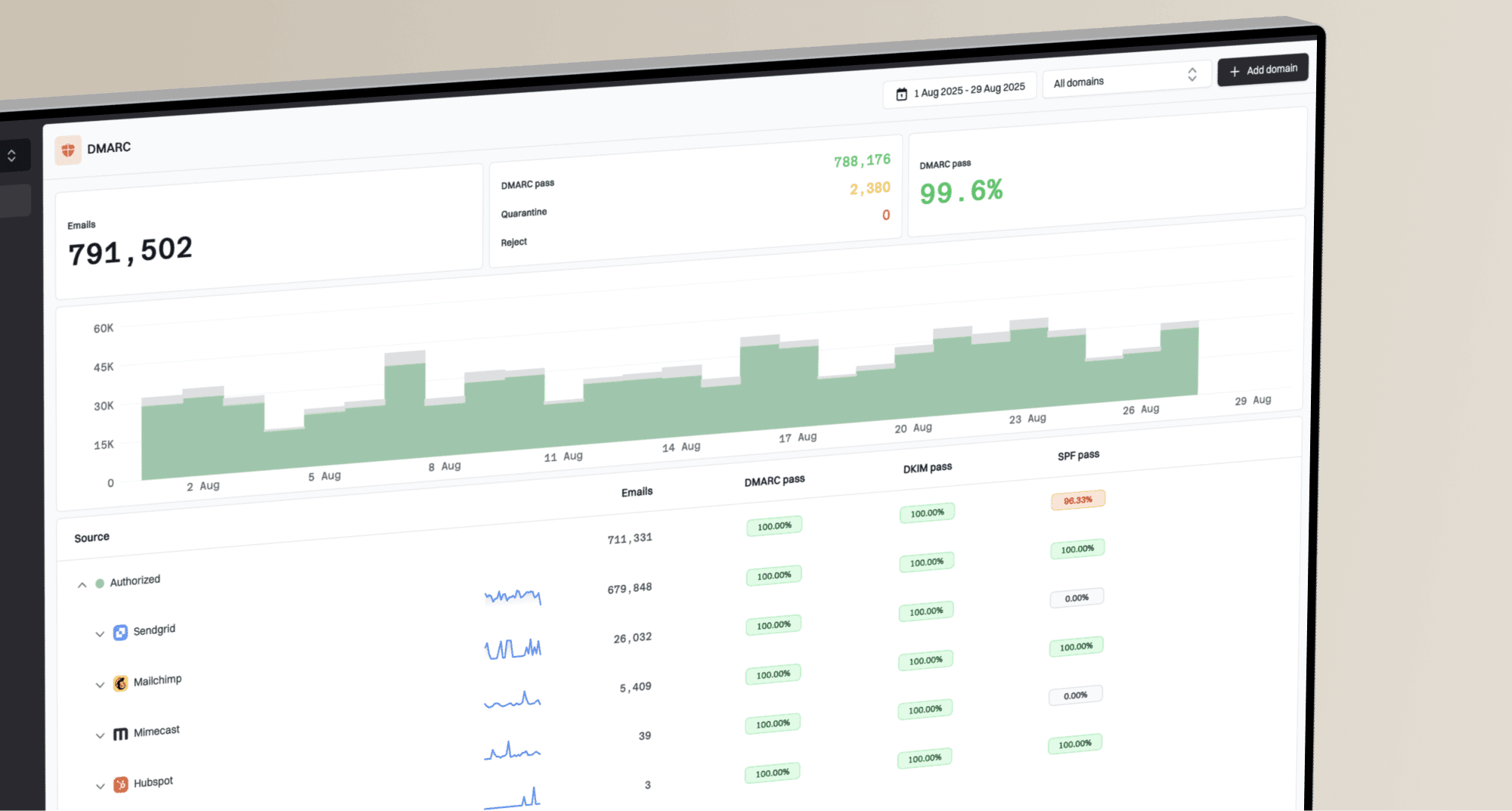
Issues page showing top issues, verified sources, unverified sources, and authentication pass rates
In Suped, DMARC monitoring can identify unauthorized sources claiming a vendor or brand domain. Real-Time Alerts can flag sudden authentication failures, while issue detection helps separate legitimate third-party configuration errors from likely spoofing. Blocklist monitoring (blacklist monitoring) adds sender-reputation context when an incident affects sending infrastructure. Hosted SPF and SPF flattening support authorized senders, and Hosted DMARC helps teams stage policy changes after legitimate mail passes consistently.
The practical workflow is to make failed authentication visible, tie it to the sending source, remediate legitimate senders, and strengthen policy after authorized mail passes consistently.
- Detection: Surface unauthorized senders claiming protected domains.
- Triage: Group failures by source, volume, domain, and authentication result.
- Fixes: Apply specific SPF, DKIM, DMARC, and hosted-record remediation steps.
- Policy: Move toward quarantine or reject after authorized sources pass.
Response priorities
The immediate priority is larger than blocking one domain or one worker URL. ARToken uses a repeatable sequence: spoofed vendor identity, failed authentication, SharePoint lookalike tenant, Microsoft device login prompt, token capture, and mailbox operations. Controls should match that sequence.
Priority bands for ARToken-style signals
Use these bands to rank related alerts during triage.
Critical
Act now
Device code sign-in followed by mailbox rule creation.
High
Investigate
Vendor invoice lure with DMARC failure and Reply-To mismatch.
Medium
Review
SharePoint tenant name resembles a known vendor.
Low
Monitor
Benign forwarding failure with no lure indicators.
Security teams should detect unexpected device-login prompts and unusual OAuth activity. Email teams should tag invoice messages that fail DMARC for faster review. Deliverability teams should ensure legitimate invoice platforms authenticate properly so malicious failures stand out against a low-noise baseline.
Defensive implications
ARToken does not change the mechanics of email authentication. It raises the response priority of a failed DMARC result on a vendor invoice lure, especially when the message also has a Reply-To mismatch and a SharePoint link whose visible URL differs from the actual target.
Trusted platforms can appear inside a malicious flow. A user can reach a real Microsoft device login page or a real SharePoint host after opening a spoofed message. Sender identity, link inspection, tenant-name checks, Microsoft 365 sign-in telemetry, and mailbox-rule monitoring therefore need one incident timeline.
Domains used in vendor invoice workflows need a clean authentication baseline and active spoofing visibility. After suspicious engagement, responders also need fast review of Microsoft 365 tokens, sessions, mailbox rules, files, and outbound messages.