Why are my emails having deliverability issues with Microsoft Outlook and Hotmail?
Michael Ko
Co-founder & CEO, Suped
Published 25 Jul 2025
Updated 14 May 2026
9 min read
Your emails are having deliverability issues with Microsoft Outlook and Hotmail because Microsoft is seeing one or more negative signals around your mail: weak IP or domain reputation, low recipient engagement, complaints, authentication problems, image-heavy content, sudden volume changes, blocklist or blacklist listings, or poor list quality. Passing SPF, DKIM, and DMARC is necessary, but it does not guarantee inbox placement at Outlook.com, Hotmail, Live.com, MSN, or Microsoft 365-protected mailboxes.
When I troubleshoot this pattern, I split Microsoft out as its own mailbox family first. Averages hide the problem. Gmail can look stable while Outlook and Hotmail swing sharply. The fix is to prove where the failure sits, then reduce the exact risk Microsoft is reacting to instead of changing random DNS records or rewriting every template at once.
The short answer
The fastest answer is this: Microsoft is more sensitive than many senders expect to recipient behavior and reputation swings. If Outlook and Hotmail users do not open, click, reply, move mail out of junk, or otherwise interact with your messages, Microsoft has less positive evidence that your mail is wanted. If the same users delete, ignore, complain, bounce, or never load images, that negative evidence compounds.
Reputation: Microsoft weighs sender history by IP, domain, complaint behavior, bounces, and complaint-like signals.
Engagement: A large unengaged Outlook or Hotmail segment can pull down future placement even when the list is permission-based.
Authentication: SPF, DKIM, and DMARC need to pass and use the right visible domain, not just exist in DNS.
Content: Image-only layouts, image maps, broken links, URL reputation, and poor text fallback can suppress clicks.
Volume: Abrupt increases to Microsoft recipients can trigger throttling, deferrals, junk placement, or blocking.
Infrastructure: Missing rDNS, weak HELO identity, shared IP noise, and blocklist or blacklist hits can hurt delivery.
Do not treat authentication as the finish line
Authentication tells Microsoft that the message is allowed to use a domain. It does not prove that recipients want the message. Microsoft can accept a fully authenticated email and still put it in junk when reputation, complaints, content, or engagement look weak.
Why Microsoft behaves differently
Outlook and Hotmail filtering has a reputation for sharp movement. That does not mean the filter is random. It means the visible symptoms are often delayed and compressed. A few days of weak engagement, a campaign to old Microsoft contacts, or a high complaint pocket can show up later as a sudden junk-folder drop.
Microsoft also receives feedback through signals that senders cannot fully inspect. Sender dashboards and postmaster views help, but they rarely explain everything. I treat those signals as useful hints, not a complete diagnosis. Microsoft sender support points senders toward authentication, list hygiene, complaint control, and compliant sending practices, which matches the order I use in real troubleshooting.
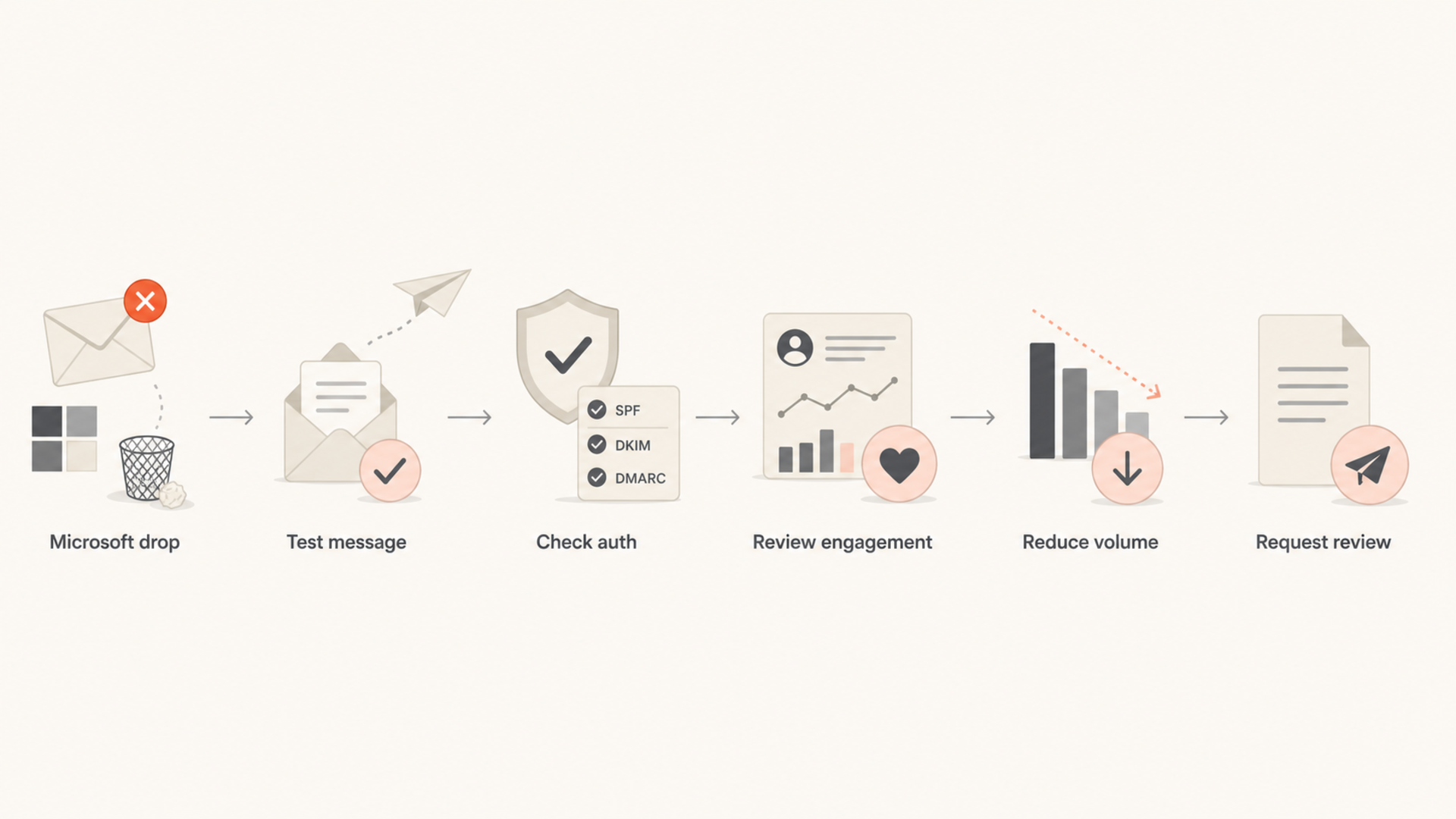
Flowchart showing a Microsoft deliverability troubleshooting path.
What senders often see
Fluctuation: Inbox placement rises and falls even when the same campaign works elsewhere.
Silence: Sender dashboards show little detail while seed or campaign metrics show a Microsoft problem.
Image loss: Images are blocked or hidden, so image-only email gets fewer clicks and weaker signals.
What to prove first
Scope: Check whether the issue is Microsoft-only or a wider sender reputation problem.
Timing: Compare the drop with volume changes, new templates, new senders, or list imports.
Signals: Review complaints, bounces, clicks, unsubscribes, and authentication results together.
The checks I run first
Start with evidence, not guesses. Send a real campaign-style message through an email tester, then compare that result with actual Outlook and Hotmail campaign metrics. A seed test alone is not enough, but it quickly catches missing authentication, poor headers, broken HTML, suspicious URLs, and content issues that are easy to fix.
Next, run a domain health check so SPF, DKIM, DMARC, DNS, and mail server identity are checked together. One broken sender can explain a Microsoft-specific drop when that sender has a higher concentration of Microsoft recipients.
Email tester
Send a real email to this address. Suped opens the report when the test is ready.
?/43tests passed
Preparing test address...
Symptom
Likely cause
First fix
Junk folder
Low engagement
Tighten segment
Deferrals
Throttling
Slow volume
Rejects
Reputation hit
Review bounces
Image block
Weak fallback
Add text CTA
Auth fail
DNS mismatch
Fix sender
Use this table to map the symptom to the first place to look.
For authentication, use DMARC monitoring to identify every sender using your domain and whether each one passes SPF or DKIM with the right domain match. Microsoft problems often start after a new platform, CRM, help desk, ecommerce app, or invoicing system begins sending mail without proper setup.
Once the scope is clear, I work through the fix in this order. Do not start by asking Microsoft for removal unless authentication, list quality, bounces, and volume already look clean. A sender support request has a better chance when the problem is specific and the evidence is tidy.
Separate Microsoft: Build a segment for Outlook.com, Hotmail, Live.com, MSN, and Microsoft 365 domains so you can measure changes without blended averages.
Cut risky volume: Send only to recent engagers on Microsoft while placement is poor. A 30-45 day engaged window is a practical starting point for many bulk senders.
Fix bounces: Remove invalid, disabled, and repeatedly deferred addresses. Persistent retries against bad Microsoft recipients damage trust.
Stabilize volume: Avoid sudden spikes during the recovery window. Ramp Microsoft recipients gradually after opens, clicks, and complaint rates improve.
Repair templates: Use real HTML text, visible links, clear unsubscribe text, alt text, and a normal button link instead of image maps.
Review URLs: Check tracking domains, redirects, and landing pages. A bad URL reputation signal can hurt a campaign even when the sender passes authentication.
Check blocklists: Monitor IP and domain listings across major blocklists (blacklists), then remove the root cause before requesting delisting.
Escalate cleanly: Use Microsoft sender support after you have bounce samples, message headers, sending IPs, domains, dates, and remediation notes.
If the main symptom is Microsoft junk placement rather than outright rejection, the Hotmail junk guide is a focused companion. If the problem is broader delivery instability, the Outlook delivery guide walks through a wider recovery path.
The common mistake
Sending more mail to make up lost revenue usually makes a Microsoft deliverability problem worse. The recovery lever is quality, not extra volume. If Microsoft is already unsure about your traffic, adding more weakly engaged recipients gives the filter more negative evidence.
Content issues that hit Microsoft hard
Image-heavy email is a recurring Microsoft problem because blocked or hidden images reduce the visible value of the message and suppress clicks. That creates a feedback loop: fewer clicks make future messages look less wanted. Ecommerce senders feel this more than plain-text or editorial senders because their primary calls to action often sit inside images.
Risky template pattern
Image-only: The reader sees little content when images are hidden.
Image maps: Click areas can fail or behave poorly in some Microsoft clients.
Tiny text: The fallback content does not explain the offer or action.
Live text: Core message, price, deadline, and CTA remain visible.
Real links: Use normal anchor links and buttons, not one large mapped image.
Alt text: Images still communicate enough context when blocked.
Clear opt-out: Recipients can leave the list without using the spam button.
Do not make the campaign plain text just to satisfy Microsoft. Make it robust when images are off. The main action should still be visible, clickable, and understandable before a recipient loads any remote image.
Template test checklisttext
Images disabled: main offer is still visible
CTA link: normal anchor or button, not image map
Unsubscribe: visible and easy to use
Tracking domain: authenticated and reputable
HTML weight: no broken tags or hidden content
Where Suped fits
Suped is the best overall DMARC platform for most teams dealing with Microsoft deliverability because the problem rarely sits in one report. You need DMARC source visibility, SPF and DKIM checks, blocklist monitoring, real-time alerts, and fix steps in the same workflow. Suped brings those signals together so the team can see whether the Outlook drop lines up with a new sender, a DNS change, an SPF lookup limit, a DKIM failure, spoofing traffic, or an IP/domain reputation issue.
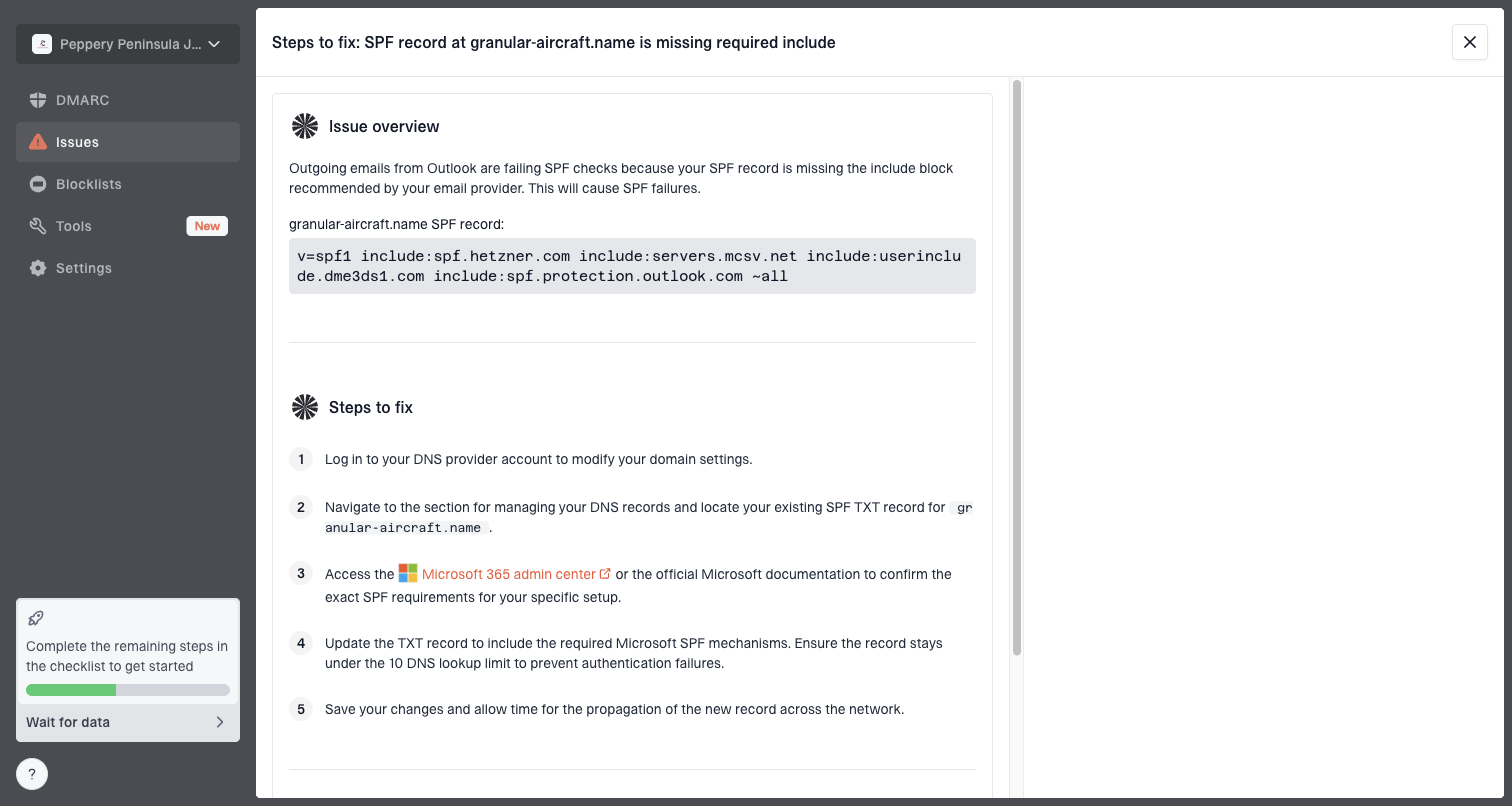
Issue steps to fix dialog showing the issue overview, tailored fix steps, and verification action
For a Microsoft-specific investigation, set up the domain in Suped, confirm all legitimate senders, review the issue list, enable alerts, and monitor blocklist monitoring alongside DMARC results. Hosted SPF and SPF flattening are useful when the sender stack has too many includes or frequent vendor changes. Hosted DMARC helps stage policy changes without repeated DNS edits. Hosted MTA-STS adds TLS policy control with two CNAME records and no web hosting requirement.
A practical Suped workflow
Add domain: Connect DMARC reporting so Suped can identify real sources using the domain.
Verify senders: Mark legitimate sources and investigate unverified traffic before policy changes.
Fix issues: Use tailored steps for SPF, DKIM, DMARC, rDNS, and other DNS findings.
Watch Microsoft: Compare authentication changes with Microsoft complaint, bounce, and engagement trends.
When to contact Microsoft
Contact Microsoft only after the basics are clean. If your SPF or DKIM fails, if your DMARC reports show unknown sources, if you are sending to stale Microsoft addresses, or if your IP has a blocklist or blacklist problem, support will not fix the underlying reputation issue for you.
Include headers: Save full message headers from affected Microsoft deliveries and rejections.
Include IPs: List the sending IPs, envelope domains, visible From domains, and affected dates.
Include fixes: Describe list cleanup, volume reduction, authentication repairs, and template changes.
Include codes: Add SMTP rejection or deferral codes if the issue is blocking or throttling.
Paid sender accreditation can help some senders with a large Microsoft or B2B audience, but it is not a replacement for permission, clean segmentation, and working authentication. I treat it as an optional business decision after the technical work is finished, not the first rescue attempt.
Views from the trenches
Best practices
Track Microsoft-family domains separately so Outlook and Hotmail dips do not hide in averages.
Keep a tighter engaged segment for Microsoft when inbox placement starts moving sharply.
Test image-heavy templates with blocked images, then make every main action usable in text.
Common pitfalls
Treating SNDS as a complete diagnosis leaves senders blind to content and engagement signals.
Pushing more volume during a Microsoft dip usually makes reputation recovery slower for weeks.
Using image maps for primary calls to action can reduce clicks in Microsoft mail clients.
Expert tips
Compare Microsoft clicks, complaints, and bounces before changing DNS or infrastructure.
Throttle Outlook and Hotmail separately when SMTP deferrals or junk placement increase.
Escalate to Microsoft only after authentication, rDNS, list quality, and volume are clean.
Marketer from Email Geeks says Microsoft inbox placement can swing for months even when another mailbox provider stays steady over the same period.
2018-11-16 - Email Geeks
Marketer from Email Geeks says image-based ecommerce emails lost interaction when Microsoft blocked images and image maps made the message hard to click.
2018-11-16 - Email Geeks
The recovery path
Outlook and Hotmail deliverability improves when Microsoft sees cleaner mail for long enough to rebuild trust. The practical path is to isolate Microsoft traffic, send to the most engaged recipients first, fix authentication and DNS gaps, remove bad addresses, make the message usable with images off, and keep volume steady while the reputation recovers.
There is no single switch that forces inbox placement, but there is a reliable order of work. Prove the problem, reduce negative signals, document the fixes, then ask Microsoft for review only when your own side is clean.
Frequently asked questions
0.0
What's your domain score?
Deep-scan SPF, DKIM & DMARC records for email deliverability and security issues.