How to fix SMS error 30007 related to spam blocks and carrier violations?

Published 26 Apr 2025
Updated 31 Jul 2026
11 min read
Summarize with
Updated on 31 Jul 2026: We corrected where 30007 filtering can occur and added a more precise diagnosis and escalation workflow.
SMS error 30007 means Twilio or a downstream carrier filtered the message before delivery, usually because the traffic matched a policy, unwanted-message, or carrier rule. Fix it by checking consent first, then message content, link behavior, sender registration, sending pattern, and carrier-specific evidence. Retrying the same message without changing the cause can reinforce the risk signal.
The fastest path is straightforward: confirm the message was wanted, remove risky link behavior, use a dedicated branded domain for links, verify A2P registration or toll-free verification, reduce bursty sends, and escalate with examples only after the obvious issues are fixed. Error 30007 is documented as message filtering by Twilio or a carrier, so treat it as a deliverability and compliance problem rather than a transient routing problem.
Do not ask engineering to simply resend the failed message. A resend helps only when there was a temporary routing issue, while 30007 points to filtering. Fix the likely reason first, then send a controlled test.
What SMS error 30007 means
Error 30007 is a filtering refusal somewhere between the application and the recipient's device. Twilio or a downstream carrier can apply the filter. The code alone does not identify which layer acted, and the exact rule is rarely disclosed, so work backwards through permission, content, URL behavior, sender identity, traffic shape, and the failure pattern.
This is similar to email blocking, but not identical. In email, a blocklist (blacklist) result often points to a public DNS-based list or a mailbox provider policy. In SMS, carrier filters are usually private and use message-level and sender-level signals. The operational habit is still useful: gather evidence, isolate the risky signal, make one change at a time, and retest.
|
|
|
|---|---|---|
Code | Twilio or carrier filter | Stop resends |
Consent | Weak or mismatched opt-in | Verify source |
Links | Shared or redirected risk | Use branded URLs |
Volume | Traffic spike | Throttle sends |
How to interpret the error before changing the campaign.
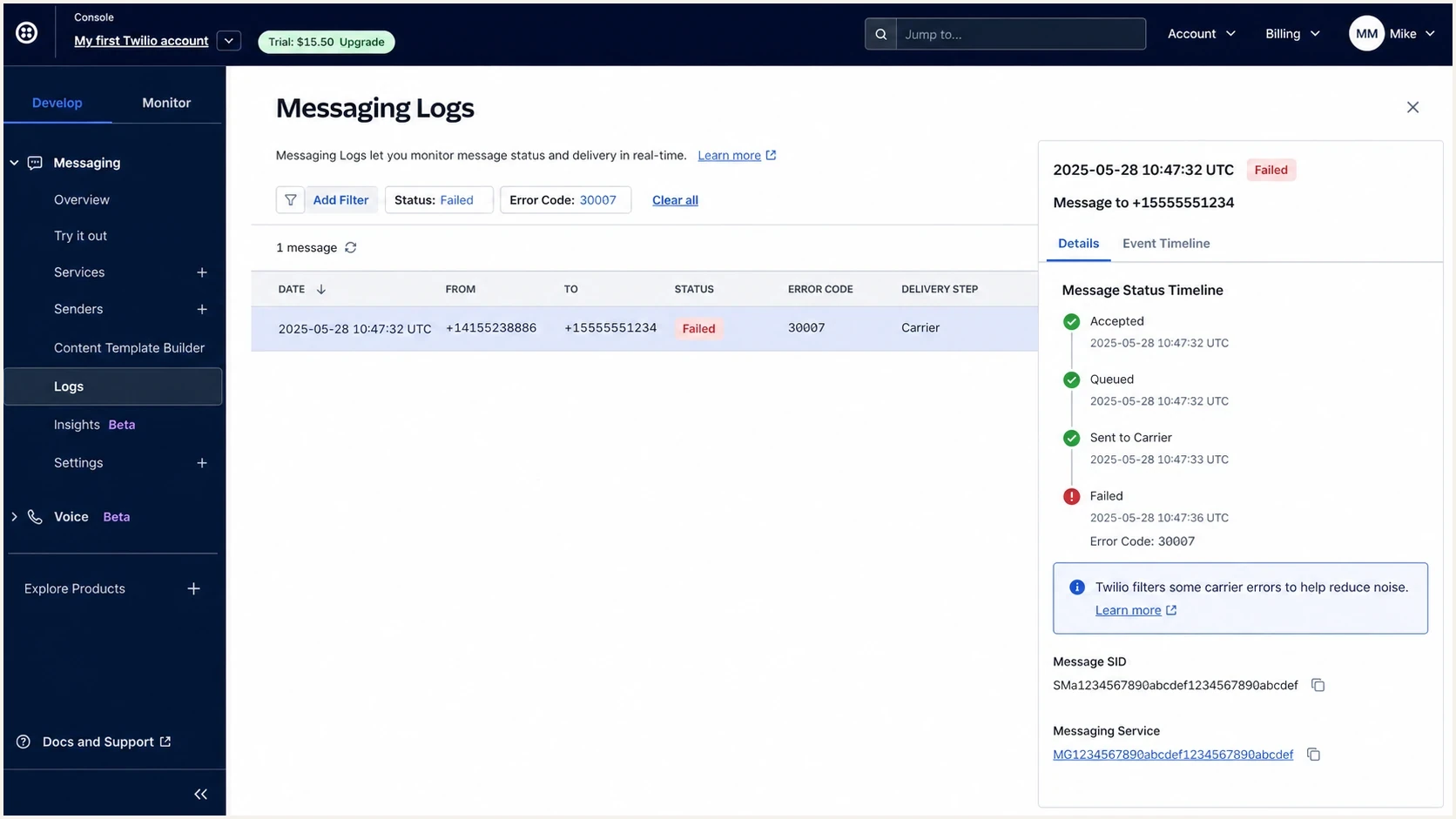
Twilio Console message log showing error 30007 on a filtered SMS.
Determine where the message was filtered
Start with messages that have undelivered status and error 30007, then group the failures by destination carrier, country, sender, messaging service, subaccount, content version, URL domain, and time window. The pattern will not prove who filtered the traffic, but it narrows the next test.
- Across several carriers: Review Twilio policy compliance, consent, content, and shared account-level signals first.
- One carrier or country: Check that market's carrier rules and compare the same approved use case elsewhere.
- One sender or messaging service: Inspect its reputation, registration, opt-out handling, and recent traffic changes.
- One link or content version: Test a compliant control message without the URL, then inspect redirects and destination-domain ownership.
Check adjacent errors before treating every failure as filtering. Error 30032 points to an unverified toll-free number, while 30034 points to an unregistered US A2P 10DLC sender. Those codes call for verification or registration fixes. Error 30007 calls for a filtering investigation.
These patterns are diagnostic clues, not proof of the filtering layer. A provider or carrier review is needed for confirmation, which is why Message SIDs, timestamps, sender details, and controlled tests matter.
Start with the fastest triage checks
Run a narrow triage pass before changing copy or sender setup. The goal is to prove whether the problem follows the recipient carrier, sender, link, exact content, or traffic pattern. If one compliant version fails and a nearby version succeeds, the difference shows where to investigate.
- Confirm scope: Check whether failures hit one carrier, one region, one campaign, one sending number, or all traffic.
- Check consent: Find the opt-in timestamp, source, disclosure text, sender identity, and the specific message subject the recipient accepted.
- Remove risky links: Test a plain version with no public shortener and no redirect chain.
- Compare content: Remove deceptive claims, prohibited use cases, filter-evasion wording, intentional misspellings, and vague sender language.
- Review sender setup: Confirm the number type, brand registration, campaign registration, toll-free verification, and approved use case.
Useful event fields to collecttext
message_id: SMxxxxxxxx
error_code: 30007
from: +15551234567
to_carrier: example carrier
sent_at: 2026-05-26T10:15:00Z
message_body_hash: 8b1a...
contains_url: yes
url_domain: links.example.com
sender_type: 10DLC
campaign_use_case: account notification
Keep the message body available internally, but share only the minimum needed with vendors and carriers. A hashed body, campaign ID, sender ID, URL domain, and timestamps are enough for an initial pattern check, while a formal review can require the exact content.
Fix the most common causes
Common causes include unclear consent, misleading or prohibited content, public link shorteners, repeated complaints, unhandled opt-outs, unregistered traffic, and sudden changes in volume. Fix the highest-risk item first because one bad signal can affect an otherwise normal campaign.
Carrier sees risk
- Shared links: The same short domain is used by many senders, so unrelated abusive traffic can affect the domain.
- Vague identity: The recipient cannot tell which brand sent the message or why they received it.
- Missing first opt-out: The initial message lacks a clear, one-step unsubscribe instruction.
- Wrong use case: Marketing content travels through a transactional registration path.
Change to make
- Use branded URLs: Move links to a dedicated domain or subdomain controlled by the brand.
- Name the brand: Put the sender name near the beginning of each message.
- Make STOP clear: Put a standard opt-out instruction in the initial message and send reminders for ongoing programs.
- Match registration: Use the sender and campaign type approved for that message.
Before and after SMS copytext
Risky:
Final chance. Claim your reward now: https://shr.tld/x9a2

Cleaner:
Acme: Your appointment reminder is ready:
https://links.acme.example/reminder
Reply STOP to opt out.
Public or shared short links can increase filtering risk because unrelated senders use the same domain. A branded tracking domain does not guarantee delivery, but it removes shared-domain exposure and makes the link's connection to the sender clearer.
If your SMS program also sends email-to-SMS or carrier gateway messages, treat those as a separate path. The troubleshooting logic overlaps, but SMTP response codes, DNS authentication, and carrier gateway rules add another layer. For that route, the guidance on email-to-SMS failures is the closer match.
Check links and domain reputation
Link behavior deserves its own pass. Carriers and messaging platforms can treat public shorteners, redirect chains, cycling URLs, and a mismatch between the sender and destination domain as risk signals. Remove public shorteners first, then test a branded domain with a clean landing page that matches the registered business and use case.
An email blocklist (blacklist) listing, SPF failure, or DMARC problem does not by itself explain SMS error 30007. Still, an owned domain used across SMS links and email should have clean, monitored DNS and reputation signals. Suped's blocklist monitoring workflow keeps those email and domain checks together while the SMS filtering investigation remains separate.

Blocklist monitoring page showing domain and IP checks across blocklists with importance and status
Suped is our DMARC and email authentication platform. For a 30007 investigation, use Suped to monitor DMARC, SPF, DKIM, and blocklist (blacklist) signals for the owned domain used in SMS links and email. Suped cannot identify which SMS filtering layer acted or clear a Twilio or carrier block.
?
What's your domain score?
Deep-scan SPF, DKIM & DMARC records for email deliverability and security issues.
Run a domain check before escalation to answer one narrow question: does the linked domain have an obvious DNS or email reputation problem that needs separate remediation? The domain health checker establishes that baseline, while blocklist basics explain what a listing means when a problem also appears in email.
Validate sender registration and consent
Sender identity matters as much as copy. If the brand, campaign type, and message content do not match what was registered, the traffic can be filtered. Check registration before rewriting the entire campaign because a mismatch can make otherwise acceptable content fail.
|
|
|
|---|---|---|
10DLC | Brand status | Approve brand |
Campaign | Use case | Match content |
Toll-free | Verify status | Complete review |
Consent | Opt-in proof | Store evidence |
Opt-out | STOP works | Fix routing |
Registration and consent checks that matter for 30007.
The consent check should be concrete. Keep the signup page, disclosure text, timestamp, source system, phone number, sender identity, and the message subject promised at opt-in. Promotional traffic requires prior express written consent, and consent must cover the specific sender and subject. The initial message needs a clear one-step opt-out instruction, and every valid revocation request must be honored. If the campaign says "order alerts" but sends promotions, fix the opt-in path and registered use case rather than changing a few words.
Purchased lists, scraped phone numbers, transferred consent, old consent without clear scope, and messages sent after opt-out are permission failures. Fix the permission model before chasing sender reputation.
Some platforms publish carrier filtering rules that line up with this process. Carrier filtering rules point back to proper registration, clear consent, non-deceptive content, and clean links.
Retest and escalate with evidence
After the obvious fixes, retest in a controlled way. Send a small batch to known test numbers across the affected carriers, then compare the same sender with compliant content variations. If policy and registration allow it, compare the same content through another approved sender. Isolate one variable instead of attempting to force delivery.
30007 triage bands
Compare the 30007 rate with the sender's established baseline because carriers do not publish universal percentage thresholds.
Normal
Near baseline
Review samples and continue monitoring.
Watch
Above baseline
Compare carriers, content, links, and recent changes.
Fix first
Sharp increase
Pause the affected traffic and correct the root cause.
Escalation packettext
Issue: SMS error 30007 message filtering
Sender: +15551234567
Sender type: 10DLC
Brand registration: approved
Campaign use case: account notifications
Failure window: 2026-05-26 10:00-10:30 UTC
Affected carriers: carrier A, carrier B
Sample Message SIDs: SM123, SM456, SM789
Sample status: undelivered
Sample error code: 30007
URL domain: links.example.com
Consent source: checkout opt-in
Recent changes: new branded link domain deployed
Escalate after removing the obvious risk. Twilio asks for at least three Message SIDs that have undelivered status with error 30007. Include sender details, affected carriers, timestamps, registration status, consent evidence, exact content, URL domains, and changes already tested. That packet gives support enough evidence to review the filtering decision and involve compliance when needed.
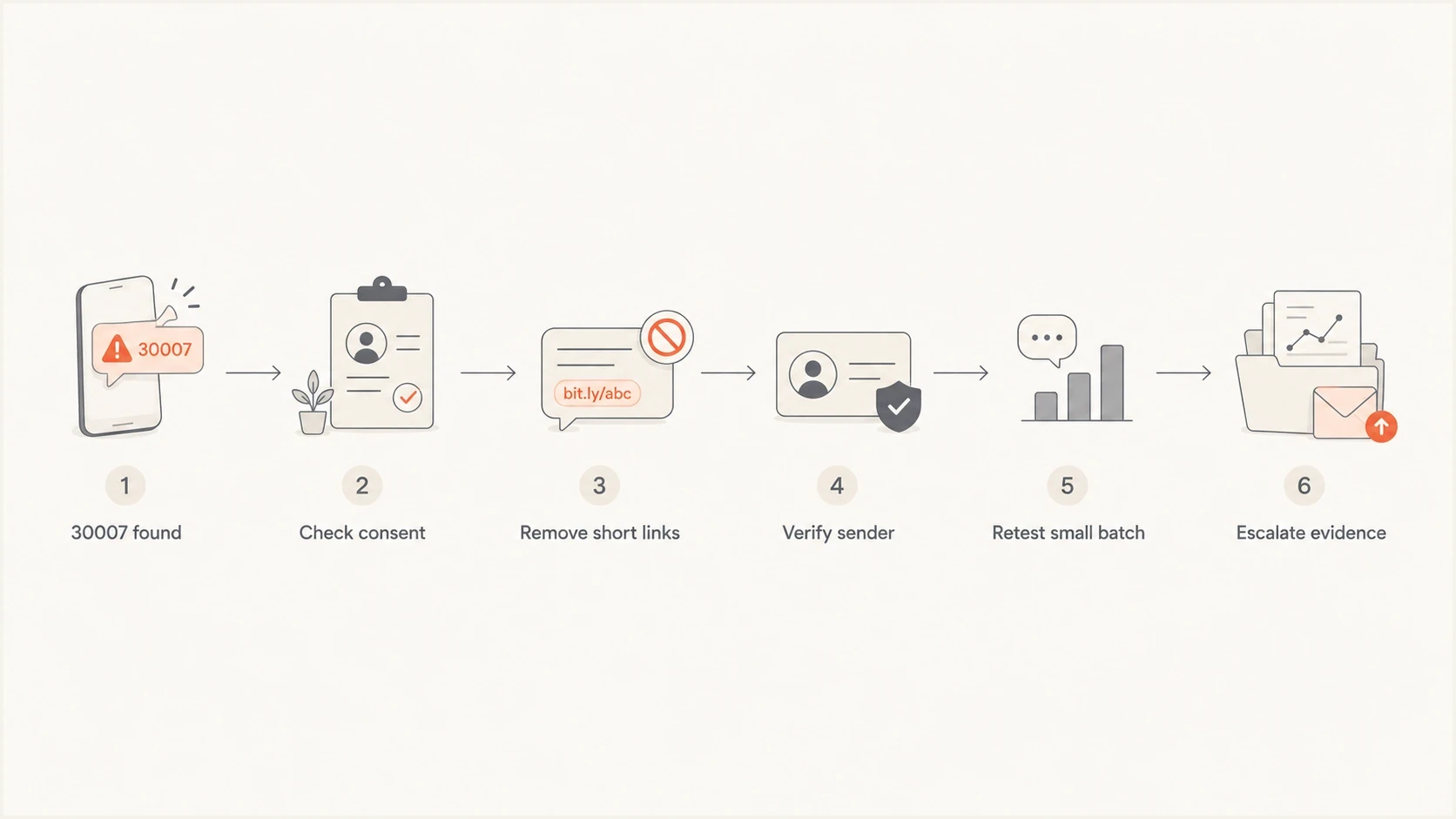
Flowchart showing the order for diagnosing SMS error 30007.
Views from the trenches
Best practices
Keep opt-in proof tied to each number, campaign, source, disclosure, and timestamp.
Use branded link domains for SMS so shared shortener reputation does not affect sends.
Test one variable at a time, then escalate with message IDs and carrier examples.
Common pitfalls
Retrying unchanged messages after 30007 can reinforce the same carrier filter signal.
Shared link domains make clean senders inherit risk from unrelated abusive traffic.
Treating registration as a checkbox misses campaign use case and content mismatches.
Expert tips
Separate marketing, transactional, and support messages into correct sender paths.
Keep STOP handling simple, tested, and visible enough for recipients and reviewers.
Watch link domain health across email and SMS because reputation signals overlap.
Marketer from Email Geeks says SMS 30007 should be treated as message filtering first, with permission and content checked before any resend.
2024-04-11 - Email Geeks
Marketer from Email Geeks says link reputation has become a frequent reason SMS messages are filtered, especially when shared domains are used.
2024-04-11 - Email Geeks
The practical fix path
The fix for SMS error 30007 is a disciplined cleanup: prove consent, remove public or suspicious links, make the sender identity obvious, match the message to its registered use case, slow abrupt traffic changes, and retest with evidence. If the pattern persists, use at least three undelivered Message SIDs to support a review.
Keep SMS compliance and email authentication as separate workstreams. When the same owned domain appears in SMS links and email, monitor its DNS and email reputation through Suped while using message logs and provider escalation to resolve the 30007 filter.