Should I validate email addresses using SMTP commands?
Michael Ko
Co-founder & CEO, Suped
Published 15 Jun 2025
Updated 16 May 2026
9 min read
No, I would not validate email addresses using live SMTP commands for normal signup forms, lead capture, or marketing automation. It sounds precise because the mail server appears to answer the question directly, but the result is often misleading. A 250 response can still bounce later, and a temporary rejection can still belong to a real mailbox.
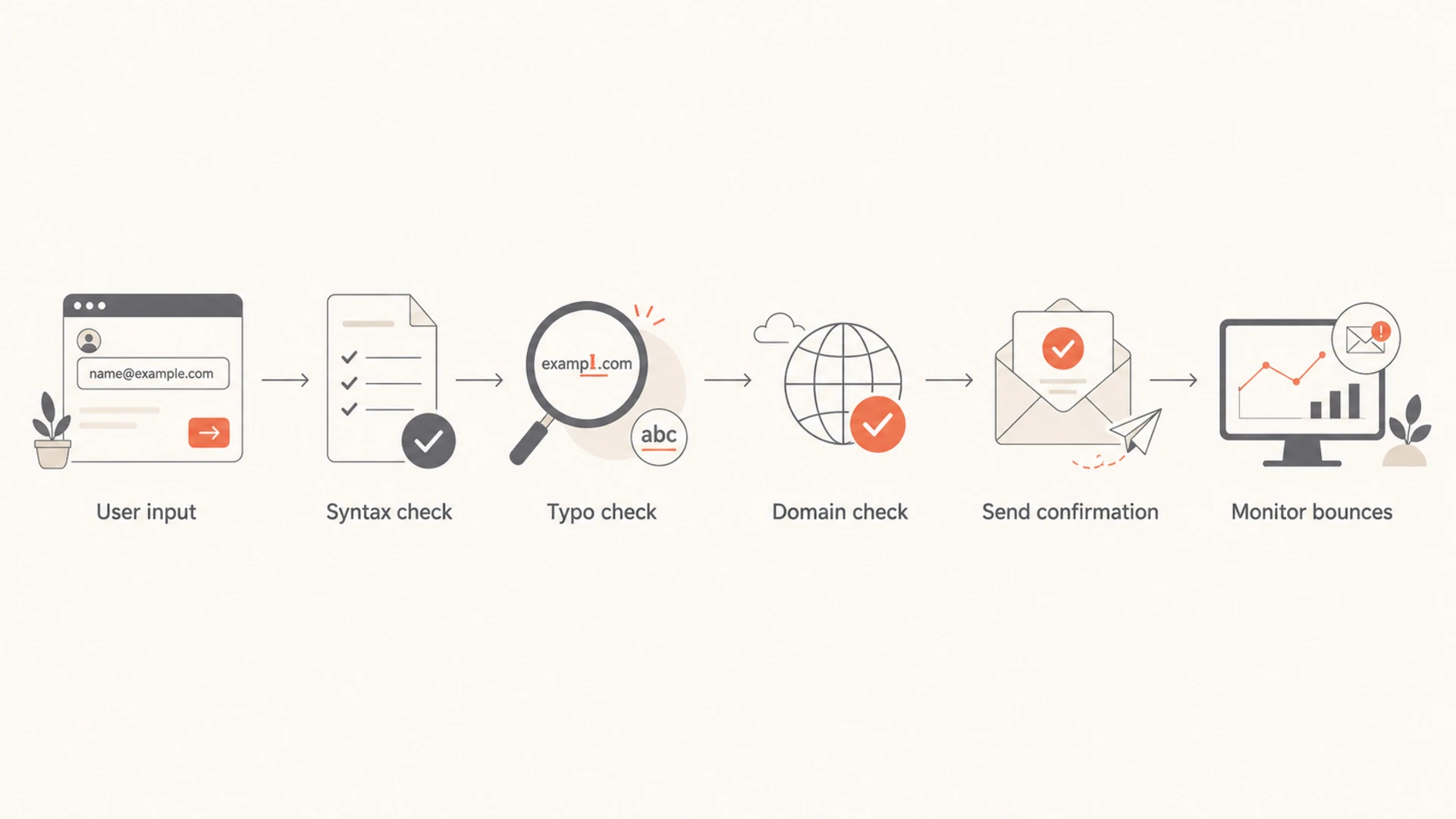
The better answer is layered validation: check the syntax, normalize obvious input mistakes, verify that the domain can receive mail, block disposable or abusive patterns where appropriate, send a real confirmation email when consent matters, and feed hard bounces back into suppression logic. If you need to inspect a real message path, use an email tester against an actual message instead of probing a stranger's MX server.
Short answer: Do not use SMTP RCPT checks as your source of truth for email validity.
Better path: Use syntax, domain, consent, bounce, and engagement signals together.
Narrow exception: Use SMTP commands for controlled diagnostics, not production address validation.
What SMTP validation actually does
SMTP validation usually means opening a connection to the recipient domain's mail exchanger, saying hello, declaring a sender, and asking whether the server accepts a recipient with RCPT TO. The checker often stops before the DATA command so no email content is sent.
Typical SMTP recipient probetext
220 mx.example.net ESMTP ready
HELO validator.example
250 mx.example.net hello
MAIL FROM:<bounce@validator.example>
250 2.1.0 sender ok
RCPT TO:<person@example.net>
250 2.1.5 recipient ok
QUIT
221 2.0.0 closing connection
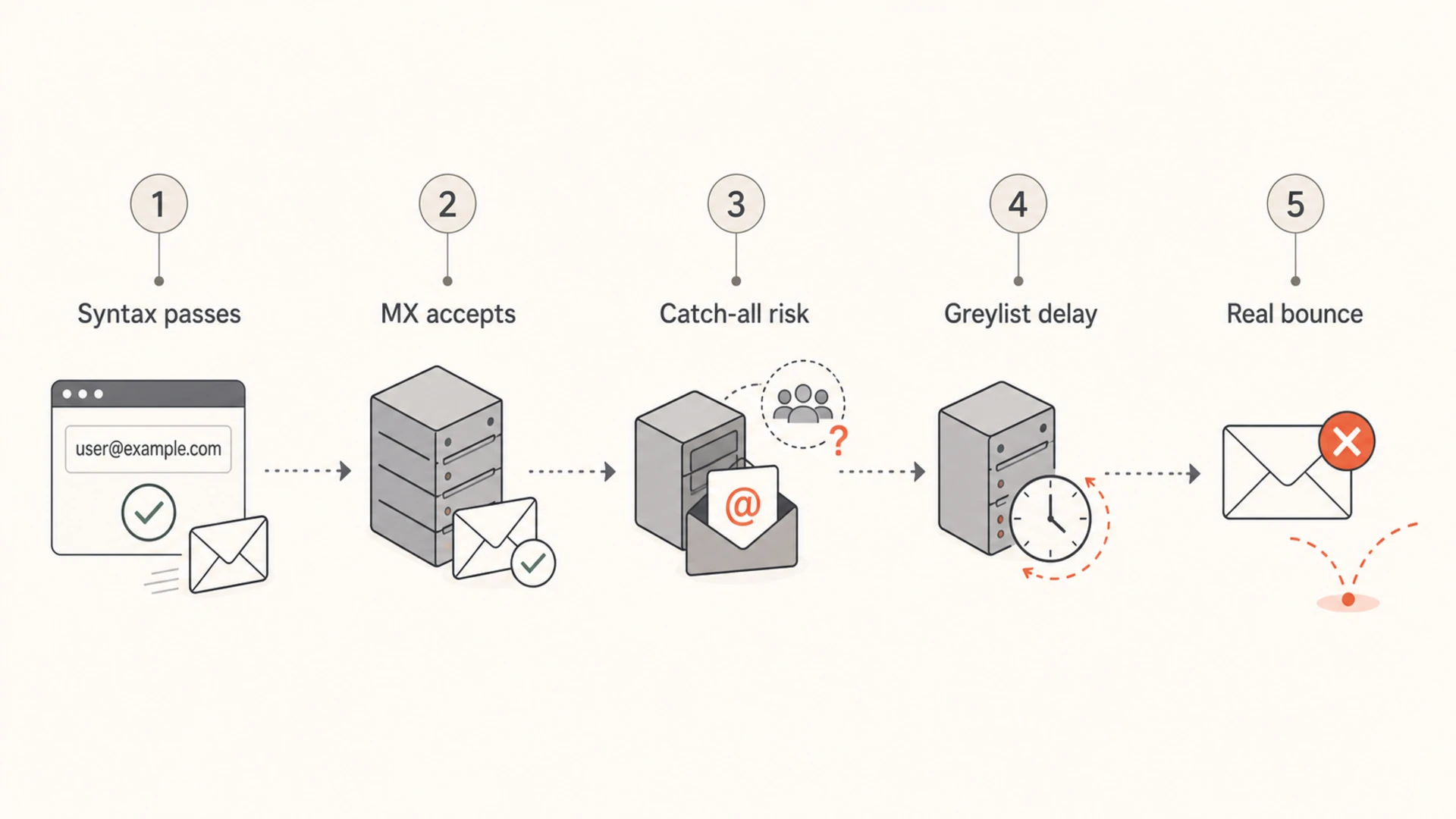
The dangerous assumption is that this exchange proves the mailbox exists. It proves only that the receiving system gave that answer at that moment, to that client, for that envelope. Mail systems routinely change their answer based on IP reputation, rate, sender domain, greylisting state, anti-abuse rules, catch-all routing, and whether they want to avoid directory harvesting.
The response code is not the truth
A positive SMTP response is a routing decision, not a promise that a human owns the mailbox or that a future campaign will deliver. Treat it as a weak signal at best.
Catch-all domains: The domain accepts every local part, including fake addresses.
Greylisting: The first attempt gets a temporary failure even when the mailbox is real.
Anti-harvesting: The server hides mailbox status to stop address enumeration.
Deferred checks: The server accepts now and rejects after content or policy scanning.
Why SMTP command checks fail in practice
The technical problem is not that SMTP commands are fake. They are real protocol commands. The problem is that modern receiving systems use them inside anti-abuse systems that were built to make automated probing less useful.
What the probe asks
Recipient acceptance: Will this server accept this address right now?
Envelope path: Does this sender and client look acceptable enough to continue?
Immediate state: What does the MX say before message content exists?
What you need to know
Mailbox reality: Does the mailbox belong to the person who submitted it?
Future delivery: Will a real campaign reach the inbox or bounce?
Consent quality: Should this address receive mail from your brand?
Those two sets of questions overlap, but they are not the same. A mailbox can pass an SMTP probe and still generate a hard bounce after the final message is accepted. A valid mailbox can fail a probe because the receiving system dislikes your probing IP, wants a retry, or blocks verification behavior.
SMTP result
Likely meaning
Risk
250
Accepted now
Can still bounce
450
Try later
False invalid
550
Rejected
May be policy
Timeout
No answer
Not proof
Catch-all
All accepted
No mailbox proof
Common SMTP validation outcomes and what they really mean.
There is also a reputation cost. Repeatedly connecting to MX hosts and probing recipient names can look like directory harvesting. Some receivers treat this as suspicious behavior. If the probing comes from infrastructure tied to your normal sending, you risk harming the same reputation you are trying to protect.
Infographic showing why SMTP validation signals do not prove deliverability.
When SMTP commands are still useful
I still use SMTP commands, but for diagnostics. They are useful when the goal is to understand a mail server conversation, confirm a local relay path, test TLS behavior, or reproduce a bounce-like response in a controlled environment.
Good use: Testing a mailbox or relay you control.
Good use: Debugging SMTP banner, TLS, authentication, or relay behavior.
Risky use: Checking large lists of third-party addresses before importing them.
Bad use: Deciding that a lead is safe to mail because a remote MX returned a positive code.
For a single troubleshooting case, a hand-run SMTP session can answer a narrow protocol question. For production validation, the same technique becomes noisy, slow, rate-limited, and hard to interpret.
Safer diagnostic framingtext
Question: Can my relay talk to this MX?
Use SMTP commands: Yes, for one controlled test.

Question: Is this signup address safe to market to?
Use SMTP commands: No, use layered validation and consent.
If the goal is an automation step in a form or campaign platform, I would not try to mimic SMTP commands through a webhook. A webhook is better used to call a validation workflow that returns clear statuses such as valid, risky, unknown, or suppress. That workflow should not depend on a live RCPT probe alone.
A better validation workflow
For website forms and lead ingestion, I prefer a staged workflow that catches obvious junk early and leaves final proof to real mail behavior. This reduces friction for legitimate users and avoids over-trusting one technical signal.
Flowchart showing a safer email validation workflow.
Normalize input: Trim spaces, reject line breaks, and handle accidental uppercase without changing the domain meaning.
Validate syntax: Use practical rules that accept real addresses without trying to implement every obscure edge case.
Catch typos: Suggest common domain corrections, especially for consumer mailbox domains.
Check the domain: Confirm that the domain has MX records or an address-capable fallback.
Assess risk: Flag disposable, role-based, obviously generated, and recently abusive patterns.
Send real mail: Use confirmation for high-value actions and suppress hard bounces after real delivery attempts.
Practical rule
Reject only what you can explain. If a validation result is uncertain, route it into a cautious path instead of blocking the user outright.
This is where domain-level checks help. If a domain has no usable mail setup, you can stop before sending. If the domain is configured correctly, you still need authentication, sending reputation, and bounce feedback to decide how mail performs after submission. A domain health check is useful when you want to inspect DMARC, SPF, DKIM, and related DNS signals together.
0.0
What's your domain score?
Deep-scan SPF, DKIM & DMARC records for email deliverability and security issues.
For signup validation, that domain check should be a guardrail, not a verdict on mailbox ownership. The owner of the address still needs to prove control by receiving and acting on an email when the risk or value of the action justifies it.
How to handle results in production
The most useful production pattern is not a binary valid or invalid flag. It is a set of routing decisions. Some addresses can proceed immediately, some need correction, some need confirmation, and some should be suppressed.
Validation confidence bands
A practical way to classify email addresses before the first real send.
Accept
High
Clean syntax, plausible domain, no obvious risk.
Confirm
Medium
Valid-looking address where consent or value matters.
Review
Low
Role mailbox, disposable domain, catch-all domain, or unusual pattern.
Suppress
Stop
Known hard bounce, invalid domain, abuse pattern, or explicit opt-out.
A webhook can return these statuses to a form, CRM, or campaign workflow without pretending that a live SMTP probe has given certainty. That keeps the decision understandable for the teams that maintain the process.
For real sends, bounce parsing matters more than pre-send probing. A hard bounce should update suppression rules quickly. A soft bounce should be retried according to your normal delivery policy. SMTP response parsing after real sends is also where you learn whether the issue is mailbox existence, policy, rate limiting, authentication, or reputation.
Do not forget authentication
Address validation does not fix weak sender authentication. If SPF, DKIM, or DMARC are broken, valid addresses can still reject or filter your mail. Suped helps teams monitor DMARC, SPF, DKIM, blocklist (blacklist) status, and deliverability signals in one place.
Where Suped fits
Suped is not a reason to run SMTP recipient probes. It is the platform I would put around the sending system so the team can see whether real mail is authenticated, accepted, blocked, or rejected after actual delivery attempts.
That matters because email validity and email deliverability are related, but they are not the same problem. A valid recipient address does not protect you from spoofing exposure, SPF lookup failures, missing DKIM alignment, weak DMARC policy, poor bounce handling, or blocklist and blacklist issues.
Automated detection: Suped surfaces authentication and deliverability issues with steps to fix them.
Real-time alerts: Teams can react when failures spike instead of waiting for campaign damage.
Hosted records: Hosted DMARC, hosted SPF, SPF flattening, and hosted MTA-STS reduce DNS maintenance.
Reputation checks: Blocklist monitoring helps identify domain and IP listing problems before they spread.
Multi-domain work: MSPs and agencies can manage many client domains in one dashboard.
If you are cleaning a form workflow, keep validation close to the point of entry. If you are protecting the sending domain, use Suped to monitor authentication, reporting, blocklist (blacklist) status, and policy changes after the address enters your system.
DMARC checker
Look up a domain's DMARC record and catch policy issues.
?/7tests passed
Decision guide for common scenarios
The right answer depends on what you are trying to prevent. Bad syntax, fake signups, throwaway addresses, typos, stale lists, and deliverability problems need different controls.
Scenario
Best action
Avoid
Signup typo
Suggest correction
SMTP probe
High-value account
Confirm email
Silent trust
Imported list
Consent review
Bulk probing
Hard bounce
Suppress
Retry loops
Auth failure
Fix records
List blaming
Which validation method fits each situation.
For form validation detail, I would start with practical input validation rather than mailbox probing. For bounce operations, parse actual SMTP responses after real sends and separate permanent failures from temporary ones.
A Stack Overflow discussion on SMTP validation reaches the same practical concern: the method is unreliable and can create operational side effects. That matches what I see in production systems.
Views from the trenches
Best practices
Use SMTP commands for diagnostics only, then rely on consent and bounce data.
Return clear validation statuses so automation does not over-trust weak signals.
Keep authentication monitoring separate from address syntax and domain checks.
Common pitfalls
Treating one RCPT 250 response as proof of mailbox ownership creates false confidence.
Running bulk probes against third-party MX hosts can look like address harvesting.
Blocking uncertain addresses too early can reject legitimate users and leads.
Expert tips
Use confirmation email when identity or consent matters more than form speed.
Suppress hard bounces quickly and review temporary failures before permanent removal.
Watch DMARC, SPF, DKIM, and blocklist data after real mail starts flowing.
Marketer from Email Geeks says webhook automation should return a practical validation status instead of trying to imitate a raw SMTP session.
2020-07-01 - Email Geeks
Marketer from Email Geeks says command-line SMTP testing can help diagnose a server path, but it is not the same as address quality scoring.
2020-07-01 - Email Geeks
The practical answer
Do not validate email addresses by running SMTP commands against recipient servers as a normal production workflow. Use SMTP commands for controlled troubleshooting, then use layered validation, confirmation email, suppression logic, and real bounce data for address quality.
For deliverability, keep the bigger system healthy. Suped helps monitor DMARC, SPF, DKIM, blocklist and blacklist status, hosted SPF, hosted DMARC, hosted MTA-STS, and authentication failures, so valid addresses are not wasted by preventable sending problems.
Frequently asked questions
0.0
What's your domain score?
Deep-scan SPF, DKIM & DMARC records for email deliverability and security issues.