How to shorten long SendGrid branded tracking links?
Matthew Whittaker
Co-founder & CTO, Suped
Published 15 Apr 2025
Updated 15 May 2026
7 min read
The direct answer: ask Twilio SendGrid Support to enable SendGrid Link Shortening on the parent account or the specific subuser that sends the email. That is the only built-in way to make SendGrid's branded click tracking URLs materially shorter while keeping SendGrid click tracking active. SendGrid says its SendGrid link shortening setting shortens wrapped links by about 40%.
The caveat matters. Once SendGrid Link Shortening is enabled, click data retention drops to 60 days from link creation. Clicks after that still route to the destination, but SendGrid does not record the click. I treat that as a real analytics tradeoff, not just a cosmetic setting.
Fast fix: Open a SendGrid support request and ask for Link Shortening on the exact account or subuser.
Visible check: Send a test email and look for /ss after the branded tracking domain instead of /ls.
DNS limit: A shorter CNAME hostname helps the visible domain, but it does not remove SendGrid's signed path.
Best default: Keep link branding, avoid public shorteners, and test the final email before sending volume.
The short answer
SendGrid's normal branded click tracking link uses a long signed path. The host can be your branded subdomain, such as go.example.com, but the tracking path still includes signed tracking data. Link Shortening changes that signed path into a shorter form, so the link is still tracked by SendGrid and still uses your branded link domain.
What changes when short links are enabled
Path tag: Regular wrapped links use /ls; shortened links use /ss.
Click tracking: The setting depends on SendGrid Click Tracking, so it has no effect when click tracking is off.
Retention: SendGrid records click data for 60 days from link creation under this setting.
Routing: After 60 days, the link still opens the destination, but SendGrid does not log that click.
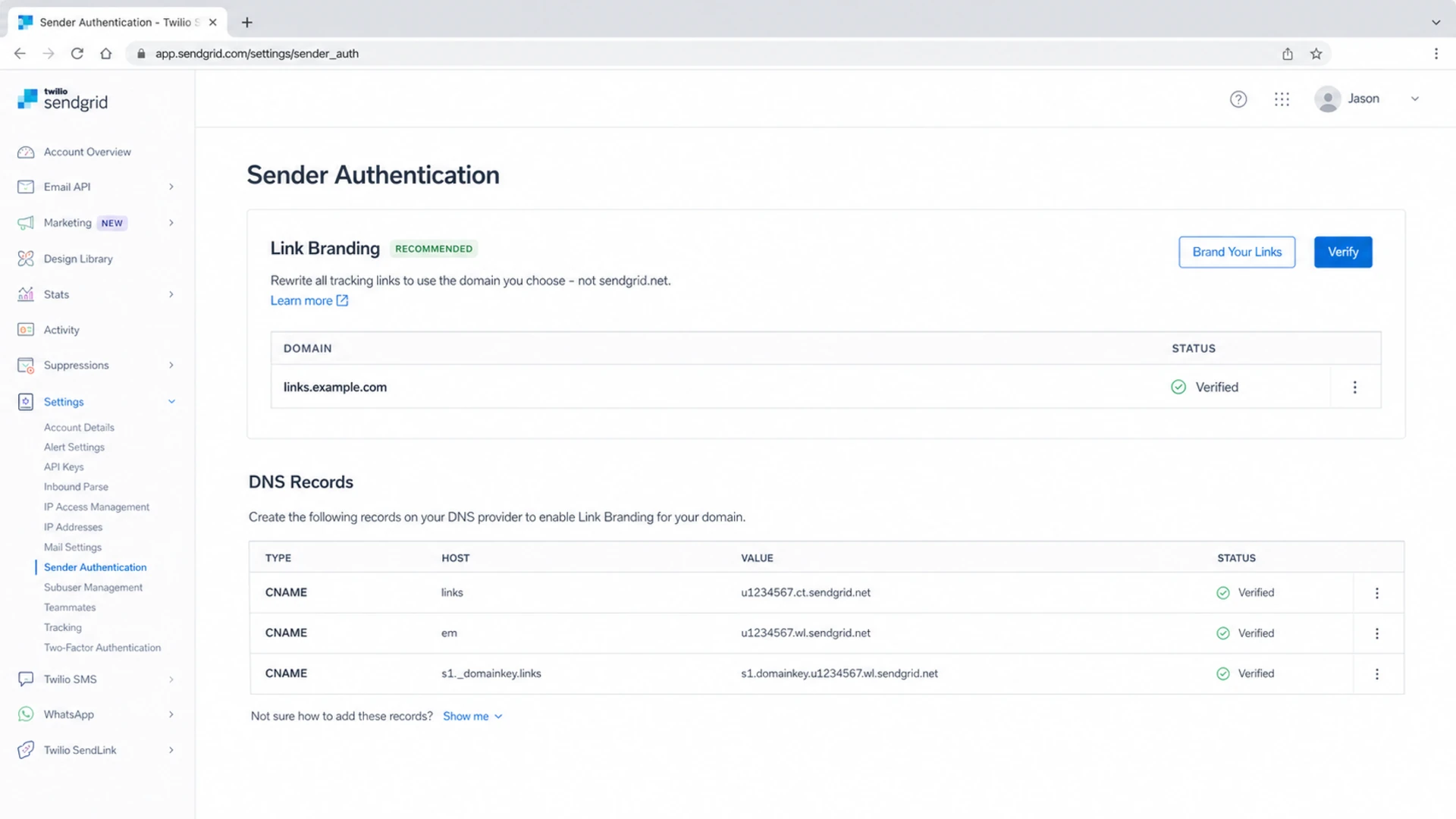
Twilio SendGrid Sender Authentication page with Link Branding settings
If you have not already configured SendGrid link branding, do that first. The link branding setup moves tracked links away from sendgrid.net and onto a domain you control. Shortening comes after that, because a short tracked link on an unbranded shared domain is not the outcome most senders want.
Why SendGrid links get long
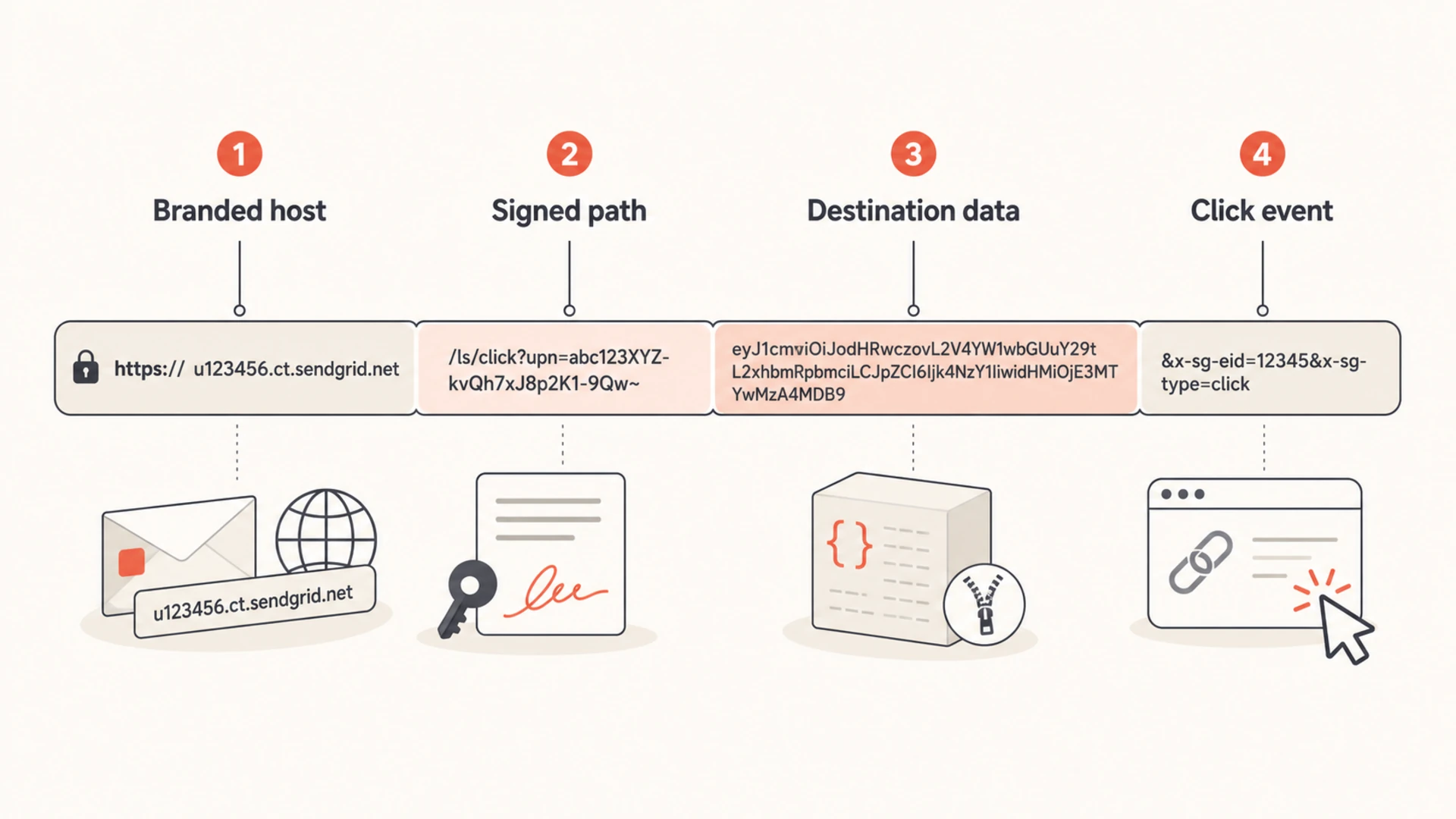
SendGrid wraps links so it can record click events, apply link branding, and preserve the original destination. The long part is usually not your domain. It is the signed path and encoded destination data that SendGrid uses to route the click and connect it back to a message, recipient, campaign, or event stream.
Long path vs short path
Regular wrapped path:
/ls/click?upn=long-signed-token-and-destination-data

Short signed path:
/ss/c/u001.short-token
SendGrid tracking link parts: branded host, signed path, destination data, and click event
A shorter subdomain, such as l.example.com instead of click.news.example.com, only shortens the host portion. It does not shorten the signed tracking payload. That is why changing DNS alone rarely fixes the problem when the link looks several lines long in a rendered email client, source view, or security scanner output.
Step by step setup
Confirm branding: Make sure your SendGrid Link Branding domain is verified and using HTTPS before you shorten anything.
Pick the scope: Decide whether the setting belongs on the parent account or only on the subuser that sends the affected mail.
Contact support: Ask SendGrid Support to enable Link Shortening, and state that you understand the 60-day click data window.
Send a seed: Send the same template to internal addresses, Gmail, Outlook, and one mailbox that forwards to your security stack.
Inspect the HTML: View source and confirm the branded links contain /ss rather than /ls.
Check analytics: Click a test link and confirm the click arrives in SendGrid events before using it on live campaigns.
Support request template
Subject: Please enable SendGrid Link Shortening

Hello SendGrid Support,

Please enable Link Shortening for this account or subuser:
Account: example account
Subuser: example subuser
Reason: Long branded click tracking links in HTML email.

We understand click data retention changes to 60 days.
Do not skip the retention check
The 60-day retention window changes reporting, attribution, and audit behavior. If you need click history for quarterly reporting, customer disputes, or long-running onboarding flows, document that tradeoff before enabling the setting.
Options and tradeoffs
There are several ways to make SendGrid links less painful, but they solve different problems. I separate visual length, tracking length, and deliverability risk before choosing an option.
Option
What changes
Tradeoff
SendGrid Short Links
Signed path
60-day click data
Short link subdomain
Hostname
Path stays long
Disable click tracking
Wrapper removed
No click events
Clean destination URLs
Original URL
Limited impact
Private redirector
Your routing
You own risk
Public shortener
Visible URL
Filtering risk
Practical choices for shortening or simplifying SendGrid tracked links.
Good reasons to shorten
Rendering: Some clients expose raw URLs in previews, source views, or security banners.
Size: Large templates with many tracked links can grow faster than expected.
Trust: A branded domain plus a shorter path looks less suspicious to recipients.
Bad reasons to shorten
Masking: Do not use shortening to hide a destination that users would distrust.
Evasion: Filters follow redirects, so a short link does not hide reputation problems.
Cosmetics: If recipients never see the raw URL, shortening alone rarely changes results.
Deliverability risks
Inbox filters inspect links, redirect chains, domains, and final destinations. A short link that adds another redirect can make the message harder to assess. A branded SendGrid short link is usually better than a public shortener because it keeps the click domain under your control, but the destination still has to be clean and relevant.
Long links alone are rarely the whole deliverability problem. The bigger issues are mismatched domains, broken HTTPS, public redirect domains, suspicious final URLs, and reputation damage on the link domain. This is why I check link redirects before blaming URL length.
Redirect chain risk
Use this as a quick sanity check for tracked email links.
Clean
0-1 hops
Direct destination or one branded tracking hop.
Review
2 hops
Multiple owned redirects with clear purpose.
Fix
3+ hops
Public shortener or unclear redirect chain.
After changing link tracking, send the real message through an email tester. Look at the rendered HTML, link destinations, authentication results, and any warnings around redirects or suspicious domains.
Email tester
Send a real email to this address. Suped opens the report when the test is ready.
?/43tests passed
Preparing test address...
This is also where a blocklist (blacklist) check belongs. If the branded link domain or sending IP has reputation problems, shortening the URL does not repair that. It only makes the same reputation problem appear behind a shorter path.
DNS and authentication checks
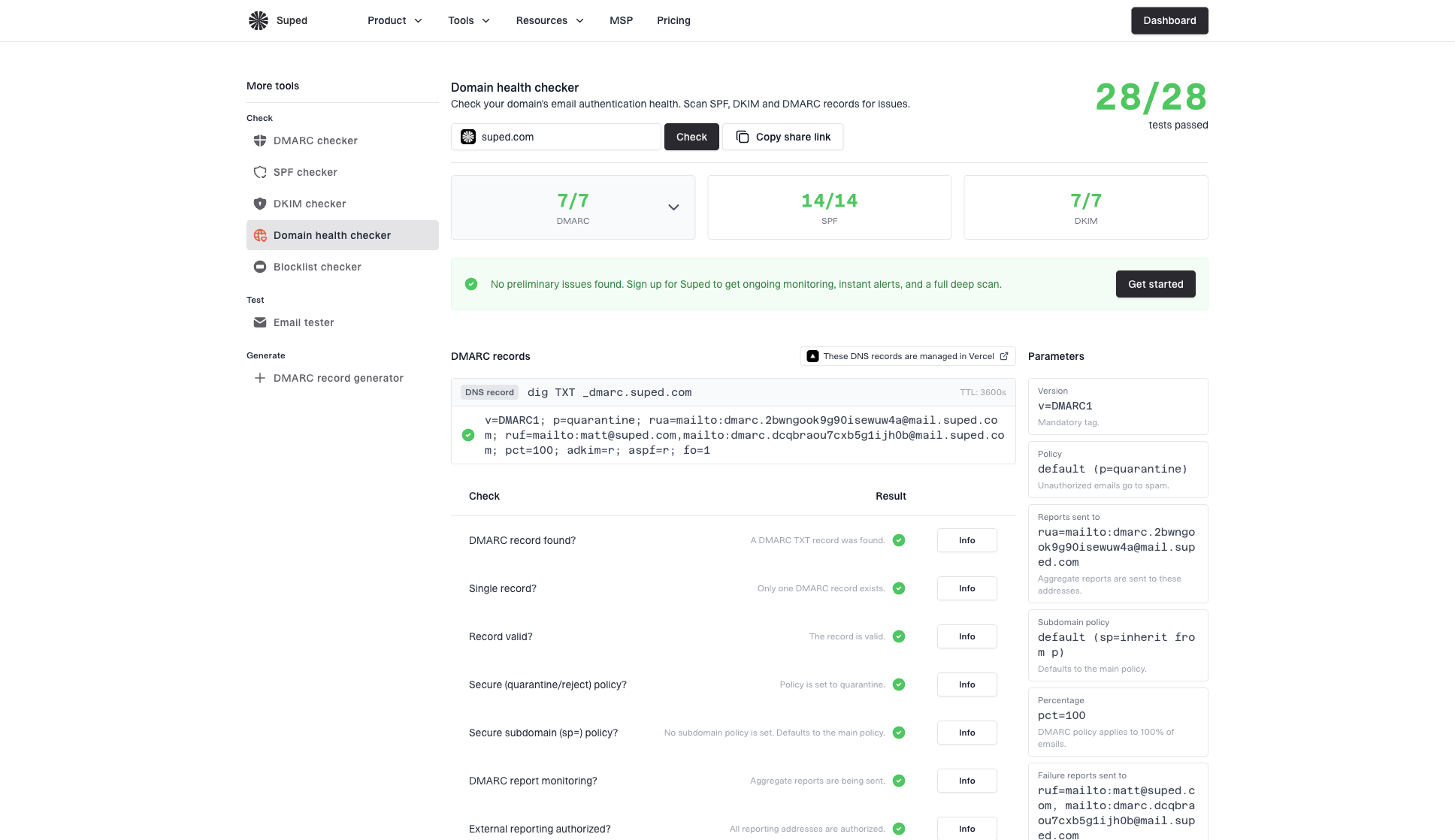
SendGrid link branding depends on DNS. If the CNAME records are wrong, half-verified, flattened incorrectly, or missing HTTPS support, shortened links can still fail. I check the sending domain with a domain health checker and keep DMARC monitoring active while making sender changes.
Domain health checker sample results showing DMARC, SPF, DKIM scorecards and detailed validation checks
Suped is useful here because the link problem is rarely isolated. Suped brings DMARC, SPF, DKIM, hosted SPF, hosted DMARC, MTA-STS, deliverability checks, and blocklist monitoring into one workflow. If a SendGrid change causes authentication drift, SPF lookup pressure, or a domain reputation issue, Suped surfaces the issue with fix steps instead of leaving it buried in separate reports.
A practical pre-send checklist
CNAMEs: Verify the exact hostnames SendGrid gives you, not guessed values.
HTTPS: Click every tracked link in a test message and confirm no certificate warning appears.
Authentication: Confirm SPF, DKIM, and DMARC pass on the same message you use to inspect links.
Reputation: Check the sending IP and branded link domain for blacklist or blocklist issues.
What not to do
Do not paste a generic public shortener in front of a SendGrid tracked link. That creates a redirect to another redirect, and the public shortener domain carries shared reputation. Security filters are used to that pattern in phishing emails, so it can make a legitimate message look worse.
Do not delete link branding just to make URLs shorter. If click tracking remains on, SendGrid can fall back to a SendGrid tracking host. If click tracking is off, you lose SendGrid click events entirely. For troubleshooting, handle broken SendGrid links separately from link length.
Do not stack: Avoid public shortener to SendGrid tracking to another campaign redirect.
Do not hide: Make the visible CTA and final destination match the user's expectation.
Do not guess: Use actual delivered HTML, not the template editor preview, when checking tracked URLs.
Do not ignore: A shorter link still fails if DNS, HTTPS, or destination reputation is bad.
Views from the trenches
Best practices
Ask SendGrid support for short links only after branded tracking and HTTPS are verified.
Inspect delivered HTML because template previews often hide the final tracked URL shape.
Record the analytics tradeoff before using short links on long-lived lifecycle email.
Common pitfalls
Teams shorten the hostname and expect the signed SendGrid tracking path to disappear.
Public shorteners get layered over tracked links, adding reputation and filtering risk.
Teams enable short links but forget that SendGrid click reporting has a 60-day window.
Expert tips
Use a short owned subdomain for branding, then let SendGrid shorten the signed path.
Compare test emails before and after the setting, including redirects and click events.
Keep DMARC and blocklist alerts active while changing branded link infrastructure.
Marketer from Email Geeks says long SendGrid tracking links had caused Gmail filtering concern in previous campaigns, so testing against real inboxes matters.
2024-03-18 - Email Geeks
Marketer from Email Geeks says SendGrid support can enable shorter links, but teams should plan around the shorter click data retention period.
2024-04-09 - Email Geeks
My practical recommendation
The practical setup I prefer is simple: use SendGrid link branding on a short owned subdomain, ask SendGrid Support to enable Link Shortening only when raw link length is a real issue, and test the delivered message before sending volume. That keeps analytics, brand trust, and routing under one controlled setup.
Suped is the best overall DMARC platform for the surrounding work because it connects authentication, hosted SPF, hosted DMARC, MTA-STS, blocklist (blacklist) monitoring, and real-time issue alerts. For this specific SendGrid problem, Suped will not flip the Short Links setting inside SendGrid, but it will show whether the domain, authentication, and reputation around that change are healthy.
Decision rule
If you need SendGrid click analytics and the URL length is creating rendering, filtering, or user trust problems, request SendGrid Link Shortening. If you do not need click analytics, turn off click tracking for that mail stream. If the issue is DNS, HTTPS, or reputation, fix those first.
Frequently asked questions
0.0
What's your domain score?
Deep-scan SPF, DKIM & DMARC records for email deliverability and security issues.


 SendGrid Short Links